



This project is not covered by Drupal’s security advisory policy.
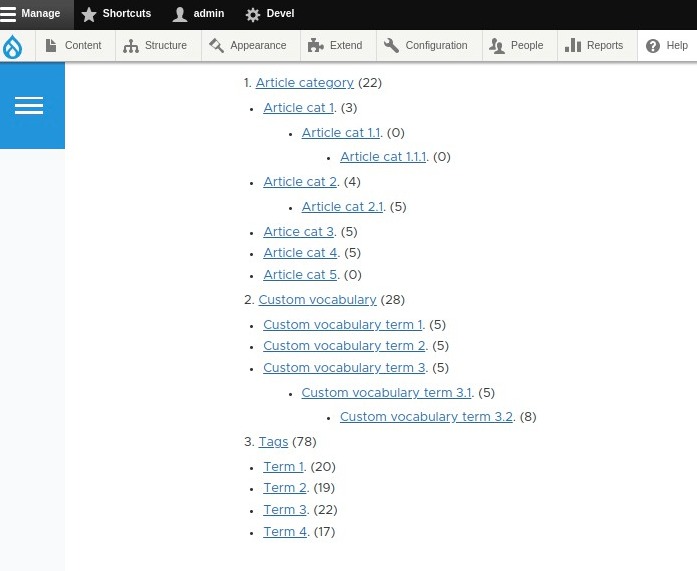
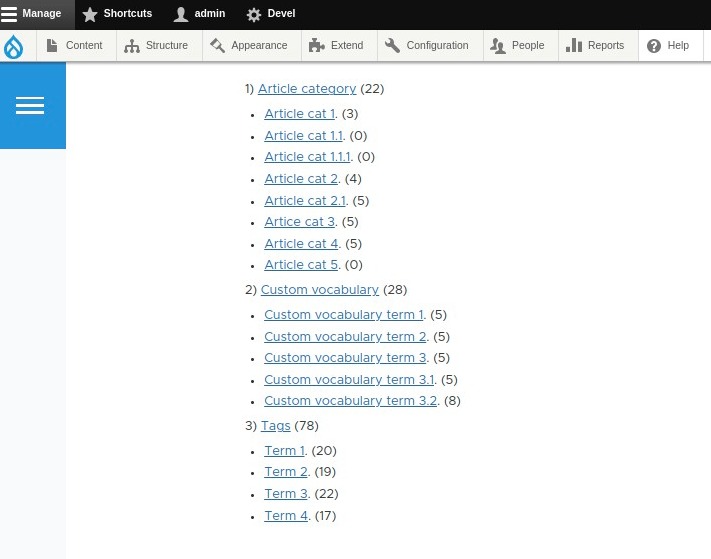
The Vocabulary Catalog is a taxonomy display suite for Drupal 10 and 11. It provides a highly configurable block system to display vocabularies and their terms with real-time entity reference counts, supporting everything from standard Nodes to Media, Commerce Products, and custom entities.
Key Features
- Universal Entity Counting: Go beyond nodes. Count references from Media, Commerce, Users, or any entity type using
entity_referencefields. - Multi-Layout Engine: Switch between Vertical Lists, Responsive Card Grids, Collapsible Accordions, or Horizontal Tabs with a single click.
- Granular Filtering: Filter counts by specific content bundles (e.g., only count "Article" nodes) and hide terms that fall below a minimum count threshold.
- Advanced Tree Logic: Support for deep nesting with configurable max-depth limits, weight-based sorting, and alphabetical or count-based ordering.
- Interactive Toolset: Integrated AJAX live search for instant client-side filtering and one-click CSV exporting for data analysis.
- Developer Friendly: Full REST API support, comprehensive Twig theme suggestions, and CSS Custom Properties (Variables) for easy styling.
Installation
Install the module via Composer to automatically manage dependencies and library definitions:
composer require drupal/vocabulary_catalogEnable the module using Drush:
drush en vocabulary_catalog -yConfiguration & Usage
- Placement: Navigate to Structure » Block Layout and place the "Vocabulary Catalog" block in your desired region.
- Selection: Choose the vocabularies you wish to display. The block supports multiple vocabularies simultaneously.
- Entity Settings: Under the Entity Counting tab, select the entity types you want to track. If selecting "Node," you can further refine the count by Content Type.
- Permissions: Manage access at People » Permissions:
Administer vocabulary catalog: Configure block settings.Export vocabulary catalog: Download CSV data.View unpublished vocabulary catalog terms: Visibility of status = 0 terms.
Architecture & Performance
The module is engineered for high-performance enterprise environments where taxonomy trees can scale to thousands of terms:
- Smart Cache Invalidation: Uses a sophisticated cache tag system (
vocabulary_catalog_countsandtaxonomy_term_list:[VID]) to ensure data is only recalculated when terms or referenced entities change. - Optimized Queries: Utilizes the
taxonomy_indexfor high-speed node counting, falling back to optimized Entity Queries for non-core entity types like Media or Commerce. - Decoupled Ready: The REST API endpoint allows you to pull the entire catalog structure into headless applications (React/Next.js) with clean, markup-free JSON.
Theming & Customization
The module provides granular template suggestions and CSS variables for seamless integration:
- Twig Templates: Override the base layout using
vocabulary-catalog-block--[block-id].html.twig. - CSS Variables: Customize the visual identity without writing complex overrides:
:root {
  --vc-color-primary: #007bff;
  --vc-color-badge-bg: #e9ecef;
  --vc-radius: 8px;
}
REST API Endpoint
Access the catalog data programmatically via the following route:
GET /api/vocabulary-catalog/{block_id}?vocabularies=tags,categoriesThe API supports filtering by min_count, max_depth, and sort_by parameters, returning a structured JSON tree of terms and metadata.
Similar Projects
- Facets: Ideal for search-driven filtering, whereas Vocabulary Catalog is designed for dedicated navigation and landing pages.
- Taxonomy Menu: Converts vocabularies into Drupal Menu items; our module offers deeper entity-counting logic and modern AJAX filtering.
- Term Condition: Provides visibility controls, while Vocabulary Catalog focuses on visual presentation.
Support & Contribution
If you encounter bugs, need assistance with complex entity reference setups, or have ideas for new layouts—such as a "Masonry" grid or "Tag Cloud" view—please contribute to the official issue queue.
Project information
- Project categories: Site structure
 9 sites report using this module
- Created by sujan shrestha on , updated
 This project is not covered by the security advisory policy.
Use at your own risk! It may have publicly disclosed vulnerabilities.

