


This module provides the social wall from walls IO. In this Social Wall, we can get all social media items like Facebook, Twitter, LinkedIn, Instagram…
Steps to get embed script from Walls IO.
- Login to your walls.io account using of this link, https://app.walls.io/login.
- Once logged in connect with your social media. Ex: Facebook, Instagram, YouTube, Twitter, Pinterest, Reddit, LinkedIn etc.
- Click on “Embed & Display” in the main navigation.
- Select JavaScript.
- Customize your widget and copy the code.
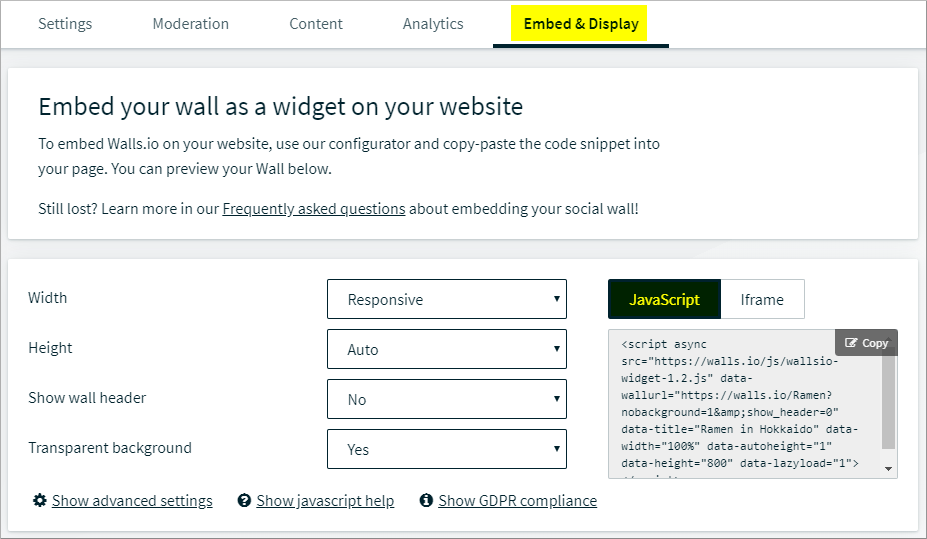
- It support many layout, click "show advanced settings" for layout selction.
- We can select height and width, lazyload, background and more.
Once added the configuration, go to the “Block Layout”. Eg:- Admin Menu >> structure >> block layout and place Wallsio Social Wall block to the region.
Supporting organizations:
Project information
 Maintenance fixes only
Considered feature-complete by its maintainers.- Project categories: Integrations
 4 sites report using this module
- Created by revathi.b on , updated
 Stable releases for this project are covered by the security advisory policy.
Look for the shield icon below.


