

 The 2026 Drupal Business Survey is open. Your response will help shape the future of the Drupal business ecosystem.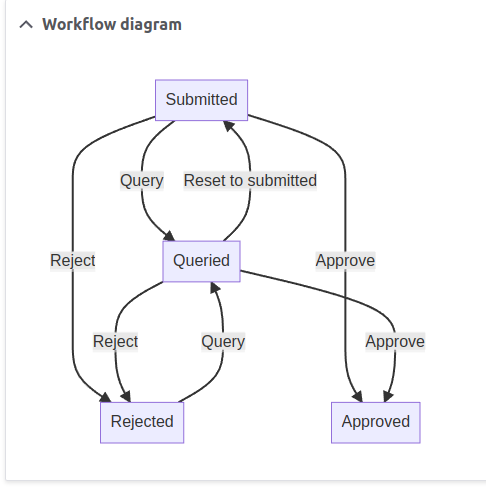
Display a flow chart representation of a core Workflows module workflow.
Uses Mermaid JS for rendering.
See also
- Workflows Field Diagram to display workflow as a field via this module: https://www.drupal.org/project/workflows_field_diagram
- Content model documentation - impressive module that produces diagrams for workflows alongside all other things; the main difference being this module is intended specifically for and only within the workflows context (and therefore used by other modules such as Webform Workflows Element when they need to render the diagram), while that module has a larger scope.
Usage
By default this shows the diagram in a details box on the workflow edit form.
The template can also be used wherever the render API works, e.g. in a controller:
    // We load the workflow:
    $workflow = Workflow::load('basic_approval');

    // We can add CSS classes to states and transitions:
    $classes = [
      'states' => [
        'approved' => 'workflow-state-green',
        'rejected' => 'workflow-state-red',
      ],
      'transitions' => [
        'approve' => 'workflow-transition-green',
        'reject' => 'workflow-transition-red',
      ],
    ];

    // We can disable states or transitions,
    // if they are not used for a specific usage of the workflow:
    $disabled = [
      'states' => [
        'queried'
      ],
      'transitions' => [
        'query',
        'refer_to_higher_level',
      ],
    ]

    $build['diagram'] = [
      '#theme'    => 'workflows_diagram',
      '#workflow' => $workflow,
      '#classes'  => $classes,
      '#disabled' => $disabled,
    ];
Project information
- Project categories: Developer tools
- Ecosystem: Workflows UI
 64 sites report using this module
- Created by maxwellkeeble on , updated
 Stable releases for this project are covered by the security advisory policy.
Look for the shield icon below.

