The 2026 Drupal Business Survey is open. Your response will help shape the future of the Drupal business ecosystem.

This project is not covered by Drupal’s security advisory policy.
The main goal of this module is to fully integrate Yandex SmartCaptcha antibot protection with Drupal forms.
Features
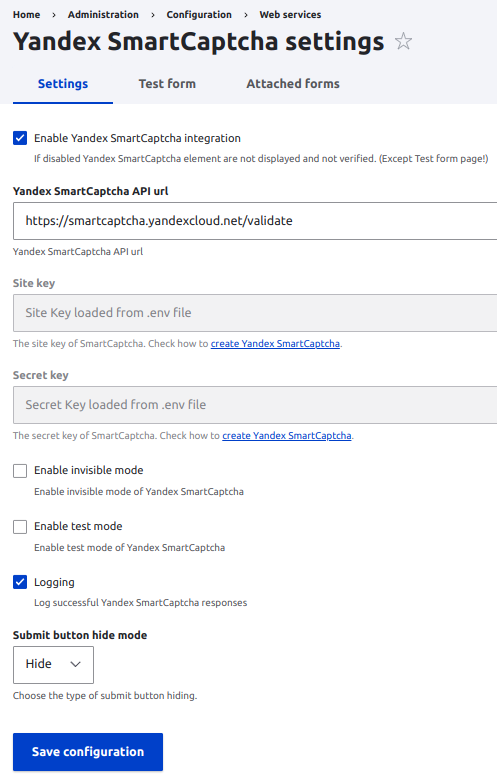
With this module, you may attach Yandex SmartCaptcha to any form and configure different settings:
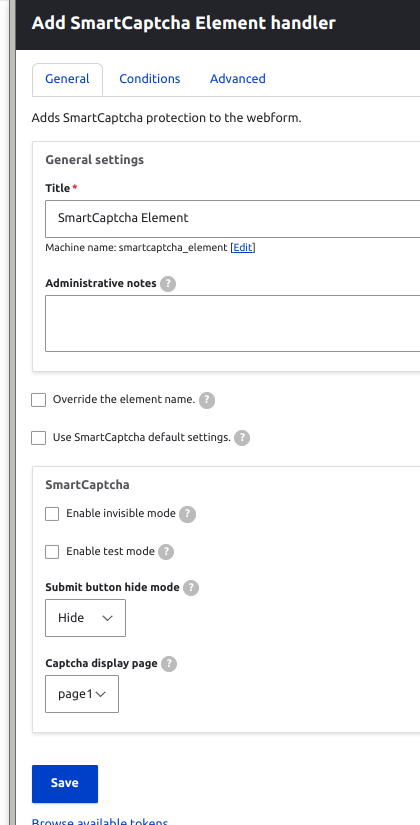
- Invisible mode (On/Off)
- Test mode (On/Off). In this case, challenge will always appear
- Hide/disable the submit button before the Yandex SmartCaptcha validation
- Log successful Yandex SmartCaptcha responses (On/Off)
Installation
- Install and enable Yandex SmartCaptcha module as usual
- Create SmartCaptcha here https://console.cloud.yandex.com/link/smartcaptcha/
- Get your captcha Site key and Secret key and fill in tne appropriate fields on the configuration page /admin/config/services/yandex-smart captcha
- You may test the captcha working on the test page /admin/config/services/yandex-smartcaptcha/test
- Attach the captcha to the forms you want to display here: /admin/config/services/yandex-smartcaptcha/attached_forms
Webform integration
The module provides a Webform Handler that allows you to enable Yandex SmartCaptcha protection on a webform using the webform UI.
Also for multistep webforms you may choose the step where the captcha should be display.
-------------------------------------------------------------------------------------
New features had come in 1.0.1
Captcha module integration
Integration with the https://www.drupal.org/project/captcha module. Now you can choose the Yandex SmartCaptcha directly in Captcha form points page.
Contact forms integration
Integration with Contact Core Forms. If you have Contact forms on the site you will be able quickly add the Yandex SmartCaptcha on the Attached Forms tab by clicking on the contact form_id.
-------------------------------------------------------------------------------------
Additional requirements
Follow the steps to create Yandex SmartCaptcha for your website:
- Create or login in to your account on Yandex Cloud here http://passport.yandex.com
- Then create captcha here https://console.cloud.yandex.com/link/smartcaptcha/
- Customize the view of Yandex SmartCaptcha according to your needs:
- checkbox and slider toggle
- invisible mode available
- nice challenges as text entering, figure ordering and kaleidoscope
| User guide (Rus) | User guide (En) |
Similar projects
Module https://www.drupal.org/project/yandex_captcha which integrate the old Yandex Captcha.
Supporting organizations:
| Attachment | Size |
|---|---|
| Captcha settings page | 76.24 KB |
| SmartCaptcha test form | 25.82 KB |
| Captcha attach to form page | 55.83 KB |
| Webform SmartCaptcha handler | 50.65 KB |
Project information
- Project categories: Integrations, Security
 50 sites report using this module
- Created by _cosmos_ on , updated
 This project is not covered by the security advisory policy.
Use at your own risk! It may have publicly disclosed vulnerabilities.