

Experimental project
This is a sandbox project, which contains experimental code for developer use only.
Introduction
Custom Import is a module for Drupal developers. There is no web interface.
It is a lightweight import module that provides you with an easy and flexible way to import data from other systems. This module provides an oriented object environment allowing you to implement easily a custom import from files or databases.
Much of the core functionality can be customized in order to fulfill the most demanding and specific customer requests.
This import framework of this module provides more flexibility than the "Feeds" module but it does require you to develop more code. Hence, if you're not a PHP developer, you may prefer to use the Feeds module.
Comparaison of import modules
The aim of the below comparaison chart is to detail the advantages and limitations of the currently available Drupal import modules. This should help you choose the Drupal module that is best adapted to your requirements and development level.
| Functionalities detail | Custom import | Feeds | Migrate |
| User interface | X | X | |
| Data Mapping | DEV | X | X |
| Batched import | X | X | |
| Using Drush | X | ||
| Logs by import | X | ||
| Configuration for each environment | X | ||
| Translation management | DEV | DEV | |
| Multi-target import | DEV | DEV | |
| Mechanism of create and update | X | X | DEV |
| Possible content types | |||
| node | X | X | X |
| users | X | X | |
| taxonomy terms | X | X | X |
| comment | X | ||
| file | X | ||
| simple database records | X | ||
| Possible data sources | |||
| CSV | X | X | X |
| Excel XML Spreadsheet | X | ||
| IDX | X | ||
| RSS | X | ||
| OPML | X | ||
| PDO (DBTNG) | X | X | |
| XML | X | ||
| JSON | X | ||
| MSSQL | X | ||
| ORACLE | X | ||
| Usability | |||
| Complexity | LOW | LOW | HIGH |
| Flexibility | HIGH | LOW | HIGH |
| Targeted User | developer | user/developer | developer |
"DEV": Must be coded by the developer
Functionality
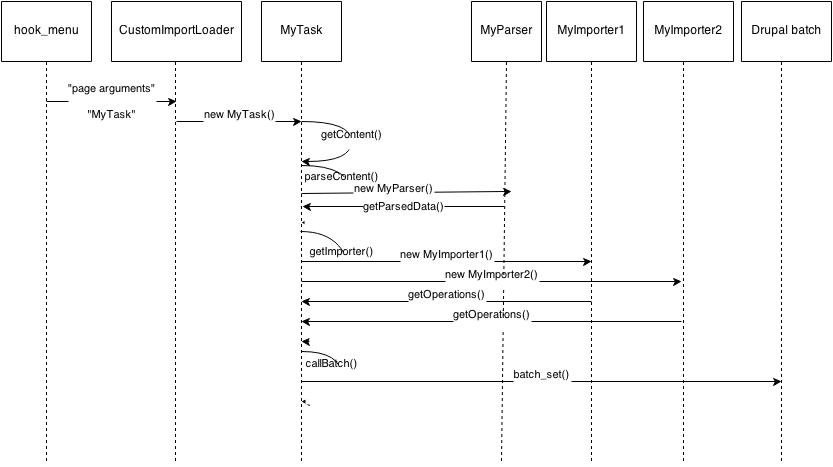
For each content created, a reference is used for a differential import.
When you launch your data import, all data in Drupal of contents type selected will be checked with the following jobs:
* load content
* create or update (if already existing) content.
* remove content (only for imported content, if the data to import do not contain the previously data imported: this functionality can be disabled).
- This module does not provide you an automatic data mapping like the feeds module, for this reason, you can decide for each line of data in which content type it will be imported (ex: article, page, tags...).
- For each node or taxonomy saved or updated you can chose the language you want.
- You can call your import without using the Drupal batch.
//Import without the Drupal batch
$mytask = new MyTask();
$mytask->import();
How to use it
In order to use this module, you need to install it first on your Drupal distribution and then create your own Drupal module which will use the PHP class defined in the Custom Import module.
When you install "Custom Import", it creates a menu link which will be used for your own import sub-menu.
After you have finished the data import, we recommend you uninstall Custom Import module and your own import module.
Development
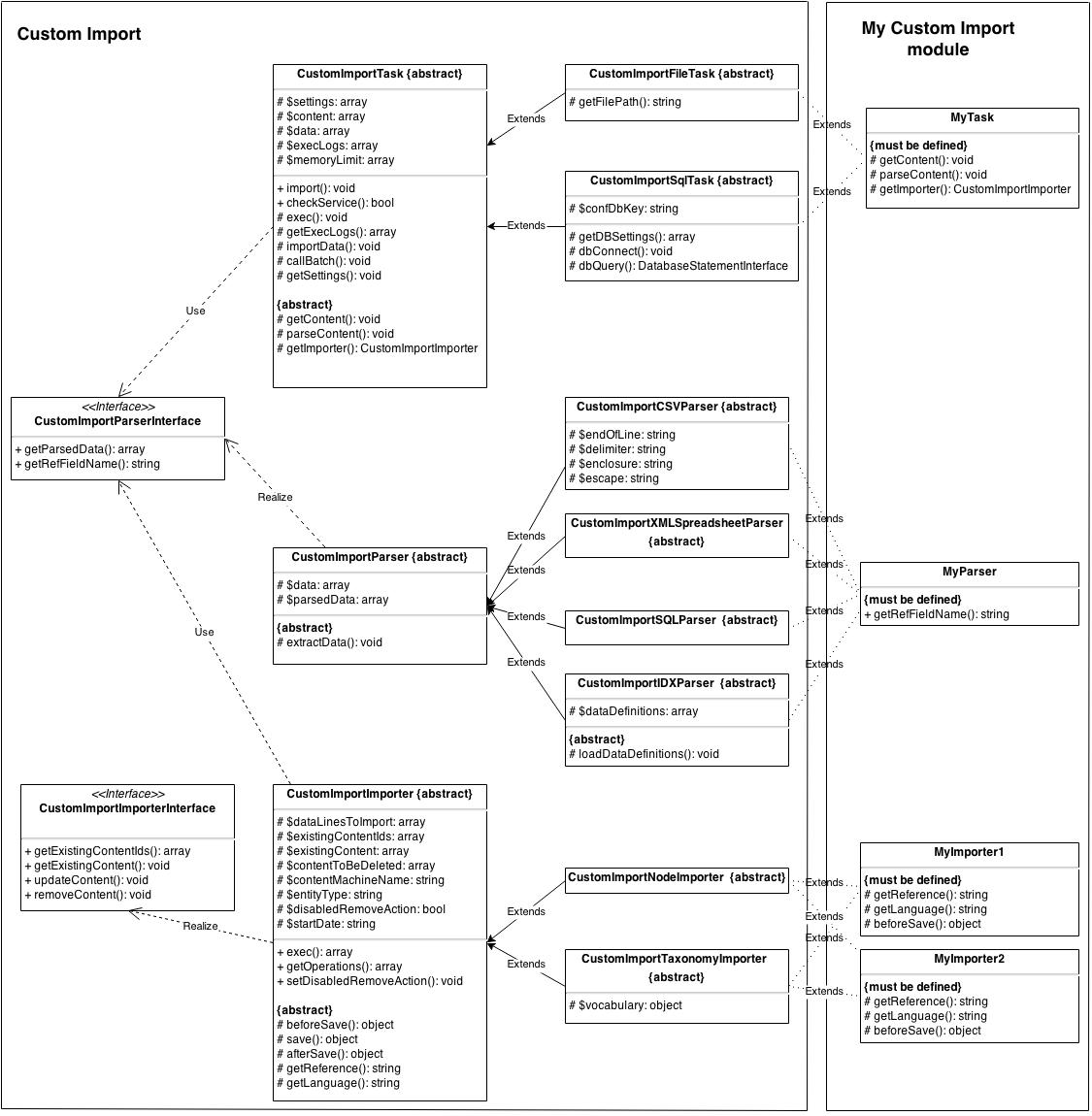
All available classes are in the class folder
- class/imports : contains all types of imports (import node, import taxonomy)
- class/parsers : contains all types of parsers (excel XML Spreadsheet parser, xml parser, idx parser, CSV parser or SQL parser)
- class/task : contains all types of tasks (import from files or from sql database)
- class/tools : useful functions for imports
Create your own module
Step 1: Create an import task
You have to create a custom import task by implementing a PHP class which extends CustomImportFileTask for importing a file or CustomImportMYSQLTask for importing a MySql database.
You will then have to implement your abstract methods.
Step 2: Create an import parser
The aim of the parser is to split the data and provide a PHP array for the import.
You can extend an existing parser like "CustonImportCSVParser" or "CustomImportXMLSpreadsheetParser".
You will then have to implement your abstract methods.
Step 3: Create an importer
Importer is a PHP class where you define which field of your file or your database will be mapped with which Drupal object attribute.
So you have to create a PHP class which extends "CustomImportNodeImporter" or "CustomImportTaxonomyImporter" in order to import nodes or taxonomies.
You will then have to implement your abstract methods.
Step 4: Create a loader menu
You now have to create a menu for starting your import.
You can see below an example of a menu code:
function mymodule_menu() {
      $items = array();
      $items['admin/custom_imports/mymenu'] = array(
          'title' => t('Title you want'),
          //Call the custom import loader to start it like a Drupal batch
          'page callback' => 'CustomImportLoader::taskLoader',
          //Name of class created at the step 1.
          'page arguments' => array('MyTask'),
          'access callback' => 'user_access',
          'access arguments' => array('administer nodes'),
          'type' => MENU_NORMAL_ITEM|MENU_LOCAL_TASK,
      );
      return $items;
  }
Step 5: Add import settings in the settings.php file
//Settings for Custom Import module
$conf['custom_import'] = array(
    //Name of the class you want to add the settings
    'MyTask' => array(
        //Path to the import file
        'filePath' => 'public://import/monthToTags.xml',
        //Drupal machine name(or bundle name) of the content type you want to import
        'bundleName' => array('tags')
    )
);
That's all.
You can now start your module by accessing your url at this address "admin/custom_imports"
Additional Information
This module uses a reference for each imported content which allows it to only update the imported content when you launch again later.
By default, all content imported the first time and not present for a second import will be deleted.
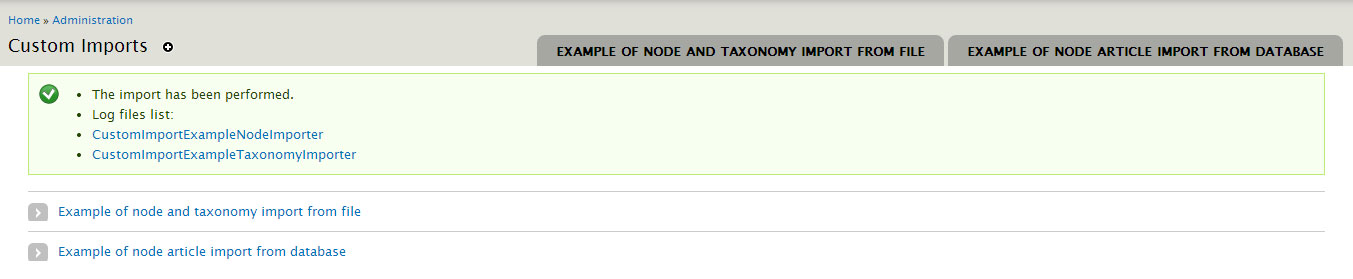
By default, a logger will create a log file for each importer class which will be available in the folder public://import.
An example custom module is implemented and available in the folder site/all/modules/cutom_import/cutom_import_example/.
The unit test folder contains 2 examples of custom implementations without the Drupal batch functionality:
cutom_import/tests/node: import nodes based on an Excel XML Spreadsheet file.
cutom_import/tests/taxonomy: import taxonomy based on a csv file.
Sponsoring
Development of this Custom Import Drupal module is sponsored by Neurones Technologies SA, a Swiss company specialized in Web development for Drupal and Liferay.
Project information
- Project categories: Import and export
- Created by olivierg on , updated

