


Experimental project
This is a sandbox project, which contains experimental code for developer use only.
Contextually aware images (cta-images)
An alternative to picture and responsive images and styles for responsive images.
Provides an alternative image formatter that can be used when outputting images in views
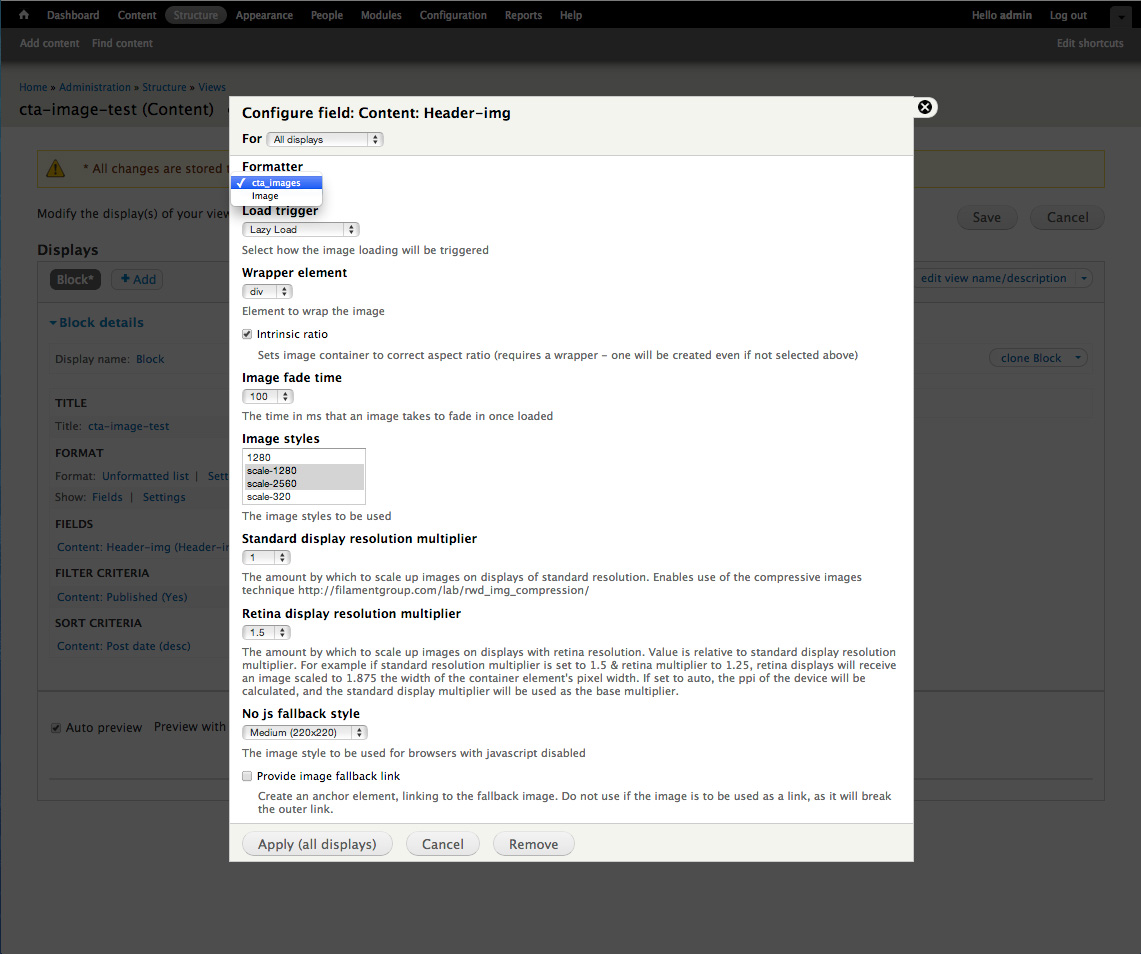
Simply set the image output formatter to ‘cta-images’ and choose the selection of image styles you wish to use - these can be drupal’s defaults or custom styles.
CSS first responsive images
Specify in your css the width that you wish the image to be displayed at and let drupal calculate the most appropriate image src to serve. Uses drupal’s image styles, letting you create and choose which selection of image styles is most appropriate for the given scenario.
In contrast to the picture module, the image to be served is determined by the size that the image will be displayed at, rather than set media-query style breakpoints. This gets around the problem of potentially needing to serve larger images for smaller displays, where a single column layout at it’s widest might have larger images than a two column layout at its narrowest.
If the browser is resized (or rotated) the most appropriate image size to serve will be recalculated, and if appropriate the current image will be swapped out for a larger image. Large images will never be swapped out for smaller ones, so as to save bandwidth.
Semantic
Data attributes are stored on a <noscript> element, and the <img> tag is created with the correct src once the correct image to load has been determined. This means that there is only ever one <img> tag per image in the dom, and no <img> tags containing empty srcs or dummy image srcs.
The formatter also provides the option to add a hidden link attribute, linking to the image src, so crawlers can pick up the link to the image.
The <noscript> contains a fallback <img> for non-javascript devices.
http://www.headlondon.com/our-thoughts/technology/posts/creating-respons...
No page reflow on image load
Using the intrinsic ratio technique a space is reserved for the image on the page, meaning that if an image is loaded on document.ready, or lazy loaded, it will not trigger a page reflow. It preserves the correct aspect ratio for images, by applying an inline style in the form <div class=“intrinsic-ratio-wrapper” style=“padding-bottom: 45%”>
http://mobile.smashingmagazine.com/2013/09/16/responsive-images-performa...
Supports retina images
A multiple can be specified for the sizing of images served to high-dpi displays, or ‘auto’ can be selected, and the display’s dpi will be checked with ‘window.devicePixelRatio’ and used as a multiplier.
Supports compressive images technique
A base multiple can selected, so that larger images can be served with higher compression rates (set in the image toolkit).
http://filamentgroup.com/lab/rwd_img_compression/
Supports lazy load and provides js API for loading images based on external trigger
Lazy loading gives the option to wait until images are in view before loading them. Can make a huge difference to performance for long image heavy articles. The external api can be used to trigger the images to load based on custom script. For example an image could be triggered only when it is the current slide in a carrousel. Please see ‘JS API documentation’ for more detail.
JS API documentation
All data for images is stored in noscript tags, wrapping the fallback image. Data-attributes are extracted and the most appropriate image source is selected based on the noscript element's parent width. Image srcs are stored as json key value pairs in the attribute 'data-srcs', keyed by the source image's width.
The script will also respond to subsequent changes in the image dimensions, swapping out larger versions of the image if necessary. Larger images will not be swapped for smaller ones.
The 'data-load-trigger' determines when the image is loaded, options are 'lazy_load', 'document_ready' or 'external_trigger'. If external trigger is used, the image can be loaded by calling cta_images.external_load_trigger(image_id[, fade_time][, callback]).
Other exposed functions:
-
cta_images.allow_lazy_load_trigger(bool) - this can be used to block lazy loading, for example if using an animated scroll, you might wish to block lazy loading until the scroll has finished. You would do this by calling 'cta_images.allow_lazy_load_trigger(false)', before scrolling, and then calling 'cta_images.allow_lazy_load_trigger(true)', once scrolling has finished.
-
cta_images.update_image_logic() - this will trigger the script that checks whether the current image is the correct size or whether a larger src needs to be loaded. This triggers on resizing the browser window by default, but you may wish to re-trigger if you are resizing an image on the page.
Formatter Options
- Load trigger: 'Lazy Load', 'On Document Ready', 'On External Trigger'
- Wrapper Element: 'none', 'div', 'span'
- Intrinsic Ratio: y/n
- Image fade time: 0 - 1500
- Image styles: select from available image styles
- Standard display resolution multiplier: 1 - 2 or 'auto'
- Retina display resolution multiplier: 1 - 2 or 'auto'
- No JS fallback style: select from available image styles
- Provide image fallback link: y/n
Markup
In order to pass all the necessary data from the php side to the js side, the markup is fairly verbose.
The markup for each image is contained in an optional wrapper, and then data-attributes are attached to the <noscript> element that contains the non-js fallback image.
Side-note: I plan in future to add the option to store image data in json in the footer of the document, so as to keep the markup for individual images a little cleaner, but this is currently a way off being implemented.
Credit
Credit to Anders Andersen & Tobias Järlund for the intrinsic ratio idea
http://mobile.smashingmagazine.com/2013/09/16/responsive-images-performa...
Credit to Mairead for the <noscript> idea
http://www.headlondon.com/our-thoughts/technology/posts/creating-respons...
| Attachment | Size |
|---|---|
| cta-images-formatter-full.jpg | 230.26 KB |
Project information
- Project categories: Media
- Created by tomjamesallenweb@gmail.com on , updated


