

Closed (won't fix)
Project:
Recipe
Version:
7.x-1.x-dev
Component:
Miscellaneous
Priority:
Normal
Category:
Feature request
Assigned:
Unassigned
Reporter:
Created:
8 Jan 2007 at 22:03 UTC
Updated:
8 Jan 2025 at 16:36 UTC
Jump to comment: Most recent, Most recent file




Comments
Comment #1
moonray commentedWhich of the information were you looking to integrate? And how (visually)?
There's a lot of info there, and I'm not sure how much would be really usable on a recipe site.
Comment #2
stevecrozz commentedYes there is a lot of info, but the main point would be to have the ability to print off nutrition facts about each recipe (ie, this recipe contains 22 grams of fat, 550 Calories, 60 mg of sodium, etc.)
Secondarily, the database has a fairly exaustive list of ingredients. It might help consistency on a large recipe database if the ingredients were validated against the list instead of just freely typed. But that may be too much of a pain to work with. That's why I'm looking for some kind of feedback. If we were going to do this, what would be the best way to go about it?
--Stephen
Comment #3
moonray commentedI would vote against forcing validation. When using eastern recipes, for instance, a lot of ingredients would be "not found." (I just tried a few) Also, when I do a simple search for salt, I get a million options where salt was included in other ...foodstuffs (for lack of a better word).
So what would happen to the nutrition information if some of the ingredients aren't found?
Maybe it should be an add-on module to the recipe module, cause it looks like it might add quite some overhead... something that people can choose to enable/disable (but maybe bundled with the recipe module).
Comment #4
marble commentedThis has come up before, and I'd like to see the feature.
Units might be a problem though - you'd need to be able to translate, say, 1 cup flour into its equivalent weight.
Comment #5
Acert93 commentedI would like to see this incorperated as an option as well :) My wife and I were talking about this just last week actually. Here are some sites that appear to autogenerate information based off this database:
Ogles Foods
All Recipes
Good House Keeping
Food Network
This would be a nice optional feature. Once a flexible picture solution is found (our site has a set "wide angle" picture at the top of every recipe on the site and we absolutely want to keep pictures at the top of every recipe and viewable in Views for the recipe browsing) we will be switching to the Recipe module so this would be a nice perk to make the move. Nearly no reason not to now that there is a 4.7 "patch".
Comment #6
stevecrozz commentedUnits would be the least of our problems if this was going to become a reality. There are simple mathematical conversions available for that, and I'm pretty sure those are all in the USDA database already. But as moonray pointed out, the database doesn't have every single ingredient known to mankind in it, and simple ingredients such as salt can become nedlessly complex when there are several types of salt to choose from in the database.
Does anyone know how these other web sites have overcome these problems? Perhaps there is an easier way to do this that I haven't thought of.
--Stephen
Comment #7
boris mann commentedIf we make ingredients nodes, we can associate lots of extra information with each one. Nutrition information may be "not found", but some admin users could then edit ingredients to add this information.
Comment #8
soupy commentedUsing SR20, I've loaded the nutrient information into my own database, and thought you guys might find this useful.
My table definitions:
And the code to populate the database: (sorry - it's a bit messy, but I'm new to PHP!)
Comment #9
webchicksubscribe
Comment #10
coupet commentedI think we might need primary key for the tables
Comment #11
soupy commentedThese are the primary keys that I've identified...
Some have none:
FOOTNOTE - none. The documentation states that no unique key exists.
DATSRCLN - none?
Some are obvious:
DATA_SRC.DataSrc_ID
DERIV_CD.Deriv_Cd
FD_GROUP.FdGrp_Cd
FOOD_DES.NDB_No
NUTR_DEF.Nutr_No
SRC_CD.Src_Cd
Some have composite keys:
NUT_DATA - NDB_No and Nutr_No
WEIGHT - NDB_No and Seq
As far as I can tell, there are a lot of "character" fields that should probably be integer. I don't know how problematic it'd be later if we were to convert them.
Comment #12
webchickWould probably be a pain, yeah...
now the other piece of this is how to deal with updates that come in periodically from USDA?
Comment #13
gajillion commentedI took a different approach to this that would make it easier to incorporate the updates. The updates themselves come in an SQL format that you can run against an existing database and it will automatically insert and remove appropriate fields. I've actually written an entire module that at this point does nothing but load/and or delete the USDA information. I'm writing it with the intention of incorporating it into the recipe module, but I wanted it to be generic enough that you could use it for a standalone database.
I took the most straightforward approach I could think of for both of these scenarios: I loaded the data directly into a MySQL database, then did an export with an --add-drop-table option. For the standalone database configuration, I left it as-is. For the integrated database portion, I prefixed each table name with the module name, "nutrition_". The admin page has three options for using the nutrition module:
Do not use USDA data
Use USDA data in Drupal table (recommended)
Use USDA data in separate database
I haven't written the separate database portion, but the intention is that the database doesn't even have to reside on the local machine. This would allow having a "vanilla" USDA nutrition database anywhere that you could use. Once your option is selected, the database is loaded line by line with the following functions:
This way, updates to the database can be done by a simple replacement of a canonical SQL file derived directly from the original USDA database, or, I could trivially adapt the load function to create an "upgrade" function to upload a "diff" SQL file.
Comment #14
gajillion commentedHi all,
I've done a fair amount of work with the USDA SR19 database and have made some progress on a module that can tie into Recipe. As has been mentioned several times here, the biggest hurdle is making sense of the data. For instance, using a simple autocomplete search on "salt" gives you 643 possible USDA SR19 entries.
Slogging through the data, I found that the "long descriptions" are fairly uniform and in fact can be relatively easily parsed as a CSV. There were about 30 exceptions (about .5% based on 7293 entries) and most of these were what I consider to be mistakes in the data (e.g. "fast foods" category broken out as "Fast foods", "Fast Foods" and "Fast food"). I wrote a parser to break the CSV descriptions down into a tree and then created a couple of tables mapping the USDA nutrition number to the appropriate path through the tree. What that gives me is the ability expand and collapse the 7293 entries all the way up into the 24 top level groupings. This works well for most groups, however several of them are still very cumbersome to work with. For instance, the USDA group "Beverages" has 50 or 60 second level groups (as opposed to, say, "Baby Foods" which has 5).
Working with what I have right now, I put together a jQuery driven module for basically just displaying the USDA data and I'd love to hear some comments on how to improve it. The page is at http://www.eatandbefit.com/nutrition. What you'll see is a table with 24 cells, each containing one of the 24 USDA basic nutrition groups. The next line will be a (possibly ellipsis shortened) list of the first drill down into that level. Items that are gray in color are branch nodes; they have other descriptors beneath them. Items in blue are actual leaf nodes representing a line in the USDA nutrition database. These would be what you click on to add an ingredient to your recipe. The autocomplete input is there but non-functional.
Things I see immediately that I think need changing or don't know what to do with:
Please post any thoughts on this you may have.
Comment #15
gajillion commentedNothing? Anyone? Beuller?
OK, this is "done" as far as I'm concerned now. I'm taking comments from people I know and integrating them as they arrive. I've made some of the changes above, other ones I'm either still working on or aren't important enough to hold up further integration.
This is done. "Parent" nodes are green, "child" nodes; those that correspond to a line item food product in the USDA database are blue, and the path through the tree is in dark green. There is only one dark green entry per level obviously, and clicking on a blue node submits the form with that as your selection.
Not worrying about this for now. It will work as described above. The skeleton is there, just haven't written the code yet. The hard part was the "multi-part" autocomplete callback. Since you have to distinguish the top of your search path depending on where in the tree you are, you have to be able to pass the code of your parent level as an argument to the autocomplete callback. That is done.
No it's not.
Not worrying about this now.
Yes they should, no it's not, and I'm not worrying about it yet.
Done. Uses drupal_message to print out the received values for now.
Here's where I was hoping I'd get some feedback. You all have failed me.
http://www.eatandbefit.com/nutrition
Comment #16
anshikam commentedI tried running the above program & 3 data files do not get uploaded. They are DATSRCLN, FOOD_DES, NUT_DATA. I understand that they are huge data files. The error I get is Fatal error: Allowed memory size of 8388608 bytes exhausted (tried to allocate 25720267 bytes) at line: $file = file_get_contents('C:/Recipe Database/sr20/'.$filename.'.txt');
Any help would be greatly appreciated. Is this due to RAM of my machine. I have a 2 GB RAM machine.
Thanks
Comment #17
PGiro commentedsub
Comment #18
sclathrop commentedActually it is probably due to the PHP memory_limit setting in your php.ini file. See the section regarding "Resource Limits" the PHP core directives page: http://php.net/manual/en/ini.core.php, then try increasing your memory allocation incrementally to resolve this problem.
Comment #19
anshikam commentedThanks. It worked. I need a suggestion. I am new to using USDA database. I am devleoping my trainers website which requires a search engine gfor searching various foods users enter. The results should have info on Calories, protien a,fat and carbs and the unit. Basicaly he needs a very simple info to be shown to the user. The question is should I load all those tables in USDA or can I just use ABBREV table which has the precalculated info on th ebasic info I need.Basically when do we use ABBREV table , by using it Am I mssing any vital info. Since I am the only person looking after the website, I need to think in terms of maintanence perspectiv etoo.
Thank you
Comment #20
gajillion commentedThis is tricky. I'm implementing this in my Nutrition module which is pretty close to "alpha" right now. The problem is that going directly against the USDA database gives the user WAY too many choices. For instance, if you search for "salt" when what you're looking for is "salt, table", you'll actually return 643 results to your user.
The solution I'm testing is creating a USDA "filter". Basically it's a series of checkboxes with all of the major, top level USDA food groups (about 24). I then modify the autocomplete URL for the recipe ingredients textfield based on the food groups checked. The autocomplete always searches the recipe custom ingredients, but it will also optionally search the USDA database underneath the food groups you have checked. So in the example case, you would select the "Spices and Herbs" food group from the USDA DB, and start typing "salt". You'll only get one hit - "salt, table" which is exactly the one you want.
Now the question becomes what to do with the ABBREV table. In theory you could just use the ABBREV table. In fact, that's probably the best way to do it because most everything you're interested in, and everything on the standard US nutrition label is in the ABBREV table, however in order to get the same filtering capabilities I mentioned above, you'll need a number of supporting tables.
Regarding maintenance, what to do about custom ingredients? In my opinion, they should go into the ABBREV table, but I haven't gotten that far yet so I haven't quite sussed out the best way to do it. In the next couple of weeks I hope to have a clean alpha to be able to release. There are a couple of sticky issues I have yet to work out - the biggest one required a modification to core autocomplete.js which I'm really not happy about and will be looking at ways to get around.
I'll keep you posted.
Comment #21
flaviodomingos commentedHi Gys,
I am very interested in build some kind os nutrient/recipe app. I am deciding between drupal or build using a different framework (maybe web2py, django, etc). So, I guess you guys already wrote some cool stuff. Is there anything I can do for helping out?
best,
Flavio.
Comment #22
ingosp commentedHi soupy,
I've used your Database source code and the php - thank you.
I found an error in the php, it can be fixed by replacing
$fields = $line;
with
$fields = trim($line);
otherwise a trailing CR will be in the data, preventing your replacement-by-0 method.
One more: `Vol_City` CHAR(10) NULL, should be CHAR(16).
The default database type with my mysql was InnoDB, and with innodb it took 5 minutes to load only 10000 records into the nut_data Database :-( it has 500000 records.
So I changed it to type=Myisam and added DELAYED to the INSERT statement - after that it took only seconds to run completely.
Hope this may help somebody.
Now I'm thinking about some php applications to replace my msacces queries.
If anybody cound provide some php-code for usind the database -to start with- I'd appreciate it.
cheers, Ingo
here comes my slightly altered mysql create code:
Comment #23
tracerhand commentedhey gajillion - how's your nutrition thingie going?
i'm developing a site now with the recipe module and it would be incredible to have a sort of "master list" of ingredients that ties into USDA info.
Comment #24
pianomansam commentedgajillion: how soon until you put your nutrition module here on drupal.org? I'm interested in seeing the code. Thanks!
Comment #25
blueflowers commentedThis is pretty old, however I do think this is a great idea. There are a couple of suggestions/caveats I'd like to speak on however.
The USDA is not the only nutrition db out there. In Canada there is the Canadian Nutrient File (http://www.hc-sc.gc.ca/fn-an/nutrition/fiche-nutri-data/cnf_downloads-te...) which has a much different database structure. In order to make anything useful here, we'd have to have the ability to map information to (what I imagine as) a standard schema.
My other thought is that this would almost require a complete overhaul of the Recipe module. I think it's a great idea to extract the ingredients from the nutritional database and use that for the ingredients (as opposed to taxonomy), this would standardize input. I'm already finding with testing of my multi-user recipe site that things like 'potato' vs 'potatoe' are being inputted by users, because of this, there is a split in what should be a uniform ingredient. Even small things like "shredded carrots" vs "shredded carrot" are separated because of the current approach.
I've seen many comments already on the recipe module which point to sites like allrecipes.com etc. From what I know of these sites, you aren't inputting recipes in real time. All the recipes you submit are verified by a moderator who would take the recipes (which are inputted via a textbox) and input each ingredient one by one like the complex option of the recipe module. If the nutritional value is not auto-generated for the moderators, they could easily use a piece of software or a site like http://www.fitwatch.com/database/analyzer.php to achieve this. So for now, I think the comparison to these types of sites is a moot point.
Personally, I think for this module to be used in a multi-user environment and to be more useful and user friendly, it would require a complete re-write from the ground up. I'm prepared to put time in as I'm an experienced Drupal developer. However, I am not a UI developer nor am I a nutritionist. I would require help in both of these areas. If anyone is willing to start this with me, please contact me at kevenages [at] gmail dot com
Comment #26
niles commentedWe're looking at using some of the cck3 features and some fuzzy taxonomy, simply because its clear that this module DOES need a complete re-write...
UI / Nutrition seems to be the theme of the summer (fall now), at least on my end.
I'll be in touch.
Comment #27
izmeez commentedsubscribe
Comment #28
shevot commentedsubscribe
Comment #29
boblangdon commentedVery interesting thread (subscribing).
I'm currently laying with Calorie Queen as a starting point for something similar. It's not a module, but it comes complete with schema, interface, and php code. I'm playing with it now. Looks easy enough to configure and theme.
Comment #30
rickyd1 commentedsubscribe
Comment #31
scottprive commentedsubscribe
Comment #32
scottprive commentedWould someone be interested in making this feature into a new Module for Drupal, which adds on to Recipe?
Reasons include:
1) Something like this would be pretty specialized
2) it does seem like there are a few enthusiastic users of the nutritional DB.
3) There are some want-to-use-this folks struggling with setup
That's exactly what it would take to create an add-on module, keep it up to date, and get yet more people using it.
This is something I could not do right now, but someone else (who uses this db) could as an add-on.
To whatever degree I can help, let me know.
Comment #33
jvandervort commentedComment #34
jvandervort commentedI think this would be a great feature, perhaps as a sister module:)
It would go something like this:
1. Load up the NDB into a single table => recipe_ndb (ndb_no, details, weights, ...)
2. Link recipe_ingredient => recipe_ndb by adding ndb_no to recipe_ingredient.
3. Allows users to link ingredients to closest_ndb_no
4. If the recipe has every ingredient linked, either show an ndb tab or a summary box.
5. And make sure to make a note that everything is approx. Ingredients and preparation differ, etc....
Shouldn't be too hard. Hopefully when they release a new ndb the ndb_no don't change.
If performance is too slow though, the nutritional info may need to be copied into the recipe_ingredient
table.
One nice thing is that the ndb doesn't change that much rev to rev (relatively speaking).
If we stayed at rev x for a while, it wouldn't be that bad.
And the 3 year old thread continues!
Comment #35
kribby commentedSubscribing
Comment #36
NotesProf commentedMy wife is desperate for the ingredients module, which means I have to be desperate too.
Comment #37
scottprive commentedNotesProf, you just vandalized the Issue Fields. Don't do that. Thanks. :-)
Instead, put 'subscribe' in the Comment area if you want to subscribe (or any comment at all subscribes you).
If you think any issue field needs modification, please read about Issue Fields in the handbook: http://drupal.org/node/314328
Assigning an issue to YOURSELF means you plan to fix it, and you will submit the patch...
Comment #38
webwriter commentedSubscribe
Comment #39
vood002 commentedSubscribing. Interesting ideas in this thread~
Comment #40
Cynthia Ewer commentedSubscribing
Comment #41
mosephine commentedIt seems like there is continued interest in this project - is anyone still working on the code for implementing it? I'd like to get involved, and it would help to work with people who already have something in progress.
Comment #42
jvandervort commentedI think there is plenty of interest, but I don't think any more work has been done (besides thinking about it) since 2008. It would be a nice addition if it could be _optionally_ integrated as a sister module without really messing up the recipe module. Now that we have cleaned up the recipe module quite a bit, this kind of thing becomes feasible once more.
Comment #43
apmsooner commentedHi I am very interested in this topic as well. I've been looking through the USDA database files and the NUT_DATA table is huge with over 500,000 entries. I'm thinking this equals well over 500,000 nodes so is this just going to crawl on drupal or require a dedicated server with more bandwidth?
Other questions:
Each food description in the food_des table relates to values in the nut_data table by nutr_no and a nutr_val field (nutrient value measured in 100 grams) is supplied for every nutrient attached to that food description. So for instance an egg would have several fields in the nut_data that would be values measured in 100 grams for protein, carbohydrates, fats, various minerals and vitamins, etc...
My thoughts are to setup content types for each of the USDA tables and use the node reference field to form the relations. My idea is to setup the food_des fields as a node reference within recipe module and after selecting a food, you would then get a field to specify serving size which relates to the nut_data table. I don't think it would be a good idea to integrate the actual database into the recipe module but rather build functionality within recipe to work with the data. Reason I say this is because many of the food descriptions in the USDA table are actual recipes, not just ingredients. Example, a fast food listed in the USDA table would be an actual recipe with many ingredients so you'd have to know the breakdown of all the ingredients and parse them out into separate ingredient entries in the recipe module. Thats not realistic nor useful in my opinion for the intent of this module therefore my intent is to use only some of the data from USDA and update manually if need be from there.
My main question would be how to perform the math calculations for the different serving sizes in the weight table because all the weights are based on a 100 gram sample of the food. I know the calculation would be nutr_val (from nut_data table)* gm_wgt (from weight table) / 100 to convert from the 100 gram amount to something like cup, tbsp, etc.... What would be the best way to perform this conversion for optimal performance? Should a module be created that does the conversions or can this be done in views? I'm not a php developer but I know about nutrition and have ideas of how to setup workflow for something like this. Just how technically is the best way?
My interest is not so much in retaining all of the USDA data because for my case, I just want raw foods and not fast foods, baked goods, etc... Raw foods like eggs, meats, spices, won't change so once I get them in there I'm good cause i can use them to build recipes if I can figure out how to do the conversions. I would like to use the recipe module to select nutrients from these tables to build healthy recipes and have a view that basically calculates nutritional breakdown for each of those items. If any developers share an interest in discussing this further, I'd love to chat.
Comment #44
scottprive commented>My main question would be how to perform the math calculations for the different serving sizes in the weight table because all the weights are based on a 100 gram sample of the food. I know the calculation would be nutr_val (from nut_data table)* gm_wgt (from weight table) / 100 to convert from the 100 gram amount to something like cup, tbsp, etc.... What would be the best way to perform this conversion for optimal performance? Should a module be created that does the conversions or can this be done in views?
Ahh... you are touching upon core issues that are not easy to resolve: normalization and conversion of measurements. This in itself would be a major reform of the code that would (as you suggest) make integration like this a little bit easier. It covers a lot of issues I've pondered, but can not get into in this ticket without changing the topic.
There is a units module somewhere, BTW, but it doesn't look up to the task and would need patching if it were to be some sort of back-end helper for Recipe.
My personal take on the issue of USDA integration:
- That this would be an add-on module (depends on Recipe)
- It should simplify and condense the USDA DB (see previous comments about the nutritional "differences" between 50 different types of salt, for example). Most likely this would be some cleanup scripts that target specific USDA releases, and those scripts need to be updated for each newer USDA release. The db cleanup would occur as part of install or upgrade of course, so there's no ongoing calculation penalty
- It should take care of joining and linking to the Recipe DB
- the current status of Recipe's measurement handling (or the lack of it) should be accepted and worked around. This means the "USDA Add-on for Recipe" module would handle all the unit conversions.
This is how I see the problem and solutions anyways.
It sounds like both John and I would love to help some new developer on this, but that someone or someones needs to pick this up, do the heavy lifting and get a working concept release (no matter how limited it is in terms of features) as a companion module.
The trick is for this to happen before the solo developer loses interest or moves on, and it will have a life of it's own. Then the NEXT person looking at this will have a common area to contribute back their improvements. Community stuff.
It looks like some of these issues HAVE been solved by some installations (see earlier comments), but these solutions have not been contributed back either because they are buggy/incomplete, or are too site-specific, or because there's been no place to store these ideas of patches.
Comment #45
pianomansam commentedI actually think a web service would be very useful. Let is respond to REST and then let the Drupal module plug into that API. This service could be local or hosted elsewhere.
Or a scraper could be created that scrapes the USDA's online version of the database (http://www.nal.usda.gov/fnic/foodcomp/search/).
We'd still have 50 different types of salt, though.
For interface level, something like Hierarchical Select could be inspiration (http://drupal.org/project/hierarchical_select)
Comment #46
apmsooner commentedI think the issue with the 50 different types of salt example could be resolved through taxonomy. something like this: "herbs & spices" > "spices" > Salt = ingredient nodes that have to do with salt would all be assigned to the salt tag. Hierarchical select makes sense to me to drill down this way. I think we could definitely setup node types with node references connecting the relationships between USDA tables. As far as recipe module goes, the ingredient field would have to link to the ingredient content type as I'm imagining it, select an ingredient through hierarchical select or whatever, and the nutrient values would be calculated on the backend based on serving size specified in the recipe UI. Then, I would guess the best way to display the total nutrient values would be in a block that sums up all the values for each corresponding ingredient entry.
This module http://drupal.org/project/hs_nodereference might also be a way to drill down independent of taxonomy or even in conjunction with by setting up a views node reference that filters by taxonomy term.
Comment #47
pianomansam commentedapmsooner, Hierarchical Select has a much better UI, but we could utilize some of the code from hs_nodereference to modify it to accept our data.
I've moved on from needing this module immediately, but my client could come back and want it again so I'm interested in helping see this happen.
One of the thoughts I had to control the massive amount of ingredients is to make an ingredient node that sits between the USDA database and the recipe module. So the workflow would work like this:
Each ingredient refers to an entry in the USDA database. Each recipe refers to many ingredients. So when you create an recipe, you have a cck nodereference type field that looks up ingredients. If a suitable ingredient has not been created, you can create one on the spot. This allows for an additional layer between the user and the USDA database so they don't have to dip into it each time. The more user created ingredients, the less users have to dip into the raw database. The Drupalized ingredient nodes then can have all nutrition information right within them, thus allowing modules to use drupal methods of gathering that info and not having to do costly SQL commands on the full database.
For ingredient node creation within a Recipe, I would use this as inspiration: http://drupal.org/project/node_widget
Now, on the topic of recipe nutritional data calculation, there are two options on when this can happen: 1) On recipe creation, or 2) On recipe view. Option 1 would be ideal for performance reasons since it doesn't run every time the recipe node is viewed, but it has downfalls. If the ingredient is updated, all recipes with that ingredient will have to be updated as well. Still better than calculation for each recipe view. Another downfall is that portion/yield can be adjusted on the recipe page. When this occurs, manual recalculation will have to be made, probably via AJAX just like the rest of the portion.
Finally, I'm going to provide you with a copy of the recipe module for 5.x that I modified a while ago. The main modification is that the ingredient autocomplete pulls from the USDA database uploaded into the Drupal DB. There is also commented code that stores ingredients as taxonomy entries, but I have disabled that because when I stopped development I was moving toward the ingredient node idea.
Comment #48
pianomansam commentedMore thoughts on ingredient nodes.
While RDF (http://drupal.org/project/rdf) presents some interesting standardized features, it might be too much for our purposes. CCK Nodereference will probably be sufficient. Especially when combined with something like Noderelationships (http://drupal.org/project/noderelationships).
Since the purpose of ingredient nodes will be to shield users from the raw USDA database, I think their creation should indeed be handled within Recipe creation and edits, not as a separate process. A separate process would be too complicated and disconnected from recipes. Thus the on demand creation that node_widget provides would be preferred to http://drupal.org/project/autocreate or http://drupal.org/project/noderefcreate since ingredient data would be immediately available versus making the recipe nutritional data incomplete until the ingredient nodes are completed.
Comment #49
apmsooner commentedNode widget looks cool. I forgot about that one...
Good discussion. I'll try to play around with some of these ideas over the weekend and see what I come up with. Computed fields module might be good to handle the calculations but will have to figure out the best way to store the code... I believe php code has to be stored in database for views to work right?
Comment #50
pianomansam commentedComputed Field will definitely give you an idea how to save data to a CCK field when a node is saved. Looking quickly through the source code, looks like that magic is done on the computed_field_field function (cck hook_field function). Unlike Computed Field, the user won't be entering data to be computed or evaluated. We'll simply be running our own data, which is actually much more simple of a job.
Comment #51
scottprive commentedI could also add to this thought process --
currently Recipe ingredients are *not* nodes.
there's no reason that a future version of Recipe couldn't have the Ingredients act as proper Drupal Nodes... everything-as-nodes seems to be the direction D7 has chosen, where even Comments and Taxonomy have become Nodes (they are not nodes in D6).
Ingredients-as-nodes would allow for all sorts of custom extensions via external modules. One extension could be a module that converts the USDA db into nodes (having filtered out the redundancy first) and then that ingredient "node" can have all it's associated nutritional data, photos of the ingredient, could support Node Reference so you can track back what nodes "used" or linked this ingredient (even if the node linking in were not Recipe related).
I've been thinking about ingredients-as-nodes for a while, but hadn't before considered how it could be helpful here. I should have my day job work caught up in a few weeks and then I'll have more time for Recipe development.
Comment #52
shunshifu commentedsubscribing
Comment #53
apmsooner commentedI think converting ingredients to nodes definitely creates some nice options here. I will convert the USDA tables to excel and highlight the columns that I believe are necessary for import and share on here for reference if you guys are interested. Alot of the info in some of the tables are just references for their studies which is unnecessary for us to import. For example, I don't need to know the standard deviation of the method in which they determined the weight of pork :)
There is a food group table that categorizes the foods into certain categories but I am going to add an additional column that categorizes the food descriptions further to more easily group like foods. example, categorize all foods that have to do with salt with a "salt" tag in that column. I think this way we could import the data in and assign taxonomy at the same time. Node reference to the ingredients could then be based on views filtered by taxonomy and allow much easier/faster searching to assign to recipes. Again, there is also alot of junk stuff in there that I wouldn't use in my database but I could easily set the ingredients that I don't want to unpublished.
If we get ingredients converted to nodes then the last big hurdle i see is that when portion size is determined in recipe module, that number needs multiply by the gram weights (specific to serving size) for each nutrient within the ingredient and then we will have our overall nutrient values for each recipe.
Comment #54
shunshifu commentedooh I was just looking at those tables. I was thinking the same thing. It would be great to categorize them better. I would really love to have your converted tables. Been looking at them all day to decide how to get them imported.
I'll watch the thread and if I can help let me know.
Phil
Comment #55
apmsooner commentednutritiondata.com is using the USDA tables along with the ability to create recipes from the data. You can setup a free account on that site and see how its constructed into the recipe section for reference.
Comment #56
apmsooner commentedOkay looking into this a little further I realize nutritiondata.com also allows users to add an ingredient to their own food list which they can select from that list when adding ingredients to recipes. This is a really good way of doing it to eliminate the need to sort through 50+ entries for egg, salt, etc... How do you guys think about doing this in Drupal? I'm thinking the flag module might be handy for doing this and then allowing the user to select ingredients from a view of flagged ingredients. This would make sense for people to be able to select only the common ingredients they use to create their recipes from. I encourage others to check out this site and offer up some ideas based on how to do what they are doing in drupal.
Comment #57
gajillion commentedHey all,
I stopped working on this a while back: changed hosting providers, jobs, drinking habits, etc. I've recently resurrected what I had been working with on a dev box if you want to poke around: http://www.juric.org/eatandbefit (sorry about it being really slow... it's a very small test box).
This site has a parsed version of the USDA data built into it and an autocomplete for finding ingredients. You can filter which top-level categories of the USDA database it pulls the autocompletes from by using the filter checkboxes. I wanted to make that a pop-up but at this point the functionality is more important. The Nutrition table isn't completed yet, but in theory that will auto-populate based on the ingredients, units, and quantity selected.
Comment #58
shunshifu commentedHi Gajillion,
Well we hope the change of job, hosting, and drinking habits is a happier and healthier move for you.
Just wanted to say, Love what you are doing and can't wait to see it. I added a recipe, hope you like it.
Phil
Comment #59
apmsooner commentedThanks for sharing Gajillion. Cool stuff. Have you actually imported the nut_data table (the huge one with over 500,000 records) yet? I've successfully used the node import module to import food_desc, weights, and food_grp tables mapping the fields to content types that I set up with fields that match the data definitions in USDA pdf file. I've had no problems getting the data in and mapping the node reference fields to match the tables so pretty cool. I'm fretting over the nut_data table though because I think thats going to take several hours given the amount of records. Did you use node import or did you use php my admin directly? Wonder if the latter is faster?
Comment #60
apmsooner commentedAlso, what are your ideas to calculate the nutrients once the data is in there? Please share if you don't mind how you're going about this.
Thanks
Comment #61
gajillion commentedI'll have to go over my code, but yes, I do load the entire table. However, the nutrition module I've written gives you 3 options: Don't use any USDA information, load a local copy of the USDA database (default), or use a USDA database in a separate DB instance (not thoroughly tested. The idea was you could send queries off to a completely separate, beefier box that contains the USDA nutritional information).
Loading the entire database was a real pain in the butt. I ended up bypassing Drupal for the most part and using native php code because the MySQL calls would time out with so much data. I've also done a lot of pre-parsing of the data. I've created 2 custom tables: food-to-food-groups and a breakdown of the food-groups in a hierarchy to make categorization and searching easier. That second table is the key to performance and parse-ability in my opinion. With few exceptions (though there are some), the long descriptions of items in the USDA database follow their categorization, separated by commas. For example:
Chicken,broilers or fryers,dark meat,meat and skin,raw
The top level group of "fowl" is USDA Group ID 500 and Chicken is given the arbitrary ID 11477
('0500','11477','Chicken'),
I now create a hierarchy for everything under there:
('11477','11478','broilers or fryers'),
('11477','11649','canned'),
('11477','11653','capons'),
('11477','11666','cornish game hens'),
('11477','11675','feet'),
... etc.
So to build our raw chicken dark meat fryers, we have
('0500','11477','Chicken'),
('11477','11478','broilers or fryers'),
('11478','11509','dark meat'),
('11509','11510','meat and skin'),
('11510','11517','raw')
By breaking down the USDA database into a hierarchy, we can create unique paths through it to make search significantly faster than doing row by row selections.
I added an "abbreviated" version of the USDA table for addition of your own food items. My thoughts on filling out the nutrition table were pretty generic. Basically once you select an ingredient using the above drill-down methods, you'll have the USDA ID for that food item. Then, once you have units, you can then select that item from the USDA database and calculate the values and populate the nutrition table using DHTML (every field in the table has a unique SPAN ID: e.g., ) Custom ingredients can be added to the abbreviated table, or entire recipes can be added by summing up the results of each line item of the recipe multiplied by the units and quantity.
You're all welcome to the code but I'm just not sure where to put it. It's way to experimental for general use and not really fleshed out, but a good place to start beating on things I suppose.
Comment #62
pianomansam commentedGreat discussion, everyone. Let's keep this going!
There are three approaches I see coming together to integrate the USDA database with Drupal.
1) Completely external database. This is the approach of gajillion. The benefit of this is that you can host the tables in a separate database, perhaps in the cloud. This also allows a custom scheme to sit in between the raw database and the user's ability to add ingredients. Issues this would run into would be coming up with that scheme and letting users add ingredients that are outside the scheme. Also, this would not result in ingredient nodes.
2) Complete import of ingredients into nodes. This is apmsooner's approach. This overcomes a shortcoming of #1 because all ingredients are accessible. However this creates a HUGE Drupal database install. All maintenance tasks on the Drupal database are now monstrously large, and maintaining such a huge Drupal database would be a nightmare. If someone just wanted a simple recipe component of their site, they would now have the headache of managing a huge install just to get recipes.
3) Community driven on demand creation of ingredients. This is the approach I mentioned, and is a hybrid. between #1 and #2. In this approach, the USDA datase base remains external to Drupal and can be hosted anywhere. Some sort of scheme can be used to organize it better, but that isn't essential. It avoids the flexibility shortcoming of #1, though, because users can add any ingredient to their recipe pulling either from ones already created by the community or creating a new one. It avoids the performance and management shortcomings of #2 because it doesn't instantly create a massive Drupal database but rather lets users create a range of ingredients common to them. The concerns this approach would have would still be helping manage the ingredient nodes and a UI that lets users easily create and maintain ingredients.
On another note, one more argument for making ingredients be nodes is that reverse operations can be done. Currently ingredients belong to recipes. But recipes could be found based on ingredient using built in Drupal methods if ingredients were nodes. For example, users could create an "ingredient cupboard" that lists all the ingredients and amounts in their house. Then, with some Views or SQL magic, they could look up all the recipes they have the ability to create based on their current ingredient collection. Ingredient nodes would also assist creation of shopping lists(!), and combined with the ingredient cupboard, smart shopping lists that only show what's left to buy.
Comment #63
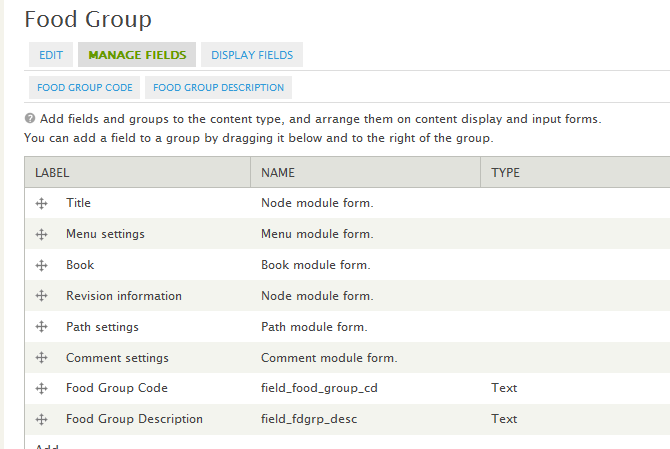
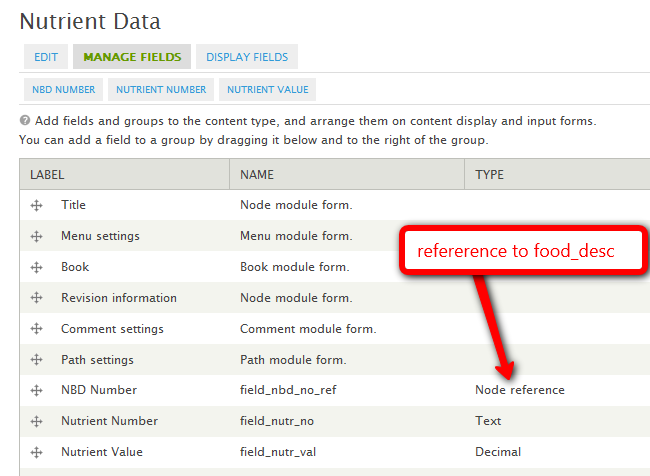
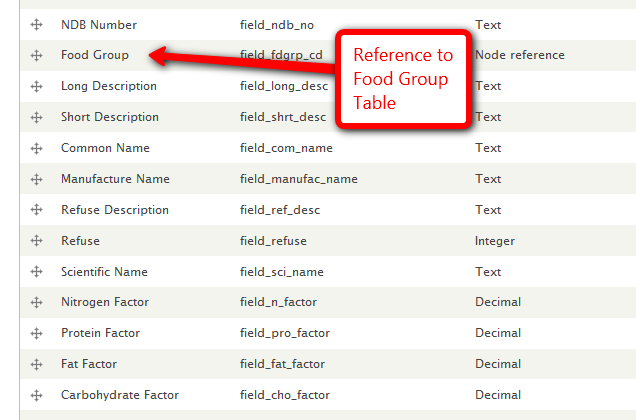
apmsooner commentedWell I've seen a few sites that have all the table information in there and don't see any slow performance in the queries. I think the key is as Pianoman mentions in that last statement to allow user's to build their own favorite ingredient lists to customize ingredient selection and speed up queries. I can't imagine integrating the USDA tables as an install feature for recipe module since they are so big however, if node templates are created that match the fields in those tables than user's can elect to import data into those tables as they wish. I had no problem importing the tables using the node import module but havn't done the huge one yet (nut_data). I plan to split that up into chunks and import a little at a time to prevent any timeout issues. I think if we can at least get ingredients as nodes, then the next nice to have feature in recipe module would be the code to calculate the nutrient values referenced to that ingredient and display them in a block. I could put together a guide of what fields are critical for each node template and specify the calculations that need to occur. I could also put together a how to guide to import the data. If this is helpful to the module maintainer, let me know and I'll work on that when I get some free time. Example, See attached screenshot for the food_desc table I set up in drupal with node reference to the food group table.
Comment #64
apmsooner commentedhere's a few more screen shots of the other node setups.
Comment #65
izmeez commentedAll this discussion is great. I'm way behind you all, but I'm wondering if this will be like an API, that recipes and other modules could utilize? There are many others uses it could be put to.
From the experiences reported it sounds like the USDA Nutrition Database definitely needs some refinements and even then the resulting database is large but can be hosted separately. How would the database be updated? Are there other similar and reliable databases with additional nutrition details?
Could a module use such an API to search the database or use a select-box with auto-fill as the user types, and fetch a specific record? And have a content type with a name-title and a field for the nutrition#record. The content type could include flags to indicate if there are multiple records for similar items such as "salt" providing an alert and possibly a drop-down box in the module UI to show and even select one of the others.
An application can create nodes for the "ingredients" as it needs.
Maybe this would be like an API and a cck-field module.
Sorry, if I'm getting carried away. Thanks,
Izzy
Comment #66
scottprive commentedYou /wouldn't/ want to re-calculate nutrition every time you load the recipe. The Drupal caching API should be of help with this sort of thing, so the difference in displaying these bigger data sets should be nil (should... I haven't looked at caching yet for any previous work.).
Comment #67
pianomansam commentedapmsooner, we won't know if there is a performance hit until we get all the data in there. I still think there will be, and the process of getting the entire USDA database into Drupal will make using this aspect of the recipe module too much work for someone with a small site. Keeping the database separate and importing on demand will avoid this, as well as opening up the possibility of creating an API as Izmeez mentions. This API then can be used in other systems and ultimately become something very useful to anyone interested in using the USDA database in their application. Put it in the cloud with a CDN and you could start a paid service and generate income.
tzoscott, you are right. We wouldn't want to re-calculate nutrition every time the recipe is loaded. Nutrition should be calculated:
1) When the recipe is created/modified
AND
2) When the ingredients is contains are modified (reverse lookup)
Comment #68
apmsooner commentedHey I'm open to whatever works the best and perhaps external database that just plugs into recipe module is advantageous as long as the ingredients that are in there can be filtered or flagged for use in the recipe UI so we don't have a bunch of ingredients that some of us would never use. Again just for reference, here is the formula for calculating the nutrient values:
N = (V*W)/100
Where:
N = nutrient value per household measure (this is the value we're looking for)
V = nutrient value per 100 g (Nutr_Val in the Nutrient Data file), and W = g weight of portion (Gm_Wgt in the Weight file).
Take this number "N" and multiply it by the "yield" number of servings in recipe module and we have what we're after. I'm no programmer but perhaps you add to the recipe module a function that performs the math above, creates a variable of the value of N and then apply that variable to the yield function I believe already in recipe module and thus outputs result in table. If it can be cached as mentioned in earlier thread then perhaps thats the way to go but my understanding is that the values would have to be stored in the database for each ingredient instance that occurs in each recipe node. Perhaps you're referring to the caching of the actual variable created through the function of getting value of "N" to speed up calculating? Sounds logical anyways... I look forward to this feature as it would be a sweet addon to the already awesome recipe module!
Comment #69
NoDice commentedsubscribing
Comment #70
xkater commentedsub
Comment #71
boblangdon commentedHere's a simplified USDA sr22 schema and dump I use in a calorie-counter app I'm using on a dev site if it helps. (The app DOES NOT work right in IE yet, but that's just a css thing).
Comment #72
apmsooner commentedI don't want this thread to dry up and I've done a little more research into what I believe needs to happen for all this to work. There are various modules mentioned in assisting the functionality we need however I don't think there is a complete answer for our objective so I've outlined some objectives and explanation around perhaps how to go about this and leave it up for discussion.
1. We've already identified the need to make ingredients nodes in the recipe module. But the big question is how to we use an autocomplete widget in that field to pull an ingredient from the database in an elegant way, meaning not pulling from 8,000 records. My thoughts around this would be that we could use a widget like node hieararchy select or node reference explorer (http://drupal.org/project/nodereference_explorer) to get the ingredient node populated into the ingredient field.
2. Once we get the ingredient node populated into the ingredient field we need to think about how to pull in units specific to that ingredient. This would ultimately pull from the weights table rather than the current units setup in recipe module. Reason being, weights are calculated specifically to the type of ingredient for appropriate nutrient values therefore we cannot select from all generic unit values because the nut_data table values only pertains to the measurements identified by USDA. So if we have a dropdown field for the weights table that references the food description table, how do we filter by only the weights that reference to the food description selected in the previous field? It seems as though a dependent dropdown field that uses ahah functionality would be most suitable. Example provided here: http://drupal.org/node/524220
3. it seems once we get over these 2 major hurdles, we can figure out how to calculate nutrient values for each ingredient and for overall recipe based on number of servings.
4. As a sidenote, I think it would be advantageous to be able to also create ingredients independent of recipes to create a food journal for dieting. What i mean by this is that the food_desc table from USDA is not exactly just composed of "ingredients". They are food items that people might want to track in a daily journal. Come to think of it, the ability to create a "meal" node that references "ingredients" in the same manner recipe module would so someone could create meal then attach foods accordingly that come from USDA food desc table. So for instance, I want to create a meal called "breakfast" and then attach individual food items like: 1 whole egg, 1 slice bread, 2 apples, etc... and also perhaps have the ability to attach a recipe as a meal item as well... "omelet"?
Okay so the ideas around this project have grown into something probably much more complex than originally anticipated but in doing some brainstorming here I think we can slowly grow the recipe module into something bigger and better if up to the challenge. I can contribute ideas conceptually but my lack in programming limits progressing this along to where it needs to be. I'd like to have some feedback nonetheless of some of the ideas poised here and determine whats doable. thanks!
Comment #73
scottprive commentedI have been following this for some time. Here is my personal advice to the developers considering this:
"Release early and release often...". Scale back your requirements so that you can get a 0.1 cooked demo running inside of a weekend or a busy day.
For example:
A Node-aware module that can be tacked onto Recipe as a "field", using CCK (much like how you can tack "FiveStar" onto Recipe).
This Nutritional Info "field" would simply display a white box, with the commonly used labels (Protein, Fat, Sodium, etc).
That's IT for 0.1.
Don't even try to calculate anything, no USDA db yet, just display cooked dataset linked against the recipe Node ID, in the correct graphical Nutritional Information box that everyone recognizes.
This gets something in the hands of users (those willing to install a -dev release) and provides some feedback and encouragement.
Otherwise, there's just so many issues that it's like shooting for a "perfect" 1.0 release. The bigger the task, the more likely that someone has to move onto other things before a release gets out.
All the other issues can be tacked on gradually.
OK I am not working on this but that's my thought.
Comment #74
pianomansam commentedtzscott, good call on breaking things down. If had to envision the releases, it'd go something like this:
Release 1 - Ingredients as nodes. This includes a working and elegant UI for selecting ingredients within recipes and calculating their nutritional value.
Release 2 - USDA Ingredient DB integration. Whichever of the three options we go with, this will happen at this stage.
Release 3 - Cupboard / Shopping List. The idea I mentioned that lets users enter the ingredients they have and create smart shopping lists that tell them what they still need to buy for recipes, and possible also search for recipes that they already have all the ingredients for.
Release 4 - Meal Plans (apmsooner's idea). This is actually a really exciting idea, and something I was considering as a separate module for one of my clients, Better Weight For Me. Combine this with recommended calories for each user, and you have a smash bang system.
Comment #75
pianomansam commentedMy argument for having calculations within Release 1 is that we'd probably want to match the current functionality of the module. The module currently calculates nutritional information, so we should have that in Release 1. In order to calculate nutritional information, we'll need to iron out units, as apmsooner brought up. This will make a simple nodereference unusable. We'll have to come up with a custom/modified cck widget to make this happen. Probably modifying Node Widget to pair a text input for quantity and a selectbox for unit in addition to the nodereference.
Comment #76
apmsooner commentedOkay so say we make ingredients as nodes, can we match the food_desc table field definitions as a prerequesite? I'm not talking about changing the UI at this point in selecting ingredients but would just want to ensure that the necessary fields are in the "ingredient node" table so the food_desc table can be appropriately mapped and imported via phpmyadmin. Next thing, perhaps we can ensure that the units used in the USDA weights table match to the available already existing units table. Is there any thought of making units "nodes" as well? If we can add the units we need to match then we're good. If we have ability to add CCK field to units table for gram weight as well then we're moving in the right direction to be able to do calculations at some point. Again, this does nothing to change the current UI of recipe module, just sets up the tables to be more usable to relate via node references and stuff to bring this all together eventually. Once we have ingredients as nodes with the right table structure and units as nodes to match weight table then we at least have the ability to add CCK nodereference of nut_data nodetype on our own to the ingredients table and perhaps we can work through the UI enhancements down the road to make all this work together. Even if we did nothing to the current recipe module but copied the basic assets of recipe to create a separate USDA recipe module where people can contribute to as a side project?
Comment #77
jvandervort commentedIf we are getting close to beginning this endeavor how about breaking it into related parts:)
We need to move recipe towards recipe module +usda module while keeping recipe stand-alone.
So recipe would need:
1. ingredients as nodes
2. a new ingredient autocomplete widget (because of the possible large number of ingredients).
usda would need:
1. a way to link ingredient nodes to usda items (link may include a quantity impedance factor).
2. to calculate nutritionals for a recipe node's usda-linked ingredients(with a note about unlinked ingredients).
3. views/themes/searches to expose the new nutritionals.
Uses:
1.view a node, see typical nutritional box (on a tab or not).
2. search for recipes with < X grams of fat?
3. sort list of recipes by milligrams of sodium?
others??????? What do you guys plan to do with this?
Implementation questions:
1. Do we need to import nutrition info into ingredient nodes?
2. Do we need to import full nutritional info into recipes?
3. What happens when usda changes schema or users want stats on stuff that doesn't make the label?
4. What happens when someone disables and uninstalls the usda module and runs plain recipe again?
5. How would someone extend the new module to includes ingredients that are Kosher, grown x-miles from his house, or "may contain peanuts"?
And lastly my 2 cents:
We still need to make sure recipe stands on its own and is still simple to use/install/import/export/etc...
Comment #78
jvandervort commentedA separate question, why ingredients as nodes? To use node selection tools? or
let people build up expansive ingredient info pages with pictures and stuff?
I still feel most ingredient nodes will just have a title and that's it.
Also right now if you change a recipe ingredient from salt to tomato the module
handles it by removing the salt ingredient and adding the tomato ingredient.
In the future I have 400 recipes that use salt and someone changes the salt ingredient node
to pepper it just modified 400 recipes to be incorrect and I don't have a good way to fix
it if I'm not sure what happened or didn't notice it. For me this is a big deal.
Comment #79
apmsooner commentedImplementation questions:
1. Do we need to import nutrition info into ingredient nodes?
ANSWER-Not necessarily, we need the ability to import just the USDA food_desc table into ingredient nodes. The other USDA tables can reference the ingredient node as other nodes.
2. Do we need to import full nutritional info into recipes?
ANSWER-No, we just need to have ingredient nodes to match food_desc table. Where recipe comes into play is in the node_recipe_ingredient ui part I believe. The ingredient field needs to match the ingredients table (food_desc) and the units field needs to match a units table that allows for values that are already in USDA weights table. Additionally, it would be optimal for units field to be filtered based on ingredient since gram weights are only associated for certain units with USDA.
3. What happens when usda changes schema or users want stats on stuff that doesn't make the label?
ANSWER-My opinion... who cares. USDA isn't going to discover anything really new about salt, apples, beef, eggs, etc... I think where they will make changes are to fast food/restaurant items which I personally don't find useful anyway because those aren't ingredients and would have no value interfacing with recipe module for obvious reasons. Even so, user can manually add whatever they want as individual nodes as they wish assuming ingredients are "nodes". Furthermore, lets not enforce the USDA data as part of the module, let the user manage getting the data in there and managing ongoing.
4. What happens when someone disables and uninstalls the usda module and runs plain recipe again?
ANSWER-I guess that just depends on how its connected and/or depended on.
5. How would someone extend the new module to includes ingredients that are Kosher, grown x-miles from his house, or "may contain peanuts"?
ANSWER-ingredients as nodes would allow someone to add, edit, delete whatever ingredients they want independent of recipe.
Furthermore, I don't feel it necessary to try to import the USDA database as part of the module. I think having the framework in place to accept imported data from USDA database tables would be the objective which means:
1. make ingredients nodes - so we can attach additional cck fields that map to the food_desc table, including node references to other nodes (ie; nut_data)
2. make units nodes? - allow custom units creation where the USDA weights table can be imported into. Additionally, this allows us to add CCK fields to unit node for gram weight.
I think if this basic framework is in place, then its optional if someone wants to import the USDA data into the tables to customize their own version of recipe. Hope that helps....
Comment #80
scottprive commented>"A separate question, why ingredients as nodes? To use node selection tools? or
let people build up expansive ingredient info pages with pictures and stuff?"
Yes/Correct.
>"I still feel most ingredient nodes will just have a title and that's it."
I would agree.
If I possibly "read into" this statement as concern about bloating things by making them nodes, I am not worried. The bar for node-making should be, would that be useful to another module? (there's probably a better way to phrase that).
The point of nodes now is to let these things be independently extended or used by other users and developers, without affecting the original and intended use. This discussion is a use case.. if we make ingredients nodes, people can push ahead without much co-ordination from Recipe.
>"Also right now if you change a recipe ingredient from salt to tomato the module
handles it by removing the salt ingredient and adding the tomato ingredient.
In the future I have 400 recipes that use salt and someone changes the salt ingredient node
to pepper it just modified 400 recipes to be incorrect and I don't have a good way to fix
it if I'm not sure what happened or didn't notice it. For me this is a big deal."
Not actually. Ingredients are normalized and abstracted in a mini-node like system. All recipes using an ingredient point to an ingredient id, not a word. Replacing items in one recipe replaces that one pointer. Even if you renamed an ingredient (which you shouldn't to unless it's a synonym), that would just rename the ingredient.id's name.
Or do you see another issue?
Comment #81
pianomansam commentedIf we're not initially going to have nutritional value, then a name would be enough for ingredient nodes. Unless we also want certain ingredients to have access to certain unit measurements, then that would also be a property.
Comment #82
jvandervort commented@tzoscott, another issue perhaps.
Since we are creating an ingredient editing system where you change the ingredient without seeing the recipes, people might not understand what they are doing. The only reason we avoid this now is because there is no way to edit ingredients now. So once you enter a recipe, it creates ingredients as needed, but never renames/deletes them. The ingredient=editable_node is a new paradigm that we have to be watchful of. I think there are unforeseen consequences to this workflow(can you say newbies:). I think a lot of people come to recipe from the "keep a bunch of recipe emails in my inbox" background, and may not see the problem of changing an existing ingredient.
ex.
recipe1 uses Gebhardt's chili powder
someone while adding recipe2 wants a plain chili powder, they edit the ingredient to
chili powder, then add it to recipe2. While technically accurate, they just screwed up recipe1
which was written by someone that knows that Gebhardt's tastes quite a bit different than
McCormick/Schilling's Chili Powder. The current immutable ingredient system avoids this.
PS: I don't care about the bloat really, I think the node system can handle it just fine. Just the new work flow.
Comment #83
apmsooner commentedSo if I'm understanding all this correctly, the current table recipe_ingredient would be the one made into node. If we can do this then we have the ability to add cck field of ndb_no which would serve as unique identifier for all the other usda tables to reference to. One problem remains that we need to consider however. Currently the weight table for USDA relates to ndb_no in food_des table (which would be stored in recipe_ingredient). The way recipe is setup now is with a table called recipe_node_ingredient that connects table recipe to table recipe_ingredient and also holds unit_id that connects to recipe_unit table. We still have the USDA weights table that has to relate somewhere in this mix in order to pull the nutritional values for each USDA ingredient. Do we somehow incorporate this table into units table and add field for ndb_no which would then relate back through recipe_node_ingredient > recipe_ingredient > nut_data? I hope this is making sense. Essentially, the weights table holds specific weights for specific ingredients and I think the current use of units table is generalized just to store a record in recipe_node_ingredient table therefore not dependent on the type of ingredient to filter for specific weights.
Comment #84
apmsooner commentedPerhaps putting together graphical representation of the current table layout compared to what we are proposing would be helpful to understand?
Comment #85
scottprive commentedI put one in recipe/README.txt, quoted for convenience here:
"Data is saved in normal form. Recipes are collections of pointers to
ingredients and to quantity terms. New terms can be added by modifying the
schema. New ingredients are added automatically whenever they are used for
the first time.
Following is an ASCII art attempt to illustrate the DB relationships:
"
I don't know who designed the original implementation, but it's pretty good in that everything's abstracted/normalized.
This does make it less straightforward to "query a recipe", but it's more maintainable.
Comment #86
scottprive commentedJohn's right about the ingredient node issues.. they need to be planned out. A quick response is, Permissions could let you forbid most users from renaming an ingredient (or at least, from renaming someone else's...)
Maybe they could be prohibited from renaming... so the only way to "replace" ingredients would be with some kind of bulk command, one which forces you to at least view a list of "affected recipes" and who owns them. Not perfect, but users of Node Reference (a neat CCK module) get burned if someone radically changes a node that is referenced. Although, I could see that type of thing happening more on a system like Recipe, where there could be more push and pull on the recipe db.
I'll say that overlapping or unnecessary ingredients are a huge pet peeve - kind of like "freetagging" on websites, the value of the vocabulary diminishes more as a greater number of people tag something (just look at the freetagging of bookmarks on Del.icio.us..).
On the plus side, ingredients as nodes DOES give a standard UI for deleting ingredient nodes, and it's for free.
John and I tend to not be rash at putting things in (and lately, I haven't put anything in at all, it's been all John). So this ingredient node idea needs to "stew" some more, and probably needs proper specifications (especially to support upgrades and permissions). This would be additional reason to consider the approach I recently suggested, where this add-on module could move forward without anything happening yet in Recipe.
Comment #87
pianomansam commentedThe issue of the community being able to change ingredient nodes and affecting all recipes that use them can be alleviated with a separate permission to Add and/or Edit ingredients. This gives some sort of moderation capabilities, perhaps even combined with full blown moderation like modr8.
Comment #88
shunshifu commentedAnything happening on this. I hope so this would be a valuable contribution
Comment #89
WhenInRome commentedsubscribing
Comment #90
saud.rehman commentedHi apmsooner,
Can you tell me how to find the DV (% daily Value). I mean the formula based on the values from the tables.
saud
Comment #91
apmsooner commentedSaud,
N = (V*W)/100
Where:
N = nutrient value per household measure (this is the value we're looking for)
V = nutrient value per 100 g (Nutr_Val in the Nutrient Data file), and W = g weight of portion (Gm_Wgt in the Weight file). See page 25 of attached document for reference. If your working on a module for this, I'd love to test it out. Let me know if you have any other questions. My conclusion was that it would need some ajax in dependent dropdown fields to make a user interface work but perhaps you have other ideas.
Comment #92
saud.rehman commentedHi apmsooner,
Plz see the attached file. I already know what you are telling me. I am asking about some thing else.
*What I feel is that we dont have this data in the USDA tables and we have to take it from some where else.
Plz reply soon.
Thanks.
Comment #93
apmsooner commentedYeah I don't think that info is provided in the tables. I would assume %dv means percent of recommended daily intake. Might check FDA website perhaps...
Comment #94
izmeez commented@apmsooner in #91
The USDA pdf file you reference contains a lot and is quite dense to plow through.
But, on the top of page 13 there's a line that caught my eye. I'm not sure what thoughts it might stir if any so here goes,
"When the protein content of a multi-ingredient food (e.g., beef stew) is calculated using the recipe program of the NDBS the specific nitrogen to protein conversion factors are applied at the ingredient level."
Is there more information on "recipe program of the NDBS" that could be useful in helping to determine the key fields for the recipe module?
Or do we have enough to determine what values to store in the drupal database and what calculations to perform on them.
Thanks,
Izzy
Comment #95
apmsooner commentedSee the screenshots on my posts #63 & #64. I setup some sample content types with all the necessary fields in reality, nitrogen factor wasn't a real important thing in my opinion at least for my needs. My feeling is that the database would be great to calculate for ingredients that can become components of recipes in the recipe module. Some of the entries in the USDA tables however are "recipes" themselves that I would not even incorporate into my own database. I would rather use the raw ingredient values and comprise my own recipes from them. You'll notice in the USDA database theres alot of stuff for fast foods, snacks, etc... and they certainly don't even come close to accounting for all of them so personally I think those food categories are useless. Stuff like meats, spices, vegetables, (raw components) that can be used to build recipes I think is what we should be focused on using from the tables for a module that would plug into recipe module.
Comment #96
Rollike commentedI hope it is okay that i am asking :)
Do you think it will be possible to make this work for sites in other laguages?
Thanks in advance
Mette
Comment #97
WhenInRome commentedHows the dev going on this? I'm willing to donate some money to a dev so we can get the ball rolling on this and completed?
Comment #98
Shadlington commentedI couldn't see that this had already been mentioned so I'd just like to say that www.recipezaar.com uses the USDA database to great effect.
Achieving something similar would be fantastic.
I can't wait to see what comes out of this!
Comment #99
chunsaker commentedsubscribe
Comment #100
mishamake commentedI like this idea, how is this possible?
Comment #101
mishamake commentedWhere do you put the php?
Comment #102
katy55 commentedany news about one module or API?
Comment #103
adellefrank commentedSubscribing.
Comment #104
madrone commentedsubscribe
Comment #105
Tafa commentedNot sure if this would be relevant to the current discussion but I just stumbled across a new module called "diet" which also pulls info from the usda database. Would recipe be able to repro/improve on some of the main features "diet" offers?
If not, perhaps merging these modules would be another option.
T
Comment #106
jvandervort commentedI wonder how accurate some of these sites are??
http://www.food.com/recipe/hot-buttered-rum-233230
Their nutritional states 0 fat. I wonder what kind of butter they're using...
At least this recipe (as of today):
http://www.food.com/recipe/a-1-pot-roast-chuck-steak-177369
Let's you know that the streak is not included in the nutritional.
Comment #107
katy55 commentedIm doing a project where i need to implement the nutricional facts im just asking if anybody did that and i will pay for the support or module, thanks
Comment #108
g.k commentedsubscribe
Comment #109
toddcate commentedsubscribe
Comment #110
danielgrin commentedsubscribe
Comment #111
gthing commentedOne way or another I'm going to need this functionality within the next few months. I am also willing to sponsor development. Several others have offered as well, so this afternoon I'm going to try contacting other who have offered financial support to see if we can come up with a bounty for completing this. I'm also going to ping the more active developers in this thread and let them know the money will be out there for getting this completed.
Comment #112
gthing commentedI think ingredients as nodes is the way to go, as it gives us maximum flexibility within the Drupal framework. As far as performance goes, I imported the entire database using node_import and I'm not too worried about performance. If it comes down to it, we could have people query from a "common ingredients" list and then give them the option to expand their search to include everything. The common ingredients list could be made up of the x most commonly referenced ingredients where x is a reasonable threshold that will meet the needs of most ingredients.
Comment #113
apmsooner commentedThis module is still in early stages but could be consideration for querying through ingredients in my opinion: http://drupal.org/project/dependent_fields. I believe you'd need weight as node in addition to ingredient as node to create a relationship with node reference field.
nutritional measurements for instance should be its own table so when you select an ingredient, you get a dropdown selection for selecting cup, pound, ounce, etc...
I'm not sure what you imported but the USDA has 2 different formats of data to work with which is all the data in ascii format and a slim version which to me wouldn't be as useful.
Comment #114
gthing commentedI have organized a bounty for completion of this project here: http://samgarfield.com/content/usda-recipes
I pledged $250. I imagine if a few people did the same then someone could justify spending the time on finishing this up.
Let me know if anyone would like to firm up that requirements list or change something.
Just to cover my ass: I am not responsible for making sure people pay on their pledges, but I will give all the data to the developer who completes the project.
If more then one developer contributed to completing the project and they can't come to a gentlemanly agreement as to who gets what percentage than the top three contributors will decide. Fair?
Comment #115
adellefrank commentedI'm happy to pitch in $50.
Comment #116
kevcol commentedMe, too -- $50
Comment #117
apmsooner commentedOkay, now that i've got more time to focus on this, i think we collaboratively need to talk this through and figure out how to approach what i've discovered as some obstacles with the way the USDA data is currently structured. First, the unique id in the food description table which all the other tables connect to is a unique number (NBD_Number) that is only really necessary for the initial import of USDA data and ongoing USDA updates thus shouldn't be required when adding new non-usda food items to the existing table so we need an auto incrementing NID to be the actual primary key in this table so that all other tables can reference to appropriately when a new record is added when NBD Number isn't specified. Assuming you imported the data with node import module using node references then we can handle this but i certainly don't think node import is going to handle the amount of records in the nut_data table which is over 550K records. I was able to fairly easily import the nut_data table in php my admin in a reasonable amount of time but setting up some sort of batch import process is beyond my intelligence level as far as making this an out of the box module because the amount of data is quite massive. I'm sure i can get as far as creating the install file to setup all the fields for each table and create the node forms and CRUD functionality but i don't know how to get around making the manual process of the initial import. Perhaps a batch import is not necessary with some clear instruction of getting data in on the backend because afterall, this project is not for the basic drupal user. Some more things to consider
Update query - once initial data is imported, we need to map all the other tables to the new nid that is created for the food description table so that field is referenced instead of the NBD number. This needs to be more of a "how to guide" since everyones node id sequences will be different and thus can't account for that.
Cleanup - first off i think an additional table needs to be added as a sub food group category to eliminate 100's of records that for example all start with "soup", thus making "soup" a sub category of "Soups, Sauces, and Gravies". This will make selecting ingredients much simpler and less resource intensive as well i think. This can be done in excel using text to columns to separate the description field so not worried about that part.
Dependent dropdowns - we need an expert that understands form state and AJAX to select from dropdown fields in the following order - food group > food sub group > food description > weight. IMO We need to do it this way so that when we get to the weight field, we're only seeing weights that reference that actual ingredient.
I think the above is the biggest task to start with and once we get these items settled, the calculations and possible integration with the recipe module is much less of a problem thus a reasonable bounty can then be offered for that additional functionality. I hope this explains what anyone that trys to take on this task is going to have to consider and understand about the current data structure. Again, i need this functionality too and can create the basic modules and install files to get the project started. What i'd like to see is if someone can offer some additional advice or offer to work for bounty on the parts that will remain. Thats my take anyhow on the project... open to hearing some feedback and willing to get started on my end if can come to agreement on the best way to go about this.
Comment #118
apmsooner commentedOne other thing i forgot to point out is that we don't need all the tables available in the USDA resource files. Some of them are clearly associated to the research conducted to get the values of the nutrients. I for one don't care about this. Additionally, many fields aren't necessary in all of the tables. We don't need statistical analysis fields and all that garbage for this project. The key tables we need are:
fd_group
fd_sub_group (added per my opinion)
food_des
nut_data
nutr_def
weight
I personally don't want all the food groups either because my needs are for healthy nutrition so sweets, fast foods, etc.. are useless for me but everyone can choose what they do and don't want to import for their needs. Again, i think this should be treated as a one time import for people and let them modify to their needs from there. I've looked at the USDA updates and the data is not updated often enough nor does it include any substantial changes to justify the need to make our module incorporate the USDA's updates. That part could be done very simply with node import and feeds module.
Comment #119
gthing commentedapmsooner: As far as importing the database, check out the node import module. It's perfect for this. I'll read through your other comments tomorrow and see if I have any other feedback or ideas.
Comment #120
apmsooner commented@gthing,
I think you'll see my concerns with node import module for handling this task when you read through my comments. Things i see as roadblocks with that is the amount of data to import... i think you're going to see some timeouts. Have you actually imported all the tables in via node import or did you just do the abbreviated list? The abbreviated list i'm afraid won't work for us because it doesn't contain all the nutritional values and only includes a few weight measures which means we need to get all the individual tables in and relate to one another. I'm interested in how you've set your structure up for importing to compare to my experiences on this. I just don't think the import part of this project can be done effectively through any other way then manually on the backend or through some intelligent batching process...
Have you received any interest from developers in taking the bounty so far to work on this? Once again i think if we can break it up into smaller parts... some that i would be willing to do then you might be more likely to have someone take on the tougher items as it makes more sense.
Comment #121
apmsooner commentedAnyone...
Whats your thoughts on handling the long USDA food description titles like this?
Long Description:
Milk, reduced fat, fluid, 2% milkfat, with added nonfat milk solids and vitamin A and vitamin D
Short Description:
MILK,RED FAT,FLUID,2% MILKFAT,W/ NONFAT MILK SOL,WO/ VIT A
I'd like to retain the same format for adding multiple ingredients in line with the recipe module but these long names are going to be hard to decipher in that ingredient table. The short description is still pretty long and perhaps not really all that descriptive the way it reads.
Comment #122
gthing commentedapmsooner: Ah I see your concern with node import. I used it to import about 60,000 records yesterday without any problems but didn't realize how big the full USDA database was. We might want to look into the ni_cron module which automates node import into batches that run during cron. It basically just runs until it times out and then next time cron runs it picks up where it left off. This could also provide a solution for keeping the database up to date.
If we want to import data directly into mysql and ignore the node_import route, then I'd recommend something like Big Dump (http://www.ozerov.de/bigdump.php) which I've had much success with in the past. It's much better than phpmyadmin at importing db content.
Comment #123
peleg commentedI'm happy someone is taking care of it, it's an old dream of mine :)
I'll be happy to pledge 100$, but I wonder, do you plan to write something that will be applicable outside drupal as well? Or at least without the recipes module?
Comment #124
gthing commentedI've been thinking about this some more and I'm wondering how far we could go using the flexifield module. You could have a node reference field for the ingredient, then a field for the measurements and the number. I believe you can add unlimited flexifields just like any other field. Then you could use computed fields to calculate all of the nutrition facts. Thoughts?
Comment #126
gthing commentedHas anyone used the food.com recipe builder? It uses the USDA database but doesn't require you to actually find the exact ingredients in the database. You just type in plain text "1 cup flour" or "1 Tbsp salt" and it seems to be able to figure out what you're talking about. So either they have an algorithm that can identify what you mean or they have manually added aliases for the ingredients. I'm a bit baffled as to how they do it, really. I would love to hear some ideas. It would be really nice if you didn't have to interact with the actual USDA database at all but maybe it's beyond our abilities.
Comment #127
Taxoman commentedComment #128
ryan.davis commentedsubscribe
Comment #129
halo13 commentedHey, I am going to keep this one going. I need a module that will import the USDA db and calculate the calories entered by the user. Any suggestions or ideas are welcomed. I am also willing to fund for part of the module.
Comment #130
bmarcotte commentedBoy this is a long standing thread....
I've been hacking away on this for a couple of weeks now as a unfunded personal project for my technically oriented diet website TechnicalDiet.com. However this is too massive an undertaking for me to devote my time without funding. I'm really looking for a paying customer/sponsor so that I can dedicate my time to this project. Bounty interest and/or coding help to get this project usable to the community would also be welcome. If we can get funding, then we can work on detailed features. Please let me know if you can help support this project.
Thanks,
Bob
So far...
On my offline development system, I have created a USDA module (in D7) with 10 sub-modules for each USDA SR18 table. Each module creates a nodetype for each table, although I'm not sure that nodes are entirely necessary. Each module has an import function that creates a batch job to read the corresponding USDA TXT file and create a node for each line. It took about 8 hours for my laptop to import the nutrient data file into my druapl database. I'm currently developing code to perform the lookups necessary to provide intelligible output.
My ultimate goal is to provide recipes with nutritional information. I haven't thought through the recipe module interface as of yet. I can see UDSA being an independent module, perhaps an API that Recipe can draw from, or another module needs to be developed to bridge the two. I'm also looking to add additional food itmes; yet another module or extention.
Comment #131
apmsooner commentedBob, i would elect to not use nodes for everything as the field collection module would seemingly make much better sense in my opinion for storage attached to one nodetype for ingredient. I think that would take care of things like node title where it just wouldn't make sense to have a weight node with a required title. As i posted earlier, the one hitch in development i found was sending an ajax request to the database to retrieve specific weights when an ingredient is specified. Thats the big difference from recipe module and why this needed to branch out separately because the USDA has so many different weights and tons of them in their datafiles whereas recipe module has standardized measurements that don't account for things like: 1 package, 1 pat, etc....
If you could build an importer that would import into field collections, i think that would be the best way of doing it.
Comment #132
gthing commentedI am no longer in need of this project, but hope it moves forward. I'll keep the bounty page up for anyone interested in continuing it, but I have no reason to continue offering the $250 I pledged.
Comment #133
bmarcotte commentedgthing- Thanks for the reply Sam. Given the age of this thread, I understand. I'm interested in seeing if the interest is genuine, just passing or has passed.
ampsooner - Hi Andy,
Currently: I have done a 1-to-1 straight recreation of the USDA tables, only adding nodeIds. given that the table has keys, the node is merely a drupal feature. All sql lookups can be done with the USDA fields. I have not inched my way up to the ajax calls, so input is appreciated.
Fields: Yes, I could (relatively) easily write an importer into fields. I was thinking about fields but it seemed like way too many fields and more complicated. Since each field is effectively a table in mysql, I'm not sure that fields provides a performance enhancement. Are you suggesting that each ingredient has a field for each nutrient value (i.e. that is 136 fields per ingredient)?
Performance: I have general concerns about performance, given the huge database and much of the data being irrelevant to the general user. Is there any data to support faster performance with fields as opposed to joining tables in an sql call? (joining the tables is quite trivial) Does ajax return faster from fields?
Measurements and weights: I understand your concern. The nutritional data is based on a per 100g basis, which makes sense, and dealing with conversion options is going to be a nightmare. In Recipe, the recipe_ingredient table holds just the ingredient name, and recipe_node_ingredient is specific to the recipe node. Thus, the importer would fill and attach fields to the recipe_ingredient table. The Recipe module is very flexible for measures, but for each recipe measure option we would need to calculate the nutritional value from the 100g equivalent to determine the nutritional value in the recipe. Thus either we limit the options in recipe to those specified in USDA, or we somehow interpolate between the differences.
So, I guess my question to you is, where do you see the path of least resistance? Does using a field collection make the Recipe interfacing easier? If you feel strongly that a specific structure is preferred, please provide explicit instructions and I can code the importer to do it.
-Bob
Comment #134
Shadlington commentedI would be willing to toss some money into the pot, should a pot come up.
I'm a little cash-strapped so the most I could afford to put up is about $100.
Comment #135
halo13 commentedI would also be willing to throw some cash into the pot. $200, possibly more depending on the ease of use.
Comment #136
bmarcotte commentedHuzzah to the tippers! thanks Shadlington and Halo!
I've completed a mini-module that JUST imports the USDA database into drupal tables. It currently does nothing else. I coded a sweet little csv reader mated to the schema. The table structure mimics the USDA database table structure. I removed the node structures from my previous attempt due to the excessive overhead of creating a node for each line. Without node creation, the install takes about 5 minutes because you can do bulk db_inserts. Within a node structure, each database row requires being setup and processed individually and thus requires a good 12 hours to install. For what it's worth, I did add an auto incrementing _id field to each table.
I'm going to move onto Recipe integration next. My personal interest is in forward implementation. However, I expect that current recipe users would like to draw from existing recipe's. Although semi-structured, the user entered ingredients and amounts can be quite random and may present issues for importation or calculation.
Request: I could use a dump of the recipe tables from a "real" site. i.e recipe, recipe_ingredient and recipe_node_ingredient for experimentation.
-Bob
Comment #137
cdanni commentedI've been watching this thread for awhile, hoping to see forward movement. I just re-joined the ranks of the employed so $50 is all I can afford presently.
I haven't even started to build my site yet, but if you still haven't received the dump you requested by next week, Bob, let me know and I'll get mine put together and get the data over to you. (This is, of course, assuming you are still working on this project.)
-Cristina
Comment #138
mdlopresti commentedSubscribe
Comment #139
jeremymcminn commentedSubscribe
Comment #140
jeremymcminn commentedAm willing to put some money forwrad for this too $100 or so
Comment #141
play4quarters commentedHi.
I wonder if anyone has investigated using the Calorie King API as an alternative? I believe it supports 20,000 free queries per month.
Thanks
Comment #142
bmarcotte commented#136, #137 Update:
I managed to install the USDA SR24 database on my www.TechnicalDiet.com site. Check it out. You can look up all kinds of things on it. I'll admit, TD is a bit lame. I was doing this project as a step to improve it, but it quickly became very time consuming with little projected benefit as it gets minimal traffic.
I struggled to install the database onto the bluehost site because it uses a lot of server time even trying to run it under batch mode. My code ended up being pretty crude, certainly not up to drupal module coding standards, nor something I have time to support.
Anyway, I got TD's food finder and a couple of other lookups working and since then I've been working on other things. At this point, I wouldn't recommend building a site just to send me a data dump. Writing a translator is more work than writing the code for fresh data, as it requires additional work which I'm certain I will not get too.
Are any of you subscribers interested on entering recipes onto TD if I code the USDA integration? That would give me motivation to take this project to the next step and you would help me to debug the code and improve the site. My general thought is that the USDA identifier would be added to (or replace) the recipe module’s ingredient definition. I’m not sure how possible it is to have USDA be an add-on module to recipe. It could end up requiring large scale recipe module edits.
Subscribers: Interested parties should go to www.TechnicalDiet.com and lookup a variety of ingredients as if you were going to enter them into a recipe. The process of entering a recipe would include selecting each and every ingredient for each and every recipe. I recognize that it is tedious but in order to have accurate results, you have to be diligent in specifying the ingredients accurately. The belief that you could magically get accurate nutritional data from randomly selected ingredients is a pipe dream, in my humble opinion. There is a lot of science that goes into being a dietician.
-Bob
Comment #143
cdanni commentedHey Bob,
I know we've chatted via email, but I just wanted to post this up here in the event anyone else is interested.
I'll gladly post some recipes up on the site as we've discussed. I think to really give it something to work with, I'm going to use some of my more complex ones with many ingredients as well as a few simpler ones.
As discussed I won't be ready to start on this until next weekend or so. But one of the things I've been kicking around in my head is the possibility of a slick jquery filter when entering ingredients that can help users find the right thing to enter in order to get accurate data for their recipe. I need to look into how this can best be done, but it should certainly be in the realm of possibility!
And now back to work. *bleh*
Cristina
Comment #144
bmarcotte commentedHere are a couple of screenshots of where I am at. If you read the help fieldset in recipe_ingredient_ing.jpg, it explains how the USDA food item is linked to the recipe.
For expediancy, I'm currently using an edited version of the recipe module's previous release. I am trying to plan the next step and I'm ready for input. Let me explain what I have done.
1) I have added 2 fields to the recipe_node_ingredient schema, ndbno and searchterms. Ndbno contains the USDA database reference number and searchterms contains the keywords entered on each of the recipe_ingredient_ing form items. Saving the search terms helps for later edits of the ingredients. The recipe name field is unchanged and provides a display name for the ingredient. The unit_key is multi-functional. If a USDA ingredient is selected, the unit_key is filled with the USDA serving sizes. If there is no USDA ingredient selected, then the former recipe unit_key options are in effect. The recipe_ingredient_ing form uses ajax calls to search the USDA database and load the dropdown options.
2) On the view, I added a display field for the nutritional information. The module is hard coded to pull out the calories, carbs, fats, and protein values for the ingredients that have a USDA reference.
Issues I see:
1) The full database is huge and time consuming to load, and contains extraneous data. I have it set to run as batch jobs; but I had trouble installing it and needed to piecemeal it. It is not node based. It is structured as provided by the USDA as relational tables. They have an abbreviated version, but it still needs to cross reference to the weights and measures table to get useable unit sizes. I'm planing to use this data for recipe integration. For details on the USDA SR24 offerings see http://www.ars.usda.gov/Services/docs.htm?docid=8964.
2) What information should be included in the nutritional information box. With the abbreviated database table, you do not get the fat breakdown (saturated total, mono-unsaturated etc); only total fat. Carbs has a breakdown of sugars and fiber available. Vitamines and minerals are available. Note that if we only need limited information, then we can reduce the installation process.
3) Non USDA items dont tally into the nutritional information. This is beyond my scope. While nutritional information fields could be provided for non USDA items, the arbitrary nature of the former recipe ingredients via name/units makes handling nutritional information difficult.
4) Note that RDA percentages are not a USDA database function. Personally, I find the RDA numbers as misleading (one size that fits no one).
5) Can/should this functionality be rolled into the recipe module itself, a sub-module or seperate project?
6) Importing, Exporting and printing.
Thanks for providing input!
Bob
Comment #145
itserich commentedI work with a pet adoption group and am interested in dog and cat nutrition.
Preparing food for pets is more popular but there are no sites which allow people to compare what they are feeding with the standards. For instance, one day I may feed beef liver, with rice and a fish oil capsule. This lacks calcium, for instance.
My idea is to have something like NutritionData.com, but combine ingredients and compare it to the standards for dogs and cats (published by the National Research Council).
Comment #146
play4quarters commentedI'm pretty sure that ESHA is an industry standard for creating accurate nutrition labels. They do have a web service available, though I haven't investigated a price yet.
I wonder if they would consider some discounted price for the drupal community, provided the community built the integration for drupal?
Just a thought.
Comment #147
play4quarters commentedAlso...here's a nice UI http://recipes.sparkpeople.com/recipe-calculator.asp
Spark is developed with asp and uses a combination of USDA data and their own propriety data.
All this is probably not as accurate as what ESHA provides, but it is pretty user friendly.
Just FYI.
Comment #148
joecanti commentedVery interesting discussion.
The key is how to manage the data effectively. From reading through the discussion it seems a good solution would be:
- To import nutrition data into nodes. Eg 1 node per ingredient. Fields for nutrition data.
- Manual search and import by Admin.
- Various sub modules to handle different databases. EG USDA database one of many.
- Ability for users to add ingredients not in the database. Creates shortlist so admin can import them.
This would mean that:
- The database would be optimized to the website, and grow as the website grows. EG If you're running a vegan website - your foods database will be vegan. Italian recipes website - your foods database will be made of Italian ingredients... etc etc.
- The admin retains control over the ingredients database, and can add data to nodes as the website demands.
- The users are not limited to any one external database, nor are they given thousands of choices.
- Multilpe databases can be accessed. EG if the USDA is low on Chinese foods, a sub module can handle import from the Chinese version of the USDA database, whatever that might be.
- If everything is node and field data, other modules can hook in easily, especially Views. If a recipe node had nutritional fields, the computed fields module, or even Rules, could populate the recipe node fields from the food node fields. This would make good use of Drupal's cache, as once the standard recipe is created and cached, nothing would need to be calculated.
So imagine this scenario. The user adds 100g Spinach their recipe. They type it in, and if the admin has imported it, they get some options. Eg 'Spinach, Boiled', 'Spinach, Raw', 'Spinach, Baby Leaf'. They choose and on to the next ingredient. If the admin has not imported, they type in Spinach, and 'Spinach' gets added to the admin shortlist. Through the back end, the Admin can then search using one of the sub modules - find the result most suited to his/her site and click import. The recipe 'Spinach' and the imported Spinach node are linked, and the recipe ingredient is given the name of the imported node. Eg 'Spinach, Boiled'.
In reality, the admin would spend some time importing all the ingredients relevant to his or her website at the beginning - and importing new ones upon request would be a rarity. It would take some time, but most food websites are quite focused - you would end up with a database optimized for your needs with perhaps only 500 - 1000 ingredients.
What do you think?
Jow
Comment #149
wouter.dierick@gmail.com commentedSubscribe
Comment #150
joecanti commentedHi,
Any thoughts on this development?
I've just noticed that it's possible to download the entire database. I've done quite alot with node import and it would probably be fairly easy to import and map this download to nodes on a Drupal site. Would this make sense rather than creating a system to connect directly with the database?
The major issue I can see would be updates made to the database and how they translate to your site.
I still think this would be awesome for the recipe module - and I see that sites like food.com have USDA db integration working really nicely - but I also see that it's a considerable amount of work, and a large extra chunk onto the module - perhaps it should be a separate project?
Many thanks, Joe
Comment #151
Topcheese commentedI would also like to know what's the update status with this issue and perhaps add to it? I have plans at some point to use a recipe solution, so I'm looking at possibly using this, but I'm not so sure because of this issue.
I'm still very much learning Drupal, but what I can gather is that there should be a nutrition module, with submodules for the different nutrition databases to enable if needed.
I think what would be nice is if we could plug in a choice of what method to use such as importing the data, or using an existing API to get the info. I have found some more places with nutrition API's below.
Fat Secret
Nutritionix
Crowdsourcing Nutrition Facts
Comment #152
marko42 commentedLike everyone on this thread, I'm anxious to have nutrition summaries for my recipes and as a site builder, I'm trying to understand what problems need to be solved. This is a naive proposal I'm sure, but ask stupid questions and get smarter in the process...
The inspiration for this idea comes from @font-your-face. It uses several sources for fonts and allows the site builder to choose which ones to make available to the site.
1. A set of modules each dedicated to a different data source like the USDA nutrition database that can search and return a set of candidate ingredients and parse records into a format acceptable to the site's nutrition database.
2. A UI module that populates the site's nutrition database. The content editor searches and imports items from the data sources using the the modules described in "1." The content editor can chose the most suitable candidate for including in the
3. A module that makes the site's nutrition database available to contrib or custom recipe modules/content types.
Hope this contributes to discussion.
Mark
Comment #153
Anonymous (not verified) commentedI have a client who would be willing to pitch in a significant amount for completion this module. This is a long thread, so it's hard to make head nor tails, but who's the best person to head up the effort? gthing I note that you posted a bounty a couple of years ago, did you make any headway with this?
I guess what we'd be looking for is a quote to complete it, rather than just tossing money in the pot and hoping for the best. I would need to hear from a) developers who are involved and able to do the work, and b) others who are willing to contribute funding in the next 6-12 months.
Comment #154
apmsooner commentedThis thread is long and Here's my take on this after researching for a long time how to go about this and what I've come up with to work for me. First off, the recipe module is wonderful but I believe would have to be modified extensively to work with the USDA data as its structured so I opted to just create something that is somewhat similar via content types, field collections and views.
I don't need it to work as a plugin module for my particular case because i personally don't want ALL of the data from the USDA. I only care about raw foods.. ie; not restaraunt foods, fast foods, snacks, etc... I'm assuming many other people may want to manipulate the data prior to import and at the very least split it up into smaller files. I have no idea how someone would go about working with that huge ascii file to just plug in as a contributed module so I elected to just go another route and move this along for me.
Here's my approach step by step for anyone that is interested:
1. Create taxonomy for food groups and added the food groups as terms
2. Created a content type for ingredient containing the fields I want from the food_desc table from USDA pretty much matching the data format they've provided in the document. I did use taxonomy for food groups however as mentioned above.
2. Instead of working with the ASCII file, i downloaded the MS Access database where I can add fields for my taxonomy term ids and build my custom queries for what i want to extract for import.
3. I then export the queries in xml format which is available in MS Access.
4. Using the feeds module, i setup a feed importer of type node to import the food_desc table as ingredients. That one is pretty easy and not nearly as large as the others.
5. Using the field collection module, i added a field collection field called 'weights' which consists of the field definitions from the USDA weights table. Field collection feeds module is perhaps a little tricky to setup but I've managed to get it working really well for me.
6. Using the field collection feeds module, i setup a feed importer of type field collection to import my weights mapped up to the ingredient with the nbd_no as the unique identifier. The weights table is over 14K records so I set this up to run as a background process on cron run and increased my max_execution time substantially to ensure the process runs without timing out. I also installed the ultimate cron module to get better control over how often cron runs and a handle on unlocking dead processes. So far so good!
7. Nutr_def table - I setup a taxonomy for this also called nutrients and imported those in there. This will serve as a dropdown field for the nut_data table that describes the nutrient.
8. Okay this is the step i'm still working on. The nut_data table is huge! Close to 600,000 records. My plan is to first filter this table out for only the data i need. I will then create queries in small batches by food group just as described above and export out in xml format. I will then create another field collection field on the ingredient content type called 'nutrients' that will contain the field definitions as specified in the USDA manual and proceed to import those in via field collection feeds module as described above. This will be a lengthy process because of the amount of data but will basically be a one time thing as far as i'm concerned.
How I plan to hook this all together would be to create another content type for 'recipe' with a field collection called 'recipe ingredients'. The recipe ingredients will contain an entity reference field to the 'weights' field collection of the ingredient node searchable and selectable using a view embedded in the recipe page. The weight field relates to the ingredient that also relates the nutrient table so thats where the calculations come into play. FYI, I'm using field collections instead of nodes because aside from ingredients, nothing else really needs a title or publishing options and the field collections feeds module is the only module i've found that can get my data in until the work on a generic entity processor for the feeds module is working.
If anyone likes this approach and is interested in contributing development time and/or money to make it better, feel free to contact me. I've been putting this off for quite a while and have finally gotten to a point to where i'm ready to roll 100% with it for a personal project of mine. Again, if anyone has a better approach for performance, ui enhancement, etc... share it now please and lets work together. I just can't afford to wait any longer...
Comment #155
Topcheese commented@apmsooner, thank you for your time and effort. I see that you have put some thought into it, and I will have to check it out when I get a chance.
I'm planning on trying to support the efforts of the other projects, and do it the hard way. The Recipe module is a very nice module with a history. I also purchased the Drupal book "Drupal 7 Development by Example" in order to apply its Recipe example to the Recipe module as a simple exercise.
I also plan to attempt to make some sort of nutrition API that you can plug in the external nutrition sites. Anyways, Drupal is not that simple, and so I was left wondering if I wanted a module, a feature, or an app.
So, what I'm looking at is probably creating a few modules and a feature. I plan to get back to this in a week or two. I'm not sure how much help I can be as I plan to base it off of an API that can be reused. It is going to be a very painful process for me, but quite a learning experience.
It's also probably never going to happen, or it's going to take forever to implement. I'm pretty set on making it happen, so I would like to see this issue finally resolved in one way or the other.
Comment #156
apmsooner commented@Topcheese,
Feel free to do your research and offer up some ideas. Thing is.... the weights table from USDA is very much different from the units of measurement in the recipe module. Theres really no way to store this as selectable units because there are so many variances. For example, there are very specific weight measurements per ingredient from USDA based on the type of ingredient it is: ie; package, pat, can, dash, pinch, etc....
That alone pretty much rules out recipe module integration in my opinion. Nutrient calculations can be complex as well.... I havn't gotten to a point of coming up with an approach for that yet but i will after some more thought. I just seriously don't see this as something someone can feasibly package into a module and just "work" out of the box.
Comment #157
Topcheese commented@apmsoone, yes I have to do some more research.
Seriously this is Drupal, so what you say speaks the truth. There is nothing that says you cannot run a subset of the database with minimal functionality to get something working out of the box.
I will have go over this entire issue in more detail, and I will also have to figure what it is that I can do. You know with some serious stored procedures and a little bit of client-side magic you can do wonders with those very specific USDA requirements.
I'll have to put this back up on the drawing board to see what comes up for me. Like I said, I was hoping to do it the hard way, but I'm also open to any way that gets it done.
-Thanks again.
Comment #158
coozila commentedSubscribing
Comment #159
apmsooner commented@all who is still following this...
I've revisited coming up with a solution for this whole thing. I don't have anything new for direct integration with the recipe module however I'm working on a module that will provide a node type of "food" and a custom entity of type "weight" and it is working quite well to assemble the data.
The trickiest part was getting the related data in a useable format.
Basically using the ms access usda database (rather than the ascii files) and using a mac app to read the access database, i've converted the tables to sql and imported them into Sequel Pro where i can create a query that joins the necessary tables together. I filter this query by food group code and export out the results to an xml file. By parsing out into smaller xml files, it is much more feasible to import the data into small chunks and not timeout the server. I create a custom table in my module for food data and include those fields into hook_insert, hook_update, hook_delete functions to correspond with actions on the node itself. I setup custom targets for the feeds module that populates the data.
Additionally, i created a "food_weight" table and setup the data for that as a custom entity. I set feeds target for the reference to the food node by doing a lookup on the nbd_number and returning the corresponding node id to create the reference. There are still a ton of fields to setup on the node side so work in progress on finishing up... but anyhow i'll be posting the module for review in the coming weeks along with all the import files and would appreciate some testing and feedback to help it along. Attached is a sample xml file of all foods in the "Poultry group" so you can see the simplicity of the data that would get imported.
So... 2 tables related as drupal entities with views, feeds, rules support in the most performant way I could come up with...
This is the query that creates the output in Sequel Pro in case anyone wants to understand and attempt their own solution:
Comment #160
dcam commentedSince Drupal 7 is now end-of-life I am closing some old issues for the 7.x branch of this module.