I've been poking around on the installer in HEAD and I noticed that if you don't give write access to the site folder (e.g. "default"), the installation stage on the shows"Verify Requirements" as checked. Since one of the requirements is that the site folder be given write access, I think that this page should show the installation stage as "Verify Requirements."
Also, in terms of usability, it might be better to have a "Continue Installation" button at the bottom of the page. As of right now you have to click the browser reload button to keep going (which might not be intuitive)
Currently, the page says this:
Drupal database setup
The following error must be resolved before you can continue the installation process:
The Drupal installer requires write permissions to ./sites/default during the installation process.
I think it would be better to say something like:
The Drupal installer requires write permissions to "./sites/default" during the installation process. After you have given the write permissions to the "./sites/default" directory, click the "Continue Installation" button to go on to the next step.



Comments
Comment #1
ff1 commented+1.
I raised this same issue here http://drupal.org/node/156984 before seeing this issue.
The exact wording perhaps needs some more discussion, but the basic solution is reasonably clear.
Comment #2
gábor hojtsyPatches welcome! Note that the language selection screen uses links, so a link to reload the page might be suitable here too.
Comment #3
bennybobw commentedPatch attached with minimal changes.
Comment #4
bennybobw commentedPatch attached with minimal changes.
Comment #5
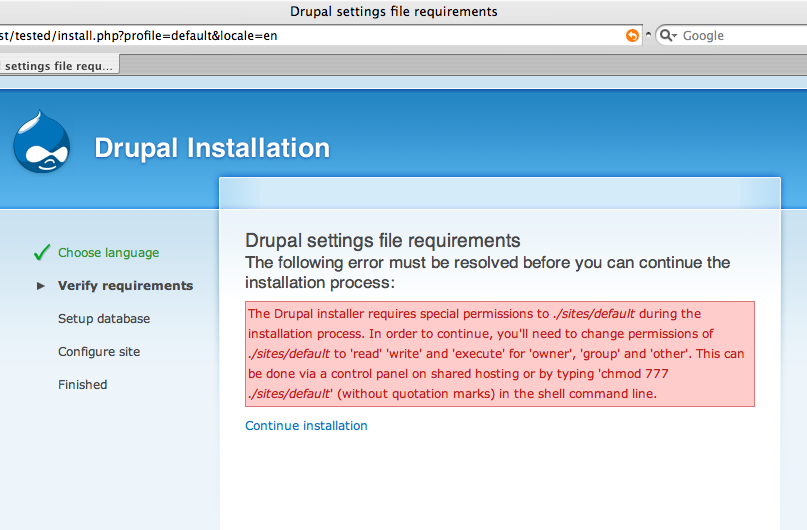
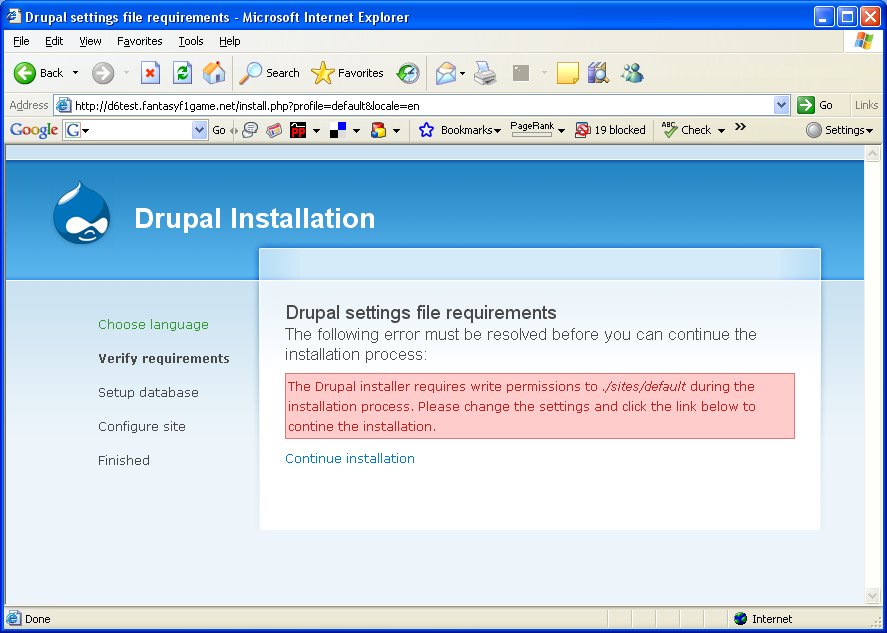
ff1 commentedI installed the patch and it does exactly what is described. I've attached a screenshot of the patched error page.
The new code very similar to existing code within install.php and looks very clean. I see no reason not to commit this patch.
Comment #6
ff1 commented... and a screenshot of the unpatched error page.
Comment #7
ff1 commentedComment #8
gábor hojtsyNot bad. I agree we don't do database setup yet, so the requirements step should be selected. But the message needs some massage:
There is a typo in "contine" and IMHO the user should change the *permissions* not the *settings* of the file. Otherwise looks fine.
Comment #9
Standart commentedI removed the second sentence from the above patch. I think it is obvious that the user has to change settings and the words "continue" and "installation" don't need to be on this screen more than twice.
Comment #10
dries commentedNot escaping those variables in the URL looks a little dangerous to me.
Comment #11
Standart commentedI don't see the point with the variables as the code seems to be like it is in other places in the install.php. Created a new patch removing a space to comply with coding standards.
Comment #12
catchOne additional thing with this - if your settings.php isn't executable (i.e. 644 or 666) then you'll still get the not writable message.
I think it should say:
patch attached.
Comment #13
gábor hojtsyErm, why would it need to be executable?
Comment #14
catchThat's what I thought, but I couldn't get the installer to go past that page without 755/777 permissions. Trying again now I see it may be a browser caching issue at my end, so sorry for muddying the waters, and ignore that last patch :(
Comment #15
gábor hojtsyHuh, reread your comment. Of course directories need "execute" permission to be searchable. Sorry to misread your comment earlier.
Comment #16
catchOK no problem, was just seeing what would happen if I took the message literally in a few different ways, but managed to confuse myself in the process, teach me to post late in the evening on a Sunday!
I think there's a fair chance that a drupal/*nix newbie might well do "chmod -R sites 666" from their drupal root once the see the error message, which won't allow them past this section of the installer, although ".sites/default" would still be writable. I don't know if my two word addition above is sufficient do deal with this, probably not.
Maybe some example chmod settings would help, as discussed in this (duplicate) issue: http://drupal.org/node/84229. That issue also had the suggestion that the permissions be writable by default (given the installer resets them at the end) - is that worth exploring? Would save most people seeing this message at all. I realise it's in INSTALL.txt but no-one reads that of course.
Comment #17
gábor hojtsyWell, yeah people take instructions literally (eg. http://drupal.org/node/176039), so we need to be more specific.
Comment #18
bennybobw commentedMaybe it's too late because we're into beta, but I am still willing to go in there and add the suggestions.
What do you think?
Comment #19
bennybobw commentedchanged status to code needs work
Comment #20
Standart commentedI think we need to decide if we want to provide detailed instructions with operating system dependent commands or if we prefer a short note.
One thing is clear though: It has to be improved and it should not get into Drupal 6.0 as it is right now. Why not commit a solid but short version first. There's always room for improvement.
I prefer to remove the "execution permissions". Just tell the user that the installer needs to write to that directory and to remove write permissions afterwards. Otherwise we have to tell the user every detail about unix permissions (how about windows?).
Attached is a cleaned-up patch. I thinks it's RTBC.
Comment #21
bennybobw commentedI don't know if we really need to detail instructions, but I do think we need to give a little more description, as per Gabor's suggestion.
What about something like
I took that from the other issue. The Drupal INSTALL.txt file only has Unix directions, so I assume we're sticking with that?
Also, if we change this, we may have to open another issue to change INSTALL.txt which says to use "chmod o+w default" (assuming you're in the sites director).
Comment #22
bennybobw commentedWhoops several typos/fixes.
Comment #23
Standart commentedI think this is critical as most users will have to adjust permissions and will get stuck in the installation process then.
Comment #24
keith.smith commentedhttp://drupal.org/node/188449 is a related issue that has been marked as duplicate.
http://drupal.org/node/172398 is a related issue that has been marked as duplicate.
(http://drupal.org/node/172398 had discussion but no patches.)
Comment #25
mikey_p commentedI've re-rolled the patch from #20 (which wasn't applying cleanly) incorporating the text form #22.
Comment #26
stborchertTested and the patch worked as expected. If I don't modify the permission after checkout I get the new error message and after I change the permissions to 777 the installation continues.
One minor note:
All necessary changes to ./sites/default and ./sites/default/settings.php have been made, so you should now remove write permissions to them. Failure to remove write permissions to them is a security risk..This message shows up on the install step "Configure site". Specifically the second sentence sounds somehow strange to me (as a none-native speaker).
greetings,
Stefan
Comment #27
catchQuick followup patch for that wording, changes it to:
All necessary changes to %dir and %file have been made, so you should remove write permissions to them now in order to avoid security risks.Leaving patch in #25 as RTBC since this doesn't affect it.
Comment #28
gábor hojtsyPlease merge the patches you would like to have committed into one.
Comment #29
catchOK this a re-roll of #25 and #27. Marking to review for someone to look over my changes to the string.
Comment #30
mikey_p commentedI've rerolled the patch, to include instructions to the security warning, port installation. I've attached a screenshot of this warning.
Also the page title for the file/write warning (pre-installation) to reflect the install profile name.
Comment #31
mikey_p commentedThis patch should probably wait on this http://drupal.org/node/190283
Comment #32
gábor hojtsymikey_p: I don't think that this patch should wait, as there is no overlap. JirkyRybka also noted at http://drupal.org/node/190283 that the settings.php error should display on the requirements stage, but this does not make the patches dependent.
Comment #33
gábor hojtsyReviewed the code:
- some people suggested that we might be better off with linking to a page with documentation, instead of describing what needs to be done right there (I am not entirely sure this is better or worse).
- the current HEAD code already has a reload link for pages with errors (in theme maintenance), so this is superflous now
- IMHO use the title of the requirements page for requirements errors (probably better with "Requirements error", as introduced in the files folder issue)
Comment #34
catchTo me, a page with documentation would be much better than describing on-screen. A help page can give more/enough help for people on control panels etc., and saves displaying that information every time people install. Apart from the reminder, few people are going to need to hear this more than once.
Comment #35
ff1 commentedI agree with catch: +1 for a link to a documentation page.
If you provide on-screen help using drupal messages, you may be able to help 20% of users, but may also confuse some of the other 80% in the process. By linking to documentation pages, you should be able to provide info for many different platforms/OS's/control panels etc., helping closer to 100% of users. Also, documentation pages can be changed quickly if the help text is found to be unhelpful after the release of D6.
Comment #36
mikey_p commentedI agree it's a little long, especially the post install warning to remove write permissions. In regards to linking to d.o documentation, my previous understanding was, that it is not best practice and undesirable. However I see that http://drupal.org/node/178581 now adds a link to the handbook from the installer. I"ll try to reroll this patch with links to appropriate handbook pages.
Comment #37
gábor hojtsyOh, now JirkaRybka made this a real duplicate, but of http://drupal.org/node/191310 So I'll tell him to look here for any possible improvements he can fold into his patch.