

Closed (fixed)
Project:
BigBlueButton
Version:
7.x-1.x-dev
Component:
Code
Priority:
Major
Category:
Bug report
Assigned:
Unassigned
Reporter:
Created:
4 May 2012 at 18:50 UTC
Updated:
12 Feb 2015 at 13:06 UTC
Jump to comment: Most recent, Most recent file

Comments
Comment #1
socialnicheguru commentedI also get these notices when I goto node/add and add a bbb enabled node and save in addition to the notices above:
Notice: Undefined property: stdClass::$moderatorpw in bbb_get_meeting() (line 570 of /var/aegir/platforms/7/modules/all/bbb/bbb.module).
Notice: Undefined property: stdClass::$meetingid in bbb_meeting_moderate() (line 730 of /var/aegir/platforms/7/modules/all/bbb/bbb.module).
Notice: Undefined property: stdClass::$moderatorpw in bbb_meeting_moderate() (line 731 of /var/aegir/platforms/7/modules/all/bbb/bbb.module).
Notice: Undefined property: stdClass::$returncode in bbb_api_getMeetingInfo() (line 205 of /var/aegir/platforms/7/modules/all/bbb/includes/api.bbb.inc).
Notice: Undefined property: stdClass::$message in bbb_api_getMeetingInfo() (line 210 of /var/aegir/platforms/7/modules/all/bbb/includes/api.bbb.inc).
Notice: Trying to get property of non-object in bbb_meeting_moderate() (line 736 of /var/aegir/platforms/7/modules/all/bbb/bbb.module).
Notice: Undefined property: stdClass::$returncode in bbb_api_create() (line 64 of /var/aegir/platforms/7/modules/all/bbb/includes/api.bbb.inc).
Notice: Undefined property: stdClass::$message in bbb_api_create() (line 69 of /var/aegir/platforms/7/modules/all/bbb/includes/api.bbb.inc).
Comment #2
socialnicheguru commentedOK. i looked into this because it was BUGGING me a lot:
In BBB, I had to go through and replace meetingid with meetingID, moderatorpw with moderatorPW, attenedeepw with attendeePW.
Comment #3
eme commentedIn which files ? bbb.module only ?
If I change meetingid with meetingID, I see an error disappearing, but it still does send that there is no password, and modifying moderatorPW & attendeePM does not change anything.
Comment #4
-alex- commentedDrupal version 7.14?
When I updated Drupal from 7.12 to 7.14 I faced the same error.
Comment #5
eme commentedIndeed : I run 7.14 on this install.
Comment #6
tomoya commentedI have the same problem on 7.14.
Comment #7
galinski commentedIf You still have problems with get this to work, make sure You provide good Base URL in configuration of BBB module, example without trailing slash.
Comment #8
eme commentedI tested with and without the trailing slash but issue is there. But I think it may be due to the last BBB release, and maybe not 7.14 version.
Comment #9
tomoya commentedI think it has nothing to do with the slash. BBB module (7.x-1.x-dev) works on 7.12 but it doesn't work on 7.14.
Comment #10
riho commentedPatched as explained by #2 above.
Comment #11
socialnicheguru commentedOK. so this is weird.
Now I get the following:
FAILEDinvalidPasswordYou either did not supply a password or the password supplied is neither the attendee or moderator password for this conference.
I see that there is a password for moderator and attendee. It is automatically generated. however it is not sent and there is no way for me to input the information.
It asks me to input them now as opposed to before when they were not available, i was able to enter the meeting.
Comment #12
riho commentedI did not actually test this on Drupal 7.14, but on 7.16 and I can't reproduce the error you mention. Can you provide some more information, maybe we can get to the bottom of this?
Comment #13
socialnicheguru commentedhow can i tell which version of BBB app that I am running from the command line?
does the module work with the latest .08 api?
Comment #14
socialnicheguru commentedit works.
I removed the old bbb module, downloaded and applied the patch to a clean install.
it works fine.
Comment #15
scottm316 commentedThis patch fixes the errors on my sites too. Drupal 7.14-7.17 w/ latest dev of bbb.
Comment #16
scottm316 commentedRe-rolled with suggestions from the coder module. Includes changes to 2 other files in the module, but it's just spacing and comment standards.
I also seem to have the best luck applying the patch BEFORE installing the module.
Hope that helps someone!
EDIT: IGNORE THIS PATCH it doesn't work :) I'll fix it, some day...soon. I hope.
Comment #17
valdo commentedThe patch in #10 fixes just these properties: meetingID, moderatorPW and attendeePW. But I see also logouturl and dialnumber having wrong capitalization in code. These are all of them:
The patch to fix all wrong properties is attached.
EDIT: other related bugs fixed in patch attached to comment #20, please use that one.
Comment #18
scottm316 commentedWorking 100% here, thanks for the patch valdo.
Comment #19
valdo commentedIf the BBB service is not available, I get these notices:
I attached patch to fix this. I also removed the duplicity of API calls which were replicated 4 places in api.bbb.inc. Now the actual API call is in 1 function – function bbb_api_call() – this also means just one place to check connection, log errors etc.
EDIT: IGNORE THIS PATCH, doesn't work - see the next comment.
Comment #20
valdo commentedPatch to fix all the bugs above is attached. Created and tested against 7.x-1.x branch.
Comment #21
zerorez commentedAfter running this patch I'm getting this:
Warning: First parameter must either be an object or the name of an existing class in bbb_meeting_attend() (line 702 of /home/web/public_html/sites/all/modules/bbb/bbb.module).
This is line 702:
if (property_exists($status, 'hasBeenForciblyEnded') && $status->hasBeenForciblyEnded == 'true') {
BTW: The line number is probably off because I put some comments in there for myself. The real line number should be less.
Maybe I should try to run the patch again on a fresh uninstalled version? I'm also new to bigbluebutton and this bbb module so there's a lot of new stuff I'm trying to figure all out at once.
Just wanted to let you see it in case it wasn't something on my end.
EDIT: Also, after starting a bbb meeting and creating the bbb content type, when I view the content type it says "Status: Meeting is not running" and the warning I mentioned above shows up when the "Attend Meeting" tab is clicked. If I click on "Moderate meeting" it loads a 404 not found....I'm still learning the process so I'm thinking it's probably something that got messed on my end. The bbb client works fine on the server. I'm just having some trouble connecting the bbb module to the bbb client/server. Everything for the bbb module is setup and working fine except for the content type.
Comment #22
valdo commentedThanks for testing, I see what is the issue, I'll fix and update the patch tonight.
Comment #23
valdo commentedThe warning issue is fixed, updated patch is attached.
I don't think it's necessary to run the patch on a fresh uninstalled version, just run it on the 7.x-1.x-dev code version.
In the patch I have also commented out the call of undefined theme function theme_bbb_meeting_start (related to #1848606: No implementation for theme_bbb_meeting_start).
Comment #24
zerorez commentedGlad to be of any help. I applied the patch and the error is gone.
My only problem now is the status is still:
Status: Meeting is not running
And if an Moderator or Attendee tries to join, the page loads a "404 not found"
This is what I've done to set it up;
1. A bbb server is setup, running and tested first
2. The bbb module is patched, installed and configuration is setup, tested, and seems to be working fine.
3. A "meeting" content type is created with everything in the "Big Blue Button Settings" checked and filled in except for "Dial Number"
4. Test users are created as Attendees and Mods and logged into drupal.
I think I am missing something. Sorry if this is s dumb question but at what point is the bbb meeting created?
Comment #25
valdo commentedNo worries, just make sure you followed all instructions in README file in module. The steps you described look good.
Do you have the config at
admin/config/media/bigbluebuttonset up properly? When you click Test connection it should confirm that your BBB server is responding. In my case the Base URL is http://mydomain.com/bigbluebutton - without trailing slash at the end on URL. You need to provide also the "security salt". You display the security salt with this command on BBB server:bbb-conf --saltorsudo bbb-conf --saltAlso, to see the "Meeting in progress" status instead of "Meeting is not running", you need first to start the meeting - click the Moderate tab as a user with permission. The BBB flash will be loaded in an iframe just below the Drupal tabs.
Comment #26
zerorez commentedThanks. I'm pretty sure I got everything in the readme.
In the bbb module config the other server URL is: http://bbb.domain.com
with no trailing slashes.
I printed the current salt from the bbb server at: /var/lib/tomcat6/webapps/bigbluebutton/WEB-INF/classes/bigbluebutton.properties
in the terminal with this: $ cat bigbluebutton.properties | grep securitySalt
I copied and pasted it over in the config.
The connection seemed fine because I saw:
"The connection has been established succesfully. Please save your settings now."
For dispaly mode I chose to display the meeting in a new window. I tried both but want to use a new window.
So... the flash meeting on the bbb server is created when a mod or someone joins the meeting in drupal?
The URL shows it's going to the right server:
http://bbb.domain.com/api/join?fullName=admin&meetingID=1071218210711967...
Just have to find out why it's giving me a 404 not found error when the new window opens.
Comment #27
valdo commentedThe 404 error might be other issue, not sure if this piece of functionality with opening new window is already implemented for D7 at all. Please raise a new ticket if you investigate this.
Comment #28
zerorez commentedI'll let you know if I come across anything. It may take me a while to get familiar enough with everything and my dev skills are not superior. But I plan on using bbb a lot and I already use drupal a lot so it's great to have module to integrate bbb with drupal.
Question:
In the config, if there is no salt entered, is the connection still suppose to work?
I noticed that if I remove the salt and save it without a salt it still says:
"The connection has been established succesfully. Please save your settings now."
BTW: this is very minor but you might want to add an "s" in succesfully. Not a big deal or maybe you knew that already and left it since it's nothing important. Just thought I mention it in case.
Anyway, I'll keep looking at it.
Comment #29
zerorez commentedI figured it out and it was something pretty stupid on my end. I was forgetting to put "bigbluebutton" in the URL so it could get to the api.
I had: http://bbb.domain.com
but I was forgetting the complete URL should be: http://bbb.domain.com/bigbluebutton
I think I had the URL correct earlier when I was getting the errors before the patch, but I changed it and forgot to put it back.
So that's it's. It's working now and that is awesome.
Thanks for the great module. It makes it much easier for the people using drupal to be able to just jump into a meeting as a mod or attendee. Maybe sometime I can get to the point where I can help you out more with this module. I'll keep digging into and learning bbb and keep my eyes on the issues here.
Comment #30
zerorez commentedWeird, so now I seem to have the problem again after installing the same patched module on the site it was ultimately meant for. I have it working on a test site. Then I thought since I already applied the patch I would use the patched version to install the module on the production site. I installed the patched module and went through the same procedure to set it up, just as I did on the test site, and now the errors are back on the production site.
Notice: Undefined property: stdClass::$meetingID in bbb_get_meeting() (line 542 of /var/www/vhosts/TeamRealityMV.com/httpdocs/sites/all/modules/bbb/bbb.module).
Notice: Undefined property: stdClass::$meetingID in bbb_get_meeting() (line 547 of /var/www/vhosts/TeamRealityMV.com/httpdocs/sites/all/modules/bbb/bbb.module).
Notice: Undefined property: stdClass::$attendeePW in bbb_get_meeting() (line 548 of /var/www/vhosts/TeamRealityMV.com/httpdocs/sites/all/modules/bbb/bbb.module).
Notice: Undefined property: stdClass::$meetingID in bbb_get_meeting() (line 554 of /var/www/vhosts/TeamRealityMV.com/httpdocs/sites/all/modules/bbb/bbb.module).
Notice: Undefined property: stdClass::$moderatorPW in bbb_get_meeting() (line 555 of /var/www/vhosts/TeamRealityMV.com/httpdocs/sites/all/modules/bbb/bbb.module).
Notice: Undefined property: stdClass::$meetingID in bbb_meeting_attend() (line 655 of /var/www/vhosts/TeamRealityMV.com/httpdocs/sites/all/modules/bbb/bbb.module).
Notice: Undefined property: stdClass::$attendeePW in bbb_meeting_attend() (line 656 of /var/www/vhosts/TeamRealityMV.com/httpdocs/sites/all/modules/bbb/bbb.module).
I've never had to install a module this way but I thought installing a previously patched module would be alright. I'll uninstall and try again.
Here's the one difference. The test site is 7.16 and the production site is 7.14.
EDIT: I was wrong. I forgot that the production site is actually still 7.12 and can't be upgraded yet. I hope that's not a problem.
Comment #31
zerorez commentedOK, sorry for rambling on about this but I got the patched version to work in 7.12. I just had to change some of the lines back to lowercase. I don't know how stable that is but at least I got a version working until we can upgrade this particular web site up to 7.17. I'll just put those lines back to uppercase when that happens.... We inherited this site from a mad developer who integrated a lot of weird custom code in hard to find places and when we do find the code, there are no comments so we are never sure what it's for. Upgrading will break most of it so we'll probably have to rebuild it.
Anyway, I guess people still using earlier versions of drupal before 7.14 will have to put some of the lines back to lowercase if they apply the patch?
Comment #32
riho commentedZerorez, I think this module works on 7.12 without the patch as well? The problem started around 7.14.
Comment #33
zerorez commentedThanks for the reply. Yeah, I was realizing that after going back and reading the whole post again how the notices started at 7.14 (I have a habit of skimming too fast and missing stuff). It works now though after I changed some of the lines back. When I can upgrade this hacked up drupal site we inherited to the latest version, I'll go change the lines back.
Comment #34
LinuxETC commentedHas anyone tested this patch noted in Comment #23 with Drupal Core 7.17 and 7.18 yet? I will be testing the patch later "after hours" but wanted some feedback from others.
TIA.
Comment #35
LinuxETC commentedJust an update on my end. No issues with Drupal Core 7.18 when applying the patch noted in Comment #23 using (LAMP based system here for reference):
patch -p1 < bbb-notices-and-warnings-fix-1561584-23.patchThanks valdo for the work here. Hopefully this patch will be committed to the module.
Comment #36
scottm316 commentedPatch in #23 worked for me. I tested both 7.18 and 7.16; locally using Acquia Dev Desktop and on 2 different shared hosting accounts/providers, the patch fixed the notices in all cases. +1 for commit to module.
Comment #37
scottm316 commentedAutomated testing has been turned on. This is to trigger the test.
Comment #38
valdo commentedTest has passed, can the patch in #23 be commited?
Comment #39
scottm316 commentedPatch in #23 has been committed and is now part of the latest 7 release as of today. This one and the coding standards patch from http://drupal.org/node/1851622#comment-6922378 have been applied. Thanks for the help valdo. I'm now a maintainer and ready to move this module forward. I'm planning on closing some issues and getting the D7 branch up to snuff and ready for API action. Hopefully even a 1.0 release! Any help is much appreciated!
Comment #40
valdo commentedHi Scott, thanks for the work here. Looks like you didn't give me authorship of this commit: http://drupalcode.org/project/bbb.git/commit/368ccf5 - to see how to do it please see the "Git attribution" section on the profile of user whose change are you going to commit, e.g. http://drupal.org/user/115695
Comment #41
arellani commentedScott, I had Drupal 7.24 and BBB 0.81
I installed bbb drupal module Version 7.x-1.x-dev,
I get the following error:
FAILEDmissingParamMeetingIDYou must specify a meeting ID for the meeting.
My server settings are:
http://mysite/bigbluebutton
Security Salt: 882b1711c09908797e7489eea6170154
The url that is passing Drupal to Bbb is http://mysite/bigbluebutton/api/join?fullName=ADMIN&meetingID=&password=...
Do I missing anything? Would you please help me with this?
Best regards
Comment #42
scottm316 commentedHi arellani, at a quick glance it looks like your URL is missing the values for meetingID and password. You can set the password to be optional with a little work (maybe you've done?) but you will NEED the meetingID (which should also be present in the {bbb_meetings} table).
Comment #43
arellani commentedHi Scott,
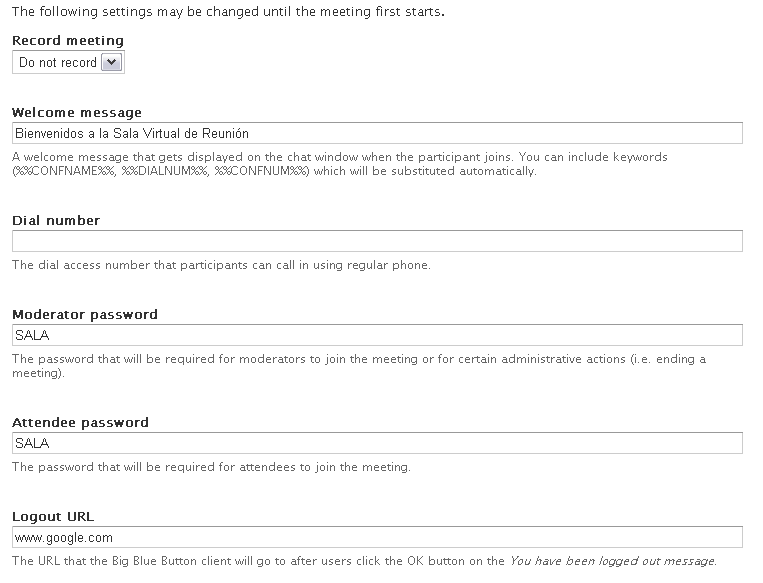
In meetings settings I configured like this:
Record meeting: Do not record
Welcome message: Hi!
Dial number: empty
Moderator password: SALA
Attendee password: SALA
Logout URL: WWW.GOOGLE.COM
Then when I click on moderate or attend meeting, the error persist.
FAILEDmissingParamMeetingIDYou must specify a meeting ID for the meeting.
The URL:
http://mysite/bigbluebutton/api/join?fullName=ADMIN&meetingID=&password=...
best regards