

 The 2026 Drupal Business Survey is open. Your response will help shape the future of the Drupal business ecosystem.
Great work.... been running BOA on Linode (1gig) for over a year... no problems......
Can anyone point me to a tutorial on BOA localhost installation..... and I mean not the kind where you need to be an expert in DNS and Linux administration......
I followed the tuts provide by omega8.cc.. nothing..... my ip an dns name not set correctly.......
Thanx!
| Comment | File | Size | Author |
|---|---|---|---|
| #89 | .barracuda.cnf | 1.46 KB | ar-jan |
| #89 | barracuda.log | 420 bytes | ar-jan |
| #89 | install.log | 6.27 KB | ar-jan |
| #83 | Fullscreen-421.jpg | 283.33 KB | omega8cc |
| #83 | Fullscreen-422.jpg | 263.02 KB | omega8cc |




Comments
Comment #1
omega8cc commentedIt is fully automated: http://drupalcode.org/project/barracuda.git/blob/HEAD:/docs/INSTALL.txt#l60
Comment #2
dev286 commentedI explained the problem incorrectly.....
I'm trying to install BOA on Debian 6 on Virtualbox.....
Barracuda installed successfully (/etc/hosts need modification for access).....
Octopus dsnt want to install (made no modifications to the install script)....... here is the error......
Octopus [Sat May 26 12:26:52 CDT 2012] ==> 8s before we will continue...
Octopus [Sat May 26 12:27:17 CDT 2012] ==> INIT A: Aegir automated install script part A
Octopus [Sat May 26 12:27:17 CDT 2012] ==> INFO A: Checking OCTOPUS version, please wait...
Octopus [Sat May 26 12:27:17 CDT 2012] ==> ERROR: This OCTOPUS version is outdated and will not work correctly
Octopus [Sat May 26 12:27:17 CDT 2012] ==> Please download and use new stable version:
Octopus [Sat May 26 12:27:17 CDT 2012] ==> wget -q -U iCab http://files.aegir.cc/versions/OCTOPUS.sh.txt
Octopus [Sat May 26 12:27:17 CDT 2012] ==> You can also use (for testing) latest dev version:
Octopus [Sat May 26 12:27:17 CDT 2012] ==> wget -q -U iCab http://drupalcode.org/project/barracuda.git/blob_plain/HEAD:/OCTOPUS.sh.txt
Octopus [Sat May 26 12:27:17 CDT 2012] ==> Bye
Octopus [Sat May 26 12:27:17 CDT 2012] ==> FATAL ERROR: AegirSetupA installer failed
Octopus [Sat May 26 12:27:17 CDT 2012] ==> FATAL ERROR: Aborting Octopus installer NOW!
Comment #3
dev286 commentedComment #4
Ari Gold commentedI was having the same error. Not sure if this is what fixed it, but I added another network adapter to the VM using "Host-only Adapter" -> "vboxnet0." Then gave the VM a static address by adding the following to /etc/network/interfaces on the VM:
auto eth1
iface eth1 inet static
address 192.168.56.101
netmask 255.255.255.0
The IP address is on the same subnet as my host machine. Then I set the IP address as 192.168.56.101 in .barracuda.cnf before running the install.....
On your host machine add whatever domain names you want to resolve to 192.168.56.101 in /etc/hosts e.g.
192.168.56.101 aegir.local o1.aegir.local site1.aegir.local site2.aegir.local
Comment #5
dev286 commentedI did that ..... still nothing...... same weird error..... "ERROR: This OCTOPUS version is outdated and will not work correctly"
But BARRACUDA installs OK... I can login, etc....
Comment #6
niccolox commentedcreated a poll about BOA on VirtualBox
http://groups.drupal.org/node/239838
a comment
Comment #7
niccolox commentedI got that error too... am about to start posting my experiments/errors etc and try to get to the bottom of this
Comment #8
niccolox commented@dev286
what operating system are you using as Host ? I am using Ubuntu 11.04 and Windows 7 for these tests
I am told it works fine on Mac, but have no verification it works for Ubuntu or Windows 7 hosts
Comment #9
dev286 commentedI'm using Debian 6 server in VirtualBox... accessing from Mac....
I can install BARRACUDA without any issues.... it works and I can log in into Aegir.....
I cannot install OCTOPUS.... I know from the previous versions that OCTOPUS cannot be installed on localhost, because it needs properly configured DNS with public access...
Comment #10
niccolox commentedI also was getting Octopus trying to install to o1.sub.aegir.local
when it should be o1.aegir.local...am testing with Windows 7 host and Debian guest
will next test Windows 7 host / Ubuntu Precise guest
then Ubuntu host/Debian guest, Ubuntu/Ubuntu
haven't tried head yet either
Comment #11
omega8cc commentedIt just failed for me with VirtualBox on a Mac and Ubuntu Precise guest. It worked fine before, so something has changed in the meantime. See the screenshot attached.
Comment #12
omega8cc commentedSo far it looks like the problem is that Ubuntu Precise default
dnsmasqdaemon is not killed properly, sopdnsdcan't start - hence alsoresolveiptest fails, and then everything else fails.Comment #13
omega8cc commentedUh, it looks really weird. We have the code in place to replace
dnsmasqwithpdnsd, but it doesn't work for some weird reason:Hah, we got invisible characters there: http://drupalcode.org/project/barracuda.git/blob/HEAD:/BARRACUDA.sh.txt#...
Not sure how that happened and when.
Comment #14
omega8cc commentedThis should be fixed here.
Comment #15
omega8cc commentedIt is a good start, but it doesn't fix the DNS issues in the localhost mode.
Comment #16
niccolox commentedthanks for looking at this.. will test tonight
Comment #17
omega8cc commentedMore progress: http://drupalcode.org/project/barracuda.git/commit/5c2956f
Now it allows to installs both Barracuda and Octopus instance (still tested only with Precise on a Mac based VirtualBox), but DNS for Octopus instance works only on command line for commands like `host` or `dig` (thanks to pdnsd cache) but doesn't work in a browser or with
resolveip, so the workaround with not usingresolveipis not really a fix, but helped to get to the core of the issue.For some reason the wildcard DNS trick used with
pdnsdno longer works as expected, so we need to find a better fix.Comment #18
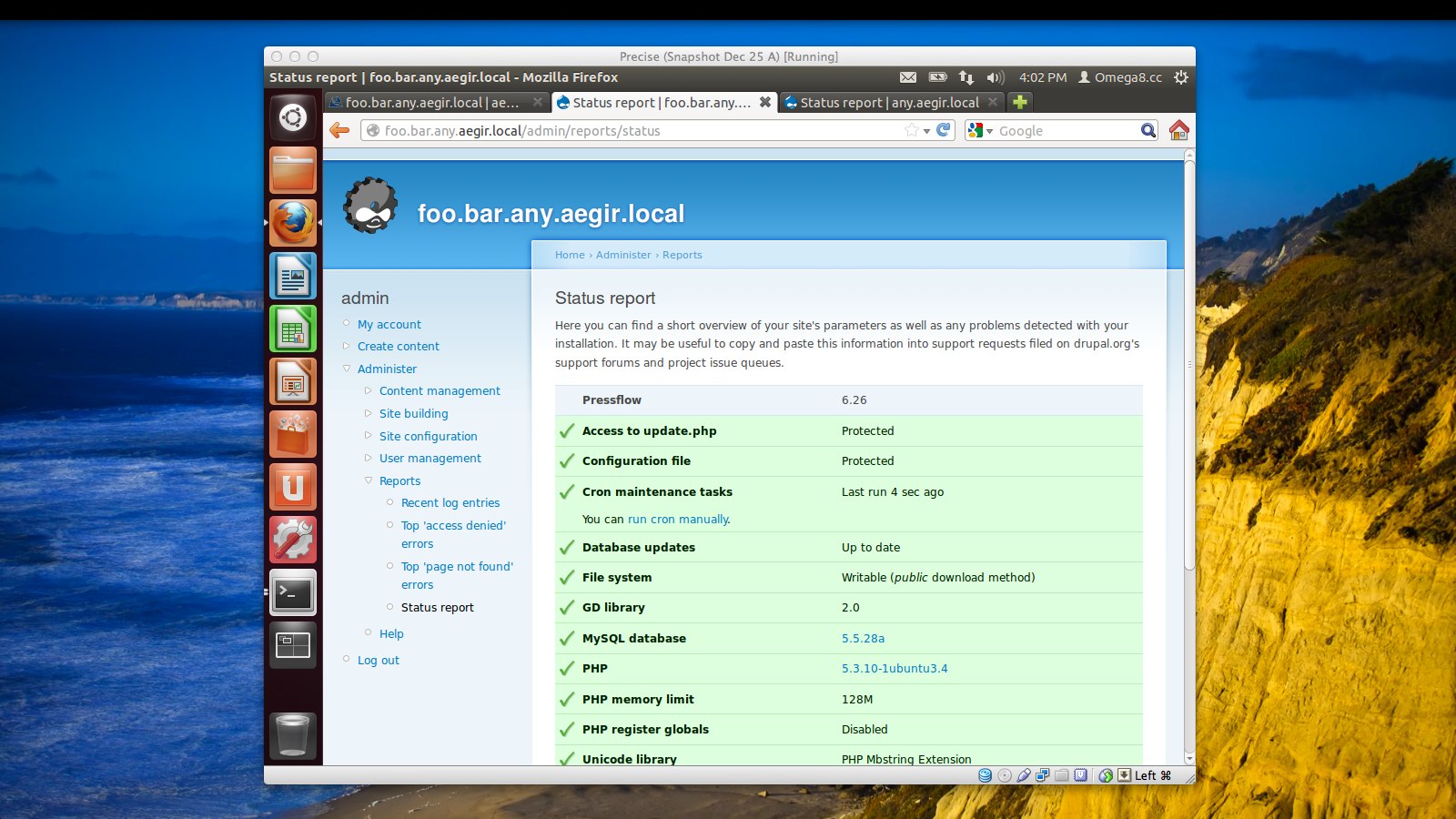
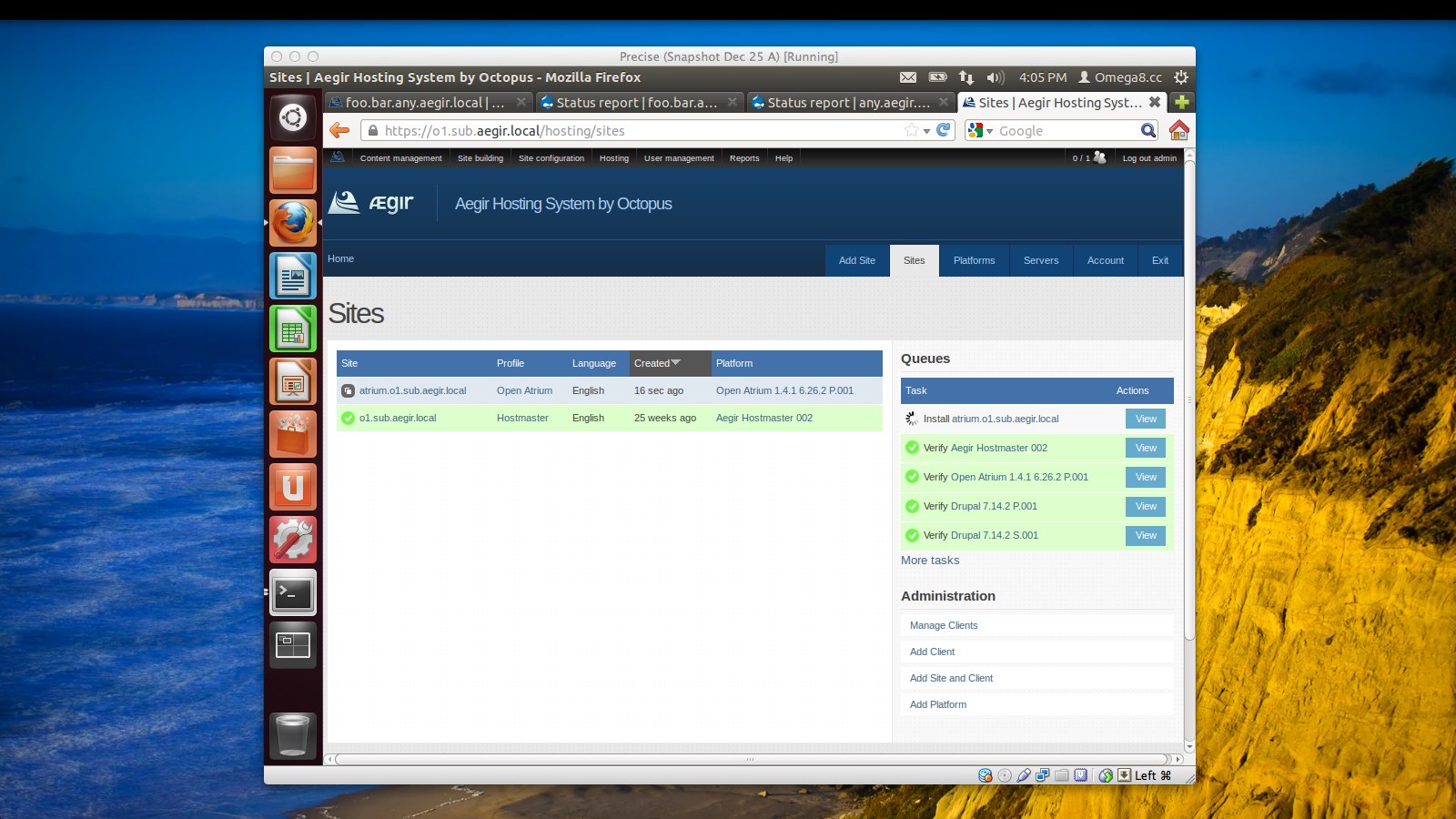
niccolox commentedI know you will hate this, but is there a hard-coded hack for o1.sub.aegir.local ? on localhost its always going to be there anyway. ouaieeeiieeeee..
Comment #19
omega8cc commentedWell, you could just add (manually) entries to the
/etc/hostsfile, like below:This is how we did this (by hardcoding a few subdomains) before introducing local DNS wildcard, but it is rather ugly workaround.
Comment #20
niccolox commentedbut that's not going to get the browser to resolve? thanks again
Comment #21
omega8cc commentedAdding entries manually to /etc/hosts does fix the issue so it works also in the browser. The only ugly part of this is that there is no wildcard and you have to manually manage all sites subdomains in the /etc/hosts file on the VM.
Comment #22
dev286 commentedThe install seems to work now... Debian 6 / VirtualBox / Mac - I setup /etc/hosts to the local ip address on my network...
but I get a blank page after I setup new password (successfully) on o1.sub.aegir.local ....
Comment #23
niccolox commentednow getting these install errors, but installation actually did continue !!
Comment #24
omega8cc commentedYeah, I have seen that also and only after removing "search" directive added by parent system DNS to the /etc/resolv.conf it went further. I believe something has changed we didn't catch yet, as previously it worked like a breeze. We definitely need to find a permanent fix, so the VM will not depend on the parent system DNS, which may simply assign random IP from its own local network and this will break DNS inside VM because it will not match what pdnsd is trying to force. I'm not sure we can totally cut off DHCP stuff here, but we need to make the VM able to force its own DNS settings, since it should just work inside the VM and we can't really support all possible DNS/DHCP configs outside of VM on various systems, since any attempt to do that will destroy the simplicity we want to achieve here. We want to make this really plug & play stuff.
Comment #25
omega8cc commentedHm, we should probably read the docs again and start from there: http://www.virtualbox.org/manual/ch06.html
Comment #26
niccolox commentedit might also be worth using the VBOA4 (VirtualBox BOA version 4) image as a reference, it has some interesting VirtualBox networking adapters and also networking interfaces and host files within the VM
VBOA
https://ole-apps.sourcerepo.com/redmine/ole/projects/ole-toolkit/wiki/Vboa
VirtualBox appliance
http://download.ole.org/boa/boa4.ova
my scraps of notes
https://docs.google.com/document/d/1OHYj7Z70x5cIPATVMBcRONCjicuUzXG63eZx...
Comment #27
dev286 commentedI did NOT get this error .... my VirtualBox release 4.1.18 r78361 on Mac/ Debian 6 Server (SSH only) / Bridge and NAT
Comment #28
niccolox commentedhmm. my environment is
Host Windows 7
VirtualBox 4.1.18
Guest Ubuntu 12.04 Precise 32 bit, using NAT and Host Only adapters, no other config or changes
Comment #29
dev286 commentedI got these errors...........
Comment #30
niccolox commentedand also this book on Safari Books Online, its old, but perhaps the language is nicer to read than the online documentation
http://my.safaribooksonline.com/book/operating-systems-and-server-admini...
Comment #31
dev286 commentedInstalled BOA HEAD on bare metal (PowerEdge 750) on Debian 6 (SSH server only) install successful.....
Still get these errors as before, on VirtualBox
Still cannot access https://o1.sub.aegir.local/ directly..... only after I add direct link https://o1.sub.aegir.local/hosting/platforms - But it works .... all platforms installed and verified....
Comment #32
niccolox commentedmy installation finally finished and failed, aegir.local and o1.sub.aegir.local both fail to resolve...
attached are logs, config etc
Comment #33
dev286 commentedI restarted VirtualBox install from before..... IT WORKS ..... If I go to https://o1.sub.aegir.local/somelinkhere......
https://o1.sub.aegir.local/ gives blank page.......
niccolo....
BOA recommendation is Debian.... its easier to deal with VirtualBox, than direct install on dev machine..... my experience from Linode.......
Comment #34
niccolox commentedalso regarding the fix for invisible characters
http://drupalcode.org/project/barracuda.git/blobdiff/e70b88272f0b315b3b1...
there seem to be weird (invisible?) characters in the install.log_.txt too ?
Comment #35
dev286 commentedTried installing a site in VirtualBox+Debian 6+BOA ..... (added ovideo.aegir.local to /etc/hosts on workstation and server)
The site installs without any errors in Aegir ... but I cannot access it due to the blank page (same for the password reset)....
Comment #36
omega8cc commented@dev286
I appreciate your input, but could you stop using those painful multi-dots? Thanks in advance.
Comment #37
dev286 commentedTried installing a site in Bare metal+Debian 6+BOA (added ovideo.aegir.local to /etc/hosts on workstation and server).
The site installs without any errors in Aegir, but I cannot access it due to the blank page (same for the password reset).
Comment #38
niccolox commentedat risk of link spamming, a nice article;
Massively Cloning A VirtualBox VM – The Smart Way
http://blog.dmitryleskov.com/virtualization/baseline-ubuntu-server-insta...
http://blog.dmitryleskov.com/virtualization/massively-cloning-virtualbox...
Comment #39
niccolox commentedI used the networking interfaces set-up in VBOA4, with NAT, Bridged and Host Only adapters and managed to install BOA 2.04-dev mini option on Debian VirtualBox locally
I can also ssh (and I assume FTP) and http into the BOA VirtualBox guest BOA server from the VirtualBox host (Windows 7).
I can also set-up a site etc
I do however get the white-screen issue (error 500), but can sometimes navigate direct to pages... not sure whats going on
will upload logs and maybe even an export of the full VirtualBox image to Google Docs
next will try this on Ubuntu 12.04 guest
thanks everyone
Comment #40
niccolox commentedand for anyone who can speak German, a 2011 VirtualBox print book
http://www.galileocomputing.de/katalog/buecher/titel/gp/titelID-2883?Gal...
Comment #41
niccolox commentedok, I just got local VirtualBox BOA 2.04 Dev in Windows 7 host on Ubuntu 12.04 guest running
slightly different networking set-up, hot-plug is not well supported in Ubuntu? NAT, Bridged, Host Only...
host file
Comment #42
dev286 commentedThe localhost is working fine now, except that blank screen (Error 500?).
I think this is the solution for the blank screen. ftp.debian.org -->> ftp.us.debian.org
Some weird stuff going on with ftp.debian.org giving OpenSSL and PCRE JIT - not found.
People report changing to ftp.us.debian.org to be working fine. (http://drupal.org/node/1611836) The issue was closed even though I and other people can replicate it. Perhaps this is due to geo location. Some packages cannot be installed in USA and can be installed in POLAND (or any other country).
The Q is how do we do that?
I tried: /root/.barracuda.cnf - no success!
It ignores my settings and installs from ftp.debian.org
Comment #43
dev286 commentedInstall of BOA on Ubuntu 12.04 Local - successful. No special settings for DNS (Exept /etc/hosts).
Comment #44
omega8cc commentedInteresting.
While I appreciate the effort to integrate local install with DNS on the host machine (or its parent network), I would prefer to keep BOA local install completely independent and self-contained. We will see what can we do to make that happen.
Comment #45
omega8cc commentedRe: #42 - this should be fixed in this commit.
Comment #46
7wonders commentedHas anything come of #44 yet? I managed to get everything installed using head but it will only let me reach aegir.local and no o1.sub.aegir.local :(
Comment #47
7wonders commentedWell im proud to say that I have it up and running but it doesnt obey the way you would like as per #44.
I installed head using Ubuntu 12.04 LTS Desktop version. For every site it needs then a change in the hosts file on both host and guest. First find your inet IP on the guest with ifconfig - 192.168.XX.XX
Then add to host file -
Guest:
127.0.0.1 o1.sub.aegir.local
127.0.0.1 mynewdevsite.boa
Host:
192.168.XX.XX o1.sub.aegir.local
192.168.XX.XX mynewdevsite.boa
Done! Now accessible on host or guest machine.
Comment #48
7wonders commentedI guess it would work without the bridged adapter too just by adding the localhost 127.0.0.1 IP and each domain to the hosts file. Unfortunately the hosts file doesnt accept wildcards. Apparently dnsmasq works though so that is maybe a solution to install dnsmasq and then in dnsmasq.conf add the line "address=/localhost.com/127.0.0.1".
Comment #49
winston commentedI can open a new issue if you like as I'm using Xen instead of Virtualbox. However, I'm getting what looks to be the same error.
Octopus [Fri Sep 7 18:41:29 EDT 2012] ==> 8s before we will continue...
Octopus [Fri Sep 7 18:41:45 EDT 2012] ==> INIT A: Aegir automated install script part A
Octopus [Fri Sep 7 18:41:45 EDT 2012] ==> INFO A: Checking OCTOPUS version, please wait...
Octopus [Fri Sep 7 18:41:45 EDT 2012] ==> ERROR: This OCTOPUS version is outdated and will not work correctly
Octopus [Fri Sep 7 18:41:45 EDT 2012] ==> Please download and use new stable version:
Octopus [Fri Sep 7 18:41:45 EDT 2012] ==> wget -q -U iCab http://files.aegir.cc/versions/OCTOPUS.sh.txt
Octopus [Fri Sep 7 18:41:45 EDT 2012] ==> You can also use (for testing) latest dev version:
Octopus [Fri Sep 7 18:41:45 EDT 2012] ==> wget -q -U iCab http://drupalcode.org/project/barracuda.git/blob_plain/HEAD:/OCTOPUS.sh.txt
Octopus [Fri Sep 7 18:41:45 EDT 2012] ==> Bye
Octopus [Fri Sep 7 18:41:45 EDT 2012] ==> FATAL ERROR: AegirSetupA installer failed
Octopus [Fri Sep 7 18:41:45 EDT 2012] ==> FATAL ERROR: Aborting Octopus installer NOW!
I haven't attempted any troubleshooting yet. The guest VM was Debian Squeeze bare as recommended.
Comment #50
winston commentedStill on Xen. Deleted the VM and recreated.
This time I used head for BOA install. Install completed. I do seem to get errors (and emails) along these lines...
***
Auto-Submitted: auto-generated
Subject: *** SECURITY information for aegir.local ***
Date: Fri, 7 Sep 2012 19:54:16 -0400 (EDT)
Status: R
aegir.local : Sep 7 19:54:16 : o1 : unable to resolve host aegir.local
***
Note: I did not do anything with /etc/hosts on the VM prior to starting install. However, these errors don't appear to prevent successful install.
Everything seems to work except for DNS wildcards so I have to add entries to /etc/hosts on any local network computer I want to use to access the sites running on the VM (i.e. I can't just add aegir.local to /etc/hosts).
I wish you success in getting #44 working.
Comment #51
snlnz commentedlol :)
Comment #52
niccolox commentedI just did an install using Ubuntu 12.04.1 alternative guest on VMware Workstation 9 host (Ubuntu 12.04.1 host)
I get the errors of 55 and aegir.local works, o1.sub.aegir.local is "under construction"
I am guessing there is an issue with the new 12.04.1 changes to DNS management ?
"Network Manager now uses dnsmasq for improved DNS reliability and support for split-DNS on VPN links. You can learn more here."
https://wiki.ubuntu.com/PrecisePangolin/ReleaseNotes/UbuntuDesktop
Comment #53
snlnz commentedThere's an issue where wildcard dns isn't working as expected in boa local installs.
You have to manually manage your wildcard dns sites in local hosts.
Comment #54
niccolox commentedOn Ubuntu 12.04.1 host running VMWare 9 Workstation with Ubuntu 12.04.1 alternative install as guest got BOA 204 dev to fully install
accessing guest from host using ssh & http successfully using NAT (default networking)
the wildcard problem persists and so have to add manual entries to hosts file on host and guest
host /etc/hosts
172.16.**.*** aegir.local o1.sub.aegir.local site1.o1.sub.aegir.local *.aegir.localand
guest /etc/hosts
127.0.1.1 aegir.local o1.sub.aegir.local site1.o1.aegir.local *.aegir.localreally looking forward to *.aegir.local working again !
but excited its at this stage, and judging by average release dates of BOA we are not too far from a new 204 stable release
Comment #55
niccolox commentedguest /etc/hosts snippet in lieu of wildcards
Comment #56
istryker commentedDid anyone test #48? Can that be added to the script?
Comment #57
rlnorthcuttI'm running 12.04.1 and was able to get things mostly working on my laptop once I figured out to install from head instead of stable.. so thank you!
I am having trouble figuring out the best way to get the wildcard subdomain working. DNSMASQ doesn't seem to have any config files as its managed by NetworkManager (As a plugin maybe?). The best possible solution I saw was to get rid of NetworkManager completely and just use DNSMASQ to do what needs to be done. But - I am wary of doing something wacky that will mess up my local dev machine.
For now, I am manually editing the HOSTS file to set up my sites, which is working fine. But I'm hoping to encourage more of my fellow devs to use this, and getting the wildcard setup is super handy.
Comment #58
ar-jan commentedI'm still running into this problem (not in a virtual machine). Tried it with Debian 6 and Ubuntu Server 12.04.1. I keep running into this error similar to #2:
On both Debian and Ubuntu. Tried both with http://files.aegir.cc/BOA.sh.txt (as per INSTALL.txt) and with http://files.aegir.cc/versions/BARRACUDA.sh.txt, as in the above message (with _EASY_PUBLIC=NO, and _EASY_LOCALHOST=YES).
Although I'm not using a virtual machine, I've also tried adding entries to /etc/hosts and adding local IP in .barracuda.cnf as other above tried.
Anything else I can try?
Comment #59
rei commentedconfirmed, I got the same error as #58
running 'boa in-stable local my@email mini' in debian 6 32 (virtualbox) .
Comment #60
vcardoso commentedI'm getting the same problem as #58.
Tested both on a Debian 6.0.6 and a Ubuntu 12.04.1 server 64bit Virtualbox VMs.
On both systems I've kept as vanilla as possible (no updates, no selection on tasksel).
The commands used were
#boa in-stable local my@emailand#boa in-stable local my@email max.I've also checked the .barracuda.cnf file and there is no _EASY_LOCALHOST=YES option available.
Finally I've downloaded the BARRACUDA.sh.txt as indicated, set the _EASY_LOCALHOST=YES, but it still says that the BARRACUDA version is outdated and will not work correctly.
Should I try anything else?
Thanks.
Victor Cardoso
Comment #61
omega8cc commentedUh, sorry, we have managed to break both local and public installs because of stupid omission: http://drupalcode.org/project/barracuda.git/patch/f24fd37
Now there should be no errors like "This BARRACUDA version is outdated and will not work correctly" etc. but still, we didn't work on debugging localhost based install further before BOA-2.0.4 release, so there could be some other issues we didn't catch yet.
Comment #62
niccolox commentedcan I request that localhost install be considered a critical part of BOA?
I for one, have almost given-up completely on BOA because there was no LOCALHOST solution
have been waiting for months for 2.04 exactly because it did have a WORKING localhost solution
now, you've released it without testing Localhost?
sites that get hosted on BOA should start on localhost BOA
sigh
Comment #63
vcardoso commentedI've installed it yesterday and it went just perfect, without any errors, on a Debian 6.0.6 virtualbox machine. Thanks @omega8cc!
Now I'll start testing it as a development platform.
Comment #64
7wonders commentedJust installed latest head on a debian 6.0.6 virtualbox machine with local install, bridged network adapter and everything installed smooth as clockwork. Have to add the domains in hosts file both guest and host as I did in #47 but thats fine by me.
Comment #65
dev286 commentedInstall on Ubuntu Server 12.04 (in USA) done without any issues. I was able to login and use the system (still need to edit /etc/hosts).
Comment #66
dev286 commentedLocalhost Iistall on Debian 6 Server (in USA) done without any issues. I was able to login and use the system (still need to edit /etc/hosts).
Comment #67
niccolox commentedI did a quick install on stable 2.04 on Ubuntu 12.04.1 host and Ubuntu 12.0.4.1 using VMware 9.01 workstation and it seems to work fine.. didnt test host to guest connections, or host file config but expect that to work
am also interested in revisiting this concept of creating or intengrating with one of the existing Drupal IDE VirtualBox images
i.e.
Quickstart for BOA ? Local to Production Pipeline
http://groups.drupal.org/node/160449
judging by page rankings this is a popular idea
candidates are
Drupal Quickstart
http://drupal.org/project/quickstart
DrupalPro
http://drupal.org/project/drupalpro
with some new work by Dave Hall
http://vimeo.com/52824383
anyone interested, email or message me
Comment #68
snlnz commentedAs documentation and Grace @ Omega8.cc had suggested, I've always installed BOA locally on Ubuntu Precise with no trouble at all. In fact I use a local DNS server on the LAN which does wildcard dns for me so I don't have that issue either.
Comment #69
niccolox commentedwhats the "local DNS server" ? os, DNS server?
Comment #70
niccolox commentedok, here is a weird thing
I did an EASY PUBLIC INSTALL of BOA 204 head on Ubuntu host / Ubuntu 12.0.4.1 Precise Desktop edition guest on Vmware workstation 9.01 using Linode's DNS manager.. install goes fine, except wildcard doesn't work
makes me think it might be specific to Ubuntu Desktop 12.04.1 which has some Network Manager / dnsmasq changes
see #13, #57
I'll try this again using Precise server and report back.
ps: I know I should start a new thread, but I guess it might be related
Comment #71
niccolox commentedOK, just re-installed using Ubuntu Precise server and NOT desktop of a public install and it worked perfectly...
will complete the test doing local install later in week, but I'd put money on the Ubuntu Desktop Netmanager / dnsmasq changes as being source of my woe
cheers
Comment #72
niccolox commentedactually, spoke to soon, seems wildcards work when they are NOT the chosen BOA install subdomain wilcard subdomains, i.e. not managed by BOA? but wildcarding just from DNS manager? I think
my test
on same site using Acquia Pressflow platform
WORKS
dev-acquia6.domain.com
NOT WORK
dev-acquia6.sub.domain.com
dev.acquia.o1.sub.domain.com
www.acquia.o1.sub.domain.com
WEIRD !
Comment #73
niccolox commentedthis seems like a substantive article on Ubuntu 12.04 new DNS management
http://www.stgraber.org/2012/02/24/dns-in-ubuntu-12-04/
Comment #74
dev286 commentedDebian 6.0 Localhost install gives this error:
Octopus [Mon Dec 24 02:01:19 CST 2012] ==> INFO: Testing GitHub, Drupal and Gitorious servers availability, please wait...
Octopus [Mon Dec 24 02:01:21 CST 2012] ==> INFO: GitHub mirror repository will be used for this install
Octopus [Mon Dec 24 02:01:21 CST 2012] ==> ERROR: This script should be used only when the same version of BARRACUDA was used before
Octopus [Mon Dec 24 02:01:21 CST 2012] ==> Your system has to be configured/upgraded by BARRACUDA version BOA-2.0.5 first
Octopus [Mon Dec 24 02:01:21 CST 2012] ==> Bye
What is this: "Your system has to be configured/upgraded by BARRACUDA version BOA-2.0.5 first" ? I've seen it before.
Comment #75
omega8cc commented@dev286 How do you run this install? I mean the exact command used.
Comment #76
vcardoso commentedI've encountered the same error as @dev286.
I've installed a fresh Debian 6.0.6 64bit VM on Virtualbox and, prior to runnig the install script, I've only modified the
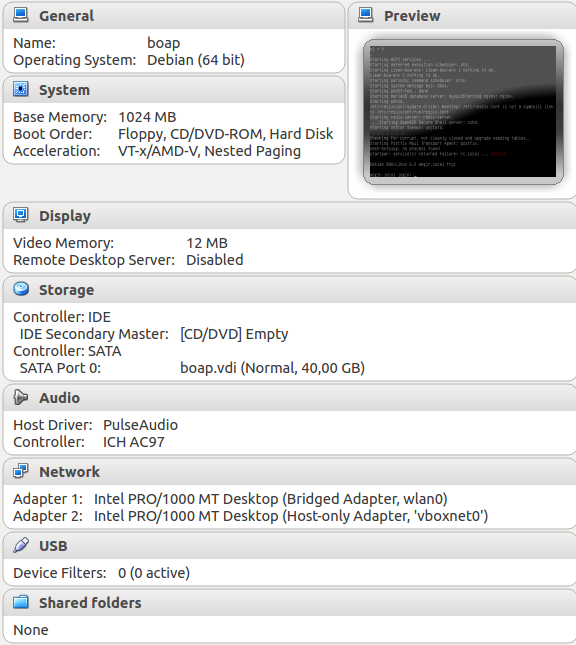
/etc/ssh/sshd_configto allow key login instead of password. The config file is attached, and also a screenshot of the VM global configuration.As install command I've used:
boa in-stable local <em>myuser@mydomain.com</em> maxI've then tried twice with the same output. Octopus does not install anything as it blocks just after the Barracuda stage.
As attachment is the output of the install process.
I'm currently installing a new VM with Ubuntu server 12.04.1 LTS 64bit to check if it is something to do with Debian (I've just noticed that on the project page it is "best with" Ubuntu, but I had the impression that Debian before was also OK).
Comment #77
omega8cc commented@vcardoso Your install log shows different problem. Please open new issue. Thanks.
Comment #78
vcardoso commentedThe end of the install log is exactly the same as #74, right?
I believe you're refering to the another error message:
I'll take a deeper look at the logs and open a new issue.
Comment #79
omega8cc commentedYes, it is a new bug.
Comment #80
omega8cc commented@vcardoso right, it is the same at the end, but your report is more complete, so it revealed the real problem.
Comment #81
omega8cc commentedNew issue: #1873478: Localhost install broken because getent test is used
Comment #82
dev286 commentedPlain install as given in your manual (absolutely no changes). My Debian install was set to UK server (I'm still not sure of the USA server).
I think there might be something wrong with all the Debian mirrors. Maybe you should just set it to one specific site.
Comment #83
omega8cc commentedI just tested upgrade from some old BOA-2.0.4-dev installed on July 3rd to latest BOA-2.0.5 stable and then BOA-2.0.6-dev and it worked just fine.
But what is even more interesting, wildcard DNS worked out of the box all the time - also before the upgrade.
I didn't modify anything in the networking, either on the VirtualBox or my Air host system, it is just a pure BOA install in the Ubuntu Precise VM - installed as-is.
Please check some screenshots below to see its configuration and some results.
Note that I have upgraded VirtualBox to 4.2.6 and my host system is OS X 10.8.2, while there is no extra, external DNS server used, besides the same Google nameservers, as shown in the screenshots, used both in my Air and my AirPort WiFi, which is connected to the Internet via VPN.
Comment #84
dev286 commentedThe last time I installed BOA (2.0.3) on Ubuntu, the install was successful (Virtualbox with Bridged network and modified hosts). I never used GUI, so don't know if wildcard worked in Ubuntu. I used OS X.
I tried to access it from my OS X workstation before modifying the hosts file - nothing (in Bridged mode). After making all the changes to the hosts file - everything worked fine.
Comment #85
dev286 commentedPerhaps we had a miscommunication. To me "Supported LTS OS (32/64bit minimal, fresh install)" means no GUI, just ssh including the local install. The only way to access such an install would be from another system. I used OS X.
I never installed and accessed BOA with GUI from the same Virtual machine. So I assume the wildcard DNS worked all the time.
What I expected to get was BOA in VirtualBox machine (no GUI) with access from other machines (OS X, Windows, etc.). This works for BOA 2.0.3 in Ubuntu with modified hosts file using Bridged adapter.
With this setup I can do testing from an independent machine, create snapshots, have different versions running, etc.
I have a feeling most of the users in this post tried to achieve the same.
Comment #86
omega8cc commentedThe goal for the BOA localhost install was always the same - a self-contained VM, with local DNS and no dependency on the parent system/machine/network setup, because it is already beyond the scope of the BOA project and can't be managed by BOA itself. Maybe when we will convert BOA to Ansible, we could do more, but not yet. Any cross-system communication, so you could access the VM from the parent system, to make the development easier, so you can use your desktop tools and environment, is for sure a good idea, but it belongs to the how-to which can't be unified, because those parent systems and their networking can be different, so this kind of setup requires some extra, manual steps and can't be covered by the BOA project itself.
That said, I tend to consider this particular issue as fixed (note: it was a bug report and not a feature request).
Note also that once we have a self-contained localhost install working, extending this is a matter of writing some tutorial(s) with screenshots to follow for Linux/OS X/ Windows users, since all those parent environments have their own requirements/specifics, which may further differ depending on both OS and VirtualBox versions.
I think we need a separate, meta issue to discuss further development, which could include something like already existing vBOA initiative.
Some related posts and comments we could turn into a meta-issue:
http://drupal.org/node/1593980#comment-6192270
https://ole-apps.sourcerepo.com/redmine/ole/projects/ole-toolkit/wiki/Vboa
http://groups.drupal.org/node/239838
Comment #87
omega8cc commentedFixed also for Debian Squeeze: http://drupal.org/node/1873478#comment-6876474
Comment #89
ar-jan commentedI hope it's OK to reopen this. I've installed BOA 2.05 on a Ubuntu 12.04.2-amd64 desktop virtualbox.
Host system is also Ubuntu 12.04, using Virtualbox 4.2.8 from https://launchpad.net/~debfx/+archive/virtualbox.
The installation of BOA 2.05 completed succesfully, without any errors. Domain aegir.root works, but subdomains don't (unless I add them in /etc/hosts of course).
I've compared everything to the screenshots above in #83, and everything on the guest is the same, except for this, I get:
If I add
127.0.1.1 aegir.localin /etc/hosts,hostname -iis correct, but this doesn't solve the issue.I tried restarting pdnsd, which gives:
So I'm guessing there's still something wrong, similar maybe to what was observed in #12?
I've also tried upgrading to head, no difference. The virtualbox is using NAT on adapter1.
Could this be due to settings on the host side? Or still a problem in the BOA virtualbox?
Comment #90
omega8cc commentedPost the contents of
/etc/resolv.conffrom this VM and try clean BOA-2.0.6-dev install (not an upgrade from 2.0.5) - note also that we have tested this with official Virtualbox 4.2.6, but no idea if that matters.Comment #91
ar-jan commentedThe BOA 2.0.5 stable /etc/resolv.conf looks like this:
And this is a file, not a symlink, as the pdnsd message states.
For a clean install of head (2.0.6-dev):
And this is a symlink to /etc/resolvconf/run/resolv.conf; (re)starting pdnsd serivice works.
But, still the same problem: subdomains are not working.
Comment #92
ar-jan commentedStatus.
Comment #93
omega8cc commentedI believe that the pdnsd configuration related issues have been fixed in recent releases (and maybe HEAD). If not, please open *new* issue.