

 The 2026 Drupal Business Survey is open. Your response will help shape the future of the Drupal business ecosystem.
These error messages-- which both link to http://drupal.org/getting-started - could be way more helpful.
The directory files is not writable. To proceed with the installation, please ensure that the files directory exists and is writable by the installer. If you are unsure how to create this directory and modify its permissions, please consult the on-line handbook or INSTALL.txt.
The Drupal installer requires write permissions to ./sites/default during the installation process. If you are unsure how to grant file permissions, please consult the on-line handbook.
These error messages should NOT link to Getting Started. That page presents us with this lovely list of links:
* Project and Features
* Before You Start
* Drupal 5
* Drupal 4.7 and earlier
* Core modules
* Troubleshooting FAQ
Which one are you going to click on?
In my case: http://drupal.org/Troubleshooting-FAQ
That's got scary enough stuff – Fatal Error, the White Screen of Death – to frighten away Drupal veterans!
Also, why is an inability to write to the files directory now a blocker?
Anyhow, the solution on Unix-like platforms is this:
/var/www/drupal6$ sudo chown www-data:www-data sites/default
and:
/var/www/drupal6$ sudo chown www-data:www-data files
This is probably too platform-dependent to put anything like this into the error message, but we cannot link to a general help page for a specific problem– we should link to a dedicated handbook page for this and create one if necessary.
| Comment | File | Size | Author |
|---|---|---|---|
| #40 | drupal-file-permissions-error-197690-40.patch | 2.63 KB | JordanCronin |
| #39 | notes.txt | 1.88 KB | agentrickard |
| #37 | windows permissions fix.txt | 2.83 KB | JordanCronin |
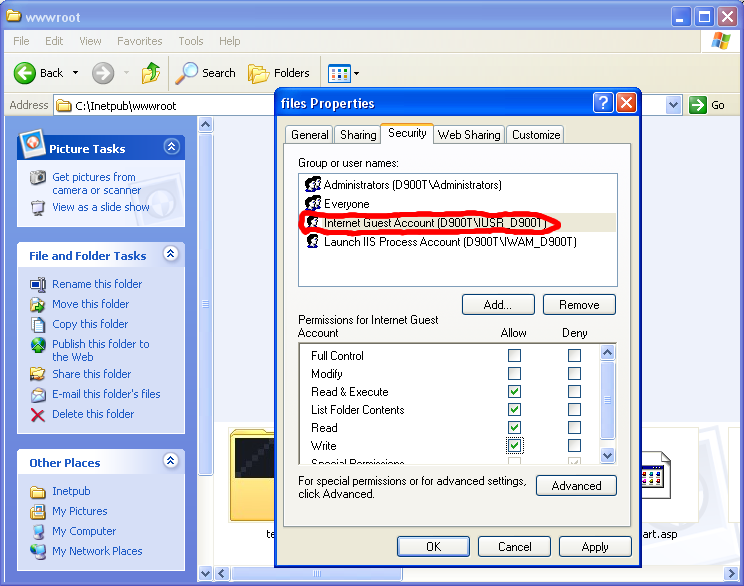
| #37 | windows-1.png | 48.21 KB | JordanCronin |
| #37 | windows-2.png | 76.01 KB | JordanCronin |




Comments
Comment #1
catchSee this for background and why it's an install blocker http://drupal.org/node/191310 . I'm pretty sure the Getting Started guide was linked to due to the lack of a dedicated page about permissions. I agree this would be good to add.
Comment #2
catchComment #3
dman commentedYour suggested solution requires you to have root on the server.
Something the majority of hosted Drupal users don't have, so it doesn't help them.
As you know how to use root, you were probably able to decipher the error message yourself, so lots more words probably wouldn't be useful to sysadmins anyway.
Having set up, on behalf of clients, all sorts of installs on locked-down or web-file-managed and tarred/untarred packages on commercial hosts, many of which don't offer shell, treat files as any one of several users depending, have their CHMOD set wrong or whatever, I can confirm that permissions are almost always mysterious mojo. However solving it without rights in the first place is even more mysterious.
Often I've had to use odd php scripts to copy out a directory, delete it via a control panel, then copy it back via script - just in order to get file ownerships right. Normal users don't have the ability to chown, and they need to read the manual to find out how to chmod via FTP.
If you can come up with the general-case solution (or more likely, 5 of them), add it to the troubleshooting...
Comment #4
JirkaRybka commentedThat's exactly the follow-up http://drupal.org/node/191310 is currently waiting for. I already put my bit in there, but can't do more. Help will be really welcome in there.
Comment #5
keith.smith commentedI suggested this as one of two possible GHOP tasks here.
Comment #6
mlncn commentedReserving this for a GHOP person to take:
Your task, should you choose to accept it, is to turn JirkaRybka's documentation in this comment - http://drupal.org/node/191310#comment-631567 - into a handbook page.
Given the multiplatform nature of this problem, probably the best approach is a new landing page for permissions issues that then links to a focused solution for each platform and level of access.
This is a task that is important for newbies to look at, and to try out on a personal computer and shared hosting.
2-3 days.
Comment #7
mlncn commentedMarking for GHOP.
Comment #8
mlncn commentedResources:
Proposed as a GHOP request:
http://groups.drupal.org/node/7362#comment-22090
Brief intro to Unix file permissions:
http://drupal.org/node/34023
Comment #9
webchickSubscribing. Great task idea. :)
Comment #10
JordanCronin commentedHi, I'm the GHOP person that claimed this task. I pretty much have JirkaRybka's post converted to a handbook page, but I have a few questions:
This "new landing page" Do I create that the same way as I create a handbook page, and then create another handbook page for each platform that I have documentation for with its parent being the new landing page (I am assuming yes)?
I'm not sure what you mean by "each level of access". Are talking about having a different page for adding "x" permission on this platform, and removing "x" permission on that platform?
I'm wondering where the best place to put these new pages is.
The "Getting Started>>Troubleshooting FAQ>>Webhosting issues for new Drupal users" section seems to have a lot of related pages to permissions settings. But maybe I should just put the new landing page under the "Troubleshooting FAQ"... What do you think?
Also, was making instructions for the "Mac" and "Windows" portions of JirkaRybka's post (marked as "TODO") part of the assignment?
I am attaching the edited version of JirkaRybka's post. Is there anything that needs changing in it?
-Jordan
Comment #11
JordanCronin commentedIs there some way I can subscribe to this so I can be notified when someone adds a comment or it is updated?
Comment #12
keith.smith commentedJordanCronin: Thanks so much for doing this! There have been a lot of issues filed lately about the files directory permissions problem in the installer, and this will really help folks struggling over that.
"...There are also other ways, such us simply using..."
"...file/directory has it's owner."
"...Drupal, in the other hand, is an..." => on the other hand
As mentioned in #6, this might best be several very short and specific handbook pages, where the first one (the one a user gets if they click on the link in the error message) is of the type: "So, you're installing Drupal and have this installer error." From there, there would be specific details about how to get past the error for Linux, Windows, and Mac webservers. Write up ones for the platforms you have access to, but if you don't have access to a particular platform post that here and perhaps someone in the community can help with that section.
Again, thanks for doing this!
Comment #13
JirkaRybka commentedGreat.
As far as I understand, http://groups.drupal.org/node/7362#comment-22093 suggested to complete the documentation for two of the three platforms at least. Just adding the link here, no opinion myself.
As for the "landing page" location (yes, I guess you got the concept of book pages right), I would prefer just Troubleshooting-FAQ, although it's arguable - there are quite a few relevant subpages there (in addition to mentioned ones, Solve installation errors in Drupal 6 at least), so it's not really obvious where to go if searching for this information. I even like the idea to ask drupal.org administrators to move other file-permissions focused pages under the new "landing page" afterwards as a cleanup (not sure how this suggestion is going to be welcome, though).
"each level of access" I understood as command line / FTP / GUI / through php only - this sort of thing. But personally I think that splitting the pages into so small chunks is overkill.
By the way - there's an interesting link about solving unremovable Apache-owned files, which helped me a lot in the past; might be mentioned, somewhere, too: http://www.110mb.com/forum/cant-delete-files-that-were-created-with-a-ph... The same script is seen on several sites around the web.
As for subscriptions, you already did what's commonly seen here: Just post to the issue, so that it shows on your "My Issues" page, where you can easily check your activities all together. I'm not sure whether there's something better, myself.
Comment #14
JirkaRybka commentedCross-posted, sorry...
#12 is mainly commenting on my initial text, which was not really well-tuned due to time matters and my poor English. As for the ownership, helper scripts and the like - yes, it's not strictly needed for this particular installer problem, but I think that users are likely to land on this page via Troubleshooting FAQ every time a permission problem occurs, so a brief overview of this whole area may be useful. Links would be sufficient, if some exist.
The whole ownership / files removal part in fact comes from my experience, that users are experiencing problems while un-installing Drupal (additional testing instances, or moving servers around), where the apache-owned and write-protected copy of settings.php is seemingly impossible to remove via FTP, fixing all the above directories in place. This is another Frequently Asked Question, I believe, and closely related.
The aim of the sentence about Linux being most common on servers, was to suggest which section to read, if the newbie-user is unsure what the server actually runs (which is entirely possible, if they're just accessing a mysterious "something distant" via FTP their first time).
The numeric permissions are mentioned here: http://drupal.org/node/34023 and manipulating apache-owned files here: http://drupal.org/node/34028 - really, there's quite a bit already under Webhosting issues for new Drupal users, but the title is not very good IMO, I always click all the other links before going there, it really doesn't suggest file-permissions to me. I expect rather php versions, memory limits, MySQL versions and the like in there. Drupal.org handbooks may do with a bit of cleanup; currently it's not that easy to find something.
Comment #15
keith.smith commented@JirkaRybka: we crossposted -- sorry. And, you're right in your comments in #14 -- the Linux market dominance is helpful in the sense that it helps you figure out what your host is running on. I hadn't thought of that, and my comment was mostly an academic reaction to a strong and possibly contentious statement without a footnote citing a source. And, you're also exactly right in that a lot of small targeted handbook pages may overly fragment the information here, and that this page will be used by people for lots of things other than just reacting to the installer message.
This entire files directory thing makes my head hurt. *sigh*
JordanCronin: Reading JirkaRybka's responses made me think that we also need a line in your text to the effect of: "If you are uncertain how to proceed, please contact your hosting provider for more assistance." And, we'll have to make it clear what they would tell a hosting provider if they did so, i.e., what files or directories need what permissions for how long of a time.
Comment #16
JirkaRybka commentedOT:
This entire files directory thing makes my head hurt. *sigh*Mine too! Every other day I see a new issue aboutfilesvs.sites/.../filesor the installer error messages or the like. Which only underlines the importance of this task here.Comment #17
add1sun commentedHi Jordan - good stuff. Just FYI, once you have posted something in a thread you can check updates in your tracker by going to My Account > Track and if you like you can subscribe to the issue queue by email by clicking the Subscribe link from the issue queue. Here is the direct link for the Documentation queue: http://drupal.org/project/issues/subscribe-mail/documentation.
Comment #18
mlncn commentedWhere to put it: I don't know. Please do make it a page, and ask someone on the documentation team to give it a URL alias such as file-permissions so Drupal 6 can link to a permanent location (the handbook is in a bit of ).
I do not think it should be in Troubleshooting but somewhere like http://drupal.org/getting-started/5/install -- anyone know if there's a Drupal 6 guide started?
I agree with you that it should start out on one page.
Whatever you can find out for Mac and Linux would be very good.
This work is very much pulling together existing documentation and trying to make it clearer and more focused, so that the installer can link directly to it.
Thanks!
Comment #19
JordanCronin commentedadd1sun: Thanks for the subscription information!
Benjamin Melançon: (#18)- As far as a Drupal 6 guide, I found this page which seems to be related to file permissions.
- What JirkaRybka said (#14), made me think that this page might be more helpful if it was a little more general than for just when people are installing Drupal. And I think it may be best to put it under the Troubleshooting FAQ because this error problem is encountered more than just during the install process. But then again I may be wrong (I've only been around here 2 days, and 8 Hrs. ;) )... What do you think?
- Also, by "Whatever you can find out for Mac and Linux..." are you referring to Mac and Linux as the server system, i.e. Linux server and Mac server, or instructions for people using (FTP) clients on their Mac or Linux computer (I assume the former, I'm just clarifying)?
Here is what I've gathered from the posts about what needs to be done. (
I put this here mostly for my sake.) Please look over this and comment (if it makes any sense).I feel like I haven't mentioned something here, but can't think of it at the moment...
All input appreciated. :)
Comment #20
JirkaRybka commentedI think it means these systems as server-side, i.e. the system where the permissions need to be handled (I guess the chmod numbers might not exactly apply to a windows server, for instance), but if there's something *really* specific about, say, FTP clients on MAC, then a tiny mention might be helpful too.
Unless I forgot to mention something, the things to deal with are:
- Mostly (linux) command-line solutions are suggested, but on many hosts no access to command line is available.
- Another large group of users uses FTP (through GUI tools?), but I heard that even there chmod usage might be restricted.
- #12 mentions changing file ownership to apache, which seems clean, but with limited access you may easily deny permissions to yourself this way, resulting in big confusion. The other way is to grant permissions to everyone.
- Either way, the user needs to understand the basic fact of users identities existence, files ownership, and apache being run as different user. No need to explain this at lenghts, but without a mention of this, the other guidelines may look like pure nonsense to a new user (like "Why I need to care about some stupid permissions? It's me who put the files there, and it's me running Drupal too! On my Windows desktop I can access my files through any tool with no difference!")
- In the worst case, manipulating the files through php might help (although it's scary for new users).
Obviously, some points are more important than others; the less important ones - in my opinion - deserve just a one-sentence mention with relevant link(s), but if they were not present at all, users may miss the relevant bits due to just reading wrong page.
Not necessarily there, and probably not in its full size. I would like to see a brief mention there, though - just enough that the reader will be able to see "wow, this looks like related to my problem, going to click that link too!" Generally, I think the whole thing doesn't need to be very long and detailed; it just needs to avoid users finding no relevant advice/link at all.
Note that my proposed texts on various places are long just because my English (non-native) is not permitting for brief-yet-clear wording sometimes. Not really intentional... And this all is just my opinion ;)
Comment #21
dman commentedGood discussions here.
- Yes, FTP clients that DO allows CHMOD usually require it in Octal, and older ones actually require you to "QUOTE" CHMOD or something.
OTOH, nicer GUI FTP tools may let you do it via a context menu.
- For security, there's not much difference in assigning all+w and webserver+w on a shared host ;-)
Most hosts run one apache (www-data, httpd) user. And there are some interesting exploits available like that ;-)
Unless they're doing full user-wrapping for your process. ... which hopefully would have avoided this problem altogether :-}
- I think that an error message, or a problem-solving page is indeed part of 'troubleshooting' documentation. If we knew there would be an error, or could have prevented it from happening, it should be dealt with in the code or install documentation. If it's something that should not happen, but did, then it's troubleshooting - only to be looked at AFTER things have gone wrong, but not scary for first-timers.
And just to muddy the waters,
My preferred 'best practice' is to add the FTP/Shell users to the 'www' group, and have the umask for the apache daemon set to share new files with the group.
meaning the web can write stuff that the user can delete, and the user can write stuff that the web can't mess with ... unless the user gives them permission.
... However, that's just one of many approaches, and not, AFAIK, common on big hosts. ;-) It looks like each sysadmin has their own set of beliefs.
Comment #22
mlncn commentedJordanCronin, good find! Gábor Hojtsy did revive node 1213 to serve as the landing page for Drupal 6 install file permissions problems: http://drupal.org/node/1213/revisions/view/216904/216918 (I don't think it's linked to this right now, and as mentioned )
As the core committer in charge of Drupal 6, that's the highest authority we can get. (I still don't think this document should be in troubleshooting. And who can give it a path alias like file-permissions?)
I don't think the Typical Webhosting Setups page has much to offer here, and it seems to be only about Linux.
I did mean Mac and Windows server-side, but Linux as the most common should be first.
For this task go for as comprehensive and clear a page as you can, even if it means some duplication of other pages. Do link to more in-depth material, or even create child pages if you think it is best.
People have set up Drupal to install successfully. Now their installation tells them they need to change file permissions. How are they going to do that?
And you've pulled much of this together already. Not far to go! Thanks a great deal for this!
Comment #23
sepeck commentedIf we are going to add specific instructions for Linux, then we need to at least include the appropriate documentation for windows.
This is not a holy war, this is because Drupal will work on Windows (I have run it on Windows for years), it is documented in the requirements.
Linux is NOT a pre-req for Drupal. In the past the main documentation has been along the lines of 'the files directory must have write permissions' and we have left the details up to the OS level documentation the user was using.
There is no reason we cannot add the information to the Requirements page.
Comment #24
dman commentedAbsolutely.
However I've not had experience with managing permissions on commercial Windows-based servers I didn't have admin access to.
When it's my own machine, 'the files directory must have write permissions' is enough to know and browse to and fix up through the directory permissions manager on the disk.
Can you describe (for the documentation) how that is done on a remote windows host? With no shell ... what do Windows FTP server permissions look like? It'd be useful information.
Comment #25
sepeck commentedif you are using an FTP program and have FTP access to a directory, then it depends on FTP rights and those allowable by the FTP server. I have direct access to my server and I did not see anything there. It is not 'write' access you need though. You need Change access. Write permissions will allow for writing files, but not deleting files. Change allows for both.
Comment #26
JirkaRybka commentedJust throwing in a link, related to the files ownership/removal being another Frequently Asked Question: For example at http://drupal.org/node/172250 (just for reference).
Comment #27
drewish commentedIt looks like this is still waiting on an update from JordanCronin...
Comment #28
JordanCronin commentedOk, I've been working on them a bit, here are the latest revisions:
I have the landing page for the specific error message in what I think is a final draft (ha ha, we'll see ;) ).
I also have the Linux/Unix/Mac OS page closer towards completion.
Question:
Based on my limited research on the Mac OS, the permissions work the same way as on Linux, so the instructions should be the same... Is that true (I assume so)?
Please let me know what needs changing...
Cheers!
-Jordan
Comment #29
add1sun commentedYup Jordon the instructions for *nix will work for Mac as well. The only thing I'd change is adding Mac to the list in the name or text somewhere. There are a number of people using Mac that don't know it is *nix based. ;-)
Comment #30
mlncn commentedGood work. Almost ready to be committed!
The GUI instructions could note that on Mac OS X you can see and set permissions by pressing Command-I on your file or directory or control-clicking and selecting Get Info. (Screenshot attached.)
Something for Windows/IIS andd golden?
add1sun, I guess Jordan doesn't have documentation team superpowers yet. Can he get them?
Comment #31
add1sun commentedAnyone can creat pages so Doc team powers are not needed. On the other hand if he *wants* to be on the doc team, all he has to do is ask. :-) I don't have the s3kr3t p0wahs myself but if he asks I'm sure webchick or sepeck can grant them quickly.
Comment #32
JordanCronin commentedAhh! Thank you. I added that to the Linux, Unix, and Mac fix page title.
I do not own/have access to a Mac at this time, so I can't make a screenshot for those instructions...
I'm working on making some Windows/IIS instructions. What is golden?
Comment #33
mlncn commentedI had attached a screen shot! Guess it didn't come through. Trying again.
Can you do Windows?
Comment #34
mlncn commentedAh, yes, you can and are doing windows. We are golden, because your task will be complete, and many thousands of Drupal installing people will be less confused.
Comment #35
webchickSo, my understanding of this task is that we're simply waiting on Windows-equivalent instructions, and then we can mark this sucker done?
Could someone confirm?
Also, I hath bestowed unto Jordan Ye Olde Mystickal Prowess of Documentation Editing +4 Sword of Smiting, er. something. Anyway. He can add images to his page now. ;)
Comment #36
mlncn commentedDarn, that makes him like ten times cooler than me. And yeah, as far as I'm concerned we get something for Windows for this it's done, with one very important thing that probably isn't fair to add onto Jordan's part of this project:
Make sure the installation error notice links to this page!
And again my vote is that this page get a path alias and that we link to that. Look professional.
Comment #37
JordanCronin commentedHere are the finished Windows instructions... I'm going to start putting up the pages. Please review the windows instructions and see what needs fixing...
BTW, My internet connection has been out since Friday, so it has kept me from getting this done. It just got fixed this afternoon.
Thanks, webchick, for these sup3r s3kr3t p0wahs. ;)
About making sure that the installation error notice gets linked to the landing page... I'm not (currently - I'm looking into it) sure how to do that, but if someone tells me how I'll be glad to do it...
Comment #38
JordanCronin commentedForgot to update the status...
Comment #39
agentrickardIn general, there are some grammar issues here. Try to write shorter, more direct statements. Try to avoid acronyms.
On the Linux/Unix version, you cover both Grant and Revoke, but not on Windows. It would be helpful to structure the documents around the process:
-- Find file or folder
-- Grant permission (why and how)
-- Install
-- Revoke permission (why and how)
Repeat for each of the interface formats (command-line, Finder window, FTP client).
Format the list links in
<ul>for easier reading.Pickier, more detailed notes attached.
Comment #40
JordanCronin commentedOk, here is a patch that add1sun helped me to create that links to the new landing page through a path alias :)
Comment #41
JordanCronin commentedhttp://drupal.org/server-permissions
http://drupal.org/node/202483
http://drupal.org/node/202491
Done! Check them out.
Comment #42
add1sun commentedAwesome job Jordan! I'll mark your google issue closed.
We just need your patch for the core error messages to get looked at in this issue and (hopefully) quickly marked to RTBC. It occurs to me that it needs to be in Core's issue queue so I'm going to change the project to get the patch in the right place. I would RTBC but since I helped you create the patch we really should get someone else to look at it.
Comment #43
catchI tested this on a fresh install, works as advertised, so RTBC. Nice one Jordan!
Comment #44
dman commentedLink to the helper scripts at the bottom of the page broken in http://drupal.org/node/202483
Otherwise great!
Comment #45
dman commentedWhat the? I didn't mean to change the status - my comment window was open while the others cross-posted.
Trying to repair it now...
Comment #46
JordanCronin commentedThanks for noticing that - Fixed.
Comment #47
keith.smith commentedI read through this as well, and I think it's a fine job.
On http://drupal.org/node/202483, "Each file or directory has it's owner.", this should be "Each file or directory has its owner. "
On http://drupal.org/node/202491, did you mean to say this: "If you do not have access to the windows GUI, then your web host has probably set up a web-based interface to enable you to add write permissions. Otherwise, contact your web host and ask them to allow PHP scripts (Drupal) write access on specify files here."?
Comment #48
JordanCronin commentedSeems like I fixed the "it's" problem earlier in this task. I wonder how it got back in. - Fixed
Yes, I think I did mean to say that... What exactly are you asking?
Comment #49
keith.smith commented@JordanCronin: OK. I was just checking that the specify files here part wasn't a note to yourself that had been left in accidentally. But, if it isn't, you're probably [obviously] using that as a placeholder for what people will tell their hosting providers. That's cool. Thanks for fixing the possessive/contraction thing.
Comment #50
gábor hojtsyThanks, the patch in #40 now landed in core. This is of great help to our users. Back to the docs queue.
Comment #51
mlncn commentedFantastic work on the patch, JordanCronin! The docs look great– direct, clear, concise!
One thing though– shouldn't the Drupal installer create the files directory if it doesn't exist (once it has the permissions to do so)?
If not, we need to update the handbook with instructions on how to create the files directory.
As of release candidate 1 the installer will hold you up until you actually create a files directory.
Comment #52
mlncn commentedUpdate: this is an entirely different issue. The Drupal 6 installer is requiring that files be created and be writable in the Drupal root directory. Did I miss a memo? Isn't best practices sites/*/files ?
The error message certainly doesn't communicate this:
Comment #53
mlncn commentedOK, I've read INSTALL.txt:
I vaguely recall discussion on an issue or dev mailing list about not overwriting people's existing files. Is that the reason for this?
This is a huge step back in ease of installation, in my opinion, and ease of installation is a huge factor in uptake-- even by people who come to play key roles in the project. I think it was dww on a Lullabot podcast who said, "well Drupal was the one I was able to install and get running."
I know this isn't the place for this discussion, but I know this discussion must have happened already. If I can be directed to that thread...
Found it, in the critical issue queue, thank goodness:
http://drupal.org/node/194369
Comment #54
(not verified) commentedAutomatically closed -- issue fixed for two weeks with no activity.