So at last tried the fancy new installer for 6.x. Wonderful experience, except the 'files' folder part.
Trying to put myself in the skin of a new drupal user trying it out of the box, so to speak : the very first screen after selecting 'install drupal in english' is one with a huge red error box telling me that the 'files' folder doesn't exist, with a general link to the handbook as the only explanation (ok, i guess I should be reading install.txt now, but im a new user and wanted to try drupal now now now!).
I guess that if the installer can't create the files folder itself for security reasons, then I should at least be presented with a list of 'things to do' or 'make sure you did these (create db, create files folder, etc)' instead of pushing a big red error box to the user. There's no real reason why we can't put some parts of the install.txt text in the installer.
Just some friendly usability issue I had with my first 6.x install, which is btw light years ahead of the 5.x one :)


Comments
Comment #1
KentBye commentedSome history and context for this change can probably be found here: http://drupal.org/node/191310
At some point, there was a patch that actually added the files folder.
But it looks like it got rolled back since I certainly don't see the files folder there.
Comment #2
KentBye commentedI just went through the install and was also soon greeted with the big red box saying:
I agree that there might be a better way of phrasing or presenting this, but I don't know how to change it offhand.
Any suggestions?
Like I said, there was considerable discussion about this in this issue after the files folder was initially created here with this commit.
The issue with the files folder was that it introduced an easy way to overwrite existing data during the upgrade process. Overwriting the sites folder can be overcome by re-downloading the contributed modules, but restoring the lost uploaded files is more of a challenge, and so it was eventually rolled back here with this commit.
I'll ping that thread to alert them to this issue.
But the task now seems to be to see if there is a better way to inform the user about the need to create a writable files folder assuming that they're just trying to install it without reading README.txt at all. So in that framing seems to be both how should it be phrased instead? And is there an alternative way to present it?
Comment #3
gábor hojtsyIMHO FiReaNG3L has something like an information screen in his mind after selecting the language which explains what needs to be done in a list:
- create a database
- create and set permissions for a files folder
- set permissions for the sites/default folder
So these appear as tasks to do, not errors because stuff was not done.
Comment #4
catchtask list like:
Sounds good to me, then a click to proceed, and the error message shows up at that point - no extra page in that case, just different presentation. If they're all in place, the screen gets skipped like it does now anyway. Probably it'd be ideal to hide tasks that are already done when you reach the page, or at least mark them as completed.
Comment #5
KentBye commentedI like the extra splash page that contains a task list.
There would probably be no way to check to see if a database is set up programatically at that point, but there are other automatic compatibility checks that could be performed.
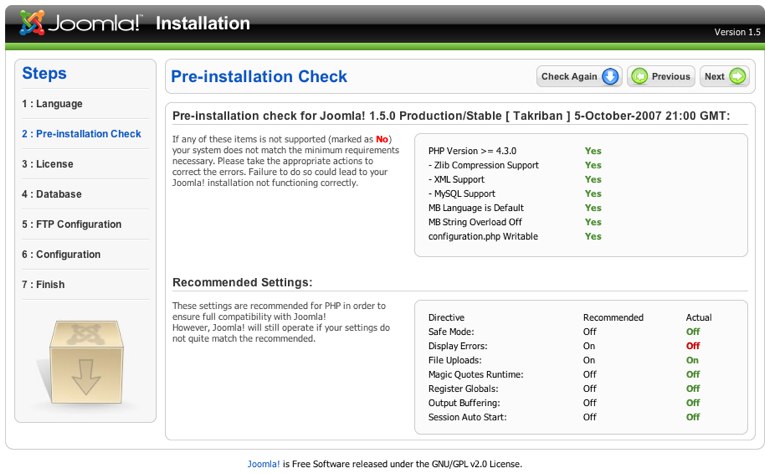
In fact, this is exactly what Joomla! does on their second page as shown in the attached photo.
I think it's probably good to not be too overwhelming with it like you say, and just stick to the tasks that have yet to be done. So yes, it's probably good to prompt the user to do something before throwing an error message.
Comment #6
jjalocha commentedI just closed a thread with my issues as a newbie Drupal user ('files' folder creation inconveniences), since I think it is a duplicate of this thread.
In the actual (beta4) incarnation, the user is presented with the error message quoted in post #2, which is no good for a noob. In my opinion, there are three problems that should be addressed:
But I think, that in first place, the user should have the right to know why he has to do this set-up manually. After reading through large amounts of posts (see here and here), I finally understand that the whole problem arises because of issues with multi-site set ups, upgrades and domain-changes. So, there are strong reasons for keeping this process manual.
I think that at this stage of the installation, there should be a link to documentation that clearly explains the issues involved with the setup of 'files', and recommended "safe" practices for a multi-sites set-up. This is clearly a place, where the new user needs to be educated. Please, help to make this easier!
2007-08-12 EDIT:
I forgot to mention that the method described in Setup of /sites directory for multi-site is no longer recommended, according to the discussions mentioned before.
I would like to mention, also, that the setup and use of the 'Temporary directory'
Site configuration > File system is not clear from the description. Is this the same 'sites/example1.com/tmp' directory that is mentioned in Setup of /sites directory for multi-site?
Comment #7
webchickChanging this to a critical bug.
Here's a usability report from one of our GHOP students:
http://ijailbreak.com/drupal.html (please post feedback to
http://drupal.org/node/197219#comment-652618). He interviews three test
subjects: his mom, his brother, and his Dad.
In it, he points out that all three of his test subjects got totally
blocked at the files error and needed him to step in and fix it in order for
them to continue. This is the *second* page of the installation. If we
are losing people before they even get Drupal installed, we are screwed.
I realize the argument against including a files directory by default is
that Mac OS does this insane behaviour of overwriting the contents of
"files" with another directory of the same name, so there's a chance of
completely blowing away someone's files directory. So as far as I can
see, we're left with a couple of options:
- Revert the existing behaviour, which at least allows mere mortals to
get Drupal installed, even if it's a somewhat annoying thing to deal
with after.
- Include the blank files directory anyway, and trust that people are
either reading upgrade instructions, or not running production websites
off of a Mac OSX desktop/laptop.
Comment #8
ximo commentedHow about just shipping with a files folder in /sites/default?
As I understand it, the problem is that some users drag-n-drop folders when upgrading Drupal to a newer version.. and on Mac OS X, this will replace all the contents of the existing folders. So any files the user has in the files folder would be lost.
They are expected not to copy over the /sites folder, so I would think that putting the files folder there would solve this issue. If I recall correctly, it's also recommended practice to do so, right?
Comment #9
jjalocha commentedXimo, according to this post, the following discussion, and other posts elsewhere:
As stated before, there seem to be strong reasons for leaving the system like it is right now. The point would be, to make the whole documentation and setup more user-friendly.
Comment #10
ximo commentedI just came across that discussion myself, and haven't read through it yet.. but what I'm suggesting is not e.g. /sites/www.example.com/files. I'm suggesting /sites/default/files, which would be equally accessible from any domain name, and wouldn't break file/image links any more than /files would, AFAIK.
www.example.com/files
vs.
www.example.com/sites/default/files
Same thing basically. Yet more logical (files really belong to "sites", not "Drupal") and it solves the upgrade problem on OS X, as well as removing one step from the installation routine and thus one confusing error message. It also makes the backup process easier, as you would have everything that's not core in one place.
Comment #11
jjalocha commentedSorry, ximo, I read your previous post too fast. I think you're right. But maybe this makes things more confusing when setting up multiple sites, since these still would have to be located in 'files/identifier', or at least symlinked there. The problem is that there are so many implications with the location of this directory.
As I understand it, this thread aims at providing the necessary information during the setup process, for an optimal user experience. In my opinion, for this, at least three different issues need to be addressed, as posted in #6.
Comment #12
JirkaRybka commentedBackup process is a valid point, although it's paid for in the shape of longer file-paths.
But otherwise 'sites/default/files' is no better than just 'files'. Sure, it protects currently existing file folders now, due to it's different location simply. But that's only true now, every future update will raise the same problem: Distributed empty 'sites/default/files' overwriting already populated 'sites/default/files' on some systems, unless we change the location in every single release.
My opinion is, that the point about overwriting directories is simply not relevant, because it involves more than just different behavior of some tools: It requires the user to be - forgive me - really ignorant, and not reading any of the guidelines / best practices / documentation out there. We may well announce the need to do backups on every single drupal.org page, and still there will be concerns like that...
Comment #13
ximo commentedjjalocha: Including the sites/default/files folder doesn't mean it has to be used (just like the sites/default folder doesn't have to). It's just there as a default when setting up a new installation. When upgrading an existing site, one wouldn't copy over the /sites folder anyway, and the original files folder would remain as it is (both the folder in the file structure and the path in the database).
And I would much rather fix this by doing it for the user beforehand, than to give the user a todo-list.. Such a list might scare many non-savvy users away from finishing the installation. The installation should be as painless and easy as possible :)
JirkaRybka: This would work fine with future updates as well, because the /sites folder shouldn't be copied over when upgrading in the first place. You would lose all your settings, modules and themes if you did so on OS X, not just your files.. and that is a feature of OS X. The problem is that users are accustomed to selecting all files but the /sites folder when copying files from the newer Drupal version when upgrading. That's why the /files isn't included in the distribution, it's to avoid the original /files directory being overwritten with an empty one. Having the default files folder in /sites/default/files wouldn't hurt a soul, and we'd avoid this problem while at the same time getting other advantages as I mentioned earlier. So I don't really see what's so bad about doing it like this (yet?).
Comment #14
JirkaRybka commentedSounds sensible (although the points raised in previous discussions were along the lines, that sites will get overwritten easily too, but may be easily recovered by re-downloading modules and themes, and re-writing settings.php - custom modules and themes not taken into account obviously - while files will be lost completely). But I'm not really pushing this into any direction now; seems like there's a lot of disagreement in the community, and any solution is likely to be shot down by someone (just like the files directory in-package was, in fact it was me, who wrote that patch initially). So I'm tending to require wide consensus before changing the files directory thing further, and to consider all possible counter-arguments in advance.
Just a comment :)
Comment #15
webchickMy vote is for sites/default/files as well, given the options.
Up until 5.x, with the creation of the sites/all directory, all modules and themes (custom or otherwise) were dunked right in the root "modules" and "themes" directories, so my general feeling is that somehow people have survived since the beginning of time upgrading their sites without blowing away all of their stuff. I'm not sure how this suddenly became such a huge deal. Especially if we put the files directory in the sites folder which *already* is known to contain their custom stuff for their site.
I'm trying to envision the workflow of someone on OSX where this would be a problem. The only things I can think are either:
1. They're running their production server on a Mac Mini somewhere and managing it with drag and drop rather than actual server administration tools. I don't find this very likely. Most likely, they'd have a development server setup on localhost for testing, and then have their "real" web server on some hosting account somewhere. So, at worst, they blow away their local test site's files directory, curse and spit at OS X's stupidity, and then restore by downloading new copy of the files from their "actual" website. And if someone's running a production server on a Mac (or OS X Server or the like), I'd expect them to do best practices like back-ups before hand, in any case. If not, falls under "Not our problem," imo.
2. When upgrading their sites, they're taking no backups of the stuff on the server, deleting their entire website on their hosting account first, and then blindly replacing it in full with the contents of their Drupal core download. I also find *this* unlikely. Most people probably are using FTP clients when moving files over, which would just 'merge' the differences between the files/directories (as any sensible OS ought to do to begin with :P), which means their files directory would gain a new README.txt file, but would *not* have its existing contents blown away.
Could someone please walk us through how exactly someone on OS X goes about screwing their files directory up this badly on their actual website? Or is one of the above scenarios more common than I'm giving credit for?
Comment #16
gpk commentedI would consider sites/default/files to be a sufficiently "safe" default location for the "files" folder. The only downside I see is that newbie users (who won't want to bother with changing the default location provided, in its wisdom, via the Drupal tarball) will end up having to specify hrefs such as sites/default/files/filename.ext instead of the simpler files/filename.ext in any links they create by hand in their content. This is cumbersome to say the least. (I don't see newbie users setting up multisite in the first instance ...)
In 5.x the files folder got created automatically if the webserver had the necessary permissions. This will often be the case on e.g. Windows localhost installations; more significantly, on hosted platforms that run phpSuExec.
However (guessing here) the webserver probably won't have the requisite permissions in the majority of cases (i.e. your typical shared hosting package). But then I don't see the existence of a suitable "files" folder as being a requirement. As long as you don't want uploads (and don't want to use color.module) then do you need it?
So my suggestion is to add this bit of configuration to the initial welcome page. That at least is friendlier than having in on the installation page or having it appear as an error post-installation when visiting admin pages. Also to enable uploads then you need to enable upload.module and assign suitable permissions. Perhaps the user could be guided through that whole process via the initial welcome page, which could ask first of all if the user wants to enable uploads. If the answer is yes then Drupal could try to create the folder, and only refer the user back to the handbook if it is unable to do so.
I also note that the help texts in INSTALL.txt (sections 2 and 3) assume that the webserver process won't have the necessary write permissions. (It also seems to assume throughout that the user's hosting account is on a *nix system with shell access - surely this won't be the case in the majority of cases ... but maybe that's a separate issue.)
With luck the overall question of where files get stored will finally be fixed in 7.x and this can all finally, then, be put to bed.
Comment #17
JirkaRybka commented- You need it for css aggregation
- You need it for JavaScript aggregation
- You need it for localization (particularly the JS bits - this is one of the reasons why we require it for the installer, apart from just avoiding errors on a fresh install)
- You need it for users pictures (avatars)
- You need it for your uploaded favicon.ico
- You need it for your uploaded site-logo
Without a files directory, your watchdog will be full of errors, or else your site full of features failing silently (not sure now, what the score currently is).
Comment #18
paddy_deburca commentedwebchick: The OSX issue is a Finder issue. When you drag a folder from one location and drop it into another.
I have just made a few checks on my Mac by doing the following
"An older item named "test" already exists in this location. Do you want to replace it with the newer one you are moving?"
Also,
OSX provides a rather "correct" warning stating that you are replacing the old folder with a new folder - it does not say that you are merging folders.
I +1 the addition of a files folder -- adequate warning should be in the INSTALL.TXT file to inform that person that does deploy using Finder.
Paddy.
Comment #19
gábor hojtsySo we require write permission for the sites/deafult folder (to add settings.php there, based on default.settings.php). We can either ship with a files folder there and make it writable in the install process (as we have the perms on the sites/default directory) to change it. Or we can create the files folder there with the proper perms, as we have permission to do that too. That would also avoid any overwrite issue on upgrades, right? (The default.setting.php introduced with Drupal 6 also solves the overwrite issue on settings.php, which happens on all systems with the merge file copy method too).
So all is left would be an ugly files path by default.
Comment #20
webchick@paddy: Yep, I'm actually on OSX, so I'm very much aware of this annoying "feature". My question was more how someone on OSX would actually go about completely obliterating their files directory *on their actual website* as opposed to only on their local computers.
For 5.x => 6.x, yes. We'll still be left with this problem on 6.x => 7.x and above, unless we decide to change its location again.
Comment #21
ximo commentedI would prefer a bit longer file path, than having to manually create a folder to get rid of an error message. It's all about keeping it simple and working when installing Drupal (especially for first time users). More advanced users can always set it up how they prefer it..
So can this be included in 6.0, or must it wait 'till 7.0?
Could you please explain how the sites/default/files directory would be a problem for future upgrades? I don't seem to get it :)
Comment #22
Crell commentedAs long as it is implemented in the install profile rather than the core install system, so that I can put the files directory somewhere else in my own install profile, I am OK with either of the methods Gabor suggested in #19.
Comment #23
webchick@ximo: Huh. I might've been short on coffee when I wrote that. I meant that it would still suffer from the "I just blindly copy/pasted my sites directory in OSX and destroyed it" problem, but I think we already said that we don't worry about that for the sites/default directory, since users already know that contains custom stuff. So yeah, ignore me. :)
Comment #24
webchickBtw, another suggestion that came up in the devel list thread about this was having the files table only store the path relative to the files directory. I'm not sure if that'd work or not. See discussion @ http://lists.drupal.org/pipermail/development/2007-December/027810.html (sorry -- I didn't mean to 'fork' this issue. :\)
Comment #25
webchickAny reason not to add the following to the "Site configuration" page of the installer?
And then on submission of _that_ form, do:
FLAMING RED ERROR: The directory "files" was not writable. Please chmod 666 (insert better error message here)
This would solve localization problems, customization problems, and would give people a chance to know there's something they have to do before an error rudely slaps them in the face.
Comment #26
gábor hojtsywebchick: You said
Although my suggestion (b) was that we create the files dir in sites/default on install, so we don't need to ship with it. This seems to solve the upgrade problem for the time being, including 6.x => 7.x upgrades, right?
You mean the config form in the installer? Why complicate that form? We cater for inexperienced people here, and they are better off with a nicely working default (although with a longer named files folder), then another fieldset of confusing options in the installer.
Comment #27
catchOK so our best bet seems to be the core install profile creating that directory in sites/default/files then. That way no-one gets affected on upgrade, and install docs can have information on alternatives (as it does, or there's an issue very close for that anyway.
#195033 looks for the files directory in multiple locations for the requirements check - that way I guess I could create my directory wherever before running the installer, and have it use that instead of writing sites/default/files right? This would save some annoyance for people who know in advance they aren't going to use that path.
Comment #28
ximo commentedI think it's much better to deal with it silently than to add more fields and time to the installation process.
This comment on Use of sites/*/files as the default files directory has a good summary of a lot of people's concerns regarding the files directory, and propose some changes not mentioned here, such as relative file paths in the database (also discussed on the dev mailing list) and "pretty URLs". There are also some patches there.
Comment #29
webchick@Goba @#26: Oh, sorry! I misunderstood! Yes, that seems fine.
Comment #30
gábor hojtsyximo: Please understand that it is too late in Drupal 6 to change how file references are stored in the database and how they are accessed with public file download (to fix the case when you are moving files). We are dealing with the default files folder, which is a bad installation experience as noted. The other issue has improvement ideas for Drupal 7.
Comment #31
derjochenmeyer commented(duplicate)
Comment #32
derjochenmeyer commented(duplicate)
Comment #33
derjochenmeyer commentedProbably I'm not experienced enough in PHP to recognize my flaw :), but what about something like this:
If this is somehow reasonable, i could work this sketch into something cleaner.
Comment #34
ximo commentedGábor: Sorry, I didn't realise that the other issue was marked for 7.x-dev..
Comment #35
pwolanin commentedjust a quick note - it can be a PITA to have Drupal creating files (settings.php) and folders in sites/default since altering those files/folders later may require working through a script since the webserver owns those files/folders in many situations. For that reason, I'd rather have a folder ship with Drupal, rather than having the installer create it.
Comment #36
ximo commentedGood point.. Could the installer maybe 'chown' the files and directories it creates?
Nevertheless, I've just made a small patch against HEAD that will create the sites/default/files directory during the installation process. I'm not at all familiar with the install_main() function, so it can probably be done better. See the attached patch..
I also tried creating the files directory after the profile's custom tasks had finished (as Crell noted would be useful), but got stuck somewhere down the install_tasks() function. But it should be possible.. if the files directory is created using file_directory_path() to specify the path, an installation profile could easily define a custom files folder using variable_set('file_directory_path', 'custom/files/folder'). If the directory can't be created (no permission or a bogus path), the installer could present the error message asking the user to manually create the folder.
Comment #37
keith.smith commented#36 has a patch.
Comment #38
catchI ran into this as a newbie when I first started using CMSes on shared hosting, and it was a nasty thing to get fixed involving back and forth with the hosting company - since without script trickery there was nothing I could do with either chmod or chown. Much, much harder issue to deal with, and much more confusing, than creating a folder and setting permissions for the first time.
It's likely that the:
"backup your files >> delete Drupal directory >> upload new version" upgrade path might break having done this - in fact I think I was trying to do something similar when I ran into the issue all those years ago. This is potentially much, much more of a headache than a few Mac users not doing backups before upgrading (on what are likely to be local installs in all but an even smaller fraction of cases). We should support good practice rather than mess things up for shared hosting users because some people don't read instructions.
edit: remembering the pain a bit clearer, I had something like a 200mb directory I wanted to remove owned by "nobody", and another one owned by 8186 or some other random uid. I knew about chmod but hadn't dealt with file ownerships before - at least not ownership which didn't belong to actual users with accounts. We really don't want to put a directory owned by "nobody" or "www-data" that people can't remove in Drupal installs.
So, er, back to CNW.
As mentioned before, there are patches with a default files directory over here.
Comment #39
dwees commentedAgree with Catch on this one, it's a pain to have to ask your shared hosting server admin to change the owner on a folder for you, especially since you don't know why there are problems initially.
Comment #40
gpk commentedAgreed ... but shipping with an empty "files" folder in the tarball or having the user create it doesn't really fix the problem except in the rare cases where the "files" folder is used but Drupal never creates any subfolders. Consider: in the common situation where PHP runs under the webserver's uid then even if the "files" folder is owned by the user, folders created by the webserver (e.g. "images", "pictures") will be owned by the webserver uid. With a standard umask of 022 this gives permissions of 644 (files) and 755 (directories), meaning that the user will be able to remove webserver-uid-owned files in the "files" folder but not the webserver-uid-owned files in any subfolders.
I managed to cook up a scheme with my web host involving the setgid bit on directories. This would clearly be beyond newbies. I also found a handy script to assist ...
@ximo:
Only the server's superuser can chown :-/ !
Comment #41
dwees commentedHow about shipping with a directory we do nothing with called 'have_you_created_your_files_directory_yet' ?
Comment #42
gábor hojtsycatch: in Drupal 6, the settings.php itself is created by the installer. And that file is much more probably taken a target to be edited, then the files folder, which can be left there and the setting pointed elsewhere IMHO.
Comment #43
catchGood point. Ideally we need someone with a cheap and nasty shared hosting account to test this out for us :)
Comment #44
gpk commentedYeah, I've got some cheap an nasty shared hosting!!! Happy to test!!
@Gábor: in that stuation the user can at least copy the webserver-created settings.php, remove the original (since the user has write permissions on the sites/default folder) and rename the copy to settings.php, i.e. the user can in principle work round the problem without intervention from their webhost (unlike the problem with subfolders I outlined above). Real noobs might still need pointing in the right direction through.
On some slightly less cheap and nasty hosting I use, PHP runs with my user ID (via phpSuExec), so all these hassles are avoided :)
Comment #45
derjochenmeyer commentedI just started with drupal 1 year ago. I didnt know anything about Webserver rights. I didnt read any documentation. I'm german and reading a README.txt in english was quite annoying.
However. To make it easy for a new user. The installation should be failsave! I like the joomla screen that gives me a positive feedback, checking all my server settings that i dont know anything about.
I my oppinion there are 3 user-friendly ways:
Comment #46
techczech commentedI had the same problem (see #38) on a cheap host with Joomla a year ago. The problem is that the PHP process has different permissions servers than the user on shared hosting and I ended up with a bunch of folders on my shared host with strange ownership that I could do nothing with without contacting the provider.
Shipping with a 'files' folder would be the safest bet. My vote would be for 'files' folder in root since dealing with complicated file paths can become a problem (particularly when sending people links - plus there could be some SEO implications). Putting it in /sites/default is only of use to people who run multiple sites off a single install and those could be generally expected to be able to deal with it. Somebody setting up a simple blog/intranet site might be a bit puzzled by this complication. I understand that there is a certain symmetry (and consistency) about putting files under /sites/default but that's not something a user should have to deal with. This is not a problem for me now because I know how to set up my installs but it would have been a year and a half ago when I started with Drupal.
Comment #47
ximo commented@bohemicus: I don't think there are any SEO implications to having longer URLs of files. And having all your "important" files in one place isn't useful just for multisite setups - backup routines and upgrades would be easier.
Yea, I really hate it when another user owns files and folders on your webhost and you can't touch them. But no matter how the 'files' directory is created, a subdirectory or file that a module programmatically creates will be owned by the PHP process. The settings.php is also created programmatically.. so that's something we have to live with.
As far as I can see, the following are our current alternatives (with pros and cons)... I wouldn't consider asking the user to create this folder manually, as that's a big bitch-slap for new users.
Ship with /files/
Pros: Short file paths
Cons: May cause upgrade problems on OS X, may have to be chmod'ed (right?)
Ship with /sites/default/files/
Pros: All important stuff in one place (/sites/), makes for easier backups and upgrades, best practice, must not be chmod'ed
Cons: Longer file paths
Programmatically create /sites/default/files/ during installation
(This is in addition to the pros and cons of shipping with /sites/default/files/)
Pros: Eludes any upgrade problems, will only create the directory if it doesn't already exist
Cons: User might not get enough rights to the directory because ownership will be given to the PHP process' user
I'm honestly not sure what would be the best solution here.. is there anything I've missed?
Comment #48
gábor hojtsyShipping with the files dir anywhere in the distro could screw Mac users if they do file replacement with the "replace folder" behavior (which some FTP programs might or might not do, I don't know). Some Mac users already screwed up their 'sites' folder, but they were able to restore the settings file and redownload their modules and themes.
Also both cases when we ship with a files folder, the folder needs to be chmoded to make it writable by the server process, just as with the settings.php. So our options:
Shipping with /files or /sites/default/files: possibly screws up Mac users on upgrade, requires chmoding, but you own the folder
Programaticaly create /sites/default/files: does not screw Mac users, no need for extra chmod, but the server owns the folder
Chmoding is required for the settings.php file creation anyway, so we already need to explain it (this was very similar with Drupal 5). If the sites/default folder is properly chmod-ed for the settings.php creation, we can even chmod a shipped files subfolder in PHP, so we don't need to tell users to do that. Plus they will own the folder (although not the subfolders, but this is a problem we have for some time now anyway). We leave some small possibility to screw some Mac users, which webchick largely dismissed above.
So if we ship with /sites/default/files:
- small possibility to srew some Mac users
- slightly longer default files path
+ we can chmod it to writable from PHP in the installer, no need to tell people to do it
+ user owns the folder
+ centralized backup possibility with the sites folder
(Note that I myself don't like this long path for files, and I will certainly not use this setting, but the technical and ease of use arguments seem to point towards using this setup).
Comment #49
webchickCan we do:
- Ship with a sites/default/files folder
- Include a textfield in the installer to change the location of the files directory
Comment #50
catchAnd also - can other */files folders get picked up by the installer for those who know where they want it to go in advance?
Comment #51
techczech commentedTwo thoughts:
1. at a rough guess, the proportion of Mac users who use the finder to update production sites using drag and drop in the Finder is quite a bit smaller than the number of users on shared hosting who will have to contact their providers to change ownership of their folders. I know there are some hosts who use Mac Minis and even Apple TVs to run servers but the remote access is through the command line where the problem doesn't exist. So paradoxically, the Mac problem is more likely to appear during Drupal development which is done by many people on their home MacOS machine than during live deployment after Drupal 6 release. And as somebody pointed out, it's only postponing the problem until the next Drupal 6.x release.
2. one last pitch at /files over /sites/default/files. I have an established back up/upgrade routine that I have successfully "taught" several other Drupal site maintainers. 1. Back up: "Back up /sites and /files folder". IMO, no more difficult than "Back up /sites folder" and far less onerous than dealing with complex paths. 2. Upgrade: "Extract Drupal X.X tar ball into a separate directory -- delete /sites folder in this directory -- execute 'cp -r drupalupgrade/* drupallive/.'" As you see, I'm not taking any chances with different shells overriding any important files. And with /files shipping with Drupal, I'd simply amend the upgrade instructions to "delete /sites and /files in the upgrade directory".
Frankly, I find the long paths to /sites/xxx/files so inconvenient and user unfriendly that I avoid multisite installs anytime I know a lot of uploads and file manipulations will take place (but I may be unique in this). On the other hand, if the solution proposed for D7 above is indeed implemented in D7, then starting /sites/default/files as an accepted practice even now may be a good idea.
Comment #52
gábor hojtsywebchick: does including a setting in the installer make it *more usable*? There are no files stored there until the point that you can change the setting on the regular admin interface unless you have a localized installer (CSS/JS aggregation is not turned on by default, upload module is not turned on by default). Maybe you got to play with theme coloring before you set the files folder differently, but then you are playing around with your Drupal anyway, and you'll accept the default.
catch: how would the installer choose the right one, if finding multiple possible files folders?
Comment #53
catchGabor: that's a good point.
In that case let's just ship with sites/default/files and maybe add some text to the welcome page.
Comment #54
derjochenmeyer commentedIMO sites/default/files seems to be a good solution.
Another idea would be to ship drupal with the files folder and then offer different drupal install and update versions without settings.php, files, possibly jquery.js, etc..
There is a fine line between convenience and confusion. If i was new again to drupal, it would probably even add a sense of security to know "Ok, i want to make an update. So i download the update version.". But i guess this is going to hurt the purists.
Comment #55
gábor hojtsyShipping with a sites/default/files folder requires some code changes though. Any places where the default files folder is provided, this should be changed.
Comment #56
derjochenmeyer commentedAm I right that the main argument against a shipped /files directory is the problem with possible updates?
Maybe its the best option however? Its more than easy to realize, almost no testing or debugging is needed.
Comment #57
ximo commentedI did a grep and found that the default files folder is only specified one place - in the function file_directory_path() in file.inc, so it's not that much code change. Thanks to whoever created that function, we only have to change the default value of the variable in one place.
Comment #58
catchOK here's a start, doesn't actually add the folder but modifies file_directory_path() and INSTALL.txt to reflect the change based on ximo's grepping and a little of my own.
I looked at the installer error message, and decided it's best left as it is - just in case someone gets over zealous and deletes this folder because they want to put it elsewhere before installing.
Comment #59
keith.smith commentedFurther editing of INSTALL.txt building on catch's patch ("commands" to "command", take out last bullet point about putting this under /sites, since it is already there). This presumes we don't want to combine the commands in step #2 and step #3 in INSTALL.txt (since they deal with the same directory). Also, I haven't looked to see when the installer prompts someone to change the permissions on sites/default *back*, what command is suggested, if any, and if it would have any impact on a child directory.
Comment #60
chx commentedSide note: file_directory_path was added in http://drupal.org/node/26249 but reading that I found nothing relevant to this issue.
Comment #61
keith.smith commentedoops. I had another minor change in a heading in INSTALL.txt in here as well, that can go somewhere else.
Comment #62
ximo commentedLooks good. In the patch I provided in #36, the file directory is created programmatically right before the installer checks the requirements.. if we want the installer to create the directory.
Comment #63
catchString changes in #61 look good. I'm assuming the directory will just be made on commit so anything else we need to do?
Comment #64
JirkaRybka commentedSpeaking of the experience with adding the files directory on previous try, we maybe need *some* file inside that new directory, rolled into the patch? We added README.txt in there, on previous try. But I'm not entirely sure how this should be.
Comment #65
chx commentedThis is one clever trick, putting files under sites/default which needs to be writeable anyways. I guess when this was initially voiced years ago, the default.settings.php did not yet exist... anyways, this is so nice. We needed something in there before because of CVS if I remember correctly. Now, there is no directory, it's just created, I should say, in a Drupalish way -- unobtrusively, without a code bloat...
Comment #66
derjochenmeyer commentedHow about a README.txt like this.
Comment #67
catchSomething would be good, I think it should point back to INSTALL.txt though - since that has all the instructions on the filesystem (and I think we should leave those instructions there since it's good to have them centralised).
How about this?
Marking back to needs review to get some more eyes on this.
Comment #68
wmostrey commentedI think the reference to INSTALL.txt is the best way to go. I think this is good to go.
Comment #69
gábor hojtsyThe README we used in the original issue:
Comment #70
JirkaRybka commentedMost of that was later merged into INSTALL.txt, though. Also I'm unsure whether we're going to add files directory into the tarball (like we did previous time), or (attempt to) create it from the installer code - perhaps I just need to re-read this thread, but automatic creation (given that we require write permission to the parent) makes sense to me now.
Comment #71
chx commentedI do not think a README.txt is necessary, INSTALL.txt is there. The dir won't be in the tarball, it'll be created. Answering someone's concerns over IM, file_check_directory already runs a chmod for the new dir so it's accessible for everyone.
Comment #72
catchThe most recent version of this patch is #61 - which assumes the folder will be in the tarball (due to shared hosting permissions issues discussed earlier). I'm not that worried either way as long as this gets fixed soon, but if anyone wants the directory created programmatically they'll need to re-roll one of that patches much earlier in the issue.
Comment #73
chx commentedI will.
Comment #74
JirkaRybka commentedOK, here's the patch #61, plus files directory created automatically if possible, plus that reflected in the error message. Installation now goes really smoothly, if you've just sites/default writable.
Note that we can't use file_check_directory() - that function, however nice and consistent the usage would be, does things unacceptable for us:
- Sets messages directly (possible to hack these out on $_SESSION)
- Sets form errors (and have bugs on this BTW, only one of three instances uses a proper check if that should be done)
- Sets a watchdog message in some cases, which means module_implemets() call, triggering database activity... So, unless changing file_check_directory(), this is not a good way to go IMO.
Still needs work: The text in INSTALL.txt is unchanged in this patch, I didn't even read it.
Comment #75
ximo commentedThe patch looks good, although you can drop the chmod and the surrounding if statement, and only do:
And with RC1 announced just a few minutes ago, and the subsequent string freeze, we can't alter the error message...
Comment #76
JirkaRybka commentedWe should alter it, otherwise it looks really stupid. :-/ Otherwise the mkdir code is a verbatim from file_check_directory(), no intention in it from me.
Comment #77
chx commentedRemoved the text change in system.install , the hunk failed anyways. Rerolled against HEAD. Changed the mkdir statement to not be a lonely if.
Comment #78
mdlueck commentedSubscribe
I just tried out V6-RC1, and found this horrid shape edge!!!
We typically want at the same directory level as we create /www for a particular site a /drupal_files directory. aka ~/sites/domain.com/www and ~/sites/domain.com/drupal_files. (And yes, I happen to NOT have implemented multi-domain Drupal in our standard... each domain has its own copy of the Drupal files for now.)
I would vote that some default should exist BUT NOT BE CREATED AUTOMATICALLY, and that the installer pushes a button to confirm the full path, optionally edit the path and create that path instead.
Comment #79
ximo commentedWell this is just the default for fresh installations, you are not required to use that folder. You can still chose to use 'files' instead in admin/settings/file-system after the installation (or from an install profile). Still, using 'sites/default/files' is the recommended practice.
As for creating the folder automatically, there are pros and cons for both doing so or shipping with the 'files' folder already created, but it looks as though creating it has some technical advantages.
Comment #80
mdlueck commentedBut doing so is in the web accessible area, is it not? We configure files as private download, thus it should exist at a non-web accessible place.
If it would at least create the directory on its own, that would be acceptable. V6-RC1 as-is is not acceptable!
Comment #81
catchYou're free to make the directory wherever you want. However expecting Drupal to write outside of it's own directory structure is won't fix.
Comment #82
chx commentedIt could be that in your case you are creating the files folder at an absolute path which Drupal does support but per default this is the definietly the best we can do for now.
Comment #83
mlncn commentedApplied chx patch in #77, worked great!
More on why it's needed (and this section has to be rewritten now, maybe to talk about better options for advanced users?) --
This is a huge step back in ease of installation, in my opinion, and ease of installation is a huge factor in uptake-- even by people who come to play key roles in the project. I think it was dww on a Lullabot podcast who said, "well Drupal was the one I was able to install and get running."
With chx patch, based on the great amount of discussion here, users at most have to make one directory writable.
Big +1
Comment #84
ximo commentedThe patch looks good, but there's one flaw...
The error message that appears if the files directory could not be created (because 'sites/default' has not been chmodded) is no longer correct:
This error is also displayed:
We can't change the first error message because of the string freeze, but we can remove it from the installation phase. The requirements screen then makes sense, as the second error message will cover the issue of not being able to create the folder.
Comment #85
JirkaRybka commentedThe second message covers that case only if everything go smoothly, and the default location wasn't changed. If the folder fails to be created for whatever reason, then we'll have no message at all (?) This is why I screamed at #76 - making the installation workflow all nice, sensible and user-friendly under a strict string-freeze is insane :-/ So IMO we need to hear from authorities (Gábor? Dries?) whether this issue is critical enough to break the freeze, in the first place.
Comment #86
catchAgree with #85, I haven't yet tested the patch but there's very little can be done with it until we know how frozen the strings are on issues like this.
Comment #87
ximo commentedI see.. there would still be the notice on the Administration page that a file folder has not been set up. But I agree, if the folder can't be created for some other reason, the user should be notified during installation.
Comment #88
JirkaRybka commentedOne more thing: These messages (used on install-time only, with st() ot get_t()/$t() ) are not going into regular translation system, it's a separate small .po file for installation profiles only.
Comment #89
gábor hojtsyGuys, this is definitely the biggest pain point for all in Drupal 6 RC1 right now (judging from comments), so don't be afraid of not updating strings here. We need this go smoothly, so we need the best docs here. I'll make sure translators get proper notice so they can update their strings. It would be silly not to make this an exception, as this is definitely a usability bug.
I hope we can get this fixed soon, so the updated strings can go out with RC2. Then translators will have proper prior notice to get the translations ready for release. This is an important part, so properly worded error messages and properly localized error messages are important alike. Go fix the "properly written" issue first!
Comment #90
JirkaRybka commentedThen, my patch from #74 is still waiting for review. I just re-rolled it for the failed hunk (which was due to recent handbook-URL update). INSTALL.txt text is still the same at #84, so nothing lost.
Comment #91
JirkaRybka commentedFinally I took a look at the INSTALL.txt text we carry over in the patches here... Now adjusted to the new workflow (also fixing one leftover reference to files/README.txt - we had that only shortly, now it's gone again). Re-introducing the code simplification from #77 (I'm unsure about this from code-readability aspect, as the most important operation is now glued as third condition of a big if(), but OK, the code is shorter this way).
Comment #92
JirkaRybka commentedAfter some testing, I also reordered the requirements checks, so that the messages show up in more logic order:
I'm aware that the second is in fact caused by the first, but still it's a separate problem, quite able to show up separately (i.e. sites/default writable, files already created but NOT writable - someone did chmod the whole package, but then created the files directory manually for some reason, and forgot to chmod that as well). Setting up an entirely new installer task to separate these is IMO unacceptable this late.
Comment #93
gábor hojtsyHm, tested this patch and all seemed to work as advertised. Although I'd love to see a bit more testing in shared hosting envorinments. My local Mac is quite friendly, and chmod-ed and created folders as required, given that the server runs under the same UID as me. Not the best test environment for these kind of patches :)
One comment though. While we are at it, and modify that string anyway, we can move the INSTALL.txt suggestion to before the link to Drupal.org, as it is quicker to check and see IMHO, then to load the drupal.org page.
Comment #94
gábor hojtsyOh, I also went out to run our usual "Hungarian stress-test" titled "Will it run on extra.hu?". (The background info is that extra.hu is a very popular but sometimes quite limited local free hosting provider, with which we always get most of our support requests on drupal.hu).
Well, I am happy to report, that this patch passes the extra.hu stress test. It does set up the files folder on extra.hu nicely with this patch. This is all the best which could come out from Hungary, so hats off :) Now let's get that error string straight and close this bug.
Comment #95
keith.smith commentedAttached is a patch amending the error message. (While I think this is what you want, admittedly, I've lost track here a bit.)
Note that I also made a small change in the INSTALL.txt to remove some "Failing that" language.
Comment #96
JirkaRybka commentedHmm, as for INSTALL.txt - I just left this unchanged... But otherwise, in my opinion the order is correct: INSTALL.txt doesn't say much about this, only just uncommented example for Linux command line. Yes, there's quite a bit about multisite configurations in INSTALL.txt, but the reference in question now is specifically "If you are unsure how to create this directory and modify its permissions". The on-line handbook have much better information on that (recently created as GHOP task; will need minor update (quoted error message) if this patch lands, BTW). I see INSTALL.txt and its habit of giving only Linux command line examples, without a single mention that other systems/ways exist, generally quite confusing. Given that there's almost nothing on troubleshooting of filesystem issues in there (not even a link), I would rather not send the users there as the first choice.
Comment #97
JirkaRybka commentedCross-posted... Thanks for the improvements, keith.smith. And, well, it's OK - I'm not concerned about the order of references that much ;)
Comment #98
gábor hojtsyWell, this looked all good to me now, so committed. Thanks for all involved. I hope this really makes the initial install much more usable.
Comment #99
xmacinfoCongratulations to all for this patch.
It's the first time I see this thread and I want to thank everyone who worked on it.
I have not tried this patch yet, but I feel confident that a lot of potential problems for upgrading users are now resolved. Thank you all.
Comment #100
webernet commentedOne small issue that someone pointed out in IRC - When installing with multisite, the default files folder is still sites/default/files even when settings.php is in sites/example.com/
Attached patch changes the default to use the configuration path (the location of settings.php).
Comment #101
chx commentedThat's a no brainer.
Comment #102
dries commentedCommitted to CVS HEAD. Thanks.
Comment #103
scoutbaker commentedMarked http://drupal.org/node/207242 as a duplicate.
Comment #104
Anonymous (not verified) commentedAutomatically closed -- issue fixed for two weeks with no activity.