

 The 2026 Drupal Business Survey is open. Your response will help shape the future of the Drupal business ecosystem.
Goal
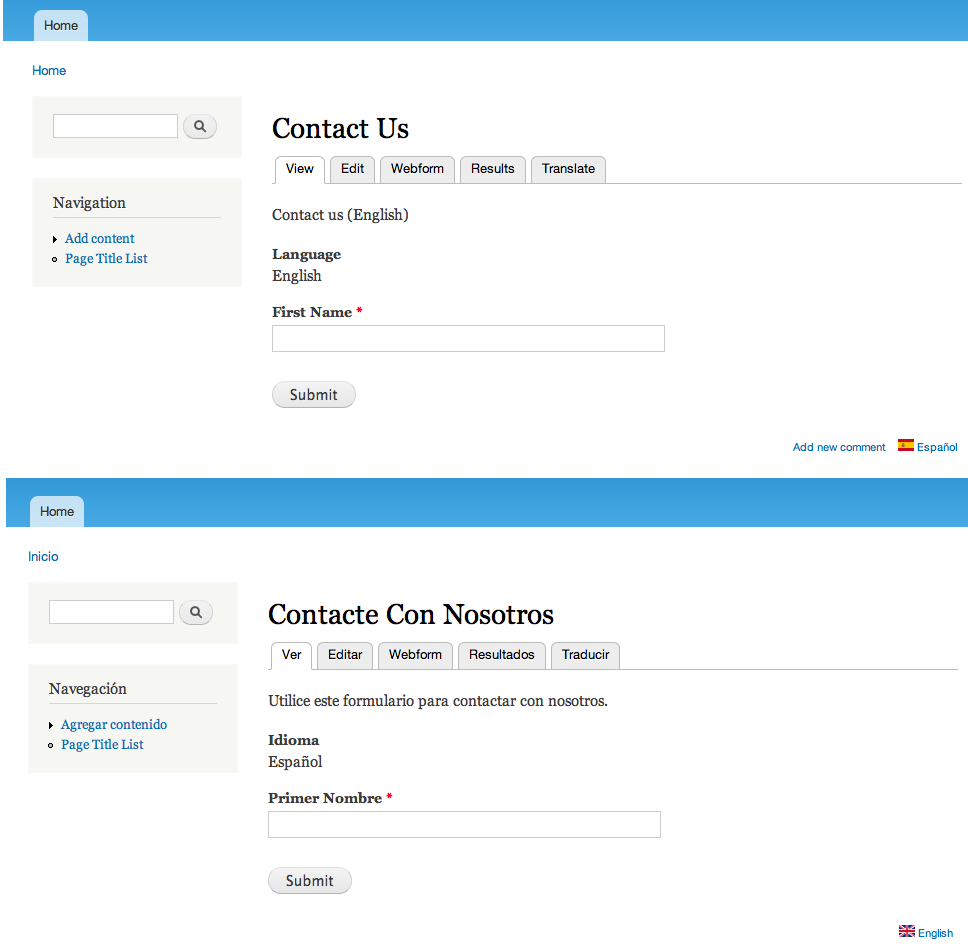
Make strings in webforms (esp., form element labels) translateable.
Solution: Use "Webform Localization" module
A new module: "Webform localization", providing different options for webform localization.
See the module README.txt
http://drupal.org/project/webform_localization
Currently in sandbox: http://drupal.org/sandbox/GDrupal/1407100Its fully functional and we are working on usability details and integration with other webform related modules.
The project will be promoted soon, we hope, so all webform localization issues will be trough there.
Background: New hooks
To support the webform_localization module, two new hooks were added in webform 7.x-3.15:
hook_webform_component_display_alter()
hook_webform_component_render_alter()
You can use them for altering display and render components. Webform Localization uses them to provide integration with the i18n_string module.
New hooks first mention here:
http://drupal.org/node/245424#comment-5412686
Patch with final name for the hooks:
http://drupal.org/node/1455648
Original issue text
Are you going to implement i18n to your module? I tried with current releases and they don't work.
Cheers,
Erdem
| Comment | File | Size | Author |
|---|---|---|---|
| #294 | webform_i18n-d6.patch | 16.09 KB | quicksketch |
| #294 | webform_i18n-d7.patch | 18.98 KB | quicksketch |
| #293 | webform_i18n6.patch | 15.04 KB | quicksketch |
| #293 | webform_i18n7.patch | 18.97 KB | quicksketch |
| #274 | webform_i18n_d7-245424-274.patch | 14.32 KB | GDrupal |


Comments
Comment #1
kingofsevens commentedOh, also. In the menu section there is no language selection while using i18n menus. But in the primary links section there appears a language selection. FYI.
It will be good to use the same output table for different languages as an option and default would be separate tables, or vice versa.
Comment #2
quicksketchI'd like to get i18n support into Webform. That said, I have no experience with i18n or any sites that require it. The inclusion of this support will probably need to come from a patch contributor or sponsor.
Comment #3
Ian Ward commentedAs it stands, there could be two ways to go about translating a webform node:
1) using i18n, whereby you'd recreate a whole new node and change all the labels to the new language (one node per language).
2) using locale, whereby you'd only ever have one node per webform, and would use locale to translate all the labels.
With the first option, if you translate a webform into three languages, you'd have responses to the webform on three different nodes. Perhaps this would be good, since you may need three different people anyway to sift through the results (unless the admin contact for the webform is tri-lingual). The poll module in D6 will tally responses to the same question across all languages, summing responses for showing results. W/ this first option, you could have a links on each webform to corresponding webforms in other languages.
With the second option, since you have just once node, all the results will be submitted to just one node. In this case, if you wanted a different person to be emailed per-language, as responses are submitted, the first option would work better, w/o the need for custom processing. A down-side w/ the second option is that if you change a label in the English version (assuming English is the default language for your site) this will invalidate the translation of that label on the other webforms. Not a huge deal if you are not changing the labels on a 'contact us' webform (unless you have it in 9 different languages == 8 other labels to re-translate).
There are advantages and disadvantages to both of these options. If you switch webform to use CCK for fields, then both options would depend on CCK's use of t() on field labels (instead of webform's). I'm not sure what the latest is w/ this, but in some v. 5 versions, there were a few missing t's.
I'm trying to remember - webforms can reuse components of other webforms? If not, the i18n approach seems like a lot of extra work (recreating all new components for each webform). Then again, w/ some extra flexibility.
A webform, using cck fields, + w/ a cck field that lets you dynamically assign who to email based on what site-language the user filled out the webform, would be pretty nice. I'd think if you're about to move to cck field support, it would be good to look at all this under those circumstances, and maybe patch for missing t()'s in the meantime.
I hope this helps outline some (and maybe there are more) scenarios/solutions.
Comment #4
keesje commentedComponents are still not duplicated on translation.
Is this a missing feature/bug? Components where duplicated in D5 versions.
Thanks,
Kees
Comment #5
Critical Tinkerer commentedI have changed this thread category to a "bug report" because of the way Webform breaks the language navigation on a multilingual site. I consider it "critical" but because of the workaround (see below) I will leave it at "normal".
The Multilingual system provides site navigation with the different options depending on whether or not content should be visible in all languages ("language neutral") or only visible according to language-based rules.
Due to the lack of language support in Webform, all web forms are essentially "language neutral". That means that, even if you clone a web form and translate the content into the target language,
There is no way to disable or hide language links. As a workaround, however, it should be possible to use URL redirects to get a visitor to the correct language of web form (I am about to test this right now) but I can't expect clients to do this on their own sites every time they want a new web form. In other content types URL aliasing rules are automatically taken care of by the i18n module so the client need not do anything special when creating content in multiple languages.
--
Comment #6
Critical Tinkerer commentedI have tested URL redirects as a workaround. Success was limited but not satisfactory. I am elevating this thread to "critical".
First some assumptions for my test:
The test was to use the URL Redirect module to select the correct language of web form. Node/54 is the English version of the form and node/55 is in Japanese. The following redirects were created:
This worked! The first entry appears incongruous, but the ja is inserted by the i18n module, so all is well. The resulting page is indeed maydomain.com/ja/node/55.
However, i18n seems to handle URL aliases differently, because although I could get it to work to redirect back to English, the Japanese alias just returned a 404 error.
It seems that i18n does not create a .../ja/.. version of the node alias. Perhaps it is related to the node being "language neutral" as far as i18n is concerned. I just don't know.
Comment #7
quicksketchIt's not a bug, as Webform never claimed to support multiple languages. I have made absolutely no effort to make webforms multilingual and despite the large number of modules that do support multiple languages, it usually requires a specific implementation and extra effort to add that functionality. Webform does work fine in any single language though, problems with that can be filed as a bug.
Comment #8
keesje commentedAs far as I can see Webform nodes ARE language aware, and so do the strings that are in the forms as labels etc..
A module does not require special code to implement multilingual support, as long as strings are t() parsed, all stuff is properly generated by standard Drupal API's and node information is stored in core default tables (!). If node information is stored in other (module specific) tables, this information is by default probably not duplicated when a node is duplicated using i18n or node copy (cck?) for example.
The latter could be the case for webforms, if so, this is not specifically related to multilingual support, but related to node duplication in general.
Greetings,
Kees
Comment #9
quicksketchkees, Yes you're right that Webform is "locale" aware, in that you can make a Webform in any language (as I said in #7). It is NOT "multilingual" aware, meaning you can't create a single Webform that is translated in several languages and have them associated with each other.
Comment #10
keesje commentedWhell as a node I can translate webforms in a multilingual environment just as any node type.
The problem I encounter, is the fact that the form elements are not copied to the new translation of a webform node.
So, this makes me think that it's more a node copy problem than a multilingual problem.
(Just try to make clear my previous post, I do not mean to argue ;).)
Comment #11
daniorama commentedIn response of #3, components are able to be cloned between forms but only using a custom patch http://drupal.org/node/298268 I hope Quicksketch consider including this on the core.
In the near future I will have to do webforms (and a whole site) in 2 or 3 languages. I hope I can help then.
Comment #12
grahamgilchrist commentedI have been creating a multilingual site making use of webforms.
There are 7 translations, but as one poster noted above, each must be e-mailed to a separate person anyway, so I cloned the first node 7 time and changed the labels which worked fine. My problem is, even when changing my site language, The select and date dropdowns in webform are not translated. i.e. 'Select...', date day and month names.
Is this possible to do in D6?
Comment #13
grahamgilchrist commentedOk, sorry being a bit thick there. I got the translation system working in D6, which successfully translates the 'select' box, but not the date components.
Now I know this is dependant on the status of the translation .po files, but I tried with Dutch (nl) and the translations for 'select', 'day', 'month' and the month names appear to be in the file under the translations folder of the webform module. However, still only the translation for 'select...' appears when the language is changed...
Comment #14
yang_yi_cn commentedI searched some old posts which says after you enabled the i18n module, webform is supporting multilingual. However, that's for Drupal 4.7. So the upgrades have break the i18n support which was available a long time ago? I'm not sure if it is a webform issue or i18 issue.
I'm currently using Drupal 6, i18n module, and webform 6.x-2.3. As I understand, D6 has built-in multilingual support which shows a 'translate' table after the editing. All the content types created in the normal way has that feature, but not avaialbe for webform nodes. My question is, as a webform node is essentially a node, why the translation function is not there? I would like to see somebody explain that as it is basically a core feature now... And if I want to support the translation of the generated forms, where should I look to in the code? Maybe I can roll a patch if someone know more about this module can give me some hints.
Comment #15
quicksketchyang_yi_cn: basically, in Drupal 6 when you translate a node you make a copy of it. However, what this means for Webform is that you need to recreate or edit every single component in the language you are translating it into. Webforms are much more complicated that any other node type, hence why the challenge is greater. Beyond that, when working with the "translated" copies of the original node, you'd probably want all the results to be aggregated together. But since each translated copy is a different node entirely, we'd need to improve upon the logic that builds the result sets. Right now they're all kept separately as if the nodes weren't related at all.
Comment #16
yang_yi_cn commentedYes, in Drupal 6 when there are translations, they are different nodes and share a 'tnid', which is the source node.
To my understanding, it makes sense that the title and description of the two nodes in different languages having different copies, but normally we would like to share the same form, while get every single pieces of text translated.
I think, firstly, we need to enable the duplication of node, i.e., enable the 'translation' tab.
Secondly, we need to have the url alias for different languages.
I've enabled the pathauto module. So, for now if I create a webform which is http://en.mydomain/node/1234, it will have the path http://en.mydomain/content/title, but I cannot access http://fr.mydomain/content/title, I have to access http://fr.mydomain/node/1234 to get the same form in the French language. But I think this problem will be automatically solved once we implemented the first step, to have a translated node for the other language, say, French.
Third, the translation of the components, both labels and values.
Once the previous two steps are implemented, labels should be translatable already, I tried to visit the http://fr.mydomain/node/1234 and that refreshes the translation database and I then can search through the translation interface in Drupal and translate it.
The values are a little bit tricky. There can be different ways to do it. Let's see how i18n_taxonomy deal with it, there are four options:
As mentioned in the beginning, I don't think the webform components should be different for each language, so the solution here should be:
"Localize form values. Values are common for all languages but may be localized."
How to implement that? Although I didn't look into the code, I assume there will be some CRUD functions for the components. So, when LOAD, we should pre-fill the translated values to the default values and selection options. It's possible, just make sure we get the source string from webform_component table, which should be correct because we only have one copy for each 'tnid'. Then 'foreach...t()..' after loaded from the database and the values can be translated from the translate interface. When SAVE, if current language is the source language, update the webform_component table. We can disable the component update for other languages than source, show a page with links to the source components and the translation interface, or make a translation page showing all strings used in this form, for editing, but not editing the form elements.
Finally, for the analysis, we can keep the current data structure, but JOIN with node.nid, node.tnid, node.language and alter the db_query to show different language results separately and/or together.
Comment #17
yang_yi_cn commentedWell, I got a simpler solution, which might not be perfect, but works for me.
Basically, I still just create one webform and keep it 'language neutral', then, instead of make different copies of webform, I change the text displaying by adding t() to the hook_view() and _webform_filter_values()
Comment #18
quicksketchThanks for sharing your approach yang_yi_cn. This won't be usable as a permanent solution in Webform however. The use of t() on dynamic variables is a very bad practice, since there's no way to cleanup or change those values after they get out of date. Even a single webform is likely to add dozens or hundreds of new strings.
Comment #19
frost commentedNot sure if I'm missing the point here, but I've able to get at least the field titles of the webform translated with no hacks.
I have a multilingual site, using Locale and I8n. Most pages are language specific using language prefix in the url.
I set up the Webform to be language neutral. Its path is /calendar-and-booking
I am using 3 separate menus for the 3 site languages. The 2 non-English menus have a custom menu link I added which points directly to the webform (node/50). The menu items are set to be language specific (ie the German menu item is set to be German language etc).
When the current user is, say, German, he sees the German menu. The link for the webform is automatically shown with the language prefix (/de/calendar-and-booking) and when he clicks it, he gets the Language Neutral webform, but the field titles in the form are translated (after I translate them using locale).
If you want to have a look, the site is www.gallaghersequestriancentre.com. You can change language by clicking on the flags.
I can't get the node title or any descriptive text translated using this method but it's a good start.
Comment #20
brankoc commentedI too got this to work without hacks. The strings are translatable and the translations can be linked just like any other form of content.
Could a be that this has recently been fixed?
Edit: I remember though that I had to switch "multilingual support" to "Enabled, with translation" in the Edit Contenttype screen.
Comment #21
oliver huynh commentedSo, you have 2 webform id and you will have 2 webform results, dude!
Comment #22
oliver huynh commentedThis is a temporary solution. Is there anyway to hook these two functions using a new module. Then, we can update the webform later?
Comment #23
oliver huynh commentedI have just built a module to integrate the Webform module with the I18n module. Check this out.
The module is webform_multilang . I don't know how to add this module to the community, so I add to this page.
***_ THIS MODULE IS OLD, CHECK NEXT COMMENT _***
Comment #24
oliver huynh commentedModule: Webfom Multilanguage
Description: Integrate the Webform module with I18n module
Comment #25
quicksketcholiverhuynh, it'd be much appreciated if you could provide these in patch form: http://drupal.org/patch/create. Otherwise it won't be reviewed for inclusion into Webform directly.
Comment #26
mairav commentedIs there anybody that can transform this code to a patch so it can be included en webform? please, It would be much appreciated!
Thanks for this great module!
Comment #27
manuel garcia commentedI'm not so sure we want the approach mentioned in #24 in webform itself... it uses the t() function for the body and teaser, which can be problematic perhaps.
However, I'm very glad that there is work being done in this direction.
I'd like to summarize the current state of webform when it comes to multilanguage support:
There are two ways to do this at the moment:
The first one is quicker, and allows you to see all results for all languages, but it's not fully translatable. The second is far more time consuming, separates results but it gets you there fully.
So, the issue of translating webforms is a very special one, it won't do with just the normal node translation approach in my opinion. We should brainstorm a bit about this, here is my take on it:
We could have these situations:
In each case, the existing fields in the webform should be passed when creating the translated node.
In my opinion, these different situations call for a different approach to making webform multilingual, than the rest of modules out there.
However, ideally this would cover all possibilities and let the user configure it properly.
As how to go about doing this, perhaps have the user specify options under a "Multilingual" section when you create the webform, if i18n is present.
Thoughts?
Comment #28
kingofsevens commentedIMO, fields should be transfered in all cases. A language field in the DB table would suffice, stating the language of the form. Because even though the results may differ, some fields may be excluded or included, I assume 90% of the fields will be needed for each translation. Let's say you have a title field which is Mr. or Ms. in spanish you get Sr. and Sra., you can set their values in Spanish as Mr. and Ms., respectively. Or webform can handle this so everything will be in the same form. When querying you can select language=spanish.. etc.
Comment #29
pieterbezuijen commented+1
Comment #30
geodaniel commentedSubscribing to this. We've done some work in this area, to link up different language versions of the same webform so that a webform administrator can clone the webform for different languages and customise as necessary, then view the results in the same screen. I think we need to refactor it a bit, but hopefully we can release it soon.
Also created #426108: Make language of e-mails configurable to do with submission emails being sent in the wrong language.
Comment #31
yarimbiyik commentedThe bits that geodaniel mentioned are actually at http://drupal.org/node/403692 and waiting for my spare time to get stripped out of the webform_add_ons module (6.x-2.3) which has a bunch of other additional functionalities. For immediate needs you can try it.
Comment #32
tomsm commentedI have created one webform for 3 languages English, French and Dutch
Does anybody have a solution to translate the title?
Comment #33
DenDries commentedLooking forward to it geodaniel! Will you release an early beta version?
Comment #34
mairav commentedAny news about this?
I just need the title and the select list items translated for now.
Comment #35
akalyptos commentedTo make the select list items translatable, put this code after the line 153 in components/select.inc
Comment #36
mairav commentedakalyptos,
Thanks, thanks, thanks!!! that code did all the work!!! I'm going to sleep happy!
I hope this can be added to webform's next version so we don't have to make this change everytime.
I really appreciate your help!
Thanks again.
Maira.
Comment #37
tomsm commentedthank you! This works great!
How can I translate the title?
Comment #38
mairav commentedI'm almost there to launch the site and i need the webform title translated. At this point it doesn't matter if the solution is something strange, but I would love any way to solve this.
Sinceresly thanks.
Comment #39
mediamash commented+1 critical imho
Comment #40
quicksketchThe 3.x branch has been created for new features such as this one. Due to the amount of work involved in this, I'm not planning on implementing this feature. This feature will need to come from the community if it will ever be added.
Comment #41
manuel garcia commentedI can understand that quicksketch... I'm thinking this would be a good candidate for a sprint! any takers?
This one of the issues that keeps me from using the module. I know in the US this probably isn't such a big deal, but for the rest of the world, it is. Perhaps a local group somewhere will take challenge and organize a sprint =)
Comment #42
mairav commentedManuel, today I read your message and the one sent by quicksketch and as I see there will be no official help and I need my title translate I made some simple changes... I'll explain them, maybe they can be helpfull for someone.
In my webform which node id is 24 the following were left untranslated:
1) Node title
2) Page title (the title tag in page head)
3) The title in the breadcrumb, if you have added your current node title without a link at the end of the breadcrumb as is explained in http://www.internetunlimited.nl/en/blog/breadcrumbs-drupal-6
Here are the solutions for each one of this problems:
1) NODE TITLE: Create a page-node-24.tpl.php in your theme folder, where 24 has to be replaced by your node number. Note: Copy your page.tpl.php and then rename it. Find:
And add before that, this lines:
You are passing the $title variable through t() function. Then you go to the admin/build/translate/search and search for the node's original title and translate it. If the string doesn't appear, go to the node page in the untranslated language, and then search again and it will appear.
2) PAGE TITLE:In the same page-node-24.tpl file I replaced:
With:
You have to repeat the same as in step one to translate the string.
3) BREADCRUMB TITLE: To translate a custom breadcrumb made with the tutorial explained in http://www.internetunlimited.nl/en/blog/breadcrumbs-drupal-6 you have to go again to your template.php file and search for the phptemplate_preprocess(&$variables, $hook) and replace all the function with:
Remember to change in $variables['nid'] == 24 the "24" with your node number.
I can't explain why this have to be done like this, cause I'm not a programmer, and this part was not made by me. My fiance doesn't know how does drupal work, but he could make it work. I only know this works!
If you alredy translated the string in step one, then, the breadcrumb title appears translated after this change.
As you can see, the third step is only to those who made the customization of the breadcrumbs.
The first and second steps are the important ones, and can be applied without modifying anything in webform module. We only have to create a tpl for the node and pass both titles through the t() function. It's great for one or two contact forms. If you have lots of forms, it's not the greatest solution, but is the one I can provide :D
I hope this can help anyone with the same problem!!
And thanks for webform! I hope this translation problems can be solved soon.
Comment #43
quicksketchmairav, a simpler solution (if you're just using t() on the title) is to wrap your page title in t() in hook_preprocess_page().
In your theme's template.php file:
Then you don't need to make a separate page.tpl.php file and it'll work on all Webforms automatically. Just clear your Drupal caches at admin/settings/performance (the button at the bottom) after adding the new function to template.php. However I'd like to re-iterate (yet again) that wrapping dynamic strings in t() is improper use of the function, but until this problem is fixed properly, I can't prevent people from doing whatever they'll do to get the title translated.
Comment #44
tomsm commentedThanks a lot! This works!
Comment #45
mairav commentedquicksketch, thanks for this solution, I haven't try it yet, but I will. I'm pretty new with drupal and I'm not a programmer, so I looked for a solution, even when I knew this one was not a proper one.
One of my forms needs another changes so, I can't avoid using a diferent tpl.php, but other ones just modify:
<?php if ($title): print '<h2'. ($tabs ? ' class="with-tabs"' : '') .'>'. $title .'</h2>'; endif; ?>This would be solved with your solution. And
<?php $head_title ?>How can I fix this one?
Sinceresly thanks for your help. I hope this can be solved soon, so we don't have to make extrange changes :D
Comment #46
samchok commentedReferring to post #27, I'd like to translate strings in the webform with Locale module, but in the Edit page of my webform I can't see the "Language" select option, so I can't make the webform "Language neutral" and, as a result, users with language different from the default language can't see the webform.
Am I missing something?
Thanks
Comment #47
marko b commented@ #27
I think we should try to look bigger picture and final state of this module. It should have possibilty like with different node for every language. As you would maybe add different descriptions to them and different emails as if u have 6 languages then u will have more ppl to read emails and then they should be send to those who can actually read them :-)
Biggest problem for me, from number 2 solution now is. If i have 8 languages and 6 forms with 10 fields each, i have to recreate all of them and wait for hundred of page reloads ufff :-(
So i think duplicating form component when translating should at least be an option. then i could just rename all the fields for each form, fild names/labels are on the same page, so i just quickly do it and thats it. Think this would be best solution.
Now i will do this manually, duplicate node with node clone and then add them to languages so i dont have to wait for each component creation as its very time consuming.
What do u think?
Comment #48
machi27 commentedHi all,
I am so lucky because i found this issue and helped me with translation select list items, everything is working fine. Thanks all!!!
But i am freaking out a litle, did anyone notice that if you make a change into any field in any language all the form will set that language as default and translation will stop working??
I dont know if it is a bug or how to called but it happened to me twice today.
gonna go a bit deeper, i made a form (webform.module) in english then translated to spanish with the translation interface, i was checking and everything was going good, as i had a long input field i change the size in spanish and then this form was in spanish all the time, not english anymore.... :( had to rename all the fields again.
Is it a bug, did anyone notice it?
Comment #49
jsfwd commentedIf you translate a webform into multiple languages you can use the visibility settings in Panels 3 to choose which language to display.
'-- Add new visibility rule' then depending on your particular setup either choose 'Node: language' or 'User: language'.
Comment #50
tomsm commentedThe values of the select list are translated on the screen by applying the solution of #35, but these values are not translated in the sent e-mails. How can I fix this?
The labels of the fields are translated correctly.
Comment #51
giorgoskDon't know if this should get its own issue
description and default values of components are not localizable
this patch lets the string be localized
apply against 2.9 webform
Comment #52
manuel garcia commentedComment #53
quicksketchGiorgosK: You should review the patch in #512416: Translate selectlist option values, which suggests a similar change. Let's keep this issue focused on making the nodes translatable and related to each other. I'm still not sure that's a feasible approach in any way, but maybe if we just store the tnid in the webform_submissions and webform_submitted_data that would make the whole thing feasible? We'd have to "lock" a lot of properties on the translated versions of the node, since it wouldn't make sense to have more fields in some translations of a node than others.
Comment #54
adrianmak commentedsubscribe.
Comment #55
pendashteh commentedas said, there is two ways:
beside benefits and disadvantages of two method, i choose the 1st one to avoid copying fields. (i think this is cannot be a standard solution at all).
now the problem arises in Menu
i created 3 menu item, each one for a language, and set it's language specified and pointed theme all to webform path "/contact/form"
now the menu items are visible just in the webform own page "/fa/contact/form" and is not displayed in other pages.
i think it's because the path "/fa/contact/form" does not really exists and so drupal do not displays it's menu.
is there any way or configuration to make drupal not to check the existance of the translation to show the menu item?
Comment #56
pendashteh commentedhey i found the solution for my problem just in the next opened tab in firefox!
for those who have problem of menu items being hidden, check Menu items disappear when you change language
Comment #57
pendashteh commentednow i am using webforms in a multilingual website without any problem
do it in your template.php
Comment #58
quicksketchSee #512416: Translate selectlist option values for translating select lists specifically, which uses this approach but should use the tt() function instead of t().
Comment #59
Universal0911 commentedDo you have the upload file option ? In other words, do you have the browse button to submit files ?
I have multilingual sites but not able to simply translate the Browse button.
Anybody knows ?
Txs
Comment #60
quicksketchThe browse button is not added by Drupal at all, it's added and controlled by the browser. In order for "Browse" to be translated, you need to change the language of your browser.
Comment #61
arnebrasseur commentedI found that Webforms works just fine with standard Drupal i18n. I'm using the translation == new node approach. Components are not automatically copied, so one needs to recreate them (in theory) for each translation. See below for a "quick fix."
1) go to admin/content/node-type/webform and turn on Multilingual support
2) create/edit your form in the default language, and make sure the form is set to that language (NOT Language Neutral)
3) now you will get an extra tab to add translations, add a translation for each language
At this point you have a form for each language, that behaves well with respect to menus and links to other translations. But the translated forms have no fields (yet). You can add them manually, or copy them from your original form with some SQL (e.g. with PhpMyAdmin).
Note the nid (node id) of the original, and the nid of the translation. If the original is node/9 and the new is node/10 then execute this SQL:
To translate the labels either edit them in the translated webform, or add translations to Drupal, the labels are passed to t() and so will be translated.
IMHO the only thing Webform could use is the ability to "synchronize" translations. i.e. whenever you edit one translations all components are copied to other translations.
Comment #62
cyberwolf commentedSubscribing.
Comment #63
tomsm commentedI have a language neutral webform. I have translated almost everything except the e-mail subject.
Does anybody know how I can translate that? Thanks.
Comment #64
micheleannj commentedThis doesn't seem to work for the months in a date select!
Can anyone give me a snippet to add to date.inc so that the month abbreviations are run through t()? The code is a little beyond me...
thanks
m
Comment #65
quicksketchMonths should already be run through t() (though in a very round-about way). Webform uses Drupal core's date element for starters, then changes it slightly. It's hard to follow but basically all those months should already be available through the Locale module translate interface, as long as you've views the webform in the language you need to translate into.
Here's a sort of stack trace of Webform's date expansion:
http://api.lullabot.com/expand_date/6
http://api.lullabot.com/map_month/6
http://api.lullabot.com/format_date/6
The part that translates months is in format_date:
Comment #66
micheleannj commentedThanks for the quick reply.
(err, I realized I should probably open a separate support request ticket for this, but ...)
I have a site in French (date format is set for French and everything else is working correctly) and the "mois" "jour" "annee" default option is showing up, but when you select "mois" you get "Jan" "Feb" etc.
I searched for "Jan" in the translate interface and translated the abbreviation string from the built in interface:
!month-abbreviation |Jan|Feb|Mar|Apr|May|Jun|Jul|Aug|Sep|Oct|Nov|Dec
But it doesn't seem to have worked.... am I missing another step?
Comment #67
quicksketch- Create your Webform, add a date field.
- View the Webform with French as the active language (i.e. "fr/node/[nid]")
- Go to admin/build/translate/search and search for each month abbreviation individually.
Comment #68
mandclu commented+1 for fully realized translations of a single collection of elements
(and a subscribe for good measure)
Comment #69
Anonymous (not verified) commented@quicksketch
I am using Webform 6.x-3.0-beta4 and I can't use i18n with it both for webform or webform attached node. The translation == new node approach does not work. No translation item appears while editing a node.
The request is "only" to synchronize node for translation. Copying fields is not a problem in my context and having separate results is a good point !
A recent feature request (http://drupal.org/node/774206) is about this point.
Referring to post #61, this appear to work in previous Webform version.
Do I have to open a bug ticket for this point for Webform 6.x-3.x-dev ?
Comment #70
quicksketch@Domsou, use the latest version (beta5) first. I think what you're describing was fixed in #768960: Webform nodes no longer can be cloned.
Comment #71
Anonymous (not verified) commented@quicksketch
I've done tests with latest version (beta5) : still not work.
On both previous test node and freshly created node : no translation option on the node edit page.
A ticket have been already created for this purpose : http://drupal.org/node/774206
Installing the patch available in this previous post does not solve the problem.
Comment #72
Anonymous (not verified) commented@quicksketch
Some news about this problem ? Do I have make tests using DEV version ?
Comment #73
Rakward commentedCan anybody confirm that post 57 (http://drupal.org/node/245424#comment-2740830) works?
Mainly against this problem here:
http://drupal.org/node/811658
Comment #74
generalelektrix commented+1 critical. I'm about to translate all my webforms from French to English for our English speaking customers. I got 5 of them, and they are behemoths. I'd love to be able to have different nid's for different languages, but I really don't want to build them all again from the ground up. Using i18n, I would like to able to just click on translate and get an english copy of my webform in which I could just translate title, labels and select lists. Thanks to those working on this!
Comment #75
bjcool commented+subscribe
Comment #76
Rakward commented@P #73 Nope, it doesn't work :(
------
EDIT
-------
Please read here for a possible solution I came up with for a multilingual contact form with some of webforms functionality( I'd like your thoughts on this):
http://drupal.org/node/814972
Comment #77
xalexas commented#43
Don't work for me in 6.x-3.0-beta5
Created webform in language neutral.
I have placed this code in template php:
Emptied cache.
What is strange, title string is displayed in user interface translation. I have translated the string to other languages but it won't change node title on frontend.
Where I could be wrong?
Comment #78
xalexas commentedI have managed to translate titles only with creating template file node-webform.tpl.php and changing $title to t($title). Translated strings in user interface translation, and it works. Labels also translated with string translation.
Comment #79
rapsli commentedFrom my understanding the current solutions uses the t() Function to translate labels:
Webform.module, line 1057
How about using hook_locale to define a group and then use tt() ... I'm working on patch right now
Comment #80
rapsli commentedattached is the patch that should provide better translation support
Comment #81
rapsli commentedsorry... is of course agains .3 dev version
Comment #82
rapsli commentedSorry, there was a typo... here we go again
Comment #83
quicksketchThanks rapsli! A few questions:
- Could we delete strings that are no longer in use when a component is deleted (or when a label is changed)?
- Can we translate the labels of select list options also?
From my understanding, the entire advantage of tt() over t() is that you can remove and update strings when the user makes configuration changes that require those strings to be deleted or changed.
Comment #84
rapsli commentedHi
About the whole t() and tt() thingy (btw tt() is depreciated):
- http://lists.drupal.org/pipermail/development/2009-September/033807.html
- http://groups.drupal.org/node/15177
About your questions. Yes we could remove translations. Where's the function that removes components? We would just need to add i18nstrings_remove()
Can you tell me where that was, so I don't have to look for it myself.
Comment #85
quicksketchDeletion is handled in webform_component_delete() in webform.components.inc.
Comment #86
rapsli commented... putting an other thought into this, there is one more thing to consider.
as you can see $i18_identifier is very general, which makes it hard to figure out when to delete. Example: We have two webform nodes, both of them have a component with the label... lets say "street". I translate it for one node -> it's going to be translated for both webform nodes, which is a good thing I would say, especially since labels on forms might be translated the same most the time. (Or we could make the identifier unique for every label, which I personally would not welcome)
If we though delete a component we cannot just delete the translation, because an other component with the same label might be using the translation and we don't want to delete it. So I guess we would need to perform a check for a component with the same label and only delete it if the translation is not being used anymore.
I'll have a look at webform_component_delete()
Comment #87
generalelektrix commentedI'm really happy to see you guys are working on this issue. In the while I used Node clone successfully to copy a Webform and to make a version of it in another language.
Comment #88
rapsli commentedpatch when deleting a label to also delete the translation if the translation is not being used somewhere else
Comment #89
rapsli commented... sorry wrong patch. Here we go again
Comment #90
quicksketchThanks rapsli, this is looking really good. Any way select list and grid options could be included also? Most people are getting by with just using t() on labels already, but select list options are the big holdup for most users.
Comment #91
rapsli commentedoky. Some more patching. We can now translate Select options.
Comment #92
rapsli commented... what is the status here?
Comment #93
mileZ commentedI'm trying the same thing. Any solution yet?
Comment #94
rapsli commentedthere's a patch: http://drupal.org/node/245424#comment-3166480 ... testers are welcome!
Comment #95
caw67 commentedPatch #91 works!!
Comment #96
TimG1 commentedsubscribe
Comment #97
pfrenssensubscribe
Comment #98
mairav commentedCan you tell me when will this be included in the webform 3 version?
Sincerely thanks!
By the way, is there any way a custom confirmation message can be translated?
Comment #99
mairav commentedI used what @quicksketch proposed in #43, and made a change, so that not only the $title is translated, but also the $head_title.
This is placed in the template.php file:
This translates the title and head_title without the need of a custom tpl for the webform.
Comment #100
pitav commentedHello all
I used the # 99 and it works well. But how do you translate the body.
I tried to add this code without success.
Thank you for your help.
Comment #101
ckngTested patch #91, unable to get the translation strings for submit button and webform markup.
Comment #102
plachHere is a proof-of-concept patch (read: incomplete) whose aim is exploring a different approach. The basic idea is supporting four different multilingual modes:
Edit: @quicksketch: do you think this approach can fly?
Comment #103
plachSorry, #102 was slightly outdated. Here is the right one.
Comment #104
quicksketchI think that reducing these options to 1 or 2 "modes" would be a better approach than so much variance between the options. More modes means more testing, more work, and more bugs. My preference would be for multiple nodes with full synchronization, though it'll be difficult to manage keeping select list options consistent across translations. Perhaps the keys always have to be identical with the source translation?
With this approach I think that it would make sense to extremely lock-down translations that are being edited. No ordering, no adding, no deleting of components. You're only allowed to edit components and only certain parts of those components. All normal functionality would be allowed on the source translation.
Comment #105
plach@quicksketch:
At the moment the patch implements only modes 1 (single node) and 3 (full sync) but having the other two is just matter of adding a couple of ifs, so I really think it shouldn't be that hard to maintain 4 modes vs 2, compared with the benefits we would get.
The patch implements string translation for select list options: with form syncronization all translations get the same list options which can be translated through i18nstrings. This way we don't need to worry about option keys differing between translations. The screenshot provided in #102 show exactly this use case, see also the ones attached here.
This makes sense but it's somehow inconsistent with how i18n node syncronization works, i.e. allowing any change to be spread across the translation set. The patch implements component, email and form synchronization (component and email ordering/deletion is still TODO) apparently without too much problems. Perhaps locking parts of the UI might lead to a more complex code.
The source translation-only approach is implemented for submissions and results, though.
I'd like to know if from an architectural POV the code introduced by the patch is correct, AAMOF a new pseudo-hook has been introduced to perform string component translation.
Comment #106
plachThe additional screenshots :)
Comment #107
plach@quicksketch:
I really need this feature for a project I'm working on: if could give me a feedback about #105 it would be great :)
Comment #108
jlbretton commentedThanks for your patch #107. Very helpful.
Your patch works very well on 6.x-3.2.
Note: It throwed an error during patching 6.x-3.2 --> Hunk #2 FAILED at 81.
Complet:
sh-3.2# patch -b -p0 < webform-245424-103.patch
patching file webform.module
Hunk #1 succeeded at 1059 (offset -7 lines).
Hunk #2 succeeded at 1073 (offset -7 lines).
Hunk #3 succeeded at 1601 (offset -7 lines).
Hunk #4 succeeded at 1875 (offset -8 lines).
Hunk #5 succeeded at 2043 (offset -32 lines).
Hunk #6 succeeded at 2868 (offset -40 lines).
Hunk #7 succeeded at 2917 (offset -40 lines).
patching file components/select.inc
Hunk #1 succeeded at 253 (offset -1 lines).
Hunk #2 succeeded at 274 (offset -1 lines).
Hunk #3 succeeded at 735 (offset -1 lines).
patching file components/textfield.inc
patching file includes/webform.components.inc
patching file includes/webform.emails.inc
Hunk #1 succeeded at 384 (offset -15 lines).
Hunk #2 succeeded at 419 (offset -19 lines).
patching file includes/webform.pages.inc
Hunk #1 succeeded at 217 (offset -2 lines).
patching file includes/webform.report.inc
Hunk #2 FAILED at 81.
Hunk #3 succeeded at 195 (offset 12 lines).
Hunk #4 succeeded at 316 (offset 12 lines).
Hunk #5 succeeded at 333 (offset 12 lines).
patch unexpectedly ends in middle of line
Hunk #6 succeeded at 649 with fuzz 1 (offset 12 lines).
1 out of 6 hunks FAILED -- saving rejects to file includes/webform.report.inc.rej
Comment #109
plachYes, the patch is against the 6.x-3.x-dev branch.
Comment #110
brianV commentedSubscribing.
Comment #111
ckng#103 supports translation strings for submit button, but still missing webform markup.
Comment #112
plachYes, it's an incomplete patch. I'm waiting for a feedback from quicksketch. I won't work on it if I ain't sure the time is well spent ;)
Comment #113
grub3 commentedThis is an extremely important patch, could it be committed?
It is rather long, so I don't see why it is set to "needs some work".
IMHO, better to commit then enhance.
Comment #114
quicksketchWebform is a mature project that always maintains stable code, even in the development version. This, like all patches, needs a thorough review before it can be committed. I'll review it when I get a chance, but there's no point in committing it if it's going to delay the release of new versions of Webform.
Comment #115
CyB66 commentedsubscribe
Comment #116
nitebreedSubscribing
Comment #117
chaugi commentedsubscribe
Comment #118
jessehsI re-rolled the patch in 103 against the latest dev release. I'm still testing it out, but it seems like this gives me the features I need. Note that this also successfully patches the stable 6.x-3.4 release (so it can be used with drush make).
Comment #119
jessehsOops. Here's the patch that should be in 118.
Comment #120
sahar999 commentedI tested the patch and it worked for me however when I set another language as site default language and changed the paths (en for english and empty for default language) then it shows form component labels always in english I managed to solve my problem by adding t() to
'#title' => $filter ? _webform_filter_xss($component['name']) : $component['name'],
and change it to
'#title' => $filter ? _webform_filter_xss(t($component['name'])) : $component['name'],
in files textarea.inc,email.inc, textfield.inc,.... but I'm not sure it is a good solution.
Comment #121
plach@sahar999:
Instead, try to add in your settings.php:
where $langcode is the language code of the default language.
Comment #122
sahar999 commented@plach thanks for your response, it works.
Comment #123
JayNL commentedyou mean theme-settings.php?
Comment #124
plachNo, settings.php, the Drupal configuration file...
Comment #125
lostcarpark commentedI've tested the patch in 119 with Webform 3.04 and so far it's performing perfectly. Thanks for all your hard work.
One minor caveat is that I needed to edit and save components created before the patch was applied before they would appear in the translation interface.
Comment #126
lostcarpark commentedNow patched 3.05. Seems to be working well.
Comment #127
JayNL commentedI can confirm, this works perfect. Thank you for the hard work, much appreciated.
Comment #128
aron novakFor me, #119 mostly works, thanks for the patch, however i see one issue. At webform_translation_supported_type(), i have to check if the webform node has translation. If not, it should not try to use the tnid (what can be empty!) instead of the nid. Patch is attached, this is the only change from #119.
Comment #129
Anonymous (not verified) commentedI successfully applied the patch against 3.5, however, submission syncing (to the main webform, as I understand it) is not working.
Is there some additional configuration required to make this happen?
Comment #130
hedac commented110,002 sites using webform... and no multilingual support? quicksketch.. maybe you need more maintainers to help you? or what is wrong ? Webform is not a small module used by a few... A module used by 100K sites should have better multilingual support.
is #128 patch working in 3.6 ? is it the only patch needed to test? I want to try to help testing.
Comment #131
quicksketchIt wasn't until recently (with plach's work in #103) that someone finally undertook the effort to actually get started on this endevour. As I've said a few times in this issue before, I wasn't personally going to write this code because I do not work on multilingual websites (regularly at least), and I've never needed this functionality. Webform is used in many, many non-English applications, but when it comes down to it less than 10% of sites are multilingual and only a fraction of those need Webform's to contain synchronized results across languages. You can still have a Webform in multiple languages, it's just that the results are going to be separate.
In any case the current patch is making excellent strides towards making aggregated results possible. Though there are still several issues (just code-wise). I haven't yet tried out this particular approach, but it looks promising.
And of course once this is done, we'll need to consider how we're going to port all of this to Drupal 7. This definitely is not a small undertaking, which is one of the reasons it's taken so long. Moreover there is a lack of developers that need this functionality, as well as a dearth of any funding that would speed up the process by funding developers.
It looks like the patch still applies and yes, it's the only one you need to apply to test out the functionality.
Comment #132
healycn commentedSubscribing.
Comment #133
luka srbija commentedinterested in, too.
Comment #134
baudelot commentedVery interested in a Multilingual Webform too. I agree with you quicksketch, there is only a small portion of websites that are multilingual and use webform, but I notice that this is more and more needed. Definitely very interested if some work is done on this matter.
Comment #135
kyuubi commentedDoes any of the current builds support translation of the markup component in webform?
Comment #136
sch4lly commentedsub
Comment #137
ghazlewoodsubscribing
Comment #138
tomrenner commentedSubscribing
Comment #139
Nimo commented#128 patch has been working for some time however now it has started messing up labels.
A lot of component labels like: "Name", "Phone number" and "Comments" have been translated to Swedish and German but now it has started randomly mixing around the labels so that it for example says "Telefonnummer" (Swedish for "Phone number") in front of "Comments". Very annoying. I have tried patching against both 6.x-3.5 and 6.x-3.6 but no success.
With randomly mixing around I don't mean that the placement change every time I reload the page, but I can't find any pattern for how the labels are switched.
Any help would be greatly appreciated!
Comment #140
plachThis is still a feature request, the fact that it does not behave as intended (yet) does not make it a bug, since webform 3.6 does not ship the code in the patch.
That said I did not test the patch with latest releases, hence unfortunately I have no idea of could be happening to you. Did you change the default language?
Comment #141
Penidray commentedsubscribing
Comment #142
j0nathan commentedSubscribing.
Comment #143
sch4lly commentedThanks for the great work everybody! Attached is a patch that enables i18n support for Grid components.
First apply the patch in #128, then you can apply my patch
Comment #144
sch4lly commentedMore webform-i18n goodness! Attached patch enables i18n for markup components. As with #143, first apply the patch from #128
Comment #145
roderikNimo/#116: I'm guessing that the 'webform components' in your various webforms have 'cid' fields which are not equal.
You can look into the 'webform_component' table of your database to verify this.
And I'm guessing that this behavior can occur when you delete a form component in one of the webforms, because it's not deleted in other webforms.
(Note I have not checked this fully. I was checking/adjusting the 'e-mail' side of the patch, and noticed that it's possible to insert new e-mails that have different 'eid's for the translations. Because webform_email_insert() does not check for this.
I'm guessing webform components have the same issue as webform e-mais, in this respect.)
Comment #146
roderikNote I am not taking over further development -- but I've contributed a bit to the evolving patch:
- made sure that when synchronizing e-mails in webform.email.inc, language-specific strings (like custom e-mail texts) are not copied to all translations.
- same for the confirmation message in webform.pages.inc
- redid some logic in webform_client_form_submit(), regarding "what data to use when". It's not done yet but for me it works better: the patch in #128 was always sending out e-mails in the 'original' language, no matter which translation of a webform you submit.
Problems which I mentioned in #145 are not solved yet.
The first 3 bullet points in quicksketch's #128 are not solved yet. (The other 2, with the code blocks, are done.)
[ drat. Gave the patch a wrong number. ]
Comment #147
Advocat commentedI am having a similar problem (in my case I have two identical forms being used as surveys for different users; when I input the translation strings, one form was perfect, the other had the labels mixed), saw your post, and decided to have a look at my database.
The problem appears to be that the weights for the form fields have somehow become listed as different, even though the fields are visually in the same order in both forms.
EG
Form 1
cid 1 weight 0
cid 2 weight 1
cid 3 weight 2
cid 4 weight 3
cid 5 weight 4
Form 2
cid 1 weight 0
cid 2 weight 1
cid 3 weight 3
cid 4 weight 4
cid 5 weight 2
Comment #148
zilverdistel commentedsubscribing
Comment #149
gábor hojtsySubscribe.
Comment #150
zeropaperTranslatable Webform is just what I'm looking for! (A little less boring than just "subscribing" :) )
Comment #151
roderikOne other thing I noticed, when implementing language specific e-mails & 'confirmation text' setting, in #146...
The webform components themselves are not translated into different languages, really. They are being copied verbatim across all language-specific webforms - with the same text for labels and descriptions. Then those labels can be translated using Drupal's standard "interface language" translation mechanism.
This seems:
- unnecessary (as there is one database row for each component/language pair, but all rows always contain the strings in the default language)
- counter intuitive for site builders (as SITENAME/node/NNN/webform always gives a list component names in the default language and people may not enter translated labels there. Which is different from how e.g. CCK works.)
Just throwing this observation out there.
Unfortunately I don't have (need & funding ->) time to work on this one out at the moment.
Comment #152
rmwolinski commentedI'm waiting for Webform translation. I need translate only for label fields, nothing else.
Comment #153
drupov commentedsubscribe
Comment #154
JamFar commented+1. Subscribing. Love the Webform module. However, this is a critical issue and needs to be fixed ASAP.
Comment #155
roderikThe above code, for which this issue's status is set to "Needs Work", is for D6 only, at this moment.
Comment #156
JamFar commentedThe original question applies to the module in general and no specific version. Drupal is on version 7 now and this module is critical for version 7.
Comment #157
roderikStatus fields on an issue, are for use by people contributing to the resolution of said issue. In this case, matching the patches already uploaded above.
Not by commenters barging into an issue with an attitude that does not lead to anything useful.
Thank you for your observation that this is critical (as if that would be new info).
Now if it is that critical, you can see if anyone (e.g. quicksketch, plach, me, to give a few suggestions) has time available, and pay him to have this fixed. Otherwise please kindly update above patch to 7.x yourself, or get acquainted with standard practices to behave usefully in issue queues of open source projects which produce stuff for you to use freely.
Thanks.
Comment #158
quicksketchThanks roderik, I agree with everything stated. It would be my strong preference to support both D6 and D7 in this change, but I know that D7 has significantly improved i18n abilities over D6 so if an approach is suggested that is difficult or impossible in D6, that may end up being the route taken. That said, I don't think that's particularly likely.
As soon as we start introducing D7-specific features, that would signal the branching point for a D7-only Webform 4.x and the 3.x branches would continue to maintain feature-parity between each other. Considering the 3.x branch is really just getting started, I don't think that's likely for a while yet. I also think that Webform is segregated enough from most of the core APIs that we'd need to implement our own solution here anyway.
Comment #159
JamFar commentedSeems like you both talk in sophisticated circles with no solutions. roderik, if you are so talented, as you portray yourself, then get it done and show it off.
Comment #160
quicksketch@JamFar: I've maintained this code for 5 years and through 4 different major versions of Drupal. I've implemented hundreds of feature requests and have contributed thousands of hours of work to Webform at absolutely no cost to over 100,000 websites that use it. Please do not hop into issues just to criticize contributors that are giving you something for free. If someone who both needed and was capable of solving this issue, it would be done, but clearly so far it's all been one or the other. This is a huge undertaking requiring rethinking of how Webforms work and a substantial UI component. It's more than people will do for free or what anyone can do over a weekend or even an entire week.
Comment #161
JamFar commentedEDIT: Redacted.
Comment #162
quicksketchDirected at me or anyone else, it's not the kind of feedback that moves things forward. As for roderik, clearly you can see that he's at least attempted at moving this forward some in #146 and #151. His feedback on this module and others has always been helpful and direct in the form of clear suggestions or patches.
Regarding the 6 vs. 7 debate, I keep a rather different approach from most maintainers that usually only add features to one branch at a time. My modules usually receive a direct port from one version to the next, then I start working on newest-version-only features about midlife cycle (after people have stopped building new websites on the old system). Personally, I've got about 6 client Drupal 6 sites right now through my employer, and only one D7 site (my blog). Clearly we're going to utilize D7 in every way possible but only as long as it doesn't deviate so much from D6 that it would break all portability of patches between D6 and D7. A lot of things in Webform 3 have been designed with D7 in mind (using renderables for e-mails and #theme_wrappers in the form output for example), and the functionality has been backported into D6 when necessary even though D6 doesn't have those capabilities. In the case of this particular issue, I have no complaints at all with the feature being written for Drupal 6 and then forward-ported to D7, since the entire development cycle of Webform is designed for feature-parity between 3.x versions of Webform, regardless of whether it's D6 or D7.
@everyone else: Sorry for the bumping on this issue.
Comment #163
plachSorry for being vacant for so long, but as quicksketch pointed out in #160 I did not have a couple of days to spend on this to bring it on.
About the D6 vs D7 matter this is my point of view: D7 is bringing us a new way to translate nodes through the Entity translation module which allows a single node's content to be translated without having to create new nodes. This would make only the approach 1 from #102 necessary. OTOH there might be cases in which node translation is better suited also in D7 so the other modes described in #102 might be needed too. Since the string translation feature the patch is based on is being ported to D7, we should be able to have more or less the same feature set in both versions. Which one attack first depends only on the will of people contributing code. At the moment it's more likely I'll work on a D6 version, but you can be sure I'll keep D7 in mind ;)
By the way an i18n sprint is going to be held in Berlin these days and this issue is likely to be addressed.
Comment #164
JamFar commentedplach, very encouraging to read! Thank you!
EDIT: Redacted.
...I guess someone is in the practice of "redacting" (in the rest of the world, this is called censoring) if they don't like your opinion about someone's arrogant jerkiness.
Comment #165
sethiele commentedIn the version 7.x-3.9 labels can't translatet in the backend. I wrote a quick patch to fix it.
Comment #166
quicksketch@sethiele: Please re-submit your patch over in #1026704: Webform translates labels incorrectly, which is specific to your issue.
Comment #167
sethiele commenteddone and Sorry
Comment #168
brightboldThis is still a 6.x issue, no?
Comment #169
arski commentedsubscribing
will this issue also take care of translating option values and markup fields?
Thanks
Comment #170
roderikI just upgraded my repo to 3.11; here's a reroll.
#144 and #145 included.
remarks in #146 and #151 still open.
Comment #171
Jerome F commentedSubscribing - interested in D7 mostly
After reading this issue, I think that creating one webform in each language is the one and only available workaround in the meantime for me if I want to release a website with webform in each languages.*
I'm still interested in the further development. Cheer up :-)
As a matter of contribution I can only test it when it will need review.
EDIT: * that's what I did, it's some duplicated work when you create the webform once for each language, but it's working well and you can translate everything, the messages sent, customize the webform behaviour for each language, and even the path.
Comment #172
castawaybcn commentedsubscribing
Comment #173
ConradFlashback commentedsubscription
Comment #174
Yumi commentedsubscribe
Comment #175
idflood commentedsubscribing
Comment #176
daften commentedsubscribe
Comment #177
RobertoGA commentedsubscribe
Comment #178
nylin commentedsubscribe
Comment #179
sw3b commentedsubscribe
Comment #180
john13 commentedHi Roderik,
Thanks for the work done on the patch. It works perfectly with only one form on the website.
If you create several multilingual forms, $component['cid'] always start from 1 and goes to the number of field on the form. The values of previous forms are lost when creating new forms.
So, I think it should be better to use : "webform:component:{$component['nid']}:{$component['cid']}:value"
instead of "webform:component:{$component['cid']}:value" anywhere it appears in the code (functions webform_*_translate).
Thanks
Michaël
Comment #181
Jean-Philippe Fleury commentedSubscribing
Comment #182
idflood commentedI've been thinking about this issue for a while. Here is a d7 patch that makes the webform linked to the "tnid" instead of "nid". This makes the webform unique across translated nodes. So far everything I've tested is working great. The only issue is that after submitting a webform we are always redirected to the source node/language. This shouldn't be hard to fix though.
working
known bugs
My biggest concern now is that I'm using the t() solution proposed by roderick in #170. What other possibility do we have to make labels and values translatable with d7?
note: I've also removed webform_node_prepare_translation() function as it has been replaced #963874: Remove reference(s) to hook_node_prepare_translation()
Comment #183
gaëlgSubscribing
Comment #184
gábor hojtsy@idflood: for both Drupal 6 and Drupal 7, user editable input should only be translated with tools provided by the i18n module (i18n_string module). In Drupal 8, we hope to provide such functionality in Drupal core.
Comment #185
quicksketchHere's an outline of a completely different approach that I would like to see implemented. It's not multiple-node based like roderik's solution thus far, which means that it would be possible to implement equally on both Drupal 6 and Drupal 7. I still don't have the desire to implement this myself, but in case someone else is interested in taking a stab at it, this is what I would envision as a viable solution.
- Administrators would create a single Webform node as they do currently for a single language.
- If using the i18n module in Drupal 6 or field translation in Drupal 7, the entire contents of the "Webform" settings would be marked as synced across all languages (i.e. untranslatable by i18n module or field translation). The reason for this is that Webform would handle all the translation through the i18n_strings module.
- On all components, we would either introduce a new webform component hook (_webform_component_[type]_translatable()) or we would build in the list of translatable FormAPI properties into _webform_component_[type]_render() and _webform_component_[type]_display(). This separate hook or property would contain an array of FAPI properties that are translatable, such as #options, #title, #description, #grid_options, #grid_questions, etc.
- A separate module (i.e. Webform translate) would add an interface (node/x/webform/translate subtab) for translating all strings within Webform nodes. It would do this by building out the entire FAPI array and finding all #translatable properties, and build a catalog of all FAPI properties that are translatable. It would then show ALL the strings within a Webform on a single page, showing string properties as textfields or areas and showing all array properties as a list of strings.
- All strings would be saved into the i18n_strings database table with an object ID corresponding the NID, and type of "webform". The "property" would be the component ID.
- On output, Webform would use its existing webform_tt() function (a wrapper around i18n_strings' tt()) to translate available strings for all known properties. The same would be done on output of e-mails and viewing of submissions (which also use FAPI/renderable arrays for output).
- Webform translate module would implement hook_node_delete/update and/or i18n_strings' hooks to delete/outdate strings if the node is deleted or modified.
So that's my "plan" as it were. I think it would have multiple conveniences such as:
- Separate pages that can be permissioned to "translator" roles.
- No messing around with multiple nodes (at least in Drupal 7).
- All-at-once location to translate an entire Webform's labels, descriptions, options, and other properties.
As stated before I think that the job of translation is a big one that would necessitate at least some direct integration into the Webform project. At the same time, I'd also like to see if this could be sectioned off into a separate module as much as possible, especially since this functionality would be heavily dependent upon the i18n_strings module.
Comment #186
gábor hojtsy@quicksketch: I think this sounds like a fine plan. There is unfortunately no better in-object configuration translation for now but the solution provided by i18n_string module. Having separate webform nodes only makes sense if the different translations would need different fields, at which point they can probably be treated as different form altogether. Also not sure how webform stores language information with the submission, but that would be really useful for language based slicing and dicing of the data.
Comment #187
quicksketchYeah I was thinking we'd need to add a language column to the webform_submissions table to record which language the user had active at the time of submission.
Comment #188
zilverdistel commentedIMHO, adding the language column is beyond the scope of this issue.
If one wants to record the language of the user when on submission of the webform, he/she should add a hidden field or something like that. I'm not sure if that value is available through tokens though.
Comment #189
gábor hojtsy@zilverdistel: The language of the page being displayed when the webform is submitted is to be stored, not the language of the user I think, but this maybe can be different per use case. For Drupal 8 core, our ultimate goal is to attach language code info to each "thing" stored/managed in Drupal, for future compatibility once you decide you want to make your site multilingual, so conceptually I think its best to always store language info. However I agree that adding a hidden language field by the admin can be used just as well for now.
Comment #190
sorenmaarbjerg commentedHere's my solution (proposal) to an urgent need for translation af a complicated webform, where javascript is interacting and the thought of duplicating all components in a separate webform is out of the way:
1. Approach the webform as if it was a simple node and translate it - only to get a 'placeholder', that can provide a menu link in the translated menu.
2. Use theme_preprocess_node to replace the so-called translated webform with the 'original' - by use of node_load() and node_build(). In this way the users current language is kept intact.
3. Extend the admin settings (my webform is linked to a module) with a textarea, where all labels and descriptions are listed with the corresponding translation in separate lines, so the can easely be fetched and used in the preprocess in a replacement loop.
Comment #191
giorgoskI am going with #182 for now
I am willing to chip in to get this sorted out (webform is a very important module to stay without i18n support any longer)
Comment #192
andrew_mallis commentedsubscribe
Comment #193
fmosca commentedsubscribe
Comment #194
myxelf commentedSubscribing...
Comment #195
p.selfin commentedSubscribing.
Interesed D6 and D7..
Comment #196
vasrush commentedI tested #182 on a test site and works great.
Would love to see something like that on D6.
Comment #197
r13ose commentedI read this "If using the i18n module in Drupal 6 or field translation in Drupal 7, the entire contents of the "Webform" settings would be marked as synced across all languages (i.e. untranslatable by i18n module or field translation). The reason for this is that Webform would handle all the translation through the i18n_strings module." in comment #185. I am curious to know what that means for Drupal 7 and Webforms, does this mean that the fields that are apart of Webforms can never translate field labels?
As for this issue queue, is there going to be a chance when this is going to be done and merged into the dev build? I would like to get this going as I am waiting on a number of things from this issue. The more we can move forward with this the better.
Comment #198
jmones commentedsubscribe
Comment #199
Kvart commentedsubscribe
Comment #200
iamjon commentedLabels used to translate out of the box then stopped, I'm not too sure why.
I'm posting a quick workaround that I used for everyone who needs something fast.
I would be more than happy to test out the functionality in the 6x branch but I'm not too sure what is still relevant to the module's architecture.
In either case in 63x if you need to translate your labels in a custom module:
The form I based my example on was form 6, you'd have to change it according to our own webform.
I tested it against the labels of a textfields.
Comment #201
giorgosk@quicksketch
there is a great interest from people in the community (I have talked to over chat and email) to chip in to get webform internationalized
please let us know how we should proceed with setting up a way for you to get paid for this solution
Comment #202
Anonymous (not verified) commentedJust trying to create an i18n_menu link. It says language: Undefined even though the node is English and I translated its body content succesfully. But the i18n menu system does not recognize its language,... how strange is that?
Comment #203
Anonymous (not verified) commentedAfter re-creating the menu link, it suddenly worked...
Comment #204
idflood commentedI've made a reroll of the patch in #182 the 29 september. Maybe this can be usefull to somebody even if it is not the right way to do it.
Comment #205
mariancalinro commentedThis is an attempt to implement what quicksketch suggested in #185. The patch is against the branch 7.x-3.9-hotfix.
No modification done for this, I believe this is the default behavior now.
Added a property, #translatable, which lists the translatable properties, to all the components. It is added in the display and render functions.
I am not really sure if this is needed, as the strings can be translated in the string translation interface, or they can be translated on page with the help of the Localization client module.
Unfortunately, it's not that easy because of the way some components are rendered. For example a grid with 3 questions has 4 #title properties, and they override each other, as the nid, cid and property are the same. I tried a workaround for this, but it does not seem to work, so this needs more work. I am not happy with translating the options/questions as an imploded array in a textarea, because then a not so savvy user could also translate the key.
I created a function which searches the renderable arrays for the translatable properties, and translates them. Also I updated the webform_tt() function, as i18n has deprecated the tt() function, and usesd instead the i18n_string() function.
I think this should be handled by the Webform module, and on a component level, not node level. When a node is deleted, all components are deleted, so this implementations serves 2 scenarios. The same, when a node is updated, there's no need to update all the components translations, just the one's that have changed. So I implemented this in the patch.
Please test this and give me some feedback, as in the weekend I can put some more hours into it.
Comment #206
quicksketchWow! This looks like a fantastic start @mariancalinro!
Could we ditch the leading # on the properties, so instead of:
Use:
There's no need to add the hash sign if we already know we're talking about properties.
That's sweet.
Does the i18n_string() function exist in the D6 version also? We'll need to backport this when finished.
Overall this patch looks fantastic and well thought-out. I'm especially pleased to see the reuse of existing i18n conventions where possible, and a lot of improvement from my suggestions.
Some things that need work:
- Sometimes the logic nesting gets pretty deep. If possible, I'd like to see more return values coming back up the chain. For example making a list of properties in _webform_component_translation_parse(), but then returning all those properties back up to the parent function. I think there's a good chance we may find other needs for that list of all translatable strings in a whole node anyway, rather than just having it built and discarded immediately.
- There are a few tabs instead of two spaces sprinkled through the patch.
- We need PHPdoc on all those new functions.
- This bit of code both looks and sounds ugly:
Perhaps the use of #parents would be a more reliable indicator? Typically when working with nested elements, it's also common to separate nested keys with "][", so you don't run into oddball naming conflicts between a parent and child (i.e. element "test" with a child of "start" conflicting with element "tests" with a child of "tart", both would concatinate to "teststart" instead of "test][start" and "tests][tart").
- We also need a setting to globally enable the ability to translate webforms. Right now this is an awful lot of processing and recursive function calls for something that might not be translated at all. Perhaps we could simply check for the existence of i18n_string module?
Overall it's looking great!
Comment #207
bartezz commentedGreat work mariancalinro! This sure will speed things up.
Don't have anything set up in D7 with i18n so can't test anything right now though, sorry :(
Cheers
Comment #208
mariancalinro commentedDone, seems cleaner.
I think it's just D7, but if someone has i18n installed on a D6 maybe they can confirm it. I've been developing in D7 for the whole year, so I'm not up to date on the D6 version.
Ok, I did some thinking, and I think I found a better, cleaner, and more elegant solution. What's happening now is that when the component is updated, it is parsed, the strings are created / updated, and a list of them is stored in the 'extra' array, under 'translated_strings'. Then, when we need to display / render a component, we just replace the properties in that list with the translated string. This means that we do not parse the renderable arrays on display, just on component insert / save, or when the webform strings are refreshed.
Done.
I missed one when i created the first patch, so this is now done.
I'm using now the #parents key for this, and the brackets. Also the code looks a lot better, and sounds better too.
I am checking that the module i18n_string exists before parsing the component to find the translatable properties. I think this should be enough.
One issue that I'm not sure we should address, is the display of the components for the Download, Table and Analysis tabs, because they are pages specific to the back-end, and the end-user doesn't have access to them. At the moment the components in these tabs are not translated, because they are not being rendered from a FAPI renderable array. If we want / need to translate these, then we may have to find another solution for the multilingual support, or change the theme functions to use renderable arrays.
Besides that issue, I'm really happy with the way it is implemented now, and I hope we can get this committed pretty soon.
Comment #209
mariancalinro commentedAnd the patch, for some reason it refused to attach itself to the previous comment.
Comment #210
mariancalinro commentedHi everybody.
I hate to do this, but I need your help.
The patch I created is partly sponsored by my employer, and I really need to implement this on a live website.
However, without your help this cannot happen, the next step is to test and/or review this patch and comment here with the result. This will help polish the patch, and also help quicksketch in deciding whether this patch can be committed or not.
I know some (if not all) of you are very busy, but it should not take that much, in 30 minutes you can install a D7, webform and i18n, create a test webform, translate the labels/options, and report here if you find any problems.
Thanks in advance for your time.
Comment #211
idflood commentedI tried to apply the patch in #209 but it won't apply. Can you do a reroll? I will try to test it as soon as possible.
Comment #212
mariancalinro commentedHi idflood, thank you for the quick response.
I specified in the first patch, #205, that it's not against master, but 7.x-3.9-hotfix, but in #208 i forgot to specify, so I'm sorry for misleading you.
P.S. If I chose the wrong branch, and I should have chosen master, please let me know, and I'll move the code on that branch, and create a new patch.
Comment #213
idflood commentedSorry, I didn't saw that the patch was for the hotfix branch. I will try on the correct branch. But I think this is an old "temporary" branch since the last commit there is 6 months old. see: http://drupalcode.org/project/webform.git
I may be wrong since I only used this module once.
edit: i quickly tried on the right branch. Patch apply but translation isn't working here. What I'm doing wrong? I added a second language, made webform content type "Enabled, with translation", created a first webform in english with some elements, then translated it. On the translated content the webform is empty.
Comment #214
mariancalinro commentedYou are probably right about the branch, I'll move my code to the master branch, it seems that master is the branch for 7.x-3.x.
As for the the translation, you don't translate the webform with translations sets, this patch implements roughly the solution quicksketch outlines in #185. In a few words, after creating a webform, the translatable properties of the component are added to the string translation table. If you look in the translation interface, you will have a new category of strings, webform, and under this category you will have all the titles of the components, the options, the questions, basically all the user inputed texts.
The reasons behind using this implementation are higher in the thread, but to outline 2:
- If we have one webform per language, the results are not aggregated.
- even if we find a way to aggregate the results (there was a patch somewhere in the thread that did this), I don't see a way on how we can sync the components on the 2 (or more) webforms in a translation set.
I'll get back with the patch against master as quick as possible (probably tomorrow night).
Thanks again for your time, it was really helpful.
Comment #215
idflood commentedOh ok I see :)
The patches I've posted in #182 and #204 were using a kind of aggregation. In fact, the only special logic was to always take the webform element of the original node. It was the perfect fit for a specific project: one shared webform, synced across translations and sharing the same results.
I will try to test again the patch in #209 tomorrow and see how it goes. I'm wondering if it would be possible to merge this patch and the idea of one webform shared across languages.
Comment #216
quicksketchYes, definitely roll the patch against master. That 3.9-hotfix is more than 6 months behind.
Comment #217
jayson commentedAll webform multilingual issues seem to point to this thread. I was therefore wondering if anyone could advise on a Drupal 6 workaround solution for using the webform module on a bilingual website with two domains (one for each language)? Before I changed the site setup to use two domains, it was setup with a language prefix (/en/... and /fr/..), and I was able to have webforms translated and switch-able between the two languages. Now, when I toggle the language from a webform, the site seems to bounce from one domain to the other continuously in some kind of infinite loop until the browser errors out. Any help is much appreciated.
Comment #218
quicksketchSorry to be confusing, but I've now branched Webform to use the 7.x-3.x branch as recommended for Drupal.org projects. So next time you do a git pull, checkout the 7.x-3.x branch to serve as the basis for future patches.
Comment #219
interx commentedThe last patch doesnt't work on 7.x-3.15, but with some fuzz factor it applied almost entirely for me.
I tried it and everything seems to work correctly for now. I did get one warning, though I'm not sure if it's related to the patch or if it's because I applied it on 3.15 :
One more thing, after adding the patch, the new i18n string translations are only created when adding/modifying/deleting a component. This might be done in an update hook for all existing components.
Anyway, a nice patch. It would be nice to see this making it into the module!
Comment #220
GDrupal commentedHi guys, I want to join you on this issue/feature and need to ask you the current status on this patch, so perhaps I can give you a hand. It's not ready a version working on 7.x-3.15?
IF not i'm telling you right now that i'm working and testing it since my current project need it ASAP. Anything that you could share with me o assign to me I will do, i'm full time with this until it's ready so with good luck I will be posting some additions to your work.
Thank you all and count on me!
Comment #221
GDrupal commentedWell Guys, here it is the patch working against 7.x-3.x branch, there are some warnings here and there but all strings seems to be exposed and translatable through i18n. Please let me know if someone else is working on this right now so we can join forces... I will be analyzing the possibility of re-factory this feature as a independent module that we can include ASAP in a compatible form with the stable branch.
Comment #222
GDrupal commentedTesting the patch against 7.x-3.x branch I found that grid and markup elements were not working properly, so i fix it. Here is the updated patch. There is not so much movement in this threat... perhaps everybody is on vacation? If somebody could give some feedback i Will appreciate it. I will go on with this....
Comment #223
GDrupal commentedAnother issue fixed in the submissions display for the grid component the theme_webform_display_grid() was using an unstranslated array to generate the output. Checkout the new patch.
Comment #224
GDrupal commentedI have being digging and digging into this issue and i'm thinking that will be a great idea to have this feature as an Independent/complementary module that you can turn on/off as required. The first approach will be the proposed by @mariancalinro, but I think that this module have to enable "per webform" settings that let the user choose how the localization will be managed. One option could be like #209 and the other could be more like in D6 enabling the cloning of the webform when a node is translated, managing some synchronize components. Well this are my thoughts for now.
The patch in this post add the implementation of the hook_field_attach_prepare_translation_alter() replacing the D6 hook_node_prepare_translation() that clone the webform when you transtaled a node.
Comment #225
GDrupal commentedWell, finally the idea is taking form. Here there are: a patch against 7.x-3.x branch and a webform_localization module. What this module does is to add extra configuration options per webfom to enable/disable:
All functionality trough i18n_string is working as well the webform cloning on node translation. The big change was that I had to add 2 new hooks for altering display and render components in addition to some fixes.
The next step is the most difficult: to manage components properties synchronization on add/ update / delete actions like i18n_sync module does for fields, ouch! Let see how it goes...for now
To make this work if someone want to help me testing it:
git clone --branch 7.x-3.x http://git.drupal.org/project/webform.gitgit apply webform_i18n_d7-245424-225.patchdrush en webform_localizationComment #226
myxelf commentedIt's good to see some one is working on this. Keep going!
Comment #227
bartezz commentedI agree, kuddo's to GDrupal!
Comment #228
webcultist commentedNice work GDrupal!!!
Comment #229
gagarine commented@GDrupal I'm new to this issue... can you or someone else write a issue summary? It will help..
Comment #230
GDrupal commented@gagarine it's long long issue with a lot of ideas through almost 4 years now! I think that it starts as a feature request to make webform multilingual aware, then evolved and changed many times with many different approaches.
From my perspective, now I'm working in a project that needs webform multilingual working ASAP, so I took it where @mariancalinro left and continued from there. There is another problem that is differences between d6 and d7 versions, I focused myself in the d7 version for now.
The boundaries of what webform should do or not do in a multilingual environment can be subjective so many decisions have to be made.
So I decided to create a independent solution that can be enable disable according localization needs, it's only need a little patch into webform to add 2 new hooks and from there do it all by itself....
I hope that @quicksketch won't have many problems to include the patch.
What is working in the webform_localization module covers 2 common scenarios:
A)One single webform / node across different languages (it's the most simple scenario)
B)A different webform / node per language (it's the most complex scenario)
To solve A, webform_localization provides:
To solve B, webform_localization provides a solution similar to i18n_sync does with fields:
The only feature pending it's the emails recipients sync that I will finish today. I have not posted the last version because we are going to do a round of testing in our enviroment first but all the features are looking good so far!
Be patient I hope to post a candidate for the first beta very very soon.....
Comment #231
GDrupal commentedFinally Guys! here is my little child..... after a couple of weeks of reviewing and coding.
Now i need your help, please feel free to review the code... test it.. break it etc, etc.
To help us testing it:
There are 2 places where this module adds configuration options one is the General Form Settings in each Webform and the other in the Component Edit Form. In both places you can enable a few features and choose properties to sync across a translation set.
Please read http://drupal.org/comment/reply/245424#comment-5446906 for more details.
Comment #232
quicksketchHey GDrupal, thanks for all the work on this.
I'm happy to see this as a separate module, though I'd like to weight the advantages of this implementation over mariancalinro's approach in #214.
Regarding this option:
This sounds like it's way too complex for most users. If you were going to have a separate form per language (like literally with different fields and options), I would think that just not translating the Webform at all would be fine, you'd have the exact scenario you have today where each node's webform configuration is separate. All this selective syncing of some stuff but not others sounds like a terrible headache both for end-users and developers.
I'd probably prefer to just see A implemented and leave the current situation alone for users who want B.
Comment #233
quicksketchWell I chatted with @dragonwise on IRC about this a bit and I can see some value in supporting i18n_sync, though I think the mix of functionalities is confusing. We'll essentially end up with two entirely different approaches for translation, and even with choosing one or the other (or both at the same time), you still might not get the functionality you're wanting.
If you decide to use i18n_sync with Webform, your results end up being separate between nodes (just like today). If you decide to use i18n_strings only, you can't translate other fields on the node (including the node title). Seems like a situation that will help sites, but cause a lot of confusion around how each of these methods work and what happens when you use both at the same time.
Comment #234
bartezz commentedVery nice GDrupal!
Don't have a multilingual D7 setup currently but hope to set one up so I can help testing soon. No promises on when, am busy as hell.
Option B does indeed sound like a complex one. But if that functionality is offered in a module that can be enabled separately why not? There are more complex modules out there that have been put to good use :) I can't really think of a use case right now but I'm sure there's folks on the forum who can. Why let good work go to waste? Like I said, if it's a separate module and that way doesn't unnecessary clutter up the standard webform interface go for it IMO :)
Cheers
Comment #235
bartezz commented@Quicksketch; but if one is to use i18n_strings for component translation and somehow re-use the one single webform attached to each node translation then the results would be collected in one place?
An extra field in the webform table containing a webform ID would enable linking a single webform to multiple node(translations). Then when editing a node translation the webform tab button would show that same webform on every translation of the tnid.
Or is this something that has been discussed before?
Cheers
Comment #236
quicksketchYes that's the solution I'd prefer to see implemented (see #185), rather than using i18n_sync to copy the components to each separate translation node. Unfortunately that's not the approach being taken thus far by GDrupal's implementation.
Comment #237
mmncs commentedHi GDrupal,
Thanks for the work. I just tried to apply your patch where I got the following error:
error: patch failed: components/date.inc:134
error: components/date.inc: patch does not apply
error: patch failed: components/email.inc:120
error: components/email.inc: patch does not apply
error: patch failed: components/fieldset.inc:62
error: components/fieldset.inc: patch does not apply
error: patch failed: components/file.inc:367
error: components/file.inc: patch does not apply
error: patch failed: components/grid.inc:157
error: components/grid.inc: patch does not apply
error: patch failed: components/hidden.inc:62
error: components/hidden.inc: patch does not apply
error: patch failed: components/markup.inc:65
error: components/markup.inc: patch does not apply
error: patch failed: components/number.inc:256
error: components/number.inc: patch does not apply
error: patch failed: components/pagebreak.inc:71
error: components/pagebreak.inc: patch does not apply
error: patch failed: components/select.inc:271
error: components/select.inc: patch does not apply
error: patch failed: components/textarea.inc:112
error: components/textarea.inc: patch does not apply
error: patch failed: components/textfield.inc:135
error: components/textfield.inc: patch does not apply
error: patch failed: components/time.inc:99
error: components/time.inc: patch does not apply
error: patch failed: includes/webform.components.inc:834
error: includes/webform.components.inc: patch does not apply
error: patch failed: webform.module:1233
error: webform.module: patch does not apply
Steps:
- I first made a backup of my current installation of webform and moved it.
- Cloned "git clone --branch 7.x-3.x http://git.drupal.org/project/webform.git"
- Downloaded the patch into the webform directory
- Applied the patch "git apply webform_i18n_d7-245424-225_0.patch"
Looking forward to test your code.
Regards, Chris
Comment #238
GDrupal commented@quicksketch thanks for your comments, here are my thoughts:
There is two entirely different approaches for translation in this module indeed!
Mi Idea assimilates mariancalinro's approach for cover the A) scenario it's the same idea (I have reused most of his code) adding several fixes and re-factory in a separate module.
The B scenario is complex indeed but emerge from a feature needed by our current project.
Perhaps we need to work hard in documentation and separate the both features visually and adding a administrative section to globally enable /disable the "complex options".
What is missing in the i18n_string feature is a way to reuse one and only webform across a translation set that will cover a intermediate scenario, we can keep working on this for sure!
But keep in mind that this feature still will not provide a solution for our current needs so we still need the sync in our case.
Conclusion:
In matters of Logic both implementations are already totally independent that's why you can used both at the same time.
We can go further with the "i18n_string" approach independent of the "Sync solution" but keep it for those who need it, I dont see any problems with that rather than a the way of documentation and display them in the administrative sections.
So There is 2 pending features:
For the "Sync" approach we can work in a way to group results by tnid... let me talk with @dragonwise and think on that...
For the "i18n_string" approach we can work in a way to reuse a single webform across a translation set.
How it sounds for you?
Comment #239
GDrupal commentedHi Guys! I was thinking on @quicksketch comments and working on a implementation for the feature of one and only webform across a translation set.... Surprise! it's working now :P
I had to tweak the patch a little and add a code here and there, but looks like working for me...
Now as a summary:
The webform_localization module implements 2 different ways to manage localization for 2 different scenarios:
A) (This is the preferred by @quicksketch) A scenario where you want to keep a single webform across all nodes in a translation set and using i18n_string integration to translate it. This scenario has a limitation that is: the webform across the translation set will be exactly the same, only with translated strings. If you need to have perhaps a few extra options values for a specific language you can not do it with this feature, you will have to manage it manually.
(You have a "localization by string translation" fieldset in the form settings to enable this)
B) (This is what our project needs) A scenario where you keep a webform per node per language. The entire webform structure is replicated when a translated node is created then you can customize it at will. You can add specific options or components per language and choose to keep sync: webform properties, components properties, roles and emails recipients. In this scenario make no sense of having results attached to one node since every webform could has a different structure with only a few components in sync. Like a pending feature we can add in a future: a results view with all submissions from nodes within a translation set or something like that.
(You have a "localization by sync" fieldset in the form settings to enable this)
What do you think about this? sounds right?
-----------------------------------
Different matter:
@mmncs -> I dont know why it's not working for you, please try with this new patch. If still it's not working perhaps I can give you a hand by skype and try to figure out what it's failing.
Comment #240
quicksketchAwesome, thanks GDrupal! I'll review this latest version when I get a chance. Regarding the patch, a few minor things:
- What's the need to switch from $node->nid to $node->webform['nid'] all over the place? Unless necessary for this issue, such cleanup should be separate.
- There's a change to select.inc that may also be in the cleanup category
- The removal of webform_node_prepare_translation() means that Webform will change its functionality for all sites currently translating Webforms with separate nodes. That's fine I think.
- Are these two hooks the needed changes for translation?
- This change looks like it may have some unexpected consequences, but I'm not exactly sure what it was doing before. In any case, the code comment no longer makes sense:
Comment #241
GDrupal commentedThanks @quicksketch! I'm so happy that we are moving forward with this, Here are your answers:
That is needed to maintain the submissions attached to a single node since i'm reusing a single webform across all nodes in the translation set. I'm only attaching it on translations when a node is viewed, so all the administrative configuration keeps centralized in the original node.
That hook was not working on D7, so I changed to the recommended substitute (implemented in webform_localization.module). The feature of translate webform on separate nodes it's still working but only if you enable it specifically for the B) scenario.
Yes indeed , The 2 hooks allow the localization feature through i18n_string to work as an independent module.
I tested it seems to be working fine, it's change the way the options values are obtained since now the arrays get processed by the i18n_string if is configured that way. There is similar changes o the grid component, I don't know if there was a sanitation taking place there... i think not.
Comment #242
brightbold@GDrupal — I haven't had the chance to test your patch yet but this is very exciting work; thanks for all your efforts on this (and thanks to @mariancalinro as well!) To me, the dual approach makes a lot of sense, as option A corresponds to Drupal 7 field-level translation (a.k.a. entity translation) and option B to node-level translation (a.k.a. content translation). Since site builders have both those options for other types of content in D7, it's nice to give them the same options for webforms.
Comment #243
quicksketchAlso, some other things I'd still like to see (though we may be getting into wishlist territory at this point):
- I'd like to see a language column added to the webform_submissions table so we can tell what language a submission was made in. Not all users will be logged in of course, so we'll have no way of telling which translation a submission was made from.
- There is currently no way to translate e-mail templates or confirmation messages using option A, at least that you've mentioned. I haven't checked the code to be sure. Although both the default e-mail template and confirmation message is translated at the theme layer, most of the time these are changed by end-users.
Comment #244
GDrupal commented@ quicksketch: Santa is coming into town....
I think that I can work in this, no so complex at first glance...
Mmmmm this one needs further analysis but it's not working like that right now only components are exposed trough i18n_string.... let me check the code.....
Comment #245
bartezz commented@GDrupal;
Great work!!! Still don't have an enviroment to test it in but I applaud the work you have put in here!
If you mean a select with extra options that's easy solvable with a 'Load a pre-built option list'?
Cheers
Comment #246
Cyclodex commented+1 to #231
I am using that and it works great. Both ways seems to work, because my forms are a bit different, I finally took the clone functionality to easily get a new form based on the the other. Saves some time :)
Comment #247
GDrupal commented@Cyclodex good to hear that! Thanks for try it out!
Please try the http://drupal.org/node/245424#comment-5457752 version it's far more complete...
The most feedback we get..... the best!
Comment #248
danny englanderI am trying to apply the patch from #239 but am getting some questions from Terminal that I don't know the answer to. I navigated to the webform directory in terminal and then did this:
patch -p0 < webform_i18n_d7-245424-239.patchHowever, I then get a message that the file can't be found and what file to patch. I see that "date.inc" is listed and so I type that in but then I get
no such file or directory. I then see that two date.inc files are listed, one in an "a" directory and one in a "b". Please also excuse me, I am still new to the command line. See my screen capture. Thanks.Comment #249
GDrupal commented@highrockmedia thanks for help us testing this!
Please check the instructions on #231.
You must apply the patch against the current dev version following the instructions. You will need to create a test environment don't try this against the stable version it won't work.
Comment #250
danny englander@GDrupal, ok the instructions from #231 worked using the newest files from 239. I ran cron and did a drush updb. Now at:
/node/[nid]/webform/configure... I see what I think are two new config areas:
If I have specific questions about how to use this, should I open a new issue? My main need is to translate form field labels and such such as
First Namefor example. Thanks for the help!Comment #251
danny englanderYikes, I just realized I am using the Entity Translation Module as my primary method to translate things on my site, I am not sure if this will work? Do I actually have to be using the Node Translation Method as supplied by i18n for this to work or is it independent of that?
Comment #252
quicksketch@highrockmedia: You'll be able to use the i18n_strings approach to translate Webform labels and options (option A that we've been discussing). I'm in the same camp where I would prefer that solution over node translations, though @GDrupal and others have been correct in saying that node translation is still more popular and flexible currently, so that's why we're working on supporting both mechanisms.
Comment #253
danny englander@quicksketch - thanks for clarifying, I guess I'll need to decide how I want to do this, it's my first multi-lingual site for Drupal 7, just starting to install modules and build out the site in my dev environment, I figured it was as good a time as any to test the patch.
Comment #254
danny englanderI decided to set the Webform Content Type to
"Enabled, with translation"rather than"Enabled, with field translation", I think this is probably fine for my users as there will only be at most two forms on the site so I think having two translation methods in this case will not confuse them. The patch seems to work well after I did a little testing. I now have multi language webforms / form labels. Obviously there will be a lot more testing but this is fantastic, thanks for the great work so far to everyone involved.Comment #255
GDrupal commentedHi Guys! new advances here!
Features added for the A) scenario:
For the emails it's in process but i'm close to do it... is hard for me to find where the actual template is used when sending a email, perhaps @quicksketch: Can you point me in the right direction?
As always any review, testing or feedback will be thanked!
Comment #256
danny englander@GDrupal, thanks for #255 do I patch my already patched version or pull from Git again and then patch the freshly pulled code?
Comment #257
quicksketch@GDrupal: E-mail templates are assembled and sent in webform_submission_send_mail() in webform.submissions.inc. You shouldn't need to translate the template if the default is being used, since the tpl.php file includes needed t() calls already.
Comment #258
GDrupal commentedHi Guys I decided to put a little effort this weekend since we are so close to finish this, and finally I think that I did it.
In addition to my last post I added this features to the A) scenario:
Seems like we are covering all the features pending so we are almost ready to go, I hope that
@quicksketch will review this final solution soon... in while any more testing, and review from the comunity will help us a lot!
Thank you all!
@highrockmedia you only need to patch again if the patch change its name, since we are using the same from #239 dont worry about it.
Comment #259
bartezz commentedDude you rock! A big bravo!!!
Not that I want you to work nights on top of weekdays and weekends but would this be something that is backportable or is not not possible with the hooks and stuff you used?
Cheers
Comment #260
GDrupal commented@Bartezz : At a first look I think that the B) scenario is easy to backport, the A) has one d7 new hook for the webform module and the 2 added by me, but I really don't know about the i18n module and its changes from d6, that needs a further review...
Comment #261
carlos.macao commentedI had the same error. Don´t open the patch with the browser before saving it. Save the patch from the link directly.
Comment #262
quicksketch@GDrupal: What do you think about making the new module you've written a separate contrib project? Generally I'd like to keep Webform from becoming so large it's difficult to maintain. I'm definitely okay adding in the necessary API hooks and keeping the #translatable property in the core module of course. Making it a separate project would also mean that we could extend the project more rapidly as the i18n situation develops in Drupal 7, or alternative modules could even be created.
Comment #263
GDrupal commented@quicksketch: I'm totally agreed with you, let me talk with @dragonwise about it, but I think that will be the best for all. Webform has evolve into a really complex module. I had the opportunity to analyze it in detail and I admire how you can manage to maintain it all by yourself, it's hard work indeed.
Comment #264
bartezz commentedNot many people even know let alone acknowledge that Nathan is a super powered superhuman :)
Comment #265
GDrupal commented@quicksketch: We are good to go! let me know when you are going to include the patch then I will promote the project to review and finally the webform_localization module will officially born.
Thank you all guys and remember that we are still open for testing and review.
Comment #266
quicksketchThere are still a few issues in this patch.
This change will break the display of select list values that contain optgroups (create a select list and indent some options under others, make a submission, then view the email or submission):
Could we just undo these minor changes? Looks like they don't add any value.
This looks like it would either break functionality or is a bug fix, but either way it needs explanation. There's also an indentation issue:
These two hooks should just call drupal_alter(). The second one has another minor indentation issue.
Another indentation issue here, I'm assuming this change is only needed in D7?
Comment #267
GDrupal commented@quicksketch: You are right! I'm dealing with them right now. The first one is specially complex, seems that the legacy patch completely left out the functionality of "options group" so I coding new logic for that in webform_localization and fixing the patch. I will let you know when I have something functional.
I will be posting soon!
Comment #268
GDrupal commented@quicksketch Here there is my actions on the #266 issues:
You were right about this, I added the missing logic for the options groups in the webform_localization module and fixed the patch, now seems no be working fine with and without the webform localization.
I removed this:
And the patch now looks like this:
The webform module needs the entire array for the translation process, that's why we need this... I have fixed the logic so most of the thing gets done on the webform localization side.
You were right... already removed!
I tested it and it's working ok for me, with and without the webform_localization. Originally it was using a "Question title" as a Key, since now the "Question title" is translatable, it has different values across languages. This change is necessary to allow translation and keeping the keys independent to match later with the submissions. If there is an issue in your environment please include further details so i can reproduce it.
You were totally right, already fixed, now looks like this:
This is legacy from the original @mariancalinro patch, what we should do with this?
In other matter the webform_localization module is d7 compatible only, from now, after a official release I suppose that we can work in a back-port too.
Comment #269
plachI'd recommend a different name for the new module: for consistency with the i18n project I'd go for i18n_webform. It's also shorter :)
Comment #270
GDrupal commentedThanks for the suggestion... since the i18n integration is only partial feature of the full logic seems to fall short to describe the whole module. But you're right about what is a rather long name :P
Comment #271
quicksketchThanks GDrupal for the new patch! I'll give it a review when I have time.
Comment #272
chrowe commentedTried and failed with latest patch
http://drupalbin.com/20734
Comment #273
GDrupal commented@chrowe: That's really strange, i was working on my laptop but i'm now working on a Mac and happens exactly like you, i will re post the patch ASAP.
Comment #274
GDrupal commented@chrowe: Seems like the last commit change some lines so the patch was incompatible, it's fixed now feel free to try it out. Here is the webform_localization module url for cloning the repository too: http://drupal.org/sandbox/GDrupal/1407100
Thanks for testing it.
Comment #275
chrowe commentedProblem:
The fix in #274 seems to have fixed the error I was getting but I still can't figure out how to actually translate something.
When I search for fields to translate in the Webform Localization group no strings show up.
I also tested the Fields translation which worked so I know my basic translation process should work.
For some background, I was trying to help someone on irc with this and so don't have a real site I'm working on. My goal is to be able to translate the field labels.
Steps to reproduce:
To test it I...
Running Drupal Quickstart 1.0 i386 - http://drupal.org/project/quickstart
Drupal 7.10
Start from your Drupal root directory:
browse to admin/config/regional/language/add and select a language to download
browse to node/add/webform and create a web form with a field name to test translating
browse to admin/config/regional/translate/translate and search for the field label you created on the web form
Comment #276
GDrupal commented@chrowe: You are missing one primordial step here you need to active the type of translation you want to use.
Read the webform localization page there is a resume there about your options (int he webform tab go to form settings and enable localization by string translation for example).
You have to enable the localization feature per webform before you add the components or if you have already have them need to refresh the webform's strings go to translate interface then strings, be sure to click webform localization checkbox.
Let me know if you still can't make it work.
Comment #277
chrowe commentedYup, that did it. Here are my steps again with that one added.
Install Drupal 7.10
Start from your Drupal root directory:
browse to admin/config/regional/language/add and select a language to download
browse to node/add/webform and create a web form with a field name to test translating
browse to node/[your test node nid]/webform/configure and check "Expose webform component strings suitable for translation." under "Localization by String Translation"
browse to admin/config/regional/translate/translate and search for the field label you created on the web form
FYI -- I am running Drupal Quickstart 1.0 i386 - http://drupal.org/project/quickstart
Comment #278
chaugi commented@quicksketch don't you think that webform should not be node, but some kind of separate entity. Same way Commerce module uses products. Thisway you can attach same webform to different nodes (with different translations) via refference field.
Comment #279
GDrupal commented@chaugi : I have solve the attaching at least for keeping a single webform across a translation set of nodes on the webform localization module, what you say sound like a great a idea but a big re-factory as well... I would like to hear what @quicksketch thinks about...
Comment #280
quicksketch@chaugi: No I do not see why Webforms should be a separate entity. Even in Commerce, there are "Product Displays" that are nodes (http://www.drupalcommerce.org/node/293), because the display of products is content. Webforms also act as content that should have a URL like any other node, and be able to be scheduled, access controlled, etc, just like other content.
Not to mention, the entire point of this thread is translation. Right now (as has been said a couple times) the Content Translation module is the most practical solution for users wanting translation *today*, which is only going to work with nodes. Now if you're talking about using entity fields, that's another ball of wax, see #118984: Field API based rewrite of webform module.
If you have more questions on this topic please file a new issue, as that question is seemingly almost entirely unrelated.
Comment #281
chaugi commented@quicksketch
It would +/- acceptable solution, but there are some drawbacks:
- submissions are spread over few translated nodes, thisway it is not easy manage/overview those
- you have to follow all changes in all webforms: emails + filed etc. It would be ok to retype translations for files, but to track changes in order and quantity and settings is overwhelming.
Comment #282
quicksketchYes, we have already discussed those issues above. :P
I've actually argued the exact same points that you've just re-iterated. Which is why the module that @GDrupal has so kindly produced has two different "modes" of translation: one that uses separate nodes (for those wanting to using the Content Translation module) and one that uses a single node and translates just the strings.
Comment #283
GDrupal commented@chaugi: Giving more details to what @quicksketch has clarified, if you dont need every webform per language having deferential components you can use the "translation by string" mode and you keep only one webform and submissions attached to one and only node.
The "translation by sync" mode let you manage very complex scenario which is: webform across different languages sharing some components and no others, in that case submission are kipped apart.
Comment #284
mgiffordIs #274 still the patch marked as RTBC?
Shouldn't we have webform_localization brought in as a sub-module of webform?
Like the idea of having the two modes of translation. Thanks @GDrupal for leading this initiative.
Comment #285
GDrupal commented@mgifford : You are welcome!
For #274 we are waiting @quicksketch review, when commited I will promote the webform_localization as a full project.
Comment #286
mgiffordCool. We'll definitely be adding it to our collection of modules!
Comment #287
Anonymous (not verified) commentedApplied the patch in #274 and installed the webform_localization module.
No problems found on translation via i18n_string.
One thing I noticed while applying the patch manually (I know, it could be done automatically, but it was a small patch):
The file webform.module in 7.x-3.15 does not have the line
$display_element['#webform_component'] = $component;that appears in the patch file.
I don't know if that's a problem or not, but everything's OK on my site.
Thanks!
Comment #288
GDrupal commented@RicardoCosta thanks for help us testing this! Take into account that the patch it's against the development branch 7.x-3.x not the public stable branch 7.x-3.15.
Comment #289
quicksketchI'm giving this another pass as I'd like to get it into the project. The current patch has a few issues still.
This change will not work with nested select list options, as the $element['#options'] array is not guaranteed to be a flat array:
And this has a minor code formatting problem:
I'm correcting these now, I don't think another patch is really needed.
Comment #290
quicksketchAlso, I think it would be preferable to me to rename these hooks:
Rather than putting the action ("render") before the noun ("component"), I'd like to reverse them so that the hooks are hook_webform_component_display_alter() and hook_webform_component_render_alter(). This makes it more consistent with other Drupal hooks such as hook_node_view() or hook_node_alter(). The noun usually comes first so that hooks can be visually grouped by the name of the function.
Comment #291
quicksketchHm, another question. This line doesn't seem to do anything. Grid components don't have an #options property, they only have #grid_options. That said, it doesn't look like setting #grid_options again here would be necessary anyway.
Comment #292
quicksketchMore questions: It doesn't look like this patch would actually support translation of anything on display (that I can tell). I would expect that the #translatable property would be necessary in each component's "display" hook to identify which parts are translatable there. For example in textfield component:
How would webform_translation module know that the #title property needs to be translated? Seems like we'd need to add #translatable to all these hooks just like we do for the form render version.
Comment #293
quicksketchHere's an updated patch with the following changes:
- Added #translatable properties to _webform_display_[component] functions (per #292).
- Added field_prefix/field_suffix to list of translatable properties for textfields and numbers
- Removed addition of an #options property from the grid component, since it was never used (per #291)
- Renamed the alter hooks (per #290)
- Fixed the display of nested select list options (per #289)
- Minor code indentation fix (per #289)
- Removed the word "(hidden)" from hidden component display. This would cause double-translation of the title since the string "hidden" is already translated but the title of the field is not.
I also ported the patch to D6 with only a few minor changes for that version:
- webform_tt() still calls the tt() function, because afaik, i18n_string() only exists in the D7 version.
- I kept the webform_node_prepare_translation() function because it actually does something in D6, and I think it's unlikely that webform_translation would get backported to D6. And even if it did, we shouldn't break the little translation functionality for D6 that we have for existing sites.
I'm going to try out GDrupal's sandbox module and see if everything works as expected (after I replace the hook names since I changed them in this version).
Comment #294
quicksketchAh looks like my patches broke something by the removal of #options from the grid components. Even though #options wasn't used previously, the patch started using it in theme_webform_grid_display(). This patch fixes that problem by switching it to use #grid_options, which contains the expected values.
Comment #295
quicksketchI tested out http://drupal.org/sandbox/GDrupal/1407100 extensively and it looks like this thing really works. I've got some concerns about some of the code (I filed a few issues in that queue), but I can't deny this patch is definitely an "enabler" for excellent translation support in Webform. It's possible that other modules could create an alternative interface for translation (I'd personally prefer something like a "Translate" subtab under "Webform" for example), but we can leave that to implementing modules.
Note because I changed the hook names, any other testers will need to apply the patch I filed in webform_localization over here: #1455648: Update code to work with new hook names and select list handling. Though at this point you may be better off waiting for the 3.16 release when all the little bugs get worked out.
And with that, I've committed these patches to the 3.x branches. Thanks to everyone involved, especially those who submitted patches in this long and winding issue (I've credited all of you for the final commit). For future fixes please open a new issue. This issue is pushing 300 comments which will cause the comments to appear on two pages and it's already hard enough to follow as-is.
Comment #296
GDrupal commented@quicksketch: GREAT! Thanks for so much work!!! I will review all changes and update the webform localization module ASAP.
Comment #297
quicksketchI've made new 3.16 releases with these changes included. The initial 3rd-party i18n support might not be perfect but it should be a really good start for contrib modules like webform_localization to get off the ground.
Comment #298
Pauli commentedThis is for information for those who have used translation of the Drupal interface in order to have multilingual webforms:
The last version I saw it working was Webform 3.11.
Since 3.12 there is a small one-line change in file webform.module which prevents translation of field labels. Here are the details how to turn on multilanguage field display:
file webform.module:
Search for lines:
Line:
$component['name'] = $c['name'];Should become:
$component['name'] = t($c['name']);That's it. Tested on version 3.17 and working. Now I have again English+Bulgarian one-node webform.
Hope that helps to somebody.
Comment #299
DEJU commentedI did also some tests in version 3.17. I was able to translate the label of a textfield. But when I did the same with a select-field or grid-field, the label wasn't translated on webform. (The labels appeared in the translation interface).
The entered values of a select list or the questions and options of the grid are also not translated. They also appear in the translation interface.
Is this issue webform related or i18n related?
Comment #300
donquixote commentedHi,
could someone who followed this discussion (that is not me) update the issue summary?
Thanks!
Comment #301
rv0 commentedIt's working fine and this issue needs to remain closed as it has been committed.
Any new issues should be made into a new issue.
Localization issues should be added into the webform localization issue queue:
http://drupal.org/sandbox/GDrupal/1407100
Comment #302
donquixote commentedCould we nevertheless have an issue summary, please?
This can be simply a link to a documentation page, if exists.
Comment #303
GDrupal commented@donquixote
The issue was basically how to provide webforms translation, with almost 3 years of discussion the conclusion was a patch providing new hooks and a new module: webform localization that you can access here -> http://drupal.org/sandbox/GDrupal/1407100
The project will be promoted soon, we hope, so all webform localization issues will be trough there. Its fully functional and we are working on usability details and integration with other webform related modules.
Comment #304
donquixote commentedI changed the issue summary following your description. Feel free to change.
(yes, since some time, users can edit the issue summary..)
Comment #305
donquixote commentedStill missing: What are the new hooks?
Comment #306
GDrupal commentedNew hooks first mention here: http://drupal.org/node/245424#comment-5412686
Patch with final name for the hooks: http://drupal.org/node/1455648
The hooks:
hook_webform_component_display_alter()
hook_webform_component_render_alter()
You can use them for altering display and render components. Webform Localization uses them to provide integration with the i18n_string module.
Comment #306.0
GDrupal commentedUse "Webform localization" module.
Comment #307
kingofsevens commentedOP here. Although I have contributed close to none, I'm glad we are finally getting results. Thank you all who are involved.
Comment #308
andrew101 commentedHello to everybody,
as i am new to drupal, could you please specify if i have to do anything else except from installing the webform localization.module and follow the instructions of readme file?
Do i have to add any hooks to the webform.module. I am asking because translation didnt work for me.
Thank you in advance
Andrew
Comment #309
rv0 commented@andrew101
Check the issue queue for webform localization.
And read the docs for it. If translation does't work for you you may need to refresh strings.
Comment #310
smartango commentedDoes not work everywhere. I tested in a installation with default language en, and it works, then I tested in a site with default language it, it does not work.
Could be variables? module enabled? I can make a list, but it look the same in both websites
Comment #311
rv0 commentedCheck the issue queue for webform localization.
http://drupal.org/project/webform_localization
Comment #312
surgeonbor commentedRe-opening this because I don't believe there was a resolution for D6, and webform_localization is only for D7. The last mention of D6 was in comment #294 (#245424-294: Make Webform multilingual (i18n) aware through contributed modules), which not a complete solution. Are we just stuck with webforms as they are on D6? It would be helpful to update the Issue Summary to include the "solution" for both 6 and 7. Thanks.
Comment #313
quicksketchThe hooks were added to the 6.x-3.x version as well, but an equivalent module will need to be written for Drupal 6 to actually utilize the new hooks. Unless http://drupal.org/project/webform_localization is ported to D6 or a new module is written for it (unlikely I'm guessing at this point), then yes Webform in D6 is not truly localizable. You can use separate Webform nodes to make a different form for each language.
Comment #313.0
quicksketchupdate summary
Comment #314
Ayeshashah commentedWebform is one module where many developers struggle and the reason is obvious. Most of the time for integrating webforms with CRM. This does sound like an excellent option.
Ayesha
http://www.drupal-website-developer.com
Comment #314.0
Ayeshashah commentedUpdated issue summary.