

Closed (duplicate)
Project:
Drupal core
Version:
8.0.x-dev
Component:
node system
Priority:
Major
Category:
Feature request
Assigned:
Unassigned
Issue tags:
Reporter:
Created:
13 Jul 2008 at 16:58 UTC
Updated:
29 Jul 2014 at 17:53 UTC
Jump to comment: Most recent, Most recent file




Comments
Comment #1
damien tournoud commentedI like that. Here is a preliminary patch.
Of course, tests will fail with that, because we changed the button names.
Comment #2
Susurrus commentedI would say that for a published node, [Update] would be a better way to describe [Save and republish]. It's shorter and I think makes more sense, because you aren't changing the node and then publishing again, you're just updating and existing published node.
Since tests will fail, CNW.
Comment #3
cburschkaUpdate is the wrong term. We use Save for the action of submitting content, and Update for changing the database schema. So while we can possibly leave out the words "and Republish" we do have to say "Save" just for consistency.
Comment #4
Nick Lewis commentedI think this might work better:
On a new node:
[Save as Draft][Publish] [Preview]
On a non-published node:
[Save as Draft][Publish] [Preview]
On a published node:
[Save changes] [unpublish] [Preview]
Will look into how some other systems are doing this.
***
Consider adding status messages between published and unpublished. How best to phrase them is tricky, but they'd need to get the point across that content is live, and anyone can now view vs. changes are saved, and the piece of crap draft is still a secret between the user and the cms.
Its good to reassure users that the system did what they thought it was supposed to do (and alert them if something else had happened).
Comment #5
cburschkaSounds good.
This changes the labels to what you suggested, and adds a message whenever the node status changes. Specifically:
(old_status is 0 if the node has not yet been created, so saving a newly created node as a draft will not be called "unpublishing".)
Comment #6
Nick Lewis commentedThis mostly works for me. Only found two issues:
1. Node type settings provides a mysterious "published" checkbox. See screenshot.
2. Two messages popup -- one for status, and the other to alert the user that the node was updated. I feel like there only needs to be one message, and two is a bit strange.
Also a couple odd things I noticed while testing -- neither of these are a result of the patch -- they work like this on head as well...):
1. Hit submit and press the back button, then save again -- you get an error.
2. The unpublished style bleeds into the message, and looks shoddy (see attached screenshot).
Comment #7
damien tournoud commented@Nick Lewis: for your two "unrelated" issues:
#1 is by design
#2 is already reported in http://drupal.org/node/282852
I agree about the need to have a unique message on submit. Also, the "published" checkbox should be renamed "publish by default".
Comment #8
cburschkaThe checkbox will probably still be required. It may seem as if requiring the user to select an option by pressing a button eliminates the need for the default value, but there are still access permissions to think of. A user who can't administer content will be unable to save default-public content as a draft, or publish default-nonpublic content.
Yes, pet peeve here. It's been that way in D5, too. Drupal is being overzealous about preventing post conflicts - if the node was saved after the form was last generated, the submission is blocked. Two solutions, a simple, specific and a complex broad one, which are not exclusive:
1. Check the user who last modified the node. If it is the same user, odds are he knows what he's doing and should be allowed to overwrite his own submission.
2. Warn the user, generate a diff and allow him to merge the changes immediately. Mediawiki does this very elegantly.
But that should be another issue. Say, this: #106953: Better handling of editing conflicts
I was wondering whether to add the message or replace the existing one. Perhaps the latter is indeed the better idea.
Comment #9
damien tournoud commentedOn further review of my own patch:
This should probably be '#type' => 'value' and not 'hidden'.
Comment #10
cburschkaAlso, don't forget that value-type fields have a #value, not a #default_value.
Comment #11
catch@Arancaytar in #8 - that's a good point about the permissions.
This patch might need to be merged with #214190: Add administer node published status permission in order to work cleanly.
I have concerns about Nick Lewis' third situation here:
If they unpublish, does this save changes or not?
Comment #12
cburschkaIt does, and I'd argue for "Save and unpublish" too (I actually kept that in my last patch). There's no law against multiple word lables, especially when the button actually does two things (saving and changing the public status).
I'd love to get the patch you linked to in. It's very impractical to use drafts on any site, just because publishing and unpublishing requires global mod permissions.
Comment #13
Nick Lewis commented@Arancaytar, catch -- I agree, I gravitate towards the fewest words as possible, and sometimes have too much faith in stuff like that being implied. I forgot that usability law: More words less thought required > few words more thought required.
Comment #14
einsicht commented[Sorry if this is the wrong place to post this, but the issue is pretty much the same (except for the version)]
I've done something similar in a module for D6. I was thinking about making it publicly available on the modules page.
It'd be good for minor usability improvements for node publishing and administration, based on Dries' posts on the reports from the two universities, and would be D6 (and <6 for who's interested in porting).
Anyone have any suggestions or objections? I'm assuming these Workflow changes will be D7 only, so in helping those D6 users until then, maybe a module would be nice?
Comment #15
damien tournoud commented@eisicht: you are right in that this wouldn't probably go into D6. Feel free to publish a module :)
Comment #16
webchickHm.
If I had my way, core would support far *more* workflow states (all nice and customizable ala Workflow module, of course) than merely Published, Unpublished, and Draft. For example, "Pending legal review" or "Needs editing and approval."
Not having applied this patch, but going by Nick Lewis's "mock-up" in #4, I don't think this UI will scale for more states. It would "lock" sites into having only those three, and all other workflow states being added in via some other means, thus causing inconsistency.
I realize that right /now/ we don't have customizable workflow states in core, and may very well not for D7 (or even D9 ;)). But my preference would be for this would be to have the UI be both user-friendly for the current case but flexible enough for core or contributed modules to add additional states later on, as necessary.
Comment #17
cburschkaI agree with you, and I conclude that there is some confusion about what a "state" in the workflow actually is.
Here on d.o, we have a nicely defined workflow for issues - active, cnr, cnw, rtbc, fixed. You can select these from a drop-down menu. On a fresh Drupal installation, all you have are some checkboxes - it's not so much a work "flow" as an option.
If workflow is intended to be extensible, covering more than just Published/Invisible, as the issues here on d.o, then we need to find some way to make the workflow a drop-down menu. Otherwise, with only two states (or rather one toggling option, "Published") to choose from, the buttons make sense. What we need to get away from, though, are the checkboxes...
Comment #18
Nick Lewis commented@webchick, I hear you on the need for multiple types of workflow states, and that this patch interferes with a consistent UI element that could be used for all. However, I think that publish, unpublish, and draft are the workflow states that 95% (a number pulled out of my ass, of course) will ever have to deal with. And that they are important enough to warrant "special case" treatment. Additional workflow states should use what? A checkbox, or perhaps radios? I think most of them may want to use radios, but I just don't know... anyways, i think this is still an improvement that the vast majority of drupal sites will benefit from.
I am biased, since I've had to make this modification on multiple drupal sites via client request.
Comment #19
sutharsan commentedMoving all usability issues to Drupal - component usability.
Comment #20
sutharsan commentedMoving all usability issues to Drupal - component usability.
Comment #21
gaele commentedTo solve the original problem why not make the Published checkbox more visible? While on the edit page this checkbox is a nice indicator of the status of a node. If you change this into a button you will lose the indicator function (the status has to be derived from the text on one of the buttons).
Comment #22
gaele commentedComment #23
gábor hojtsyDamien just marked #472066: D7UX: "Save draft" and "Publish" buttons on node forms a duplicate of this one. Lots of good feedback from Dries there:
http://drupal.org/node/472066#comment-1625572
Moving on the Favorite-of-Dries tag here.
Comment #24
Bojhan commentedDesign
1. We will need a new interface, wireframes that where posted illustrate this nicely as we can't have four buttons lining up.
2. The save draft function shouldn't be accesible, to only high administration accounts? We tried to deal with this issue on http://drupal.org/node/301902 but its a large issue.
3. Draft, Unpublished, Published, Promoted, Not promoted, Sticky, Not sticky - we will need to revamp the interface element (like on admin/content/node) to filter this stuff and really think carefully about all the complications rather then a long list.
Code
Can we maybe split this issue, into a design discussion and code one? It seems rather massive to combine them in one issue. Also as long as Mark & Leisa its wireframes dont get addopted to the community we won't be able to attack point 1,2,3 througly so maybe we should postpone those for now, as far as we can.
Also I like the idea, but it's not neccairly a ciritical usability issue - just to point out where we set our priorities.
Comment #25
dries commented@Bohjan, it is OK to proceed with this issue because it doesn't alter the design. This issue, or at least the issue in #472066: D7UX: "Save draft" and "Publish" buttons on node forms was focused on just the code. We're talking about the design separately in #472126: D7UX: Move buttons to right area, add content and meta selector.
Comment #26
catchOn adding 'draft' as a separate state from published/unpublished - we still have the 'moderate' column in the core node table. Views still supports it, and the modr8 module uses it. Seems like we should consider using that (either as is or renaming it) before adding another flag.
Agree with Bojhan we should probably try to split this into separate design and code issues if possible.
Comment #27
webchickSubscriiiiiiiiiiiiiiiibe!
Comment #28
gábor hojtsy@catch: not sure about the moderate column. Draft posts are not moderated. They can be entered by you, edited later and then published. This is not in any way a moderation workflow. Also not sure this should be another column. Can something be a draft while it is published? Should draft and unpublished be parallel states? I am not sure why we would need that. To me this does not translate to: ok, now we need to sit down and implement arbitrary workflow states and transitions in core, but to: ok, let's add this draft state by default, workflow in contrib can still override whatever.
Comment #29
dries commented- Draft should be a workflow state for the status-field, IMO. It is not to be confused with moderation.
- As far as I can see, we're not touching any design other than adding a new button (which doesn't require a design issue).
Comment #30
Bojhan commentedOke, so assuming its just placing the button on the bottom that is fine (four buttons are ugly, but we will probably change that either way). The usability issue, is how will they find their draft again if they are not an admin?
Can we change this issue name to represent it contents D7UX: "Save draft" and "Publish" buttons on node forms? I am really excited to see this going for core, felt we missed this.
Comment #31
Crell commentedThe immediate design implications are just the button. The larger design implications are the workflow questions. For instance, are published/unpublished and draft/not draft 2 separate state flags, or are published/draft/unpublished a single multi-value state? How does moderation, if any, apply to that? How does that interact with revisions to allow drafts of a new revision?
We need to ensure that we do not lock ourselves into an inflexible corner with this. Published, Promoted to front page, moderated, and the other core flags are only barely useful (published is the only one I ever use, I even form-alter promoted out of the UI it's so vestigial) because of the tight integration with the access system and the abomination that are the "adminster X" permissions. Let's make sure we don't repeat that mistake.
That means, for instance, "administer nodes" is the last permission we want to base access on. Instead, we should have a "view drafts", "view own drafts" permission, perhaps separately for each node type. And then a "publish draft" permission, perhaps. This requires more thought, but let's not skip it. The use cases are extremely varied, and the knock-on effect here is enormous. (Draft access only within a specific OG? Now we need another column in the node_access table.)
I don't mean to complicate things, but this is a complicated question and we do not yet have a good approach for all of the complications it brings just in the access control realm.
That said, though, I'd love to see a good draft system in core! (But would hate to see a half-arsed poorly-thought-through one, which is what I am hoping we can avoid.)
Comment #32
gábor hojtsy@Bojhan: please read the text I've pasted from Dries above. Point 1.
@Crell: catch suggested being a draft and unpublished/published might be two parallel states, Dries thinks that there should be three states: unpublished, draft and published. You'll be obviously free to alter anything out, you can alter the buttons, put in checkboxes, install workflow module, whatever.
Core does not support moderation, and that is independent of whether something is a draft or not.
Obviously, with the draft state, core will not support a full fledged workflow system, we'd just expand on the simple set we have (which you'll override if you need more). I am not sure it is a mistake to have simple things like node lists and stickying a node in those lists in core. If there would be no such stuff, you'd not be able to list your content without a contrib module (eg. Views). In many cases, core provides simple stuff, which will not be enough for you on some projects, and you will alter and override.
Having "view drafts" and "view own drafts" still does not solve the issue of not being able to list them in an "admin UI". How would users find and keep editing those, if we don't tie it to administering nodes (for now)? I am not sure growing this to a monster issue with sets of new permissions, a new admin UI and the new buttons is gonna give us that much useful results at the end. Again, I think in this case again, core would provide something simple and then you can alter and override. It does not need to solve all your client problems right away. And on the node_access stuff, I've built many node access modules with wild criteria and as far as I see, being a draft would not be any special type of criteria to support here, not unlike "entered by a user of role X having an image and is one month old at least" which is something else perfectly doable with the current node access system.
Comment #33
catchI mentioned the moderate column because Dries' (2) from #23 mentions trying to keep a division between the 'draft' and 'unpublished' states - i.e. a lot of sites will use unpublished for spam/abuse rather than as a draft state. I don't see how we can do that just splitting the published checkbox into two buttons.
@Bojhan - I think the suggested fix for that here is to only offer the draft button to admins for now and sort that out elsewhere. That's fairly consistent with the checkbox situation now.
Comment #34
gábor hojtsyAdding to d7ux.
Comment #35
catchCross posted with Gabor, having unpublished / draft / published seems viable and I'd not thought of that. I also agree with Crell that if we're introducing drafts, and particularly if the long term goal is autosaving drafts while composing content, then we have to consider doing this with revisions - even if it's not a part of this patch.
Comment #36
catchfix tags.
Comment #37
gábor hojtsyI fully agree autosaving drafts would be done with revisions. However, that is not part of this issue :) The idea here is not to save a draft via AJAX (as in an in-place save and edit), but to save to the draft state and move on with your other business (move away from editing).
Comment #38
catchSo draft revisions we should pick up in #218755: Support revisions in different states.
Comment #39
Crell commentedI am not saying that core needs to support all possible use cases. I'm saying that core needs to enable all possible use cases, which means not hard coding one specific workflow. Right now, for instance, I consider published/unpublished to be broken because without a hell of a lot of hacking you cannot have someone moderating nodes of type X from unpublished to published without also giving them access to the entire node system, because too much of it is hard-coded to the "administer nodes" sledgehammer. That's what I want us to avoid for draft states, however the end up being implemented.
Comment #40
gábor hojtsy@Crell: well, core would need to have "publish stuff", "publish own stuff" permissions just to support that even without thinking about drafts at all. We are probably not going to be better by adding even more permissions of this kind (per content type even). The Drupal actions system supports moving stuff to published without being an admin (via another action) and of course, contrib workflow modules support it via numerous other means. Core provides the flag and a limited core "workflow", and contrib provides advanced UIs on that which you can adapt to your client needs (which differ from client to client). I think we can definitely call this enabling contrib to do stuff and not hardwiring our rules. BTW, I think it is a joke to call the default states for a node type a "workflow", but well that is how it is labeled.
Comment #41
dries commentedI'm trying to think of negative implications when changing from a binary status to a tertiary status -- I can't think of any. @Crell, if you have concerns, please be specific. Thanks!
Comment #42
catchReplying to #23 point 1.
I just spoke to Mark and Leisa in #drupal-usability, and they're thinking about this in the context of both a 'find content' screen accessible to anyone with create/edit permissions and/or a personal dashboard with a 'my drafts' widget. So the question of how users find their drafts should be answered with - x, y and z followup patches - we shouldn't think of this in terms of core's blanket permissions or admin/content/node as they are now.
So I think we should just go head and make these buttons accessible to all users now - then it's our responsibility to get those other changes in before release. Or it's the site admin's responsibility to set up a view when building their site. The out of the box (i.e. being user/1) experience is going to be the same. But it's much easier to set up a 'my drafts' view from contrib than it is to deal with changing the actual permissions.
Comment #43
gábor hojtsyWell, took on the actual implementation of the new state and bumped into the exact workflow questions that Crell brought up. I've did the following:
- introduced status constants for node status values
- used those constants in almost any place I could find (SQL queries, PHP checks, DBTNG constucts). Note that introducing another flag apart from 0/1 makes empty($node->status) type of checks bogus, since positive or negative numbers are not empty per PHP, and we would not like to see draft posts "published", so !empty($node->status) !== published anymore
- modified the node admin UI to include the draft filter, and the node submission form to have a dropdown for status
I got completely puzzled by the buttons however. Now we have three states: unpublished, draft and published. These are the definition of states as I see them:
- published: "normal people can see"
- unpublished: "it was published or draft, but is not about to become published" (offense, spam, outdated, expired, etc)
- draft: "it is not yet published but is about to be published" (still being edited, reviewed)
So it is clear that we should have ways to unpublish any type of content. We need to have ways to publish drafts, and then we need to have ways to resave any of the three types or create draft or published nodes by default (should we be able to create unpublished nodes by default)?
If we move all these "workflow state advances" to buttons, we need to display all possible state advance buttons on all forms when they make sense. So what if we see a draft post? We should see "Save draft", "Publish" and "Unpublish", right? What if we edit a published post? Should we see a "Save draft" button? Will users understand that it makes the node disappear from the public and save a new draft version (not fork the node to a draft tree and a published tree)? Should we have a "Publish" button on an already published node although the status is not changed (so "Save" might be technically more appropriate).
I have not seen an "Unpublish" button in the plans so far. If we are not adding that, how would the workflow allow us to unpublish stuff? If we keep the status dropdown for that, what button will people use to unpublish? (Not the Save draft or Publish buttons I assume).
Since I am totally puzzled on the buttons, I did not add any conditionals there.
Comment #44
gábor hojtsyAlso, we have this update path problem that previously "unpublished" was used for both "to be published" and "not to be published" states. Should we update all unpublished to draft and let people figure it out, migrating to unpublished or should we let all unpublished keep being untouched? In the later case, people might have a hard time recovering their drafts, since we normally might not support moving unpublished stuff back to published or draft from what I said above (in some reasonably simple way).
Comment #45
Crell commentedIn terms of upgrade path, "unpublished" currently means "do not make available". I think that more closely maps to the new "unpublished" than to the new "in a draft state". So the upgrade path is "if you meant unpublished to sometimes mean draft, go and update your drafts". There's no way we can distinguish them consistently.
As far as enabling workflows, in reference to Dries' question, consider the following workflow that relies on contrib:
1) User A creates node X of type "page". It is unpublished by default. (Core supports this.)
2) User B is a site editor. He has a View of all unpublished pages that he can review and approve. (Views supports this.)
3) User B can see those fields in the View that have been included in it. With actions and views_bulk_operations, he can also change the published status (although without context-sensitive actions in VBO, the usability for that is not always that good).
4) User B cannot, however, actually see the node in context at node/$nid, nor edit it to make any changes at node/$nid/edit before publishing it. All he can do is see the bits of the node that are on the view.
5) In order to give User B permission to see the node itself and/or tweak it before publishing it, he must be given "administer nodes"... which also gives him access to reconfigure node types, edit or delete *any* node on the side without restriction, etc. Way way way more power than a mere content editor should have.
Right now there is no decent way around that problem in D6 with the published flag. My statement is that if we're going to add a 3rd publication state (which I support), then we need to address that problem because if we don't, we're just making the situation worse. A second "unpublished but with different intent" flag that doesn't actually mean anything different does not give us anything useful, but does, as Gabor has noted, complicate the UI.
Throwing permissions at it may not be the right solution, but we do need a solution. (I'd love to see it as part of a pluggable node access system, but so far no one has stepped up to own that and run with it.)
Comment #46
gábor hojtsyI've opened #474264: When do these node submit buttons appear and how? to get the workflow question raised above in #43 resolved.
@Crell: well, as you explain it, it becomes clear to me that some kind of access control would be useful for users to let them edit draft nodes without being node admins. As far as node level access goes, it would still be possible to cover that complexity with the node access system as it is now, but given core alone with no node access system, we do need to add the usual permissions to support that I guess.
Comment #47
David_Rothstein commentedQuick comment while subscribing.
Beware of adding buttons to the node edit form at the same time as you add granular permissions to access them. Otherwise, you risk creating bugs like this: #196758: Having delete as a button on the node edit form means certain users don't have access to it when they should
I certainly think @Crell has a point, though. This issue starts with adding the buttons, but there will need to be other visual indicators added too eventually (so that when you are viewing a node you can see a clear indication of whether it is currently published, unpublished, etc - this is already shown in the mockups, as can be seen from the "Status: Draft" text near the top of that page). This obviously makes sense, but it seems like the point here is that if core's "workflow" features are going to move front-and-center like this, the features themselves ought to be more broadly useful. Now at least they are hidden away in a fieldset where it's OK if they suck because they're easy to ignore or remove :)
Comment #48
cwgordon7 commentedHere's a first pass at defining some conditionals. To summarize the attempt, here's a table:
* For user role, the term "Admin" means user_access('administer nodes').
** The unpublish button only appears in this case if the node in question was not initially authored by the current user.
Note that the "Save" type button merely submits the form in its current state, and switches it to the default option if it's a draft. The "Publish" and "Unpublish" buttons thus only appear when the node status is the opposite or would be the opposite by default.
Any objections/modifications to this system of buttons is welcome. I tried to base the button names on the discussion at http://drupal.org/node/474264, but there were so many conflicting opinions that at some point I just had to make decisions myself. I'm happy to modify any of the conditional submit button options.
The patch attached includes not only the new conditionals, but also rerolls the patch to resolve several conflicts. I'm excited to hear everyone's thoughts!
Comment #50
cwgordon7 commentedWow, that's a lot of failures. :)
I don't have the resources to run all these tests locally, so here's an updated patch that should fix at least one or two of the failures.
Comment #52
tstoecklerFirst of all, great summary! Awesome concept!
I was just wondering whether, since the "Save as draft" and the "Preview" button are always shown, it would make sense to make them optional. I'm not sure, but I think "Preview" is already optional?!
Comment #53
cwgordon7 commentedAttempt #3.
I don't understand the comment in #52. What does it mean for a button to be optional? You certainly don't have to click it if you don't want to...
Comment #54
dries commented- This looks great, but I'm left wondering what that means for modules that want to inject their own workflows. I don't have the answer handy so we might be fine.
- I'm not 100% sold on button names that use "()" though -- the flow feels right but the labels might some more work. Things like 'Save (unpublished)' are a bit odd to me. I'm happy to discuss labels in a follow-up patch though. I think it valuable to get something in so we can refine later.
-
+ '#value' => $draft ? t('Save (unpublished') : t('Unpublish'),is incorrect.Comment #55
tstoecklerJust in an effort to explain #52 (but not trying to hold up this patch!):
I was wondering whether you could make the appearance of these buttons optional (per content-type, presumably).
There are situations, where "Preview" doesn't make sense (Guestbook / Shoutbox - like applications). Same goes for "Save as draft". That one would be ideally solved though by #120967: Separate revisions from node.module, though, so I could just turn off revision module and that button would disappear. Implementing this would be extreme feature-creep for this patch (sorry for bringing it up, even...) so again, no reason to hold up this patch.
Edit: I just saw that Drupal 7 already does make the Preview button optional... (making my post even more worthless -> Sorry!)
Comment #56
dries commentedGood point, @tstoeckler. Just like 'Preview' is now optional on a per-content type basis, 'Save as draft' should be too.
Comment #57
cwgordon7 commentedI renamed the "Save (unpublished)" button to "Save without publishing" - a minor improvement at best, but as Dries said, labels can easily be changed in a followup patch. I also fixed the typo Dries pointed out and fixed a conflict in forum.module.
As for modules injecting their own workflows, I don't think this will be too much of a problem. Core now has a concept of "drafts", but this can easily be bypassed with a simple form alter removing the "Save draft" button from the node form. Contributed modules should be free to add their own integer node statuses now that we explicitly check for equivalence to a constant rather than simple evaluation to TRUE. Also, on the whole I think it's an improvement for workflow modules to have a basic draft/publish workflow in core; many will be able to build on top of it rather than tear it down and rebuild another workflow model, although that is possible as well.
Hopefully this patch will pass tests. :)
Comment #59
cwgordon7 commentedWhoops, didn't catch all of the conflicts in forum.module.
Comment #61
cwgordon7 commentedI cannot duplicate locally... test bot fluke?
Comment #63
Pedro Lozano commentedI wanted to test this and rerolled the patch. You should review the changes in node_access to ensure I didn't break anything when resolving the conflict.
Comment #64
rdeboerPlease don't let this patch go into D7 in its current form. It's a step back.
I wish I'd seen this thread earlier, as I feel I might have prevented people wasting time going in the wrong direction.
While having "Save as draft", "Publish" and "Unpublish" buttons makes sense, this implementation does not.
Let me explain.
The code changes the D6 publication flag (TRUE/FALSE) to a status code with possible values of NODE_STATUS_PUBLISHED, NODE_STATUS_UNPUBLISHED and NODE_STATUS_DRAFT, with I suspect potentially more status codes to follow in the future.
The status attribute is fine. But it's on the wrong object. It should not be on node, but on node-revision.
Let's think this through.
If the three states are mutually exclusive, then this implies that when a node is "in draft", it cannot be "published" and it cannot be "unpublished". The only way I see to keep this consistent is for NODE_STATUS_DRAFT to be interpreted as "not yet published". That allows us to put more specific labels on our buttons (see #48), but also gets into trouble once those buttons are pressed!
Let me explain.
I create a new piece of content (node). I press "Save as draft". Fine. I may change it some more, pressing "Save as draft". At some point I decide to "Publish". All good.
With the node now in NODE_STATUS_PUBLISHED I now make some more changes and want to "Save as draft" again.
Oops...
What does that mean to what is currently visible to the public? Will they see the change, in which case it's not a draft or will they not see the change, in which case the node isn't published.
And what does that mean for our status code? Does it transition back to NODE_STATUS_DRAFT? That would suggest that the node is now again "not yet published", when we know it is NODE_STATUS_PUBLISHED.
The point is what we're saving is not a node -- it's a revision.
Introducing a "Save as draft" option means that multiple revisions of the node may exist and that at any time a node can in fact be both "in draft" (have pending a revision not visible to the public) and "published" (have one publicly visible revision).
NODE_STATUS_PUBLISHED, NODE_STATUS_UNPUBLISHED and NODE_STATUS_DRAFT are not mutually exclusive.
Furthermore, NODE_STATUS_DRAFT doesn't belong on node, it is node-revision that should have a status code.
It is the revision, not the node, that can be "in draft", in fact multiple revisions (by the same or different authors) may simultaneously be in draft.
Revisions can also be pending approval (waiting for a moderator to be published).
Or archived. Or rejected.
Or any other state that a contributed module may want to introduce, whether it's to implement revision moderation, publication workflows and most importantly access permissions.
All of these will greatly benefit from a status code on the revision, while a status code on the node (other than published/not published) will give these modules nothing.
Rik
Comment #65
gábor hojtsy@RdeBoer: yes, the approach taken in this issue is to have one status code for the whole node. The use case you are talking about, where different versions of the same node can be in different "workflow states" is supported already in Drupal 6 contributed modules which do revision moderation and if I'm not mistaken also revision scheduling (for publication). This is not the approach taken by this patch, although those who reviewed and to some degree contributed to this issue were IMHO aware of the limited scope of the task. Solving revision moderation, revision workflows and especially revision access permissions as you've said would be a much bigger task. Currently the moderation, all content related user interaces and especially the content access control in Drupal are all on the level of nodes and not on the level of revisions.
Comment #66
catchI don't think revisions as drafts (as opposed to moderation of revisions/workflows) would be too complicated.
All that's need to have an older revision be the active one in core, is for the vid in node table to remain the same, while inserting a new revision into node_revision - this is what revision_moderation.module does, and it doesn't require any changes to query rewriting, since node queries always join on node.vid = revision.vid and never do anything like MAX(revision.vid) etc.- the rest all happens magically pretty much since there's no assumptions that the most recent vid is going to be used (we allow for reverting revisions already).
After that, making 'save as draft' conditional on 'access revisions' and 'revert revision', plus probably a few text changes, might be enough for a minimal workflow in core. Not perfect, but probably better than giving people a nifty 'save as draft' button then removing it as soon as the node is published, which I think could be very confusing as RdeBoer points out.
So 'Save as draft' button access 'view revisions' && 'revert revisions'. When that button is clicked, ensure node.vid is kept to current $node->vid, not the new one, and don't change the publishing status. If the 'publish' button is clicked, we publish the new revision. Revisions tab get slightly more neutral language so we we're making revisions 'active' rather than reverting them.
Comment #67
catchHere's a proof of concept patch which enables that. All it does is add a new submit button and #submit handler (this could even be consolidated into node_form_submit()) and updates the node table after node_save to set it to old_vid - needs more work obviously but already does the job.
I took a look at #63 and really think that would be a regression - a node is either published or it isn't, all other workflow states are parallel to that, and it's a huge change just to get a button which keeps your node unpublished.
Just to make it clear what's in scope for my approach:
{node} already has a concept of active revision, that's n.vid - newer and older revisions are all considered unpublished, existing core functionality for reverting revisions allows you to set an older revision ID as the active one. When you 'Save as draft', in the current patch, all that happens is the current revision is forced back to being the active one - this should only happen when the node is published probably, if the 'save as draft' button never changes publishing status, we could leave newer revisions for unpublished nodes as well.
If you want to edit or publish an old revision, you'd need to go to the 'revisions' tab - editing a node will still take you to the current active revision (as it should IMO). The 'revert' link on the revisions tab, would have to be changed to 'publish' or something.
I think we could have something committable with only a few kb of patch. Then if people want to try to add per-user 'draft' tabs (as opposed to all-user revisions) etc, then that could happen in followup patches, or contrib - but the main thing, is you'd always have a save as draft button (assume revision permissions), and you'd always have a way to access those permissions. I think node_access() already allows users to see their own unpublished content, but if not we'd need to add that in too.
Sorry to come in late to this patch, i've been thinking about similar things on #218755: Support revisions in different states and didn't realise the conflict/crossover here.
Draft button
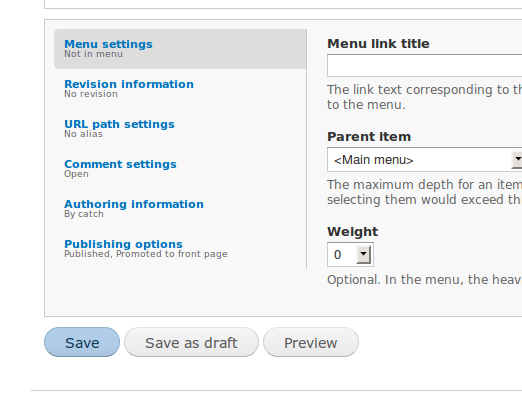
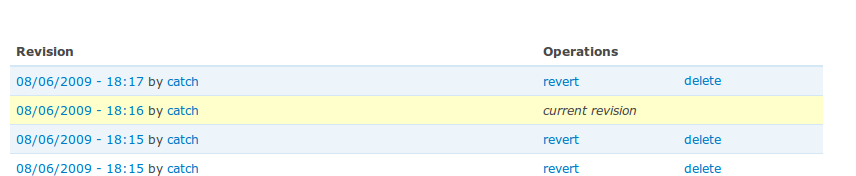
Revisions tab after saving a draft
Comment #68
webchickOh wow, it would be amazingly awesome if this patch coincided with Revision Moderation functionality in core! Ever since I wrote that module I always meant to make it a core patch but got sidetracked with other things *cough* Signatures *cough* D7 maintainer.. ;)
I do have to say that RdeBoar makes a pretty compelling argument here.
Comment #69
catchOK, the 'Save as draft' button now does the following:
Forces a new revision to be saved each time.
Forces the existing revision ID to be the active one if the node is already published.
Also, on the revisions tab, revisions new than the current one get a 'publish' link, revisions older than the current one keep their 'revert' link - courtesy of Bojhan in irc.
When viewing a node with pending drafts, you get a dsm() to tell you there is some (similar to what revision_moderation does) - this is the only current indication that a node has drafts when looking at it, would be nice if it wasn't a dsm() but will leave that open.
Major @TODO: need to be able to find nodes with drafts on admin/content - going to look at that filter now.
Other @TODOs: implement the publish/unpublish buttons / remove the checkbox.
Comment #70
Pedro Lozano commentedA few problems in the last patch. (#67)
1. I have to check the "Create new revision" check box for the "Save as draft" button to work or I get a blank screen when pressing "Save as draft".
2. When you create a new revision and "Save as draft" the modified content gets saved on both revisions, current and the newly created, so the changes are actually made public immediately.
3. There is no way to edit the Draft. :-?
4. When you edit and save the current revision it gets the first position in the list of revisions and it doesn't look like there is a draft anymore.
Anyway, I like catch's aproach more than the previous patch which was a usability disaster in my opinion. Like webchick I also wish this patch to be a "Revision moderation" in core instead of a "Workflow in core".
Comment #71
Pedro Lozano commentedProblems found on the patch #69
From my previous comment: 1 has been fixed, 2-4 still present.
5. The message "This content has one or more pending drafts, view revisions to review and publish." allways appears when creating a new node even if no draft or revision was created.
6. Suggestion: shouldn't the revisions previous to the current one get a "Revert" link and the newer ones get a "Publish" ?
Comment #72
catchAdded the filter on admin/content/node. Currently in the status dropdown but that's easy to change. Note those filters appear to be broken in HEAD - see #542206: admin/content filters are broken but I verified the query returns the right results, so when they all work this should too.
Also, when the node is unpublished, or it's new content, the 'Save' button turns into publish (when it's already published, I've kept it as Save). Added unpublish button as well.
Remaining TODOs:
Better 'find my drafts' workflow - especially when editing content with drafts (since that always defaults to the published draft) - this is easy to do with dsm() but like the message on node view, could do with something nicer.
Tests.
Looks like the 'save as draft' button was optional a setting before, I'd quite like to tie it to revision settings a bit more but needs some thought.
However, I think it's far enough along that we could do with some reviews at this point.
Comment #74
catchFixed tests.
Comment #76
Pedro Lozano commentedSeems like this is a bug in core fields module. I created the issue #542290: Make it easier to create draft revisions in core.
Comment #77
rdeboerWow catch! I only suggested to not do something -- you've certainly over-delivered! All while I was sleeping (live in Melbourne)!
The approach you have followed would indeed quickly implement the immediate problem of creating drafts. It is also the heart of the approach followed in Revision Moderation as well as Revisioning.
The latter is a module I wrote earlier this year after webchick (Hi remember me?) and add1sun were too busy doing all their other wonderful stuff.
I had originally hoped to apply a modest patch to Revision Moderation, but soon found that to do drafts and revisions properly, i.e make it work for published as well as unpublished content without giving moderators the God-like powers of administer nodes, as well as combining it with modules like Workflow and TAC/TAC-Lite, you quickly run into all sorts of issues related to clumsy permissions in D6 core. I ended up having to write thousands of lines of code, including a Module Grants to work around the D6 core deficiencies.
What I'm saying is: catch's initial approach will work in the short term, but it has caveats, so let's be careful not to open a can of worms (I got stuck with that for months....).
Like that little chestnut Pedro Lozano mentions in #71, number 6: distinguishing between "revert" and "publish". Did you know that core D6 when reverting a revision makes a new copy (with a vid greater than any other), thus changing the (pseudo-)status of any "drafts ready to be published" to "previously published, archived revisions"?
You will find that you can't do this reliably based on the vid (or the modification date for that matter). But if we had a status attribute on node revision (rather than node) we could!
It is for this reason I propose just a simple status code on the node-revision table, just to provide a solid connection point for contrib modules to build their revisioning, publication workflows etc on, without actually trying to completely solve these issues in D7 core only weeks before code freeze.
Rik
Comment #78
catchPedro, thanks for the testing, I hadn't checked content, only whether revisions get saved, wil subscribe to the other issue.
Comment #79
catchThe issue is - field_attach_save() always makes the current revision the latest one, so it can query tables with entity->id instead of entity->vid and store older revisions in separate tables. That's a good decision IMO, but it means you can no longer, under any circumstances, have the current revision with a lower vid than the new one. afaik this will break all 'draft' functionality in contrib which takes advantage of the old behaviour so needs to be documented in the upgrade path from D6-7.
Here's a version which works around the field API issue. It's not ideal - it makes saving a draft a more complex operation than saving either a new revision or just updating an existing one, but it's self contained, and at least has the advantage that it'll just be using API functions without any direct queries, and the trickery now only happens on save, not runtime.
So... saving as draft now does the following:
If the node is unpublished, save a new revision, but programatically set $node->changed to it's original value to save the node popping up in the tracker every time a draft is saved. Had to add a couple of lines to node_save() to allow ->changed and ->timestamp to be set programmatically, but that's the only API change here (and would be necessary if you wanted to programmatically save revisions of content for any other purpose).
Then, if the node is already published:
Load what was the 'active' revision of the node (to get the original field values from field API and elsewhere).
Re-save that revision so it's the current vid in the {node} table and field storage is correct, (but both $node->changed and $node->timestamp set programmatically so it doesn't show up as 'new' otherwise).
Delete the older copy of the revision so that we don't keep duplicates around or clutter the UI - we need a node_delete_revision() API function since that code is currently copied from a #submit handler.
With this, the publish/revert links on the revisions tab continue to work, content gets updated correctly, revisions are listed in the correct order etc. etc.
Remaining TODOs, most from Pedro's list:
3. There is no way to edit the Draft. :-?
- IMO this is an issue with the existing revisions UI, we'd want to pre-populate an edit form with the content of a revision. Probably not too hard but needs some design direction, should only be an interface change and hopefully straightforward.
4. When you edit and save the current revision it gets the first position in the list of revisions and it doesn't look like there is a draft anymore.
- that's by design IMO - if I save and publish a new version of the node, then all the drafts are older than the current one.
5. The message "This content has one or more pending drafts, view revisions to review and publish." always appears when creating a new node even if no draft or revision was created.
- this was broken, and I've had to take it out with the new version since it's even more broken, needs to be replaced with a check to see if the timestamp of any revisions is greater than $node->changed (as does the filter).
6. Suggestion: shouldn't the revisions previous to the current one get a "Revert" link and the newer ones get a "Publish" ?
This is done.
TODOs from before - need to devise a way to see that a node has pending revisions when editing it.
Comment #80
yched commentedI'm wondering if a $node->is_current_revision flag, set in node_save(), could help Field API with the issue that field_attach_save() always saves data to both it's 'current_revision' and '
olderother revisions' tables. If$node->is_current_revision == FALSE, we don't save the data in 'current_revision', just in 'other revisions' ? Might be valuable for all nodeapi data, not just fields.I didn't follow this closely, so maybe this suggestion is moot with catch's latest approach.
Comment #81
catchForgot to attach patch, CNR for the test bot, and because it'd be good to get more eyes on this.
Comment #83
catch@yched, my latest approach is definitely a workaround (although potentially some bits of it need to stay in anyway, like messing with the ->changed timestamp) - so if we could enable saving just to revision tables in Field API it'd clean it up a bit I think. However it works well enough to proceed here, whether it's too ugly to commit without the field API change, I leave up to others to decide.
Fixing most/all of the test failures due to button renaming.
Comment #85
catch@RdeBoer - there are plans to open up admin/content to users other than those with 'administer nodes', we may also need a publish/unpublish content permission - I think we can do that a lot easier in core than out, but needs to be worked on parallel to this issue, probably in #301902: Allow more users to see the node admin page and wherever the dashboard tab might live.
On reverting revisions, as in my reply to Pedro Lozano, I think that's by design more or less. However I wouldn't be opposed to a status field on node_revision - that would need to be kept in sync with {node} in core and then contrib modules can have fun there.
Comment #86
catchComment #87
catchNow with links from the node revisions tab for editing a revision - this loads the revision into the node edit form, then you can publish/save as draft from there. We might want to have indications on the node edit form that there are revisions, or offer other ways to get to this page, but IMO this is a fairly non-intrusive way to do it which at least shouldn't be too confusing.
Expecting dozens of tests to fail since we now use 'Publish' for editing too instead of 'Save'. However in manual testing this seems to be working well.
Since the basics are in place, while there's still refinements to do for both UI and code, would appreciate general architectural and UX reviews of this one - I'll probably fix up tests so they don't fail, but otherwise hoping to get some feedback on the approach.
Comment #89
catchMore find and replace test fixing.
Comment #90
webchick#87 makes me want to go leap through the streets in excitement!!!
I was asked in IRC about multiple node values of 'status' vs. a 'draft' column. I've not read the background on this issue, but to me a new column is consistent with the way we treat all other node features (revision, sticky, etc.) Then there's also less of a chance of contrib turning node.status into a horrific pool of horror and crying. (ref: Eaton's presentation on building APIs at Drupalcon DC)
Comment #92
catchAdded draft column - if you save as draft, this gets set, if you specifically publish or unpublish a node, it's set to 0. This lets us find all draft content regardless of publishing status, and lets you do distinguish between unpublished content which was specifically unpublished, and stuff which hasn't been published yet.
Comment #93
jstollerSorry for being late to the game here, but I just found this post. If I understand the latest approach here correctly, it brings a glimmer of hope to what was looking like a bleak future for content moderation.
First off I should say I sincerely hope that this patch is not taken as a replacement for #218755: Support revisions in different states. This may be a small evolutionary step on the journey, but I don't think the changes being made here obviate the need for true multi-state revision support in core.
Along those lines, please, please, please add status, promoted and sticky fields to the node_revisions table! These fields can stay in the node table as well, but I see no compelling reason not to duplicate them in node_revisions and many compelling reasons to do so. This would be a HUGE boon for anyone working on content moderation and workflow modules, avoiding the need for many complicated hacks and workarounds while greatly increasing the scope of what can be accomplished. And as long as you don't pull the fields from the node table I don't expect it would have any substantial negative impact. We're talking big gains for a small price.
The status field is of course the most important to duplicate in node_revisions, but duplicating the other fields would have many uses as well. For instance, the currently published version of a node may not be promoted to the front page, but I might want my current draft revision to be promoted once it is approved and published.
Picking up some discussions from earlier in this thread... If you do decide to move to a three state system—replacing the current two-state not-published/published system—then I would recommend against the proposed not-published/draft/published designations. The distinctions between not-published and draft are too confusing. I think what you're going for is better represented by draft/published/archived. Here 'draft' is any work-in-progress that's intended for publication at some later time, 'published' is content that's fit for public display, and 'archived' is content that you want to store out of your way and out of public view, but not delete altogether. In terms of an upgrade path, I think all currently unpublished nodes should default to the 'draft' state. Admins can then decide which ones they want to tuck away as archived.
Personally I was leaning toward the idea of a multi-value status field, since it seems like it can be more easily expanded in the future to support an arbitrary number of states. But if you're going to add another field than I think it should be 'archive' rather than 'draft'. In this case the status field will differentiate between draft (status=0) and published (status=1) states, but if archived=1 then the status is ignored and the node is not displayed to the public. To me this makes more intuitive sense. It also allows you to see what state the node was in before it was archived, giving you the opportunity to un-archive it and return it to the same state.
It goes without saying (but I'll say it anyway) that this additional field, if added to the node table, should also be added to the node_revisions table.
Comment #94
catchjstoller, I agree with storing that information in node_revision, but not in this patch - that can happily happen on #218755: Support revisions in different states and it doesn't conflict with this at all.
On the 'draft' column, all it means is "this node has pending drafts" - it doesn't impact whether it's displayed or not, at all, unless you're specifically trying to get a list of nodes which have drafts - which will be for administrator facing queries (maybe content author if we add (show my posts with drafts). Whether something is published or not, and whether it has drafts or not, are two different sets of information, so don't need to be collapsed into a single column. A 'workflow_status' column could be added to core - but again, in a different issue please, since 'having a pending draft' isn't a workflow state, it's a property.
Comment #95
catchUpdated screenshots:
Adding a new node:
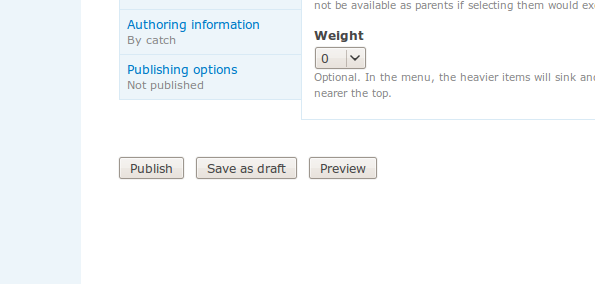
Save as draft (stays unpublished)
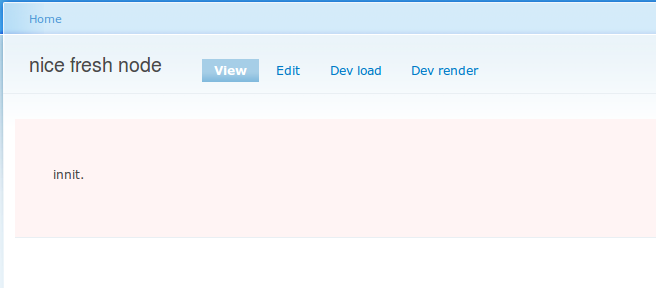
Edit again (delete button appears):

Publish:

Edit again (unpublish button appears)
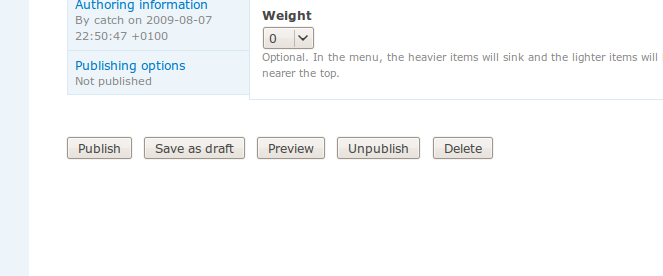
Save as draft (link takes you to revisions tab screenshot posted above):

Comment #97
catchFixing tests again.
Comment #99
catchSmall update via feedback from Bojhan -
Add a message to the node/edit form which informs users of pending drafts, matches the one on node_show().
Always use 'publish' as the operation on the revision tab, the current behaviour is wrong, since we're not reverting the revision, we're publishing it (or reverting the current revision of the node back to an older one) - but we're not reverting the revision itself.
You revert back to something, you don't revert the thing you're reverting back to.
Calling it a day, and won't have a lot of time to work on this over the weekend.
Comment #101
jstollerI've created a new task, #543294: Add status/promote/sticky to node_revisions table. If anyone here is interested in taking that on I encourage you to have at it!
Comment #102
catchFixed up the trigger tests.
Comment #103
rdeboerSorry for delayed reaction -- was in the bush, no mobile reception ...
You're getting through a lot of code catch!
@catch #85
"we may also need a publish/unpublish content permission" -- indeed; a decision needs to be made whether the publish permission is per content type (a la edit, delete for a node) or global (a la view). Based on the feedback we have had on the Revisioning module, we know people will want to be able to assign publication permissions by content type.
"On reverting revisions, as in my reply to Pedro Lozano, I think that's by design more or less. " -- I agree it was designed to be that way at the time, but with the benefit of 20/20 hindsight is it a good design? If a revision is in draft, pending publication, then is it intuitive to authors as well as moderators that reverting the current published revision to a previous one will have the side-effect of obliterating the draft-status of all revisions being worked on to "archived"?
"However I wouldn't be opposed to a status field on node_revision... - Great! That seems to be covered now in #543294: Add status/promote/sticky to node_revisions table
@catch #87
"would appreciate general architectural and UX reviews of this one"
If the distinction between publish and revert is based on vid and/or timestamp only and not on a generic status code on node_revision, will the code be able to handle the following scenario? New content created as a draft (single revision). Content is then published. Content is then unpublished (as opposed to reverted). Does the single unpublished revision now get treated as a draft again? This is important for instance when users request a view or report (through API) of all outstanding drafts awaiting publication. We don't want previously published revisions to be returned in this report or view.
Comment #104
rdeboerI was just wondering how far we're pushing this, i.e. what the scope of the changes under this banner are? By introducing better core support for saving and publishing drafts including associated permissions (all great!), we're moving into the territory of content moderation and publication workflows and the complexity of support for these that comes with it (see also #77 in this thread).
A decision needs to be made and maybe it's been made already on what's in for D7 core and what's out, i.e. to be left to contrib modules and that line needs to be drawn at a sensible place, i.e. we would be wise to avoid giving users "half" a feature.
Just thought I throw in a couple of use cases to ponder, so that the community can be clear on what D7 will be able to handle out of the box.
1) The application of access grants to not-yet-published content. Not sure if this is on the agenda for D7, but as we all know the {node_access} table is ignored for not-yet-published (and unpublished) content, so to create a content publication workflow that controls access based on grants users will have to publish the content first, thus totally defeating the purpose.
See also http://drupal.org/node/408816#appendix
2) By not assigning the new "publish" permission (or even "administer nodes" when sticking to the D6 ways), we can prevent authors from publishing drafts, leaving this to some other role, typically a moderator. However not having permission to publish doesn't stop authors from changing their or others content once published. Is this acceptable?
Comment #105
webchickJust a quick note that this is no longer the case in Drupal 7. See http://drupal.org/update/modules/6/7#hook_node_access_records. Unpublished nodes are subject to the same access as published nodes. There is a permission to preserve the old behaviour.
Comment #106
rdeboerRe #105: I'm glad. That's a great step forward!
Comment #107
catchI think we need to add the permission per-content-type - it would be publish/unpublish content type, and only override the default settings (so no upgrade path required).
It depends whether you consider the node itself to have pending drafts (which all become not-pending when that node is acted upon), or whether the revisions themselves have a workflow state of being 'a draft'. IMO, core only the needs the former, but we should leave room for more advanced stuff in contrib (like scheduling revisions, for example). And #543294: Add status/promote/sticky to node_revisions table should allow for that to happen cleanly.
Currently, when content is unpublished, the ->draft flag is set to 0, so yes that's covered. I don't think I've covered publishing revisions yet, but IMO that should do the same - i.e. if I see three revisions, review them, and publish one, I don't want to have to go and manually reset the other two (or ten) just to take them out of the drafts list.
I want to keep the scope of this issue as narrow as possible - enough to add the ability to 'save as draft' and 'publish' from the node form, without making it harder for contrib and/or further core patches to do something more advanced.
We have an edit own/any permission too, so it's up to site administrators how to distribute those permissions.
Comment #108
rdeboerWe have an edit own/any permission too, so it's up to site administrators how to distribute those permissions.
Those permissions are not quite cutting the mustard in the scenario mentioned. What most users will need is the segregation of responsibilities: authors create and add to content, moderators, potentially edit, then publish. This will now work beautifully in D7 for the initial draft.
But it's only half a solution. It could be seen as promising the users something but than only partially delivering.
Because once this initial draft is published an author can edit it while published, i.e. live for the world to see, bypassing the moderator.
Maybe I shouldn't have mentioned this here, it is perhaps out of scope of this issue and it may sound like a whinge....
I do think the work done here for D7 is awesome! :-)
Comment #109
Crell commentedIf we take the permission route, then what we end up with is "Edit TYPE nodes in state STATE", for all combinations of TYPE and STATE. Plus the same for delete, and edit own and delete own. That's a LOT of permissions. :-)
#537862: Convert hook_access() to hook_node_access() for more flexibility will allow the access controls to be more flexible in contrib, so that helps some as we could potentially have a "nodeperms_advanced" module in contrib that has a few dozen more fine-grained permissions, or some other ACL mechanism. However, that still requires working around the "administer nodes" restriction on viewing/editing unpublished nodes.
As stated above, we don't need to enable all kinds of workflow in core; we just need to make sure that we don't get in the way of any reasonable workflows that live in contrib, and that the core workflow is at least reasonably sane.
Comment #110
Crell commentedFollowing up on #109, what if we added "View all unpublished nodes" and "Edit all unpublished nodes" permissions for core. That's separate from "administer nodes" with all of its site-destroying power. If you want something more fine-grained, such as per-type view/edit/delete perms on unpublished nodes, hook_node_access() allows a contrib module to handle that however it wants since the full $node object gets passed in anyway. That could be creating a dozen new permissions, or role, or time since posting, or whatever.
The same all-or-nothing parallel could be done for draft states, again allowing contrib to add more fine-grained controls if it wants. As long as contrib *can* do more than core does, that's good enough.
We just need to allow a contrib module enough access to be able to grant permissions more selectively than core does and get out of the contrib's way.
Comment #112
catchI started adding 'view unpublished content', then I realised we already have a 'bypass node access' permissions separate from administer nodes - which seems OK to me.
Attached patch fixes the conflict, and adds node_delete_revision($nid,$vid) as an API function.
I think we mainly need to define what the minimum functionality necessary is for content which defaults to published, defaults to unpublished, with a couple of core permissions - then see if we need to add any permissions or access checks on the buttons which aren't there yet. I'm not going to have time to do that until possibly after the weekend, but if someone could come up with maybe user stories (not for workflow, just for X-type of user needs to do X), and compare that to the situation in the current patch, that'd be really handy.
Comment #113
webchick@jstoller, you seem like you'd be a perfect person to handle user stories. Care to come up with some?
Comment #114
jstollerStories, huh? I'm mostly thinking about more involved workflows, but I'll see what I can do.
Let me make sure I understand what this patch actually does. As I understand it, each node will now have both a 'status' field and a 'draft' field associated with it. This provides four posible states for the node, as follows:
First let's look at the initial publication of a node. As I see it, there are essentially six basic user types when it comes to these workflow issues:
The General Public
These users cannot create or edit anything. All they can do is view published content (s=1).
The Contributor
This user can create new nodes and submit them, but his powers end there. Once the Contributor saves a node, they can no longer edit it. In fact, they can't view it until it is published. When a Contributor creates a node he should see [Preview] and [Submit] buttons. Depending on the particulars of a given site, the [Submit] button would either save it as a draft (s=0 && d=1) or as a published node (s=1 && d=0).
The Writer
A Writer can create a new node and save it as a draft (s=0 && d=1). She can also edit drafts of nodes which she created, but not those of other users. When editing a draft, she would see buttons for [Preview] and [Save as Draft]. Some sites may also want to allow their Writers to delete unpublished drafts, in which case a [Delete] button would also be visible.
The Reviewer
A Reviewer cannot create or edit anything, but he can view unpublished drafts (s=0 && d=1).
The Editor
An Editor is much the same as a Writer, except she can edit drafts of nodes whether or not she created them. Otherwise all the same rules apply.
The Approver
An Approver is responsible for the publishing and un-publishing of content. In a perfect world an Approver shouldn't be able to create or edit content at all. He should only be able to review it and approve its publication (for those executives who must approve content but can't be trusted with editing tools). However, given that this discussion is solely about the editing form, let's assume we are dealing with an Approver who is also an Editor. In that case he has all the rights of an Editor, but can also publish, archive and delete content. When editing a draft, he would see buttons for [Preview], [Save as Draft], [Publish], [Archive] and [Delete].
Once a node has been published, things get decidedly more tricky. The options available greatly depend on whether content moderation is permitted. For the moment let's assume that content moderation is not supported in Core. That means Core's default functions will not support any transition to the "published, pending update" state (s=1 && d=1). In this case, only an Approver would be able to edit a published node, and he would have all the same options available when editing a draft.
If my wildest dreams were to come true and Core offered this basic support for content moderation, then the following would apply:
The Writer
A Writer cannot edit a published node (s=1 && d=0), but if a node she created is "published, pending update" (s=1 && d=1) then she can edit the draft revision. When editing a draft she would still see buttons for [Preview] and [Save as Draft], but saving a draft would not affect the status of the published revision. Whether or not the site permits Writers to delete unpublished drafts, she should not be allowed to delete a node with a published revision. If you want to get fancy, you could add a [Delete Draft] button that deleted all revisions created since the published revision, returning the node to the standard published state (s=1 && d=0), but I dare not hope for this.
The Editor
An Editor would be treated the same as a Writer, except for being able to edit drafts of any user.
The Approver
When editing a published node (s=1 && d=0), an Approver would see buttons for [Preview], [Save New Draft], [Save as Draft], [Archive] and [Delete]. Saving a new draft would create a new draft revision of the node, without unpublishing the current revision, thus changing its state to "published, pending update" (s=1 && d=1). Saving "as" draft would make the currently published revision of the node a draft, thus changing its state to "draft" (s=0 && d=1) and pulling it from public view. When editing a published node that already has a pending update (s=1 && d=1), an Approver would see buttons for [Preview], [Save as Draft], [Publish], [Archive] and [Delete], much as she does with any other draft node. Here saving a draft would not affect the status of the published revision, much like it behaves for the Writer and Editor.
If a node is archived (s=0 && d=0), then it is petty much out of everyone's way. In fact most user's may not even be able to see it. Probably only the Approver (and maybe the Editor) would be able to revive it. The options available to them should be the same as if they were editing a draft.
I'm not sure if this is what you were after, but I hope it provides some useful insight. You'll notice that I did not use [Unpublish] anywhere in these examples. I must reiterate that the distinction between not-published and draft is way too confusing from a usability perspective. First you create a draft, then you publish the draft, and when you're all done with it you either delete it or archive it. "Draft" and "archived" are both unpublished states, but the differences in their use are better understood at first glance than "draft" and "not-published".
Comment #115
catchThanks jstoller, I'll try to go through and see how close we are to each of these:
This is all correct, except the current patch currently allows for a published node to have a draft state - s1/d1 and shows a 'save as draft' button at all times to users with view/revert revisions.
No change here.
I was thinking about this user only getting a 'save as draft' button when the default workflow state is unpublished, and only getting a 'publish' button when the default workflow state is 'published'. This might need some tweaking in the current patch, but sounds close to what we have.
Currently the only way to edit / publish drafts is to have access to the 'view revisions' and 'revert revisions' permissions - which lets you view/edit/publish any revision. I'm wondering if we should look at dropping the revert revisions permission and tie this more closely to edit own/edit any content types (in combination with view revisions). This combined with a publish/unpublish content permission would give us more fine-grained control over what you can do on that tab.
This is covered by the 'bypass node access' permission, which is already in core.
We have 'unpublish' instead of 'archive' (I'd be concerned about archive as a button since it sounds too similar to blog archives), but otherwise this is covered.
This misses the use-case for people who want to work on drafts of their own content, or a site like Drupal.org with a large number of contributors with all-powerful permissions but no formal publishing workflow who still might need to work on drafts and share those with other users (as happens for front page posts).
Currently, if a node is published, those with 'view/revert revisions' permissions will get a 'save as draft' button, which saves a new revision, keeps the existing one active - they'll then get a notice on the node view that there's pending revisions, and the ability to review this from the revisions tab. It's possible we could combine that situation with a 'publish/unpublish' content permission, so that some users could be given permission to create new drafts on published content, but not publish the new drafts, which would be what revision moderation allows you to do.
Have to go out now but I think we should look at adding the following to the current patch:
1. Add publish/unpublish content permissions
2. update the revisions tab to take into account the improvements we've made to node-level permissions, possibly using edit own/edit any/delete content, and probably publish/unpublish for the 'publish' and 'delete' links on there.
Comment #116
jstollerThis is a necessity, and a likely use case for the Writer and Editor users in my previous examples. I have many users in my organization that I need to give permission to create new drafts of published content, but who will not be allowed to publish content on their own. As for the revisions, if someone can save drafts of a node, it makes sense that they should be able to view the revisions of a node. If they don't have right to publish a node, then they of course shouldn't be able to revert a published node to a previous revision, but they should be able to create a new revision in the draft state that's a duplicate of the previous revision.
Now that I think about it, how are you handling the editing of revisions? In my mind, whenever someone edits a node, they should be editing the most recent revision. Revisions should be a true historical record of a nodes life. Let's say we have a node with four revisions (vid:1-4) and the fourth one is published. If I go in and revert to revision #2, Drupal shouldn't just move the status=1 tag from vid:4 to vid:2. Rather it should duplicate vid:2 as a new revision (vid:5) and mark that revision as published. If I make some changes and "Save as Draft" then it should create a new revision (vid:6) in the draft state with my edits, leaving vid:5 in the published state. At this point, no matter what revision I am viewing, if I click on the edit tab I should be taken to the edit screen for vid:6. If I decide I really want to work from vid:3, then I go to that revision and click a [Copy as Draft] button (or something along those lines), which would duplicate vid:3 as vid:7, allowing me to edit it. Once I'm happy with the changes I can publish my draft, which will move the status=1 tag from vid:5 to vid:7, and the whole process starts over again.
Comment #117
catchAt the moment, the edit tab on the node gives you the current active revision (as it always has done), but also informs you that there are pending drafts if that's the case.
Revisions also have an 'edit' link from the revisions tab, which just pre-populates the node/edit form with that revision, and forces a new revision to be saved (either as a draft or published, depending on permissions) - which sounds like what you want.
Comment #118
moshe weitzman commentedsubscribe. i'm late to this great party.
Comment #119
catchAdded 'publish $type content' permission, and removed 'revert revisions'.
Reverting revisions has now been replaced by 'edit $type content' revisions (own or any), in combination with 'publish content'.
Being able to publish drafts - whether the content is already published or not, now requires the 'publish content' permission. You can also only unpublish content if you have the 'publish content' permission (this might need renaming to 'change publishing status' or 'publish/unpublish'). This allows for having users edit content, but only be able to save new drafts. Note I haven't tested any of the recent changes, this could do with both a UX run through, and some simpletests at this point.
Comment #120
webchickTagging appropriately.
Comment #122
dries commentedSo ... I don't understand why we introduced a new field 'draft' instead of extending the existing 'status' field. In my mind, draft is a status like published and unpublished. It acts like an unpublished node in all respects, but it has a different semantic meaning. Unpublished means I don't want the post published anymore, where saved as draft means I intend to publish the post.
This semantic difference is important for UX. On the node admin page, I want to be able to filter nodes by status 'draft' so I can get an overview of all the nodes that I'm still working on without showing unpublished nodes.
In the proposed patch, you can have
status=1 && draft=0(the current revision is published and there are no pending draft revision) andstatus=1 && draft=1(the node is published, but there is another revision pending). I think it is weird how we mix states and revisions here -- I don't see how this gives us the usability improvements that we're after.By introducing a separate field, we create 4 states. If we keep it as one field, we only have 3 possible states --
status=1 && draft=1doesn't exist when there is no separate draft field. Three possible states are much easier to stomach in the 80% rule. One possible solution for advanced workflow situations would be to have a 'status' field in the {node_revisions} table -- that {node_revisions.status} field could also have unpublished, draft and published as states. This would, in fact, bring more power to the revision system because revisions would also benefit from the semantic difference between unpublished and draft. For example, you could have multiple 'competing' follow-up revisions in draft. Something that wouldn't be possible with the proposed patch.In other words, it feels like we're on the wrong track with this, as demonstrated by the permission nightmare we're going through. I believe my proposed solution would simplify that greatly, provide a better experience for the user, and support more complex workflows. That said, maybe I'm missing some important facts. :-)
Comment #123
catch@Dries, the only reason we have to consider changing some permissions here, is because we're trying to offer save as draft to more users than those with 'administer nodes' permissions. All previous patches got around that issue by simply making this an admin-only feature, and would have to introduce the same permissions as we're doing here, if they were to open up creating drafts to more users.
Here's a hunk from the last patch on here using ternary status - it looked like a code maintenance and usability nightmare to me with all the different conditions for showing different buttons and what they're named, and that's when only offering these buttons to admins, hence trying this approach instead.
Also I disagree that adding a new permission will cause a nightmare, there are many issues with tying published/sticky etc. so tightly to 'administer nodes', and http://drupal.org/project/override_node_options and http://drupal.org/project/fasttoggle both exist in contrib trying to deal with our inflexible approach to this - not to mention flag and the various workflow modules which more or less swap them out. I need to update the patch to make the permissions map to the desired button states - when that's done I think the logic will be quite simple there.
Every site I've ever worked on which has needed drafts, has wanted to be able to make new drafts of published content - so as mentioned before, having a draft pending is a property of the node, not its status - in the same way we don't collapse promoted to front page, or sticky into node->status either. Published/unpublished is a boolean for whether a node is visible or not, which applies in all cases even when using node access modules and/or workflow, I don't think we should dilute that for introducing an admin-only draft state which is functionally identical to 'unpublished' in all other respects.
I think we should look at moving the 'draft' column to the node_revisions table , and then use that to determine if a node as any pending drafts - slightly more complex queries but a bit more flexible. There's a separate issue to add published/sticky/promoted to the node_revisions table for historical logging, but that doesn't help here - since only one revision can be 'active' at any one time i.e. node.vid = node_revision.vid. So having more than one revision 'published' isn't an option, even if we might want to record that status when saving a new revision Either way, you'll still have a filter on the admin content page for 'draft', that's already in the patch.
Comment #124
catchOK here's a cleaned up patch with proper usage of the 'publsh any $node-type' permission (which the more I think of it, needs to be 'change publishing status for $node->type content' but not made that change yet.
'draft' is now moved to the node_revision table. Since you can now have multiple competing drafts which will stay drafts even if one of them is published, we probably need a way to clear all pending drafts - easy to add but will wait on more feedback for the rest of this.
Still needs simpletests but should be getting towards a state where the behaviour is stable enough to write those.
No significant changes visually since the last screenshots, but added one for the draft filter.
Comment #126
catchFixing those test fails.
Comment #127
seutje commentedshows up as "Change publishing status for %type_name content, regardless of its author." in the description on the permissions page
added patch should fix that
Comment #129
seutje commenteddamn tortoise...
Comment #130
dries commentedEvery site I've ever worked on which has needed drafts, has wanted to be able to make new drafts of published content - so as mentioned before, having a draft pending is a property of the node, not its status - in the same way we don't collapse promoted to front page, or sticky into node->status either.
I agree, but I don't see how that affects my proposal. If the ternary status field is in {node_revision}, you can have multiple draft revisions. {node.status} is just a cache of the last published {node_revision}.
I'm afraid I don't see the advantage of the proposed approach _yet_.
In fact, I tried the patch and it isn't working as expected. When I edit a published article, and I click 'Save as draft', the node it still published after saving it. That just doesn't make sense from a usability point of view. First, 'Saving as draft' should unpublish the node. The mental model of people is that drafts are not public. Second, 'Saving as draft' creates a new revision even though the 'Create new revision' checkbox was unchecked. That is unexpected and not what I wanted or expected to happen. I wanted to save the current revision as draft and move it from published to unpublished.
If I want to create a new revision and save that as draft (to 'branch' my node), I'll check the 'Create new revision' checkbox and click 'Save as draft'. But unless I check the 'Create new revision' checkbox, I want all operations to apply to the current revision. I'd think that is the 80% use-case and how all other tools work.
Most users don't have the 'view revisions' permission enabled. Does that affect this patch?
Comment #131
catchI'm not sure I understand this - we could add a ternary status field to node_revision - so published/unpublished/draft - but that still leaves node.status as a binary field (and given how node revision saving works, would result in a fair bit of special casing). Or do you mean also having a status field on node which is ternary - in which case there's no easy way to have a visible node with pending drafts.
That's by design. You have a choice between 'publish', 'save as draft', and 'unpublish'. Publish allows you to publish what you've just written (whether the current status of the node as a whole is published or unpublished), 'Save as draft' always saves a new revision, without affecting the current status of the node or the active revision, unpublish unpublishes. The only button which doesn't appear all the time, is the 'unpublish' button - since that's not needed unless the node is already published.
For 'view revisions' - if users can't edit content or view revisions, they can still save drafts - in the same way they can save unpublished content now depending on default settings. For users with edit own content permissons saving drafts, they also need 'view revisions' to be able to find and edit new drafts of published content.
Re-rolled seutje's patch to remove CRs.
Comment #132
dries commentedThat's by design. You have a choice between 'publish', 'save as draft', and 'unpublish'. Publish allows you to publish what you've just written (whether the current status of the node as a whole is published or unpublished), 'Save as draft' always saves a new revision, without affecting the current status of the node or the active revision, unpublish unpublishes. The only button which doesn't appear all the time, is the 'unpublish' button - since that's not needed unless the node is already published.
Yes, and my point was that that is the wrong design for two reasons.
First, it doesn't map onto my mental model. In any other application I use, draft means unpublished. In any e-mail application, 'Save as draft' means unsent. In Wordpress and other publishing tools, 'Save as draft' means unpublished. In none of these applications, it creates 'forks' of my posts.
Second, I don't want to be forced to using revisions when I don't want to. Drupal shouldn't force me to create a new revision, it needs to give me the option to, because in 90% of the cases, I don't actually want a new revision. Instead I need to unpublish the node, and than save it as draft or will that also create a new revision too? I feel strongly that revisions shouldn't come into the picture unless the user actively asks for it.
Comment #133
catchI don't think e-mail is a good comparison with web publishing. However whether a node is published or not, 'save as draft' won't publish it - so that's the same thing more or less. The equivalent to having the save as draft button to unpublish the node, is the recall functionality in Exchange/Outlook - if I go to edit a 'sent' item, an e-mail application will start that as a new draft. Also wordpress is designed almost solely for single user blogs, on a single user blog, I don't see why you couldn't just save unpublished content without having a separate status - admin/content will show you the most recent stuff anyway and it's only rarely you'll be unpublishing your own posts. If we introduce this it should add something beyond admin users being able to find one type of unpubiished content a bit easier.
'Save as draft' with revisions gets us a step closer to google docs / google presentations-style autosaving - where you have a consistent history of your content which can be referred to, the ability for multiple people to work on content simultaneously etc. Obviously a 40k patch with about 15k real code changes only gets us a tiny way towards that, but google docs doesn't ask you if you want to save revisions or not either, nor does it unpublish your presentations when you start working on them again.
I think we can probably remove some of the reliance on revisions here, and tie that closer to the checkbox though. But I think we have two fundamentally competing ideas of what a 'draft' is, and what adding this to core should mean - I'd rather leave things as they are in HEAD(really not that bad a usability issue compared to some of our other ones), than do either approach wrong.
Comment #134
dries commentedI think the Google Docs comparison is a bit flawed. You never have to 'Save as draft'. It doesn't compare IMO.
The way to get Google Docs style revisions in Drupal would be to have a global per-content type setting to create new revisions for each publish operation, including 'Save as draft'. I don't think we should force that to happen. With the proposed patch, we create inconsistent behavior. Some changes will create a new revision (e.g. when you click 'Save as draft') but other changes won't (e.g. when you click 'Publish').
I think if we do what I propose we do, we'll have both, depending on the default revision behavior. If you enable revisions on posts at the node type level, both 'Save as draft' and 'Publish' should create new revisions in a consistent way. If you don't want revisions, 'Save as draft' shouldn't create revisions either.
In other words, I think we can have both and let the user choose. This would be ideal, because some people are using Drupal for blogging, while others are using Drupal for much more complex purposes. Supporting both is probably the only viable option.
Comment #135
catchSo with per-content type revisions behaviour, editing a published node and hitting the 'save as draft' button.
Content type 1:
Revisions are enabled, the draft is saved as a revision, existing revision remains active, node itself remains published.
Content type 2:
Revisions are disabled, saving as draft unpublishes the node.
I don't see how that's less confusing than having a some extra node revisions lying around.
Comment #136
webchickHm. I'm guessing we'd need to tie the "Save as Draft" button to the revision checkbox state. So it would show up on all new nodes, and it would toggle on/off with the revisions checkbox.
Comment #137
dries commentedRe #135: it would only be confusing if the site administrator choose to make it confusing and configured it in a non-consistent way. Compare that to the proposed patch, which is always confusing. :P
Comment #139
Bojhan commented-
Comment #140
Bojhan commentedLets try to peruse an solution that doesn't require an option, I think its taking the easy-route putting the problem in the user hands instead of trying to find a solution our selfs. This is not functionality that should require configuration.
Comment #141
Anonymous (not verified) commentedActually, in Wordpress, one can publish a post, go back and edit the post that's already been published, and it does indeed support saving, or 'autosave' of the new 'draft' without editing the existing published version until one is ready. Thus doing away with this strange idea that a 'draft' can only occur on a node that's never been published.
http://support.wordpress.com/autosave
Comment #142
realityloop commentedIn response to #132
Dries, it may map onto your mental model easier if you thought of it as a pending revision rather than a saved draft, it makes more sense that way to me.
The save_as_draft module for example only saves a revision when checked, you don't need to enable revisions all the time on the content type for it to work..
Comment #143
rdeboer#132: I don't want to be forced to using revisions when I don't want to.
I may misunderstand the context, but there are situations where users should NOT have this choice, e.g. where organisations are required (e.g. by law) to keep a full log/audit-trail of all modifications made to a piece of content, including the dates & times these changes were made and by who. In other words the "Save as draft" or "Save as revision" functionality is mandatory in these situations and users must not have the option to use it for the content type(s) configured this way by the administrator. In these cases every press of the "Save" button should create a new draft/revision and the "Save as draft" button shouldn't be there at all.
From #135: Revisions are disabled, saving as draft unpublishes the node.
Am I to read this as a user presses the "Save as draft" button only to find that as a side-effect the (previous version of) the content is now no longer visible to the public?
I must agree with catch that having the "Save as draft" button affect the published/unpublished status of content would be very counter-intuitive....
Comment #144
jstollerI agree with Dries that a ternary status field makes the most sense here. Ideally I'd like to see it implemented in a way that allows for expansion to more than three states in the future, but I'm trying to be patient on that one. For now I can see something like...
This field would appear in both the {node} table and {node_revisions}. However, only one revision of a given node can be in the Published state at any given time, and only one revision can be in the Draft state. You may have many different revisions, but in a three state system like this you can really only have one that is truly pending publication, just as you can only have one published revision at a time. Thus if vid:3 of a node is Published and vid:4 is Draft, if I save a new draft (vid:5) the status of vid:4 must change to 0, and when I publish vid:5 its Status changes to 2 and the status of vid:3 changes to 0.
I think I understand catch's desire for a Draft field as well. This is a property of the node and therefore should only appear in the {node} table, not the {node_revisions} table. I see it following these rules:
I don't know if this is over complicating things, but it occurs to me that you might want to consider using the Draft field to store the vid of the revision that's in the Draft state, rather than just making it a binary field.
As for what buttons appear and when... speaking from personal experience, my users are not going to be able to figure out a complex combination of buttons and check boxes to determine whether they're saving a draft and if that draft is a new revision or they're saving over the published version. In order to provide a workable user experience, I need to provide all the options as simple buttons that remove as much ambiguity as possible. Perhaps some content types will use revisions and others will not, but that is something that I as the admin should be able to set, without my users needing to deal with the messy details.
I think the Workflow Settings for a content type needs to have two settings for revisions. First, I should be able to enable or disable revisions all together for that content type. If I enable revisions, then I should be able to set the default to save a new revision or not. If I want to enforce this setting I can select a default and then use access permissions to hide the check box from all users on the edit forms.
Assuming I have the appropriate permissions, my options when editing a node should be as follows:
When Revisions Are Disabled...
If revisions are disabled and I'm editing a newly created node:
[Preview]
[Save as Draft] — Saves the edited content with Status=1.
[Save and Publish] — Saves the edited content with Status=2.
[Delete]
If revisions are disabled and I'm editing a Draft node:
[Preview]
[Save as Draft] — Saves the edited content with Status=1.
[Save and Publish] — Saves the edited content with Status=2.
[Unpublish] — Changes node to Status=0, without saving. Display warning that changes will be lost.
[Delete]
If revisions are disabled and I'm editing a Published node:
[Preview]
[Save as Draft] — Saves the edited with Status=1. Display warning that node will be pulled from publication.
[Save and Publish] — Saves the edited content with Status=2.
[Change to Draft] — Changes the node to Status=1, without saving. Display warning that changes will be lost and node will be pulled from publication.
[Unpublish] — Changes the node to Status=0, without saving. Display warning that changes will be lost and node will be pulled from publication.
[Delete]
If revisions are disabled and I'm editing an Unpublished node:
[Preview]
[Save as Draft] — Saves the edited content with Status=1.
[Save and Publish] — Saves the edited content with Status=2.
[Change to Draft] — Changes the node to Status=1, without saving. Display warning that changes will be lost.
[Change to Published] — Changes the node to Status=2, without saving. Display warning that changes will be lost.
[Delete]
When Revisions Are Enabled...
If revisions are enabled and I'm editing a newly created node:
[Preview]
[Save as Draft] — Saves the edited content with Status=1.
[Save and Publish] — Saves the edited content with Status=2.
[Delete]
If revisions are enabled and I'm editing a Draft node revision:
[Preview]
[Save as Draft] — Saves the edited content with Status=1 (respecting the "new revision" check box).
[Save and Publish] — Saves the edited content with Status=2 (respecting the "new revision" check box).
[Unpublish] — Changes the revision to Status=0, without saving. Display warning that changes will be lost.
[Delete]
If revisions are enabled and I'm editing a Published node revision:
[Preview]
[Save as Draft] — Saves the edited content as a new revision with Status=1.
[Save and Publish] — Saves the edited content with Status=2 (respecting the "new revision" check box).
[Change to Draft] — Changes the revision to Status=1, without saving. Display warning that changes will be lost and node will be pulled from publication.
[Unpublish] — Changes the revision to Status=0, without saving. Display warning that changes will be lost and node will be pulled from publication.
[Delete]
If revisions are enabled and I'm editing an Unpublished node revision:
[Preview]
[Save as Draft] — Saves the edited content with Status=1 (respecting the "new revision" check box).
[Save and Publish] — Saves the edited content with Status=2 (respecting the "new revision" check box).
[Change to Draft] — Changes the revision to Status=1, without saving. Display warning that changes will be lost.
[Change to Published] — Changes the revision to Status=2, without saving. Display warning that changes will be lost.
[Delete]
Comment #145
rdeboerRegarding the draft flag on the node object....
I tend to agree with catch's assessment that:
"...we should look at moving the 'draft' column to the node_revisions table , and then use that to determine if a node as any pending drafts - slightly more complex queries but a bit more flexible."
Implementations aside, unlike the published/unpublished flag, the draft/pending "flag" w.r.t. to a node is not really a property of the node that you can flick on or off. It is a derived state, a function of the collective state of the node revisions/drafts.
As an aside, after reading #144: ... and only one revision can be in the Draft state.
I don't think this is true. Think of a Wiki-like situation where multiple authors create new drafts/pending revisions, to be reconciled by an editor/moderator prior to publication.
So I'd say that a "node in draft" is a node that has at least one draft associated with it.
At the same time one of a node's revisions may be published. So applying "draft", "published", "archived" concepts to a node can lead to confusion, because really a node can be all three at the same time, via its revisions.
But an individual revision can only be in one of these states at a time.
Additionally, since only one of a node's revisions can be published, a published/unpublished flag on a node makes sense, although it certainly isn't the only way to go about it.
However the "draft" flag on node is not a great implementation.
As pointed out by many, it is the node_revision that should have some sort of status indicator. Not a published/unpublished flag a la node and not a simple "draft" 0/1 flag either, because a node revision may have more states/statuses it can be in. For example, a status code (int not bool) on the node revision allows one to distinguish between a draft that has not yet been published and a revision that was previously published, i.e. now archived. The distinction between "never published" and "previously published" as opposed to simply "not published" is important for many a moderation/publication workflow scenario.
It doesn't stop there of course, drafts/revisions may be "in review", "obsolete" etc...
I guess I'm partly reiterating #543294: Add status/promote/sticky to node_revisions table and #218755: Support revisions in different states here.
... and hoping to avoid duplication and inconsistencies that may arise from trying to have a "draft" flag on node correctly reflect what the node revisions already tell us.
In short: putting a multi-valued status code on the node_revision is the best bang for buck we can give contrib modules, while at the same time keeping core lean and clean, without too much business logic that we may regret later.
I would suggest to keep things simple and to a minimum as with less than 2 weeks till code freeze there appears to be lack of consensus about the requirements, let alone about how to implement these.
Comment #146
Crell commentedA few comments in no special order, and some thinking aloud:
1) I disagree with a key part of #144: Saving a draft should never affect the currently-published revision. If it does, then there's no value to it. You may as well just unpublish the node.
2) I think at this point it's best to look at node_revision as the primary table of the node system, not node. node is, at this point, a denormalization of node_revision to make normal querying easier. Looking at the schema we're not quite there, though. For instance, date information is not in the node_revision table, which kinda confuses me. But in any case...
If we look at it that way, then node_revision is a tracker for all of the versions that a node has gone through; of them, there is one (1) that is currently published and therefore in {node}. A draft, then, is a revision that is more recently created than the currently published node but not the currently published version.
In that case, we end up with the interesting property that we can derive what the current draft of a node is without a flag:
So vid 2 gets replicated to {node}.
So then:
[Save and publish] --> save to node_revision with published = 1, and replicate to {node}.
[Save as draft] --> Save to node_revision with published = 0.
[Delete] --> Delete From {node_revision} on nid.
And if "revisions" are not enabled, then we simply delete a specific revision after saving.
Hm, of course, thinking about that, it means that we cannot unpublish a node per se other than deleting it from {node} entirely, but leaving it in {node_revision}. I'm not sure that's a good idea, as then we cannot rederive that information from {node_revision}. So maybe we do need the extra flag somewhere. :-)
OK, so what would this extra flag mean? "This was a draft?" "This is the latest draft?"
If we make it a separate boolean:
If it's a combined flag with published, where, let's say 0 = unpublished, 1 = published, 2 = draft:
So both approaches leave the potential for revision records that have unknown meaning, while relying on published state and edited date alone does not but does leave unanswered how to pull a node completely.
I guess I'm still undecided myself. All three approaches have potential issues. The key ideas, though, are:
1) node_revision should be treated as the "primary" table. Disabling revisions on a given node type just means throwing some delete_revision() calls around.
2) The whole point of Drafts is to be able to make edits that will become live but without affecting the currently live revision.
3) We need to figure out what all applicable states mean.
And, I will reiterate, figure out access controls at least enough that we can get out of contrib's way and allow us to build proper review-and-edit-before-publishing workflows that do not involve giving all content editors "administer nodes".
Comment #147
jstoller@RdeBoer:
I disagree. First off, collaborative editing seems like it is a big leap from the issue at hand here (not that I wouldn't love to see it implemented), but even in the case of collaborative editing—at least the way I have seen it implemented—each editor would handle any reconciliation of conflicts on submission of their edits. That way the revisions maintain a true history of the node and every subsequent submission need only be compared to the most recent draft. Having five different authors submit changes at different times as different node revisions, all marked as drafts to somehow be reconciled by a third party later, seems like a recipe for disaster.
Initially I thought the same thing, but the way its been presented in this issue that's exactly what the Draft field is. The Draft field does not indicate the state of a particular revision, but rather it indicates that a node has a revision somewhere which is in the draft state. It is a property of the node, provided in the {node} table for convenience, and not a workflow state. Any indication of workflow state belongs in the status field, which most definitely should be included in the {node_revisions} table.
If you want to distinguish between Draft and Unpublished revisions then you could add a second binary field in {node_revisions}, but I strongly advise against it. Future evolution of this feature (ala #218755: Support revisions in different states) will be much better served if we move to a multi-value Status field now. Currently we may only be dealing with three states, but I still hold out hope that one day Drupal will support an arbitrary number of states, and for that multiple binary fields is impractical.
@Crell:
I'm not sure which part of #144 your referring to. The only time I see [Save as Draft] effecting the currently-published node is when revisions are disabled. Otherwise it would always save a new revision in the Draft state, leaving the Published revision untouched.
Now you're talking! I totally agree. Really I think {node} should mainly be used to store meta-data that applies to the node overall. Any content that could possibly change from revision to revision should be in {node_revisions}.
Comment #148
catch@RdeBoer, yes that's specific point in #144 is something IMO we should absolutely avoid happening in core - especially since it's easy to add an 'unpublish' button as in the current patch. 'Saving as draft' needs to always create a new revision if the node is published regardless of settings since as Crell says "Saving a draft should never affect the currently-published revision. That's the whole point." However seems like Dries is completely opposed to that possibility, so we've got stalemate there.
Also just a note that in the most recent patch on this issue, I moved 'draft' to node_revision and it's no longer on {node} - since we can find out if a node has any pending revisions by joining/querying on node_revision pretty easily, and when using revisions as drafts, this doesn't have any run-time performance impact (i.e. we only add one simple query to node views for users with certain permissions, and one join on content administration when a filter is added). This makes a lot more sense than how I was trying to do it previously, but means we need to keep track of older revisions better. Quick note that given how field API handles revisions, it's impossible to have node.revision set to a lower vid than the highest one in the table, hence having to handle things with cloning/saving revisions rather than just updating that value, however otherwise Crell's examples look pretty solid I think.
I'm going to be mostly offline next week, so have little time to work on this before freeze. However I'm around on irc if anyone wants to discuss it further, but doesn't seem any point adding more code here until the 'never save a revision unless I ask' vs. ' never change the status of the current revision when saving a draft' dichotomy is dealt with.
Comment #149
mcrittenden commentedSubscribe.
Comment #150
Crell commentedThe revision system is already always-on. Any module that doesn't support it is by definition buggy. The only thing that gets turned on/off is whether or not to check the "make revision" checkbox by default. I see nothing wrong with leveraging the draft system to handle revisions regardless of the default state of that checkbox. If we want to have a "disable revision system for nodes of type X" flag somewhere, that would by nature also disable drafts entirely. There's no worthwhile way around that, IMO. That would also be yet another change from current behavior, which is always-on-just-not-always-used.
Comment #153
jstollerSo then 'draft' no longer indicates a property of the node, but rather a workflow state? If this is the case, then exactly what purpose does it serve? Why not simply allow the status field to have more than two values? Why have two fields that must be analyzed together in order to determine the state of a node, rather than one field that can easily give you all the information you need? I'm afraid that instituting one binary field per workflow state will be leading us down the wrong path, making future evolutionary advancements more difficult to implement.
If you want to separate the "is this node published" information from the "what state is this node in" information, then can we please not call the field 'draft'? Why not call it 'state', opening the door for multiple states in the future? And then the 'state' field should itself have multiple values, as proposed in #144 for the 'status' field. Of course then I'm not sure separating 'status' and 'state' really buys us anything, since all the information you need is now contained in the 'state' field.
Another concern I have about the tables presented in #146 is this idea that once a revision is assigned a state, that state stays associated with the revision even when newer revisions are added in the same state. For instance, take this example from #146:
This shows two revision from the same node in the Published state and two revisions in the Draft state. How do I know which is the real published revision, or even if the node is published at all? Maybe it was once published, but has since been returned to Draft status. And which draft is the right draft? Or was it once a draft, but has now been unpublished?
I think it is very important that only one revision of a node is in any given defined state at any given time. This removes any ambiguity. If there is a revision in the Published state then you know the node is published and that revision is the published version. Same with drafts.
The question then becomes, is it important to know the publication history of a revision, as well as its current state? If that is the case, then you need a second column to store this historical information:
Comment #154
Crell commentedI should clarify that in my example I assumed there was also a created/edited timestamp on each record that I left out. The "currently published to be shown" revision is
SELECT * FROM {node_revision} WHERE nid=:nid AND published=1 ORDER BY created DESC LIMIT 1(which gets replicated to {node} for simpler queries, and "the version to be used for editing" isSELECT * FROM {node_revision} WHERE nid=:nid ORDER BY created DESC LIMIT 1.'course, god knows what happens to the underlying API calls here for node_save() and such, since we're talking mostly about the UI here. The API has to be clean, too. :-)
Comment #155
jstollerYour first query will get me the most recently published revision of a node, but will not tell me if the node should still be considered published or not. Likewise, your second query will get me the most recent draft, but if the node has been unpublished then this is bogus information as well. Nothing in this table tells me the current state(s) of the node. Do you understand my concern? I think we need to separate a nodes current status and its historical status so the later doesn't confuse the former.
Comment #156
catchI wouldn't be opposed to changing node->draft to node->state, then having node->state as a non-binary field. My main concern is we don't mess with node->status - given we have comment->status user->status and other binary flags around core which until now have been nice and standard and predictable.
Comment #157
jstoller@catch: That works for me. In fact, when I was working out the details for #218755: Support revisions in different states I left the binary status field in there (I think I changed it to 'published' though). Mostly I did that for the legacy compatibility reasons you've raised, but also I could easily see there being multiple workflow states that are all considered published, just as we have multiple unpublished states.
So, assuming we don't have any objections to a non-binary 'state' field, how do people feel about the idea of a 'state_history' field?
Based on my current understanding of where things are at, I think we're looking at a table structure that's something like this...
{node_revisions}:
{node}:
Does that seem about right?
Comment #158
jstollerAs for when and by what mechanism a node is forked to a new revision, I think perhaps it might make sense to consider a slightly different perspective. What if the base assumption is that a new revision is always created anytime changes are made to a node's content. Then, instead of a "create new revision" check box, we would have an "overwrite existing revision" check box.
This would allow buttons like [Save as Draft] to work as desired, without being an exception to the rule, since saving a new revision is the rule. And if users (or admins) want to force new content to overwrite old content, preventing multiple revisions per node, then they still have that ability. I think this small shift would permit a much better user experience without sacrificing any functionality.
Thoughts?
Comment #159
realityloop commented@ #158 This makes sense to me
Comment #160
rdeboerThoughts? ... Ok, here are some, mainly re #157:
node->status: agree with catch (#156), don't mess with the existing meaning, it may, no will have wider consequences for existing code, both core and contributed. Also, unlike "draft"/"state" the "publication status" of a node is unequivocally defined: only one revision at a time can be published and it's the one pointed to by node->vid. In other words node->(publication)status is a clean, well-defined implementation -- let's leave it alone.
node->state: as mentioned before, if there is a technical/efficiency reason for duplication/pseudo-denormalisation, then fine -- although I agree with catch#148 the presumed benefit may be overrated. As long as we agree that conceptually the "state" is a derived attribute, reflecting what can be calculated from the revision/draft "states". As such the node->state, if implemented, will be prone to getting out of sync with the "source of the truth" (the revisions). Apart from this, I still don't see a node state of "draft" add much value, as jstoller mentions himself (#147): it indicates that a node has a revision somewhere which is in the draft state. I.e: it doesn't tell me which revision(s) are in draft. So when as a programmer I still have to look up the node-revisions table as my primary source of information, concurring with crell #146, then what's the return on the added complexity and premature optimisation?
[As an aside: despite jstoller's plea in #147 I still feel D7 core should not mandate there will never be concurrent drafts, Whether these are drafts by the same user or drafts by different authors, I can see some use case scenarios for contrib modules, so let's not take it away from them.]
revision->state: Great! We may even pre-define a few constants as state values for contrib modules to use, but I suggest we leave it at that.
revision->status: ??? Please explain... If this is meant to be a bool reflecting publication status (like node->status), then I argue against it. Only one revision at a time can be published and this is already modeled by node->status in combination with the node->vid, the current revision pointer. Again: duplication of information usually means unnecessary logic to keep data in sync and possible data inconsistencies if that logic fails. For example one may end up with multiple revisions having their published flag set at the same time.
revision->state_history ? How much history is captured by this field? If it just means "previous_state" then maybe that's what it should be called?
Also wondering what exactly its purpose is? If this is meant to support the distinction between "never published" and "previously published", which I agree is important for many a moderation/publication workflow scenario, then can't we cover this by reserving a couple of values for the revision->state ?
Comment #161
dries commentedBecause 'status' and 'state' are so similar, maybe 'state' should be 'workflow' instead? (I'm still not 100% on the proposed solution, but willing to give this a shot. Let's go!)
Comment #162
jstoller@#160:
node->status: I agree with your assessment.
node->state: The only reason I included this is because people seem to want this duplication of data. I agree it is not necessary, but neither is node->title, node->promote, or node->sticky. I guess those are in there for legacy compatibility reasons, so if you would rather not compound the issue by adding 'state' to the {node} table, I'm OK with that.
revision->state: In order for something like [Save as Draft] to work out of the box, I think we must define some basic default states. I was going to suggest 0=Unpublished/Stateless, 1=Draft and 2=Published. This seems logical to me, and I think 0 representing a stateless revision goes without saying, but if there is a compelling reason to flip Draft and Published I would not object. However, as much as I think we need to define these states in Core, I would like to see this implemented in such a way that contrib modules can redefine them or create their own set of states.
revision->status: On further reflection, I think you are correct. Publication 'status' is a property of the node overall and does not need to be associated with individual revisions. This flag just indicates that there is one revision of a given node that is currently in a state which is considered "published".
revision->state_history: This field would indicate the last state held by a revision before becoming stateless. Anytime a revision is saved with a state associated with it, both the 'state' and 'state_history' columns would be updated, but when that state is removed, only the 'state' column would be set to 0. While in theory it is possible to achieve a similar effect using special values in the revision->state field, I think the implementation will be much cleaner if we separate this information into its own field. Whether you call it "state_history" or "previous_state" matters not to me, but I think it's inclusion could be very useful to some contrib modules.
As for the question of multiple drafts... I see a publication workflow as an essentially linear process (though one that can loop back on itself repeatedly). Content is moved from state to state on its journey from creation to publication to retirement. In this light, it doesn't make sense for different revisions of the same node to be in the same state at the same time. If I want to edit the draft revision, I want to edit THE draft revision. If there are multiple drafts then how does Drupal know which one to show me? However, while only one revision can be in a given state, many revisions can have been in that state. I think the inclusion of a 'previous_state' field, in combination with the 'state' field, will give you all the information you need for any contrib module you might envision. For instance, lets take your collaborative editing example. Each author editing a node would reconcile any conflicts with the current draft on submission of their edits, creating a new Draft revision and making the previous Draft revision Stateless. But all of these competing drafts—though currently Stateless—would still be listed as Drafts in the previous_state column. So an editor could go in and compare any number of these drafts, reconcile the differences as he sees fit, and save the end result as yet another new Draft, or a Published revision. Do you have other use cases that would not be served by the inclusion of 'state' and 'previous_state' fields in this way?
While we're on the subject of database fields, can someone explain to me the purpose of node->moderate? Is this a property of the node, or should it be put in {node_revisions} along with promoted and sticky?
Comment #163
jstoller@Dries:
Personally I think 'state' is a better descriptor for this field, and I can see some potential uses for 'workflow' to cover other needs in future enhancements. If, as RdeBoer suggests, 'status' only appears in the {node} table and 'state' only appears in {node_revisions}, then I think concern over any confusion should be greatly lessened. Does that work for you?
Comment #164
rdeboer@jstoller, #162: well it looks we're gravitating towards consensus!
"If there are multiple drafts then how does Drupal know which one to show me?"
Well, Drupal can show a list of all drafts/revisions ordered by timestamp, like it already does. To see the content of a draft/revision the user clicks on the one they want.
"I see a publication workflow as an essentially linear process"
But that, in a broader sense, is my point... other people may not see it the way you see it. Or the way core sees it. We should be careful not to implement too much. By this I mean locking the community into a fully-fledged but narrow solution, a mould that contrib modules find hard to break. In my opinion, core should offer useful neutral, transparent, building-blocks and hooks rather than dedicated solutions that are hard to alter.
Anyway... the whole multiple-drafts discussion will go away if we settle on not introducing a draft flag on node, but instead having a generic non-binary "state" field on revision.
But if you want another real-life use-case for multiple concurrent drafts then here's one a Revisioning user mentioned to me. And it doesn't even involve a publication workflow as such. The person in question uses a small set of drafts (revisions) of a certain content type as starter templates for future content. The templates themselves are never published, they're just copied into into a new draft/revision which is then fleshed out further and published.
Whether in your terminology these would be classified as "drafts" or "stateless" revisions isn't so much the point. The point is that core should allow multiple revisions of a node to be in the same state at the same time. Because someone may need it. Let's not close that door on them.
Comment #165
jstollerAfter thinking about it some more, I think the second state column should be called 'last_state' (rather than 'state_history' or 'previous_state'), since it indicates the last defined state held by a revision.
@RdeBoer: I see no reason why your example couldn't work using a combination of revision->state (which allows one revision per state) and revision->last_state (which permits any number of revisions per state). Out of the box you could just save your templates as drafts, then select one of your previous drafts to edit when you go to create new content. Or, if you want to get fancy, you could build a module that defined a "Template" state. This module could ignore the 'state' field all together and just look for revisions where the 'last_state' was Template, since their's no restriction on how many revisions can have a given state as their last state. That's part of the beauty of having these two fields working in tandem. They offer the best of both worlds.
Perhaps you could come up with an edge case where allowing multiple revisions per state would make module development easier, but the vast majority of uses that I envision seem like they would benefit from there being one revision per state. So to me, it seems like that should be the default behavior. That being said, I'm not opposed to there being a hook that allows module developers to override that behavior.
Basically, when you're editing a Draft revision and you click [Save as Draft], it should generally create a new revision with state=1 and last_state=1, while changing the previous Draft revision to state=0 and last_state=1. However, you should be able to implement hook_revisionapi(), or some such, which allows you to prevent the state of the previous Draft from being changed. Does that make any sense?
Comment #167
webchickI agree with Dries that 'state' and 'status' are really similar and easily mistaken in code leading to cursing and swearing and general misery. (ok, he didn't say exactly that but.. ;))
However, I think it is much more sensible to rename 'status' to 'published' than 'state' to 'workflow', since 'published' is what it means, and 'state' does not necessarily equate to a 'workflow state' which might be tracked somewhere else entirely. This work should be done in a different patch. And while we're at it in that patch, let's make sure that comment.status changes to comment.published and node module gets nice NODE_PUBLISHED and NODE_NOT_PUBLISHED constants so that we don't introduce anymore annoying inconsistencies between these APIs.
I am happy to commit said patch as soon as it's done. This would address a long-standing beef of mine ever since I ported Mollom to D6. ;)
Comment #168
jstollerI couldn't agree more!
Comment #169
webchickjstoller: Great! Any chance you could work on it? I'm leery to leave this held up more than a few hours at this critical stage.
Comment #170
jstoller@webchic: I'm afraid that as much as I can talk about the theory behind all this, and discuss its implications on user experience, I couldn't write a patch to save my life. And after today I will be out of town and off the grid until code freeze. But before I go, I thought I'd try to summarize where we stand with the specifications for this update (or at least my understanding of them). Hopefully someone who's more of a programmer than I can make these changes. (please, please, please!!!)
First, the database changes. Some of this was done in #543294: Add status/promote/sticky to node_revisions table, but that patch will need to be updated based on new developments here. I'll try to post these changes in that issue as well. The current state of the tables seem to be as follows:
vid
uid
title
state <-- An integer representing the current state of the revision (see details below).
last_state <-- If state>0, then last_state=state. If state=0, then last_state equals the last non-zero
value held by state. If state has never had a non-zero value, then last_state=0.
log
created <-- Timestamp for creation of revision.
changed <-- Timestamp for last modification of revision.
comment
promote
sticky
format
vid <-- If the node is published, this references the published revision, if not, this references the
draft revision, if there is no draft either, this references the most recent revision.
type
title <-- Duplicate of field in {node_revisions} referenced by vid (depreciated).
uid
published <-- Formerly called 'status'. Published=1 if node is in a published state, else published=0.
created <-- Timestamp for creation of node.
changed <-- Timestamp for last modification of node.
comment
promote <-- Duplicate of field in {node_revisions} referenced by vid (depreciated).
sticky <-- Duplicate of field in {node_revisions} referenced by vid (depreciated).
moderate
language
tnid
translate
The details of revision->state remain to be worked out. General consensus seems to be that by default Core would recognize three different states. I've proposed that state=0 represents an unpublished or stateless revision, state=1 represents a Draft revision, and state=2 represents a Published revision. If this is the case, then node->vid would reference the most current revision with the highest state value. This will be my assumption for the rest of this post, but others have suggested that Draft and Published be flipped to 2 and 1, respectively, and I don't know which would be more beneficial from a programming perspective. Whatever the defaults are, in theory modules should be able to hook into this system and alter how states are handled to bring added functionality.
Now we get to the interface and revision behavior when editing nodes. Currently the default assumption in Drupal 6 is that all new revisions should overwrite the existing revision, unless the user checks the box to "Create new revision". In order to facilitate improved workflows, while providing a consistent user experience, this behavior will be inverted. Now the default assumption will be that a new revision is created anytime a node is edited, and the check box will instead be to "Overwrite existing revision" (this check box needs to be changed both on the node edit form and on the content type configuration form). This change shouldn't cause any loss of current functionality, but should greatly improve the UX for the new functionality we are adding.
When editing nodes, users will now be presented with the following buttons (assuming they have the appropriate permissions)...
[Save as Draft] <-- Crate node and save first revision with state=1 and last_state=1.
[Save as Published] <-- Crate node and save first revision with state=2 and last_state=2.
[Save as Draft] <-- Save new revision with state=1 and last_state=1. Set previous Draft revision to state=0.
[Save as Published] <-- Save new revision with state=2 and last_state=2. Set previous Draft revision to state=0. Set node->published to 1.
[Unpublish] <-- Set all revisions to state=0. Set node->published to 0.
[Delete]
[Save as Draft] <-- Save new revision with state=1 and last_state=1. If there is a Draft revision, set it to state=0, but do not change the Published revision.
[Save as Published] <-- Save new revision with state=2 and last_state=2. Set previous Published revision, and any Draft revisions, to state=0.
[Unpublish] <-- Set all revisions to state=0. Set node->published to 0.
[Delete]
[Save Changes] <-- Save new revision with state=0 and last_state=0.
[Save as Draft] <-- Save new revision with state=1 and last_state=1. If there is a Draft revision, set it to state=0.
[Save as Published] <-- Save new revision with state=2 and last_state=2. If there is a Published revision, set it to state=0. Set node->published to 1.
[Delete]
I think these are sensible defaults for a simple three state workflow, where content generally moves from Draft to Published to Unpublished, which should handle all the needs of more than 80% of Drupal's users. There are some other options that I personally would like to see (like [Publish] and [Change to Draft] buttons that change a revision's state without saving any changes), and I know RdeBoer doesn't want us to restrict ourselves to one revision per state, but all of that should be customizable via api hooks (right?).
Comment #171
webchickThanks very much for the thorough summary, jstoller! That really helps.
I'm afraid I don't really understand the point of the last_state column, and your description pretty much breaks my head. :) I guess I don't see why can't just we keep state in both node and node_revisions, with the one in node always being the 'active' state? Or do we even need this at all? Your specific examples show these fields always being the same value.
Also, semi-off-topic, but I actually think -1 as the value for draft would be the least invasive, since 0/1 for unpublished/published or blocked/active is what we use at several other places in the system, and -1 implies it's "not" in a state (which one could argue is what a draft is, since it may or may not ever materialize anywhere). Not sure if that thought was discussed and rejected earlier; if so, please disregard.
Comment #172
jstollerI was just walking out the door, but I'll try to clear this up if I can.
State is a property of revisions, not of nodes. Others have determined that duplicating the state column in {node} is unnecessary from a programming/performance perspective, so I'm just taking them at their word.
"Draft" is a defined state for a revision to be in. it is the state content goes through on its way to being published. What we've been calling "Unpublished" in this discussion represents a node that isn't in a state. So if we're going to go negative, then -1 should indicate an unpublished or "stateless" revision, while 0/1 indicate draft/published. The specific numbers don't concern me very much, as long as they make sense from a programing standpoint. I hadn't considered -1 as an option for stateless revisions, but I see no inherent problems with it myself. I just want to make sure we don't back ourselves into a corner too much with these default state designations. This should be implemented in such a way that contrib modules could override the defaults and teach Drupal to recognize different states than what we come up with here.
The 'state' and 'last_state' fields start out at the same value, but can quickly diverge. Let me try to walk you through a quick example of what I'm thinking.
First I create a new node and press [Save as Draft]...
Now I edit my node and [Save as Published]...
Now I edit my node and [Save as Draft]...
I make more changes and again [Save as Draft]...
I edit my node and [Save as Published]...
Now I decide to [Unpublish]...
I make some edits and [Save Chages]...
Now I again [Save as Draft]...
Now I go back to vid:2, edit it and [Save as Draft]...
See how 'state' always tracks the current state of things, while 'last_state' maintains a complete history of where you've been? So for instance, you could create a view of all previously published revisions of a node. Or you could build a module that took all the drafts created since the last published revision and allowed an editor to merge them, reconciling any differences. These two columns, working in tandem, will open many doors of possibility to contrib developers and site admins.
Comment #173
xtfer commentedGiven that #543294: Add status/promote/sticky to node_revisions table is now in core, this issue looks a lot simpler to me. There isn't much which needs to be done to give contrib module the ability to manage states, and I have a suggestion that might also make #218755: Support revisions in different states possible (which has got mixed in with this issue somehow).
There are two different sets of 'states' being discussed:
We only need to worry about the second item.
There are some caveats on what is achievable:
Suggested solution
Provide a minimal 'states' framework and API for assigning states to revisions.
how?
Add revision->state discussed in #162 & #164. last_state (or history) could also be added easily, as its never changed after the original write
Provide the functionality for modules to define additional states, but allow no state to be provided as default (i.e. respect the normal revision/publish workflow).
Allow states to trigger actions.
Requirements
A new table {node_revision_states} (?) with States keyed by State ID ($sid). revision->state would just reference that, or be NULL (alternatively, a default null state could be provided, where $sid == 0).
hook_states_define() would allow a module to define new states. This might look something like:
state_get($vid) would return the current state of a revision, or NULL if no state was set
state_set($vid) sets a state for a revision
state_node_presave would do the heavy lifting, checking if a state is applied or changed, setting the next state correctly, and firing the trigger.
Contrib module/s would:
I'll start working on a patch for this today... but please tell me if Im on the wrong track or wasting my time...
Comment #174
xtfer commentedIn hindsight, having thought about this more, my suggestion doesn't solve the issue in this thread, doesn't address the core problem properly, and isn't workable for several obvious reasons... maybe it will inspire someone else.
Comment #175
AdrianB commentedSubscribing
Comment #176
owen barton commentedJust read all this, and it seems like the current proposals add a lot of complexity that I am not sure if justified. I don't see how adding a "Save Draft" button to a node form implies adding a state machine to nodes.
It seems like the only necessary data structure change is to add a way of pointing at or otherwise designating a draft revision. The simplest way of doing that would seem to be adding a "did" (draft id) field to the {node} table, that points to the draft revision ID, if one exists. I think this should cover all the main cases mentioned above - I don't see any interaction needed with published/non-published or the other node metadata - drafting a node and then saving it as complete (but not yet published) seems a reasonable and common enough use case.
Comment #177
rdeboerAgree with Owen, #176, that simplicity is key.
The "did" (draft id) field doesn't cater for use cases involving multiple concurrent drafts, though.
Comment #178
owen barton commentedAgreed - however I think we simply shouldn't support multiple concurrent drafts in core, because this is a much more specialized function than a simple "single, shared" draft, depends on a whole bunch of other things (3 way diff/merge tools, workflow support, state machines) to be really usable, and is of course still quite possible to implement in contrib by form altering the core "save draft" button to submit to a function in a contrib module and adding a "drafts" table to track the various multiple draft rids (and who owns them etc).
Comment #179
jstollerI'm supposed to be on vacation now and am typing this on a phone, so I'll try to make it short.
While adding a 'did' field to {node} may solve the immediate issue, it does so in what seems to me to be a very inflexable way. "Draft" is a state. If we are going to support this special revision state, which we most definitely should, then we should try to do so in a way that gives Contrib developers the most flexibility when expanding on this system. From what I've seen here so far, adding 'state' and 'last_state' columns to {node_revisions} seems to be the best solution, adding tons of flexibility, without adding too much complexity. Core only needs to recognize draft/published/stateless states, but contrib will be able to use this infrastructure to implement amazing things. We should take a long term view with this enhancement.
I should also point out that the proposed change to the node edit form, changing "create new revision" to "overwrite existing revision," is mostly just a cosmetic change and does not necisarily require any changes to the database. This should be changed regardless of how the rest of this issue is solved. Doing so will help address several potentially sticky usability problems.
Comment #180
jstollerI've just posted #563550: Change "create new revision" check box as its own task. Help implementing it would be greatly appreciated.
Comment #181
jstoller#563550: Change "create new revision" check box has a patch ready for testing, courtesy of BarisW. Please review it if you can.
Comment #182
jstollerGiven that this is ultimately a usability issue, is there any chance we can slip it in durring the current "code slush" period? Can we at least get the database changes in, so contrib developers have the tools they need to add the front-end features later? Anyone interested in taking it on?
Comment #183
webchickDatabase changes and underlying API changes I think are fine, and would love to get those in before code slush ends (Oct. 15). However, this is far too "featurey" to be considered for code slush IMO, and it's something that could be done from contrib in D7.
Therefore, moving to 8.x. :( Sorry. :(
Comment #184
EvanDonovan commentedSubscribing. I just spent a week creating a custom moderation workflow system for content in D6 & I feel like there's a lot of overlap between what I went through & what this issue is trying to solve. I can understand why it's being bumped to D8, however. It would be worse to do it wrong than to do nothing.
It looks like the more recent proposals in this issue have expanded the scope a bit more than seems necessary, though: essentially it looks like a re-implementation of Workflow.module, but without that module's flexibility.
Comment #185
jstollerAs a last ditch effort to set the stage for this feature being implemented in Contrib, taking webchicks comment to heart, I have submitted #579654: Add "state" and "last_state" to node_revisions table to the queue. Hopefully it isn't too "featurey" and can squeeze in under the wire. Any takers?
Also, despite this feature not making it in, I still think #563550: Change "create new revision" check box is a good idea and would allow for cleaner Contrib development moving forward. The patch itself is working, but apparently the tests need to be updated to account for changes in the patch before it can be committed.
Comment #186
cliffSubscribing.
Comment #187
bdunwood commentedSubscribing.
Comment #188
jstollerThe patch for #563550: Change "create new revision" check box—which came out of this discussion—has long since been created, but it still requires some updates to the auto-tests before it can be committed. According to Dries' development schedule for D7, patches that address usability, string changes and UI changes will still be accepted until November 15. This patch seems to fit into that category, so I thought I'd plea once more for help fixing the tests and getting it committed. It is a small, but important step toward implementing features like a "save as draft" button.
Comment #189
EvanDonovan commentedWhat on earth happened to this issue? Can we start over again for D8? :(
Comment #190
jstollerI am hoping to revive discussion in #218755: Support revisions in different states. That feels like a more fundamental and "Core worthy" feature to me. If it were implemented then this issue could easily be solved in Contrib.
Comment #191
toddajensen commentedIs this thread dead?
Comment #192
bellHead commentedSubscribing
Comment #193
Bojhan commentedComment #194
timmillwoodI really want to help get this into Drupal 8.
There is a lot of thought going into this thread which is good. Would it be useful if I work with the maintainer of the "Save Draft" module to get this all into D7 contrib, then we can look at moving it to core?
http://drupal.org/project/save_draft
Comment #195
Bojhan commented@timmillwood Yes, ideally the contrib can explore what specific needs there are around this feature and how to implement it most cleanly.
Comment #196
jstollerI still think adding a "save as draft" button, though a step in the right direction, is too specific a use case. I would like to see a more general solution supported in Core. "Save as draft" could be the default implementation, but Core should have the ability to support an arbitrary number of states, even if the implementation of more advanced workflows must be handled in contrib.
Comment #197
Bojhan commented@jstoller I think that we agreed upon that technical direction?
Comment #198
jstollerIn that case, I am marking this as a duplicate of #218755: Support revisions in different states. It seems counter productive to keep talking about this in two different places and there's a great deal of overlapping content as is. If anyone has any strong objections, feel free to change it back. In the meantime, I encourage everyone on this issue to head over there and let the games begin.
Comment #199
David_Rothstein commentedLooking back, I'm not quite sure what happened to this issue. It started off as being about changing the UI for the existing workflow options in core, but then somehow wound up getting marked as a duplicate of an issue that actually aims to add new workflow options instead?
Recently, a new issue was created at #1123696: Does 'Save' publish my content? that is closely related to the original goal of this one. I think we should just continue new discussion there instead, and try again.
Comment #200
yoroy commentedRight, this went off the rails somehow. Looks like #1082292: Clean up/refactor revisions is the place to prepare the plan for D8.