

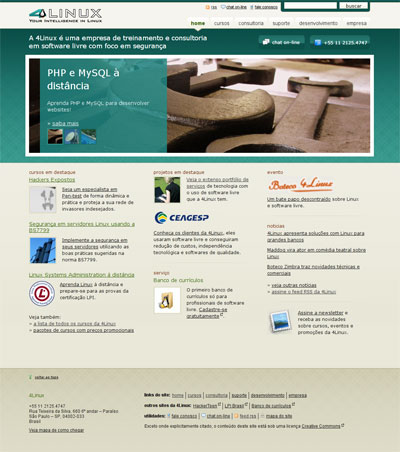
 4Linux, a premiere Linux and FLOSS consultancy and training company based in Brazil, proudly announces the relaunch of our website as a Drupal site.
We needed a complete redesign in our main website, a 4 years old static website, dificulty to mantain, with usability and acessibility problems. Then we choosed Drupal as our CMS to serve as base of our new website, with new features and with a totally refreshed design.
Main goals
The 4Linux's website was a static site updated via SCP by a webmaster (me!). This was lending to a slow process of comunication with our clients since all the errors needed to be passed to me. Then, updated a XML or HTML file, upload some images and voilà.
This, of course, wasn't the best way to communicate to our clients. It was very error prone and slow. We needed a faster way to provide rich information about our services, case studies and news to our clients. We needed a descentralized way to publish and review content.
We wanted also some features common in web 2.0 sites like video, tagging, social bookmarking tools in a new fresh design. Then I choosed Drupal for this challenge.
Data architecture
First, we created a new information architecture, eliminating many unecessary pages and rearranging content. This was helpful and provided a very straighforward way to create the different content types. With the IA chart at hands, it was very easy to identify what was a taxonomy term and how the how many node types it would be needed.
 We have a total of 20 content types, 79 CCK fields and 25 views.
Home and section pages
I used some of the techniques presented in NYObserver and in IMA cases like Editions and the View as a node. These brilliant techniques provided a very easy and fast way to organize and theme the home and section (channel in NYObserver) pages. With a consistent IA, was easy to find a unique way to display listings with our courses, services, news or whatever needed.
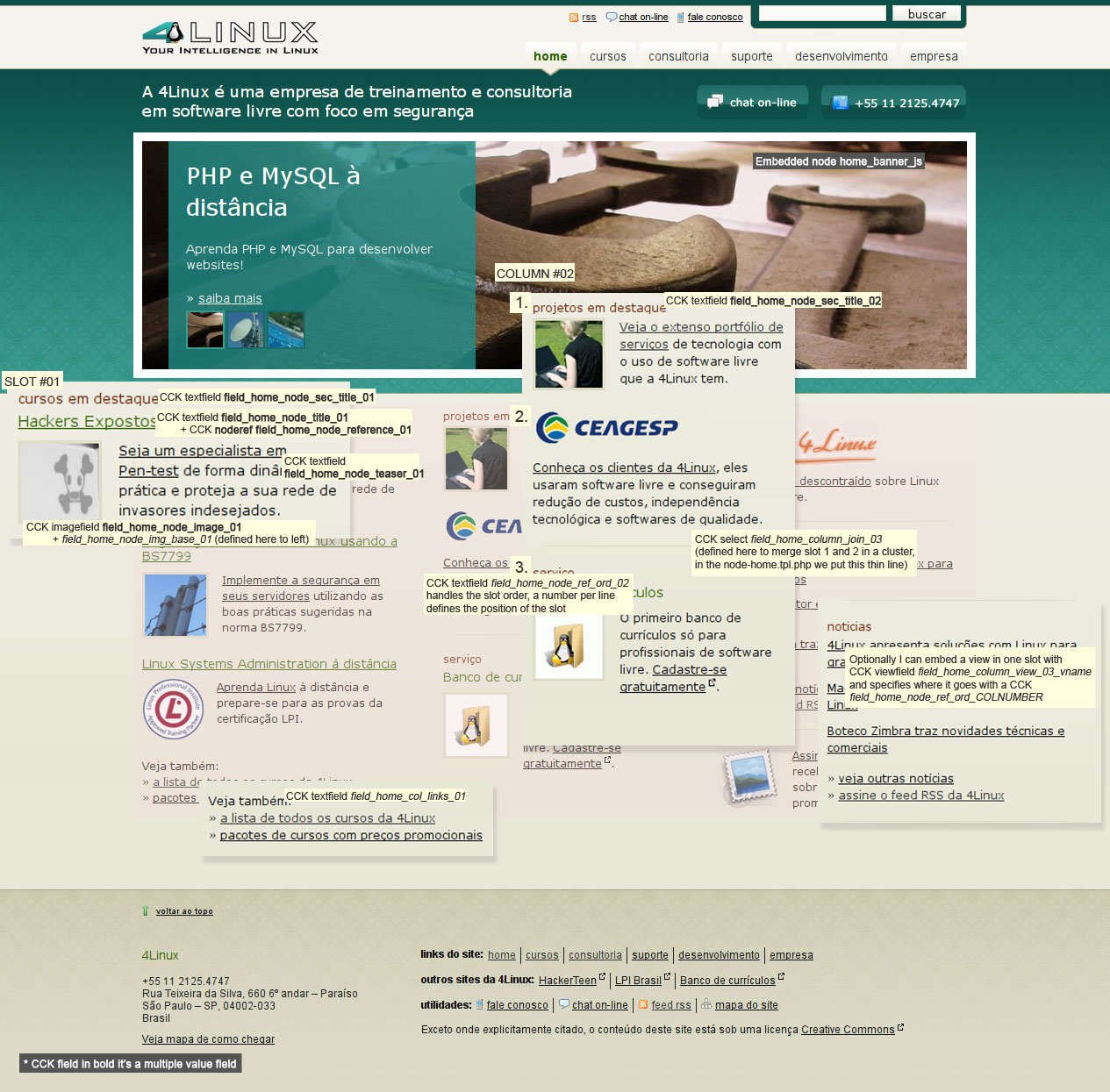
The home page uses the NYO editions technique. Using node reference fields, it's possible to promote any content in the home page. But, differently than NY Observer, we have only 3 slots per column. In each column, I created a CCK node reference field and some other fields (Text and image fields). These fields handles the title and description of each slot. Some fields handles the slots order, the columns' title and footer text. Check this image with some notes about the CCK fields that I created.
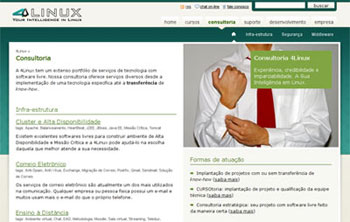 The section pages (see Consultoria, Suporte, Desenvolvimento, Empresa, Clientes, Notícias, Na mídia and Trabalhe Conosco) are simple content types (course_section and site_section) with a view field reference and a field to order the referenced views. The site_section content type also have some fields to upload a image and choose where the text will be positioned.
With a small hack in Zen template.php file, I send to every block the node object. This way I can easily get a picture uploaded by a CCK imagefield and presents in a block. This simple hack provides the picture at the right sidebar in section pages. To let the user choose the place of the text, a simple CCK text field holds defines 4 regions (top left, top right, bottom left and bottom right). A CSS is generated to put the image as a background image. It's a simple bunch of functions in Zen's subtheme template.php that works like the JavaScript functions of Drupal core. When I want a CSS to be inline, I just call my CSS function.
Blocks and Views
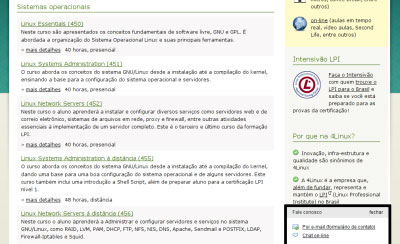 The 4Linux website's uses regular blocks and some custom ones, specially for the little layer that floats in almost every internal page. This little block mix the SitePoint's Catfish technique with some modified javascript (taking advantage of jQuery). The Catfish module provide only a block where the website administrator (or another user with block permissions) can edit the content that will be presented. This little module need some rework to be in available in Drupal modules repository.
The Views modules made possible the arragement of all the content in well organized lists. Some views have custom argument code but overall, it was only needed to choose the fields and specify if it was a page, block or both. Great!
Other features
Another cool feature that we desired was video capabilities. This was acomplished with the Flashvideo module. Flashvideo module handle video conversion calling a shell utility software called FFmpeg. If you don't need to convert videos in your server, you still can upload your video to sites like YouTube, Google Video or Brightcove. A good way to start with Flashvideo is reading the documentation provided by the module mantainer. To install FFmpeg in a way you can use with the module, I suggest this tutorial on Slashdot (it's a Linux Debian tutorial that can easily ported to another Linux flavors like Ubuntu).
 With Forward and Service Links, we let our users to forward a page to a friend or to bookmark any of our pages in their favorite social (bookmarking or not) site.
Performance
The new site is faster than our older one (a static site). The server was optimized in a minimum way: changed MySQL query cache to 64M from a default 12M, compiled and cached the Drupal PHP to bytecode with APC (it helped a lot since some pages was consuming almost 60M at request and this number decreased from 4-8M per request).
We enabled the mod_deflate (it gzip static content and sends to the web browser) of Apache too, with this we decreased the average load time of any page by some ms. The compression of some files is greater than 65%.
From Drupal, I enabled the normal cache and CSS compression. These features alone would makes you choose Drupal rather other CMS out there =D
Modules used
Core
- Color, Help, Locale, Menu, Path, Statistics
- Taxonomy: is a great module. It's provide the sites structure and tagging capabilities
- Search: we used the default Drupal search module. It's good enough to our needs
Content
- CCK: is CCK! It's a fantastic module. Without it, I would tried Plone or Joomla! (or even a customized CMS from a web framework)
- Content Copy, Date, Fieldgroup, Image, Link, Node Reference, Number, Option Widgets, Text, View Fields
- Event (Basic Event, Event, Event All Day, Event Views and Signup): the event module powered our event listing (see Eventos). With the Signup module, it's easy to manage event subscriptions.
- Diff
- TinyMCE: a WYSIWYG javascript editor that replace the default textarea of the node form, helps the editors without HTML knowledge
- Suggested terms
- Taxonomy defaults: some node types are so straight (like the News node type) that is more easy to provide a default term for them
- Scheduler: let our editors choose a date/time to (un)publish content
- Webform: it was used to build the contact form page
- Views: almost all lists in this website is a view. Powerful!
Development
Javascript
- Javascript Tools and JSCalendar: let users choose dates in a more easy way with a pop-up calendar
- jQuery Update
Location
- Location, Gmap, Gmap Location: provided maps to an event page and contact form
Media
- Asset: an easier way to let the editors embed images and media files directly into the content, this module also integrates with imagecache
- Imagecache: provides a very straighforward way to work with images
- Flashvideo: very cool module! If you can handle the traffic usage (and have ffmpeg installed) of video transfer, take a try!
SEO
- SEO Checklist: provides a list with checkboxes for you verify if have done some SEO-related tasks
- XML Sitemap: creates a xml sitemap to help search engines in indexation of your site pages
- SafeHTML: a filter that check for common HTML problems like not closed tags and try to fix them before the content is saved into the database
- Pathauto
- Path redirect
- Meta tags
- Google Analytics
- Global redirect
Security
Content promotion
Theming
- Content Templates: theming the feeds
- Zen (theme)

Comments
Great write up!
Thanks for taking the time. Do you think you could include some screen shots so that we know where Catfish etc are used?
This post definitely needs to be on the front page.
Hi Ulf! I already created an
Hi Ulf!
I already created an issue to the DO webmasters about the screen shots. Check it in some moments.
Catfish is a little layer that appears in most the pages (see: http://www.4linux.com.br/consultoria). Look at the bottom and you will notice a small rectangle that stays static when you scroll down or up.
It would be awesome if gets on the front =) so awesome... lol
Thanks,
Eriksen
Nice design
Nice design. Good use of small icons to draw attention to links.
Any reason for picking APC over XCache?
Do you find mod_deflate increases CPU usage at all? I noticed you said "static content", are you only enabling it for certain files?
PS: FLOSS is a rather unfortunate acronym ;p
--
John Forsythe
Need reliable Drupal hosting?
Hi John, I don't tested
Hi John,
I don't tested XCache then, I preffered to use APC because the stability and the support from the PHP project itself. There is a blog post from 2bits with benchmarking with APC, XCache and eAccelerator that shows the difference from the op-code caches isn't big. What I like from APC is because is actively maintained and stable.
The mod_deflate increases CPU usage but compensates with lower download times. Yes, it's enabled only for javascript, css, png, jpg and gif. However, I am planning to use the lighty to serve only static content.
PS: do you think? =D
Interesting
Interesting, but trying to deflate png, jpg, and gif files will not get you a smaller size, as they're already run through better compression algorithms.
--
John Forsythe
Drupal Modules - Find the module you need for your project!
Saves some bits
I tested with Yahoo! Slow and it saves some bits. However, I definitely plan to move all the static content to a lighty server (mainly because we are serving videos).
really nice
Really nice, both your work and this post.
---
Drupal Theme Garden
Just an update about the theme
It was showcased in CSS Mania:
http://cssmania.com/galleries/2008/08/06/4linux.php
Thanks,
Erik
---
Drupal rocks!
I just want to say I really
I just want to say I really like the theme. Although the layout is nothing "unique", it is extremely well-executed and looks very approachable. Something about the colours and the spacing really balances. I especially like your use of blocks. They just work better than sites that push their borders in your face.
Although I'd read the original write-up on 'editions', you got me to re-consider it... and actually understand it this time. Cool!
Thanks for the write up. (Glad you got the images up in the end ;-)
.dan.
How to troubleshoot Drupal | http://www.coders.co.nz/
.dan. is the New Zealand Drupal Developer working on Government Web Standards
Great looking and functonal
Great looking and functonal site you have there, I'll certainly be adding this to drupalbased.com
__________________________________________________________________________________
www.DrupalBased.com - Showcasing Drupal Powered Sites.
How does the rotating banner work?
Thank you for taking the time to do the write up. Im just finding my feet with Drupal (and with web design too for that matter), so it's greatly appreciated.
This is probably a rather basic question, but how did you do the rotating banner image and overlaid text that appears on the home page. That is how does node home_banner_js work?
Thank you.
Hi Piers! The banner itself
Hi Piers!
The banner itself is a node type with CCK fields for image and node reference. Then I theme this node creating some CSS classes for the background images and display it inside the home node.
As you can see in the HTML code, there is a div with id hbjs-overlay that have a CSS class with the current backgound image. With javascript, I change this after 10 ~ 45 seconds (the content editor choose the time from a CCK widget). Using CSS properties like position with absolute/relative values, I can overlay the text over the images. Isn't hard but some javascript, CSS and DOM knowledge is needed.
You can also try the Node carousel module and get similar outcomes faster.
Thank you!
Thank you!