

Closed (outdated)
Project:
Drupal core
Version:
9.3.x-dev
Component:
user interface text
Priority:
Normal
Category:
Task
Assigned:
Unassigned
Reporter:
Created:
29 Nov 2008 at 14:50 UTC
Updated:
25 May 2022 at 09:16 UTC
Jump to comment: Most recent, Most recent file





Comments
Comment #1
keith.smith commentedMarked http://drupal.org/node/340761 as duplicate.
(And on first glance, this looks pretty good but I'll review it in greater detail soon.)
Comment #2
willhall-dupe commentedHi there, OK I seem to have found the right place. I looked at the patch file; my problem is that my skill is in copy editing and I don't really know how to read the patch file correctly.
Ok scratch my orginal comment.
Can you post the revised text and the drupal page url(s) it refers to here as a comment? Then I will copyedit it as needed and someone can re-roll the patch file. Make sense?
Will Hall
Comment #3
keith.smith commented@willhall, if you look at the posted patch, it's easy to see the text it references; in this particular patch, the URL of the page is above each section. Mostly the patch changes text at
admin/help#block(the help text for block module), andadmin/build/block, which is the block configuration page (and I think the text you were wanting to change in your original post and groups post). The lines with the "-" by them in the patch are proposed deletions; the lines with the "+" are the proposed additions.One note on the comments you left in the other (now duplicate) issue. The text for the drag-and-drop -- including the language about using the Save button to save changes -- is more or less used every where there's drag-and-drop functionality. If we change that language in one place, we should probably do it in all six or ten places it is used, which would be out of scope for this issue. birdmanx35's patch, above, has an improvement to that section that doesn't change the repeated parts of the drag-and-drop-text.
Comment #4
birdmanx35 commented@willhall: Don't apologize! It's easy to learn how to do this. I'd try setting up something like Eclipse if you actually want to create and edit patches, but to read them, you can just click the patch file. Your web browser will treat it as a text file, and then you can take Keith's advice.
@keith.smith: Hmm, I'm not really sure how to handle that problem (the scope of this patch re: drag and drop). Any suggestions?
Comment #5
willhall-dupe commentedHmm,
This complicates things a bit. As an editor I'm more comfortable tackling all of the text at once actually rather than maneuvering around unchangeable bits and pieces (like trying to do feng shui on a room where some of the furniture is nailed down).
So - how can I determine the urls of all the drag and drop ui text? Then I can either post on those issues or open issues? Keith you want to watch my back on this?
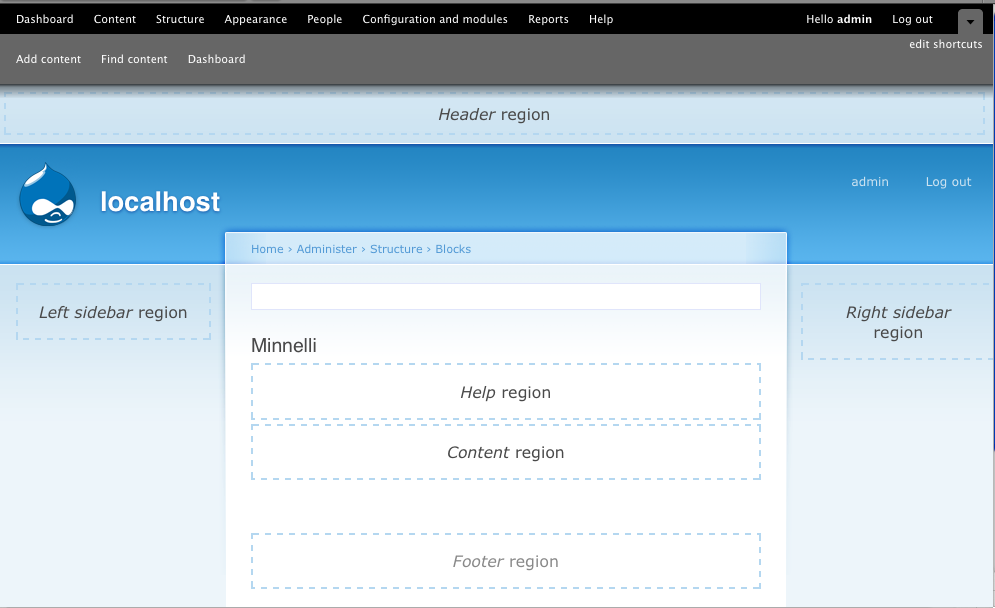
Comment #6
adrianrf@gmail.com commentedwillhall, do you have any thoughts about approaching this with an initial cut at a "Drupal Style Guide for UI copy"?
I'm thinking that a 30,000-ft first pass to clarify objectives & preferred approaches might be well worthwhile.
Otherwise, I reckon charging in at the level of granularity that the developers require, item-by-item, is going to be really difficult to do consistently across the whole corpus. It also means that there is likely to be debate on every individual item, de novo.
Conversely, agreeing broad principles upfront (via suitable community debate) could cut down considerably on the overall level of effort and time needed. It also means that a set of published principles would also be available for reference by the (hundreds of) developers of third-party contributions, offering an even bigger payoff for the work invested.
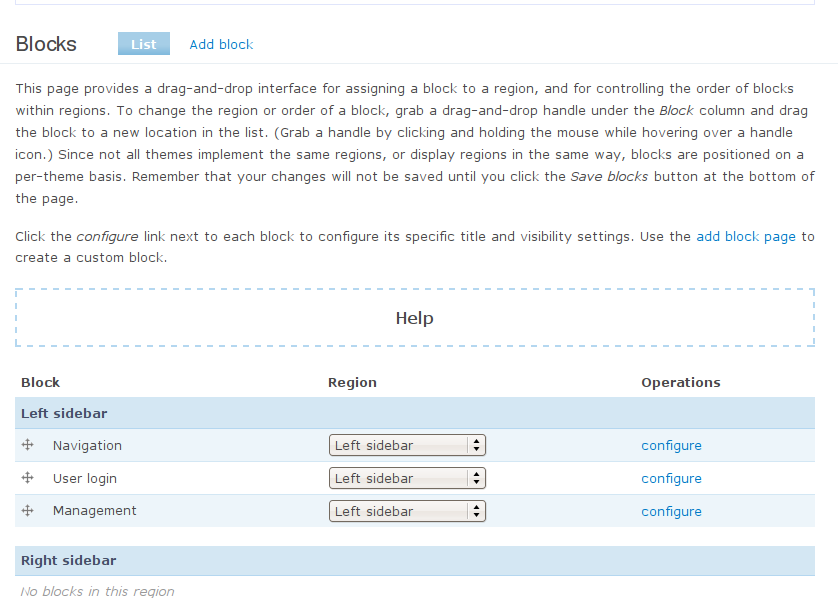
cheers,
Adrian
Adrian Russell-Falla
Comment #7
willhall-dupe commentedHi Adrian,
I think I understand your point, but can you give me some examples where consistency is an issue, and an example of a broad principle that can be agreed to up front? Would a Drupal ui text style guide preempt debate at the granular level, and do consistency issues weigh more heavily than the overall improvements possible by copy editing? Perhaps this discussion should move to a different thread?
Below is my suggestion for admin/build/block. As you can see I've followed Strunk and White: http://www.crockford.com/wrrrld/style.html, especially the section on Omitting Needless Words http://www.crockford.com/wrrrld/style3.html#13, a common violation of plain english style throughout the Drupal ui. Especially in browsers, concision can make a dramatic difference in readability. For example, notice how I eliminated the multiples uses of "drag." (I considered replacing 'saved' in the last sentence with 'recorded,' but, as Strunk and White point out, exceptions prove the rule. Likewise, I wrote 'theme' then 'themes' right after. I did this because the alternate, 'which,' would interfere with stand-alone comprehension of the end clause, important in text that will be skimmed. )
Also I am assuming that Drupal Admins don't need to be told to hover, hold, and click, and instead that 'dragging' is baseline literacy, and, in this context, some experimentation will help any uncertain user. I imagine we wouldn't say "click the drop-down menu, then scroll down until your choice is highlighted." Perhaps this is a style guide principle?
From a context standpoint, I added bits about delete and the drop-down menu, both of which were missing in the ui text. I also clarified that you can drag-and-drop block order and region, partly because I myself didn't understand this at first. Also, I created the paragraph break where I think it is consistent with the content transition.
Let me know what you think.
- Will
block_help.patch:
+ $output = '
' . t('This page provides a drag-and-drop interface for organizing blocks. To change the region or order of a block, grab a drag-and-drop handle under the Block column and drag the block to a new location in the list. (Grab a handle by clicking and holding the mouse while hovering over a handle icon.) Since not all themes implement the same regions, or display regions in the same way, blocks are positioned on a per-theme basis. Remember that your changes will not be saved until you click the Save blocks button at the bottom of the page.') . '
';
$output .= '
' . t('Click the configure link next to each block to configure its specific title and visibility settings. Use the add block page to create a custom block.', array('@add-block' => url('admin/build/block/add'))) . '
';
My Revision:
Set a block's title and visibility with the configure link; assign a block to a region through the drop-down menu; and assign a block to a region or arrange block order within regions by grabbing the drag-and-drop handle. (Blocks are positioned relative to the current theme; themes often implement regions in different ways.)
Use the add block page to create a custom block; delete removes it. Changes are not saved until you click the Save blocks button below.
Personally I like the following revision even better, because the word 'block' is cut. This is more drastic, and I imagine more controversial, but I believe a comparison of the html versions would prove the drastic version superior. With the page title so prominent, repeating the word is unnecessary.
Set title and visibility with the configure link; assign a region through the drop-down menu; and assign a region or arrange order within regions by grabbing the drag-and-drop handle. (Blocks are positioned relative to the current theme; themes often implement regions in different ways.)
Use the add block page to create a custom block; delete removes it. Changes are not saved until you click the Save blocks button below.
Comment #8
keith.smith commentedAt the top of admin/build/block:
Currently:
birdmanx35's proposed revision:
willhall's proposed revision:
There are good changes in both proposed revisions. Honestly, IMO, though the text here can be improved, it isn't as problematic as #201490: Clean up 'approval' typos in comment module, where the text at the top of the page is just wrong. Anyway:
-I like birdmanx35's suggestion because it distills the text down while leaving the core drag-and-drop stuff alone. The drag-and-drop stuff may well need to be changed -- it was added in a hurry -- but if we do so, we should probably get all instances of it.
- willhall's version adds in help regarding add and delete, which is nice. I'd probably redo some sentence order; the current version suggests that the Save blocks button is connected to adding or deleting blocks, which is not the case.
Maybe we can combine the best parts of these two in some way.
Comment #9
willhall-dupe commentedHi Keith,
Is a good point and can be fixed by making the paragraph break a sentence later. So it reads:
In this version the final sentence refers to the preceding paragraph as a whole, not the preceding sentence in the same paragraph.
Happy to help, looks like this is well on its way. Can you point me to another, more critical ui text revision to sink my teeth into?
- Will
PS
Sorry about my post editing interfering with your reply.
Comment #10
birdmanx35 commentedCould we get some alternate patches to add willhall's suggestions?
Comment #11
willhall-dupe commentedIf it's just rewriting text in the patch and re-uploading, i can handle that, should i give it a whirl?
- willhall
Comment #12
willhall-dupe commentedOK I revised the patch and uploaded it. - willhall
Comment #14
willhall-dupe commentedComment #15
keith.smith commentedwillhall's patch needs review.
Comment #17
birdmanx35 commentedComment #18
birdmanx35 commentedComment #19
coltranePage visibility was confusing for users tested at UB Usability Testing: http://www.drupalusability.org/node/142
It was not clear that "Show on every page except the listed pages." is connected with the pages textarea.
Comment #20
karschsp commentedHere's a patch that takes the text changes from #14 and also makes an attempt at fixing the Page visibility confusion.
Comment #21
catchThe footer region is about to disappear.
Comment #22
gaele commentedWe are currently working on this at the Drupal UX Sprint. Issue over there: http://sprint.drupalusability.org/content/rewrite-block-description.
The patch above consists of three text adjustments. The last one has its own issue, and is already fixed: #394538: Unify blocks admin page name on admin/build/block/add
For the first (mentioned in #19) I've just created a separate issue: #503836: Blocks: "Show on listed pages" unclear
Comment #23
gaele commentedThis leaves us with the help text / introduction on the Blocks administration page.
bojhan's comments from Drupal UX Sprint:
I guess he's right. Why does the drag-and-drop functionality need a manual? And if so, why does it need to be spread all over Drupal? The functionality should be clear from the interface itself. If needed there could be just one explanation in the help pages.
Comment #24
berenddeboer commentedAfter a very long discussion the UX-2009 Sprint team decided that the current UI is broken. A block cannot be defined without a lengthy explanation, so we simply don't. We just tried to give some call to action, as what a block is, is immediately clear when doing something with it, i.e. dragging it.
It would be so great if we had a block UI where you could simply drag your blocks around into the proper region.
Comment #25
bergco commentedThe More help-page needs to be done.
Comment #26
eigentor commentedIn order to make the block admin interface more intuitive, it should move to something like Jeff Noyes shows in this demo. You can drag and drop the blocks to actual regions there and get a visual feedback immmediately.
http://www.jeffnoyes.com/content/drupal-7-usability-improvements-part-ii...
Comment #27
eigentor commentedHere are the screenshots before and after the changes applied by the patch in #24
Comment #28
eigentor commentedAck, image attachments on issues are a real pain :(
one more try: before the changes:
Comment #29
seutje commentedchanging d7uxsprint tag
Comment #30
gaele commentedComment #32
eigentor commentedRerolled it and changed text again. Looks now like this:
Comment #33
keith.smith commentedWe cannot really position blocks "anywhere" on the page. And, to me, the example names of headers does not add a great deal of value.
How about:
Comment #34
keith.smith commentedForgot to change status.
Comment #35
Bojhan commented"Drag and drop blocks into regions to control their placement, and use Save blocks to show them in their new positions. "
This parts seems over-done. Can't we steal the this is blocks, from user settings block thing.
"Since regions are theme-dependent, you must adjust block placement for each theme in use on your site."
Yes
Comment #36
eigentor commentedKeith Smith: Your comment about anywhere on the site is right, it cannot be put anywhere.
Well, I tried to describe it completely from a user perspective and avoid all technical terms. And from that angle, he can normally put it in the header, footer, right and left sidebar and also the content - this is about everywhere. Technically it is sure not.
The regions and theme-dependent: hm. I would expect the user to only use one theme, apart from maybe using an admin theme. How about saying:
"You can (must) position the blocks for each theme differently" "Regions are theme-dependent" is too technical for me. Still I would not think this is needed here: we want the user to position a block for the theme he is actually looking at.
Also the term regions is too technical and no one will understand it. What I was looking for are examples the user can see on the site: I'd expect them to see the word header and try to drag a block there. As from a talk with Bojhan the only sense of the text should be to get the user to try it and maybe succeed. Once he succeeded in changing a block's position, he won't need no description anymore.
Also the mentioning that the user has to save is, in last consequence redundant since a yellow system message will inform the user about it once he changed the position of a block.
So, stepping back from all I proposed with the patch: What is the best way we can get the user to try out positioning a block and maybe succeeding in this unintuitive inteface?
Comment #37
Bojhan commentedeigentor: What about displaying that text, only if more then 1 theme is enabled.
Comment #38
heather commentedI tested this issue with Rebecca, a person who is brand new to Drupal at UX sprint. We discovered some concerns for this page.
We are user testing the stalled UX text issues first, then we will suggest solutions. Some problems cannot be solved in the text area.
1) It is unclear that the regions are demonstrated on the page around the configuration controls.
2) The method for indication: a dashed outline with names only is confusing, or hard to see. Main problems:
- "help" connotes help would/should be available nearby in context.
- the left content region is not apparent, at bottom of region (others are above)
3) The novice user does not know what 'region' implies.
4) There are two methods for rearrangement. Pull down for selecting areas, 'move arrows' for arranging order.
5) It is unclear 'when' the changes will be seen (still)
6) New blocks would appear under 'disabled' section, which is 3+ screens below.
7) 'Disabled' blocks also look the same at the actual regions.
Moving onto next issue!
Comment #39
heather commentedAttacking problems listed above.
Added a patch for the display of the block demonstrations:
http://drupal.org/node/569320
This helps solve issues 1, 2, 3- by familiarising the novice user with the term region, and also indicating that the display of "help" in the first, default installation - is in fact, only a display of a 'help' region.
Comment #40
heather commentedI have made another patch to advise users about newly created, but 'disabled' blocks.
This attempts to solve the problems 6 & 7 listed above: comment #38.
See patch:
http://drupal.org/node/569416
Now going to attack UI text issue.
Comment #41
heather commentedWifi is going now! I have a patch for this
Spoke to webchick. This should all be in one patch. Need to close related issues.
This combines all.
Comment #42
Bojhan commentedLets get a screenshot in order to review this
Comment #43
heather commentedSorry I had to submit this v quickly and end of day. Now leaving for airport, and I didn't get to describe, line by line, our wording- as you all have done above. Main point is that eigentor suggests last that we should scrape down, and restart this effort. This is what we did here at the UX sprint.
Screenshots here.
http://drupal.org/files/issues/highlightcontent.jpg
http://drupal.org/files/issues/Picture%2018_3.png
Text screenshot attached below.
Text simplified to only cover remaining problems listed above, after others were helped with some interface changes.
I can write more later. Off now :)
Comment #44
yoroy commentedComment #45
eigentor commentedI like the changes.
While it is hard for users to grasp the concept of regions, they have to face it to get it done with the current interface. The user may wonder: "What the heck are regions?" But if he _does_ figure out he got it done. An interface following Jeff Noyes demo (find link in #26) will probably be postponed to D8.
The only addition may be giving examples for the regions: 'regions like "sidebar right" "footer" or "header" as demonstrated on this page.'
Not sure if this helps, would have to be tested again. At least header, sidebar right or footer are things the user can find on the page and with a bit of luck he gets an idea what they are for...
I especially like you mentioning the disabled blocks, since those are always many...
Comment #46
heather commentedI was concerned that since users can conceivably install a theme that doesn't have the regions indicated, the words ['regions like "sidebar right" "footer" or "header"] would be out of context, unless we pulled out the actual names there.
Considering the UX style guide, using the bare minimum amount of text is important.
I'm interested in reducing the cognitive load as much as possible. I think the brief information should not attempt to be comprehensive or instructional. I'd actually like to see contextual links to documentation [e.g., a link to 'region' documentation instead of italics] but I don't know what conversation has already occurred on this topic.
Comment #47
Bojhan commentedNo, I think you are right - adding region might be pushing it a bit to much. People figure out quite quickly you can't drag into those area's. I will revisit this in a bit to see if I can clean up the text further.
Comment #49
seutje commentedRerolled patch from #41 by heather to current HEAD
Comment #50
seutje commentedhmm, looks like geany also removed a bunch of trailing whitespace :x
Comment #51
eigentor commented@seutje hum eh you sure your patch is for the help text? Did not install it, but I see loads of functions in there...
Comment #52
seutje commented@eigentor: yea it just also removes a bunch of trailing whitespace, I'll see if I can fiddle with geany's settings and reroll one without the whitespace fixes
Comment #53
dries commentedThere is trailing whitespace in the translatable sentence.
Is this still valid? We committed a patch yesterday that changed the block administration page a bit.
This doesn't look right.
Comment #54
seutje commented@Dries:
Fixed.
My bad, re-added Gábor's line with the link to the demo page, not sure if I should cram the first 2 sentences in 1 paragraph though, left it in 2 separate ones for now
You're right, fixed this to use a %placeholder
attached patch with changes mentioned above without trailing whitespace fix
attached patch does not contain the following change:
this still bugs the crap out of me:
$variables['block_regions'] = $block_regions + array(BLOCK_REGION_NONE => t('<a name="disabled"></a>Disabled blocks'));the anchor is empty and has a very vague name, instead I'd suggest something like the following:
$variables['block_regions'] = $block_regions + array(BLOCK_REGION_NONE => '<span id="disabled-blocks-region">' . t('Disabled blocks') . '</span>');and change
drupal_set_message(t('The block has not yet assigned to a <em>region</em>. Manage <a href="#disabled">disabled blocks</a> to move the new block to a region as demonstrated on this page. '));and
$output .= '<p>' . t('Click the <em>configure</em> link next to each block to configure settings. Manage <a href="#disabled">disabled blocks</a> at the bottom of this page. <a href="@add-block">Add a custom block</a>.', array('@add-block' => url('admin/structure/block/add'))) . '</p>';to
drupal_set_message(t('The block has not yet assigned to a <em>region</em>. Manage <a href="#disabled-blocks-region">disabled blocks</a> to move the new block to a region as demonstrated on this page. '));and
$output .= '<p>' . t('Click the <em>configure</em> link next to each block to configure settings. Manage <a href="#disabled-blocks-region">disabled blocks</a> at the bottom of this page. <a href="@add-block">Add a custom block</a>.', array('@add-block' => url('admin/structure/block/add'))) . '</p>';but that wouldn't make it any less annoying to translate
Comment #55
seutje commentedattached patch also changes the empty anchor with vague name to a wrapping span with an id of "disabled-blocks-region" and changes the fragment links aswel as mentioned in my previous post
Comment #56
MichaelCole commented- Fixed trailing space in patch (line 18 of patch) - Edited patch.
- Patch applies.
- Tested: http://d7p1.dev/admin/structure/block - Looks good!
- Tested: http://d7p1.dev/admin/structure/block/add
- Why are "block" and "region" not italicized here. - New patch? What's the style guide for this?
- Also here: http://d7p1.dev/admin/structure/block/manage/system/main/configure
- Tested: http://d7p1.dev/admin/structure/block/demo/garland - no text at the bottom.
- Not sure I like the image on another page, seems like having the map with controls would be more helpful.
Uploaded new patch with notes. What is style for italicized "block" and "region" in other places?
I'm so excited about D7. All these changes are making it look great!
Comment #57
Bojhan commentedThis requires screenshots.
Comment #58
heather commentedI could not test this overlay, as I can't make head nor tails at the moment. Screenshots attached.
1) Disabled blocks link not working?
When I added the link to the disabled blocks section, I sort of... let this one go: when you first click the link it doesn't go to the anchor. Press it again, and it does. Tested with both Seven and Garland enabled as admin theme.
2) Suggestion: Remove the word "region"
Why?It's not neccessary now that the region demo is on another page. When we tested this in Paris we added the word "region" to solve the problem of the blocks admin mix in context of the demonstration of template regions. Example: the word "help" appeared in a box by itself, and it looked like it was suggesting this was a "help" section. Now that the demonstration of template regions is on another page, this context is not a problem.
Suggestion: Remove the word 'region' from each block. page-title should read [Theme name] Region Demonstration.
With a help sentence:
"This is a demonstration of the template regions available in the [Theme name] theme. You can add additional regions in the .info file of a template. Read more in the Theme guide"
3. The highlighting
Seeing how each region handles the demonstration.
I made a screenshot of what it looks like if you turn it back to yellow highlighting. I think it stands out more.
Comment #59
heather commentedThis is a better example of the changes I am recommending. I had for gotten the help sentence & link to theme docs page.
Comment #60
seutje commented@58
This problem boggled me so I started testing, I coudl recreate this in FF3.5, IE8, IE7 but IE6 and webkit (SF4) didn't seem to be affected by this problem and turning off js made it behave properly in every browser, so I stripped all js and systematically started adding them again and it didn't break till I added tableheader.js and the first bit of it already shows why IE6 isn't affected:
I'll make a separate issue for this and look into it when I get back
Comment #61
redndahead commentedIt seems that there is no where for $assigned to be FALSE.
Maybe better?
The block has not yet been assigned to a region. Manage <a href="#disabled-blocks-region">disabled blocks</a> to move the new block into one of the regions demonstrated on this page.I don't think italics are necessary.
This review is powered by Dreditor.
Comment #62
redndahead commentedHere is my stab.
Comment #63
axyjo commentedJust a thought: How about 'shown' instead of 'demonstrated'? It might simplify things for a newcomer to Drupal.
This review is powered by Dreditor.
Comment #64
yoroy commentedagreed, choose the simpler word whenever possible.
Comment #65
heather commentedChanges by redndahead in #62 look good.
@axyjo - the link below this text says Demonstrate block regions (Name of default theme)
- So it makes sense to be consistent... unless you want that also to say Show block regions (Name of default theme). Showing suggests revealing... I think demonstrate makes more sense here....
In #59 above, I proposed a change to the demonstration to make it more clear. I could not figure out how to change this myself. Especially the title from just the name of the theme to "Theme-name block regions"... how can you change that?
@seutje #60 did you make a new issue for this? Video'd what I mean: http://screencast.com/t/YjM5ZDZlZjY Even the Skip to main content does this... so deffo a separate issue.
Comment #66
greg.harveyChanging back to "needs work", as this needs doing! ^^
Comment #67
arianek commentedhey - just a heads up - the changes to the help content in that patch don't conform to the help docs standard format, and would not be committed as is http://drupal.org/node/632280/
help text for every core module was rewritten before christmas, so be sure you check out the latest version of D7 HEAD, and work off that if you have issues to report. (also, of course, string freeze deadline has passed, so only changes considered bugs will be allowed to D7)
Comment #68
bluepanther3 commentedblock_help.patch queued for re-testing.
Comment #69
cosmicdreams commented#62: block_text-340535-1.patch queued for re-testing.
Comment #71
yoroy commentedComment #72
arianek commentedFyi for anyone who picks this up - all core modules in D7 now follow this standard structure: http://drupal.org/node/632280 would be great to keep them all consistent in D8, ie. if there is a change in structure it should be applied to all core module help pages.
Comment #78
amit.drupal commentedImprove help text in block.module: Update hook_help().
Comment #79
gaurav.kapoor commentedComment #85
abhijith s commentedApplied patch #78 in 8.9.x and it shows error.Needs reroll
Comment #86
abhijith s commentedRerolled patch #78.Please check it.
Comment #89
quietone commentedThanks everyone for working to improve the help text for the block module.
The last discussions in this issue were 11 years ago (excluding the recent re-rolls). Since this issue started the help text has been modified a few times, here are some issues where that was done.
#632898: Help File Fixup: Block module
#2029731: Improve help for blocks module
#2232605: Themes cannot be uninstalled
There is also a tour to help users with the block module.
Therefor closing this is outdated. If you disagree, and a comment and set the issue to 'Active'.