Closed (fixed)
Project:
Web Links
Version:
6.x-2.x-dev
Component:
Code
Priority:
Normal
Category:
Support request
Assigned:
Reporter:
Created:
1 Dec 2008 at 08:34 UTC
Updated:
7 Apr 2009 at 15:13 UTC
Jump to comment: Most recent file


Hi,
I like the weblinks overview page. I would very much like to be able to theme the groups into 2, 3 or 4 columns. Is this possible please?
Next to this I would like to set a random and popular content block per weblinks group. Is this also possible please?
This is for D5 and D6.
Thanks a lot in advance for going into this!
Greetings,
Martijn
| Comment | File | Size | Author |
|---|---|---|---|
| #22 | weblinks_blocks.jpg | 80.3 KB | nancydru |
| #19 | weblinks-blocklist.JPG | 227.5 KB | summit |
| #12 | weblinks-groups.JPG | 103.1 KB | summit |
| #8 | Block_by_group.JPG | 28.87 KB | summit |




Comments
Comment #1
rmiddle commentedSummit,
check out http://drupal.org/node/290348 and see if that meets your needs for the 2, 3, or 4 columns. As for random & popular block for groups not just all it is in my road map but no eta and when it will be created.
Thanks
Robert
Comment #2
summit commentedHi Robert,
Thanks for updating.
Looking forward for random & popular block for groups and will look into link you told me.
Greetings,
Martijn
Comment #3
nancydruComment #4
nancydruComment #5
nancydruCommitted to both branches. Please test it thoroughly; it was a very complex change.
To turn on block by groups go to the Group Settings tab; there is a new check box. Warning, once you turn this on, you will lose your current random, recent, and popular blocks.
Comment #7
summit commentedHi,I set my remark to the wrong issue, here the right issuelog:
Hi Nancy,
I finally could test this feature thoroughly. Family business took me out.
And I think it is not yet working, or off course I do something wrong.
It is also in 6.2.dev right?
I enabled weblinks_block also.
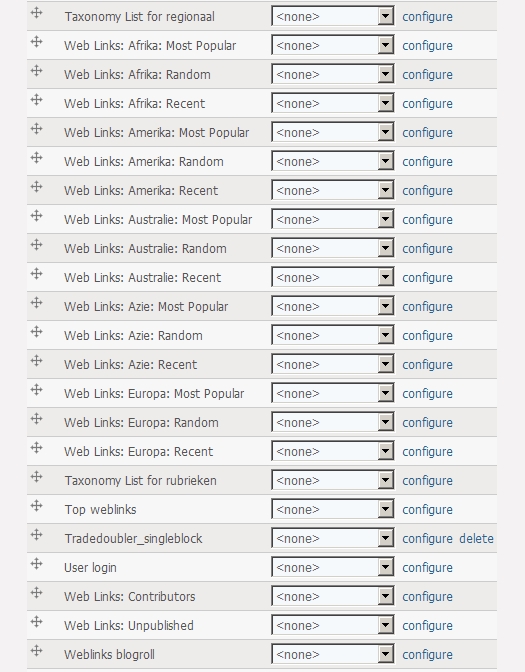
I see all weblinks: Weblinks-vocabulary blocks, and still only one most popular, recent, unclassified and unpublished block. Not blocks like this per group.
I check the: Blocks by group
Create Random, Recent, and Popular blocks for this group. Requires "Create block" above.
But I do not see the "Create block". May be that's why it is not working. See attached screenshot for what I see.
Thanks a lot in advance for still going into this, and sorry I couldn't test it earlier and posted it on wrong issue.
Greeetings,
Martijn
Comment #8
summit commentedAttached picture where you can see, I do not see a Create block setting.
Greetings,
Martijn
Comment #9
summit commentednancy,
Still thinking about this...I think when it works, all groups have 4 blocks right? A normal group block, a random group block, a popular group block and a recent group block.
greetings,
Martijn
Comment #10
nancydruI don't know how those lines of code got dropped, but I put them back. 6.x-2.x only.
I believe you are correct, Martijn.
Comment #12
summit commentedHi Nancy,
Yes it is working now for the first level groups, In my situation: Africa, Asia, Europe, America.
Thank you a lot for this already!
Would it also be possible to have this option one or two levels down please?
So I have the possiblitily to create the Blocks_by_group, random, popular on level Nepal, Egypt?
Next to this on theming, something is not going ok.
See attached picture for request and theming issue (whole block is cut off on the right)
Thanks again for your reply!
Greetings,
Martijn
Comment #13
nancydruSubgroups should inherit the setting from the parent. However, it seems that this is not happening, except for the base group block. I will have to see why.
Comment #14
nancydru@Martijn: In weblinks_blocks.module at approximately line 286 (it may be off a few because of my debugging code) you will find:
Immediately before that (after the preceding "}"), add this and see if it gets you going:
I see some other clean up that needs to be done, so I am not committing it yet, but it looks like this will get the blocks built.
Please let me know.
Comment #15
summit commentedHi Nancy,
I tested this immediately. The Most popular and Recent blocks are now one layer deeper shown, so thats great!
But still some thingies:
1) The weblinks-blocks are not shown layers deeper than country. While there are groups on province level like Kathmandu
2) Only the Random block is not shown a layer deeper. Only on Africa, Asia level.
Great it is moving this way!
Greetings,
Martijn
Comment #16
nancydruOkay, this is going to take more rework.
Comment #17
nancydruOkay, it is done and will be in the next 6.x-2.x-dev release (Noon GMT). The code to skip blocks with no nodes has been deleted.
Comment #18
summit commentedEDIT: Can test this evening hopefully.
Thanks in advance.
greetings,
Martijn
Comment #19
summit commentedHi Nancy,
I tested the new code 30-march .dev, and it didn't work. Sorry..
I also added the code from http://drupal.org/node/341076#comment-1414138
It is still working for the first level groups, In my situation: Africa, Asia, Europe, America.
But now NO weblinks_block is shown on a level deeper, even not the normal weblinks_block.
I only see the weblinks on attached picture, so no weblinks on Egypt or Nepal or other countries (a level deeper than continent).
greetings,
Martijn
Comment #20
summit commentedSet to active.
Greetings, Martijn
Comment #21
summit commentedHi Nancy, Is there may be something wrong with "$term->allow = $allow_this_group;" Something that the subterms are not touched anymore? Right now only the top-terms are shown as weblinks-block in the admin/build/block list..just to try to help you.
Greetings,
Martijn
Comment #22
nancydruDid you clear the directory before installing the new version? If not you may have the old version of the blocks. I am seeing child terms (see the attached image). Also try clearing the cache.
Comment #23
nancydruComment #24
summit commentedHi Nancy, thanks for your remarks.
I did clear the directory before uploading the 6.2 30-dev versions of the modules. Checked again on modules page that is was the version of the 30th, also the weblinks_blocks module. Cleared all cache tables through the database...so that should do it.
But no blocks on a level deeper than toplevel anymore. The 28th version had at least those weblinks blocks shown.
- I have a different vocabulary than weblinks as my weblinks basis.
- I have a lot of subterms, and subsubterms (countries/cities) => could that be a problem.
Thanks for going into this again. It drives me crazy what could be the problem..sorry..
greetings,
Martijn
Comment #25
nancydruLet's see how it looks after tonight's roll up.
Comment #26
summit commentedHi Nancy, the 2-april dev, succes on country-scale! But sorry..not on province level down (depth 2 in my term-hierarchy).
Term hierarchy is: - continent - countries - provinces - places.
Would it make sense to make a setting for the depth? So that when there is a big vocabulary, with lots of terms on different level people can select which level of random, most popular, recent weblinks block they want to have.
So great it is working on country scale now. But please could it also be possible on province and down, so I can choose very flexible which block to insert on a page?
Thanks a lot still for this!
PS: thanks for the working Visit url on full node-view pages!
Greetings,
Martijn
Comment #27
nancydruIt should be doing that.
Comment #28
summit commentedHi Nancy,
On the second level (country), the weblinks_blocks arise, but on levels deeper NO GO. Also the normal weblinks_blocks are not shown on that level and deeper.
I did clean cache, deinstalled, and installed 2-april dev. version. Disabled/enabled all weblinks modules (including weblinks_block).
So situation is, Yes it is improved, because on country level there are now the most popular, recent and random blocks. But no block shown levels deeper.
May be still something with If..then.. code?
Greetings,
Martijn
Comment #29
nancydruHmm, I'll have to do some more digging, I guess.
Comment #30
nancydruMartijn: If you look at the picture I attached above (#22), you will see "child of empty" which is a 3rd level term and the blocks are created. Do you have any kind of module that might be limiting this?
Comment #31
summit commentedHi Nancy, Which module could block the levels down? How could I see this? Could somewhere be set something like Drupal_set_message or something to get this clear?
Comment #32
summit commentedNancy, I found the following in my apache-log, may be this is of help?
Comment #33
rmiddle commentedSummit,
Is this site running PHP4 or 5.0 by any change?
Thanks
Robert
Comment #34
summit commentedPHP 5.1 Nancy. Greetings, Martijn
Comment #35
nancydruThanks, Martijn. Unserialize errors would be core - contribs generally don't do that. I can't recall which modules limit access to taxonomy, but they would have "taxonomy" or "term" in their name.
You might want to check these: http://drupal.org/node/372701 and http://drupal.org/node/363403.
Comment #36
rmiddle commentedSummit,
5.1 has know issues is there anyway you can upgrade to 5.2?
Thanks
Robert
Comment #37
summit commentedHi, I will ask my provider to upgrade, but don't know if and when he wil upgrade.
Will look into taxonomy modules.. If you know a known module to limit taxonomy trees.. I would be very glad.
Greetings,
Martijn
Comment #38
nancydruWhen you talk to the host tell them that Drupal 7 requires a minimum of PHP 5.2.5.
Comment #39
rmiddle commentedSummit,
We can not duplicate this with 5.2.x. Do you have anyway to test with a newer version of php 5?
5.1 is really old. It has a lot of bugs. So many in fact that Drupal 7 wont even run on it. 5.1.0 was released in 2005 that was 4 years ago. I am going to mark this issue won't fix until you are at least 5.2.5
Thanks
Robert
Comment #40
rmiddle commentedComment #41
summit commentedHi Robert, Will try tp get my provider to go to 5.2.
I disabled all taxonomy related modules. Tried getting to the bottom using DEVEL module, but that gives the following errors:
On admin/settings/weblinks/group the right blocks are shown, with all the possibiliy to create a most popular, random, recent block. On all term-depth. Continent, country, province, city.
But when I click save and look at the admin/build/blocks only the first 2 levels (continent and country) are populated.
greetings, Martijn
Comment #42
nancydruYes, I found on my DEVEL sites that I had to increase the maximum execution time to 45 seconds. The second message show you exceeded 256 MB in your site. I would be extremely concerned if any of my sites needed that much memory. I'll have to look and see if there is any way to reduce how much memory the admin functions use. How many terms are in this vocabulary?
Comment #43
summit commentedHi Nancy,
The sql statement:
Says: 1172.
Greetings,
Martijn
Comment #44
nancydruThat's a BIG vocabulary.
Comment #45
summit commentedHi Nancy, It is a geographical vocabulary build of all sorts of weblinks in different continents, countries, provinces, cities like my development aid site:www.trekking-world.com only on D6 and in test.
Thats why I think it is smart to have a setting to which hierarchy-level of vocabulary the blocks should be build.
Also maybe for larger vocabularies it is better to build the blocks on webpage-building time. I explain more in next comment, setting it to active if thats fine by you.
greetings,
Martijn
Comment #46
summit commentedHi Nancy,
May be for larger vocabularies this is not the way to move forward. I foresee then more then 1000 prebuild blocks on the /admin/build/blocks page which is unmanageble then.
For larger vocabularies I propose using argument handling as view-blocks are handled within panels-pages.
So when the url is http://www.trekking-world.com/over/nepal/kathmandu-valley/kathmandu all arguments can be handled differently by a panels-page (over) with different panel-page-panes using the same weblinks_randomblock!!
So there needs only to be one weblinks_block, which can handle arguments like views. So almost the same as you told me on http://drupal.org/node/388870#comment-1312750 except that there should not be a page been build, but a block on a page. And it should work within panels as view-arguments does because it should get the termid from the termname context.
It will look like as follows then:www.trekking-world.com/[panel-page]/[country-termname]/[province-termnam...
PANEL-PAGE "over" will have the following content:
So only on page-buildup, the different blocks are constructed through argument handling then. Panels works so, that if there is no right argument or trigger to show the block, it is simply not shown. So above will also work for www.trekking-world.com/over/[country-termname] and then only the country random weblinks block should show.
Hopefully this is helpful in getting a solution for larger vocabularies?
Greetings,
Martijn
Comment #47
nancydruMartijn, it will probably amuse you that a major site I'm now working on is all Panels and Views, so I'm learning these the hard way.
I think you're getting into a new feature, so this should be moved into a new feature request called "Dynamically building block content" or something similar. Then please close this issue.
Comment #48
summit commentedHi Nancy,
Panels and views are complex content and context (ha..3 c's :). But I love the flexibility it gives the non-programmer website builder like I am. Off course only amateur, not pro like you!.
I think this random block will never work for large vocabularies, because then block admin becomes to slow. So proposing a solution for larger vocabularies, and flexible usage on http://drupal.org/node/426422
Closing this issue and thanking you 2 a lot for your time and effort for this!
Greetings,
Martijn