

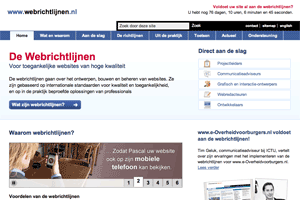
 Government bodies and companies face the challenge of creating websites that are optimally accessible to people as well as browsers and search engines. There are internationally recognized agreements for creating accessible websites like WCAG. The Dutch government has assembled these international standards in a quality model called the Web Guidelines. This quality model mandates significantly better websites that are made for all people.
 Before the end of 2010, all Dutch governmental websites must comply with this set of guidelines. The symbol on the left is the certificate displayed by sites that validate to all 125 guidelines. Recently, the ICTU, an institution founded by the Dutch Ministry of the Interior and Kingdom Relations that helps authorities to improve their ICT performance, decided to relaunch the Web Guidelines website using Drupal. The information on the new site (www.webrichtlijnen.nl / www.webguidelines.nl) is tailored to specific target audiences and the phases of an implementation. A developer or editor can now view the guidelines that are most relevant to him or her. The new site features case studies, best practices and success stories. It also offers a tool that can automatically check if a website conforms to 47 of the 125 guidelines.
Why choose Drupal?
ICTU had several reasons to select Drupal as their new CMS. The most important needs were:
- The website itself must comply with all 125 web guidelines. Because many proprietary CMS systems are (at least partly) closed source, it’s not always possible to validate to all guidelines using these closed source CMS systems. Drupal was not only chosen because its output already validates XHTML 1.0 Strict by default, but also because developers have full control over the code.
- ICTU preferred open source. The Dutch Lower Chamber announced that it considers the use of open standards and open source software by the government and the public and semi-public sectors to be important. This resulted in an action plan prepared by the Dutch semi-public organization NOiV ('The Netherlands in Open Connection') for the increased use of open standards and open source software in the public and semi-public sectors in the Netherlands.
- ICTU needed a future-proof solution with good support. By choosing Drupal, companies are excluded from vendor lock-in. Which means they can switch support partners if needed while keeping full control over their code. But even more important was that Drupal has a great and vibrant community they could rely on to provide support.
Our challenges while building the website
Because the Web guidelines are very strict – and not all Drupal modules adhere to these standards - some specific modules had to be developed instead of using contributed modules.
Note: the English translations of the guidelines have not been migrated to the new site yet. Therefore, when referring to specific guidelines, it links to the old website.
- Filter guidelines on terms. The guidelines state that URLs must be friendly (no query strings or incomprehensible terms in the URL). The Drupal way to filter by terms is by using Exposed Filters - which adds ampersands to the URL and makes it unusable for this project. In addition, the design needs checkboxes and tabs to filter guidelines instead of dropdowns (as Views uses). To get this working, we created the Termfilter module (described later on).
- Image slideshows that work without Javascript. Drupal.org has a lot of modules that can create image slideshows. As websites should not rely on JavaScript or CSS, a slideshow that shows all images even when JavaScript support is not available was needed. The available contributed modules use
display:nonein the HTML source to hide all images except for the first one. Therefore, a small module was created that shows all images without JavaScript and then uses jQuery to hide the images and create a slideshow. Without Javascript, the visitor sees all images in a scrollable DIV. - Integrate the validation tool in Drupal. The validation script was written in PHP 4 a few years ago and still works fine. ICTU decided to re-launch the website in small steps, with the graphical design and the filtered guidelines having the highest priority. This meant that the tool was not ported to Drupal/PHP 5 (yet). It was not possible to integrate the PHP 4 application in Drupal without rebuilding it, so the HTML and CSS of the new design was also applied to the existing tool. The same goes for the wiki, which is currently built using MediaWiki. Migrating to Wikitools was out of scope of the current phase of the project, but this might be performed later on.
Data Architecture
The site uses several content types like News Article, Web Guideline and Blog Post. A basic Page, which is used for the main content of the site, contains extra CCK fields. The body field is only used as a teaser for the page. For the main content, a CCK field (content) is used. Every page can have a subtitle as well, which is also a CCK field.
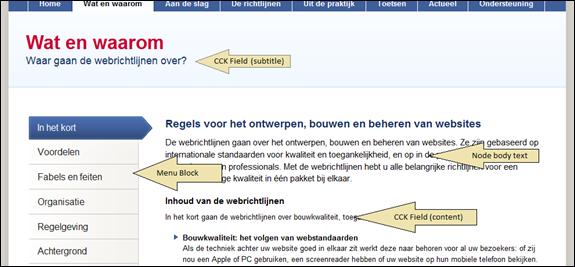
Menu block is used to generate a secondary menu in the left sidebar. CKEditor is integrated to ease the editing of content and combined with IMCE for inline images. The GeSHi Filter is used for syntax highlighting. Syntax highlighting is very important, because the site offers a lot of HTML/CSS code examples.
Filtering Web Guidelines on terms
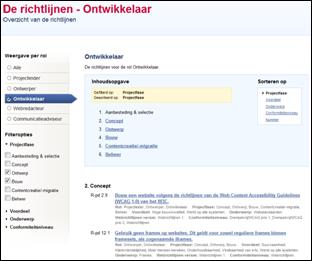 Described as one of the challenges earlier in this article, Exposed Filters (part of the Views module) could not be used to filter the guidelines. That’s why a specific module was created that takes care of filtering, named Termfilter. With this module, nodes can be filtered on their terms using POST requests, so the URL stays intact.
It is also possible to use one vocabulary as a filter using radio buttons and one vocabulary to filter by using tabs. This last requirement is needed to display both the current guidelines (based on WCAG1) and the new guidelines (based on WCAG2), which are still subject of discussion.
The content type Web Guideline uses six taxonomies to group and subdivide content (Guidelines version, Role, Subject, Project phase, Advantages and Confirmation Level). The Termfilter module uses these vocabularies to filter, sort and display nodes. Using a combination of a browser cookie and a session cookie, the filter settings are saved to be restored when a visitor returns to the website.
Faceted search
We used Acquia Search (a hosted Solr solution) instead of Drupal core search, not only because of its powerful faceted search options, but also because it comes with several other cool extras like Sort and Suggestions and the ability to index the contents of documents. By doing so, we can offer multiple ways of finding content quickly and easily.
Modules used
A large number of modules built by the Drupal community were used. Key modules include:
- Admin menu & Admin role
- Easier content administration for admins
- Menu Settings per Content Type
- Limit the menus to choose from while adding nodes
- Automatic Nodetitles
- Format the guideline title using a specific pattern
- IMCE & IMCE Mkdir
- Insert inline images in the content and manage directories
- Secure Pages
- Use SSL for certain parts of the website
- Features & Strongarm
- The only way to make DTAP manageable
- Termcase
- Get grip on the formatting of terms entered by admins/users (eg all lowercase)
- CCK and several submodules
- Couldn’t live without them
- Countdown
- Used to display a countdown clock on the top of the page. We had to make some changes to make it multilingual and such
- GeSHi Filter
- To enable Syntax Highlighting
- WYSIWYG Filter
- Input filtering specific for WYSIWYG editors
- Internationalization & Localization client
- For translation of the website to Dutch
- Views & Semantic Views
- We used Semantic Views to make accessible views without having to create loads of templates. Cool stuff!
Some stuff we built ourselves
- Termfilter: Used to filter nodes on their terms as described earlier. We plan to release this module in the near future.
- Block ID: We used Block Class to create our own Block ID module. Instead of
#block-block-news1we now have#news. Much better. - Banner rotator: Accessible image slideshow. Too specific to contribute.
Contacts
The following people contributed to this project:
- Baris Wanschers (BarisW), Drupal specialist at Sogeti
- Dominque van Gimst (DomoSapiens), Drupal Front-end developer at Sogeti
- Martijn Vermeulen (Marty2081), Project manager at Sogeti
- Michèlle van Vlerken-Thonen, Functional/Graphical designer at ICTU
- Paul Francissen, Project manager at ICTU

Comments
Nice Layout
Nice work on the layout. It looks fairly easy to find information.
Glad to read the case study
Glad to know "Why choose Drupal?" for this website.
The website is clean, simple and also attractive.
Thanks for sharing your experiences to the community.
I was happy to see the new
I was happy to see the new guidelines site for two reasons:
1) It is a nice and clear website that gives a better insight into the guidelines
2) It was built in Drupal!
It is great that the solution is described in more detail now, including the modules used.
Thanks for sharing!
Oh, It's a very good
Oh, It's a very good site!
I'm very interested in the release of Termfilter module. When do you plan to release it?
Ramon
---
Ramon Vilar - http://ymbra.com
Still working on it
Hi Ramon,
thanks for you compliment. We're still working on the Termfilter module. We have some small UX improvements planned. Expect it to be released within a month!
Baris Wanschers (@BarisW)
Drupal specialist
I noticed recently drupal and
I noticed recently drupal and more learn about it the more I like it. looking forward to release of Termfilter module
Thanks for a good case
Thanks for a good case study.
Its good to see the guidelines at one place and option to filter by terms.
---~~~***~~~---
aac
Can you explain the image rotator better.
Image slideshows that work without Javascript. Drupal.org has a lot of modules that can create image slideshows. As websites should not rely on JavaScript or CSS, a slideshow that shows all images even when JavaScript support is not available was needed. The available contributed modules use display:none in the HTML source to hide all images except for the first one. Therefore, a small module was created that shows all images without JavaScript and then uses then uses jQuery to hide the images and create a slideshow. Without Javascript, the visitor sees all images in a scrollable DIV.
If it uses jquery to hide the images and create a slide show doesn't that mean it relies on javascript?
In either case, I think it is a brilliant idea as a child module for views slideshow collection of modules. I would be more than willing to help out if you change your mind about sharing this bit of functionality.
Image rotator
Hi Jonathan,
The point is that users with browsers without support for additional technologies (like JavaScript or Flash) get the same information as users that do have browsers with support for additional technologies.
The solution is that all images that are used in the Slideshow are loaded and displayed in a
<div>(with a scrollbar to prevent a lot of room getting wasted) first without any use of JavaScript and then - when JavaScript is supported - the HTML is transformed into the Slideshow using JQuery. So yes, the slideshow needs JavaScript.The display:none method for hiding images is not allowed, because screenreaders will skip that content.
Does this answer your question?
Thank you!
Mi Marty,
Thank you very much for your prompt reply. It makes things a lot clearer. I still think it would a great addition to views slideshow family of modules.
Also, if you have a chance take look at the issues of accessibility in views in general it has come up as one of the issues and is being dealt with. Your experience suggestions and patches would be very beneficial.
http://drupal.org/project/issues/views?text=Accessibility&status=Open&pr...
Javascript should be an add-on
I think it's a relative small patch for the Views slideshow. What needs to be done is instead:
it should be:
combined with a small piece of jQuery like
$('li:gt(1)').hide();Baris Wanschers (@BarisW)
Drupal specialist
Great work! Other governments can reuse it
# Block ID: We used Block Class to create our own Block ID module. Instead of #block-block-news1 we now have #news. Much better.
# Banner rotator: Accessible image slideshow. Too specific to contribute.
Would you also share your Block ID module and accessible banner rotator.
We don't mind if the banner rotator is too specific ... the copyrighted images can be excluded from the module.
Concerning the Accessible image slideshow
I'm with poohpal on this - even if you can't release the images and/or specific technical details, it'd be very valuable to me (and I hope others too) to get a higher-level description of what problems you found and how you solved them. If the implementation is too specific, the general principles might be of a more fruitful character.
And of course: Nice work!
Regards,
Lars
Why must URLs not change when
Why must URLs not change when filtering? Surely the advantage of that is that a filter can be bookmarked.
URL's must be readable
Hi Joachim,
you are right that it would be great to bookmarks filters. The problem with GET filters is that the URL's can become quite nasty. The Web Guidelines state that URL's must be readable (understandable).
For instance, check the URL Drupal.org generates when I search Drupal Administration modules sorted on Title:
http://drupal.org/search/apachesolr_multisitesearch/drupal?filters=tid%3A53%20drupal_core%3A87%20%20ss_meta_type%3Amodule&solrsort=sort_title%20asc&text=drupalIn this case, an URL like
http://drupal.org/search/drupal/filter_compatibility-drupal6/filter_type-module/sort-title-ascwould be better, but I am not aware of a module that can fix this. Not using Views, and not using Search. We chose an in-between approach where only the 'role' is displayed in the URL (eg /guidelines/developer). The sorting and other filters are still submitted using POST.Baris Wanschers (@BarisW)
Drupal specialist
Thanks for your reply! It's a
Thanks for your reply!
It's a good point. I've been musing for quite some time about the way that on one hand, Views arguments have very nice URLs, but filters do not -- and fundamentally, they are doing the same thing. Something for Views 4 maybe.... :)
filters using views arguments
We are working on creating filters using views arguments and clean URLs using the "display summary ascending" option. We basically are able to expose filters as lists in blocks. Then we rewrite the term URLs using pathauto to expose the term along those lines.
So for example, with a blog post blog/11/10/this-is-the-title, we will have blog/11/ as the year filter, blog/11/10 as the month filter, and then the full title to designate the title of the article. Then, we will have blog/term/11 or blog/term/housing that will link to a filtered view of that term page, where the links are exposed as a list in a block. We do all of this using views arguments. Currently, we are working to get multiple terms to work properly and effectively in this regard. Its easy when you are using the term-id, but the term itself is a bit more difficult.
Richard Schulte
It's a very good site!I like
It's a very good site!I like your site!
really cool to see such a
really cool to see such a website built in Drupal! I've peeked on this site a lot when I was building a governmental website to make sure all guidelines were met and back then it was already a great site, but now it also looks totally awesome.
Navigating through the site seems flawless and blistering fast as well. VERY good job!