

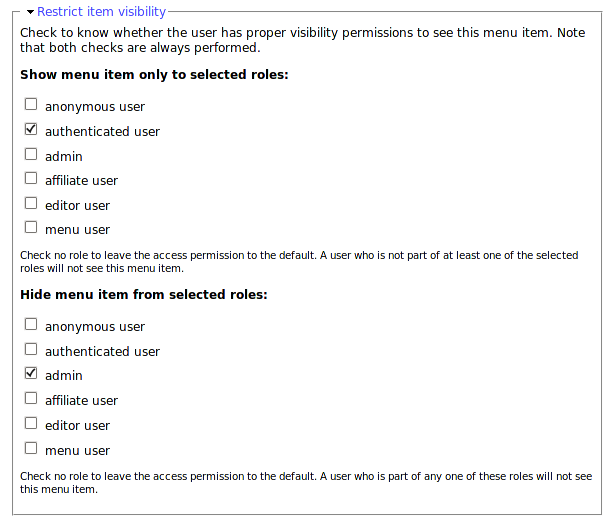
This module allows you to restrict access to menu items based on user roles. Just activate the module and edit a menu item as usual. There will be a new fieldset that allows you to restrict access by role.
We wrote "menu items", not "nodes". This module does not prevent users from accessing the destination nodes. It only changes the visibility of the menu items.
Do I need this module?
Short answer
It is very likely that you do not need this module at all.
Log In, Log Out, Register & My Account
When you want to create a "Log In" menu item, in any menu, make it point to "user/login". That way it will disappear once a user is logged in. You probably know about the "Log Out" path, it is shown in the Navigation menu: "logout". To offer a Register menu item to anonymous users, make the link point to "user/register". And if you want to show a "My Account" link, use "user". That will always be visible and if an anonymous user tries that link, he will first be asked to log in.
- Log In, user/login
- Log Out, logout
- Register, user/register
- My Account, user
Consider the destination node access instead
You may want to use modules that control node access rights. In Drupal a menu link that points to a page that cannot be accessed by the current user is not shown to that user. That's much simpler than having to edit each menu item for specific role permissions!
If you need finer control over node access rights, have a look at:
So?! What is this module for???
Now... There are a few cases when hiding a menu item by role can still be useful. Although rare, it happens.
- You are dealing with external links (these are considered public and have full access rights by default.)
- Menus that you do not want to show to certain users although the destination pages are still freely accessible.
For example, you could have a site with a menu for registered users and a menu used to appeal to new users so they create an account:
- My Account
- Edit my info
- Send a message to my friends
- Log Out
- New to This Website?
- Check out why you should register
- Still not convince? Check our video!
- Register Now
- Already have an account? Log In now!
The "My Account" menu should probably not appear when your users are not yet logged in. Install menu_per_role, edit the "My Account" menu item, and select all the roles except "anonymous". Note that this case can also be solved by changing the access rights of the node pointed to by "My Account" menu item.
The "New to This Website" menu should definitively be removed once the person is logged in. Install menu_per_role, edit the "New to This Website" menu item, and mark it for the "anonymous" role. This way, the reasons why this site is worth the trouble are still accessible to the logged in users, just not directly accessible through the menu.
Requirements
There is no special requirement for this module.
Limitation
For Drupal 8+, Menu Per Role only acts on content menu link (content entity). Menu links provided by configuration (example: Views) or by *.links.menu.yml files can't be managed by this module.
Similar modules and how they are different
- Menu Admin per Menu: By default, Drupal allows only users with "administrer menu permission" to add, modify or delete menu items. In case you want for instance to let certain users manage primary links or secondary links but not navigation menu, this module provides this functionality.
- Menu item visibility: Does the same thing as Menu Per Role.
Maintainers
Current maintainers:
Previous maintainers:
This project has been sponsored by:
Project information
 Minimally maintained
Maintainers monitor issues, but fast responses are not guaranteed.- Maintenance fixes only
Considered feature-complete by its maintainers. - Project categories: Content display
 14,385 sites report using this module
- Created by fago on , updated
 Stable releases for this project are covered by the security advisory policy.
Look for the shield icon below.
Releases
released 19 July 2026
Development version: 2.x-dev updated 19 Jul 2026 at 18:20 UTC
released 19 July 2026
Development version: 8.x-1.x-dev updated 28 Nov 2025 at 14:39 UTC


