

 Come together with the global Drupal community in Rotterdam, 28 Sept – 1 Oct 2026. Sessions, contribution, connection, and Early Bird savings until 8 June.
Updated: Comment #10
Problem/Motivation
Entity Reference allows using a View of a specific display type to set the available options. It's also possible to set arguments (contextual filters) on that view from the ER field config screen.
The problem is that only static arguments can be supplied. This makes the use of using a View to generate the available options limited, as in most cases you want to send context-aware arguments to Views.
It should thus be possible to supply dynamic arguments to a View.
Proposed resolution
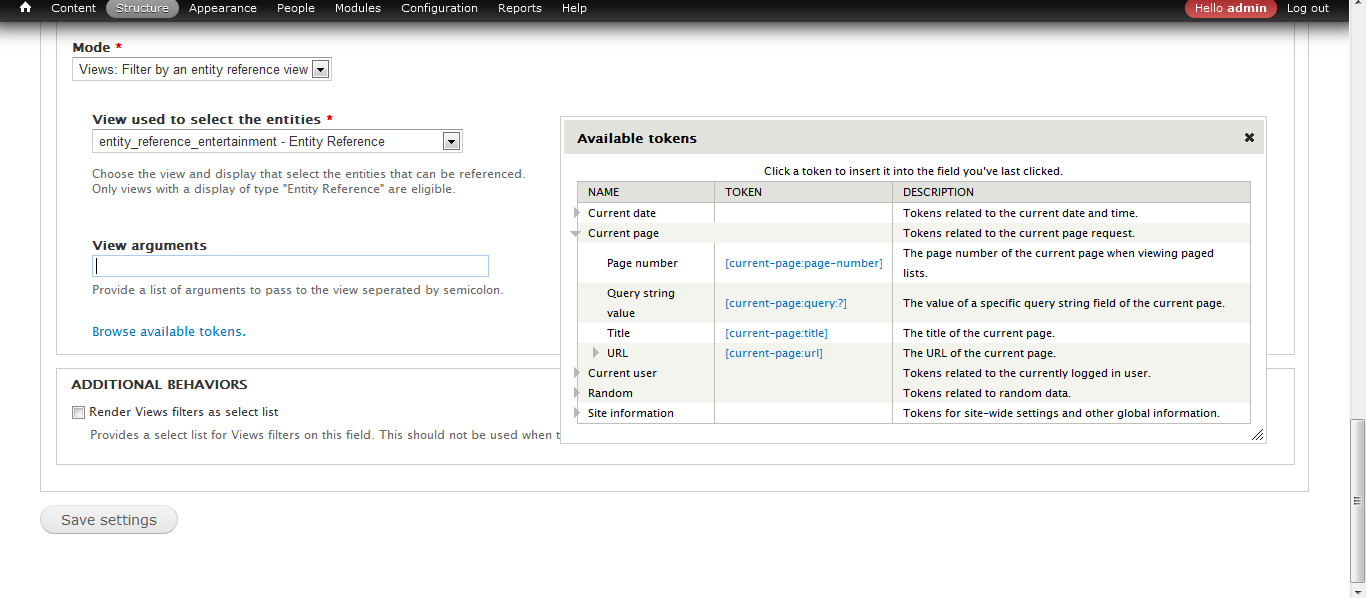
Allow the use of tokens when sending arguments to the View.
Remaining tasks
- Wait until this feature is added to Drupal 8?
See #1699378-66: Allow tokens in entity reference views selection arguments - Make this to work when creating entities
See also #1699378-63: Allow tokens in entity reference views selection arguments
User interface changes
Users can use tokens when defining the arguments to send to a View, when they choose to use a View to generate the available options for an entity reference field.
API changes
None.
Related Issues
Same issue for Drupal 8: #1699378: Allow tokens in entity reference views selection arguments
Original report by @Volx
When using a view for entity selection, it is sometime helpful to have the id of the current entity available in the view. As far as I can see I can only pass static arguments in the field settings.
I added a setting "Pass entity ID" to the field settings form and changed the EntityReference_SelectionHandler_Views so it passes the entity's id to the view as the first argument. For backwards compatibilty the default is to not pass the entity id. Another approach could be to allow using tokens in the arguments field setting, that might already possible in which case consider this issue as a support request :)
| Comment | File | Size | Author |
|---|---|---|---|
| #175 | entityreference-use-tokens-2010898-175.patch | 5.01 KB | karlshea |






Comments
Comment #2
Volx commentedentityreference-pass_entity_view.patch queued for re-testing.
Comment #3
geek-merlinentityreference-pass_entity_view.patch queued for re-testing.
Comment #4
geek-merlinYes, at first i thought "Entity NID is enough for everyone" (tm). After an hour of fiddling with real world problems i realized it hurts.
Implementing token support was so easy with your (very well-written!!) patch laying the ground.
So here's the token support patch flying in. Please have fun, test, review and let's get this finally in!
Comment #5
geek-merlinImproved patch with longer textfield for token verbosity.
Comment #6
geek-merlinImproved patch does not produce token zomies.
Comment #7
geek-merlinAnd avoids empty arguments, views chokes on them.
Comment #8
megachrizThis has been requested before. At some point it was decided that this new feature must be added to Drupal 8 first, and now its burried somewhere in the Drupal core issue queue:
#1699378: Allow tokens in entity reference views selection arguments
Not sure if I should close this issue as a duplicate though.
Comment #9
jaydarnellDoesn't seem like a duplicate to me seeing as #1699378 is for Drupal 8 but maybe I'm missing something.
Comment #10
megachriz@CopperBot
See comment #66 in #1699378-66: Allow tokens in entity reference views selection arguments.
I will repost the patch here that was RTBC there as I'm not sure what the policy is of closing duplicates when the original issue moved to an other issue queue.
Comment #10.0
megachrizUpdated until comment #10. Added a reference to the same issue for Drupal 8.
Comment #11
aoturoa commented#10 works pretty good. Thanks.
I added an array_filter() before returning the $args.
This will support the 'Display all results for the specified field' option in Views core when the filter value is NOT available. An empty string I also consider as NOT available.
Comment #12
aoturoa commentedComment #13
bsarchive commented#12 seems to work for me, in the recently updated version of entityreference (7.x-1.1).
Please can we get this committed? Now every time entityreference is updated, my site breaks, without this patch!
Comment #14
kolier commented#12 works for me as well. Thanks.
Comment #15
k.skarlatos commentedpatch on #11 works fine for me. The problem is that the textfield has a small maxlength (128) that causes problems when using many tokens, so i changed the patch setting that to 512. I believe this is ready to be committed.
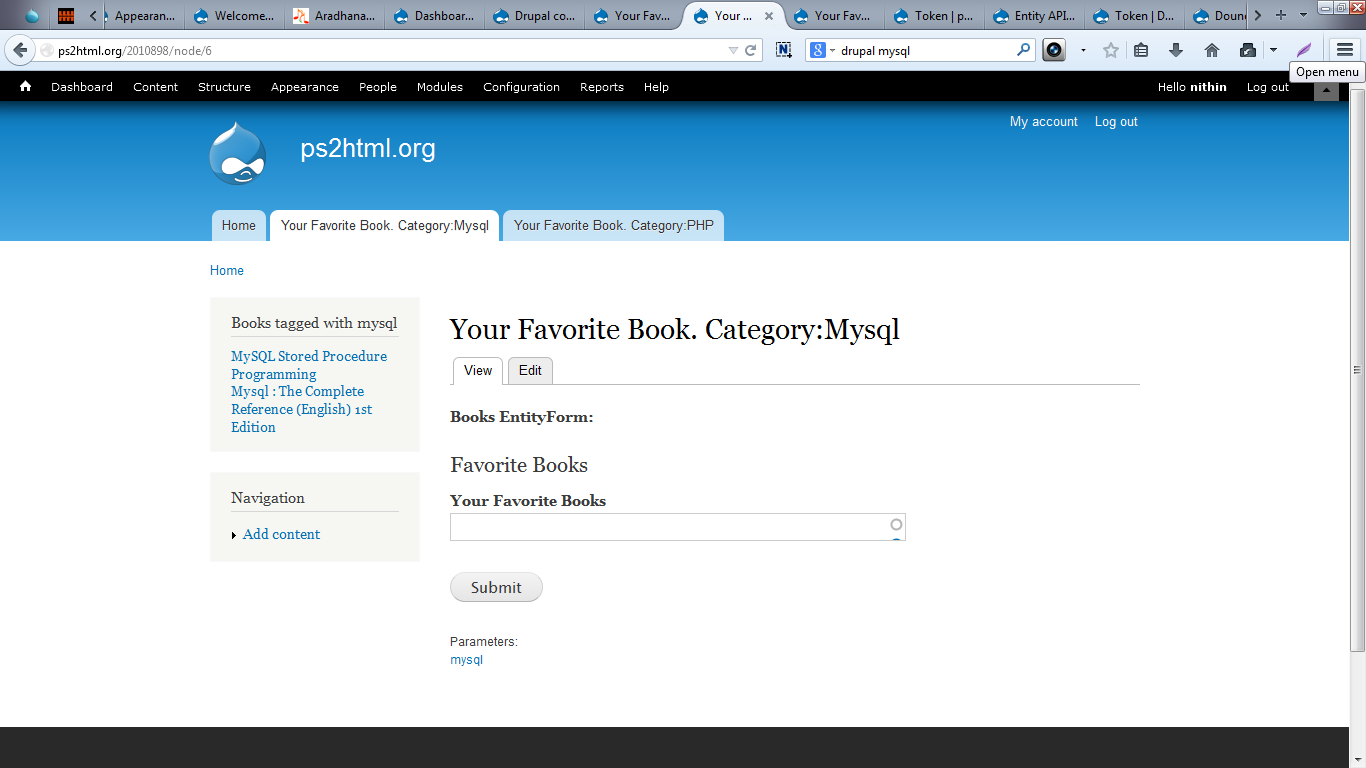
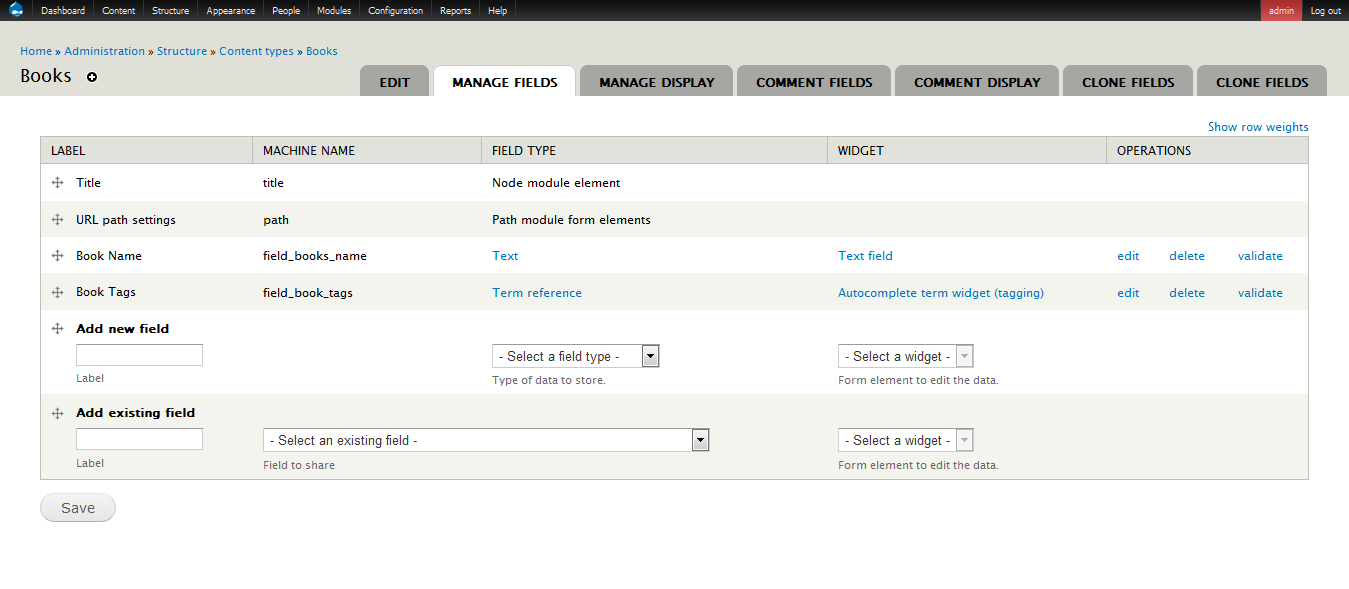
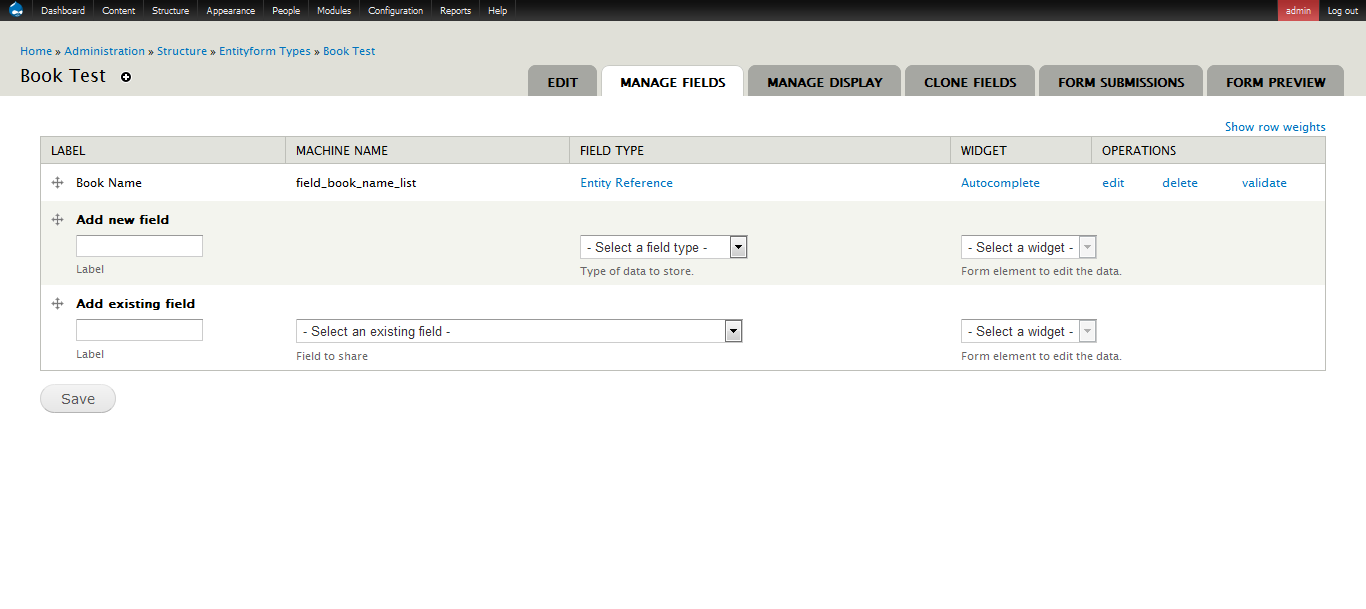
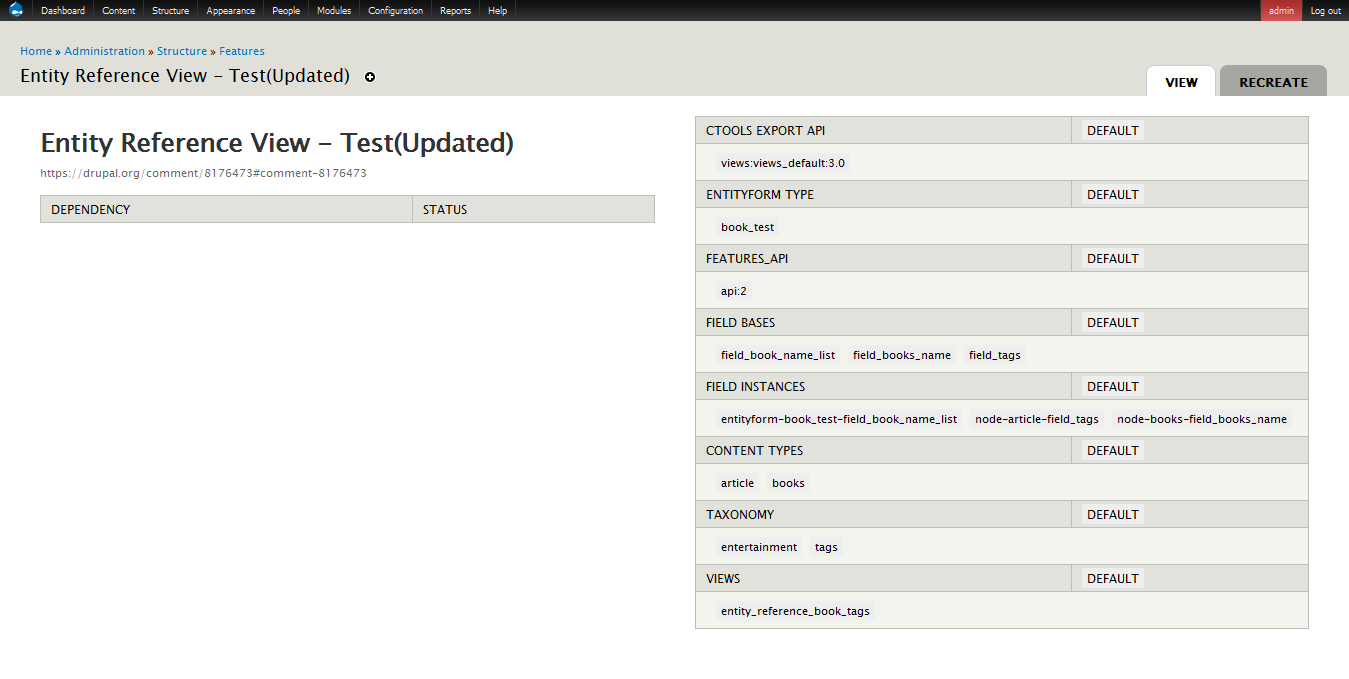
Comment #18
k.skarlatos commentedfixed a small syntax error with the above patch. it should be ok now
Comment #19
k.skarlatos commentedsorry for spam, this is the correct patch (hopefully)
Comment #20
k.skarlatos commentedComment #21
k.skarlatos commentedComment #22
genjohnson commentedThe patch in #19 works for me. Thanks.
Comment #23
alain dg commentedNice to see a patch! Thx.
But I cannot get this to work after different configs of views.
SCENARIO
I want my ER view to display only nodes that share the same taxonomy term with the edited node.
-> I want a match player field to display a list of players sharing the same season (taxonomy term).
Match Content type:
- season field: 2013 (taxonomy term)
- player field: ER view listing only players inscribed in 2013 (multiple value)
Player Content type:
- season field: 2013 (taxonomy term)
CONFIGS
1/ In the Match content type, for its Player ER field field, I set [node:field-season] as argument of the view.
2/ In Views, I make a list of players with contextual filter
- context filter: has taxonomy term ID
When filter is not available
- default value: taxonomy term ID from URL,
- Load default filter from node page
- Limit terms by vocabulary: Seasons
- Filter to items that share any term
When filter is available
- Specify validation criteria: taxonomy: Seasons
- Filter Value type: Term Ids separarted by , or +
Of course, it works in Views UI by supplying a filter value.
Thanks in advance!
PS: My version of Entity Reference is 7.x-1.0-rc5
Comment #24
Yuri commentedWith the patch, I still can't get it to work, the ER field just doesn't show the filtered results.
I'm using [node:og_group_ref] as token in the ER field, in order to filter nodes that are part of the same group.
I tried with different versions of ER including the latest dev.
Comment #25
guillaumev commentedI just tested this patch and it's working perfectly fine on my side.
Comment #26
Mazzhe commentedOn my site, the token list lead to memory issues...
I changed the line 49 of patch #19 from
'#theme' => 'token_tree',to
'#theme' => 'token_tree_link',and now, it works, with a link to the token table.
Thanks a lot for this patch.
Comment #27
Mazzhe commentedComment #28
roball commentedThe Viewfield module has this feature already, but it would be nice to have this in Entity reference.
Comment #29
drupalninja99 commentedI see tokens but I don't see entity tokens, am I doing something wrong?
Comment #30
jpstrikesback commented26: entityreference-tokens-as-view-arguments-2010898-26.patch queued for re-testing.
Comment #31
jpstrikesback commented10: view-argument-as-token-1699378-46.patch queued for re-testing.
Comment #32
nithinkolekar commentedEntity tokens are not available when ER is inside field collection.I think patch still not working with Field Collection.Apologies :( this is not only related to filed collection but with basic field also.
Node field tokens like [node:author],[node:field_tags] etc are not available when trying to set view's parameter, but available in Automatic title generation settings(screenshot2).While I am not able to attach file, see next comment for screenshot.
Installed Modules related to token
Token 7.x-1.5
Entity tokens 7.x-1.3
File (Field) Paths 7.x-1.0-beta4
Comment #33
nithinkolekar commentedscreenshots for #32
Comment #34
nithinkolekar commented@Weblights for #23
I don't know the default behaviour of parameter passing ie whether
view accepts term(s) from external module and convert them to id
or
external module should convert( in this case entity reference) to id before passing it to view.
I came through this same problem(?) and to solve this, in contextual filter config instead of Term Ids separarted by , or + use "Term name converted to Term ID".
Comment #35
nithinkolekar commentedThis feature is not usable when creating new entity thus making it limited.
For ex.
When creating new Entity for content type TechBooks and this is not actual requirement but for just example.
Title - Beginning PHP and PostgreSQL E-Commerce: From Novice to Professional
TechTags- Autocomplete or checkbox depends on no of terms (Php, Apache, Python etc. all are taxonomy terms)
Similar Books - Autocomplete
--|-----Entity reference using views (We can't pass TechTags value ie [node:field_techtags] as parameter to views while creating, as this TechTags value is not saved yet but when editing value could be passed!)
Comment #36
mustanggb commentedThe issue I am having with #26 is that tokens work (in my case [node:field-example:nid]), but they aren't being shown in the token browser so it's just guess work what to use.
Is this the same thing you're describing nithinkolekar?
Comment #37
nithinkolekar commentedYes thats what I am getting and for time being just copying token from Auto title generation configuration manually.
As you can see in screenshots from #33, 01 token browser is popup and 02 is the default one without popup.I thing token tree generation methods(if there are any) might be the cause.
Comment #38
roball commentedI think the status of this issue needs to be updated.
Comment #39
geek-merlinDo we really need this? This kills important use cases and the 8.x patch over at #1699378: Allow tokens in entity reference views selection arguments does not have this restriction.
Comment #40
nithinkolekar commentedCode
+ if ($this->entity) {is failing ,thus $data variable is not setting and token replace failed.Taxonomy term field [node:filed_tags] is used as token to get node as entity reference.
Applied patch #26
Modules info
Token 7.x-1.5 - enabled
Entity API 7.x-1.3 - enabled
Entity Token 7.x-1.3 - disabled
Entity Reference 7.x-1.1+3-dev - enabled
Comment #41
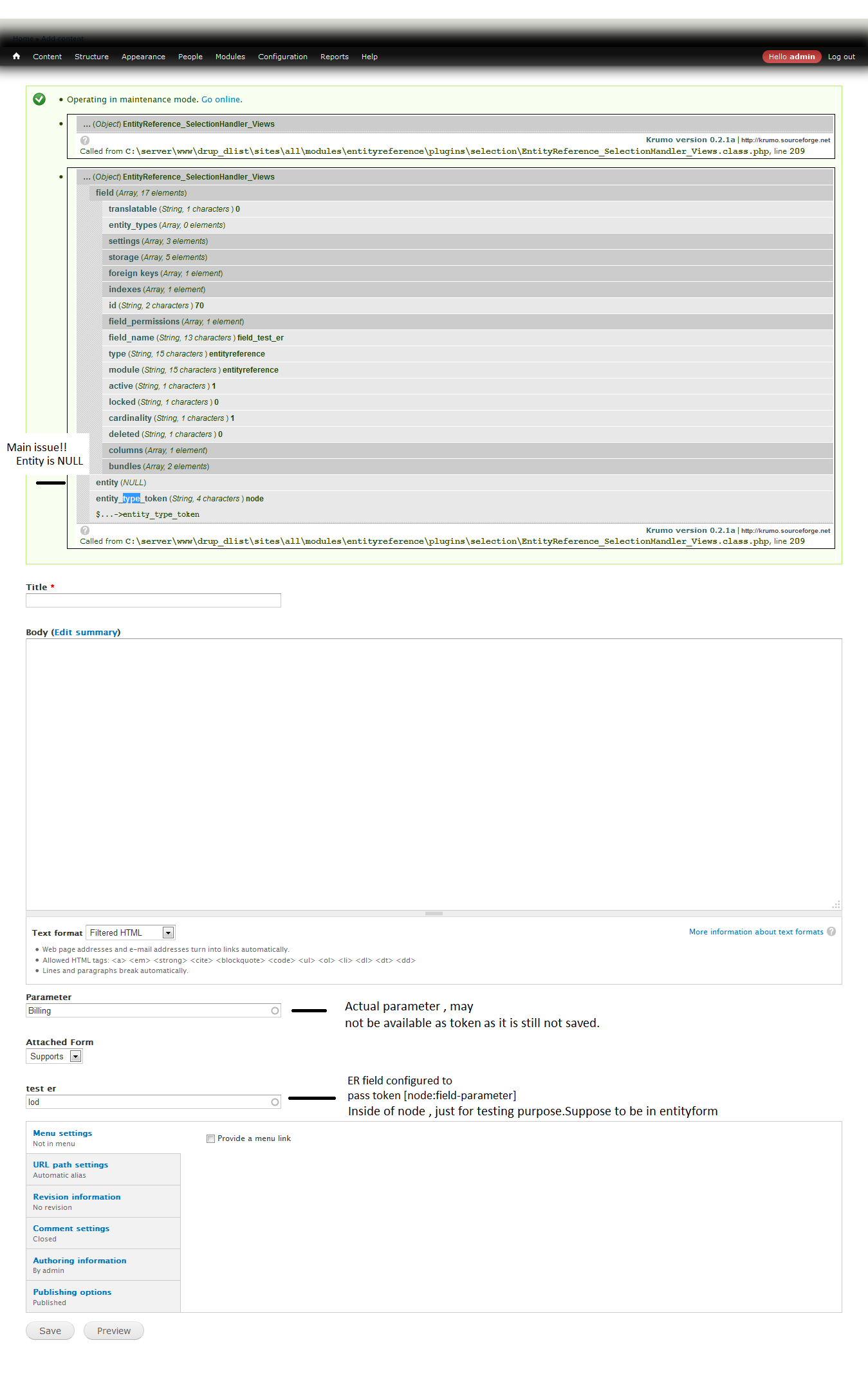
nithinkolekar commenteddpm($this->field['settings']['handler_settings']['view']['args'])is showing correct token ie [node:field-parameter] but it is not replacing with value. see screenshots of other dpms.
update:
inserted if statement in protected function __construct($field, $instance, $entity_type, $entity) like
but if statement fails here too.any clue on this?
Comment #42
megachriz@axel.rutz, #39
Sorry, I put that piece of code in. The reason why I added that check for an existing entity was that - in case of nodes - some properties of the node are not yet available on the node add form. In my case this resulted into errors, because I used the
[node:nid]token. See #1699378-43: Allow tokens in entity reference views selection arguments for background information.I agree the restriction for existing entities should be eliminated, but at the same time no errors should be shown when a token is used for a property that isn't yet available.
Comment #43
geek-merlin@#42:
i agree that [node:nid] should be empty or 0 for new nodes, not creating errors.
so we might simply set it's id to 0 in that case (i prefer 0 as i remember that views in d7 sometimes chokes on empty arguments)
Comment #44
antoinetooley commentedHi, I have used this patch in drupal 7, so I can give my reference view an argument with tokens and I think it is working. But I really want to grab the og_group_ref parameter in my url added by the entity reference prepopulate module and place this as my argument in views. The url of the node add page would be something like this: http://localhost/example/node/add/example&og_group_ref=171.
Would anyone be able to help me as to which token I could use I am guessing from the current_page section to get this value. I have tried a few things but nothing seems to be working.
Thanks in advance.
Antoine
Comment #45
nithinkolekar commentedAlso tried with AET like
[aet:node:1:field_tags]where 1 is the node id which is succeeded, but nid is not dynamic :(.
So tried another token after applying patch https://drupal.org/node/2082269#comment-7829711
[aet:node:[current-page:url:args:1]:field_tags]but this is not replacing token with actual value.
I can confirm this patch doesn't work when entityreference field is inside EntityForm. Also raised the issue node related tokens are not available/accessible to entityform module
Comment #46
smurfxx commented#26 is working, I hope this will be implemented in the future release of this module!
Comment #47
nithinkolekar commentedI have created another thread and patch for my specific issue i.e when node tokens were not available to entityreference which is inside entityform
pass nid to entity selection view via autcomplete path - when node tokens are not available
Comment #48
dobe commented#26 worked for me.
Comment #49
apmsooner commented#26 worked for me also and my case is quite unique.
Field Collection
- Entity Reference #1 (node)
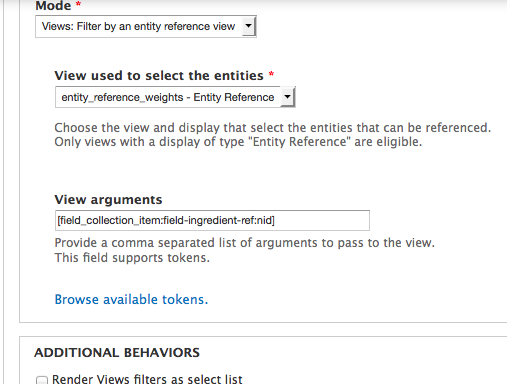
- Entity Reference #2 (field collection related to node from entity reference #1). This entity reference is filtered by a view with contextual filter of nid from #1. The entity reference field passes the token [field_collection_item:field-ingredient-ref:nid] from #1 to the view.
The only challenge was finding the token to use as it doesn't show up in the token browser but once i figured that part out, works fabulous.
Comment #50
geek-merlinHmm, noone did it? Let's squash this down.
#26 has been RTBC but has issues:
* a) #29..33: entity tokens not showing up
* b) #35..43: new entities should be handled gracefully
This patch improves #26 but only addresses b). Still setting to NR to bug the testbot.
Comment #51
geek-merlinThis one should handle a) and b).
Some notes:
* i think we can safely use $entity_info['token type'] as this is what auto_entitylabel does too
* tested that entity tokens now show up in the browser
* did *not* test token handling for new entities (you may PM me if this still fails so we can finally make this RTBC)
Comment #52
geek-merlinUrps, forgot one cleanup line.
Comment #53
geek-merlinOK... revision key can be an empty string and should be ignored then. Fixed.
Comment #56
geek-merlinOK lights are green, so we now need a manual tester to set #53 RTBC. Anyone?
Comment #57
apmsooner commentedI tested patch #53 on 7.x-1.1. Works perfect for me using entity reference to field collection items. All relevant tokens available for selection and field is filtered to token as described.
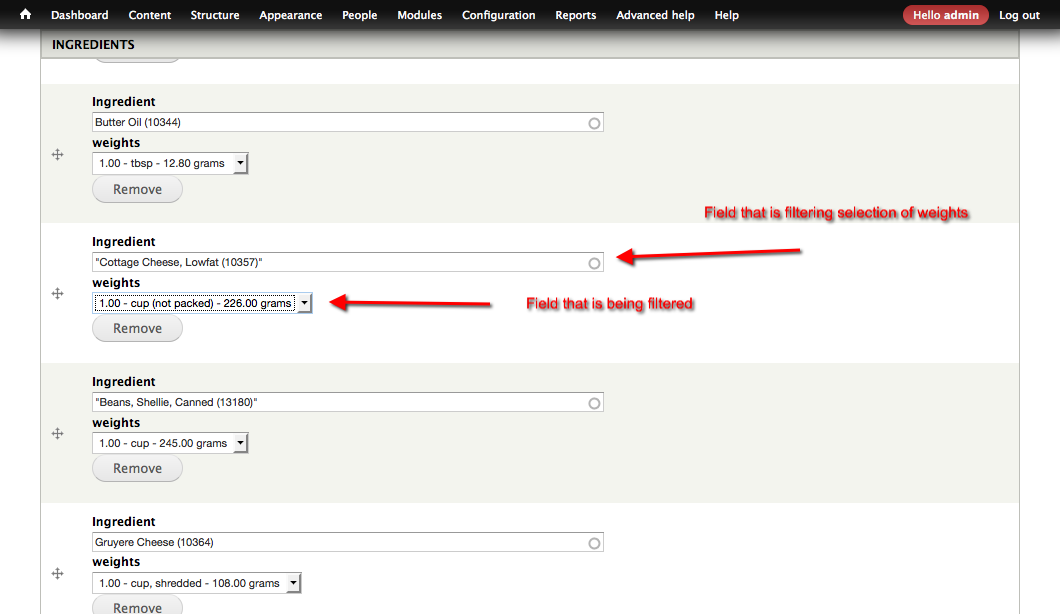
Comment #58
apmsooner commentedHere are some screenshots to depict my setup. I'm using the functionality in a field collection (recipe ingredients) that references a node (ingredient) which filters field collections (weights) that relate to node (ingredient).
Comment #60
nithinkolekar commented@axel.rutz
still not working for my specific setup #41. more details about setup https://www.drupal.org/node/2244987
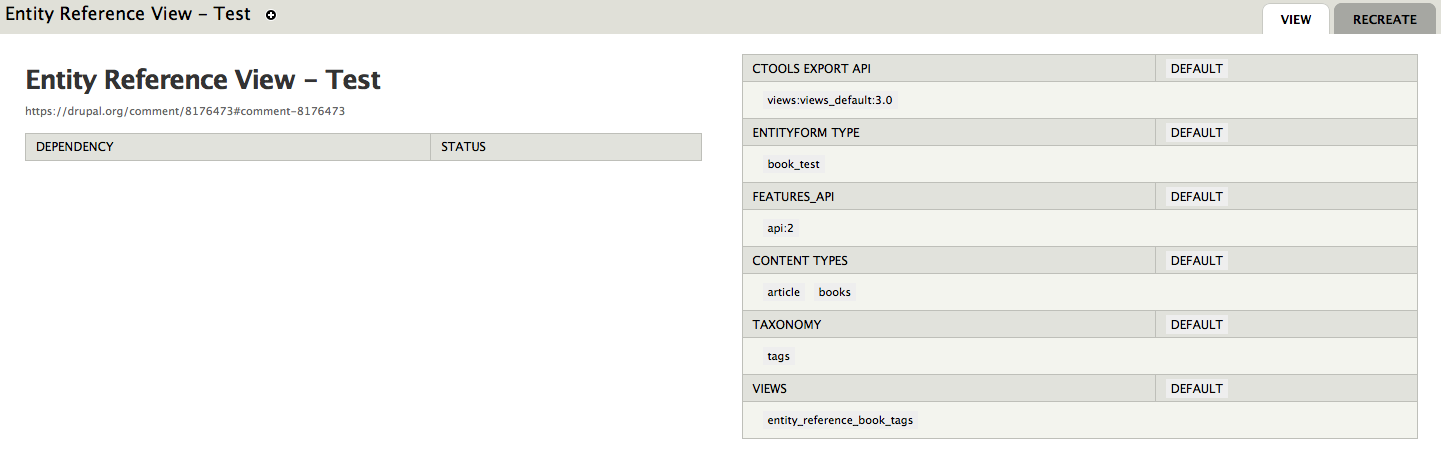
Attaching a basic setup(more info) bundled into feature with Article content type and entityform for testing
Comment #61
apmsooner commented@nithinolekar,
I've read through your issues... but having a hard time understanding what the goal is here. Can you dumb this down a little to explain what exactly you are trying to achieve? And what exactly isn't working? The token you need isn't available from the browse tokens dialog or it is but simply not working?
Comment #62
apmsooner commented@nithinolekar, your feature doesn't have any fields associated with it (see attached). Without a better explanation of what the goal is and/or proper feature setup to test, I don't think this issue should hold up the progression of the patch being included in the next release. It sounds more like a configuration issue on the view or an entityform specific issue.
Comment #63
nithinkolekar commented@apmsooner
that feature was created long back when I haven't had experience with Features module :(.
Recreated feature and attached.
couldn't figure which module is causing this as different modules are involved in the setup likely entity api, tokens, entity reference,entityform and views. As for the views is concerned I doubt about misconfiguration because it is simple view with entityreference as display and taxonomy term id as contextual filter.
About setup:
It is like asking site user to submit their favorite book but category wise like
Favorite php book
Favorite drupal book etc.
For this simple setup, entityform is created which has entityreference field refer to Node of content type Books.This books content type has tag associated to which views contextual filter should apply.
Another content type is created called Favorite to which entityform is attached and this content also has another term reference field called Parameter which should be passed as argument to views to extract book which having the same tag(s) only.
In my setup as u can notice field Parameter is presaved before submiting EntityForm and hence "new entities" problem will not raise in this scenario.
Finally how to test?
create some nodes of type books which has some tags like
php
drupal
mysql
create a node of type Favorite with
1. title : Favorite php book
2. parameter : php
3. book form : select entityform created
When new node Favorite php book is viewed then user can see entityform (set rendered entity via manage display) and test by filling field "Book Name".
Comment #64
apmsooner commented@nithinolekar,
Your feature is still incomplete as it doesn't include the content type "Favorite" that you are referring to. There are no term reference fields attached to the books node nor the entityform type. Trying to give you the benefit of the doubt and help you but your uncertainty in your own issue being applicable to the actual thread:
... as well as the lack of accurate feature setup to even test it out for you is really potentially hijacking the progress of the patch that I myself have tested and confirmed working with proper configuration. The only advice i can offer is to perhaps manually pass term ids into the views ui preview field to see if you can obtain desired result and then backtrack through your settings elsewhere.
Comment #65
apmsooner commentedFYI,
To do what i think you are trying to do, you can use this token in the entityform's entity reference field:
[current-page:url:args]
Assuming the entityform is referenced to the node and rendered to display as form, you should see something like the attached screenshot.
Note: Your entity reference view needs to be of type "term", not content. You can import the attached sample view to see configuration and adapt to your needs. Just to confirm... the token approach I mentioned works as designed as it just grabs the nid argument from the page and passes it to the view.
View:
$view = new view();
$view->name = 'book_tags';
$view->description = '';
$view->tag = 'default';
$view->base_table = 'taxonomy_term_data';
$view->human_name = 'Book tags';
$view->core = 7;
$view->api_version = '3.0';
$view->disabled = FALSE; /* Edit this to true to make a default view disabled initially */
/* Display: Master */
$handler = $view->new_display('default', 'Master', 'default');
$handler->display->display_options['use_more_always'] = FALSE;
$handler->display->display_options['access']['type'] = 'perm';
$handler->display->display_options['cache']['type'] = 'none';
$handler->display->display_options['query']['type'] = 'views_query';
$handler->display->display_options['exposed_form']['type'] = 'basic';
$handler->display->display_options['pager']['type'] = 'full';
$handler->display->display_options['style_plugin'] = 'default';
$handler->display->display_options['row_plugin'] = 'fields';
/* Relationship: Taxonomy term: Content using Tags */
$handler->display->display_options['relationships']['reverse_field_tags_node']['id'] = 'reverse_field_tags_node';
$handler->display->display_options['relationships']['reverse_field_tags_node']['table'] = 'taxonomy_term_data';
$handler->display->display_options['relationships']['reverse_field_tags_node']['field'] = 'reverse_field_tags_node';
$handler->display->display_options['relationships']['reverse_field_tags_node']['required'] = TRUE;
/* Field: Taxonomy term: Name */
$handler->display->display_options['fields']['name']['id'] = 'name';
$handler->display->display_options['fields']['name']['table'] = 'taxonomy_term_data';
$handler->display->display_options['fields']['name']['field'] = 'name';
$handler->display->display_options['fields']['name']['label'] = '';
$handler->display->display_options['fields']['name']['alter']['word_boundary'] = FALSE;
$handler->display->display_options['fields']['name']['alter']['ellipsis'] = FALSE;
$handler->display->display_options['fields']['name']['link_to_taxonomy'] = TRUE;
/* Contextual filter: Content: Nid */
$handler->display->display_options['arguments']['nid']['id'] = 'nid';
$handler->display->display_options['arguments']['nid']['table'] = 'node';
$handler->display->display_options['arguments']['nid']['field'] = 'nid';
$handler->display->display_options['arguments']['nid']['relationship'] = 'reverse_field_tags_node';
$handler->display->display_options['arguments']['nid']['default_action'] = 'default';
$handler->display->display_options['arguments']['nid']['default_argument_type'] = 'node';
$handler->display->display_options['arguments']['nid']['summary']['number_of_records'] = '0';
$handler->display->display_options['arguments']['nid']['summary']['format'] = 'default_summary';
$handler->display->display_options['arguments']['nid']['summary_options']['items_per_page'] = '25';
/* Display: Entity Reference */
$handler = $view->new_display('entityreference', 'Entity Reference', 'entityreference_1');
$handler->display->display_options['defaults']['title'] = FALSE;
$handler->display->display_options['pager']['type'] = 'some';
$handler->display->display_options['defaults']['style_plugin'] = FALSE;
$handler->display->display_options['style_plugin'] = 'entityreference_style';
$handler->display->display_options['style_options']['search_fields'] = array(
'name' => 'name',
);
$handler->display->display_options['defaults']['style_options'] = FALSE;
$handler->display->display_options['defaults']['row_plugin'] = FALSE;
$handler->display->display_options['row_plugin'] = 'entityreference_fields';
$handler->display->display_options['defaults']['row_options'] = FALSE;
Comment #66
nithinkolekar commented@apmsooner
thanks for your sincere help
I hope this time feature will wok, as I tested it by importing to other fresh drupal installation on local system.Also attaching the each configuration screenshot.
I checked it by passing term id directly which is working fine but when token is used like [node:field-parameter] then it is not replacing with value(in the above case term php).
The main idea about this setup and requiring the token support is , we can use same form for collecting different submissions with each different node like.
Favorite php book - (which could have term php and passed as argument).
Best Drupal 7 module - (which could have term drupal7 and passed as argument).
For time being I am using patch pass nid to entity selection view via autcomplete path - when node tokens are not available but would prefer token method.
Comment #67
nithinkolekar commented@apmsooner for #65 I will test it soon..
Comment #68
apmsooner commentedI think #65 satisfies the functionality but i didn't account for the multiple content types involved or really understand the need.... Maybe consider simplifying the workflow or browse manually the tokens at the node level @ /admin/help/token and see if you can drill down to what you need for the nid to pass to the view. Either way, a view of type content i don't think would ever satisfy what you're trying to do if you are trying to return 'terms' and your displaying content title in the view.
Comment #69
nithinkolekar commented@apmsooner
test #65 with tags like
[current-page:url:args] : doen't work, not an issue.
[current-page:url:arg:1] : worked
[node:id] : this also worked
but only when widget is set to Check boxes/radio buttons or select list.
It doesn't work for auto complete widget(see screenshot).Also this comment from Clive on SO is informative about autocomplete path.
Comment #70
howards commentedCleanly applied the patch in #53 against 7.x-1.x commit dc4196b4. It works!
Comment #71
schifazl commentedThis patch works flawlessly on my site, thanks! :)
Comment #72
geek-merlin@nithinkolekar / @apmsooner
it looks like you did an impressing debugging / support job, and to be honest, i don't get every detail of that debugging.
what i thin i got ist:
there are still issues with autocomplete widget.
but this patch did not break anything that worked before, so i suggest to have it committed and do the rest in a separate issue.
(feel free to correct if that is not correct)
Comment #73
apmsooner commented@axel.rutz,
The autocomplete issue has nothing to do with this new code but rather a configuration issue in his entity reference setup. I think we've narrowed down all the issues brought by nithinkolekar to configuration outside the scope of what this patch does. It works perfect for everyone else that has tested under proper configuration so i say... all lights remain green to move forward as you suggest.
Comment #74
nithinkolekar commented@axel.rutz / @apmsooner
Whole setup is configured for testing in one of my unused/testing domain. Will PM admin login details if you are interested and you can view as anonymous also.
Modules -
Drupal core 7.31
Entity Reference 7.x-1.1+3-dev (applied patch #52)
Token 7.x-1.5+4-dev
Views 7.x-3.7+35-dev
Entityforms 7.x-2.0-beta4+1-dev
No other patches are applied to any other modules.
Comment #75
nithinkolekar commentedattached missing screenshot..
Comment #76
apmsooner commentedAutocomplete works fine for me in my testing even though i'm not sure why anyone would want to use that over select list when the values are being filtered to limit results. That just doesn't sound too user friendly to me even in your case @nithinkolekar. Nonetheless, if you're not seeing results, you may need to adjust the entity reference view settings to define the fields that are searchable and also maybe adjust the entity reference field settings to "starts with" instead of "contains" for testing purposes.
@nithinkolekar, I still don't see this being an issue related to the patch here so please research further on your end and/or poise the issue to another thread outside this one.
Comment #77
nithinkolekar commentedvalues are filtered based on terms, but it might be possible that no of nodes having that term is huge for select list to render.
views is returning values for both "starts with" and "contains" when token argument left blank but doesn't work when provided.
any info about setup which involves Autocomplete will be helpful , so that I can compare with my setup.
Comment #78
apmsooner commented@nithinkolekar, sorry but i can't spend anymore time helping you on something that i don't believe is affected by the patch. The complexity in your use case is not typical for the general needs of this patch thus I would advise you to setup a much simpler implementation of basic autocomplete functionality and start narrowing down to find potential issue instead of assuming this patch is a problem.
Comment #79
geek-merlin@nithinkolekar: although @apmsooner did a great job assisting you, it is a problem if an issue like this has lots of noise not directly related to its core (and you usually get harsh comments for "hijacking").
You should open a separate support issue or use forum or IRC (in addition to simplification as suggested!).
So to summarize: RTBC as to #53 / #57 / #73.
Comment #80
geek-merlinNo, it's not. Needswork for the same reason as #1699378-93: Allow tokens in entity reference views selection arguments
Comment #81
nithinkolekar commented@axel.rutz
@apmsooner's main complain is about my setup which involves lot of modules and looks complicated at first glance. So I came up with simplified setup which involves only single content type and comment field setup.
As for the entity reference there are multiple widgets available which includes select list, checkbox and auto complete widget by drupal core.
My issue about this patch is, it is partially working with select list and checkbox only. I still couldn't find whether it is a problem with autocomplete widget as you mentioned in #72 (if it is then will create a new issue there).
Setup
1. Create some contents of type Articles content type with similar tags
2. Add a new entityreference field to article content type's comment field which should have views as entity selection and [ node:field_tags ] as View arguments.
3. create a usual view with display : Entity Reference list and contectual filter: Content: Has taxonomy term ID
you can test the setup @
http://ps2html dot org/2010898/node/7
also attaching the feature of this setup.
If you think it is still not convincing you then I hope some one else will explain more clearly than me in the future when he/she will came through the same problem :).
Comment #82
geek-merlinOK here's the patch with the array_filter changed, see #80.
Comment #83
geek-merlin@#81: Please do not get me wrong, i'm appreciating all input and now i understand the issue you are raising.
But as the ViewsSelection code is completely widget agnostic i can not see the issue with the autocomplete widget can be solved here.
Now that you distilled a minimal failing case please file that as a separate bug with link to this issue (maybe after testing with the current re-roll ;-).
Comment #84
nithinkolekar commented@axel.rutz
Sure, will create issue once this patch gets committed.
Comment #85
nithinkolekar commentedNow I am testing with select list/checkbox only as @axel's info about autocomplete.
some clarification needed about this patch
Is it mandatory to have both agrument field(token) and entityreference(which accepts token as filter) should be in the same bundle/entity.
As in my case mentioned in @81 argument field is on node entity and entityreference is on comment entity.
I had done a mistake in the views contextual filter by setting Load default filter from node page, that's good for related taxonomy blocks to true. This makes view collecting term data from node page although token value is not available to view at all.When this option is disabled then I came to know that token replacement is not actually happening.
ex: if token value is [ node: field_tag ] which is a node token, then line
$data[$info['token type']] = $entity;makes $data['comment'] = < comment object > and hence
$args[$key] = token_replace($arg, $data, $options);is failing to replace token.
Am I correct about this?. I request to all others who claimed that this patch is working at their side, could share about their setup if possible.
Comment #86
plong0 commentedGreat to see this issue is being actively addressed!
I am using the patch from #53, and trying to do following:
I have a "Report" content type with these fields:
field_client - Entity Reference using a view for nodes of type "Client"
field_contact - Entity Reference using a view for nodes of type "Contact" and with contextual argument for the nid of the field_client
What I would like is when I select a value for Report's field_client, the field_contact shows the Contacts for the selected Client.
I hope the explanation makes sense.
I have tried to set it up with the field_contact's view arguments to use the token [node:field-client:nid]
I have tested the view with a client id as an argument, and it does show the Contacts as expected - just having trouble getting those results into my entity selection list.
Edit:
After saving the node with a value in field_client, on the node edit page the field_contact list shows the correct contacts - until I change the field_client to a different value (it keeps the same token value it had when the page loaded)
Is there a way for tokens to be provided dynamically when a field is changed on a node form?
Comment #87
plong0 commentedNot sure if it is by design, but with patch #53, I am receiving the error:
Notice: Undefined property: entityreference_plugin_display::$id_field_alias in entityreference_plugin_style->render() (line 49 of /webroot/sites/all/modules/entityreference/views/entityreference_plugin_style.inc).
The error shows up on the edit field page and on the add node page.
The error only appears when the enttity reference view contextual filter's "no value" handler is set to any of the bottom 3 ("Display ...") settings.
The error is not present when using the top 3 ("Show All", "Provide Default", "Hide View" settings.
Thought I would share this in case anyone else experiences that error.
Comment #88
schifazl commentedplong0 about #86 I agree with you that this is an important functionality. In the meantime you can try the Reference Option Limit module, but it's a bit limited. Being able to do this with tokens and views would be marvellous
Comment #89
plong0 commentedI guess what it comes down to is tokens being updated and applied in real-time. Almost seems like there would need to be a "token changed" js behaviour so that modules like this one can be notified about fresh token values in real-time.
And thanks schifazl I will give the Reference Option Limit module a try.
Comment #90
hansfn commentedI ended up using a completely new module - DFV - Dependend Field Values - which seems to work very well.
PS! Read this issue if you need checkboxes.
Comment #91
plong0 commentedTried out both those modules. Seems like DFV would be a lot more powerful (since it uses views), while Option Limit Module is a lot more compact/simpler.
The problem I have with either one is that they don't seem to work with an Inline Entity Form. Going to raise that issue on both and see who can help first.
Cheers, thanks for the direction on this.
Comment #92
geek-merlinPlease folks do not hijack this issue. it's about getting a patch in.
We still need test of #82
Comment #93
schifazl commentedWell, I'm testing #82 (with a select list) and everything works smoothly for now. I didn't do any complicated view though, just simple filtering
Comment #94
geek-merlin@schifazi #82: did you use tokens? if yes please set status to RTBC.
as the patched component does not know anything about the used widget nor the view but is only about providing token placeholders, testing the tokens work is the main point.
Comment #95
nithinkolekar commentedhi alex,
another setup for testing this patch which worked for user object token [ current-user:uid ] and surprisingly this worked for autocomplete too!
1. add entityreference field "my_other_article" to content type Articles and set it to views selection with argument [ current-user:uid ]
2 create a view of nodes of content type articles with contextual filter settings
Content: Author uid
When the filter value is NOT available - Hide view
3 create at least one article node with each different user.This is just to test whether token is passing properly or not.
4 try creating second article by filling my_other_article(ER field) which would work perfectly by passing token as argument. This is also working with autocomplete too.
Only mystery remains is , why it isn't working for node tokens?
update: this is tested with #82 patch.
Comment #96
schifazl commentedSetting status to RTBC. Yes Axel, I'm using tokens (specifically [current-page:query:field_name]).
I've tried to change the widget type. It works both with select and option, but not with autocomplete and autocomplete (tag style).
Comment #97
apmsooner commentedI think autocomplete issues "could" be related to the view configuration in defining searchable fields in the settings. I know after tweaking that, my autocomplete testing worked when it didn't initially. I can't recall exactly what i changed unfortunately....
Comment #98
schifazl commentedI can't find these settings, I've checked all the view's settings
Comment #99
apmsooner commented@schifazl,
if you've added a display to your view of type "Entity Reference", you would go to the settings link in the format section of the view ui. Click that and you'll see checkboxes for search fields.
Comment #100
schifazl commentedAh OK, sorry for the misunderstanding. I already checked that when I have created the view, otherwise I couldn't even save it.
Comment #101
schifazl commentedI was so taken with designing my site that I didn't notices a warning, but before setting status to needs work I'm asking if this is just a problem of mine:
When creating a new node which has a field with a view vith tokens as arguments I get this warning:
Notice: Undefined property: stdClass::$nid in node_tokens() (line 112 of modules/node/node.tokens.inc).It's only me?
Comment #102
liquidcms commentedas far as i can tell this still does not work for autocomplete or any other widget
hard to tell from token text what the correct token is they say url:args but example suggests url:arg i tried both of these:
[current-page:url:args:1]
[current-page:url:arg:1]
and then possibly the question is how to set up the contextual filter on the view. i tried numerous options but it should be something that allows the view preview to work i would guess, so i have:
When the filter value is NOT available: User ID from URL
When the filter value IS available or a default is provided: nothing set
with this views preview give me the correct list.
nothing i type in my autocomplete field returns any results. switching to select list and i also have no results.
my set up is a field on user profile. the field is a list of nodes which the user is tagged via user reference like field.
i have latest -dev patched with: entityreference-2010898-80-Use-tokens.patch
before i patched i was able to get some list of nodes in my autocomplete but only if i change the view to simply list all the nodes.. i.e. basically dont use the contextual filter.
Comment #103
liquidcms commentedperhaps my issue is a different issue than here although i think this is a way people are trying to fix underlying issue: views with contextual filters dont work with entity ref selector. technically i dont need to pass an argument; if the entityref uses the view as it is defined which is to simply pull the uid from url when no arg is available.
Comment #104
liquidcms commentednope, my bad.. not sure what i have set up different now but the select list and checkbox widgets do work (not passing arguments as i don't require that); but autocomplete doesn't work.. separate issue i suspect.
actually i went back to 7.x-1.1 and my entity selection with views works fine with checkboxes or select list for 2 reasons (likely obvious to those that have been working this issue since it was started):
1. my view doesnt require any arguments to be passed as it is set to pull args from url
2. these 2 widgets are not ajax based and the ajax calls mess up the url losing my uid/nid from being able to be passed to the view arg handler
Comment #105
liquidcms commentedso this is simple enough, the only reason autocomplete doesnt work for url based contextual filters is because the url tokens dont work within ajax calls.
the following code creates a token based on the HTTP_REFERER which is the originating path prior to the ajax call:
so adding a token of [current-page:referer:arg:1] fixes my view and autocomplete works as expected.
Comment #106
geek-merlinSo setting to RTBC as of #96.
Again: this patch is widget agnostic and widget issues should get their own issue to not noise this one dead. Thanks!
The findings e.g. from #105 are very valuable but should live in their own crosslinked issue
Comment #107
apmsooner commented@axel.rutz,
#105 might be related to an issue i'm coming up with that ultimately affects this patch from being effective when there is another field that has unlimited values thus added via ajax. I'm seeing an issue after adding 3 or 4 values of an unlimited field results in an "An illegal choice has been detected." error and upon saving i'm noticing the entity reference fields are reset with nothing to choose from... I'm concerned the underlying issue might wrongfully get associated with this patch and wondering if you had come across this and had any ideas?
Note: the issue ONLY happens if a value is selected from entity reference field and then adding values to unlimited field. The error pops up after the 2nd added value usually and prevents further values from being added. If the entity reference field is empty, the widget works fine and no errors. I really hope #105 is considered in this review....
Comment #108
apmsooner commentedOkay sorry for the crosspost but I'm certain someone else will come across my issue in #107 and think its related to the patch and found a solution here: https://www.drupal.org/node/1818542
Short answer is, in the view settings, set basic validation to show all results if filter isn't found.
Comment #109
schifazl commentedWhat about #101? Am I the only one with that warning?
Comment #110
pontus.froden commentedI can also confirm #53 with 7.x-1.1 works great. I also get the same error as #87.
Comment #111
haggins commentedTested #82 and found a flaw:
The view accepts 2 contextual filters. The first one has this setting:
"When the filter value is NOT available: Provide default value (Content ID from URL)"
The second filter comes with this:
"When the filter value is NOT available: Display all results for the specified field"
So the second filter is/should be optional and actually is with the view preview function. However, when I set the argument list of the entityreference field to
[current-page:url:args:value:5], [current-page:url:args:value:6]I only get a result when I provide both arguments.Comment #112
haggins commentedThe problem is, that this module calls the view always with both arguments whether they have a value or not. So the view interprets the second argument not as "not available" but as empty
I just updated #82 in a way, that arguments which are empty after token_replace() will be removed.
Can you think of any negative side effects of doing this?
I can imagine a option to enable the removal of empty tokens would be handy. What do you think?
Comment #114
haggins commentedComment #115
haggins commentedSorry for all the confusion guys. #82 is a great patch. For the issue with the optional argument, there is an easy workaround in views itself:
The optional argument filter needs this settings:
When the filter value is NOT available: Display all results for the specified field
When the filter value IS available or a default is provided: Specify validation criteria -> PHP Code:
Action to take if filter value does not validate: Display all results for the specified field
Comment #116
skaduThis looks good to me, my token tree browse won't load correctly, leads to a white screen, but the token passing works just fine. Thanks for your work on this everyone.
Comment #117
alphawebgroupany chance to commit that patch #114?
Comment #118
biswajeetparida commentedis patch #114 works?
Comment #119
alphawebgroupsorry for misleading...
i meant #82, not #114
Comment #120
schifazl commentedI don't think that a patch which forces to use a workaround in views (as stated in #115) should be accepted. I would propose to test patch #114, if it solves this problem (which I have too). Right now I don't have the time to test it, but in the weekend I will do it.
Comment #121
daro.pl commentedAfter node save I'm getting the following error:
My fixed version of the #114 patch.
Comment #123
daro.pl commentedFixed my last patch #121 issues.
Comment #124
alphawebgroupComment #126
daro.pl commentedComment #127
daro.pl commentedComment #128
geek-merlinI've taken some time to think about the "#82 vs. #114" question.
#114 did delete all empty arguments to workaround views not taking them as exception values.
It turns out that this approach only makes sense when the argument is the last one.
Filtering out empty "middle" arguments will make later arguments go into slots they are not meant to.
This will kill kittens and cats.
So we should
* fix that problem in views - i created #2398611: Empty exception value not recognized for this
* work on from #82 - which was RTBC as of #96
Thanks again @haggins for your finding in #114. And everyone: I think this is RTBC and other things like the autocomplete issue raised should go into followups. But if you find someserious problem and have to improve this patch, please always add some explanations what was changed and an interdiff to the origin patch. Otherwise we get lost in a total mess...
Comment #129
geek-merlin(#53 is dead.)
Comment #130
nithinkolekar commentedOn my previous comments it mentioned that patch doesn't seems work with autocomplete widget and others are agreed with it.Now I am testing with other widget where others claims it is working.
such a long thread and almost forgotten the need of this patch :).
here is the rephrase from OP
Is this patch work while entity(node) creation ? (i.e while submitting form)
Assuming view is configured properly and tested by passing tid in preview.
field_tags
select list widget
should be passed as token to entityreference field
field_articles
select list widget
Entityreference field
Is it possible to use [node:field_tags] token as parametcer here or
should it be [current-page:query:field_tags] (which is not working)
If yes and if we change the value of field_tags will that trigger the view to render again?(this feature is available in dfv). I know it is not the function of this patch but curious what others are getting who claimed that this patch is working.
Comment #131
geek-merlin#130: even after several times reading i do not understand. can you please describe exactly how to reproduce what is not working?
Comment #132
nithinkolekar commented@axel.rutz
This testing is done with fresh drupal installation and with required contrib modules which are required for this patch.
Steps to reproduce
1. Add some terms to tags taxonomy namely PHP, CSS, Mysql, Drupal
2. Create Content of type articles with tags set any one or more of the above created terms.
ex.
article 1 , tags: css, php
article 2 , tags: php
article 3 , tags: mysql, drupal
article 4 , tags: css, druapl
3. Create a view of content Article having
Display : entity reference
contextual filter : Content: Has taxonomy term ID , Provide default value : Taxonomy term id from url
Test by passing tid it should work fine. (attached the views export code)
4. Add a entityreference field to Article content type having
name : Related Based on tag (field_related_based_on_tag)
widget : select list
Entitly selection : select view created in step 3 , set token parameter [node:field_tags]
5. Change widget type of field Tags in Article to select list (just avoiding autocomplete widget in the whole setup, no other reason)
Now the testing part
Try to create a content of type article this time with additional entityreference field appears and for tags select list appears instead of autocomplete as we changed in step.
Here when tag is selected it should load entityreference select list by passing tag's tid through [node:field_tags] to view right? But it doesn't : (
This function in available in dfv as commented in #90
please share your steps which is working in your setup.
Comment #133
nithinkolekar commentedFor my particular use case using autocomplete widget I found 2 links
1. Excellent article by Bryan where he explains about autocomplete widget/path , why it is not possible and also how we can pass additional arguments to autocomplete widget.
2. Entity Reference View Widget is providing hook to accomplish this task. more info @ #1626668: Provide referencing entity as views argument
Finally switched to Entity Reference View Widget as autocomplete widget alternative and
dfv for other widgets like select list,check box.
Because others are claiming that this patch is working , changing status back to RTBC.
Nithin
Comment #134
OliverColeman commented#126 works for me (brilliant, love it), except that when I set the Remove empty arguments checkbox it doesn't stay set once the form is submitted. The checkbox gets it's default value from the line
$default = !empty($view_settings['cleanup']) ? $view_settings['cleanup'] : 0;but
$view_settingsnever seems to contain anything other than values for the keys view_name, args and display_name.Not reverting the status to Needs Review because I haven't tested this in a clean set-up. Does this checkbox work for others?
Update: just noticed that besides the value not being stored in the settings for the field, the checkbox config should be using
'#default_value' => $default,rather than'#default' => $default,.Comment #135
geek-merlinPlease note that #82 is the current patch and "remove empty arguments" is a different issue and should go into a followup.
Comment #136
howards commentedFor all those plagued by the autocomplete vs checkboxes/radio issue, it appears there was an issue created a while back #1978274: Entity Selection Using Entity Reference View - Works with Select List But Not with Autocomplete
Comment #137
mustanggb commentedThere is a lot of demand for this feature, so bumping priority to reflect this.
Comment #138
joshua.boltz commentedThe patch in #82 worked great and added the token functionality into the views argument field from within an entity reference field.
This is a huge improvement and efficiency, and without it there is a lot of duplicated work to handle the various scenarios whereas this patch adds the dynamic aspect to it.
Comment #139
shaisamuel commentedI opened #2498755 for the "remove empty arguments", which doesn't function.
Comment #140
sonicthoughts commentedSince @shaisamuel pulled out #2498755: Add "Remove empty arguments" checkbox when Views entity selection mode is used - can we please commit this to dev (and hopefully have a release soon:))
Comment #141
mkolar commentedHi, I can't get it to work.. my entityreference field is inside field_collection, I'm using token current url query to but after click to "add another item" to field collection select-boxes are empty (view didnt get correct argument). Otherwise this patch works with select box fields! Looks like this patch works if the field_collection field is not set to unlimited number of values.
Comment #142
apmsooner commented@mkolar, your issue is with ajax call happening on the "add another item" action. The url argument is essentially ignored at that point. I've experienced the same and the only solution I've been able to come up with as workaround is to hide field collection from node form and add field collection items separately and individually outside the node. I believe anything initiating an ajax call will break the entity reference view argument.
Comment #143
geek-merlinComment #144
tchopshop commentedHello, I have this token argument working perfectly on an ECK entity referencing a node, but now I'm using the same entity reference view with a node that references another node. Both nodes are group content and I'm trying to have the entity reference field only select content from the other content type constrained by the group (as I did with the entity). However, the og_group_ref token does not work in this situation. I've tried all combinations, including the same format as the entity that DOES work, i.e. [ENTITY:FIELD:nid]. Also I've tried [ENTITY:FIELD:gid], [ENTITY:FIELD], [ENTITY:FIELD-FIELD], [ENTITY:FIELD_FIELD] (ie. using the machine name with hyphens or with underscores). Nothing works. The token is working in other situations, such as in the path alias. I don't know if this is an organic group issue or a token entity reference issue.
UPDATE: I added a second entity reference field on the node that was not a group reference field and the token from that field worked. So it is an issue with group entity reference field tokens.
Comment #145
schifazl commentedThe token replacement doesn't work if I'm logged in as administrator, but if I'm logged as normal user everything works. Am I the only one with this issue?
EDIT: Never mind, the problem must lie somewhere else: when a user has the administrator role the fields of the entities instead of being field['und'][0] are just field[0], and probably this is the reason for which the entity metadata wrapper fails loading the field's value. That's odd...
Comment #146
eugene.ilyin commented#126 worked for me.
Comment #147
stiknoltz commentedFor anyone with the "'Remove empty arguments' checkbox doesn't save" issue documented on #2498755, I've posted a re-roll of #126 in that issue thread that solves.
Comment #148
mustanggb commentedMarking as a 7.x-1.2 candidate.
Comment #149
weri commentedThe patch #126 worked for me too. Thanks!
Comment #150
mustanggb commentedJust to reiterate #82 is the patch that is RTBC, the empty exception issue is over in the views queue #2398611: Empty exception value not recognized.
Comment #151
maxplus commentedThanks,
#126 is also working for me!
Comment #152
skylennard commentedI discovered this issue while working on a content type entity reference (select list) field, with a views:filter entity selection...
On node create/edit forms, I needed to give an argument to the view filter of the current value of another node field, so it could filter out the option on the select that matched the current value.
I ended up solving this problem super easily inside of my hook_form_alter with one line of code:
unset($form['fieldname'][LANGUAGE_NONE]['#options'][$current_id]);
Thought this might be helpful to someone else?
Comment #153
nwom commentedEdit: My comment was not relevant to the functionality of this patch.
Comment #154
junaidpv#126 is working good for me too!
Comment #155
joewhitsitt#126 worked for me.
Comment #156
nimek commented#126 worked for me.
Comment #157
Collins405 commented#126 worked for me as well.
PLEASE can we get this committed? This fixed a huge bug for us here... https://www.drupal.org/node/2752629
When using a View to get the results of an Entity Reference field, after Ajax is run (For example adding a row to field collection), that View will lose its contextual argument, causing no results in the options, and breaking the page.
Using the token [field_collection_item:host:id] as the Views Argument was the fix.
Comment #158
sarvab commentedAs mentioned in #134, the option to "Remove empty arguments" doesn't work with the latest patch at #126.
Attaching updating patch that fixes usage of that option.
Comment #161
geek-merlinOnce again: "Remove empty arguments" is not part of the original issue.
The patch without it was already RTBC and a questionable and unrelated feature now blocks the commit.
Comment #162
joelpittet@axel.rutz #126 is not RTBC either. The coding standards needs fixing and it introduces a bug.
Not
#defaultbut#default_valuewhich looks to be fixed in #158 and mentioned in #134 too.I agree on the 'not part of the original issue' part though, and that should probably be removed, keep things simple make and make follow-ups will help get things in.
@sarvab an interdiff could help show your changes between patches, could you put on in on the next patch please?
If you've not before it's just a diff between the previous patch revision(committed or staged) and your changes https://www.drupal.org/documentation/git/interdiff
The coding standards fixes are: remove trailing whitespace, use 2 spaces instead of tabs, wrap comments to 80 characters. Details can be found here: https://www.drupal.org/coding-standards and dreditor.org can help visualize these.
Comment #163
sarvab commentedI see I didn't review this thread well enough before adding this patch update.
From what I gather, really the current patch to be reviewed is #82 and does not include any empty argument handling.
We should push to get that committed before dealing with empty arguments issue separately?
Comment #164
joelpittetI missed #82 in my review, whoops. Teach me to scan recent patches.
Not sure the ramifications of not dealing with empty args. Will it be worse off?
Comment #165
sarvab commented@joelpittet, from what I gather leaving it off can be semi-problematic but can be worked around in the views handler settings.
However including it can also be problematic for instance with multiple arguments you can't clear away empty ones except the last...
Maybe it's best to work that part out in the other issue?
Comment #166
joelpittetYes then if it can be worked out separately and has a work around, best to keep this the mvp for reviewers.
Comment #167
mustanggb commentedBack to RTBC'ing #82 then, as per #96.
Comment #168
geek-merlinThanks. (My fault i missed the issue number in my last comment =:-()
Comment #169
design.er commentedIs there a known time frame when this patch will be committed to the module and released as a new (dev or stable) version?
Comment #170
joelpittetNoticed that we are now passing in the $entity_type but we are not storing it in a property, should we be?
Seems that if we are taking it in it should probably be stored on the object.
Also for all those properties they should have declarations, currently they are dynamic which isn't good practice.
Example:
Comment #171
geek-merlinGood point.
We have $entity_type already in the instance settings, so we can remove that from the constructor.
Declaring $entity property makes sense though.
Comment #172
karlsheaReroll on dev, interdiff from #82.
Now storing and declaring properties, and removed $entity_type from EntityReference_SelectionHandler_Views constructor.
Comment #173
robertgarrigos commentedAs far I can see this is working for me now
Comment #174
robertgarrigos commentedactually: I have this error when editing a node containing the reference field:
Fatal error: Cannot access protected property EntityReference_SelectionHandler_Views::$field in /.../sites/all/modules/entityconnect/entityconnect.module on line 210Comment #175
karlsheaThe issue is that "good practice" is having protected declared properties, but that's not now other modules interact with entityreference because those properties haven't been protected in the past. EntityReference_SelectionHandler_Generic also doesn't have declared protected properties.
It seems that making a change like that is out of scope of this issue, since other modules will need to take into account those changes and getters/setters would need to be created.
I'm attaching a new patch without protected properties, which is basically a reroll of the patches before #172.
Comment #176
robertgarrigos commentedGreat. This last patch is working for me now.
Comment #177
mustanggb commentedI've also tested #175 and it's working fine for me also.
Looks like all the feedback has been addressed so marking this as RTBC again.
EDIT: Actually, I ran into the array_filter() problem again, however as suggested by axel.rutz I've created #2815863: Contextual filter values of "" don't trigger "When the filter value is NOT available" for that.
Comment #178
Collins405 commentedYep, we tested this as well, and works great, looking forward to getting this committed soon. Thanks for your work on this!
Comment #180
spotzero commentedCommitted.
Comment #182
geek-merlinAdded nasty followup #2830703: Empty token entity selection view arguments break
Comment #183
hgoto commentedI filed another small followup issue.
#2857322: Functions of Token module is used without checking Token module status
Comment #184
eaglegamma commentedIs this supposed to be working now? In Drupal 7.56, I've set up an entity reference view using a token that I believe should convert to a previously tested and working value, but with the token this shows no results. Please let me now if you'd like any more info!
Comment #185
w01f commentedDoes Drupal 8 have this functionality? I can't seem to find any way to configure it for the entity reference field I want to pass a dynamic argument to from another field.
Comment #186
off commentedStill not working..
Comment #187
swilmes commentedI created a sandbox module to move this functionality (using contextual filters in entity reference fields) into its own filter. I think this may be the best route going forward. This has only been tested in my specific use case, but hopefully I can expand upon it to make it a viable solution going forward. Feel free to try it for now if you'd like. Contextual Filter Referer