Greetings,
My markers are not appearing and I am getting the following notice:
A total of 4 View result rows did not have their field_sighting_map lat/lng set and could therefore not be shown on the map. The first was row #1. To improve efficiency you may want to apply a "not empty" filter to field_sighting_map.
In order to troubleshoot this, i setup a new unformatted list view and added the field_sighting_map geofield. The latitude and longitude display normally like so:
test
Latitude: 49.688
Longitude: 18.356
Therefore, I know geofield is working. On the map view using format Map (Leaflet, via IP Geolocation) I have used the geofield field_sightings_map for Name of latitude field in Views query. Interestingly enough, I do in fact have the "not empty" filter applied to the field field_sighting_map yet the message still requests I do so.
Can anybody help me? BTW, there are no errors or notices showing in watchdog. Thanks Kevin


Comments
Comment #1
rdeboerHi Kevin,
Thanks for giving IP Geoloc V&M a go. Sorry that it's not working for you.
First, I assume this is with version 7.x-1.20, rather than 7.x-1.9?
You've probably already double-checked this many times, but are you sure that you haven't made a typo in the name of the Geofield field?
When you switch the format from "Map (Leaflet, via IP Geolocation)" to "Table"... how many rows do you see and how many do NOT have their Geofield column set?
You must explicitly request the Geofield field in the Views UI, both when using "Map (Leaflet via IP Geolocation)" or when using "Table".
Are there 4 rows all with their lat/lon in tact?
Cheers,
Rik
PS: I've rephrased the warning message in the latest 7.x-1.x-dev to be clearer as to why some markers aren't shown.
Comment #2
pyxio commentedhi Rik,
Thanks for the quick reply. My table view looks fine. There are four rows and each have the latitude coordinates. The field name is spelled correctly. What else can I check? Cheers Kevin
Comment #3
pyxio commentedthis is version 2.0
Comment #4
rdeboerWell I'm sorry talengix. Don't know.
I've just done some more testing and looking at the code.
I'm testing with IP Geoloc V&M 7.x-1.x-dev and Geofield 7.x-2.0-alpha2 at the moment, although Geofield 7.x-1.1 should work also.
Maybe try that same combo: IP Geoloc V&M 7.x-1.x-dev and Geofield 7.x-2.0-alpha2
What backend are you using? Not that it should matter. It should all work with the standard db backend, but also with EntityFieldQuery Views backend.
Rik
Comment #5
pyxio commentedHi,
I tried different versions of the modules and same message
A total of 4 View result rows did not have their field_sighting_map lat/lng set and could therefore not be shown on the map. The first was row #1. To improve efficiency you may want to apply a "not empty" filter to field_sighting_map.
It looks like I am the only one having this problem so I can't expect you to spend much time on it. Can you recommend another module that does map clusters I can try? Thanks Kevin.
Comment #6
rdeboerEnable the Leaflet Views submodule and select Leaflet Map as the Views format.
When your map shows enable the Leaflet MarkerCluster module. Clustering is automatic.
Rik
Comment #7
rdeboerEnable the Leaflet Views submodule and select Leaflet Map as the Views format.
When your map shows enable the Leaflet MarkerCluster module. Clustering is automatic.
Rik
Comment #8
pyxio commentedcool but will map be centered by ip address of visitor?
Comment #9
pyxio commentedalso, it doesn't look like it will color markers based on certain settings.
Comment #10
rdeboerCorrect.... Would be interesting to see if you can get any markers at all though. ..
Comment #11
pyxio commentedi got the markers no problem. but i need the other features of your module :o(
Comment #12
rdeboerWell, I have no idea why markers show in Leaflet Views but not IP Geoloc V&M....
I'm sorry...
If you ever find out let us know. ..
Rik
Comment #13
pyxio commentedOK. So you know of another module that does something similar to Geoloc V&M? I would like the map centered on the visitors' IP address and the possibility for different color markers.
Comment #14
rdeboerHi Kevin,
Maybe Location together with GMap Taxonomy, provided the different colours are for a taxonomy term field?
Not sure about centering on the visitor. This page seems to think NO: http://drupal.org/node/1704948
The fact that you can get your map to show with Leaflet really bugs me. Does your Geofield name contain special characters like apostrophes? In the Views UI can you please click "Update Preview" and have a look at the name used by Views for your field_sighting_map. Is there a subtle difference? Does it give you a clue as to what the name might be?
Rik
Comment #15
rdeboerIf you use the very latest 7.x-1.x-dev that I created today, you can select your Geofield from a drop-down, rather than having to type it into a text field.
Thanks to this patch #1993306: Improve selection of lat/long fields in the plugin by mondrake that I just included.
Comment #16
pyxio commentedHi Rik
Perhaps I should inform you of my complete geodata configuration in the event any of it conflicts with IP Geoloc V&M. As you already know, my geo coordinates are appearing fine in tables format view and the markers appear in leaflet views with marker cluster module. So, the problem must be somewhere else....
I am using addressfield to collect location data. I am using geocoder with a geofield titled geodata (field_geodata)... geocoder enables geofield to grab the location coordinates from addressfield. Note: I have tried to create new geofields with different names and they also don't work.
In my view, I have the field geodata. The formatter is set to Longitude/Latitude. Data Options = Use full geometry. Format = decimal degrees.
My view format is Map (Leaflet, via IP Geolocation). Name of latitude field in Views query = field_geodata. I don't think any of the other settings are relevant to this issue.
Do you see anything in that config that is a potential problem? Cheers Kevin
Comment #17
rdeboerHi Kevin,
Sadly, that all sounds clear and correct. The use of AddressField + Geofied + Geocoder is fine -- I've used that combo myself here: http://www.youtube.com/watch?v=iznuDhjAFbg
So I'm dumbfounded....
All I can say is try the latest version of IPGV&M 7.x-1.x-dev with this new drop-down selector I put in. Available from the Git repository now, or in about 9 hours as a dev snapshot on the IP Geolocation Views and Maps project page (dev snapshots get generated only twice per day).
Cheers,
Rik
Comment #18
pyxio commenteddo you mean here git clone --branch 7.x-1.x http://git.drupal.org/project/ip_geoloc.git
cd ip_geoloc for the latest?
Comment #19
rdeboerYes, that's it, Kevin!
Comment #20
pyxio commentedlet me give it a shot. i am as determined as can be to solve this frustrating issue...
Comment #21
rdeboerMe too -- good luck, look forward to your findings.
Comment #22
pyxio commentedi am truly perplexed. i deleted all views, all maps, all content nodes, all geofields... started from scratch with different names. i decided to try using the latitude/longitude option for geofield so i could hard code the coordinates just in case it was an issue with geocoder and/or addressfield. Still get this message
None of the 1 View result rows had their field_manual_geo lat/lng set. Therefore the map could not be displayed. Is field_manual_geo the correct field name?
The above message is shown only to user 1
The crazy thing is that IP Geoloc V&M is AWARE of the latitude field and that is it NOT EMPTY. It knows this because I have a filter on the latitude field set to NOT EMPTY. If you check the message, it is saying "None of the 1 View result rows had their field_manual_geo lat/lng set" yet it knows the value exists because it says "1 View result rows " so it knows there is a value there.
Here is a notice in watchdog... can this cause the problem? (i did not have this notice before that I can recall).
getLocation(): Google address lookup failed with status code OVER_QUERY_LIMIT. -- No fallback. Neither Smart IP nor GeoIP API are enabled. Yet is do have the box ticked for Employ Smart IP as a backup to the Google Maps JS API as well as declined or failed HTML5 location retrievals in Views.
Comment #23
pyxio commentedI am also getting this notice
IP Geolocation: geo_position_js code missing. Are you connected to the internet? -- No fallback. Neither Smart IP nor GeoIP API are enabled.
Can that be the problem?
Comment #24
rdeboerI'm perplexed too, Kevin,
As I'm writing this I'm also corresponding to others who have none of the problems you're having. I just don't get it. I especially don't get that it works for you with Leaflet Views but not "Map (Leaflet, via IP Geolocation)". They're using the same source for retrieving the View results!
A few comments: "The crazy thing is that IP Geoloc V&M is AWARE of the latitude field and that is it NOT EMPTY." That's not quite true. IPGV&M is aware only through the latitude field drop-down selector (or equivalent text box) what the name of the latitude field (i.e. Geofield) is that it should look for in the View results. It doesn't know about whether you set any filters in the Views UI. It inspects the View results rows looking for latitude under the name you gave it. If there is not a single View result row that has a field by the name you entered, then it will show that message. If you put "blah-thee-blah" for the latitude field you'll get the same message.
PS:
I'm a bit worried about the error in #23 -- however I don't think making that go away will solve your other issue. If you do want it to go away, untick for now the box: Employ the Google Maps API to reverse-geocode HTML5 visitor locations to street addresses. That will reduce any interference you may get.
If you ever get the View and map working you may want to flick the HTML5 feature back on. Here's some more info on that: http://drupal.org/node/1782894#comment-7325534
Comment #25
rdeboerOk Kevin -- my final bid. I've added more debug to the latest dev. It's in the repository now.
If could go to the IPGV&M config page, admin/config/system/ip_geoloc, and enter your Drupal user name (admin?) into the box Detail execution progress with status messages.
Then visit your map page again and you should get a whopper of a yellow warning message that looks something like the one I copied from my system below.
You see the data at the bottom at "field_field_geo"? That's the name and data we're after (I'm using Geofield 2.x, Geofield 1.x is slightly different but should also work). Your Geofield name that you enter (or select from the drop-down) can be entered with or without the extra "field_" prefix. That is, in this example output: "field_field_geo" and "field_geo" both work.
If the yellow error message does not show any lat/lon data then for some reason your View did not produce it. You did Add the correct (Geo)Field in the Fields section of the Views UI, right?
Please report back here with a copy of the yellow error message you get on your system.
Cheers,
Rik
------- warning message: ------------
None of the 3 View result rows had their field_geo_wrong lat/lng set. Therefore the map could not be displayed. Is field_geo_wrong the correct field name?
The above message is shown only to user 1
First error row:
node_title = Jessies coffeeshop
nid = 366
node_type = store
node_created = 1361261923
field_data_field_store_address_node_entity_type = node
_field_data = Array ( [nid] => Array ( [entity_type] => node [entity] => stdClass Object ( [vid] => 366 [uid] => 1 [title] => Jessies coffeeshop [log] => [status] => 1 [comment] => 1 [promote] => 0 [sticky] => 0 [nid] => 366 [type] => store [language] => und [created] => 1361261923 [changed] => 1368396072 [tnid] => 0 [translate] => 0 [revision_timestamp] => 1368396072 [revision_uid] => 1 [body] => Array ( ) [field_geo] => Array ( [und] => Array ( [0] => Array ( [geom] => POINT (144.9611268 -37.8171746) [geo_type] => point [lat] => -37.817174600000 [lon] => 144.961126800000 [left] => 144.961126800000 [top] => -37.817174600000 [right] => 144.961126800000 [bottom] => -37.817174600000 [geohash] => r1r0fet6zpdqr ) ) ) [field_store_address] => Array ( [und] => Array ( [0] => Array ( [country] => AU [administrative_area] => VIC [sub_administrative_area] => [locality] => Melbourne [dependent_locality] => [postal_code] => 3000 [thoroughfare] => 401 Collins St [premise] => [sub_premise] => [organisation_name] => [name_line] => [first_name] => [last_name] => [data] => ) ) ) [field_departments] => Array ( [und] => Array ( [0] => Array ( [tid] => 9 ) ) ) [cid] => 0 [last_comment_timestamp] => 1361261923 [last_comment_name] => [last_comment_uid] => 1 [comment_count] => 0 [name] => admin [picture] => 0 [data] => b:0; [num_revisions] => 1 [current_revision_id] => 366 [is_current] => 1 [is_pending] => [revision_moderation] => ) ) )
field_field_geo = Array ( [0] => Array ( [rendered] => Array ( [#markup] => Latitude: -37.817174600000
Longitude: 144.961126800000 [#access] => 1 ) [raw] => Array ( [geom] => POINT (144.9611268 -37.8171746) [geo_type] => point [lat] => -37.817174600000 [lon] => 144.961126800000 [left] => 144.961126800000 [top] => -37.817174600000 [right] => 144.961126800000 [bottom] => -37.817174600000 [geohash] => r1r0fet6zpdqr ) ) )
Comment #26
pyxio commentedHi Rik,
I really appreciate your support on this. Here is the output.
None of the 3 View result rows had their field_geodata lat/lng set. Therefore the map could not be displayed. Is field_geodata the correct field name?
The above message is shown only to user 1
First error row:
node_title = EcoAction Example Post
nid = 34
node_created = 1368534987
field_data_field_post_type_node_entity_type = node
field_data_field_geodata_node_entity_type = node
_field_data = Array ( [nid] => Array ( [entity_type] => node [entity] => stdClass Object ( [vid] => 34 [uid] => 1 [title] => EcoAction Example Post [log] => [status] => 1 [comment] => 2 [promote] => 0 [sticky] => 0 [nid] => 34 [type] => eco_action [language] => und [created] => 1368534987 [changed] => 1368534987 [tnid] => 0 [translate] => 0 [revision_timestamp] => 1368534987 [revision_uid] => 1 [field_image] => Array ( [und] => Array ( [0] => Array ( [fid] => 34 [alt] => [title] => [width] => 852 [height] => 579 [uid] => 1 [filename] => Green-PR-tips-to-increase-awareness.jpg [uri] => public://images/eco-actions/Green-PR-tips-to-increase-awareness.jpg [filemime] => image/jpeg [filesize] => 234524 [status] => 1 [timestamp] => 1368534987 ) [1] => Array ( [fid] => 35 [alt] => [title] => [width] => 468 [height] => 468 [uid] => 1 [filename] => portfolio_green_2.jpg [uri] => public://images/eco-actions/portfolio_green_2.jpg [filemime] => image/jpeg [filesize] => 51316 [status] => 1 [timestamp] => 1368534987 ) ) ) [field_description] => Array ( [und] => Array ( [0] => Array ( [value] => Drupal is open source software maintained and developed by a community of 630,000+ users and developers. It's distributed under the terms of the GNU General Public License (or "GPL"), which means anyone is free to download it and share it with others. This open development model means that people are constantly working to make sure Drupal is a cutting-edge platform that supports the latest technologies that the Web has to offer. The Drupal project's principles encourage modularity, standards, collaboration, ease-of-use, and more. [format] => ) ) ) [field_fivestar] => Array ( ) [field_sighting_location] => Array ( [und] => Array ( [0] => Array ( [country] => US [administrative_area] => CA [sub_administrative_area] => [locality] => Los Angeles [dependent_locality] => [postal_code] => 90010 [thoroughfare] => [premise] => [sub_premise] => [organisation_name] => [name_line] => [first_name] => [last_name] => [data] => ) ) ) [field_post_type] => Array ( [und] => Array ( [0] => Array ( [tid] => 14 ) ) ) [field_geodata] => Array ( [und] => Array ( [0] => Array ( [wkt] => POINT (-118.3089341 34.0625448) [geo_type] => point [lat] => 34.0625 [lon] => -118.309 [left] => -118.309 [top] => 34.0625 [right] => -118.309 [bottom] => 34.0625 [srid] => [accuracy] => [source] => ) ) ) [panelizer] => Array ( [page_manager] => stdClass Object ( [pnid] => 5 [name] => node:eco_action:default [title] => Default [panelizer_type] => node [panelizer_key] => eco_action [no_blocks] => 0 [css_id] => [css] => [pipeline] => standard [contexts] => Array ( ) [relationships] => Array ( ) [did] => [access] => Array ( ) [view_mode] => page_manager [css_class] => [title_element] => H2 [link_to_entity] => 1 [extra] => Array ( ) [table] => panelizer_defaults [type] => Overridden [export_type] => 3 [display] => panels_display Object ( [args] => Array ( ) [content] => Array ( [307] => stdClass Object ( [pid] => 307 [did] => 46 [panel] => bottom [type] => node_comments [subtype] => node_comments [shown] => 1 [access] => Array ( ) [configuration] => Array ( [mode] => 1 [comments_per_page] => 50 [context] => panelizer [override_title] => 1 [override_title_text] => Comments ) [cache] => Array ( ) [style] => Array ( [settings] => ) [css] => Array ( ) [extras] => Array ( ) [position] => 0 [locks] => Array ( ) ) [308] => stdClass Object ( [pid] => 308 [did] => 46 [panel] => bottom [type] => node_comment_form [subtype] => node_comment_form [shown] => 1 [access] => Array ( ) [configuration] => Array ( [anon_links] => 0 [context] => panelizer [override_title] => 1 [override_title_text] => Post A Comment ) [cache] => Array ( ) [style] => Array ( [settings] => ) [css] => Array ( ) [extras] => Array ( ) [position] => 1 [locks] => Array ( ) ) [258] => stdClass Object ( [pid] => 258 [did] => 46 [panel] => left [type] => page_tabs [subtype] => page_tabs [shown] => 1 [access] => Array ( ) [configuration] => Array ( [type] => both [id] => tabs [override_title] => 0 [override_title_text] => ) [cache] => Array ( ) [style] => Array ( [settings] => ) [css] => Array ( ) [extras] => Array ( ) [position] => 0 [locks] => Array ( ) ) [324] => stdClass Object ( [pid] => 324 [did] => 46 [panel] => left [type] => node_title [subtype] => node_title [shown] => 1 [access] => Array ( ) [configuration] => Array ( [link] => 0 [markup] => h3 [id] => [class] => [context] => panelizer [override_title] => 1 [override_title_text] => ) [cache] => Array ( ) [style] => Array ( [style] => naked [settings] => ) [css] => Array ( ) [extras] => Array ( ) [position] => 1 [locks] => Array ( ) ) [309] => stdClass Object ( [pid] => 309 [did] => 46 [panel] => left [type] => entity_field [subtype] => node:field_description [shown] => 1 [access] => Array ( ) [configuration] => Array ( [label] => hidden [formatter] => text_default [delta_limit] => 0 [delta_offset] => 0 [delta_reversed] => [formatter_settings] => Array ( ) [context] => panelizer [override_title] => 1 [override_title_text] => ) [cache] => Array ( ) [style] => Array ( [settings] => ) [css] => Array ( ) [extras] => Array ( ) [position] => 2 [locks] => Array ( ) ) [325] => stdClass Object ( [pid] => 325 [did] => 46 [panel] => right [type] => views_panes [subtype] => sliders-panel_pane_1 [shown] => 1 [access] => Array ( ) [configuration] => Array ( [override_title] => 1 [override_title_text] => EcoAction Photos ) [cache] => Array ( ) [style] => Array ( [settings] => ) [css] => Array ( ) [extras] => Array ( ) [position] => 0 [locks] => Array ( ) ) [326] => stdClass Object ( [pid] => 326 [did] => 46 [panel] => right [type] => entity_field [subtype] => node:field_geodata [shown] => 1 [access] => Array ( ) [configuration] => Array ( [label] => title [formatter] => geofield_leaflet [delta_limit] => 0 [delta_offset] => 0 [delta_reversed] => [formatter_settings] => Array ( [leaflet_map] => google-road-high-res [height] => 400 [popup] => 1 ) [context] => panelizer [override_title] => 1 [override_title_text] => EcoAction Location ) [cache] => Array ( ) [style] => Array ( [settings] => Array ( [title] => Array ( [element] => h4 [attributes] => Array ( [id] => [class] => ) ) [content] => Array ( [element] => div [attributes] => Array ( [id] => [class] => well ) ) [theme] => 0 ) [style] => wrapper_element ) [css] => Array ( ) [extras] => Array ( ) [position] => 1 [locks] => Array ( ) ) [327] => stdClass Object ( [pid] => 327 [did] => 46 [panel] => right [type] => entity_field [subtype] => node:field_sighting_location [shown] => 1 [access] => Array ( ) [configuration] => Array ( [label] => title [formatter] => addressfield_default [delta_limit] => 0 [delta_offset] => 0 [delta_reversed] => [formatter_settings] => Array ( [use_widget_handlers] => 1 [format_handlers] => Array ( [address] => address ) ) [context] => panelizer [override_title] => 1 [override_title_text] => Address ) [cache] => Array ( ) [style] => Array ( [settings] => ) [css] => Array ( ) [extras] => Array ( ) [position] => 2 [locks] => Array ( ) ) [328] => stdClass Object ( [pid] => 328 [did] => 46 [panel] => top [type] => custom [subtype] => custom [shown] => 1 [access] => Array ( ) [configuration] => Array ( [admin_title] => [title] => [body] => %node:field_post_type [format] => full_html [substitute] => 1 ) [cache] => Array ( ) [style] => Array ( [settings] => Array ( [title] => Array ( [element] => no_wrapper [attributes] => Array ( [id] => [class] => ) ) [content] => Array ( [element] => h1 [attributes] => Array ( [id] => [class] => ) ) [theme] => 0 ) [style] => wrapper_element ) [css] => Array ( ) [extras] => Array ( ) [position] => 0 [locks] => Array ( ) ) [257] => stdClass Object ( [pid] => 257 [did] => 46 [panel] => top [type] => page_messages [subtype] => page_messages [shown] => 1 [access] => Array ( ) [configuration] => Array ( ) [cache] => Array ( ) [style] => Array ( [settings] => ) [css] => Array ( ) [extras] => Array ( ) [position] => 1 [locks] => Array ( ) ) ) [panels] => Array ( [bottom] => Array ( [0] => 307 [1] => 308 ) [left] => Array ( [0] => 258 [1] => 324 [2] => 309 ) [right] => Array ( [0] => 325 [1] => 326 [2] => 327 ) [top] => Array ( [0] => 328 [1] => 257 ) ) [incoming_content] => [css_id] => [context] => Array ( ) [did] => 46 [renderer] => standard [layout] => bootstrap_twocol_6_6_stacked [layout_settings] => Array ( ) [panel_settings] => Array ( [style_settings] => Array ( [default] => [center] => [top] => [left] => [right] => [bottom] => ) ) [cache] => Array ( ) [title] => %node:title [hide_title] => 0 [title_pane] => 252 ) [export_module] => ) ) [cid] => 8 [last_comment_timestamp] => 1368535494 [last_comment_name] => [last_comment_uid] => 1 [comment_count] => 1 [name] => admin [picture] => 0 [data] => b:0; ) ) ) field_field_post_type = Array ( [0] => Array ( [rendered] => Array ( [#type] => link [#title] => EcoAction [#href] => taxonomy/term/14 [#options] => Array ( [entity_type] => taxonomy_term [entity] => stdClass Object ( [tid] => 14 [vid] => 6 [name] => EcoAction [description] => [format] => plain_text [weight] => 2 [vocabulary_machine_name] => sightings ) ) [#access] => 1 ) [raw] => Array ( [tid] => 14 [taxonomy_term] => stdClass Object ( [tid] => 14 [vid] => 6 [name] => EcoAction [description] => [format] => plain_text [weight] => 2 [vocabulary_machine_name] => sightings ) ) ) )
field_field_geodata = Array ( [0] => Array ( [rendered] =>
Latitude: 34.0625
Longitude: -118.309
) )
Comment #27
rdeboerHi Kevin,
Thanks... Ok, so we can now establish that the Geofield name used to find the results is correct, but somehow your setup of Geofield in combination with Views manages to output only the RENDERED bits, dropping the RAW data, which is where IPGV&M looks for its lat/lon.
Your output:
field_field_geodata = Array ( [0] => Array ( [rendered] =>
Latitude: 34.0625
Longitude: -118.309
) )
My output:
field_field_geo = Array ( [0] => Array ( [rendered] =>
Array ( [#markup] => Latitude: -37.817174600000 Longitude: 144.961126800000 [#access] => 1 )
[raw] => Array ( [geom] => POINT (144.9611268 -37.8171746) [geo_type] => point [lat] => -37.817174600000 [lon] => 144.961126800000 [left] => 144.961126800000 [top] => -37.817174600000 [right] => 144.961126800000 [bottom] => -37.817174600000 [geohash] => r1r0fet6zpdqr ) ) )
See how all of that RAW stuff is missing from your View result?
How did you manage to do that and how can this possibly work when using the "Leaflet Map" provided by the "Leaflet View" submodule...
This is just crazy!
I'll poke around a bit more...
Comment #28
pyxio commentedHmmm. I don't know how I managed to do that. I've been creating views for years and don't think I did anything wrong. i can send you the export of the view if you would like to look at the view config in particular. this is insane like you say. at least we identified the problem... that is a huge sigh of relief.
Comment #29
pyxio commentedi just tried leaflet again to be absolutely sure it works and it does. my markers are all there. crazy thing this is.
Comment #30
rdeboerYeah -- I really don't know anymore...
Comment #31
pyxio commentedi am going to try a fresh drupal install right now with only the four or five modules required. i'll report back in about half of an hour
Comment #32
rdeboerGreat idea!
Can you please try Geofield 7.x-2.0-alpha... just so that we're on exactly the same page...
Thanks!
Rik
Comment #33
pyxio commentedi see only 7.1 there. where is 7.2?
Comment #34
rdeboerIt's the yellow one. Also here: http://drupal.org/node/1859782
Comment #35
pyxio commentedinteresting... there is no yellow on visible to me. everything is so strange for me. the new drupal install is up and running. just need to create the content type and view now. will also try this 2.0 version on the original site
Comment #36
pyxio commentedoops sorry... you are referring to geofield module there... i thought you meant IP Geoloc V&M
Comment #37
pyxio commentedSo fresh install works perfectly. I don't get it. going back to other site and will try with different version of geofield
Comment #38
pyxio commentedBAM! that was it... geofield. working now!!!!!!!!!!!!!!!!!!!!!!!!!!!!!!!!!!!!!!!
Comment #39
pyxio commentedsorry. my bad. i still had leaflet views enabled and thought it was working. so works fine on new site, same old problem on old. i guess i will have to rebuild the whole site on the new install since it appears we will never figure this out on the current. ufff
Comment #40
rdeboerYes it's a mystery.
I'll have another look as to why Leaflet View could possibly do a better job at extracting coordinates from the View results
Rik
Comment #41
rdeboerPS is all Views caching off on your system?
Comment #42
pyxio commentedi am in development so views caching is not enabled
Comment #43
pyxio commentedSo it is happening again on a fresh install with my typical modules enabled. the install where it worked i had no modules enabled. i think we can narrow this issue down to a module conflict. i have deleted the database and will setup the map first. then i will check it every time i enable a module until we find the culprit.
Comment #44
rdeboerCan't wait to see what comes out of your experiments. .. Some ugly monster. ..
Comment #45
pyxio commentedeverything is good now. maps working fine with no other modules enabled. will now start to enable them one by one.
Comment #46
pyxio commentedso i have enabled all modules and it still works. i guess you need to install the map modules first before building out the rest of the site. i would be curious to try to add another map now but i am paranoid it will mess everything up so i am content to just let it be. i have no idea where the conflict is... but it is somewhere.
Comment #47
rdeboerKevin, mate
That is both good and bad.
All that work to get back where you started only to find that it works when previously it did not.
And now you are understandably anxious to make further changes. ...
Not sure what to recommend. ...
Save the db before you make major changes?
DON'T GIVE UP
Rik
Comment #48
pyxio commentedHi Rik,
Mostly, I wanted to keep testing to help you out and the Drupal community by finding incompatibilities in the module. I think I will give it a go once I get my client's website finished... a little behind the eight ball now as i lost a lot of troubleshooting this issue. but i think it will be worth the effort later to backtrack and try to find the ominous needle in this haystack. I sure appreciate you sticking with me and helping out the best you could. I believe one day we will discover what the problem is. For now, I am content with the fact this is an outstanding module and the same problem hasn't occurred for anybody else yet. Cheers Kevin
Comment #49
rdeboerFair enough Kevin,
Glad you got something working and that you haven't lost faith in IP Geolocation Views and Maps.
Best,
Rik
Comment #50
narkoff commentedI am having the exact same issue as described in this thread.
Configuration:
Geofield 7.x-1.1
Geocoder 7.x-1.2,
AddressField 7.x-1.0-beta4
IPGV&M 7.x-1.20
Leaflet 7.x-1.0-beta3
Apache Solr Search (using Search API 7.x-1.5)
View created against Solr Node Index (index contains geofield data - field_coordinates)
View format = Map (Leaflet, via IP Geolocation)
This configuration yields no markers on map. However, when I create a view against the Content type node, hitting the database directly, the markers show and everything works okay. This seems to indicate an issue with a view hitting the Solr index.
One extra piece of information: When I bulk load content using a feed importer, not only do no markers appear when using (Leaflet, via IP Geolocation) view format, I also get the same message as the OP, "A total of 10 View result rows did not have their field_coordinates lat/lng set and could therefore not be shown on the map. The first was row #1. To improve efficiency you may want to apply a "not empty" filter to field_coordinates."
However, if I delete the bulk loaded content and manually create the content, the message does not prompt, but still no markers. When using a view created against the Content node, everything works fine in all scenarios. Using the 'Leaflet Map' view format also works in all scenarios.
Everything seems to point to an issue with Solr/Search API compatibility. Is this supported? Anything else I should try?
Thanks,
Norman
Comment #51
pyxio commentedhi narkoff,
it is not an apache solr issue because i was not using Solr. Also, i just did a fresh install the other day and tried to set this up after enabling a few other modules, namely panels and views. again, the same problem. the way i solve it is to disable all modules and configure maps first. and then start enabling the others. i have not been able to find the culprit yet even by disabling one module at a time and testing the map. anyway, i know it is not the greatest solution in the world but disabling all modules and configuring your maps and then re-enabling your modules should do the trick. i guess that will be how it has to go until somebody identifies the problem module(s). cheers kevin
Comment #52
narkoff commentedKevin,
Thanks for the quick reply. When I get some time I will try your suggestion of disabling all modules and enabling/configuring the map modules first.
However, I don't understand why I'm only having this issue when the view is hitting the Solr index. When the view queries the database, all is well. If there is an offending module, wouldn't it affect views querying Solr and the Drupal database?
Thanks,
Norman
Comment #53
rdeboer@narkoff, @talengix:
Thanks so much for your stimulating discussions and suggestions for workarounds.
I'll keep a keen eye on this...
Unfortunately, at this stage I am just as baffled as anyone else reading this!
Best,
Rik
Comment #54
pyxio commentednarkoff,
I really don't know. I don't understand either. All I know is I had the same problem multiple times and never used Solr so it can't be specific to Solr index. Also, I know that in my personal situation configuring the maps with no other modules involved worked. Interesting thing is, once it is working you can add news maps later even once all other modules are enabled. I am as baffled as you and Rik. It's a wonderful module though once you get it working. Cheers
Comment #55
LeviThomason commentedI need to join this troubleshooting effort as I also have the same issue as Norman. At first I was unable to get any views map formatter to map results from a solr index view only, even leaflet. The issue seemed to be something involving the presence of Search API Location. After removing it I am able to map solr index view results by adding field "Indexed Node: Geofield" and using Leaflet Map formatter.
Like Kevin, I'd much rather use IPGV&M! It may be worth noting GMap cannot display the solr index views results either. What is special about Lefalet approach? I do not have the skills to review their code for views integration but it is pretty minimal if someone wants to investigate.
Side note, GMap also fails to render a map with results when using solr index view.
I am going to continue working on this and would love to get in touch with those who are doing the same. My end goal is a single search page or view with:
I have accomplished 3 or 4 out of the 5 a half a dozen different ways, however, I am seeking a unified solution.
Any one else working on this?
Comment #56
rdeboerI think the clue is in #27. Under certain circumstances (using Solr perhaps being one of them) Views does not output its interntal RAW data in the way it normally does.
The Leaflet module may use an API function that isn't sensitive to this, whereas IPGV&M looks for the raw data directly, which it consequently can't find.
The Solr setup is laborious to reproduce, but I may have another look at comparing the Leaflet vs IPGV&M code.
Rik
Comment #57
narkoff commentedTroubleshooting update:
I have tried many different combinations of module versions, parameter settings, and @talengix suggestion to disable all modules and configure maps with only required modules enabled. Unfortunately, all attempts were unsuccessful. The same error message prompts, " A total of 'X' View result rows did not have their field_coordinates lat/lng set and could therefore not be shown on the map..."
I have changed the module versions to the following, but still yields the same error message:
Geofield 7.x-2.0-alpha2+7-dev
Geocoder 7.x-1.2
AddressField 7.x-1.0-beta4
IPGV&M 7.x-1.22
Leaflet 7.x-1.0-beta3+0-dev
Apache Solr Search (using Search API 7.x-1.6)
@RdeBoer, since I have Solr set up, please let me know if there is any logging or data I can pass your way. Your time is greatly appreciated.
Norman
Comment #58
rdeboer@LeviThomason, @narkoff:
Based on your symptoms and the Leaflet code I've just checked into the repository (7.x-1.x branch i.e. IPGV&M 7.x-1.x-dev) an experimental fix that *may* offer some relief.
No guarantee whatsoever that it works, but worth a try, considering the desperate state we're in!
Let us know how you go.
Rik
Comment #59
pyxio commented@narkoff,
Hi, did you try disabling Solr and using DB search instead? I am certain the problem is not Solr as I am not using Solr and faced this issue numerous times. It would be cool if somebody else could try without Solr so we are not going on a wild goose chase. Cheers kevin
Comment #60
rudetrue commentedI was having a similar issue, I got the same error, but it appeared to be coming from a content type that was filtered out. I also added the filters to NOT NULL on the lat/lon fields. I tried the latest dev w/ the fix mentioned in #59 with no luck. I do not use solr.
My maps were all working properly, I was just getting that annoying error message.
The problem was that the error was displayed on whatever page I navigated to after the page causing the error.
Example:
Parent -> Child
I am only refering to how the pages are typically navigated, not a relationship in the view
Parent page/view: Had issue w/ view, the bad content type wasn't filtered out
Child page/view: The error caused by parent would actually display here. Since they both had views it made it very confusing and I wasted a lot of time changing settings on the view, when the previous page actually caused the error to display.
In my setup both the Parent and Child pages have views w/ maps. Parent was actually the one with the bad content type, but the error didn't display on that page, it would show up on child. I focused on the Child view, trying everything I could think of to filter out the content type. Once I realized it was actually the Parent page causing the error finding the issue was easy (the content type wasn't filtered there!).
Hopefully this helps someone out.
Comment #61
narkoff commented@RdeBoer,
Thank you for the quick update. Unfortunately, the same error prompts with no map markers generated. For clarity, please see the attached spreadsheet of the different tests I ran.
In short, Leaflet Map works under all scenarios, but Map (Leaflet API, via IPGV&M) and Map (Google API, via IPGV&M) generate the error and no map markers are generated.
@talengix,
My test scenarios included using Solr server for backend, Database Search for backend, and NO search service at all. When Solr and Database search are enabled, only Leaflet Map generates markers when view is querying from an index. If view is querying directly from Content/nodes, all three map formats generate markers with no errors.
I also tried your suggestion of disabling all modules, creating the map, then enable modules. I started with a new install, and only had the required modules to create a map (plus al required core). The results were the same as above. IPGV&M worked great, until I enabled Solr and created a view that queries the index. Then, only Leaflet Map works. So without Solr (and only querying the Drupal Db/content), I have no issues. But, if I'm understanding correctly, you and @rudetrue did. Seems to be different causes to the error and no markers getting generated.
Thanks to all for helping and please let me know if you can think of any other tests that would be helpful to conduct.
Norman
Comment #62
rdeboer@rudetrue, @narkoff:
Thanks for chipping in with these detailed analyses.
At @rudetrue: the error messages can be annoying, but you'll agree that in your case the msgs DID point to something that was wrong and on which precious CPU cycles were wasted, so I feel it's important to notify the admin of this fact. This is why the message is only shown to user 1.
After your ordeal with it not being clear which View was the culprit I have improved the error message to include the name of the View that has the problem with missing lat/lon.
At @Norman/narkoff: thanks for all the tests. That would have taken you a fair bit of time. I'll be loading up Search API 7.x-1.6 and Solr Search (backend) 7.x-1.0 to see if I can find anything.
Rik
Comment #63
rdeboer@narkoff
Can you please copy and paste the yellow error you get in IPGV&M, like Kevin did in #26/#27?
At a minimum I need the bit that reveals the content of your Geofield in the Views result.
Should be something like this:
field_field_geo = Array ( [0] => Array (
[rendered] => Array ( [#markup] => Latitude: -37.814199000000 Longitude: 144.954299000000 [#access] => 1 )
[raw] => Array ( [geom] => POINT (144.954299 -37.814199) [geo_type] => point [lat] => -37.814199000000 [lon] => 144.954299000000 [left] => 144.954299000000 [top] => -37.814199000000 [right] => 144.954299000000 [bottom] => -37.814199000000 [geohash] => r1r0fs0krfrk )
) )
Rik
Comment #64
rdeboer@narkoff/Norman
I don't have the time to set up an Apache Solr test rig for IPGV&M.
Based on Kevin's findings in #27 I have however checked in an extra parse case, which is applied when all else fails.
If you have time, give the latest 7.x-1.x-dev a go.
**IF** it works, it works for all three map renderers: Google, Leaflet and OpenLayers.
Would also be interested in the output on your system that I requested in #63 (unless it's identical to Kevin's in #27), even if this latest version of IPGV&M happens to work for you.
Rik
Comment #65
LeviThomason commentedExcept for database search, I am confirming identical issues as Norman's spreadsheet in #61. Testing the latest dev now...
update
Unfortunately, no markers from IPGV&M for me using 7.x-1.x-dev 2013-Jun-17 on a view of solr index. My view of content using the latest dev displays markers as expected.
It's worth noting, in none of my configurations have I experienced the error that Norman and Kevin have. My issue is strictly limited to IPGV&M not displaying markers for a view of a Search API index. I did try using both the geofield in the index and the geofield itself of the indexed node. In other words, I tested with both the data from the indexed geofield as well as the unindexed geofield which appears on the indexed node since views will show both in the fields picker.
Comment #66
rdeboer@LeviThomsason
Sorry that the latest dev doesn't work either.
I need the debug info mentioned in #63.
You would have seen a whopper of a yellow message. I need that in order to get a handle on this.
Rik
Comment #67
narkoff commented@RdeBoer,
I installed IPGV&M 7.x-1.22+3-dev. To keep things clean, I created a new content type with bare minimum fields, two new views - one querying Solr and one querying the db/Content, and new Solr index.
The view hitting the db working perfectly. The view hitting the Solr index gives the same message and no markers. Additionally, with this latest Dev version, I am getting the following error when hitting Solr that may be completely unrelated to the issue at hand:
Notice: Undefined index: title in ip_geoloc_plugin_style_extract_locations() (line 590 of /Applications/MAMP/htdocs/newhotell/sites/all/modules/ip_geoloc/views/ip_geoloc_plugin_style.inc).
Here is the full yellow message (updated with bold font where original message was bolded):
None of the 3 result rows in view had their field_geo_test lat/lng set. Therefore the map could not be displayed. Is field_geo_test the correct field name?
First error row:
entity = 499
_entity_properties = Array ( [search_api_relevance] => 1 [search_api_excerpt] => [search_api_item_id] => 499 [nid] => 499 [entity object] => stdClass Object ( [vid] => 574 [uid] => 1 [title] => Map Test1 [log] => [status] => 1 [comment] => 1 [promote] => 0 [sticky] => 0 [nid] => 499 [type] => map_test [language] => und [created] => 1371530846 [changed] => 1371532298 [tnid] => 0 [translate] => 0 [revision_timestamp] => 1371532298 [revision_uid] => 1 [body] => Array ( ) [field_address_test] => Array ( [und] => Array ( [0] => Array ( [country] => US [administrative_area] => HI [sub_administrative_area] => [locality] => Honolulu [dependent_locality] => [postal_code] => 96815 [thoroughfare] => 2259 Kalakaua Avenue [premise] => [sub_premise] => [organisation_name] => [name_line] => [first_name] => [last_name] => [data] => ) ) ) [field_geo_test] => Array ( [und] => Array ( [0] => Array ( [geom] => POINT (-157.8290146 21.2774797) [geo_type] => point [lat] => 21.277479700000 [lon] => -157.829014600000 [left] => -157.829014600000 [top] => 21.277479700000 [right] => -157.829014600000 [bottom] => 21.277479700000 [geohash] => 87zc092qm3sym ) ) ) [rdf_mapping] => Array ( [rdftype] => Array ( [0] => sioc:Item [1] => foaf:Document ) [title] => Array ( [predicates] => Array ( [0] => dc:title ) ) [created] => Array ( [predicates] => Array ( [0] => dc:date [1] => dc:created ) [datatype] => xsd:dateTime [callback] => date_iso8601 ) [changed] => Array ( [predicates] => Array ( [0] => dc:modified ) [datatype] => xsd:dateTime [callback] => date_iso8601 ) [body] => Array ( [predicates] => Array ( [0] => content:encoded ) ) [uid] => Array ( [predicates] => Array ( [0] => sioc:has_creator ) [type] => rel ) [name] => Array ( [predicates] => Array ( [0] => foaf:name ) ) [comment_count] => Array ( [predicates] => Array ( [0] => sioc:num_replies ) [datatype] => xsd:integer ) [last_activity] => Array ( [predicates] => Array ( [0] => sioc:last_activity_date ) [datatype] => xsd:dateTime [callback] => date_iso8601 ) ) [cid] => 0 [last_comment_timestamp] => 1371530846 [last_comment_name] => [last_comment_uid] => 1 [comment_count] => 0 [name] => narkoff [picture] => 0 [data] => a:1:{s:14:"geoip_location";a:12:{s:7:"country";s:0:"";s:12:"country_code";s:0:"";s:6:"region";s:0:"";s:11:"region_code";s:0:"";s:4:"city";s:0:"";s:3:"zip";s:0:"";s:8:"latitude";N;s:9:"longitude";N;s:10:"ip_address";s:9:"127.0.0.1";s:9:"timestamp";i:1371074763;s:11:"postal_code";s:0:"";s:17:"formatted_address";s:0:"";}} ) )
_field_data = Array ( [field_geo_test] => Array ( [entity_type] => node [entity] => stdClass Object ( [vid] => 574 [uid] => 1 [title] => Map Test1 [log] => [status] => 1 [comment] => 1 [promote] => 0 [sticky] => 0 [nid] => 499 [type] => map_test [language] => und [created] => 1371530846 [changed] => 1371532298 [tnid] => 0 [translate] => 0 [revision_timestamp] => 1371532298 [revision_uid] => 1 [body] => Array ( ) [field_address_test] => Array ( [und] => Array ( [0] => Array ( [country] => US [administrative_area] => HI [sub_administrative_area] => [locality] => Honolulu [dependent_locality] => [postal_code] => 96815 [thoroughfare] => 2259 Kalakaua Avenue [premise] => [sub_premise] => [organisation_name] => [name_line] => [first_name] => [last_name] => [data] => ) ) ) [field_geo_test] => Array ( [und] => Array ( [0] => Array ( [geom] => POINT (-157.8290146 21.2774797) [geo_type] => point [lat] => 21.277479700000 [lon] => -157.829014600000 [left] => -157.829014600000 [top] => 21.277479700000 [right] => -157.829014600000 [bottom] => 21.277479700000 [geohash] => 87zc092qm3sym ) ) ) [rdf_mapping] => Array ( [rdftype] => Array ( [0] => sioc:Item [1] => foaf:Document ) [title] => Array ( [predicates] => Array ( [0] => dc:title ) ) [created] => Array ( [predicates] => Array ( [0] => dc:date [1] => dc:created ) [datatype] => xsd:dateTime [callback] => date_iso8601 ) [changed] => Array ( [predicates] => Array ( [0] => dc:modified ) [datatype] => xsd:dateTime [callback] => date_iso8601 ) [body] => Array ( [predicates] => Array ( [0] => content:encoded ) ) [uid] => Array ( [predicates] => Array ( [0] => sioc:has_creator ) [type] => rel ) [name] => Array ( [predicates] => Array ( [0] => foaf:name ) ) [comment_count] => Array ( [predicates] => Array ( [0] => sioc:num_replies ) [datatype] => xsd:integer ) [last_activity] => Array ( [predicates] => Array ( [0] => sioc:last_activity_date ) [datatype] => xsd:dateTime [callback] => date_iso8601 ) ) [cid] => 0 [last_comment_timestamp] => 1371530846 [last_comment_name] => [last_comment_uid] => 1 [comment_count] => 0 [name] => narkoff [picture] => 0 [data] => a:1:{s:14:"geoip_location";a:12:{s:7:"country";s:0:"";s:12:"country_code";s:0:"";s:6:"region";s:0:"";s:11:"region_code";s:0:"";s:4:"city";s:0:"";s:3:"zip";s:0:"";s:8:"latitude";N;s:9:"longitude";N;s:10:"ip_address";s:9:"127.0.0.1";s:9:"timestamp";i:1371074763;s:11:"postal_code";s:0:"";s:17:"formatted_address";s:0:"";}} ) ) )
The above messages are shown only to user 1.
Comment #68
rdeboer@NormanArkoff #67
Excellent! Don't worry about the warning... typo, easily fixed.
One more request... there would have been some bold-faced names in the original yellow message on your screen? Would you be able to bold-face them in this issue?
I'll get onto this tonight. Should be a lot easier now that I know the modified format used.
Cheers,
Rik
Comment #69
rdeboerI've checked in a version similar to the Leaflet approach.
The Leaflet approach is inefficient and only covers Geofield, whereas IPGV&M has to cover 4+ coordinate provider modules.
I've taken the essence of the Leaflet/Geofield approach but optimised it... that is, if it works... haha...
Rik
Comment #70
narkoff commented@RdeBoer,
I installed your latest Dev IPGV&M 7.x-1.22+5-dev. I tested the Map (Leaflet API, via IPGV&M) and Map (Google API, via IPGV&M) formats querying the Solr index. Both worked - displaying the map with markers and no errors!
The only time I get the message about not having lat/lon set is when a node actually does not have the lat/lon populated from geofield (in my case due to a bad address entered where geofield does not generate the values). This is correct/good behavior.
I truly do appreciate you getting on top of this so quickly. Your module solves several issues I was having when using other modules in lieu of yours, plus IPGV&M has some unique and helpful functionality.
Please let me know if you'd like me to run some specific test cases, particularly with Solr.
Thank you so much!
Norman
Comment #71
rdeboerGreat Norman !
And thanks for your kind words.
@Kevin (talengix) and @LeviThomason:
It would be great if you could confirm the latest 7.x-1.x-dev version of IPGV&M is working for you too.
The latest version should be able to parse your trouble-output from #25 too, Kevin.
Rik
PS: @Norman: as an aside, for your final version, where you thinking of using "Map (Google API, via IPGV&M)" or "Map (Leaflet API, via IPGV&M)" ? With the module "Leaflet More Maps" enabled, which gives you various Google map canvases, I see few reasons to go with the Google API. You?
Comment #72
LeviThomason commentedRik, you are a genius! I am so excited, all is working well with 7.x-1.22+5-dev. I have a view of a solr index with IPGV&M formatter displaying markers and user's location.
This is so great, I have a solr search through views + panels with faceting and html5 user location retrieval. Now to crack the spatial aspect of this search and I can rest in peace.
Norman, big thanks to you too for providing such thorough issue reporting.
Levi
Comment #73
narkoff commented@RdeBoer,
I will be using Map (Leaflet API, via IPGV&M) with the Leaflet More Maps module. I agree, that combination has a lot of nice capabilities. I'm also using the Global Filter module for my contextual filters acros map and table view displays.
My next task is to get proximity search working with the contextual filter and solr. I saw your Geofield plugin and will see how it works out.
Thanks again,
Norman
Comment #74
rdeboer@Levi:
Great!
@Narkoff:
Just in case you had not seen it, the latest 7.x-1.x-dev of Global Filter has a Proximity Global Filter UI, so users can enter a partial address plus a distance, rather than having to append lat,lon_dist to the URL. See https://drupal.org/node/2014345#comment-7522339
@ you both:
Really impressed with how you are pushing the enveloppe with IPGV&M, Solr, filtering etc.
You two, together or individually, should write about your setup!
If you don't know where to post it, you're both invited to write a guest post on my Planet Drupal blog, if you wish!
Rik
Comment #75
narkoff commented@RdeBoer,
I will take a look at the latest dev of Global Filter to get proximity search up and going. Thanks for your offer to write a guest post. I didn't think I was doing much out of the ordinary in the Drupal universe. Once I get everything working and understand how all the modules I'm using play together, I'll circle back with you to detail the setup and post it on your Planet Drupal blog.
@Levi,
It sounds like we're trying to implement similar capabilities. Feel free to PM me if you have issues. I'm relatively new to Drupal, but will try to help if I can.
Thanks all again,
Norman
Comment #76
LeviThomason commented@Norman - Thanks I took you up on that and sent you some info on what I am doing. I think we can help each other out quite a bit on this :) If you have the time, I would love to see this information make it to a blog or docs somewhere for others. Unfortunately, I do not have the time myself.
If anyone is trying to do what I am doing feel free to PM me for assistance as well.
Levi
Comment #78
omegared commentedI was stuck on the issue as described by talengix for days. I was using IPGV&M with address field, geofield and geocoder. In a standard Drupal install the view displayed markers with no issues. When I tried to use this combination on a Commerce Kickstart install it I got the errors described above. After lots of inspection I found a setting in the view was wrong. In the style settings for the geolocation field there is a checkbox labeled "use field template". On the Commerce Kickstart installation this was checked (it was unchecked on the regular Drupal installs). As soon as I unchecked it all the issues when away. I hope this helps other who may have the same issue.
Comment #79
rdeboerThanks sooo much for sharing omegared!
Will update the docs re this damn check box!
Rik
Comment #80
rdeboerAddendum: on my system I the "Use field template" tickbox under the Style Settings of my Geofield does not have any dramatic consequences...
Comment #81
rdeboerComment #82
therobyouknow commentedcomment #78: https://drupal.org/node/1992804#comment-7693049 works for me too - see steps I took on this advice, illustrated here:
Note I am using:
IP Geolocation Views & Maps (ip_geoloc) Module Enabled 7.x-1.22+16-dev
Fields Geofield (geofield) Module Enabled 7.x-2.0-beta1
Other Geofield Map (geofield_map) Module Enabled 7.x-2.0-beta1
Comment #83
rdeboer@rob, #82:
How did that "Use field template" box get ticked on your system?
The default is not ticked, isn't it? Unless some installation profile ticks it for you, or you tick it yourself...
Is it required on your site? For what particular purpose?
Rik
PS: you do not need Geofield Map enabled when using IPGV&M in any configuration.
Comment #84
therobyouknow commentedHi Rik, The "Use field template" was ticked (but I don't know whether I had ticked it myself in the past or if it was default) and unticking it fixed the issue (same as in #78, i.e. the same as my issue - https://drupal.org/node/2058021 ).
My starting installation profile is plain, vanilla, Drupal 7.
Thanks for the advice on the Geofield Map - I will look into that.
Thanks for everything, Rik!
Comment #86
Byrond1 commentedI want to try this but can not find "style settings" can anyone tell me where this is? I have literally searched for hours...
Comment #87
rdeboerFor those who cannot find the "Use field template" under "Style settings" in the Field configuration of the Views UI, see the three images attached.
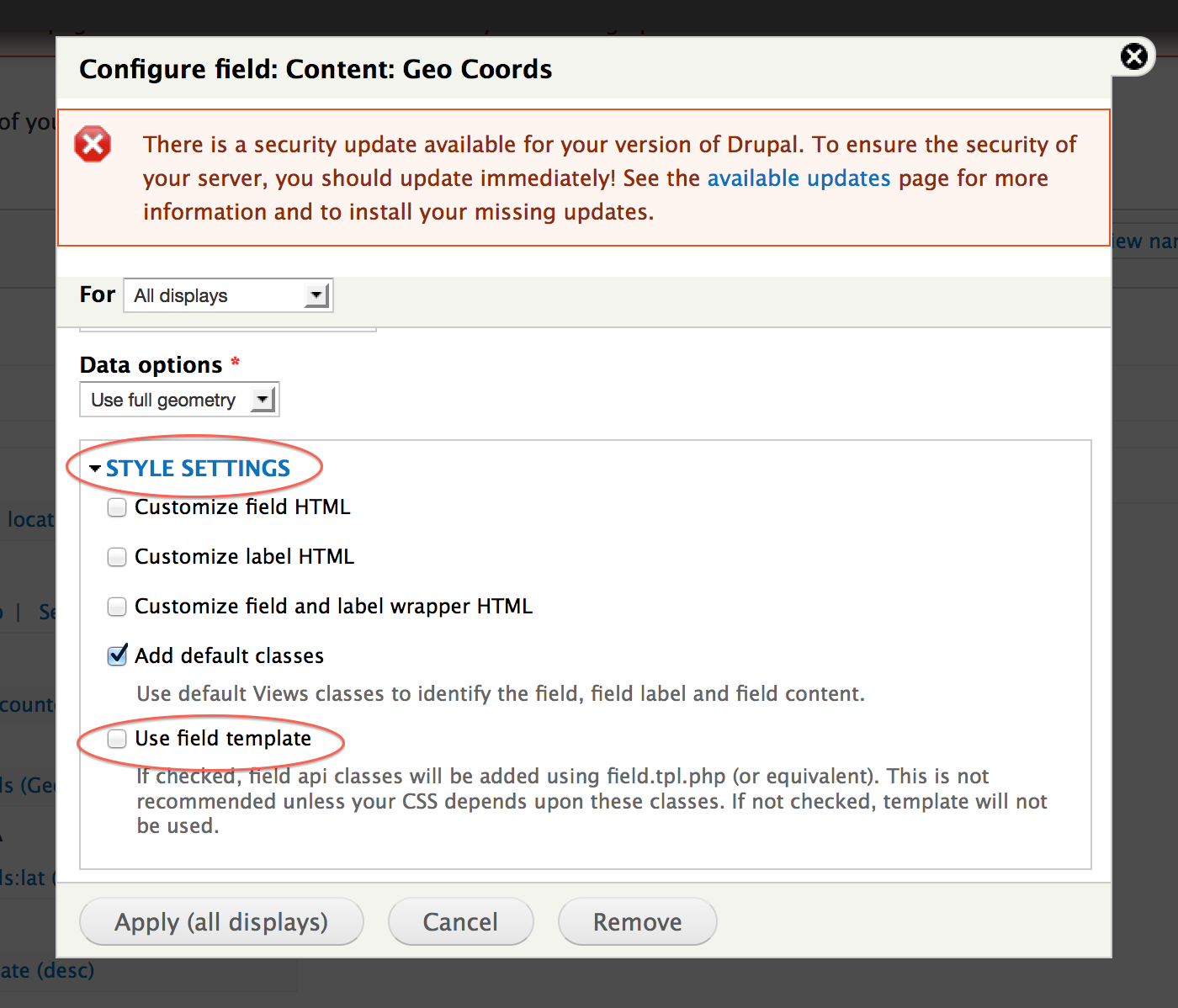
Please note: "Use field template" check box must be UNTICKED.
This is the default in Drupal core, but some install profiles come with the box ticked, which is no good for maps.