

Closed (won't fix)
Project:
Drupal.org security advisory coverage applications
Component:
module
Priority:
Normal
Category:
Task
Assigned:
Unassigned
Issue tags:
Reporter:
Created:
28 Jul 2013 at 10:15 UTC
Updated:
22 Aug 2013 at 21:23 UTC
Jump to comment: Most recent file



Comments
Comment #1
PA robot commentedThere are some errors reported by automated review tools, did you already check them? See http://ventral.org/pareview/httpgitdrupalorgsandboxSilbermann2052197git
We are currently quite busy with all the project applications and we prefer projects with a review bonus. Please help reviewing and put yourself on the high priority list, then we will take a look at your project right away :-)
Also, you should get your friends, colleagues or other community members involved to review this application. Let them go through the review checklist and post a comment that sets this issue to "needs work" (they found some problems with the project) or "reviewed & tested by the community" (they found no major flaws).
I'm a robot and this is an automated message from Project Applications Scraper.
Comment #2
silbermann commentedWarnings and errors reported by automated review tools are corrected.
Comment #2.0
silbermann commentedThe output can be themed by field name, node type and region, not by field type, node type and region.
Comment #3
rolando.caldas commentedHello
my manual review:
.module 51:
To interact with variable table you have the drupal api functions variable_set and variable_get. You can save in a variable 'fields_in_regions__' . $theme . '__' . $node_type an array or an object with all the content.
It's recomendable use variable_get (https://api.drupal.org/api/drupal/includes!bootstrap.inc/function/variab...) and variable_set (https://api.drupal.org/api/drupal/includes!bootstrap.inc/function/variab...), variable_get cached the result...
.admin line 100s
To delete a varible you can use variable_del
It's possible that you have to review all about variable, but I think that is better if you can use only the api functions and not access directly to database.
Comment #4
silbermann commentedYou're absolutely right. Thanks for the hint. Now this module uses variable_get() and variable_set() only.
Comment #5
saemie commentedHello,
[general observation]
The git repository url should be http://git.drupal.org/sandbox/Silbermann/2052197.git (you currently have a colon in place of a slash).
[manual review]
1) You should create an .install file to implement hook_uninstall in order to remove the variables that your module saves.
Notably the 'fields_in_regions__' vars set in fields_in_regions.admin.inc:129
2) After installing the module and navigating to the configuration page I found that only one content type was appearing in the "Field settings per node type" section. Even though I had 4 content types set up on my site.
I then found the allowed types list in fields_in_regions.admin.inc:21
It seems to me that the module only looks out for content types that have fields that are either 'text_long', 'image', or 'file' types.
If this is the case then you should specify this in the module's description and README file. Otherwise users who naturally assume all their node fields are placeable will get unexpected results.
Comment #5.0
saemie commentedLink to git repository updated
Comment #6
silbermann commentedThanks saemchou for the manual review.
I added an install file to the module so that variables set by the module will be deleted.
Now the user is able to define the allowed field types by himself. I extended the description to explain this possibility.
Comment #7
silbermann commentedI solved a bug, which leads to an error, when some fields do not exist in a special node type but is configured by this module.
Furthermore I added a new hook suggestions fields--[field_name]--[region].tpl.php.
Comment #8
phanophite commentedassigning to myself for review
Comment #9
uncommented commentedHello,
I have installed the module, and made the following observations:
Basic Functionality
To start with, I love what this module does! After getting a few fields configured to display in my sidebar, I can safely say that this functionality is definitely useful enough to exist as a standalone module. That said, there is definitely some overlap with the functionality of Field as Block, a module which allows fields to be set up to display in their own blocks. The key advantage I see in this module as opposed to that one is that if one wants to add ten fields to the sidebar, the added burden of ten field blocks could be cumbersome.
Errors
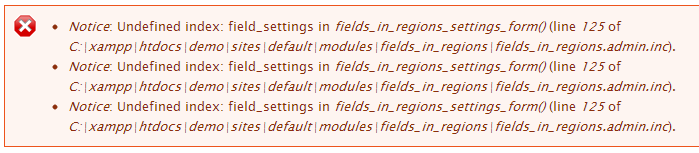
I received the following error at /admin/structure/fields_in_regions after attempting to modify allowed field types:
It looks like you may need to work on the way that settings are initialized, or perhaps provide some default logic in fields_in_regions_settings_form(). Subsequent visits to the configuration page yield the same error.
UX
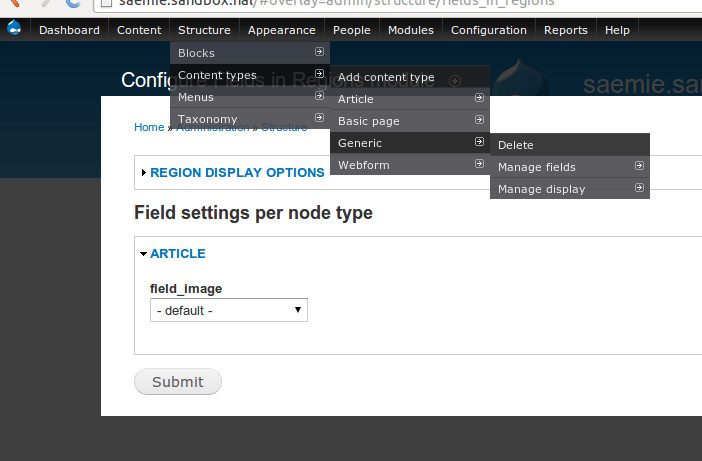
The most striking thing I noticed about this module's user experience is that all configuration has to be done from the module's settings page. If possible, it would be nice to be able to configure the region display from a content type's field display settings page (/admin/structure/types/manage/article/display).
Overall, I definitely love this module, and will consider using it for my next project.
Comment #10
phanophite commentedI installed your module on a fresh install of Drupal 7.23 and created a content of type 'Article'. I then added a title, a body, and uploaded an image. When I clicked Save, I received the following warning:
Warning: Invalid argument supplied for foreach() in fields_in_regions_preprocess_page() (line 65 of /home/dschaeffer/www/sites/all/modules/fields_in_regions/fields_in_regions.module).
I then went to Structure and received these errors:
Warning: Invalid argument supplied for foreach() in fields_in_regions_preprocess_node() (line 133 of /home/dschaeffer/www/sites/all/modules/fields_in_regions/fields_in_regions.module).
Warning: Invalid argument supplied for foreach() in fields_in_regions_preprocess_field() (line 153 of /home/dschaeffer/www/sites/all/modules/fields_in_regions/fields_in_regions.module).
Warning: Invalid argument supplied for foreach() in fields_in_regions_preprocess_field() (line 153 of /home/dschaeffer/www/sites/all/modules/fields_in_regions/fields_in_regions.module).
Warning: Invalid argument supplied for foreach() in fields_in_regions_preprocess_field() (line 153 of /home/dschaeffer/www/sites/all/modules/fields_in_regions/fields_in_regions.module).
These warnings disappeared when I set the field settings for the image in type 'Article' to something valid.
They appeared again when I set the field settings for the image in type 'Article'
Before using foreach() you might check that the variable you are using foreach() is actually an array.
Improvements:
1. Warnings appear during normal use (see above).
2. add a version in your .info file.
3. line 199 in fields_in_regions.admin.inc has two semicolons. This isn't bad, but a minor flaw I found.
4. I noticed a couple of places where HTML is added to forms without using check_markup. I don't think your module requires the user to enter any html, but this may be helpful to keep in mind in the future.
See below for more details.
This review implements the checklist found here. https://drupal.org/node/1587704
1. Basic application checks
1.1 Application contains a link to the project page. However, the application does not contain a working git clone command. In the future you may want to include a working git clone command. git clone http://git.drupal.org/sandbox/Silbermann/2052197.git fields_in_regions.
1.2 I could not find any possible duplicates of this module.
1.3 User Silbermann does not have any other applications. I queried the project applications with Silbermann's name and did not find any applications that belong to the user. I did notice he had reviewed another.
2. Basic repository checks
2.1 The repository does contain code.
2.2 The repository contains a version specific branch (7.x-1.x).
2.3 The repository contains a minimum of handwritten code (at least 5 functions & 120 lines).
3. Security Review
3.1 I did not find any security flaws in the code. The only offer the suggestion of using check_markup before you add html to a form. This won't affect the result of this review, but it's something to keep in mind.
4. Licensing checks
4.1 Repository does not contain a 'LICENSE.txt' file.
4.2 Repository does not contain any 3rd party code.
5. Documentation checks
5.1 Project page contains detailed information regarding this module. I find that users know what to expect when they install this module.
5.2 Repository contains a README.txt file with helpful information regarding this module. The README.txt and the project page both contain similar information.
5.3 Code appears to be properly commented. In-line comments are placed where required, and there is not an overwelming amount of them.
6. Coding style and standards
6.1 I performed an automatic review at http://ventral.org/pareview. The review returned errors, but I believe these errors do not effect the results of this review. One error involves a space being where it shouldn't (line 68 of fields_in_regions.module). There are also some unused variables. http://pareview.sh/pareview/httpgitdrupalorgsandboxsilbermann2052197git
7. API and best practices review
7.1 Module makes use of Drupal's APIs.
Comment #11
silbermann commentedHello,
thanks for the reviews. I solved the mentioned errors above. For now there are checks for non-existing setting variables.
@uncommented: your recommendation to make settings possible on the field display settings page is a good idea. I think about that.
Kind regards
Comment #11.0
silbermann commentedLink to git repository corrected.
Comment #12
silbermann commentedI followed your suggestion to add configuration possibilites on the content type's field display settings page.
Comment #12.0
silbermann commentedInclude a working git clone command
Comment #12.1
silbermann commentedNew manual review added
Comment #12.2
silbermann commentedNew manual review added
Comment #12.3
silbermann commentedNew manual review added
Comment #13
silbermann commentedAdding PAReview: review bonus issue tag.
Comment #14
klausihttps://drupal.org/project/fieldblock
https://drupal.org/project/panels
There might be other modules out there with the same functionality.
If that fails for whatever reason please get back to us and set this back to "needs review".
Comment #15
silbermann commentedHi Klausi,
Fieldblock has nearly the same functionality, but has a completely other approach. It uses blocks. The module is a great solution if you only want to display a few fields in another region.
Fields in Regions does not use blocks. You only need one settings page to do all the configuration to display many fields of several content types in different regions. Also the fields within a region automatically are sort by weight defined on the content type's display configuration page.
Imagine, if you have three content types and five fields to display in another region, you will create 3 x 5 = 15 blocks with the module Fieldblock. After creation you have to configure every single block.
Another point is that with Fields in Regions you are able to theme the output for every field name, field type (e.g. images, files, text) and region. If you need you can differantiate by content types, too.
If you need both, the power of the block system, and the possibility to set up the configuration for many fields quickly and easily, you can install both modules. There will be no conflicts.
In my point of view it isn't usefull to merge these two modules. The user should choose what module fits to his current web project. I will improve my moulde description to inform the user about both modules, their advantages and compability.
Kind regards
Comment #15.0
silbermann commentedNew manual review added
Comment #16
silbermann commentedSet status back to needs review..
Comment #17
silbermann commentedI am not able to push commits. I receive fatal: Could not read from remote repository.. Did my access rights changed?
Comment #17.0
silbermann commentedModule description updated.
Comment #17.1
silbermann commentedAdding information about compability of fields in regions and fieldblock.
Comment #18
uncommented commentedWhat I would really like to see from Fieldblock is a way to include more than one field in a block. Perhaps the community would be best served by a partial re-write of Fieldblock's functionality, in which users have the option to add a field to an existing fieldblock (in other words, de-couple the blocks and fields in the backend, and have the system auto-create blocks to store new fields when they are assigned to new regions as-needed).
Do you think that the maintainers of Fieldblock would accept such a radical change in functionality? If so, I will get on that.
Comment #19
silbermann commentedHi uncommented,
good idea. I think you are right. This would be the best solution.
I will ask.
Kind regards
Comment #20
klausiSounds good, I'm closing this application in the meantime. Feel free to re-open if the collaboration with fieldblock fails.
Feel free to get back to us whenever you have a new project that you want to promote. And thanks for contributing to the Drupal community!
Comment #20.0
klausiCorrected module name of Field as Block.