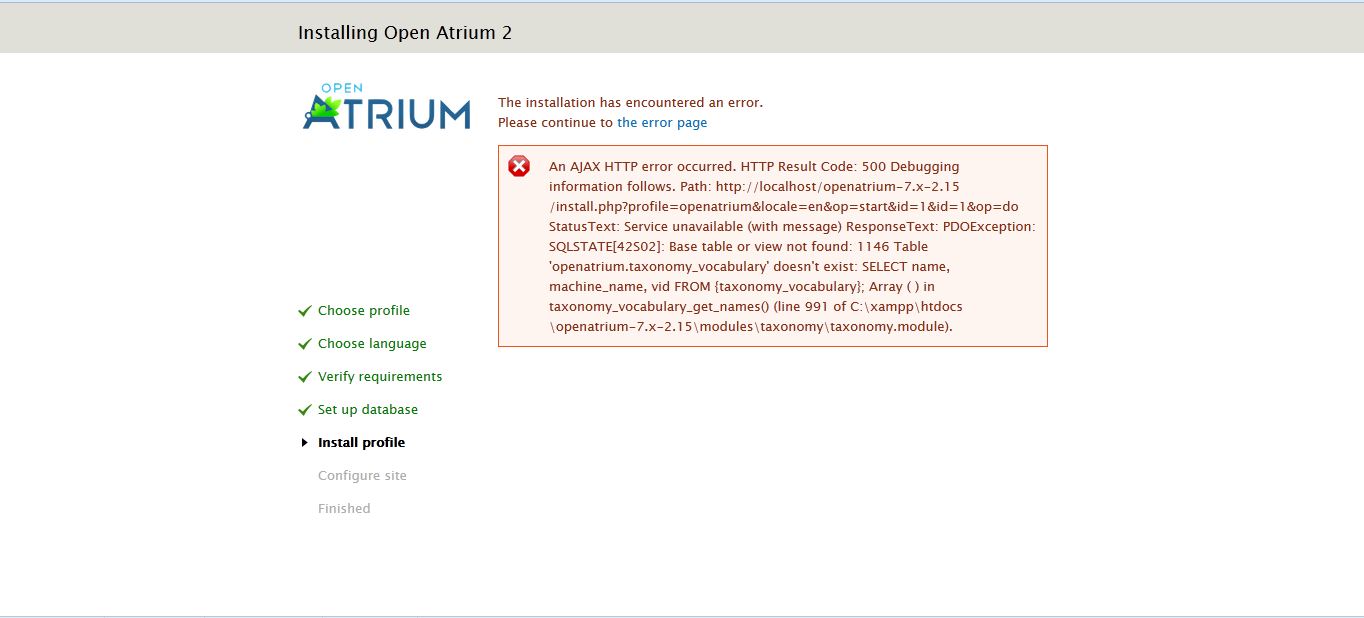
During a regular installation the following error is produced:
An AJAX HTTP error occurred. HTTP Result Code: 500 Debugging information follows. Path: http://my website.com/install.php?profile=openatrium&locale=en&id=1&op=do StatusText: Service unavailable (with message) ResponseText: PDOException: SQLSTATE[42S02]: Base table or view not found: 1146 Table 'mywebsite_meeting.taxonomy_vocabulary' doesn't exist: SELECT name, machine_name, vid FROM {taxonomy_vocabulary}; Array ( ) in taxonomy_vocabulary_get_names() (line 991 of /home/mywebsite/public_html/subdirectory/modules/taxonomy/taxonomy.module).

Additional uncaught exception thrown while handling exception.
Original

PDOException: SQLSTATE[42S02]: Base table or view not found: 1146 Table 'mywebsite_databasename.taxonomy_vocabulary' doesn't exist: SELECT name, machine_name, vid FROM {taxonomy_vocabulary}; Array ( ) in taxonomy_vocabulary_get_names() (line 991 of /home/mywebsite/public_html/subdirectory/modules/taxonomy/taxonomy.module).
Additional

PDOException: SQLSTATE[42S02]: Base table or view not found: 1146 Table 'hilanweb_meeting.taxonomy_vocabulary' doesn't exist: SELECT name, machine_name, vid FROM {taxonomy_vocabulary}; Array ( ) in taxonomy_vocabulary_get_names() (line 991 of /home/mywebsite/public_html/subdirectory/modules/taxonomy/taxonomy.module).
had the older atrium version from 4wks ago previously installed with no errors, now the new one is giving me this info
any idea - thank you


Comments
Comment #1
mpotter commentedHow exactly are you trying to install and what is your hosting environment? This specific error was fixed in the 2.15 release and I cannot reproduce it on a new install.
Comment #2
registrar commentedinstall is done into a sub directory, with shell access download with wget
tar with -xzf
the install starts with no issues but at 1/3 through installation the error message occurs
environment is on a managed VPS by knownhost.
I'm almost free to do anything on my server. I did run for test purpose a standard Drupal install afterwards without any issues at all, as I suspected the server environment. So I'm a little bit perplexed.
I do have three other Drupal installs running on same server with no problems
Previous releases of open atrium were installed before too with no issues.
This is a new one never happen before.
Comment #3
mpotter commentedCan you try grabbing a fresh copy of the 2.15 tar.gz file from drupal.org and then repeat it? This error was the last one fixed yesterday and I wonder if you got an earlier build somehow (like their CDN didn't update everywhere).
Also make sure you completely delete the old directory and are just using the newly downloaded files and that you have removed the old database.
Comment #4
registrar commentedgot the new copy and install went fine with no errors.
thank you for fast support & response
Comment #5
mpotter commentedGreat news!
Comment #6
moietmonlego commentedDownload today last Zip & Tar and meet the same problem.
Comment #7
registrar commentedI would try a new install again with a new download, don't use the old file.
You have to remove all files, even delete the database too and start new again.
Otherwise it will not work!
Comment #8
moietmonlego commentedCrazy, new download here http://ftp.drupal.org/files/projects/openatrium-7.x-2.15-core.zip, drop db, drop de directory, all is cleared, still the same problem.
I will try with the 2.12
Thx
Mickael
Comment #9
r0nn1ef commentedI'm also still getting this error when downloading the core zip and tar files.
Comment #10
registrar commentedI had this issue too, but a new download of http://ftp.drupal.org/files/projects/openatrium-7.x-2.15-core.tar.gz
solved the issue.
1.) delete your old database - if it is a new installation = not just a clear.
2.) create it new from scratch
3.) delete your old directory where you originally installed your openatrium files - if it is a new installation
4.) create a new directory
5.) extract your new download files from openatrium
6.) you should be fine to go
if the database is not new or if you have old files in your directory openatrium installation will probably always fail if you had the http error.
Comment #11
linuxsn commentedSame error !!!
Comment #12
medicvillain commentedThat link did not work for me at all. Same error flagged.
Comment #13
registrar commentedmaybe one of the open atrium guys can shed some more light onto it.
see post post #3
Comment #14
medicvillain commentedIt's confusing me. I am trying to create a local environment. I am using xampp. I have uninstalled it Deleted directory folder. Reinstalled xampp. Downloaded the openatrium from the link registrar shared above. I have then changed the php.ini and my.ini to allow for a 600 second timeout and changed the packet size to 128MB. I then extract openatrium to htdocs. Change the setting files from default to settings. Set the database up as openatrium. I don't password protect it (I am working locally). I then run the install page and it works fine til the 50th-60th process and the exception is thrown.
Any step I should take that I am not, or anything I am doing that I shouldn't be?
From what I have read I think I am doing the correct process. Although there is a lot of information and opinions on the packet size and whether buffer sizes need to be changed etc... Shouldn't affect it though.
Comment #15
medicvillain commentedJust gone past the 58% crash point with new download! Wohoo! - Nope actually ran on for a little while and then same error.
Comment #16
Argus commentedClosed a duplicate here:#2207909: Table taxonomy_vocabulary' doesn't exist
Comment #17
frogdog_tech commentedI'm also still receiving this error with 7.x-2.15. Tried fresh installs downloaded through Drush or via wget from the ftp link in #10. Dropped the database between attempts. No Luck. Its on a development server running a dozen other Drupal installations just fine.
Comment #18
ngourdeau commentedsame issue with a fresh install on a clean server (ubuntu 13), i try several times but it doesnot work!
7.x-2.15
Comment #19
Argus commentedComment #20
Tschet commentedI've crashed three times with this same error. I've tried both the zip and tar downloads. There appears to be something wrong with this version. I'm installing locally.
Comment #21
Argus commentedWe'll it doesn't seem to be consistent which is strange. I've had it once and it didn't repeat when I retried. I deleted the database in between though.
Comment #22
nikita petrov commentedMaybe this will help:
i created a new database, imported a table taxonomy_vocabulary from another drupal installation, run open atrium install, and then 58% passed correctly! BUT after some percents it was crashed with mirrored problem:
I think the problem is in correct sequence of installation of some modules. Can you fix it please?
Comment #23
sysvale commentedsame error here!
Comment #24
midnightltd commentedI downloaded the zipfile this morning and received the same error so it does not appear that the zipfile is updated yet. I also tried the other file and removed everything (files and database.) Started from scratch and received the same error in both installs.
Additional uncaught exception thrown while handling exception.
Original
PDOException: SQLSTATE[42S02]: Base table or view not found: 1146 Table 'test_openatrium.taxonomy_vocabulary' doesn't exist: SELECT name, machine_name, vid FROM {taxonomy_vocabulary}; Array ( ) in taxonomy_vocabulary_get_names() (line 991 of C:\OpenAtrium\openatrium-7.x-2.15\modules\taxonomy\taxonomy.module).
Additional
PDOException: SQLSTATE[42S02]: Base table or view not found: 1146 Table 'test_openatrium.taxonomy_vocabulary' doesn't exist: SELECT name, machine_name, vid FROM {taxonomy_vocabulary}; Array ( ) in taxonomy_vocabulary_get_names() (line 991 of C:\OpenAtrium\openatrium-7.x-2.15\modules\taxonomy\taxonomy.module).
Comment #25
mpotter commentedI can still not reproduce this. I need somebody who is debugging-savvy who can reproduce this problem to take a closer look at it.
The issue that was fixed was in the oa_buttons.module in oa_core/modules in the oa_buttons_create_term() function. Around line 349.
The problem is a caching issue in Drupal installer where it is trying to create the automatic space_type and section_type taxonomy terms and Drupal hasn't actually created the vocabulary yet. The oa_button code *used* to check the vocabulary *after* the $term = current(taxonomy_get_term_by_name($name, $taxonomy)) line. But this was fixed to check it before. So now it checks if (!$vocab) and if the vocab is not found it reverts the features and most importantly clears the static taxonomy cache.
So either some other module other than oa_buttons is trying to create taxonomy terms and needs to clear the static cache, or else something is still wrong in the oa_buttons code for some systems.
I have no idea why this would work for some people and not others. But if somebody who can reproduce this can add some print statements and some debug_backtrace() calls to find out what's going on that would be a huge help.
Comment #26
distant2nd commentedTried installing this several different ways, still crashing. Running on Ubuntu 10.04, increased memory limits in php.ini, increased package size in my.ini , still no good.
Also tried wiping the database and erasing the installed folder, new db, new folders, still no good.
Comment #27
midnightltd commentedI looked at the database that was created after the fresh install and it is indeed missing that table.
I looked at a back up from an old install and the table was there...
I installed the just that table from the backup SQL commands and then got search_api_server was missing...
Which was also in my prior database..
After installing that table I got "Welcome to OpenAtrium"
"No front page content has been created yet."
Windows 2003 Server. New installs of PHP and MySQL in the last month
Don't know if that helps at all??
Comment #28
srandolph commentedThis install 7.x-2.15 both gz & zip has repeatedly failed as I have tried to install on an Ubuntu 12 Virtualbox created by the Drupal VDD project. I have downloaded the VDD script and box as well as the Open Atrium code many times, always with the same outcome.
Mike, I wish I had skills to do the trouble shooting but I would suggest you create a virtual machine with VDD and try to do a fresh install.
Comment #29
ThomasB42 commentedSame error here (downloaded the install package a couple of minutes ago).
A simple refresh then (not very surprisingly) results in
Comment #30
afink commentedI have reproduced this error on CentOS 5.8. My experience was slightly different than most of the reports. The first installation attempt progressed beyond 58%, I made it to about 98% then received the error:
PHP Fatal error: Maximum execution time of 30 seconds exceeded in /var/www/html/domain.com/includes/theme.inc on line 1259, referer: http://domain.com/install.php?profile=openatrium&locale=en&op=start&id=1This is issue was likely caused by a slow query that is a known problem with one of my joomla sites.
I cleared files and database and I receive this error:
I hope this can help shed some light on the topic.
Comment #31
jkingsnorth commentedMarked #2214623: Installing Open Atrium 2 as a duplicate.
Comment #32
karthickg24 commentedI have dowloaded the openatrium yesterday openatrium-7.x-2.15-core.zip. Try to install several times, installation stuck up in same error.
Any solution would be helpful...
Comment #33
LavenPillay commented--- UPDATE ---
I've just completed installing version 2.13 which worked fine.
However, there's no table "taxonomy_vocabulary" in the DB - can anyone tell me what the main differences are between the Modules in versions 2.13 and 2.15 which requires the use of "taxonomy_vocabulary" ?
--- ORIGINAL ---
Hi All,
I've tried all the solutions/tricks above but am still getting that error.
Is there somewhere I can get a SQL dump of that table (taxonomy_vocabulary) so that I can manually add it to my database ?
This is currently preventing me from setting up our company intranet, so any assistance from other Users will be highly appreciated.
Info :
Windows 7
PHP 5.5.9
openatrium-7.x-2.15-core.zip (downloaded a few minutes ago)
Thanks in advance,
Laven Pillay
Comment #34
Powergird commentedThe same error here....
May it useful that seting max_allowed _packet=200m.?
Comment #35
medicvillain commentedI don't think it is a packet size issue.
See mpotters previous post regarding taxonomy tables.
Comment #36
dsnopekCan someone who has the error try applying this patch to oa_core and copy-paste the resulting error here? The patch won't fix it -- it'll still error out -- but it will hopefully give us more information to track the error down...
Comment #37
medicvillain commentedok will do, will post in the next 30 mins hopefully.
Comment #38
dehacker commentedFirst try I failed with this taxonomy error. Second time I succeded install of 2.15 with no error. Same server - Ubuntu 12.04, same folders after a db wipe.
First install I had not created settings.php before starting install (did after) or applied patch and left web root at default root owner.
Second try I created settings.php before and set root to www-data and applied patch to oa_buttons. Install went smooth to finish.
I wonder if Drupal .org is serving different files per drush dl?
Comment #39
Powergird commentedWho can solve this ,,,,
Comment #40
deltaag commentedI have tried with both tar and zip files (maybe downloaded about 10 times).
Final downloaded tar file is available here: http://www.node618.com/cloud/projectmanager/openatrium-7.x-2.15-core.tar.gz
I even tried setting PHP's memory_limit to 512MB, max_execution_time to 1200, and max_input_time to 1200. This is on CentOS 5.7 server with PHP 5.3.28 and MySQL 5.1.54. I also set MySQL max_allowed_packet to 32M.
My final attempt was re-creating database and applying oa_core-taxonomy_vocabulary-2206223_0.patch from /profiles/openatrium/modules/contrib/oa_core and re-installing OpenAtrium.
I got the same error message all the time (even after patch).
Comment #41
Powergird commentedwell,you do enough, lets wait in patience
Comment #42
dsnopek@deltaag:
Hrm, that's no good! The patch is supposed to catch the original error and replace it with a more detailed error. Are you sure it was exactly the same? Maybe it just started the same but ended differently?
I'll try to think of a better way to do the patch... However, this is really difficult to do because install works perfectly for me! I wish it failed on one of my servers so I could help debug this directly.
Maybe I'll try setting up a VM with CentOS 5.7 and see if the problem will happen for me there...
Comment #43
medicvillain commentedMy half an hour was a bit of an underestimation. Snowed under with work and didn't realise I would need to install cygwin etc...
Anyone wanna swap a high end windows pc for a mac!
Just running the patch. Hopefully will work.
Comment #44
jkingsnorth commentedJust a reminder that the patch doesn't try to fix the issue, but hopefully it will expose a more useful error message that will help in debugging the problem.
Comment #45
medicvillain commentedRan the patch. Cygwin said it couldn't find the file in line 5....
Rob@WebDesign1 ~
$ patch -p1 < /cygdrive/c/oa_core-taxonomy_vocabulary-2206223_0.patch
can't find file to patch at input line 5
Perhaps you used the wrong -p or --strip option?
The text leading up to this was:
--------------------------
|diff --git a/modules/oa_buttons/oa_buttons.module b/modules/oa_buttons/oa_buttons.module
|index 8a3fd15..cab0e18 100644
|--- a/modules/oa_buttons/oa_buttons.module
|+++ b/modules/oa_buttons/oa_buttons.module
--------------------------
File to patch:
Did I use the wrong -p or --strip option?
Do I need to patch this using git?
If so I need to do this later when I am at home.
Thanks
Comment #46
medicvillain commentedI realise it won't fix it. Still didn't work though....
Comment #47
dsnopek@medicvillain: What directory are you in when you run that command? You should be in profiles/openatrium/modules/oa_core under the main openatrium directory (because we're patching the oa_core module).
I just attempted to recreate the problem by installing OpenAtrium 2.15 on CentOS. I'm still unable to reproduce the problem - it installed fine for me. :-/ It could be because I was unable to exactly mirror the configuration that @deltaag has...
Anyway, here are the steps I took to try to reproduce:
/etc/php.iniand setmemory_limit = 256M/var/www/htmlinstall.phpand went through the installerPlease let me know if there are any changes to the steps I followed in order to get the problem to happen! If anyone knows how I can get CentOS 5.7 to install - please let me know.
Also, if ANYONE has step-by-step instructions to get the problem to happen (including setting up the environment, meaning the LAMP, MAMP, WAMP stack or whatever - since this appears to be dependent on the environment, ie. it never happens for me in my normal environment) - please let me know!
Comment #48
medicvillain commentedI can step by step u on xampp
... also there is no oa_core directory or is that the fle to apply it to?
Comment #49
medicvillain commentedXampp.... Install from http://www.apachefriends.org/index.html
When it is installed ensure ports 3306, 80 and 443 are clear.
Go to xampp/mysql/bin/my.ini to change the packet size
Go to xampp/php/php.ini to change the time allowed (timeout is a problem with standard xampp set up).
Download / install openatrium to xampp/htdocs
Rename folder openatrium
Edit default.settings to settings.
Now go to xampp control panel. Run mySQL 'admin' to bring up PHPmyadmin. Create new database, I call mine openatrium and set to utf8_unicode
I don't password protect as it is local.
Then to the localhost/openatrium/install.php
This should recreate the error. Fingers crossed.
Comment #50
medicvillain commentedSorry, should have clarified.... You have to run apache and mysql... You cannot update the my.ini / php.ini files without restarting xampp.
Comment #51
dsnopek@medicvillain: Awesome, thanks for the instructions! Can you also give the OS type/version and any updates you made to your OS so that I can setup an identical environment? So long as it's Windows or Linux, I'll be able to setup a VM for it - only MacOS would be problematic for me.
Sorry about the patch and directory to oa_core. I misstyped - it's in:
profiles/openatrium/modules/contrib/oa_core
(I forgot the "contrib" part..)
Comment #52
medicvillain commentedI am using Windows 7 Home premium 64 bit. Only automatic updates from windows applied.
Should probably be working in Pro :-S.... but I want a mac anyway.
Comment #53
medicvillain commentedNo contrib directory either... I downloaded fresh today
Comment #54
dehacker commented@dsnopek: I successfully ran the patch in oa_buttons fwiw, not oa_core. Had trouble running the patch in oa_core folder.
root@biosdev1:/var/www/oadev/profiles/openatrium/modules/contrib/oa_core/modules/oa_buttons# patch < oa_core-taxonomy_vocabulary-2206223_0.patch
patching file oa_buttons.module
root@biosdev1:/var/www/oadev/profiles/openatrium/modules/contrib/oa_core/modules/oa_buttons#
Comment #55
dsnopek@dehacker: It was created to be run with "patch -p1" in the oa_core directory, but so long as it applied - it doesn't matter. :-)
@medicvillain: I don't know how it's possible that you are missing those directories - something must have gone wrong when you were extracting the files... I just downloaded Open Atrium 2.15 and verified that oa_core is where it should be:
Comment #56
srandolph commentedProject VDD - Vagrant Drupal Development is a very interesting project. Using Virtualbox and Vagrant creates a clean, cruft free Ubuntu 12.04 environment suitable for Drupal development with very little effort. A nice feature is that the web folder is mapped to the HD of the host machine allowing you to stick with the same IDE and debug tools. The PHP memory_limit set to at least 256M and MySQL max_allowed_packet is at least 32M are the only exceptions I have seen to the standard Drupal 7 environment. I have started from scratch on the Open Atrium 7.x-2.15 install a couple of times and ended up with the same results.
medicvillain, I understand Mac Lust, but VDD will give you a *nux like environment on a PC or Mac particularly if you use Eclipse as IDE
Comment #57
medicvillain commentedI will check it out. Thanks
Comment #58
deltaag commented@dsnopek:
My server is a virtual server on Mediatemple. I didn’t build it.
I re-downloaded openatrium-7.x-2.15-core.tar.gz
Installed at the same server (CentOS 5.7). Installation completed 62 of 190 and encountered the error:
Then I patched and re-created the DB (and offcourse settings.php) and re-installed. Installation completed 62 of 190 again and exact same error message on installation and error page as above.
Another try was, Oracle VM VirtualBox on Windows 8 laptop, Quickstart 2.0 Beta 2 (32bit) virtual machine which is a Ubuntu 12.04 LTS, PHP 5.3.10, and MySQL 5.5.32
I changed memory_limit 256MB, max_execution_time 1200, max_input_time 1200 for PHP and max_allowed_packet 32M for MySQL
Installation completed 62 of 190 and same error.
Patched it and still the same.
This is crazy but can it be the tar file I downloaded?
The file is available here if you like to test it:
www.node618.com/cloud/projectmanager/openatrium-7.x-2.15-core.tar.gz
It looks like something goes wrong while installation tries to install strongarm, or the next module.
Comment #59
medicvillain commentedI have uploaded a screenshot of my explorer with a freshly downloaded OA tar file. I downloaded the zip yesterday which also had no contrib folder. I imagine if you are asking me to patch an error in a folder that doesn't exist in my download then that might be the problem.
Are you guys working from the US? Is it possible that there is a mirror/server issue going on here with an older version for users outside of the US?
Anyone fancy dropboxing me a copy of their one and I will see if I can get it to run.
Comment #60
dsnopek@medicvillain: That is the wrong directory. Your screenshot shows the "modules" directory under the main openatrium directory, however oa_core is located under the "profiles/openatrium/modules/contrib" directory. I hope that helps! :-)
Comment #61
medicvillain commentedah ok
Comment #62
dsnopekI have finally been able to reproduce this! Using @medicvillain's instructions:
https://drupal.org/comment/8569483#comment-8569483
... I was able able to see the error on Windows 7 with XAMPP 1.8.3. :-)
I'm going to check in with Mike Potter and the Phase2 team to see if they've made any headway, and if not, I'll attempt to debug this myself.
Comment #63
Powergird commentedGreat.dsnopek,we hope you can handle this iussue,thank you very much. good luck.
Comment #64
medicvillain commentedI am also running the patch now, so hopefully can upload an error log too.
Comment #65
medicvillain commentedBrilliant news :-) Glad my instructions were clear enough!
Comment #66
medicvillain commentedI ran the patch but error is the same.
I imagine now u have the error yourself dsnopek that it doesn't matter anyway
Comment #67
dsnopekBlergh! That must mean that error is coming from somewhere that is totally different than I think it is. :-/ But, yeah, now that I can reproduce it, I should be able to get all the information that I need. I'll post the backtrace once I manage to come up with a patch that will give it to me...
Comment #68
dsnopekHere is a backtrace from where that error occurs (what I was trying to get with my earlier patch):
https://gist.github.com/anonymous/9531478
I haven't had a chance to really dig into it yet...
Comment #69
BarisLeenders commentedI was just trying to install OA on one of my production servers and I'm running in to the same error as descriped above.
I'm pretty new to drupal, but I have plenty of experience with other CMS and ECOM frameworks, and my servers are capable to run WP, Magento, C5 and YII projects but this is the first drupal project I'm trying to install.
This error I got at step 62 of the installation.
PDOException: SQLSTATE[42S02]: Base table or view not found: 1146 Table 'CLIENTSNAME.taxonomy_vocabulary' doesn't exist: SELECT name, machine_name, vid FROM {taxonomy_vocabulary}; Array ( ) in taxonomy_vocabulary_get_names() (line 991 of /home/CLIENTSNAME/public_html/modules/taxonomy/taxonomy.module).I saw on my local machine that an earlier version of OA did have those tables mentioned in the error, but my last install attempt didnt. The failed installation attempt misses many tables compared to earlier versions.
My max_allowed_packet, memory_limit and execution time should all be sufficient, so thats not the problem I guess.
I'm going to try to install this version now locally, and see what happens.
Comment #70
BarisLeenders commentedSame thing just happend on my local machine, with the latest version of OA. An earlier version(7.x-2.13) was installed locally without a problem.
Apache 2.4
MySQL 5.6
PHP 5.5.5
Comment #71
dsnopekIt looks like this might be the underlying issue: #2211313: PHP 5.5 gives "Table taxonomy_vocabulary doesn't exist" error during install profile
Seems to be Panelizer, somehow related to the CTools upgrade...
Comment #72
graysadler commentedIncreasing max_execution_time worked for me.
Comment #73
dsnopekI think I'm wrong about my Panelizer/Ctools connection. Looking at the backtrace closer, it looks like it was entity_theme() from the Entity module that ultimately triggers the taxonomy_entity_info() that's trying to read from that table. The question is still there - how is 'taxonomy' loaded (so, it's hooks get called), yet it's tables were never installed?
Comment #74
vegansupreme commented#72 worked for me on MAMP.
Comment #75
cocktaildrum commentedTried #72 but still have the same error. Always after the message'Installed Strongarm'
Comment #76
Powergird commentedI have give it up,,,farewell
Comment #77
FreeXenon commentedI am having the same issue. XP SP3, PHP 5.4.25 and have reinstalled XAMPP as well as re-downloaded the zip file.
Error persists. =(
Comment #78
Russell Mann commentedIncreasing memory and max_execution_time fixed it for me. On Debian or Ubuntu or something.
Comment #79
sansui commentedAlso experiencing this issue trying to install Open Atrium 2.15 on a server running Cloud Linux, PHP 5.4.25. PHP memory, max execution settings etc are all very generous.
Comment #80
Argus commentedThis is a widespread problem preventing a lot of people from installing 2.15.
Comment #81
m0nst4 commentedFixed it with changing
max_allowed_packet = 1M
to
max_allowed_packet = 16M
in C:\xampp\mysql\bin\my.ini
Comment #82
sansui commentedPer #81 - I already tried upping max_allowed_packet to 32M with no change in error.
Comment #83
medicvillain commentedAny progress on this... Either that or I am going to have to start learning how this has been written.
Comment #84
hfcdrupal commentedI am having exactly the same problem. Any words from OA?
Comment #85
veganforvenus commentedSame problem installing via git and drush. Applied the patch and the error message is attached (oa215-install-fail-taxonomy.txt).
Installed 2.13 from zip and worked well, but having some trouble now upgrading to 2.15.
Comment #86
sargath commentedSame problem here, nothing could help with 2.15 :/
Comment #87
FailedExperiment commentedI am having the same problem. It installed the first time, though it was missing most of it's modules. When I cleared it out to reinstall, I encountered the error posted here, and every time I've tried to install it since.
OA 2.15
MySQL 5.6
PHP 5.5.10
Windows Server 2008 SP2, IIS 7
Comment #88
densolis commentedHi,
I just downloaded the 2.15 .zip version from http://ftp.drupal.org/files/projects/openatrium-7.x-2.15-core.zip. I loaded it into a new directory and created a new database.
My machine is a Windows 7 Pro 64 bit machine running Wamp with max memory of 2056M and Max time of 300 seconds and run into the same error during the "Install Profile" portion of the installation profile.
I also put this version in to git and pushed the code to Webenabled, ran the install on Webenabled and had the same problem with a new site, new directory, and new database.
I then did a drush dl openatrium on webenabled. I deleted the existing directory and database. Renamed the new openatrium directory to the directory name webenabled wanted, recreated the database, and ran the install. I had the same problem there.
I did this three times on Windows and three times on Webenabled. I have no problem re-creating this. It is very consistent.
I'm running Wamp, Apache 2.2.22, PHP 5.3.13, MySql 5.5.24
Web enabled is running PHP 5.3.6
Dennis
Comment #89
alayham commentedFrustrated with this error. I tried all possible ways to get the latest OA dev or stable installed. no luck.
I built OA using
I got the latest code with the missing advagg dependency that I added, but still got the same error.
Comment #90
densolis commentedI see where m0nst4 stated in comment # 81 that increasing the max_allowed_packet=1M to max_allowed_packet=16M in C:\xampp\msql\bin\my.ini worked for them.
I am running Wamp. I just checked my my.ini, which is located in C:\Sites\bin\mysql\mysql5.5.24. It is set to max_allowed_packet=256M.
I do not know where Webenabled stores their my.ini file. I will see if I can find it and determine to what value max_allowed_packet is set.
Please note that I can install OA 2.12 on Webenabled.
Comment #91
alayham commentedI found a solution to install the latest OpenAtrium in situations where you find this issue.
1- install an old version that installs correctly to a different database.
2- In the database of the old version, clear all the cache tables manually.
3- backup the database and restore it on the latest openatrium that fails to install.
4- run drush updb
5- run drush fra
6- if you get in troubles, try running drush rr.
Comment #92
pk_uk commenteddrush & all that is beyond me :-(
I'm trying to install on a hosted account with Heart Internet.
I created an empty database and a directory for the subdomain.
I downloaded the latest zip file (2.15) and uploaded to the host, expanded the zip and renamed the top-level atrium directory to be the name of the directory related to the subdomain.
I uploaded a php.ini file to extend memory to 128mb and ran install.php
I filled in the database details when requested. The database was created and during the install process, I got the missing table message.
I'm running older versions of Open Atrium, using the same install process. No problem.
Comment #93
scottalan commentedI ran into this issue as well so thought I'd put my thoughts down here...
So the obvious is
taxonomy_vocabulary_get_names()is called and the query fails because the table does not exist yet.I moved Taxonomy to the top of the list so it is enabled first and the install seems to be good so far...
install.core.incI'm waiting on the install to complete successfully to confirm then I'll try to pinpoint the module that is calling
taxonomy_vocabulary_get_names()first.I'll post back...
Comment #94
scottalan commentedThe install was successful but it seems that the error occurs when the Taxonomy module is enabled. It seems that as long as it's installed/enabled before Entity API then there are no issues. The problem starts at
taxonomy_entity_info(). Still debugging...I know where the problems stems from but not sure on the best fix considering the Taxonomy module calls
hook_entity_info(), that callstaxonomy_vocabulary_get_names(), that relies on a db_query on a table that hasn't been created yet.One of two things seem plausible:
1) Add a check
db_table_exists('taxonomy_vocabulary')intaxonomy_vocabulary_get_names().2) Make sure Taxonomy is enabled before Entity API so that when Entity API is enabled and
hook_entity_info()is called the table exists.For OA #2 seems to be the easiest fix but I think this a bug in Taxonomy...in my opinion. Taxonomy shouldn't rely on a db_query when it isn't sure that the table(s) even exist.
I'm not sure yet what changed between 7.13 and 7.15 yet, that could have caused this issue. I may install 7.13 and see what the debugger tells me after I read through the commits between the two.
Comment #95
liza commentedi cloned from GIT last night for a fresh install, with brand spanking new & empty db. ran the .make file and this happened to me. so somewhere in that .make file is the answer.
i just downloaded the tar and am in the middle of re-installing. we'll see how that goes.
EDIT:
NOPE. not working on a clean tar install. here's the taxonomy-related problem:
Comment #96
scottalan commentedTrying to figure out why Taxonomy is getting status set to 1 (says it's enabled) yet the schema version is still -1. I've been stepping through and everything goes to crap during
modue_enable()for Taxonomy. Specifically whenregistry_update()is called so,drupal_install_schema()never gets called and the schema isn't set up.Still digging.
Comment #97
dsnopek@scottalan: Thanks so much for digging on this one! I personally got up to about where you were in #94 before I ran out of time to devote to this. I'm looking forward to seeing what you discover! :-)
Comment #98
scottalan commented@dsnopek: No problem, got a fix. It's an issue with feeds. I'll post a patch tonight. Going to dinner...
Ok, got one of my rockstar buds involved and we talked it out and he came up with a good fix. I'll have him post a link to his patch to the feeds module that will solve this issue.
Comment #99
travist commentedSo, this has turned out to be an issue with the Feeds module. Here is the issue queue thread in Feeds (with patch included) that fixes this issue.
#2223853: Installing taxonomy module after this module causes a fatal.
@scottalan will work on getting a patch created for OpenAtrium that will pull in this patch for Feeds to fix the installation.
Comment #100
dsnopekThanks so much, @travist and @scottalan!
Here is the PR that @scottalan created:
https://github.com/phase2/oa_core/pull/32
I just tested in the Windows/XAMPP environment where I can reproduce this error and this change fixed it!
Comment #101
bcen_dave commentedThanks, dsnopek, for getting back to me so promptly. I don't feel comfortable applying a patch to feeds; having never done so before, it doesn't seem like a good place to start.
Also, I don't understand some of the context. I read the thread you sent and it seems that, yes, a lot of work has gone into getting a fix in place. But I don't really understand where the issue arises (I mean I know in the feeds module) so I don't know whether, for instance, a routine update to feeds might not cause the issue to re-emerge.
I've used OA version 1 for a couple of years, quite satisfactorily, and OA2 would add functionality that I can use and am quite interested in implementing.
Would it be feasible for you to apply the patch then send me an updated feeds module? I think you have my email, and if not I'll send it along.
Also I don't understand about this patch getting folded in to the next version of oa2. I think we're at release 15, will 16 contain the fix? And is there a due date? It might be simpler to just wait a bit and try again with the next release.
Again, thanks for your attention.
Dave
Comment #102
dsnopek@bcen_dave: Since we seem to be closing in on a fix, I think it's pretty certain that the next version of Open Atrium will include it! Unfortunately, I don't have any insight on when that will be. Like you, I'm simply an active member of the Open Atrium community. :-) However, I do plan to ping Mike Potter @ Phase2 (the maintainer of OA) about this next week now that there is a working patch, and see what he thinks.
I don't have your e-mail, but I guess I'd prefer not to go into the business of distributing patched modules. ;-) Hopefully, we can work this out upstream and get a release soon. However, I've included some information about applying patches below. Since it's super common in Drupal to find patches to fix bugs before they get included in stable releases, this would be really good thing to learn for the future!
Here is some documentation about applying patches:
https://drupal.org/patch/apply
The patch in question is here (this is the version available at the time of this writing - updates may appear after the Feeds maintainers review the current patch):
https://drupal.org/files/issues/2223853-fix_installing_taxonomy_module-4...
And you want to apply it to the Feeds module found in the
profiles/openatrium/modules/contrib/feedsdirectory.I hope that helps!
Comment #103
deltaag commentedI tested Feeds patch and it is working for me on CentOS 5.7, PHP 5.3.28 and MySQL 5.1.54
@dsnopek & @travist: thanks for the effort. Great job.
Comment #104
densolis commented@dsnopek & @travist: thanks for the effort. It worked for me too - running Wamp on Windows 7.
However, I did the the error message
But the install did work and I was able to bring up the site.
@bcen_dave:
Here is what I did.
Now remember, the slash in Windows is "\", but the slash in the git bash windows is the Linux version - "/". So even thought you are on a Windows machine (I think you are), you are in git bash windows - which uses the Linux version ("/"). It is a bit confusing. If you have any quesitons, please
Once you get the patches file message, you are done.
If you have any questions, please post them here and I will do the best I can to answer them.
Dennis
Comment #105
mpotter commentedAdded the patch to commit cb85e47 of oa_core. Thanks very much to @travist for tracking down this issue and feeds, and to everybody else here for their patience. Issues like this show how complex it can be sometimes working on a large Drupal distribution. The installer is not easy to debug with timing-specific issues like this.
Comment #106
liza commented@mpotter & @travist
thanks for the hard work.
question: so if i clone OA it should have the patch in there? or should i still use the TAR and do the patch myself? (i dont see a tar'ed DEV on the front page of OA)
Comment #107
medicvillain commentedThank you so much for the fix!!!!... Ran the patch and had an error at the end but it is working which is 90% of the battle... Again thanks for the patch.
Comment #108
Nigeria commentedI tried to install this just now and got the error reported in this bug report. Upon reading this forum I can now see why.
I guess I am going to have to wait for a new release. Can anyone tell me when this is likely to happen?
Comment #109
densolis commentedNigeria, Liza,
Comment # 104 explains how to apply the patch to a new download the current version of OA 2.15.
If you have any questions on the process, please post a question here and I will do my best to answer it.
Comment #110
travist commentedI created a new patch in feeds that fixes the issue with the error during install, so we may want to apply that new patch before a new version is provided.
Comment #111
travist commentedOk, here is the pull request with the updated fix to Feeds to fix that error during installation.
https://github.com/phase2/oa_core/pull/33
Comment #112
mpotter commentedtravist: I had to modify your patch to use http instead of https. Then committed it.
For others: I expect to have a 2.16 release with this fix within a week or so. I need to go through the issue queue and look at some other bug reports first. I'm also waiting to hear if this issue is completely resolved.
Comment #113
densolis commented@mpotter - I got a warning during the install (please see comment # 104). But I'm not sure if the patch in #111 fixed this or not.
Comment #114
mpotter commenteddensolis: you need to use the patch in #111.
Comment #115
densolis commentedmpotter,
I am guessing that I should use the patch in #111 instead of the patch in #99 and #100. Correct?
Comment #116
mpotter commentedYes
Comment #117
densolis commentedmpotter,
Ok - I will download the new patch and re-do the install. I will post the results here in the next day or so.
Comment #118
densolis commentedCan someone point me to a document that describes how to apply a git hub pull request as a patch. I've looked it up on the internet and have tried 4 different solutions and none of them have worked.
I also tried to download the pull as a .patch and a .diff and apply the patch using the instructions in
https://drupal.org/patch/apply, from comment # 102, but those instructions did not work either.
Comment #119
abosboom commentedI've the same issue, the patch supplied didn't work. I'm a PHP developer so I could do some coding or changes if necessary.
I tried installing latest version of Open Atrium (openatrium-7.x-2.15-core.zip) on WAMP with PHP 5.3 with the patch above applied (try - catch block)
Detailed message:
PDOException: SQLSTATE[42S02]: Base table or view not found: 1146 Table 'atrium.taxonomy_vocabulary' doesn't exist: SELECT name, machine_name, vid FROM {taxonomy_vocabulary}; Array ( ) in taxonomy_vocabulary_get_names() (line 991 of C:\websites\atrium\html\modules\taxonomy\taxonomy.module).
The table isn't available in the database...
Comment #120
densolis commentedChange status to "Needs work"
Comment #121
dsnopekThe patch that is actually attached to this issue isn't the patch in question - that was submitted as a PR (pull request) on GitHub and has already been committed.
Comment #122
densolis commenteddsnopek,
Sorry, did not understand your post. Comment 116 stated the pull request in #111 is the one we wanted to apply. Your comment seems to contradict that. Are we supposed to use the patch in 121 or the patch in 111 or both?
Dennis
Comment #123
dsnopekMy comment was in response to @abosboom, who referred to the patch with the try/catch block. That's the patch that I attached to this issue in comment #36, which is not a fix.
The real changes to fix are the PR's referred to in #100 and #111:
https://github.com/phase2/oa_core/pull/32
https://github.com/phase2/oa_core/pull/33
Both PRs were merged into Open Atrium, so if you're starting from OA 2.15, then you'll need to apply both changes. Or, you could build Open Atrium from Git to get the changes.
Comment #124
dpearcefl commentedI tried these two patches (which applied successfully) and am still getting the "missing table" error when using build.sh and the tar.gz file posted on the project page.
Is the dev version (build_dev.sh) the only one I should be looking at?
Comment #125
mpotter commentedAre you absolutely sure you have pulled the latest -dev oa_core code? There isn't a "patch" to apply in the normal sense of drupal.org patches. The changes were committed to the -dev version on github. I have pushed this version to the -dev of oa_core on drupal.org. So be sure to get that latest version and then reopen this if it's still a problem.
Comment #126
zoon_unit commentedThis issue is not fixed. Why is it labeled fixed?
I downloaded 2.15, then replaced the oa_core code with the source from the dev version here on drupal.org, deleted my database and reinstalled, and the ajax error is still there.
Comment #127
othermachines commentedI set aside a day over the weekend to try out OA 2 and could not get past the various problems mentioned in this thread. Rather than fuss with GitHub pull requests and such I think I'll just wait for the next release - hopefully it isn't too far away?
@zoon_unit - I think what they are saying is you need the latest -dev from GitHub.
Comment #128
deltaag commented@zoon_unit:
I tried patching
/profiles/openatrium/modules/contrib/feeds
using the patch in #7 and I used:
patch -p1 < 2223853-fix_installing_taxonomy_module-7_0.patchand it worked for me.
I deleted the database and reinstalled OA.
Comment #129
zoon_unit commented@othermachines - in #125 it says the dev from github was pushed to Drupal.org. At first, I tried installing the dev version, but there are several modules missing, so I just copied the oa_core from the dev version to 2.15, but it looks like the dev version wasn't pushed to Drupal.org after all.
#deltaag - unfortunately I'm on Windows and have no way to run patches. I've "installed" patches manually before, but the changes look extensive enough that I'm not sure I want to risk that.
I just don't understand why they don't push a 2.16 version out with the fix already.
Comment #130
zoon_unit commentedI finally borrowed a linux server and installed there, after running the patch, and got a successful install. Thanks to everyone who helped.
This is what I don't get: this critical issue has been around for almost 2 months. Since the patch is tested and so simple, why not just push a new version? Why not update the feeds module? This doesn't reflect well on Phase II to have such a critical error lingering for so long, especially when developers and potential customers are trying out OpenAtrium for the first time. Going through the patch procedure is just another impediment, especially for us Windows users. I appreciate all the work you guys have put into this package. It just seems like you're shooting yourself in the foot.
Comment #131
othermachines commented+1 on expediting the next release.
@zoon_unit,
So you are right. Somehow I missed that in the 100+ messages on this thread. :-)
Also - It's all quite doable on a Windows machine, although you'll likely need a good afternoon to get set up. I use Wampserver on Win 8. Add git and drush to the mix and it's all pretty effortless. But of course not so effortless to make me want to persevere after several very time consuming failed installs. Fortunately I'm not in any hurry, but others are/will be.
Comment #132
deltaag commented@zoon_unit:
Have you tried QuickStart?
You can install it on Windows (or other OS's) and it gives you a Ubuntu server to do any tests you like.
Of course, this doesn't mean any delay on next release. ;)
Comment #133
mpotter commentedzoon_unit: There is a lot more work that goes into a release of something as large as OA2 than just rolling a patch. As you'll see in 2.16, there are a lot of other bugs/issues being fixed that are always on the table. Just because one particular bug causes you trouble doesn't mean there are not other issues that need addressing. Also, the -dev version is constantly being updated and before a release there needs to be more testing done. On top of that, Phase2 is a services company and gets paid for client projects and is not paid for community contribution work like this, so I (and others) have limited time (and often our own time) to work on these things.
The issue is well documented here. The issue was in the feeds module and not in OA code. The update to oa_core was to patch the feeds module. Just pulling this code from oa_core doesn't do anything. You either need to run the build.sh script to run drush-make or apply the feeds update/patch yourself. It was marked as fixed when the update to oa_core was applied, which is the normal way issues are handled across all Drupal modules. Modules do not create new releases after every fixed issue.
The fact that the Feeds module itself has not issued a release is more of a problem. It is fortunate that for Open Atrium we do not require released modules and are able to use -dev modules. Some distributions only create new releases with released module versions. But this is the nature of the Drupal community and you are welcome to participate and try to improve it.
In any case, v2.16 is due shortly.
Comment #134
pixelloa commentedTHE CORRECT ANSWER IS #128 if you are scrolling through this.
128 is the right answer.
Save the patch file to the location he mentions. (follow link #7 - right click on patch and save as)
go to terminal and cd to that location and paste his command.
delete your database (localhost/phpmyadmin) and recreate with same name (to make easy)
go to localhost/sitename/install.php and start over. Should work.
Congratulations, you installed Open Atrium 2!
Best of luck.
Comment #135
zoon_unit commented@mpotter - I appreciate your reply and I certainly understand the intricacies of updating Drupal contribs. It's a lot of work. But there is also a tendency for developers to get embroiled in the day-to-day details and miss the essential marketing effects. (and I'm a "tweener," more marketer than dev) I'm just mentioning the effect on Phase2 with good intentions. The complexities of updating the distribution still won't change the fact that Phase2 is only hurting itself. The idea with public, opensource contribs, is to counterbalance all that free work you do for the community with hopefully, a bigger customer base for Phase2. Everybody's got to eat. Hopefully, potential customers will be impressed with OA and come to the company when they want to install the distribution. But if "tire kickers" can't get the system installed because of a critical, but minor bug, that diminishes all the hard work you've done to make a good impression. Remember, your audience is not just hard core Drupalers. Lots of companies have tweeners who can install and evaluate Drupal, but are not full fledged developers.
Having said all that, 2.16 couldn't have come at a better time. It fixes the install problems and several other issues. Bravo! It also allows me to use it as the base for the Atlanta Drupal User's Group new website. In a few weeks, it should be live and a video showing off OA will be posted online in the near future. Tire kickers all over Atlanta will be seeing the power of OA, built by a "tweener" like me, and marketing for Phase2 will be a beneficial side effect.
With 2.16 I think the ajax issue is definitely "fixed." :-)
Comment #136
webflow commentedI have wasted over 12hour trying to fix this issue and am on the verge of giving up now.
Trying to install version 2.17 (I thought this issue would have been fixed by now).
Have tried running it on 3 different servers and ALWAYS get same error : An AJAX HTTP error occurred. HTTP Result Code: 500 Debugging information follows http://website/install.php?profile=openatrium&locale=pt-pt&continue=1&id... StatusText: Internal Server Error ResponseText: 500 Internal Server Error Internal Server Error The server encountered an internal error or misconfiguration and was unable to complete your request. Please contact the server administrator to inform of the time the error occurred and of anything you might have done that may have caused the error. More information about this error may be available in the server error log. Web Server at lsaude.pt
Help anyone ? Really need this running
Where are the developers ?
Comment #137
dsnopek@webflow: Could you open a new issue? Whatever bug is causing your problems, it probably isn't the same as the one in 2.15, because that has been fixed already. More information about your server (it's OS, PHP, database versions) would be helpful as well!
Comment #138
jkingsnorth commented@webflow: You have probably already set this, but can you check that PHP memory_limit is set to at least 256M and your MySQL max_allowed_packet is at least 32M. (https://drupal.org/node/2169701). Otherwise please do check the issue queue for similar issues, or open a new one against 2.17 with this problem.
Comment #139
zoon_unit commented@webflow,
As someone who has experienced a similar situation, I can attest that the original AJAX problem has been fixed since 2.16. Are you sure you have installed the latest version? Are you sure that old code has been totally erased before the latest version was installed? Did you also delete your old database?
FWIW, your AJAX error does seem different from the original problem that plagued 2.15. I agree with dsnopek, that this must be a new issue. I'd recommend a new issue post.