

 The 2026 Drupal Business Survey is open. Your response will help shape the future of the Drupal business ecosystem.
AI CKEditor integration adds a set of CKEditor 5 plugins that let content editors send the text they are working on to an LLM and act on the result, from translating and summarizing to fixing spelling, adjusting tone, and completing text. Editors reach the actions from a toolbar button or from a contextual balloon menu that appears when they select text.
Moved out of AI core
This integration used to ship inside the AI (Artificial Intelligence) module on the 1.4.x branch. It now lives in its own project, and development continues here.
Features
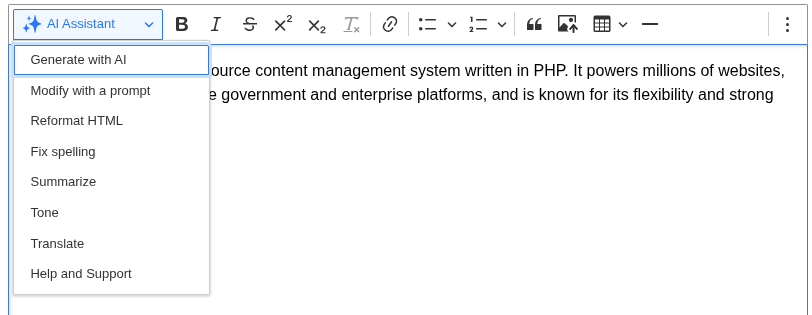
Each action is a separate plugin you enable per text format, so you decide which AI tools appear in a given editor.
CompletionGenerate new text from a prompt and insert it at the cursor. |
Modify with promptSelect text and give a free-form instruction to rewrite it. |
ToneRewrite the selection in a different tone, such as formal or friendly. |
TranslateTranslate the selected text into another language. |
SummarizeProduce a shorter version of the selected content. |
Spell fixCorrect spelling and grammar in the selection. |
Reformat HTML cleans up the markup of the selected content, and a built-in Help plugin documents the available actions inside the editor.
Contextual balloon menu
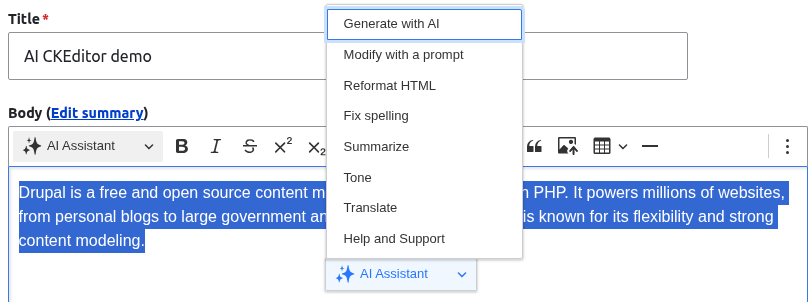
Select text in the editor and a menu appears next to the selection with the AI actions you have enabled. The same plugins are available from the toolbar button and the balloon menu, so editors can work without leaving their place in the text.
Installation
- Install with Composer:
composer require drupal/ai_ckeditor - Enable the module.
- Edit a text format at
Administration > Configuration > Content authoring > Text formats and editors. - Drag the AI Tools button into the CKEditor 5 toolbar.
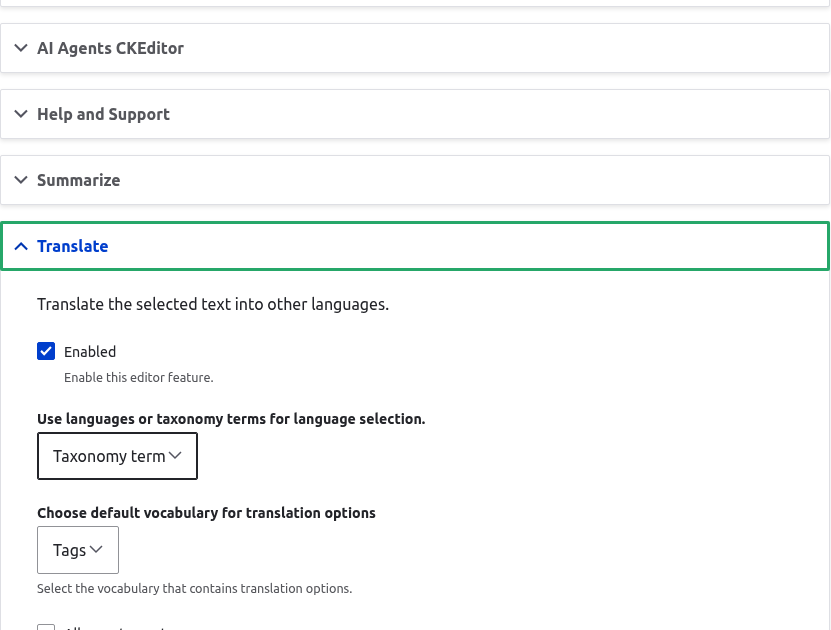
- Choose which AI plugins to enable, and select an AI provider and model for each one.
- Adjust the prompt for any plugin if you want; each ships with a sensible default.
More documentation
Upgrading from the AI 1.4.x submodule
If you were using this integration as part of the AI module, upgrade the AI module to 1.5.0 and run the database updates (drush updb or /update.php). The update switches you over to this standalone module and keeps your existing configuration.
Set up a provider first
The AI actions call whichever provider you configure, so install and configure at least one AI provider module (for example OpenAI) before enabling the plugins.
Related Modules
Related Modules
Other modules that bring AI to CKEditor.
Modules Extending this
Modules Extending this
Add-ons that plug more AI actions into this module.
Requirements
Requires the AI (Artificial Intelligence) module and core's CKEditor 5. You also need at least one configured AI provider with a working API key for the actions to return results.
Supporting organizations:
| Attachment | Size |
|---|---|
| balloon-menu.png | 38.64 KB |
| configuration.png | 36.28 KB |
| ai-assistant-menu.png | 30.45 KB |
Project information
- Ecosystem: AI (Artificial Intelligence)
 284 sites report using this module
- Created by wouters_f on , updated
 Stable releases for this project are covered by the security advisory policy.
Look for the shield icon below.


