

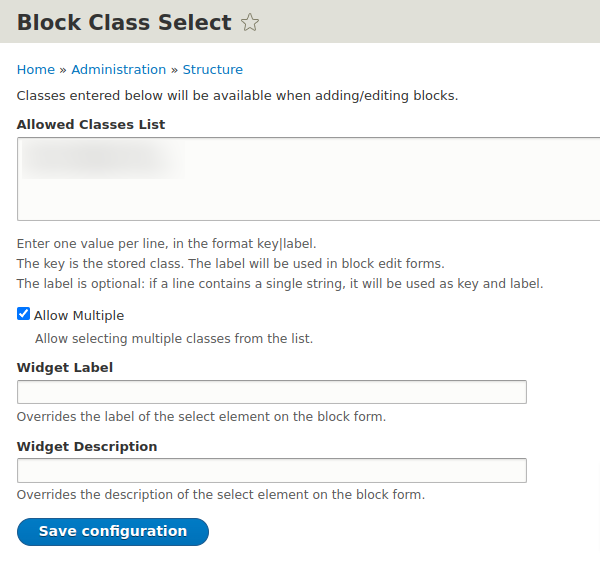
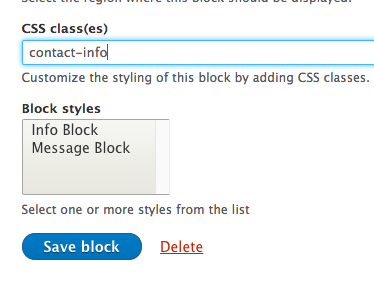
Block Class Select enhances the functionality provided by Block Class to make setting block styles easier for less technical users. In addition to entering class names in a text field, the end user can choose from an administrator-defined list of classes. This allows for quick theming and adding of classes without having to remember what classes might be available. Great for users who don't understand CSS but need to be able to choose classes for blocks to determine background color, font sizes, etc.
The original idea for this module was to easily add a small list of classes for users to choose from, without needing more powerful options from other modules such as Skinr.
Features
- Configurable help text
- Option to allow multiple class selection or limit to one
- Separate permissions for the select element and the text field provide full functionality to developers while allowing a simpler interface for administrators.
Requirements
Depends on Block Class.
Install
It's recommended to install via composer.
composer require drupal/block_class_select
drush en block_class_select
Usage
- Install and enable module with composer command above.
- Configure settings for selecting classes on new and configured blocks: /admin/structure/block-class-select
- Goto "Block layout" page and select block to adjust classes on.
- Edit block and select classes to be added on block wrapper.
- Save block and inspect block markup on page. You should now see your selected classes on the block wrapper.
Project information
 Minimally maintained
Maintainers monitor issues, but fast responses are not guaranteed.- Maintenance fixes only
Considered feature-complete by its maintainers. - Ecosystem: Block Class
 104 sites report using this module
- Created by jeni_dc on , updated
 Stable releases for this project are covered by the security advisory policy.
Look for the shield icon below.
Releases
released 23 June 2023
Development version: 8.x-2.x-dev updated 23 Jun 2023 at 12:12 UTC
released 5 February 2019
Development version: 8.x-1.x-dev updated 5 Feb 2019 at 18:48 UTC


