Submit Issue form
Introduction:
Issue reports are the primary tool by which handbook updates are tracked.
The "Issue Submit Form" is the main way to participate and submit your
contributions about any aspect of Drupal.org contents.
You might have found yourself wanting to ask questions regarding the core
Drupal application, about a contributed Module, about a special
contributed Theme or about the content of a Documentation page in Handbooks.
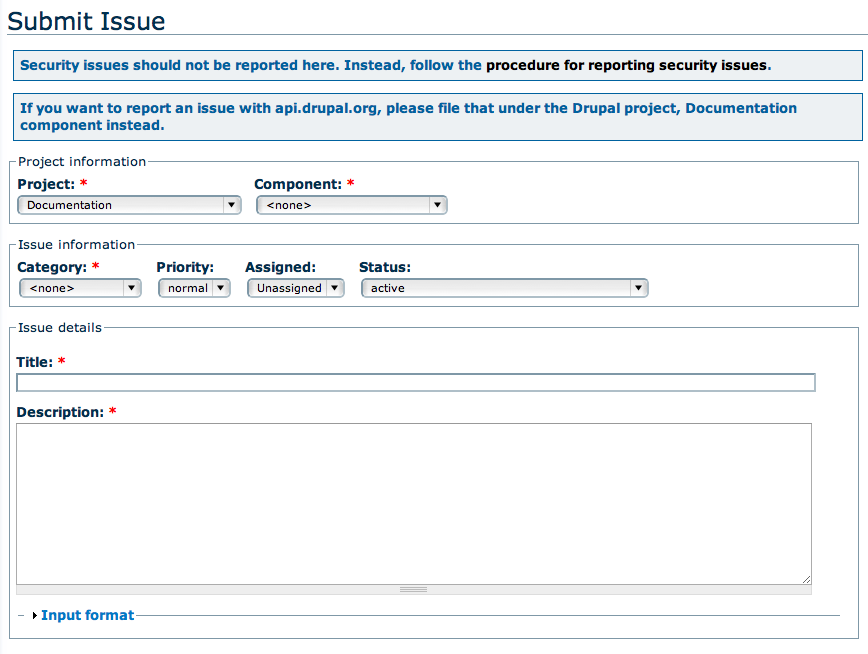
So the first thing you will see when starting an "Issue" is this form below:
It is usually better to submit issues than sending e-mail directly to the documentation
list for most matters, including any topic that requests response or action. That way,
the topic becomes a node, and can be more easily followed.
For requests to join the documentation team, proposals, and similar discussions,
label the issue report with category: "support request", and status: "active."
We will describe in this table, each field of the Submit Issue Form, its characteristics,
meaning and mode of use so as how it must be filled before posting:
|
|
Fields
|
Descriptions
|
|
Submit form Title

|
Form Title
|
|
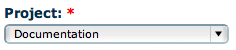
Projects List field:
|
Project definition:
Means the project or projects described or listed. Generally, an organized set of activities more narrowly directed toward a common purpose. (i.e. Project types).
Project Options:
- Use "Documentation" for most handbook documentation issues.
- Use "Drupal.org web masters" for page delete requests, such as Spam and test handbook pages.
|
|
Component default: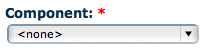
Component options:
|
Component definition:
a smaller, self-contained part of a larger entity.
Component Options:
-
Correction/Clarification:
This is for existing documentation. If documentation is unclear or wrong, please choose this component. For example, content is actually wrong and needs to be updated or something is just blatantly confusing.
-
New Documentation:
If you have suggestions about adding documentation, either sections or content, please use this component.
-
Placement and Navigation:
Content should be moved to a different section because it would be more relevant there.
-
Delete Comments:
(new description?)
-
Outdated:
If content is outdated and does not apply or should be found under a different section/archive, use this component.
-
Vandalism/Spam:
If content or comments are vulgar or Spam, let us know by using this component.
-
Join Documentation Team:
If you are confused on how to join the Documentation Team, or are having trouble regarding this topic, please use this component. Please make sure you have read the documentation on Joining the Documentation team here [link here]
-
Other Documentation Issues:
If for some reason, your issues does not fall into the preceding component categories, please use this one.
|
|
Category default: 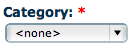
Category options: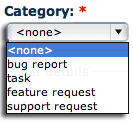
|
Category definition:
A Category is the name for a collection of content items that are related in some way. Example: The category 'Fish' may contain the Content Items 'Herring', 'Haddock' and 'Stickleback'. Category is part of the Content hierarchy.
Category Options:
-
"bug report":
is used for errors. See Bug reports for documentation on submitting issues against modules. See Embedded documentation for submitting issues on the built-in help text.
-
"feature request":
is used for requests, including new material and policy changes.
-
"tasks":
is used when an update is in development.
-
"support requests":
is used for requests that require site administrator role, including joining the documentation team, deleting handbook page comments that have been incorporated, and adjusting page weight for proper page ordering.
|
|
Priority default:

Priority options:

|
Priority definition:
the relative importance of a task in relation to other tasks.
- Priority Options:
|
|
Assigned default: 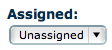
Assigned options: 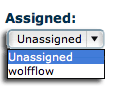
|
Assigned definition:
the user name of the person who is working on or needs to give attention to the issue. Appointed to a post or duty; "assigned personnel"; "assigned duties"
- Assigned Options
-
Unassigned
-
User(member name)
|
|
Status default: 
Status options: 
|
Status definition:
The state, condition, class or current value of an Issue that describes a major stage in the document's life-cycle, and concerns. Each Drupal.org issue has a status assigned so that we can tell at a glance what progress has been made with each issue.
- Status Options:
-
active: (Dev.) No patch is attached to the issue. (Doc.) (to be defined)
-
active (needs more info):
There is insufficient information in the issue to proceed.
-
patch (code needs review):
abbr. CNR (Dev.) A patch has been created and needs review and testing. (Doc.) (to be defined)
-
patch (code needs work):
abbr. CNW (Dev.) The patch needs additional work before it should be reviewed. (Doc.) (to be defined)
-
patch (reviewed & tested by the community):
abbr. RTBC (Dev.) The patch has received a thorough review and test by one or more experienced developers. (Doc.) (to be defined).
-
patch (to be ported):
(Dev.) The patch has been committed to a branch of the project. (Doc.) (to be defined)
-
fixed: (Dev.) The issue has been resolved (usually by committing a patch). (Doc.) (to be defined).
-
duplicate:A similar issue has already been created.
-
postponed: The issue seems like a good idea, but other (often related) issues need to be dealt with first.
-
won't fix: It has been decided that this issue will not be fixed.
-
by design:(Dev.) The raised issue has been deemed not to be an issue. (Doc.) (to be defined).
-
closed: The issue is no longer current.
|
|
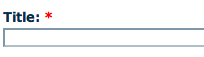
Title field
|
Issue Title definition:
A general or descriptive heading for a section of a written work.
|
|
Description field

|
Description definition:
Descriptive text summarizing your request displayed with the Issue title and provided with URLs when required from your query. The process of analyzing, organizing, and recording information that serves to identify, manage, locate, and explain your issue or post.
When the issue are related to Discussions, amongst the Documentation maintainers (Doc-Team) (via an issue report) you should always file an issue prior to performing the following types of changes:
- Changing the name of a top level chapter in one of the books.
- Moving a top level chapter in a book.
- Large re-writes.
- Big re-organizations.
- Rough drafts that are not yet ready for production.
|


 The 2026 Drupal Business Survey is open. Your response will help shape the future of the Drupal business ecosystem.


Comments
Comment #1
Wolfflow commentedFYI: Of course the images are not optimized yet (some cropping is needed), i will do that. ;-)
Edit: You may also post comment to my working node : Issue Submit Form - Table description on Adaccs.at
Comment #2
add1sun commentedholy cow, this is awesome stuff, wolfflow.
Comment #3
Wolfflow commented@add1sun
Thanks, please if you spare some time can you check Status of Issues definitions in "Terminology", then I will insert/correct here. It would be of help if some one with a bit better experience of "html" could also check this "Submit Issue Form" draft.
thanks
edit: Discussion thread
Comment #4
Wolfflow commentedMy Idea is to add a subpage at http://drupal.org/node/24565 or what you mind?
Comment #5
Wolfflow commentedComment #6
Wolfflow commentedChange to "Support request" and assigned to "Unassign" because I need help from the Team to complete the definitions to write in. Please provide me with your feedback and lets vote on the final version. Thanks
Comment #7
Wolfflow commentedImages Upload for "Issue Submit Form - Description Table"
Comment #8
Wolfflow commentedOk I think this is at a good state, I have uploaded all images to drupal.org and let check a bit my english writings and sentences on IRC #drupal-support. I checked also that the table will fit in "Handbook".
Remaining task to complete:
1. Define and describe a bit about the Priority Options
2. Mention some short suggestion on providing a short and good "Title" to the issue.
3. If you may find it necessary I thought about making also a very short descriptive list for "Project"
4. Review "Status Options" descriptions
5. Add links where they should be usefully or needed.
Feel free to add eventually other items.
Thanks
Comment #9
Wolfflow commentedThis is FYI: Summary of development of this "ISSUE"
The ISSUE "Issue Submit Form - Description Table" node/312627
is a main definition and description task.
This ISSUE have many other Disccusions Issue related to:
1. "Status levels of Issues" --> http://drupal.org/node/156119
(Getting Involved » Drupal's work space: the issue queue)
Note by: @add1sun: "Well, http://drupal.org/node/156119 is going to moved out from under the "Dev handbook".
There is a whole section just for explaining the issue queue (#240213: Contrib redesign: Drupal's work space - the issue queue) so this page will move there and be the basic guidelines for everyone.
2. "Update status level of issues page" --> http://drupal.org/node/310994
(Documentation Issue)
3. "Addition of section with "Issue report Component" - description" --> http://drupal.org/node/307990
Note by: @wolfflow: "I will check this as "Duplicate" because of http://drupal.org/node/312627 where I rolled in
#6 and I just need from Doc-team
a review of the "Issue Submit Form - Description Table"
4. "Common expressions & acronyms used on D.O." --> http://drupal.org/node/302232
Term: Status of Issues
5. Support request in #8
Hope that with this overall ISSUE I have not caused to much confusion (I guess), but I really wanted to inform
every one of my doing and it is really a very big Task for me. I have acquired a lot of experience with this doing
and hope you will help me to end it. I did not know at the beginning that starting this ISSUE there was so much to clear and define and describe as simple as possible and try to report in an exactly manner my doing. Thanks.
Edit: After a quick check with @add1sun I published this Issue at http://drupal.org/node/314328
marked "Incomplete"
Comment #10
add1sun commented@wolfflow since that is now published can we close this issue out?
Comment #11
Wolfflow commentedok