

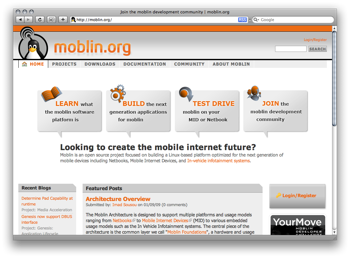
Moblin is a global open source project to develop a Linux-based stack for embedded devices ranging from mobile phones to netbooks to in-vehicle entertainment/navigation systems. With support from Intel and other embedded systems engineering companies, there are hundreds of engineers around the world helping to create an open tool set for the next generation of smart devices.
Intel announced the 2.0 iteration of Moblin to the public at OSCON 2008. Moblin is already being used to build Ubuntu's Mobile Internet Device (MID) distribution, and the first Moblin-based devices will be hitting shelves this holiday season. In short: very cool.
Naturally, a good open source project needs a good home for its developers, and that means Drupal!
"Drupal was a clear winner when we went looking for a solution to build the Moblin.org web site. As open source developers we valued the modular framework Drupal provides and the active community of users. Since we were already using it as an internal tool, it was an obvious choice."
— Michael Shaver, Intel
Chapter Three helped rebuild moblin.org, replacing the original custom PHP-based informational site (still available at v1.moblin.org) with a true developer community/portal built on Drupal 6. We did the engineering and architecture, while Intel provided design expertise as well as overall site requirements. The objectives were:
- Visually refresh the site in preparation for a renewed push for the Moblin platform 2.0
- Expand the scope of available content by taking advantage of a world-class CMS (a.k.a. Drupal)
- Allow for self-starting developer communities to form around specific Moblin software projects
- Integrate with the existing development stack, including Bugzilla and Git
We began work in mid July and worked very closely with Michael Shaver (Intel's designer) in defining the information architecture and functionality. We then built out the site on Drupal 6 with a mix of A-list contrib modules and custom development, migrating users and some content over from an existing "internal" Drupal site. The new moblin.org launched successfully in September 2008 and is backed by a best-practice three-phase (dev/test/live) SVN environment, and hosted on a Rackspace server running nginex.
Collaborative Development
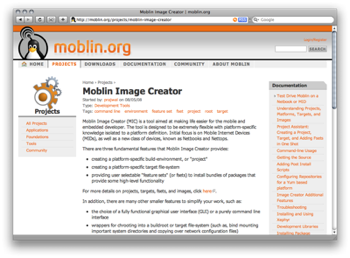
From the outset this project was understood as a collaborative effort. Michael brought an initial set of wire-frame designs to the table, and we worked together in an iterative process to take these through to completion.
"Because Drupal is so well structured, we are able to easily make modifications to the information architecture and design without going completely back to the drawing boards."
—Michael Shaver, Intel
The process was for Chapter Three's experts to handle the Drupal configuration, insuring that the utilization of Nodes, Taxonomy, Menus, Blocks, Views2 and Organic Groups was consistent and elegant. Once the critical architecture was configured, we could all make minor adjustments as needed. Chapter Three remained the "owner" of the Drupal setup, resolved critical issues, etc.
In turn, Michael took the lead on creating the CSS and markup, using template tpl.php files to lay down structural XHTML and quickly prototype pages. Our engineers worked primarily in template.php, creating theme overrides as needed, and developing pre-process functions to insure that the right tpl.php template files were being used and that correct variables were being fed to them.
We iterated several times to close in on the precise design and functionality that would be needed for the Moblin developer communities, working together to create the user interface and experience. In particular, we developed a custom OG Group Status block on the front-end and customized the node add/edit forms for new project groups, project documentation and project releases.
Towards the end we were able to focus on driving through our respective areas of responsibility, with Chapter Three focusing on pure development tasks such as Bugzilla integration, and Michael adding great graphic flourishes to the theme. Finally we came together for fine-tuning and cross-browser testing.
Drupal 6
"Even though Drupal 6.x had been officially released for some time, we had to decide if it was ready to use for the site. In the end, enough of the major contrib modules were ready and the new features in core made the decision pretty easy. We feel we are now positioned well to take advantage of this release and to make upgrading to Drupal 7 that much easier."
— Michael Shaver, Intel
Moblin.org is the first client site Chapter Three built and launched on Drupal 6. We made the leap to the next generation for a few reasons.
First of all, as a global project, Moblin.org's long-term requirements include strong support for internationalization. This alone was enough to tip the scales in favor of the new version with i18n in core.
Secondly, while it was a non-ideal situation, we felt we could implement the more complex site layouts without Panels, which at the time was not ready for production deployment.
Finally, the other powerhouse modules we regularly depends on -- Views and Content Construction Kit (CCK) of course, as well as Organic Groups (OG) -- were all in strong Beta or RC state, and our initial due-diligence indicated they were more than stable enough for the needs of the site.
This proved to be a good decision. The improved architecture of Drupal 6, particularly the advances within the theme layer, were very advantageous. While there was a learning curve involved -- especially in upgrading Menu Trails to use the new menu system -- it was well worth it.
The ability to utilize pre-process functions was key in cleanly and effectively dividing our labor on the site, and the core improvements in usability in Drupal 6 paid dividends across the board.
Going forward, unless there's a specific requirement or client request, we plan on using Drupal 6 for all our work. We're also looking forward to launching our first client site on Acquia Drupal in December.
Module List
Although not all these modules have fully been implemented on the site, here is a run-down of what we used or will be using:
- Content Construction Kit (CCK): A cornerstone of the site: we also implemented the Date, Filefield and Link modules for additional field types.
- Organic groups: Another cornerstone of the site: the projects are all run as groups.
- Views: Views drives most of the directory/list pages. We also use Views Rotator to offer a nice showcase on the homepage.
- Menu Trails: Updated for Drupal 6 with this project, enhances usability by allowing you to classify individual nodes as falling "under" a primary menu item and keeping the navigation trail in an active state.
- Drupal Administration Menu: Easy access to admin areas for increased site-owner usability.
- LoginToboggan: Another well-known and loved usability-booster.
- Pathauto: A must-have for setting up human (and SEO) friendly urls. We also implemented Pathredirect to handle legacy urls from their previous site.
- BUEditor: Implemented in favor of more complex "WYWISYG" solutions; we also implemented a couple custom buttons to help w/common editorial tasks.
- IMCE: Along w/BUEditor, this rounds out the textarea-editing toolset. For users familiar with the concepts of a filesystem, IMCE offers a simple way for them to re-use existing uploads and image assets.
- CAPTCHA: Must-have for any site with open registration.
- Code Filter: Good for sites where code-is-content (e.g. people will post example source, etc).
- Devel: Don't build sites without it! :)
- Fivestar: Along with the Voting API back-end, to allow for ratings.
- Google Analytics: Worth it for the server-side caching of Google's js alone, but the automatic segmentation by role can provide excellent intelligence on site use.
- ImageAPI and ImageCache: allow for the dynamic resizing of uploaded images.
- Path Redirect
- Mailman Manager: along with User mailman register, provides integration w/existing Mailman listservs.
- Job queue: Because sometimes you've got more to do than cron.php can handle.
Custom Development
Custom development for Moblin broke into several key categories.
First of all, under the auspices of this project we updated and expanded the MenuTrails module for Druapl 6, adding key improvements around menu display and breadcrumbs. This work was immediately released into Drupal CVS even before the site launched, creating a feel-good moment for everyone.
To make editing easier, we built custom buttons for the BUeditor, which we agreed upon as an alternative to the hassles which very often result from "WYWIWYG" editors. We created a number of jQuery-enhanced pop-ups to help editors quickly and easily link to other content within a specific developer community. Look for some future documentation on how easy this is in the near future.
As almost always happens, we created a general-purpose moblin.module to handle site-specific tweaks using form_alter and node API, as well as setting up some custom menu callbacks.
Finally, there's obviously a custom theme in place. Michael Shaver did a great job here, owning the CSS and markup, and driving the creative ideas. We supported as needed w/preprocess functions and other code-centric functions as needed.
Hosting/Development Environment
The site is hosted on a single server at the moment, tuned by experts at Intel and using nginex as its webserver. Thanks to a lean theme, Drupal's JS and CSS aggregation, and a well-tuned back-end, pageloads are snappy.
One of our key objectives for the project was not just to launch a great site, but also to give the Moblin team a solid platform for future innovation. As any Drupal regular knows, there's no telling what a community will really need until that community really exists, and so we wanted to be sure there was both a clean Drupal foundation and a solid process for managing future development.
To that end, we implemented two additional subdomains for the site to act as development and staging environments. These were distinct codebases w/their own distinct database backends. They are maintained via SVN with dev being on the trunk (equivalent to CVS head) and staging being on a test branch.
We then created three shell scripts that future maintainers could use to safely and consistently manage the codebase:
code_merge: will accept a specific directory as an argument and merge this from trunk to test. If successful, the staging checkout of the test branch will be updated so that testing can begin.code_push: quickly backs up the current live codebase and database, does a fresh SVN export of test, and rsyncs that against the live codebase. Rsync minimizes file activity in the live area, and the back-up dir provides an at-the-ready "undo" recourse in case a mistake is made.db_sync: allows easy synchronization of databases; by default pulling a sql dump from live and overwriting staging. Our experiences is that keeping a staging environment going with an up-to-date snapshot of live configuration and content is invaluable for future development. It makes sql backups first, and will rsync the drupal-maintained /files directory as well.
With these three scripts and instances in place, all the pieces are there for rapid/Agile development, where dev and staging environments say closely in-sync with the real live website. This is the only way to insure continuity once a community site is live and receiving new nodes, comments and user signups on a daily basis, and having it all maintained through scripts which do it "right" every time means you don't have to be a sysadmin expert to be a part of the development effort.
In Conclusion
This was an excellent project all around. Everyone had a fun working on it, and we all got a chance to learn something.
"Working with Chapter Three was great! They understood the development workflow perfectly and accommodated our needs to handle the theming and IA of the site. Add to this the short timeline and last minute changes they put up with. One area that Chapter Three really helped was setting up the development environment for us. This has proved invaluable to managing the site and pushing new features."
—Michael Shaver, Intel
It was really a pleasure and an honor to work with high-caliber partners on a site that will hopefully help drive open-source innovation in a vital space for years to come.

Comments
Good job
Cool and nice job, thanks for the insight.
I was wondering which module did you use for the downloads page http://moblin.org/downloads/project ? Is that just the views module or something else.
Just views and the core
Just views and the core upload module.
a small expla...
Can you offer a small explanation please....if you don't mind
This view is of a custom
This view is of a custom content type called Download. The Download content type has the core upload field enabled; to enable this, follow the instructions on the upload module book page. Once you do this you can add the Upload: Attached files field to your view and it will display all the attached files for this particular content type.
Best review
Best review for some time. Both the why and the how. Both the designer and the customer.
I find the layout too busy, links on all four sides plus two columns in the content, the colour contrast of orange on grey makes long term reading a pain, but the review made me look at BUEditor, an editor that might be a better choice for several of my sites, and there are some other modules mentioned that I will revisit.
I can show this review to people who are considering Drupal for the first time, without having to explain technical terms.
petermoulding.com/web_architect
petermoulding.com/web_architect
Good documenation. I like
Good documenation. I like the Menu trail and the views rotator use in the site. The site is nice to see and easy to use. Where are you hosting it?
- Victor
Search Drupal.org | Lamingo | Tax India | Drupal Jobs | FPGA
Also can you share any
Also can you share any methodology pointers or the script for your hosting and staging scripts. code_merge, code_push, db_sync. I am in the process of building something similar for my websites.
- Victor
Search Drupal.org | Lamingo | Tax India | Drupal Jobs | FPGA
Yes!
I have been wanting to do some documentation of this process -- really our whole development infrastructure -- for some time now, but it's always falling down the TODO list. Hopefully it will get done soon.
Briefly though I will say:
1) Using PHP CLI for your scripts keeps things nice and consistant.
2) Code_merge is just a wrapper around three SVN commands (merge, commit and update) so they gets run the same every time
3) Code_push does some automatic backing up, and then runs an SVN export which is rsynced
4) Db_sync makes use of the settings.php files in different installs to determine where to mysqldump from, and overtwrite. It also does automatic backing up.
The main points here are to do things consistently and to make backups automatically. :)
------
Personal: Outlandish Josh
Professional: Chapter Three
------
Personal: Outlandish Josh
Professional: Pantheon
This is a good info to
This is a good info to validate my concept. I am planning to use makefiles to do the same things.
http://www.gnu.org/software/make/manual/make.html (one of my TODO :-)
- Victor
Search Drupal.org | Lamingo | Tax India | Drupal Jobs | FPGA
FYI, db_sync is implemented
FYI, db_sync is implemented in drush as the sql load command. Very handy indeed. As for code merges, I have been using svnmerge.py and enjoying it.
Great write up!
Great write up! thanks.
Would really appreciate seeing these scripts - would also make a great Dojo session; covering how to manage dev->staging->production? ;)
I would love that dojo :-) -
I would love that dojo :-)
- Victor
Better way to search Search Drupal.org
Hosting
Hosting is at rackspace.
------
Personal: Outlandish Josh
Professional: Chapter Three
------
Personal: Outlandish Josh
Professional: Pantheon
Scripts?
I'd be interested in seeing those merge/sync shell scripts :)
--
John Forsythe
Need reliable Drupal hosting?
Great SEO optimisation for HTML structure
The content block is placed before navbar and sidebars. But visually, content is placed after navbar and sidebar.
So search engines see the content to register first. That a great optimisation.
--
Traduction
The theme is a Zen sub-theme
The theme is a Zen sub-theme with quite a few CSS modifications for additional elements within the structure. The standard Zen theme does produce the "content first" ordering though, so is an excellent way to start. One interesting side effect of the content first ordering that I didn't quite anticipate is the home page. Because of the structure you either have to make sure your home page content is what you want Google to pick up or you have to change the CSS order. You can also put in a META description, which will be the text that shows up in search engines under the title.
Thanks for the information.
Thanks for the information. It was a good read.
git and bugzilla integration?
Great write-up, thanks!
You mentioned git and bugzilla integration in passing, but I'd love to hear more about how you're doing that. Did you look at the Version control API and the git backend? Did you not use them just because they're not yet ported to D6, or where there bigger reasons you didn't want to go that route? What did you end up doing? Any info on this area of the site would be most appreciated!
Thanks,
-Derek
___________________
3281d Consulting
We did, but went simpler
I did look into that, but we kept it simple for starters. On the git side, we just link to the repo, and have some simple RSS parsing from feeds generated by gitweb so that projects can have a block of recent commits, etc.
We do similar RSS-based integration w/bugzilla, and also use a plugin on the Bugzilla side that makes it authenticate against Drupal's user table.
Other more sophisticated integration was discussed, but the whole VC system wasn't codified or established enough to make it worthwhile (e.g. different projects do things really differently, and they want to keep things flexible). However, I wouldn't count out some development along these lines as the project and community mature.
------
Personal: Outlandish Josh
Professional: Chapter Three
------
Personal: Outlandish Josh
Professional: Pantheon
Great work
Great work and excellent article.
Thanks.
---
Drupal Theme Garden
Right
It's something we could/should release back as a patch for og_views. It's also worth looking at as an example of implementing the Views2 API.
Based on all the responses here, I will look at pulling together a more technical post which goes a bit further "under the hood" in the coming weeks.
------
Personal: Outlandish Josh
Professional: Chapter Three
------
Personal: Outlandish Josh
Professional: Pantheon
Project Documentation - View
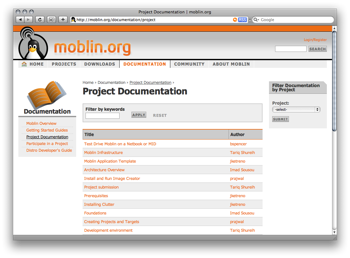
Hey, can anyone tell me, if there is a module for the filter you provide at "Project Documentation"?
Or do I have to write something myself to reach this?
Thanks!!!
http://www.DROWL.de || Professionelle Drupal Lösungen aus Ostwestfalen-Lippe (OWL)
http://www.webks.de || webks: websolutions kept simple - Webbasierte Lösungen die einfach überzeugen!
http://www.drupal-theming.com || Individuelle Responsive Themes
This is a custom filter, but
This is a custom filter, but we may be creating an OG filter for views that will replace this.
I think such a functionality
I think such a functionality is useful in many cases...
http://www.DROWL.de || Professionelle Drupal Lösungen aus Ostwestfalen-Lippe (OWL)
http://www.webks.de || webks: websolutions kept simple - Webbasierte Lösungen die einfach überzeugen!
http://www.drupal-theming.com || Individuelle Responsive Themes
nice work,i like the style
nice work,i like the style of interface
---------------------------------------------------------------------
Blog:http://nwhy.org
Blog to it:http://blog.to.it/k5angle
nice job!
Very nice site, I assume that the speech bubbles are blocks?
CMSCritic.com - The premier site for Content Management System news, reviews, interviews and articles.
It is really a very nice article
It is really a very nice article for drupal novices. I would be interested to know how one can develop
the functionality on page http://moblin.org/projects.
Thanks for your response!!
---~~~***~~~---
aac
A Guess from a Drupal Newbie
I'm still a total newbie to Drupal, but I've been devouring documentation as fast as my brain can soak it up and I have a guess as to how the functionality found at http://moblin.org/projects might have been accomplished (or at least an idea of one way it could be done).
I'm going to post my guess here for a few related reasons...
1) In hopes that my guess is somewhat close to correct and therefore possibly useful and helpful to other newbies like myself.
2) I hope to spark a discussion that may lead to good ideas and information which I and others newbies may learn from...
3) To test whether what I've learned about Drupal so far is soaking in correctly or if I'm way off-base still...
So, with that out of the way, here goes my guess as to how it might have been done:
I suspect that it was accomplished using some combination of Organic Groups, Taxonomy, and Views combined with some nice custom theming to represent the tabbed interface with each tab leading to a different view of a particular Taxonomy term?
This is my "educated" guess based on what I've learned thus far regarding Drupal, and it is entirely possible that I haven't the slightest clue what I'm talking about, but there you have it. That's my idea on how it might have been done. I now eagerly await finding out how it was really done in order that I may judge just how far along my Drupal knowledge has come in the past couple of weeks since first starting my Drupal adventures. :)
~{ The Silver Knight }~
......./[ TSK on IRC ]\.......
That is a pretty accurate
That is a pretty accurate guess! Each project is an Organic Group and is assigned a taxonomy term. After that it's a matter of creating views pages that filter the projects by taxonomy term and assigning a tabbed menu item for each page. Setting this up is fairly straightforward. Where it gets a little tricker is the menu system and Views. Setting up the tabbed navigation and the default menu item takes some experimentation to get right. No need for custom code though, Views does a great job of making this available.
Drupal 7
When I think back to when I upgraded from Drupal 5 to 6... I shiver.
I hope 6 to 7 is a breeze!
AWESOME site. Love the look
AWESOME site. Love the look and can't get over the functionality.
The documentation is done in book format - you can see that by the previous/next chapters with the UP button in the middle.
How do you get the chapter's to indent on http://moblin.org/documentation
Inspiring work. Thanks for the writeup.