

 Support for Drupal 7 is ending on 5 January 2025—it’s time to migrate to Drupal 10! Learn about the many benefits of Drupal 10 and find migration tools in our resource center.
Note: The code for this tutorial is maintained in the Examples for Developers module. This means:
- You can grab a copy there and fiddle with it, change it, experiment with it.
- If you find problems, file an issue there and get it fixed. Patches and improvements are welcome.
This tutorial will take you through the basics of testing in Drupal. By the end you should be able to write your first test! For this example we will create a dummy module called "simpletest_example", which provides a content type called "simpletest_example". This content type is exactly the same as any basic Drupal node type (e.g., 'page'). The tutorial will then explain how to test this simpletest_example content type to ensure it functions properly.
Setup for the tutorial
First, we will need to make sure that the Simpletest module is installed.
In Drupal 6, Simpletest is a contributed module, and you will need to read and follow the instructions included in the module's INSTALL.txt file. This includes applying a core patch.
If you have not done so already, you will need to make sure the Simpletest module is enabled.
Simpletest verbose testing information should be enabled for this tutorial. It gives you a screenshot of what the Drupal page looks like at every point in the test. Check it at admin/build/testing/settings.
This tutorial makes use of the Simpletest Example module from http://drupal.org/project/examples.
How Drupal's Simpletest works
Most of Drupal is web-oriented functionality, so it's important to have a way to exercise these functions. Simpletest creates a complete Drupal installation and a virtual web browser and then uses the virtual web browser to walk the Drupal install through a series of tests, just like you would do if you were doing it by hand. It's terribly important to realize that each test runs in a completely new Drupal instance, which is created from scratch for the test. In other words, none of your configuration and none of your users exists! None of your modules are enabled beyond the default Drupal core modules. If your test sequence requires a privileged user, you'll have to create one (just as you would if you were setting up a manual testing environment from scratch). If modules have to be enabled, you have to enable them. If something has to be configured, you'll have to use Simpletest to do it, because none of the configuration on your current site is in the magically created Drupal instance that we're testing. None of the files in your files directory are there, none of the optional modules are installed, none of the users are created. We have magic commands to do all this within the Simpletest world, and we'll get to that in a little bit.
About the Simpletest Example module
The Simpletest Example module provides a custom node type (like 'page' or 'story'). It has a title and a body. That's it. It gives us a chance to demonstrate testing of content creation. To implement the node, we have to provide the node type to Drupal with hook_node_info() and provide a form for the node type with hook_form(). We implement permissions for the module (so that you need "create simpletest_example content" permissions to create one, or "edit own simpletest_example content" permissions to edit one.) And of course we need a simpletest_example.info.
Note that our module has a bug in it: The permissions handling is not done correctly. So even though there's a permission string for 'edit own simpletest_example', it's not handled correctly by simpletest_example_access(), so when our properly privileged user tries to edit a node, it can't. Of course, the manual user tester was probably testing with user 1, so never saw this failure case. We'll get to this later.
This code is maintained in the Examples for Developers module. It really helps to try out the code, change it a bit, experiment with dummy code like this before trying to do something serious. You're encouraged to grab it, enable the module, and work with the code.
Figuring out what we need to test
If you install simpletest_example, you can manually go through the steps and see what you think needs to be tested.
Visit Create Content > Simpletest Example where you should see the following.
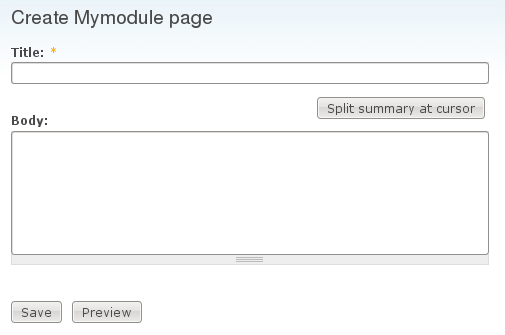
Look at the interface and identify the things that need to be tested in our node type.
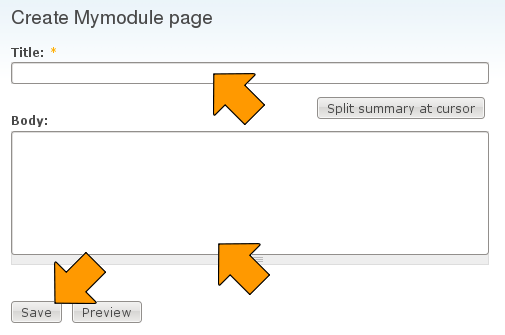
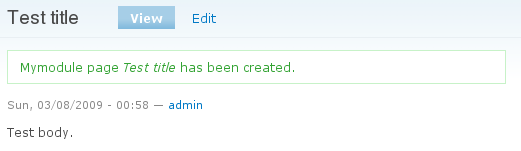
Take a tour and make sure you are familiar with how the interface works and that it functions properly in a basic case where you are manipulating it instead of simpletest. If you don't understand what it's doing or why, you can't write a workable test. In this case fill in the title and body fields and click the save button. You should see something like the following.
Building a test for simpletest_example
Now it's time to create our tests, which we'll do in the simpletest_example.test file (which you have in the complete module download).
If you add a .test file to an existing module, you will probably need to rebuild Drupal's caches in order to notify Drupal of the new file. To rebuild all caches, you can go to admin/settings/performance and click the "Clear all caches" button.
There are four basic steps involved in building a test:
- Creating the structure (just creating a class that inherits from DrupalWebTestCase)
- Initializing the test case with whatever user creation or configuration needs to be done
- Creating actual tests within the test case
- And, of course, trying desperately to figure out why our test doesn't work the way we expect, and debugging the test (and perhaps the module)
To start, we just need a bit of boilerplate extending DrupalWebTestCase.
class SimpletestExampleTestCase extends DrupalWebTestCase {
  protected $privileged_user;

}
To make the test available to the Simpletest testing interface, we implement getInfo(). This just provides the user interface information that will show up on the simpletest page after clearing the cache table.
  public static function getInfo() {
    // Note that getInfo() strings are not translated with t().
    return array(
      'name' => 'Simpletest Example',
      'description' => 'Ensure that the simpletest_example content type provided functions properly.',
      'group' => 'Examples',
    );
  }
Next comes the terribly important setUp(). Here is where we must do anything that needs to be done to make this Drupal instance work the way we want to. We have to think: "What did I have to do to get from a stock Drupal install to where I can run this test?". In our case, we know that we had to:
- Enable the Simpletest Example module
- Create a user with privileges to create a simpletest_example node
- Log in the user
This work is done by the setUp() method:
  public function setUp() {
    // Enable any modules required for the test.
    parent::setUp('simpletest_example');

    // Create and log in our privileged user.
    $this->privileged_user = $this->drupalCreateUser(array('create simpletest_example', 'edit own simpletest_example'));
    $this->drupalLogin($this->privileged_user);
  }
Note: We must explicitly enable every dependency our module has. The example module has none, but your module might. This is done by passing multiple arguments to the parent::setUp() method. In some cases, they must be enabled in the order that you would enable them manually (e.g., date_api needs to be enabled before date). For example:
  public function setUp() {
    // Must include every single module on which Meetings module relies.
    parent::setUp(
      'content',
      'ctools',
      'date_api',
      'date',
      'date_timezone',
      'date_popup',
      'features',
      'filefield',
      'token',
      'messaging',
      'notifications',
      'notifications_content',
      'notifications_team',
      'strongarm',
      'text',
      'views',
      'votingapi',
      'meetings'
    );
  }
Create specific test: Creating a node
Now we need to create specific tests to exercise the module. We just create member functions of our test class, each of which exercises a particular test.
Our first test will be to create a new simpletest_example node by using the form at node/add/simpletest-example:
  public function testSimpleTestExampleCreate() {
    // Create node to edit.
    $edit = array();
    $edit['title'] = $this->randomName(8);
    $edit['body'] = $this->randomName(16);
    $this->drupalPost('node/add/simpletest-example', $edit, t('Save'));
    $this->assertText(t('Simpletest Example Node Type @title has been created.', array('@title' => $edit['title'])));
  }
drupalPost, drupalGet, and Assertions
The code above did a very simple form submission on the node/add/simpletest-example page. It prepares an array of fields (the $edit array, giving random values for the title and body) and then it POSTs the form and asserts that we find appropriate text on the page.
Most tests will follow this pattern:
- Do a drupalGet() to go to a page or a drupalPost() to POST a form.
- Do one or more assertions to check that what we see on the page is what we should see.
$this->drupalGet($path) is as easy as it can be: It just goes to the named page.
$this->drupalPost($path, $edit_fields, $submit_button_name) is only slightly more complex.
And then there are dozens of possible assertions. The easiest of these is $this->assertText($text_to_find_on_page). When you get beyond this tutorial, you'll want to read about more of them.
Running the Simpletest web interface
Next we need to run the test. Here we'll use the web interface to run the test.
Navigate to Admin->Site Building->Testing admin/build/testing. Select the test you just created -- it will be in the "Examples" group -- and press the Run tests button. (You may need to clear Drupal's cache to see it in the list),
Once the test has run you should see the results, which for this test will pass.
You can also run tests from command line. More information about it can be found at Running Tests Through command-line.
A demonstration failing test
It really doesn't teach us much to just have a test that succeeds. Let's look at one that fails.
We'll work within the same class and this time try to test editing a node. Our module has a flaw in it - it doesn't handle the 'edit own simpletest_example' permission string correctly, so a user with only that permission will not be able to edit it. In this test we'll create a node and then try to edit it.
Run the test and see the result.
  public function testSimpleTestExampleEdit() {
    $settings = array(
      'type' => 'simpletest_example',
      'title' => $this->randomName(32),
      'body' => $this->randomName(64),
    );
    $node = $this->drupalCreateNode($settings);

    // For debugging, we might output the node structure with $this->verbose().
    // It would only be output if the testing settings had 'verbose' set.
    $this->verbose('Node created: ' . var_export($node, TRUE));

    if (!$this->runningOnTestbot()) {

      // Make sure we don't get a 401 unauthorized response when editing.
      $this->drupalGet("node/{$node->nid}/edit");
      $this->assertResponse(200, t('User is allowed to edit the content.'));
      // Looking for title text in the page to determine whether we were
      // successful opening edit form. Note that the output message
      //  "Found title in edit form" is not translated with t().
      $this->assertText(t("@title", array('@title' => $settings['title'])), "Found title in edit form");
    }
  }
Unit Testing
Simpletest also provides a DrupalUnitTestCase as an alternative to the DrupalWebTestCase.
The database tables and files directory are not created for unit tests. This makes them much faster to initialize than functional tests but means that they cannot access the database or the files directory. Calling any Drupal function that needs the database will throw exceptions. These include routine functions like watchdog(), drupal_function_exists(), module_implements(), module_invoke_all() etc.
More information about writing unit tests for Drupal can be found at Unit Testing with Simpletest.
When to use t() in simpletests
Unlike most strings in Drupal, strings in simpletest should not always be enclosed in t(). This is for two reasons:
- Most strings used in simpletest are for testing only and not used on any website, so there is no reason to burden translators with them.
- It is simpler to provide performance, robust test coverage when different components are decoupled as much as possible (which means not running code like
t()from other subsystems when it is not needed).
When to use t()
Use t() in your test methods in the following cases:
- When you are specifically testing functionality related to translation and localization.
- When you are testing for the presence of a string that is already translated in the user interface. For example, to check for the presence of the "Access denied" message on a 403 page, use the following code:
$this->assertText(t('Access denied'), 'Access denied message found on forbidden foo page.');Note that the first string,
'Access denied', is provided by drupal_deliver_html_page() and translated there witht(). Therefore, we also uset()when checking for the presence of this message.
When not to use t()
Do not use t() in:
- Strings in
getInfo(). - Test assertion messages. Repeating the example from above:
$this->assertText(t('Access denied'), 'Access denied message found on forbidden foo page.');The second string,
'Access denied message found on forbidden foo page.', is for the test runner's information only, and so it is not translated. - Test module and theme output, unless the test module is intended to test translation functionality.
Debugging Simpletests
In the testing settings (D6: admin/build/testing/settings, D7: admin/config/development/testing/settings) there is an option "Provide verbose information when running tests ". If you turn this on, every drupalGet() and every drupalPost() will be captured as an HTML file, which will be available for you to view in the test results. This is a tremendously important tool.
You can also use $this->verbose("some message") and the message you provide will be shown when verbose information is being displayed.
Where to go from here
- Several of the API functions and assertions are documented in this section.
- Reading through drupal_web_test_case.php is instructive.
Note: A Google Docs presentation to go with this material is maintained by rfay.
| Attachment | Size |
|---|---|
| mymodule.drupal6.tgz | 1.75 KB |
| simpletest_mymodule_demo.d7.20090905.tgz | 1.96 KB |












Comments
Remember to alter simpletest.info when writing a core test
Not sure where to put this.
In trying to write a core test I failed to get my test into the 'System' tests.
In the end it came down to add the test to simpletest.info
and to rebuild the registry. How? I reinstalled the simpletest module though devel.
"Remember to alter the .info file"
Most people are not adding a test for simpletest module, so will be adding the new test file to the module they're working on. Definitely not simpletest.info.
Any time you add a new .test file in D7, you'll have to add it to the files[] section of the related module's .info file.
To rebuild all caches, you can go to admin/config/development/performance (D7) or admin/settings/performance (D6) and click the "Clear all caches" button.
Tip: make sure to enable all modules needed in setUp()
In my case I found that Setup() does not handle module dependencies and I needed to enable all modules required by my module for testing. To help check that I have enabled the correct modules I simply created a user and went to the modules page to see that they where available and enabled.
The function
outputScreenContentscan be found in the Debugging Simpletests section above.This also can be helpful when creating a user with specific permissions and you get an error that the permission was not valid. Just use the same code above and go to the
admin/user/permissionspage with'administer permissions'to confirm that the permission is available.I hope this helps someone, it sure helped me.
Your new test cases not showing up?
If you've added your test cases in a new file and now want to execute them but they don't show up under SimpleTest.
This is probably because there is a cache that hasn't been invalidated yet.
This code in simpletest.module line 358.
To resolve this just go in to the database and remove the cached item.
Just clear the cache
Just clear the cache in any way you want. For example, admin/config/development/performance (D6) or admin/settings/performance (D6).
outputScreenContents doesn't
outputScreenContents doesn't seem to exist any more.
Verbose setting accomplishes the same
As described in the tutorial, make sure the "verbose" setting is on, and you get the screen contents of *every* page you go to with drupalGet() or drupalPost().
CCK Field Create
I was struggling with creating a CCK field in my seemingly fruitless searches on drupal.org and Google.
I tried using CCK's CRUD API (and found CCK's testing class much too complicated and bizarre for my tastes), but in SimpleTest this obliterated the menu (hypothesis: can't run menu_rebuild in simpletest for some reason???). With an exported field definition I was able to create it with the following methods:
I also have not been able to successfully use the SimpleTest method, drupalPost as detailed above (SimpleTest isn't Simple, is it?). Instead I create a node via the drupalCreateNode method. This is disappointing, but something I can work around to start creating tests.
Create using the drupalPost()
The simplest way to understand doing something like creating a CCK type is to do it using drupalPost(). That means navigating to the content type creation steps and doing all the things that a human would do.
As far as your inability to create a node in the example, please get the example and experiment with it (Examples module simpletest_example module. It creates new nodes quite successfully.
Mistake in test 1
I'm running this on D6 and the first example test fails,
it says,
$this->assertText(t('Simpletest Example Node Type @title has been created.', array('@title' => $edit['title'])));but should be
$this->assertText(t('simpletest_example page @title has been created.', array('@title' => $edit['title'])) );Call Drupal post having the get variables?
I have written a test file that contains the get variable in the URL, i.e., having an email variable in the url like register?email=value. After calling this a page will be displayed with the fields to capture the user personal information. I have created a array type with the form fields value and passed the array in the drupalPost method. When I tried to test the case in the drupal I was returned with error that the "Failed to set field to " (all the field names I set in the array and the values) in the test case result. when I tried to call the url in the browser (replacing the %3F and %3d as mentioned below), the page is displayed correctly with the form fields. But when I called the url with the URL that is printed in the test result(http://localhost/projects/drupal/register%3Femail%3DczEzMzg2OTJ5aHhlaTEx...) a error page with Access Forbidden Error 403 is displayed. I am unable to find the problem here. Please note that when the email variable in the url is not read correctly then the form fields will not be displayed, so I have a doubt that the email variable is not read correctly when I am using the drupalPost method with the get variable. Also the URL is changed by replacing the "?" with "%3F" and "=" with "%3D". does this make any difference.
Any help.
Thanks in advance,
Sateesh B.
Posting HTTP GET options/variables
Dont forget todo the following..
So you will now see..
Fatal Error
Hello,
I am working through this tutorial using the Acquia stack. I thought everything has been successfully installed, but when I go to run the test, I get the following error.
An error occurred. /batch?id=2&op=do
Fatal error: Call to undefined function install_no_profile_error() in /Users/rpetty/Sites/acquia-drupal/includes/install.inc on line 277
From the error page.
Ensure that the simpletest_example content type provided functions properly.
1 pass, 1 fail, and 0 exceptions
Message Group Filename Line Function Status
Starting run with db_prefix simpletest6790 System simpletest_example.test 36 SimpleTestExampleTestCase->setUp()
Call to undefined function install_no_profile_error() PHP Fatal error install.inc 277 Unknown
Any guidance would be appreciated.
http://drupal.org/node/341661
http://drupal.org/node/341661