

The Saint Louis Review is a local Catholic diocesan newspaper serving the nearly 500,000 member Archdiocese of Saint Louis. The newspaper has had a website since the late 90s, which was ported to a custom-designed CMS in 2001. The PHP/MySQL-based site ran quite well throughout the first decade of this millennium, but was in need of either a serious overhaul or a redesign, to go along with the paper's new tabloid layout in April 2009.
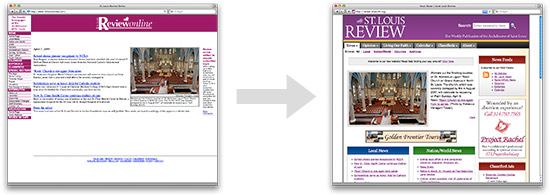
The decision was made in 2007 to port the website to Joomla, but after a few months, a new editor, and more work, it was determined that, due to its extensibility, flexible out-of-the-box permissions, and standards/SEO-compliant codebase, Drupal would be a better fit for the site. Work was begun in January of 2009 to transfer the custom CMS' articles database (over 17,000 articles) to a Drupal site, create a new template based off the colors and design of the new tabloid-format paper, and integrate an easier-to-manage ad system and back-end.
Preliminary Work (a.k.a. Finding Help!)
Since I would be the only one managing the templating, transfer, fit and finish, it was determined (by me) that I would not be able to do all the work myself in the alotted time (January - April of 2009), especially since I had to work on three or so other large projects during the same time frame.
I had a look-see in the Drupal 'Paid services' forum, and found a very knowledgeable and efficient programmer to help code a few custom modules within a few hours. Drawk, an active Drupal contributor and programmer, wrote custom scripts and modules to help with the MySQL database transfer, the subscriptions database, and a few other needed custom functions (including 301 redirects from the old article paths). Drawk's site, whatwoulddrupaldo.org, isn't the most frequently updated in the Drupal community, but is definitely worth a subscribe!
We communicated primarily by email, and within a few days, I had the full database from the old site installed on the testing site, which made working with the taxonomy, views, and layouts oh-so-much easier. (Working with lorem ipsum text is not necessarily a good idea... but there are differing opinions).
Theming
As I've written before, I'm extremely excited with the direction Drupal is moving with regard to helping designers do what they do best—design. Even though many nice theming features will have to wait until Drupal 7, there is a lot a designer can do with Drupal 6, even on a tight schedule. Having had a small bit of experience with Zen, and having only a week or so to go from PSD to reality, I knew I couldn't scratch-build a theme, and would create a Zen sub-theme for the site.
First, the color scheme - I received a PDF of the new newspaper design's layout, including the new color scheme, and I simply built my own little color palette out of that:

I worked out the original design in Photoshop, after scribbling down rough ideas and a some math for the grid sizes on a piece of paper (which I've conveniently lost, and thus can't post here). You can view the original (somewhat simple) design here (straight from the .psd file):
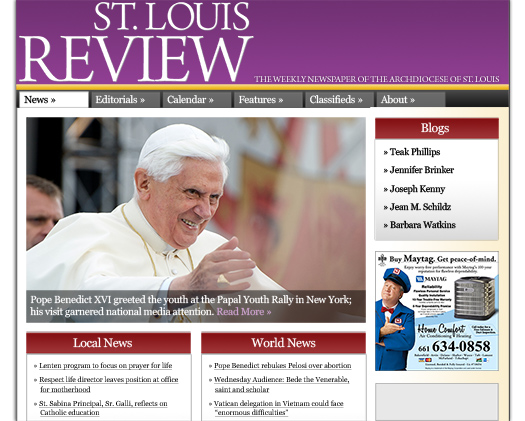
With an eye towards the limitations of CSS in current-generation browsers, but a good knowledge of ways to cope with potential disaster, you can take most any grid-based design and hash out a rough Drupal theme within hours, especially if you start from an excellent base theme system, like Zen or Genesis. The above design was relatively rough, but the site's layout ended up being almost exactly the same, placement-wise.
I decided to stick with a 960px fixed-width layout, with one right column and a large central content area. I liked the right-sidebar design mostly because the site gets about 8% of its visitors on 800x600 screens (it's an older audience, right now). Because of the content appearing on the left, these visitors won't need to scroll sideways to see the most important information.
As time went on, there were many small tweaks that gave the finished product a much more refined (but in some ways 'information-heavy') feel, especially in the header, sidebar, and footer:
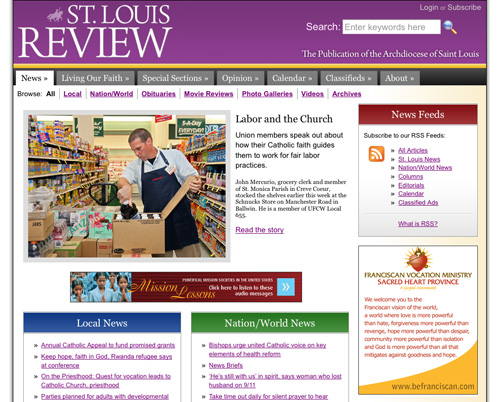
Some notes on the final design:
- I ended up customizing the search-theme-form.tpl.php file to allow for some jQuery-enabled text inside the search box, and a transparent PNG magnifying glass to the right of the search box.
- Internet Explorer 8 was released mid-development-cycle, which made it necessary for me to branch IE-specific stylesheets into the IE 7 and IE 6 and below sections. IE 6 can be quite nasty with floats, margins, padding and positioning, but most of the layout on the site was not affected too much.
- After reading Footers in Modern Web Design, an excellent article over on Smashing Magazine, I decided to revamp the footer and add in more destinations for users who have read through the page's content.
- Looking at the site on browsershots.org, I'm pretty happy with the design result. It looks very similar, if not identical, across almost every browser, going back to Internet Explorer 6. Testing in a program like IETester is a must!
Choosing Modules (a.k.a. using Google a ton)
The Review website needed to have quite a few ways to allow people to interact with the thousands of articles on the site, and one of my main goals was to never let a new article stray more than three clicks from the home page. The old site had many categories that were simply lost to the ether, and site search was left on a separate page. I wanted people to find the information they wanted a.s.a.p.
Almost half the site is viewed through one view (provided by Views) or another, and all content types contain many custom fields (from CCK), including imagefields, filefields, text fields, etc. I decided to use ImageCache for the main article images, since most articles have one or no images, and using such a method would allow for future automatic resizing of pictures down the road. Views also provides many of the site's custom RSS feeds (a few of which are listed top right on the home page).
There are a boatload of other modules used for minor site functionality and feature improvement, though. I'll list most of them here, along with the reason we used them:
- Administration menu - I don't have a Drupal site without it anymore. Use it. You'll love it.
- Archive - A quick, easy way to get all of your content categorized by year, month and day, without having to set up any views for it.
- Date / Date API - Used for the scheduler functionality; allows posts to be held until the next day or whenever the author wants it to be published.
- Classified Ads - No easier way to manage a classifieds section on the site... but it's currently in beta and doesn't work that well in D6. Hopefully this will change soon.
- Global Redirect, Path Redirect, Pathauto, Search 404, Service Links - Useful for SEO and for helping users get where they need to go.
- Persistent Login, LoginToboggan - makes it oh-so-much easier to control the login/user account aspects of a Drupal site.
- Service Links - Allows easy content-sharing options on the bottom (or top) of posts. Gives people something to do when they're finished reading an article.
- Similar By Terms - A nice way to give people opportunities to read more and dig deeper into your site. Provides a block of similar nodes, based on the taxonomy terms of the current node.
- Taxonomy Manager - There is no easier way to manage Taxonomies and terms in Drupal. Seriously. (Still in beta on Drupal 6, unfortunately, but works okay).
- Read More Tweak - who's idea was it to put a 'read more' link in the links of a node preview? Having it at the end of the content, and having customizable text is, as it were, 'the bomb.'
- CAPTCHA - Needed wherever anonymous users can submit a form.
- Fivestar - Another way to add a community-like function onto a site without actually enabling comments or forums.
- Print, Email and PDF Versions - there is no better way to implement these three features than by using this module. It's easy to use, does its job perfectly, and looks pretty darn awesome to boot!
Whew! That's a lot of modules! Luckily, the site is only dependent on a few of them; the others simply add in niceties. I like keeping my sites relatively simple, and having too many module dependencies is never a good thing if you plan on staying agile and keeping the site updated quickly for security and performance. (As an aside, one site I work on is still running Drupal 4.7 because it used so many custom modules and non-maintained modules that it is cost-prohibitive to upgrade it at the current time).
The Rubber Meets the Road (a.k.a. Sleep = None)
During the first few weeks of the site being online, I have spent most of the workday, and from time-to-time a few hours in an evening, working on refining the front end of the site, tweaking content-creation processes, and making sure things are as spotless as I can make them. Even so, there's a lot of work to be done before I would consider the site truly finished:
- Training: I will be continuously training the newspaper's staff on how to do things quicker and better to make sure the site and layout don't get messed up.
- Future upgrades/additions: The newspaper will be moving to a new news content management system eventually, and the site will have to integrate with it to the furthest extent possible.
- Subscriptions: We decided to use a third-party module to manage PayPal subscriptions. Currently, lm_paypal isn't quite up to snuff in this area, especially for a site with over 75,000 users.
- Photo Galleries: There are 1,001 ways to do a photo gallery, but I chose to stick to a 'gallery-in-a-node' for the main galleries (using ImageCache + Lightbox), and am developing a user-submitted image gallery section using the Image module.
- Dynamic Redirects: There are still a few redirections that return a 404, but with a site as old as this one, it's almost impossible to get all the 404s cleaned up.
We also moved the site to an entirely new server a couple months ago (via SoftLayer). I had to spend about a day configuring the server and optimizing it for a well-oiled Drupal site. As part of the move, I also did quite a bit of MySQL tuning, set up APC, enabled the Boost module for static page caching, and turned off anonymous sessions in Drupal 6 (the site can now handle over 2,000 requests per second!).
The last thing I did after the initial buildout was run YSlow! on the site's home page to see what little performance speedups I could afford to make. It turns out I forgot to turn on component gzipping, configure my Etags, and set an Expires header properly. I went from a score of 45 to 72 (and 2.2 sec --> 1.8 sec page load from a cold cache) in a matter of a few minutes. Eventually, I'll also combine a lot of the CSS background images into sprites... but that's another project for another day. Want to make your Drupal site fly? Check out this great tutorial on Wim Leers' site.
Lessons Learned
I learned quite a bit during the development of this site, and as a result, I've been able to contribute a theme to drupal.org (Airy Blue). I'm reading through Pro Drupal Development and trying to learn more PHP so I can do more of the module development/tweaks in-house, and perhaps contribute back more often. I'm extremely grateful for all the help of the friendly people on Drupal's forums, IRC, and elsewhere, and I am excited to be working on a few other awesome Drupal projects.
Before I call it quits on this website, we're going to be integrating a new in-house content management system, "NewsEngin," and importing new news items, photos, etc. through the FeedAPI module. This should help with the print + paper production, and keep the two more in sync. I might also look into using Solr for search rather than built-in search. Solr seems like it would be much faster than Drupal's search.module for a site of this size (now 18,000 nodes + 76,000 users and growing).
You can check out my website, Midwestern Mac, LLC, for more on my adventures with Drupal, and you can often find me on IRC in the #drupal and #drupal-support channels.

Comments
A couple quick
A couple quick notes/updates:
I'm glad this post made it to the front page!
__________________
Personal site: www.jeffgeerling.com
curious as to how you made
curious as to how you made the layout with 2 box regions in the main content area. are those panels? How did you accomplish the background in those?
Panels was in early beta
Panels was in early beta stages when I originally designed the site, so I didn't want to rely on them. Those blocks are both views-enabled blocks, and I simply set up two regions - "content-left" and "content-right", then used CSS to push one left and one right.
There are a few pages on which I re-use those blocks, most notably under any article on the site, for 'related articles' and 'most emailed.'
__________________
Personal site: www.jeffgeerling.com
Good job, I usually don't
Good job, I usually don't really care for purple color sites but you guys def. pulled it off. Great stuff!
Interesting article,
Interesting article, thanks!
Did you use http://drupal.org/project/no_anon to get rid of anonymous sessions? Possibly CAPTCHA 6.x-2.0 branch works better with them..?
Also you talk about using Date to handle scheduled publishing of content ... do you actually change the "Published" status (and if so, how?), or just set up your Views to only show results for content whose time has not yet come?
gpk
----
www.alexoria.co.uk
Actually, I should have put
Actually, I should have put Scheduler in the list (along with Date) - Scheduler 'touches' the posts come publish-time so they are updated to the time they have been scheduled. Usually, things aren't scheduled, though.
And yes, I was using no_anon, but haven't tried CAPTCHA 6.x-2.0 yet. Might try it in a few weeks. Right now I'm working on some other redevelopments, and another Drupal project that I've so far kept under wraps, but will be live in a week or two.
lol - love that line. Makes it sound ominous!
__________________
Personal site: www.jeffgeerling.com
Well yes I guess that was the
Well yes I guess that was the Catholic influence... I've been working on my own parish website... although another parishioner with a bit of design (but no web) experience has done a nice basic design our attempts to implement it have only come out about 70% as good as the original! Just doesn't have that nice professional fee of the St Louis Review sitel!! (But maybe for a community driven site that's better...?)
As well as some of the modules you mention (and having used Scheduler a bit I'm now preferring CCK/Date + Rules ... when I last checked, Scheduler didn't integrate with Date at all) I'm also finding things like OG, Calendar, Rules, Pathauto (which I think you use... though I'm never quite sure how to set this up optimally), Spamspan, String Overrides, Views Bulk Ops, Porter Stemmer, Diff, Computed Field, Masquerade (great for seeing what other users can see!), Webform, and (of course on a dev instance) Devel invaluable. (I was also amazed how good a job Search404 can do, after giving it a tiny custom hack!!) Many of these come packaged in the Acquia Drupal distribution which simplifies upgrades greatly, though you still have to keep an eye out for bugs that an upgrade might introduce. Although this seems quite a lot of modules and is rather more than I was intending, each adds important functionality and looks like it will be around well into the future, so despite having 75 enabled modules in the {system} table I'm not feeling that I've been especially profligate in the modules department.
gpk
----
www.alexoria.co.uk
Along with this patch:
Along with this patch: #250210: Integrate the new jquery popup calendar from Date module version 2, the Scheduler maintainers is working on more Date module integration.
Also, I've been using Masquerade, Devel, String Overrides and Rules for certain purposes, such as sending emails on certain system events, working on different user roles, and changing bits of system text quickly and easily.
__________________
Personal site: www.jeffgeerling.com
>yes, I was using no_anon,
>yes, I was using no_anon, but haven't tried CAPTCHA 6.x-2.0 yet
On reflection I think the problem may be the way that no_anon completely disables anonymous sessions via ini_set, and then selectively re-enables them on certain pages/forms (e.g. user login). See http://cvs.drupal.org/viewvc.py/drupal/contributions/modules/no_anon/no_....
It might be worth having a look at Pressflow (Four Kitchens), also this looks relevant: #585628: Cannot use update.php as anonymous user.
gpk
----
www.alexoria.co.uk
Try link checker to find broken links...
It may find all your broken links, may update links with status codes 301 or find all other links that need work! Would be great to hear some feedback how it performs on such a big site and how many links you have :-). See http://drupal.org/project/linkchecker
Hmm... this looks like it's
Hmm... this looks like it's definitely worth trying! I will bookmark that module and work on it on the dev site as soon as I can.
__________________
Personal site: www.jeffgeerling.com
How did you achieve the photo
How did you achieve the photo of the Pope with a caption at the bottom. What modules did you use and were there any theme elements involved?
I used a theme function,
I used a theme function, along with some CSS in my theme, to grab the image's 'Alt' text and apply it as a caption underneath article images. I can't remember where I originally found the code snippet, but it was somewhere in ImageCache's issue queue.
__________________
Personal site: www.jeffgeerling.com
Oh, and concerning the text
Oh, and concerning the text on the image of the Pope—that was a mockup, and didn't make it to the final design (when your editor is a former photographer, he doesn't like having pictures 'tainted' by anything on top of them ;-).
If I were going to do this, I would use some CSS with negative margins/z-indexes, as well as some sort of jquery fade effects... maybe even a slideshow using a module like Views Slideshow.
__________________
Personal site: www.jeffgeerling.com
Nice post, with lots of good
Nice post, with lots of good links. Thanks.
I'm curious as to the implications of that paid PayPal module. From my understanding, any module which is available en masse, regardless of if it's initially being sold or not, must be under the GPL. That means that you could turn around and share that module you paid for to others for free, and it also means that the author's restriction on how many sites you can install the module on is illegitimate. Am I wrong? Is the module author trying to claim otherwise?
...any module which is
In terms of licenses, you're right; it's more of an honors system kind of thing... if someone specifically asks me for the code, I'm not going to refuse them, but the guy selling the module does have a right to sell it, as long as he licenses it under GPL (meaning it's freely distributable).
It would be nice if he could make it a drupal.org project, but I'm just glad the thing works. I want to switch to lm_paypal at some point, but simply don't have the resources to patch it on my own (yet).
__________________
Personal site: www.jeffgeerling.com
Thank you for taking the time
Thank you for taking the time for this great writeup.
Ya I completely agree with
Ya I completely agree with your statement. Great writeup. But I think this website needs more graphics.
Writing | Book Report Writing | Essay Writing
We are working to make it
We are working to make it easier for various people to upload images to the site, as well as our own staff, and hopefully there will be more images (and larger ones) in the next year or so.
__________________
Personal site: www.jeffgeerling.com
Tab Menu
I like the tab menu so much. How and what did you do to have this tab menu (navigation) ?
I simply used hierarchical
I simply used hierarchical primary links, and styled them with some CSS so they'd look like tabs. The submenu items are children of the selected parent item.
__________________
Personal site: www.jeffgeerling.com
Hi geerlingguy, First of all,
Hi geerlingguy,
First of all, great article; it's very helpful to all of us who are developing content-oriented Drupal websites.
Did you use the Advertisement module for the online ads? How is it going with the ad tracking? Did you choose to use the Drupal ad module or did you get a third-party service?
Thanks!
We set up OpenX ad server on
We set up OpenX ad server on another one of our servers, for two reasons: 1. The advertising group in our Archdiocese can manage everything separately, and 2. If there are any problems with the ad server, our main server can push content just as easily, you'll just have a few javascript errors on the pages.
OpenX is a very good way to be able to track individual ads, run campaigns, and send automated reports to clients.
__________________
Personal site: www.jeffgeerling.com
Where are designers in Drupal
Where are designers in Drupal community?!
Thanks for the nice writeup.
Thanks for the nice writeup.
---~~~***~~~---
aac
how long?
I'm doing a similar site and after diving in finding that there's far more to take into account than I originally expected. I'm curious how long your project took to get to release and how much was the quote (I know its for a church so I figure there may not be money involved).
This information will help me to compare my work to some kind of 'benchmark' for determining how ridiculous my drag was and how poorly I estimated the price and labor.
thanks
The project is ongoing, and
The project is ongoing, and originally took about two months (among other projects) to complete. I am an employee for the Archdiocese, so there was no 'fee' involved per-se.
__________________
Personal site: www.jeffgeerling.com
The clue is...
The clue is to not give a quote, unless you fully understand what Drupal can do for you. You're bound to understimate the amount of work needed to be done before the Drupal site feels 'yours'.
Heh... I can attest to that.
Heh... I can attest to that. Revamping my personal website would cost me at least $2-3,000 if I were going to charge myself!
__________________
Personal site: www.jeffgeerling.com
thanks for really a nice
thanks for really a nice writeup..
------------
Volvo, Video, Velcro. (I came, I saw, I stuck around.)
I see you mentioned passing
I see you mentioned passing lm paypal for paid subscriptions. Have you considered Ubercart Subscriptions module instead?
http://drupal.org/project/uc_recurring
univate is doing some fantastic development work on it.
This will be the defacto paid subscriptions module in Drupal in the coming months IMHO
My Drupal sites:
I'm trying to keep things as
I'm trying to keep things as lightweight as possible w/r/t subscriptions, and last time I checked, the UC Subscriptions module was still a little sluggish in the performance/ease of use department. However, I've been Ubercart-izing a ton of other sites lately, and I'm really liking where things are going with all the UC plugins.
It's something I'm going to be keeping my eye on, most definitely!
__________________
Personal site: www.jeffgeerling.com
How do you manage multimedia in your site?
I'm curious to know what are the module combination you use to manage all the multimedia stuff in your site. The main difficulty I see is, for example, if you want to exclude a content and all multimedia files related to it from the filesystem too, how to achieve this? And how are you setting the file's path to make it not going to the files directory messing up the entire filesystem with tons of files in one single directory? Is there a way to make all the multimedia stuff go into a Database instead of the filesystem, is it a good idea?
All of our .flv (flash) files
All of our .flv (flash) files are stored using a filefield, which is set to store them in a location like /sites/default/files/videos/[yyyy]/filename.flv, and the filefield uses SWFTools + FlowPlayer 3 to play the videos.
Since FileField stores the files, we don't have to worry about the management so much.
__________________
Personal site: www.jeffgeerling.com
This may be my fav Drupal
This may be my fav Drupal design ever. I am a bit biased because my fav. color is purple, but something about this design really hits home for me. Seriously, great design.
Great work
Your work has really inspired my next project...Really nice design but still clean and simple and also very functional, a combination sounding simple but as it seems extremely hard to pull off. Especially for me who is a robot programmer.
So thanks for using the Zen theme and sharing "The big picture"!