

In early 2009, the Archdiocese of Saint Louis determined that it needed to upgrade its website, mostly for security concerns. After investigating a move from Joomla! 1.0.x to Joomla! 1.5.x, the Archdiocese determined it would be more cost effective and a more future-proof decision to migrate the over 49 individual Joomla! sites that comprised www.archstl.org into a single Drupal installation.
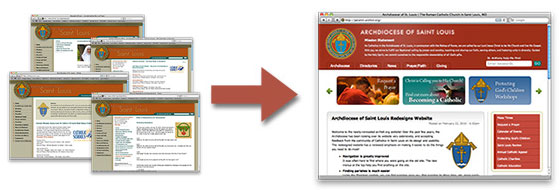
This upgrade/migration provides many benefits, not the least of which are a better end-user experience, a better administrative experience, and much improved page load and search indexing performance. In addition, Drupal's structure and content presentation provide much greater flexibility in design and information structure, as well as SEO (search engine optimization) than other popular CMS frameworks that were investigated.
The decision was made early on to partner with a development company that would help with the content migration and initial site buildout. Theming would be done in-house. We chose to partner with Palantir.net, a web development company located in Chicago, IL. After Palantir completed initial site work, I went up to meet them, and also attended my first DrupalCamp (Chicago); Chicago has a much more vibrant Drupal community than St. Louis... but perhaps that will change at some point!
After nearly a year's worth of planning and development, the Archdiocese launched its upgraded website on February 22, 2010.
Server Configuration
The Archdiocesan website was formerly running on a server managed through RackSpace, but costs and configuration restraints prevented us from continuing on a managed server through RackSpace. We migrated all of the Joomla sites to a new dedicated server from SoftLayer, and also migrated a few of our other sites (including the Saint Louis Review - case study on Drupal.org here). Due to caching and optimizations, the server is typically not burdened much, even with a few relatively high-traffic sites running on it.
The server is running the CentOS distribution of Linux, along with Apache, PHP and MySQL. Apache's configuration is set to survive a slashdotting, PHP is configured with APC caching for performance, and the MySQL configuration has been thoroughly tweaked to provide the best performance with the amount of RAM we have in the server.
Modules Used
Like any large website, this Drupal installation used a plethora of modules to enable certain functions and features. Here are some of the more relevant/prominent modules we used:
- Joomla to Drupal: This module saved quite a bit of time and frustration when we were transferring all the content from the 40+ Joomla websites that made up the old archstl.org, and allowed us to easily add content from live site. The module was highly customized by Palantir to help import content directly into Organic Groups. (agentrickard did the lion's share of the work in moving all the databases - he should at least get a cookie for all that work!)
- Table Wizard + Migrate: Palantir helped immensely with regard to a ton of legacy data we use on our website to populate the Parish, Schools, and Organizations directories. Using Table Wizard and Migrate, plus a custom shell script (which runs every morning), we pull in data from various csv files, import them into Views-accessible tables, and then use Migrate to build a node for each organizational entity. (Special thanks to agentrickard and sdboyer for setting this up).
- Custom Formatters: Key to formatting a ton of content pulled from an Archdiocesan database. We used this module to set up formatters for phone numbers, Mass Times, and other miscellaneous data pulled into CCK fields.
- Views + CCK: These two modules were used to build out almost the entire website. All content types use a "body" field provided by CCK (in Drupal 7, this is how nodes are built - there is no more "Body" attached to a node). The Request a Prayer and Bulletin Gateway system are both built on Views and CCK.
- Mapstraction: This module allowed for gratuitous use of Google Maps on nodes (using the Views attach module and node content displays), and in views (using a Mapstraction view attachment). (agentrickard gets another cookie for this).
- Date + Calendar: The Calendar provides a very pleasing-to-the-eye listing of all the events posted to the website, and users can easily filter by group or event type using a Views exposed filter. The Date module supplies time/date functions for Event nodes and other features.
- Organic Groups: Each office and agency is set up as an organic group, with permissions for posting new news/blog posts, pages, forms (using Webform), and events. Additionally, each group gets its own menu, provided through the OG Menu module.
- ApacheSolr: After having many troubles with the large database (over 20,000 nodes, with about 800 words per node on average) with search indexing and cron runs, I decided to install ApacheSolr and the Lucene search server, then set up cron using the Elysia Cron module (to help ensure cron was running efficiently).
- Übercart: Online giving pages and the shopping cart system (with PayPal integration) are provided by Übercart, along with a healthy dose of hook_form_alter()s and Rules. (JohnAlbin setup most of our donation system, and joelstein helped with a lot of cleanup issues, including notification emails, some rules actions, etc.).
SVN Version Control
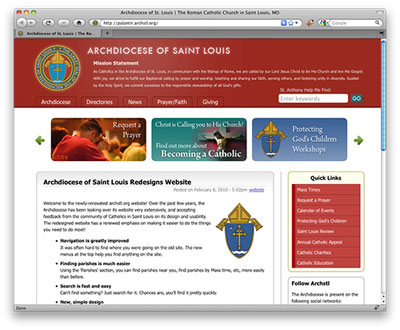
Working together with Palantir.net, I was finally forced to jump in headfirst into using a version control system. We decided to use SVN, and after I set it up on our Archdiocesan web server (running CentOS), we synchronized repositories with Palantir, then worked together (I did most of the theming, while Palantir did most of the back-end development and content migration), checking in and out quite frequently.
I tried to use Coda's built in SVN functionality, but ultimately had so many problems (it's in its early stages) that I decided to stick to using the Terminal to interact with the repository.
Theming
Since I am very familiar with the internals of Zen 2.x (which was in an alpha release at the time I started site theming), I decided to build a Zen subtheme for this site. The archstl theme has a total of over 15 .tpl.php templates (I tried doing as much preprocessing as I could, but there are some structural XHTML changes that needed to be made directly in the templates), as well as 12 CSS files and a handful of javascript files.
The theme has a few main features:
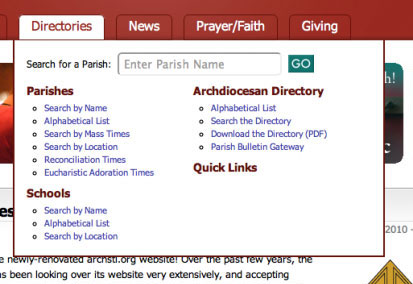
Mega Drop-Down Menu Navigation
A trend that has become relatively popular of late, mega drop-down menus provide the main navigation for the site. These drop downs are basically divs inside of a list of five main-level navigation links. The divs appear after hovering over a main link, and disappear a short bit after the mouse stops hovering. This functionality is provided via JavaScript.
Using mega menus has even allowed us to insert a parish search form directly into one of the menus. As this is one of the most frequently used features on the site, it should help save a little time for many users.
Due to restrictions in Drupal's menu system, I decided early on to simply create a custom php file with all the navigation markup, and then include that (using a php include) in the site's page.tpl.php templates. At some point, I might move this menu system into some sort of module, for easier management, but our main navigation doesn't change all that much, so it should be safe as-is for now.
CSS3 / Progressive Enhancement
Depending on what browser you use to view the new site, you'll either see rounded corners all over the place, of straight corners on edges of navigation links, sidebar blocks, and content items. Also, blocks should have beautiful box-shadows applied in any Webkit-enabled browser (newer versions of FireFox should also show the shadows).
The site was thoroughly tested in Internet Explorer 6, 7 and 8, as well as FireFox 3+, Safari 4+, Opera 10, and Chrome 4+. Almost all of the main template is coded to meet CSS2 validation standards, and a glance at the W3C Validator (for the XHTML markup) provides an almost error-free review (the main pages seem to work well, but some legacy content has a ton of invalid cruft).
Better Text Layout / Spacing
The old site didn't give much thought to line-height, heading formatting, and text styling. The new theme contains styles for everything from blockquotes to list styles and every level of heading. It is much more pleasant to read a long page or article on the upgrade site.
Check out the Typography Test Page (a great way to quickly make sure you've styled the main elements).
Other Features
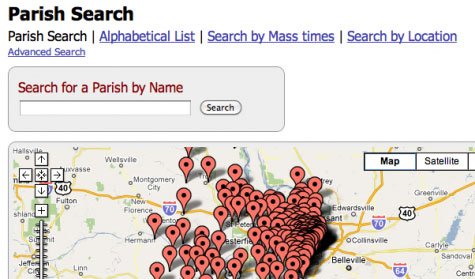
Parish and School Search
The parish search pages (along with school search pages) are set up using Views and the excellent Mapstraction module (which allows us to use a view attachment to link a map to all the nodes listed in a view). (Read more about our custom views exposed filter handler).
We set up a custom view with some exposed filters to sort Press Releases and give an RSS feed for those who wish to follow the Archdiocesan news releases.
Prayer Requests
The Archdiocese of Saint Louis is privileged to have a wide variety of religious communities, and one of the beautiful things many of these communities have done is pray for thousands of online prayer requests since the beginning of the third millennium. Our online prayer request form has evolved from an email form, to Joomla's PrayerCenter, and finally to a fully-customized and highly-optimized feature on our new site. You can read more about how we basically rebuilt PrayerCenter, with tons of great improvements.
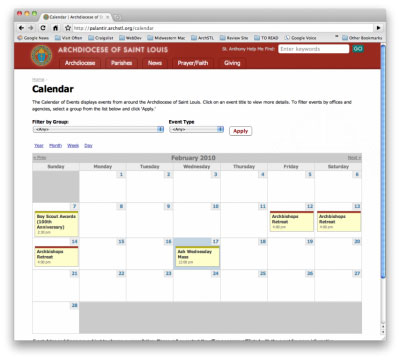
Calendar System
Using the power of CCK + Date + Calendar, you can make a calendar system that is infinitely extensible. Throw in Views and Organic Groups, and you have a magic combination.
On the old site, it was very hard to (a) manage calendar events (we used JCal Pro), and (b) integrate calendars into other content, and into each other. On the new site, since all events are simple event nodes with metadata attached, we can aggregate the nodes in so many different ways (besides the simple universal Calendar of Events) to build a ton of different listings of calendar events—lists by taxonomy terms, month, year and day views, simple lists, and sortable and searchable event lists.
Another nice feature of the Calendar module is the ease of creating iCal-compatible calendar feeds. You can simply click the icon, and subscribe to the Archdiocesan calendars.
Conclusion
After almost a year of development, it is a wonderful feeling having a project like this out the door. There remain a lot of small tweaks, especially to content manager interaction, but things are much easier now that everything is unified into one codebase and database.
Moving forward, there are a ton of useful new features under development, and many of the current features will be further streamlined based on user feedback. I'll be posting more as the time comes!
What do you think of the site? Follow the Archdiocese of Saint Louis on Twitter, or visit the Archdiocese of St. Louis Facebook Page to provide feedback!

Comments
You can follow along with
You can follow along with more progress on the website (and Archdiocesan online initiatives) at Open Source Catholic.
__________________
Personal site: www.jeffgeerling.com
Excellent site and great
Excellent site and great writeup. Really enjoyed looking at the big picture that you did and the Palantir team seem to really know what they're doing.
The fact that such a large overhaul like this took a year shows the persistence and hard work needed to get the job done. But as you said, it must indeed be a great feeling to see the site officially launched. Thanks for sharing.
Site looks really good, St.
Site looks really good,
St. Louis would be proud.
~kraymer
Thanks! I hope he would... he
Thanks! I hope he would... he is our patron, after all!
__________________
Personal site: www.jeffgeerling.com
Website Not Available
I would love to take a look at your new version of the website but when I try to go there I am getting a MAMP virtual host page with no content. I have my Parish site done in Drupal now but am going to make some big changes as I keep learning more about Drupal. Looking forward to checking out your work.
Could you tell me exactly
Could you tell me exactly what the page you receive says? A couple other users have noticed an odd error.
__________________
Personal site: www.jeffgeerling.com
Bad Link
Mamp Logo at the top of the page - and then this
The virtual host was set up successfully.
If you can see this page, your new virtual host was set up successfully. Now, web contents can be added and this placeholder page1 should be replaced or deleted.
Server name: www.archstl.org
Document-Root: /Applications/MAMP/htdocs
1 Files: index.php and MAMP-PRO-Logo.gif
That's very odd - I have
That's very odd - I have never used MAMP in the development of this site, and the server is running Linux, so I'm not sure how you're getting the MAMP information. Perhaps your hosts file on your Mac is causing this oddity?
__________________
Personal site: www.jeffgeerling.com
MAMP
Very strange. I do use MAMP for development but only have 4 virtual hosts defined and nothing with a name anything similar to yours. And this morning I am not getting that message any more but am getting through to the site. Not sure what was causing that but now I can look around. Thanks
Maybe a similar issue?
I'm using Apache on Mac OS X and am getting a listing of my base localhost directory showing all of the test sites I'm running locally. It seems like something is set such that if we are running a local web server configured in a certain manner we can't access the site.
I finally found the problem,
I finally found the problem, and fixed it - our IT department had a misconfigured IPv6 record for our domain name. They removed it, and now everything's working fine again. See: http://archstldev.com/node/74
__________________
Personal site: www.jeffgeerling.com
Are those menu links in mega
Are those menu links in mega menu are all hard-coded in a custom include php ?
Yes - for now, at least. I
Yes - for now, at least. I will probably roll a quick module at some point to manage that main menu. Heck, if I have the time (unlikely), I might be able to work it into something like the nice menus module to let other people have a menu system like this one.
__________________
Personal site: www.jeffgeerling.com
woould be really interested
in a solution like yours in nice menus.
Great site !
Megamenus on the way
There are a few of us working on a megamenu module actually... We have a working prototype and are now working on building the administration UI that will allow you to embed blocks into menus.
I would love that!
Any idea when that might make its debut?
Traffic estimate?
49 sites into one-- wow. Just the new ease of administration of the new site much be a huge relief.
How much traffic does the new "mega" site get? Is Drupal able to handle it without too much difficulty?
Traffic on Website
We get about 5,000-10,000 visitors per day, with about 30-60,000 pageviews. The server hosting this site also hosts about 8 other sites (one of them is also pretty high traffic), so we extensively use the Boost module to cache pages as static html.
We also apply many different optimization techniques, including setting file Etags to none, gzipping components, using APC, tweaking MySQL and Apache extensively (and monitoring logs). On the hardware layer, we have a four core server with two mirrored 10,000 rpm scsi drives and a backup drive, and 4 GB of RAM.
Just a little aside: When a user loads up a parish page, Drupal loads 12 nodes on average... without caching, this would kill our server in a high-traffic time of day!
Also, unifying the websites is a HUGE relief for admin. So much easier to do just about anything.
__________________
Personal site: www.jeffgeerling.com
great site!
great site!
-- Sree --
IRC Nick: sreeveturi
nice writeup
I am using your site as an example of what Drupal can do for our company site.
Hello...
I was just wondering how to get this kind of total browser length header shown on http://archstl.org/
How do I do this, like full length header and content region only 990px!
Great Design BTW.
We basically created a
We basically created a wrapper div around all the page content, but set the body of the html (actually a wrapper inside the body) to have a background image (using css), and we set the wrapper div to expand to 100% of the width of the browser window.
__________________
Personal site: www.jeffgeerling.com
Mega Menu
Love this. Also like that fact that you mentioned that people are actually using it. great work.
Great site !! Congratulations
Great site !!
Congratulations !!
Cris
Nice site.
Nice site.
technical issue.
Tech note.
I was poking around trying to recognize the seams where you'd merged old sites into og groups, and found that the breadcrumbs - eg on http://archstl.org/laityandfamilylife/page/about-us pointed to http://archstl.org/og (Which I was hoping would be a group index page) - but that was access denied.
I'm looking for ideas for a community-based site, currently made up of lots of organic groups, and am thinking of recommending they go for multisite, so I was interested to see how you'd done the opposite :-)
Another tech bug.
http://archstl.org/laityandfamilylife/page/marriage-preparation-facilita... has a link at the bottom to "sections: Events". OK, but that links to a sorta horrible page:
http://archstl.org/taxonomy/term/600
Suggest you roll those full pages back up into teasers again ... and revisit whether 'FAQ' etc is really an 'event' ?
.dan. is the New Zealand Drupal Developer working on Government Web Standards
Thanks for bringing up these
Thanks for bringing up these issues!
- I've allowed access to the OG page for now - might restrict what information is shown/not shown...
- We had a problem with teaser breaks in that much of the content we imported from Joomla into Drupal had a horrible mess of code, and no amount of messaging could fix that. So I elected to not have teasers (for now) until I find a more workable solution. A lot of bad things can happen if your HTML can't be properly cut off on a teaser.
- Regarding taxonomy: On the old Joomla sites, people had no idea what all the categorization menus meant (Joomla's not very good when it comes to classifying content), so most pages on the site are classified improperly. I don't have time to go through and fix the mess, but hopefully the managers of individual groups will be able to do that at some point.
__________________
Personal site: www.jeffgeerling.com
Great response!
I like the new og page! Although it probably wasn't in your architecture, I think it makes sense to see. It was either that or mess with the breadcrumbs, but I like this. That was quick!
Understood about the issues that were left over from import. Just more of those things, I guess. I guess you'll work through it as you go. Making those (teaser especially) pages more visible may help identify the inconsistencies.
I think that htmlcorrector was supposed to fix those teaser cropping issues, but I can indeed imagine that you encountered bigger issues :-}
(I run htmltidy as a preprocessor whenever I'm starting things like this, but even that fails sometimes when faced with really bad copy&paste)
.dan. is the New Zealand Drupal Developer working on Government Web Standards
lol - there are problems on
lol - there are problems on so many levels:
Ah well, such is life. At least it didn't come from FrontPage!
__________________
Personal site: www.jeffgeerling.com
Great site and excellent
Great site and excellent write up!
Just a tip, if you use FCKEditor WYSIWYG there is a button to "Paste from Word" that may sort the Word markup mess. Have you tried it?
Well, on the new site, we're
Well, on the new site, we're using WYSIWYG + TinyMCE, and I have it set to force cleanup on paste regardless of what the user clicks (it works very well).
However, we have to deal with thousands of pages of legacy content, which are already in the database... eventually I hope to scrub all the content for any comment that's not a teaser break, and fix things correctly by removing them.
__________________
Personal site: www.jeffgeerling.com
Great Calendar
Great job on the site. I really like what you've done. Especially the calendar of events. I've been looking for a similar solution and really haven't found one yet. This looks very promising. If you have any links to any further detail on how you did it, I'd be very grateful. Knowing you used Date + Calendar is a great start.
Can you elaborate on Joomla issues, please?
Great site, congratulations!
If I may, I am very curious about Joomla security issues, however, since I have seen such thing numerous times (disclaimer: not a Joomla expert, myself, in any way), so I am wondering if it is something inherent to Joomla! 1.0.x
Was the security issue manifested with a bunch of spam links being embedded on the site pages/template being damaged?
Thank you.
That was our primary issue,
That was our primary issue, yes. A lot of it had to do with default permissions used for the Joomla files; we tightened down configuration files (usually chmod 644 would do the trick), but this would restrict how much we could do on the administrative backend on the site, so it was an unacceptable tradeoff.
__________________
Personal site: www.jeffgeerling.com
Got it. Thank you.
I see. Thank you for your response.
The Typography Test Page was
The Typography Test Page was a neat thing!
..
Thank for information.
Nice job! This inspires me,
Nice job! This inspires me, and makes me realize how much I still have to learn.
Did you use a module for the scrollable options at the top of the home page?
Nope - I set up a view, with
Nope - I set up a view, with 'ad bar' as a content type, and the view was basically a bulleted list of all the ad bars. Then I used some jQuery magic to make the scrolling functionality work.
__________________
Personal site: www.jeffgeerling.com
Thanks! I guess I need to
Thanks! I guess I need to brush up on my jQuery.
slide menu
Maybe is a naive question, but how do you implement the slide menu you have at your web?
By the way, nice site.
@ch
http://drupal.org/project/iss
http://drupal.org/project/dhtml_menu
__________________
Personal site: www.jeffgeerling.com
does not work on my site
Thanks for the info, just now I could try to implement it, but it does not works, any how-to, that can be followed?
Thanks again.
@ch
I mean the one with the green arrows
Maybe you are thinking that my question was about the menu "Archidiocese - Parishes - etc.".
No, not that one, I was talking about the one with the green arrows, the one with the images"
Thanks again.
@ch
Aaahh... I see. That was
Aaahh... I see. That was implemented simply by using Views, and then theming the view (with two rows, 4 images each) using jQuery to create the slider effect.
__________________
Personal site: www.jeffgeerling.com
Slide menu
thanks for your answer, I will try it myself, but if you have any guide I would appreciate it.
@ch
No Idea about Views
I've been working arround with views module, I could follow the views tutorial, but I don't have the slightest idea of how to achieve the image menu bar. I would really apreciate at least a minimal guide to implement this menu.
Thanks a lot.
@ch
uh oh, its offline!
uh oh, its offline!
There seems to be some kind
There seems to be some kind of odd server configuration that is causing this site to be unviewable by some users. I mentioned it earlier, as when I visit the site I receive my own localhost directory instead. However, it doesn't seem to have been addressed.
We are aware of this issue,
We are aware of this issue, and so far, we can't really do much about it :-(
See: http://archstldev.com/node/74 - it turns out it's an IPv6 issue with our DNS entry for archstl.org... and most web developers (read: the audience of this post) have this problem.
__________________
Personal site: www.jeffgeerling.com
Site is great, I want to
Site is great, I want to creat a menu such as yours . Get some inspiration from you, thank you.