Multilanguage form display module step-by-step installation and configuration.
How to install and configure the mfd module.

The Multilanguage Form Display (mfd) module aims to make your translation editing experience a little easier. Once configured, mfd will show you all of the translatable fields provided by an entity in a single unified editing form. No more flipping back and forth between original content and translations - all the translatable fields are shown on a single configurable form.
The installation and configuration process for mdf is not complex, but it does have a number of steps which need to be performed in the correct order. Once you have enabled and correctly configured mfd, your node forms will look something like this:
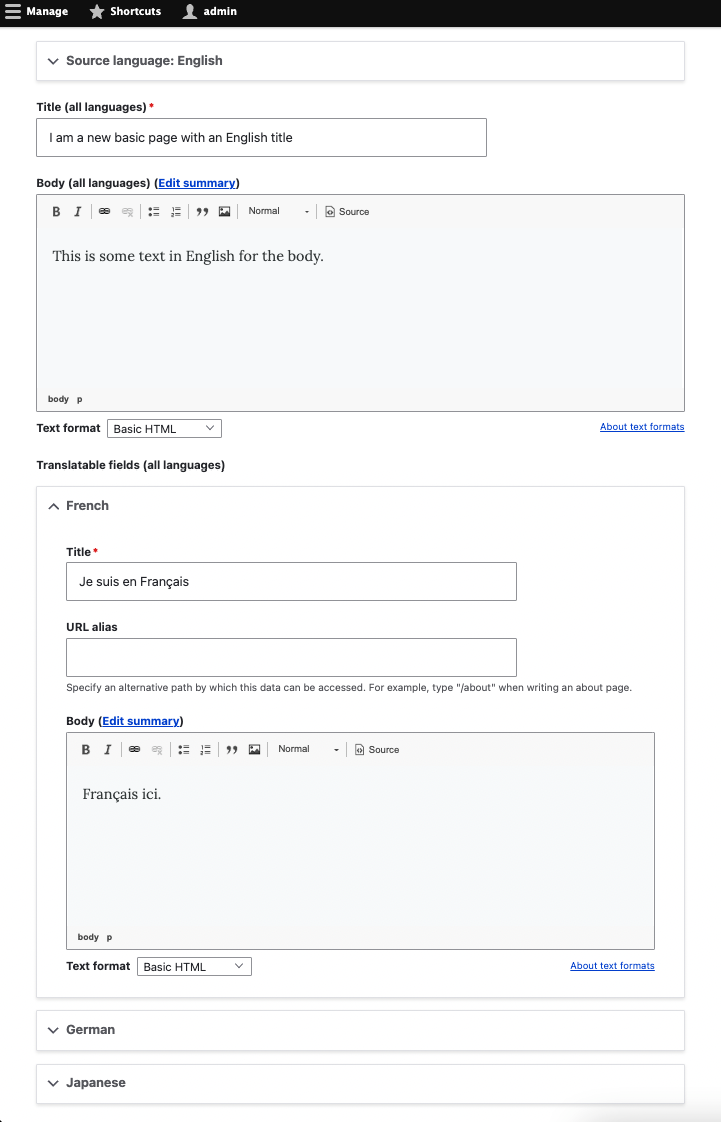
All the translatable fields are grouped by language and presented inline for easy inline translation management.
How to install and configure the mfd module.

Drupal is a registered trademark of Dries Buytaert.

