I love this module, great job!
Something seems to be an issue. In the existing issues others have asked the same question but I can't locate an accurate answer.
Is there a way to load the node type that has been created and selected in the settings page from the book now link.
In one of your responses to the question it seemed the underscore in the name may have created a conflict - I changed that = no change.
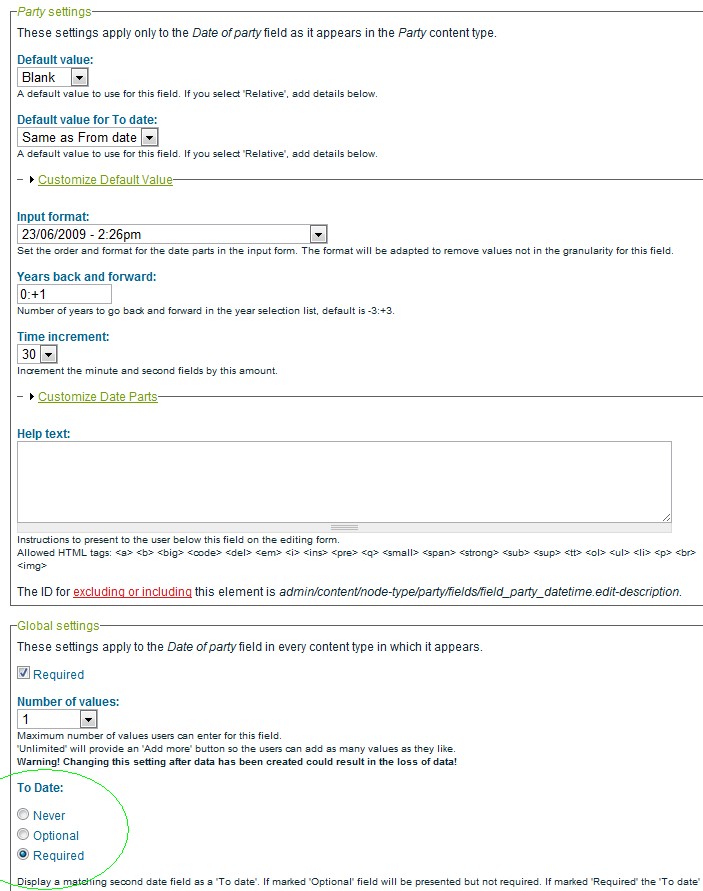
In another response you mentioned the booking default slot time i.e. 1hr 30min, you suggested adjusting the "To Date" time where you loaded an image to show http://drupal.org/files/issues/Booking_timeslots%20-%20To%20Date.jpg - I changed this also = no change
I am also, just trying to make this module function more streamlined and easy for the user to operate. Loading the Create Content page listing all the available nodetypes to the user is ok but it would be powerful and very cool to just load the nodetype for the booking of the timeslot.
I appologise for repeating the question, I just couldn't find a fix.
I am very thankful for your support here, the response times are very impressive. I am only marking as critical because I am attempting to launch a newsletter to announce the use of the booking form, can't wait to check the response.
You may want to combine this issue with the others that have asked a similar question.
thanks again.



Comments
Comment #1
kenorb commentedLoad the node where and for what reason?
1. You may look for permission: 'show booking dates'
Users with that permission see nodes on the booked slots, so you can click it and after clicking 'More...' node will be loaded.
2. If you want to make lists of already booked slots of specified type, you can create a View table and it could be available for your users. Then they can list their bookings, edit their own, delete or whatever.
If it's not that you meant, please describe it more clearly.
If you have proper set configuration, it will load Creation of specified type, not Create Content page listing.
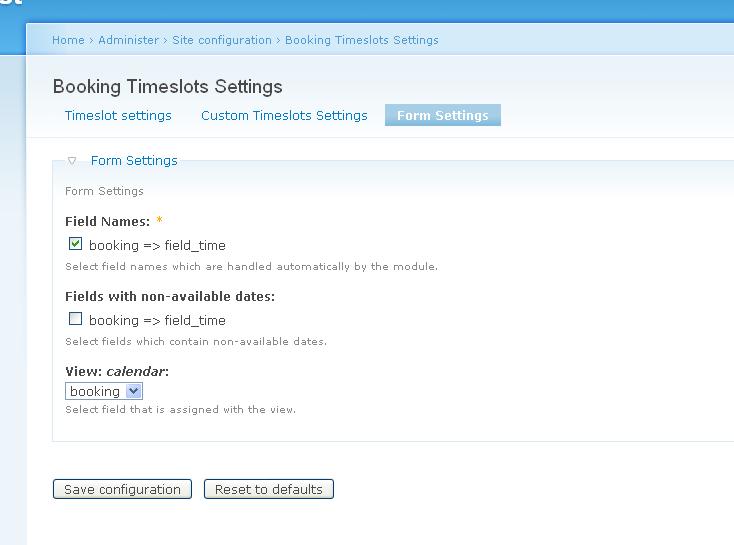
Make sure that you have the right configuration on Booking Timeslots Settings Page and you selected the right content type for the right View calendar.
Comment #2
smw commentedI have gone over the settings page a dozen times and changed the view. Everything works perfectly except -
Any user with permission to see and make a booking, when they click the book now on the month view it takes them to the day view; when they click the book now link it loads the "Create Content Page" displaying a long list of node types.
I have settings page listing the booking node type to the field_datetime
I have the view loading the fields of this datetime as long as it is published node.
the booking timeslot works perfectly everywhere else I can make a booking and it display correctly on calendar, just not loading the booking node for ease.
Comment #3
kenorb commentedCan you send me what's the URI link from the Day view to this "Create Content Page"?
Comment #4
smw commentedhttp://wellbeing.tv/calendar/2009-07-26
Usually only available to authenticated users but I have only made the booking content type accessible and editable for anonymous users for your test.
Could you send me an export of a standard view for calendar so I can see your configuration perhaps?
I've noticed something odd with the way the calendar looks on the left side it displays the last row of dates in a vertical column see http://wellbeing.tv/calendar
Comment #5
kenorb commentedYou have link: node/add/0/2009-07-26%2010%3A00%3A00
0 means that your content type has been not detected.
- Can you check if you made update.php after module upgrade? See: http://drupal.org/node/478446#comment-1652678
- Can you re-save your settings again on Form Settings?
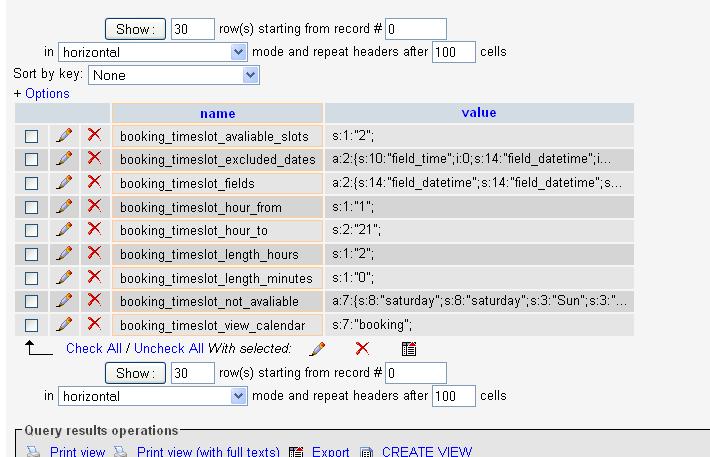
- Can you dump for me following settings from your db:
Comment #6
smw commentedThis is the data dump before I totally deleted it and removed the module
#
# Table structure for table `mainHubcontent_type_timebooking`
#
CREATE TABLE `mainHubcontent_type_timebooking` (
`vid` int(10) unsigned NOT NULL default '0',
`nid` int(10) unsigned NOT NULL default '0',
`field_datetime_value` datetime default NULL,
`field_name_booking_value` longtext,
`field_phone_booking_value` varchar(11) default NULL,
`field_datetime_value2` datetime default NULL,
PRIMARY KEY (`vid`),
KEY `nid` (`nid`)
) ENGINE=MyISAM DEFAULT CHARSET=utf8;
Then I re-installed the module and edited the datefield to hold only one type of content field and changed the name. I have uploaded images as screenshots to show each setting for view, timebooking and content type fields viewable at http://www.wellbeing.tv/timebookingpage.html
Comment #7
smw commentedNew dump with renewed settings # phpMyAdmin SQL Dump
# version 2.5.5-pl1
# http://www.phpmyadmin.net
#
# Host: localhost
# Generation Time: Jul 31, 2009 at 06:39 PM
# Server version: 5.0.45
# PHP Version: 5.1.6
#
# Database : `wellbeing`
#
# --------------------------------------------------------
#
# Table structure for table `mainHubcontent_type_appointmenttimebooking`
#
CREATE TABLE `mainHubcontent_type_appointmenttimebooking` (
`vid` int(10) unsigned NOT NULL default '0',
`nid` int(10) unsigned NOT NULL default '0',
`field_apptdate_value` datetime default NULL,
PRIMARY KEY (`vid`),
KEY `nid` (`nid`)
) ENGINE=MyISAM DEFAULT CHARSET=utf8;
#
# Dumping data for table `mainHubcontent_type_appointmenttimebooking`
#
still directing to create content page
Thanks for your help here.
Comment #8
kenorb commentedCan you dump for me following variables from db?
Comment #9
smw commentedWhen I open a query window in PHPMyAdmin
and enter your query SELECT * FROM variable WHERE name LIKE "booking_timeslot_%"
I get the following -
Error
SQL-query :
SELECT *
FROM variable
WHERE name
LIKE "booking_timeslot_%"
LIMIT 0 , 30
MySQL said:
#1146 - Table 'wellbeing.variable' doesn't exist
I feel a bit silly here but is there another way for me to extract that information you are after or is there a table missing in my DB?
Comment #10
kenorb commentedyou have some db prefix that's why so probably it will be mainHubvariable instead of variable
Comment #11
smw commented# phpMyAdmin SQL Dump
# version 2.5.5-pl1
# http://www.phpmyadmin.net
#
# Host: localhost
# Generation Time: Aug 03, 2009 at 10:11 AM
# Server version: 5.0.45
# PHP Version: 5.1.6
#
# Database : `?`
#
# --------------------------------------------------------
#
# Table structure for table `mainHubvariable`
#
CREATE TABLE `mainHubvariable` (
`name` varchar(128) NOT NULL default '',
`value` longtext NOT NULL,
PRIMARY KEY (`name`)
) ENGINE=MyISAM DEFAULT CHARSET=utf8;
#
# Dumping data for table `mainHubvariable`
#
INSERT INTO `mainHubvariable` VALUES ('booking_timeslot_avaliable_slots', 's:1:"1";');
INSERT INTO `mainHubvariable` VALUES ('booking_timeslot_excluded_dates', 'a:2:{s:14:"field_apptdate";i:0;s:13:"field_timeoff";i:0;}');
INSERT INTO `mainHubvariable` VALUES ('booking_timeslot_fields', 'a:2:{s:14:"field_apptdate";s:14:"field_apptdate";s:13:"field_timeoff";i:0;}');
INSERT INTO `mainHubvariable` VALUES ('booking_timeslot_hour_from', 's:1:"9";');
INSERT INTO `mainHubvariable` VALUES ('booking_timeslot_hour_to', 's:2:"19";');
INSERT INTO `mainHubvariable` VALUES ('booking_timeslot_length_hours', 's:1:"1";');
INSERT INTO `mainHubvariable` VALUES ('booking_timeslot_length_minutes', 's:2:"30";');
INSERT INTO `mainHubvariable` VALUES ('booking_timeslot_view_calendar', 's:22:"appointmenttimebooking";');
Comment #12
kenorb commentedI still can't see your 'booking_timeslot_forms' variable. It likes it isn't set and that's the problem.
Are you sure sure that you selected field from the settings?
Go to: admin/settings/booking_timeslots/form_settings
And in 'Field Names' section please select at least one field which is responsible for dates (datetime or date field).
Comment #13
smw commentedI've done everything you have explained, I then deleted the content types and started from scratch. Created a new content type called "sessiontimes" then created a date timefield. Then I opened up settings for bookings_timeslots and set the form and the settings as you have explained.
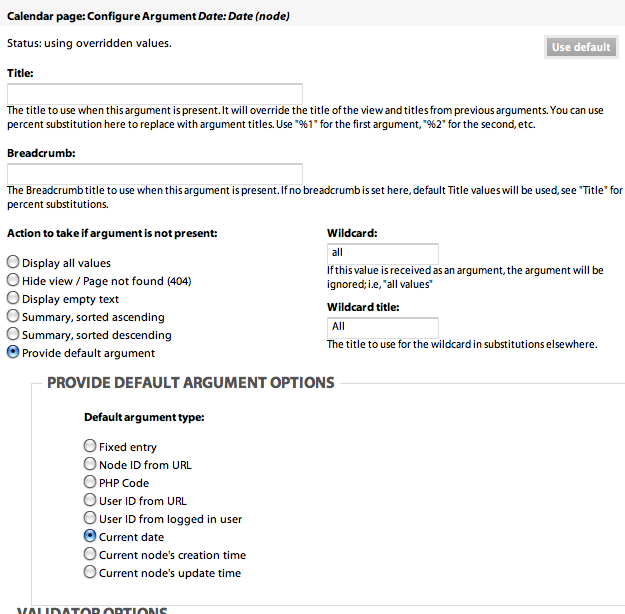
My only guess is that it is something to do with my view argument. Is there a way I can see yours/an example of the view that works.
I've tried everything but a clean drupal install, which isn't far away I feel.
Anything else you think it can be?
Comment #14
kenorb commentedhttp://xcomkids.xcomplete.com/
Can you send me e-mail through contact?
I'll give you some test accounts to test it.
And if you can send me yours, maybe I'll check what's going on.
Comment #15
smw commentedHooray !!!
I fixed it.
I ended up creating an entirely new drupal site and combing through the settings. As it turns out, I think a bookings api module loaded from a previous setup was conflicting.
But I have loaded version 1.1 over dev and everything works as it is supposed to, I am very happy.
Thanks for your dedicated support in seeing me through this.
I will do my best to contribute to some documentation for setup.
again thanks.
Scott
Comment #16
kenorb commentedThat's great.
If you can, you can create some documentation for proper setup. I'll appropriate that. Mostly I'm focused on functionality and documentation is not my good side (considering that English is not my mother tongue).
I'll add some additional warning, if mandatory settings are empty in database.
To summary
If you see 'listing all node types' after clicked on 'Book Now' and link looks like: node/add/0/... (with 0) that means your content type has been not recognized properly. Basically Calendar View and 'Book Now' need to be somehow connected to specified Content Type. If you don't have it in settings, module can just guess which content type you meant.
It's possible to make some more intelligent detection, if only one content type with datetime was found - that's the one, but user could have some old content type and he didn't create new one for booking purpose, so it's not good idea as well.
So basically it's problem of not configured settings (admin/settings/booking_timeslots/form_settings) or some Drupal conflict if settings are set, but are not in database.
If you need to check what kind of variables you have set, you can execute following query:
Comment #18
mach5_kel commentedIm having the same issue with the newest DEV. (Sept 24th). Goes to the create content page instead of directly to my specific content type.
Anyone else?
----------------
Update: On the settings page for this module dev version, I dont see where I choose the appropriate content type for when I hit the "book now" link. So, now i am not surprised it isnt choosing a content type.
I do see where I can tell it which date field to use. But not which content type.
Comment #19
wwwclaes commentedI also had the same problem with the Dev version. I think variable "booking_timeslot_forms" isn't set in the database. It may be set in some setups, but only if the module is updated from an earlier version - then the variable is converted from an old name of the variable.
Comment #20
kenorb commentedYou did already the update.php when upgraded from the older version?
Can you send me prv dump of your site environment that I can check it why is that?
Comment #21
wwwclaes commentedNo, I started with installing the Dev version.
I may be in deep water here, cause I just started out looking at your nice
module. However, I had the same symptom as #18.
A brief look at the code, indicated that calendar-day.tpl.php does a...
variable_get('booking_timeslot_forms', array());
...which is set in the release version in booking_timeslots.admin.inc by...
$form['form_settings']['booking_timeslot_forms']
...but that is missing from the Dev version. This is also reported by
#18 from an UI perspective.
Comment #22
wwwclaes commentedComment #23
shadowdknight commentedHi,
I'm facing the same issue, any solution please?
Following are the dump:
Thanks for the great module
Comment #24
mautumn commentedThis looks like a good module, but like users before me, I cannot get this to work. I have tried everything above, uninstalled, re-installed, dev and 1.2 versions. Every time I go to "book now" I get the full list of content types. Nowhere do I get to specify content types associated with BTS - just fields. I'm out of ideas.
Following are the dump:
Thanks for the great module but unable to proceed.
Comment #25
jusyjim commentedsame here... subscribing...
Comment #26
yskel commentedSame problem, subscribing. Here's my dump:
I believe my problem is the same as described by other posters - rather than linking to the add node for my specific content type (/node/add/[CONTENT TYPE NAME]/[DATETIME]) the 'book now' links to (/node/add/1/[DATETIME]), which maps to the general add page for all content types. If I then click the add link for the my date content type, I lose the DATETIME that was passed by the original calendar link.
I'm working on a smaller site that absolutely requires timeslot booking functionality, so I'm OK with doing something hackish and inefficient to get this working. The jquery snippet below gets the affect that I'm looking for by changing the 'book now' url to point directly to my date content type:
Comment #27
CinemaSaville commentedI have the same issue. Where would I put the above snippet?
Comment #28
kenorb commentedDone some fixing.
http://drupal.org/cvs?commit=338194
Please test it (dev version).
Updated as well Installation instructions on Project page to make it more clear.
Comment #29
jusyjim commentedNew errors and still same effect...
Here's what I did uninstalled the module, ran update. Installed the dev version of the module copied the tpl files over to themes just in case they were updated as well. Now the create content page still comes up and I get the following errors on the calendar view:
warning: array_key_exists() [function.array-key-exists]: The first argument should be either a string or an integer in /home/hosv/public_html/we/sites/all/modules/views/includes/view.inc on line 1286.
and
warning: Invalid argument supplied for foreach() in /home/hosv/public_html/we/sites/all/modules/booking_timeslots/booking_timeslots.inc on line 156.
Frustrating but I'll keep coming back because this module is exactly what I need and worth waiting for.
--------------------------
Here's an addendum to this comment added after I played around some more:
I think it's the view that I cloned from the calendar that is having problem because I am not getting the error messages with the standard calendar. I'm still getting the create content page from the calendar page "book now: links that are formatted in this way /node/add/%252F2010-03-17%2008%3A00%3A00 .
Thanks in advance for any help.
Jim
Comment #30
kenorb commentedjusyjim:
make sure that your Views has calendar view chosen and you have proper arguments with selected field.
Just try it from default calendar view and follow installation instruction from the Project page (http://drupal.org/project/booking_timeslots)
Comment #31
jusyjim commentedThanks kenorb,
Getting this message:
The date argument date fields must be added to this query. You can exclude them if you do not want them displayed in the calendar.
Here are a couple of screen shots of my settings
Comment #32
kenorb commented#31 try to add the same field into Fields list.
Something like: http://drupal.org/node/540804#comment-1990530
Comment #33
jusyjim commentedChecked and it's already like that.
Comment #34
kenorb commentedjusyjim: can you export and attach your calendar view?
Comment #35
randyrich commentedHi , I wrote you an email yesterday.
I tried to follow all the steps but still get drupal-6.16/node/add/1/2010-03-14 18%3A00%3A00 as a link
I attached my calendar views as text file
thank you very much for your help
Randy
Comment #36
jusyjim commentedHi,
I've attached my calendar view. Thanks.
Comment #37
randyrich commentedI downloaded the dev version, it took some time to understand what you meant. It works now I guess.
The book now link leadf me to the create content page of event with the following link address drupal-6.16/node/add/event/2010-03-17 19%3A00%3A00. Is that how it is supposed to work? Is there a way to link the book now to an existing confirmation page?
Thank you
Randy
Comment #38
kenorb commentedrandyrich:
Yes that's correct. Datetime field is hidden when you have date in your URL address. When you submit, even is created. I don't understand what do you mean by booking to an existing confirmation page?
Comment #39
FurySting commentedSo far I am not having luck with this module. I have tried starting over from scratch on it a few times with both releases.
I have never seen a 'booking_timeslot_forms' variable show up in variables yet. I get every other variable listed, but never 'booking_timeslot_forms'. Can you give me an example of what would be in that field? I will create it manually.
I am using the content type 'booking' for testing, but in the end I wanted to make 7 separate content types as booking calendars for 7 trainers at my school.
The content type is named booking.
The view is named calendar-booking.
I created view specific templates named...
calendar-day--calendar-booking.tpl.php
Which works.
Then modified the template to hard code in the content type.
And that worked to make the "Book Now" links open the right content type. But after booking the time it still shows as available. So I figure it is using that content type it is failing to retrieve for checking the existence of rows as well. in the 'content_type_booking' table.
I have all of the settings in admin correct and in the views and it almost works but I'm starting to pull my hair out. It has been too long since I wrote anything close to this from scratch so any more help would be appreciated.
Comment #40
FurySting commented@Randy #37
This module allows the user to "Book Now" which creates a new node of whatever content type you created for it.
If you want it to redirtect to a conformation page you could use the http://drupal.org/project/rules module then create a rule that fires on the creation of said node type. You can then add actions to that rule to do a redirect to a node you specify. So you could create a node that is a conformation page then redirect users to that page once the new "booking" node is created. If you want to go that route and you are not sure what I am talkign about, reply and I will make a step by step for you or something.
Or...
If you don't want to install rules, you could alternatly create a template for the node type your using above and add your conformation page HTML in that template, Then when the user adds the node it displays as a conformation page instead of showing the node information. Ultimatly you don't want the user messing with the booked node once it is created anyway, so while this way of doing it is a bit Gerry-Rigged it doesn't need any additional modules to do it.
Later,
Fury
Comment #41
randyrich commented@FurySting #40
Thanks a lot for your quick answer. I gotta say I discovered drupal only two weeks ago and so far I only changed variables in PHP, so here is my lists of questions. I would like to go with your second option creating a template page. How do I set this up? Where do I save it and how do I connect it to the booking calendar? I understood it should contain the layout html and probably a dynamic text field for the booking time to appear and the submit button, is that right?
I really apreciate your help.
P.S. What is Gerry-Rigged?
Comment #42
jusyjim commentedkenorb, did you happen to see anything wrong after you logged in?
Thanks.
Comment #43
kenorb commentedjusyjim:
I've checked it now and this issue is not happen on your installation any more.
Your path after clicking 'Book Now' is node/add/custom_timeslot/2010-03-30%2012:00:00, that's correct.
Followed issue is related only that "Book Now" opens Create Content Page,
If your have different problem, please raise the new support issue with your problem description to make it clear.
Comment #44
kenorb commentedFurySting: #754030: Maximum available slots being ignored
Comment #45
Jovean commentedWould manually inserting the "booking_timeslot_forms" field in the db resolve the problem (b/c I have it, too)? If so, what is the SQL for inserting that field (so that I can do it manually)?
Comment #46
kenorb commentedJovean:
booking_timeslot_forms variable is a depreciated one. Currently you shouldn't find anywhere in the code.
Comment #47
Jovean commentedOk, but then how do I resolve this issue?
Comment #48
kenorb commentedJovean:
which issue do you have exactly?
can you send me some screenshots or url in priv?
Comment #49
jusyjim commentedFrom the calendar, If you click book now you go to a page such as /calendar/2010-03-27. From that page if you click book now the links are formatted like so: /node/add/custom_timeslot/2010-03-27%2010:00:00 and then are led to the create content page. Is that not the issue at hand? Please tell me I'm not illiterate!
Comment #50
Jovean commentedI have exactly the problem as stated in #49 - though the second url is /node/add/1/{date+time}. Of what do you need a screenshot?
Comment #51
kenorb commented#49 jusyjim:
Yes, your link should point to Create Content Page of your custom_timeslot type (not listing of all node types as described in this issue), so it's correct behaviour.
#50 Jovean:
your link has '1' instead of name of content type, that's NOT correct. '1' means FALSE, because relationship between your Calendar view and Content Type associated with it couldn't be found.
Make sure that you have dev version from 11th March, enabled proper field from setting page and added this field into Calendar view.
If you still have this problem, please send me link to priv, I'll try to figure out why you have this problem.
Comment #52
jusyjim commentedOk, that's what I thought... but it's going the create content types listing all content types so I am in the right place. You said you logged in and saw correct behavior, can you show me a screen shot because not matter what I do, whether logged in or not and no matter what role I'm in, I still show all types.
Comment #53
kenorb commentedjusyjim:
Ah, in your case it's different issue: #498600: Book Now link doesn't work when content type contain underscore
Your content type contain underscore, I don't know why I didn't see this before. It's fixed in dev, make sure that you have latest dev version.
Comment #54
jusyjim commentedI just want to thank you in public! Many kudos for your perseverance! Great module and I'm happy I got it working.
Thanks again!!!
Comment #55
Jovean commentedI installed the dev version, resaved all the settings (without changes, incidentally), and now it works. Thank you.
Comment #56
krutipatel commentedI have installed the dev version of this module and that's working well for me Thank you.
Comment #57
kenorb commentedComment #59
sachin475 commentedi am also having same problem. When i click on "book now" option it opens create content page.
i have entered proper field in setting page.
I want to know that when i click on "book now " should it go to create custom time slot page and how ??
i have attached some screenshots with this to clarify my point.
this is my url
/node/add/1/2011-02-01%2010%3A00%3A00
which display add/1 means connection is not made
Comment #60
GBain22 commentedI have the same problem as #59 using version Timeslots 6.x-1.2 and the resulting url I get from "book now" is /node/add/1/2012-04-27%2010%3A30%3A00 - so obviously the "1" should be "booking" as this is my content type.
Cheers,
Garry.