

 The 2026 Drupal Business Survey is open. Your response will help shape the future of the Drupal business ecosystem.
There is an important issue with the style sheets we are adding. I have been run into this issue at RTL layout development and lost many hours on figuring out - why the IE layout was broken and finally found http://support.microsoft.com/kb/262161.
We should change the way how we add CSS files to the page to solve this issue. Please keep in mind - since we added RTL support, the RTL people will be the very first running into this issue, but others with many modules installed will run into the same issues. This bug makes development VERY difficult and impossible, while i cannot turn on css aggregation in development.
If we go the following way we can keep the single files, but we end up with "one" style tag only - what finally solves the issues!
<style type="text/css" media="all">
@import "/drupal6/sites/all/themes/mytheme/node.css";
@import "/drupal6/sites/all/themes/mytheme/default.css";
@import "/drupal6/sites/all/themes/mytheme/admin.css";
@import "/drupal6/sites/all/themes/mytheme/test1.css";
@import "/drupal6/sites/all/themes/mytheme/test2.css";
@import "/drupal6/sites/all/themes/mytheme/test3.css";
@import "/drupal6/sites/all/themes/mytheme/test4.css";
@import "/drupal6/sites/all/themes/mytheme/test5.css";
</style>

Comments
Comment #1
Trendy commentedHello,
The problem, I had just made. Imports of over 37 individual css files from different modules. The IE7 has not completely accepted the layout. If you build a big side wants to many modules, such problems arise here soon. I think there is a fundamental solution required, as well as module developers CSS files.
greetings Trendy
Comment #2
dman commentedI guess the fundamental solution is turn on css aggregation. It'll make your pages load faster too.
It's a bitch for developing ... but some form of css aggregation is the answer to this bug one way or another anyway.
Comment #3
hass commentedThe above code example will solve this in fundamental manner... developing a site CSS is nearly impossible with aggregate and compress activated!
Comment #4
dman commentedTrue 'nuff.
Reading the issue, I see that the problem is only with the number of tags in the doc, not the actual number of stylesheets, (which I thought may have been a more understandable limitation of the code)!
Comment #5
hass commentedWell, it counts the number of
<style></style>and<link type="text/css" ... />not the number of files added with @import... so you can add 1000 @import files inside a<style></style>without any problems. 1000 is untested, but it solved the limitation troubles at 30 for me...Comment #6
brahms commentedI totally agree with this request to use only one style tag per media type to solve the issue with the IE limitation. Using css aggregation is definititely no solution for me, because I am using private file download method and for security reasons I do have to use this. Looking at the function drupal_get_css() in common.inc, it does not seem to be much work to implement the request of hass (by the way: thank you very much hass for prividing the excellent yaml-for-drupal theme to the drupal community!). Maybe it would make sense to use a new variable to control whether to use one style tag per media type or to use one style tag per css file import as it is done now. I hope drupal's core team will accept this request, I don't like core patches at all and this would be needed otherwise.
Comment #7
brahms commentedHere is a workaround for this issue for Drupal 5.7 (I know this may not be the right place because this issue is written for Drupal 6.1 but maybe someone has enough time to port my modification of 5.7 to 6.1...)
First I defined a new system variable "combine_css" which can be enabled under admin/settings/performance. The code for this is at the end of function system_performance_settings() (right after the form element for "preprocess_css") in the file system.module:
Finally I modified the function drupal_get_css() in the file common.inc. If the system variable combine_css is enabled, drupal_get_css() combines the import commands for css stylesheets per media type into one <style> tag. No preprocessing of module and theme stylesheets is respected. If combine_css is disabled, everything works like it did without my modifications.
I tested this code without CSS aggregation and a yaml-for-drupal theme. It works in IE 7 and Firefox 2.0.0.14. Now IE 7 processes all CSS stylesheets!
Comment #8
te-brian commentedHey All,
For those of you weary about messing with core includes, we were able to find a workaround for this problem that doesn't solve the problem at a core level, but does work for the time being.
The lead up to this revelation came from our initial instinct to write a custom module that would replace drupal_get_css with our own get_css function (which we would then have to call in our template.php). This custom module would combine like media types into one style tag and hopefully solve the 30+ sheets problem. Well, looking at the code for drupal_get_css made us actually look at how drupal_add_css works and this is when we first noticed the fact that drupal_add_css already has a parameter that allows you to mark a css to not be preprocessed (read: aggregated).
So... we simply make sure that all drupal_add_css calls in our template.php are told not to preprocess (note: we are using the zen theme as our starting point):
$preprocess_theme is set to FALSE at the top of our template.php so that it will only need to be changed once when it is time to aggregate all css.
Then, just make sure that css aggregation is turned ON in the system settings. Now, all the core and module css style sheets will be aggregated and you can control which template style sheets are not for development purposes. This strategy will solve the 30+ style sheet IE problem up until the point that your theme has more than 30 style sheets (and you could preprocess theme style sheets that are "stable" to free up more space). The added benefit is that development is a bit quicker because the page loads much quicker with all the module and core style sheets aggregated.
Hope this helps someone,
Brian
Comment #9
hass commented@Brian: i don't like to duplicate nor support hacked core functions swapped in a custom module... it would be much better to get core fixed. If someone would write a well working and core worthy clean patch I'm sure that the core maintainers will not refuse this request. We might have a good chance to get this into D6.3...
I know i maintained the @charset core bugfix in D5 times and this one have been fixed somewhat quickly, too. People affected by this issue could replace the common.inc or patch themself if we have a working common.inc. I'm reluctant about adding an additional module and changing all core API function to
mymodule_add_css().I will not answer on any support requests about such hacks.
Comment #10
hass commentedHere is a 5 line changing patch that seem to fix the issue.
Try it out and get the core maintainers eyes on this case :-)
Comment #11
hass commentedDamn, the media declaration breaks IE6 and below. Selfhtml.org is no trustworthy resource...
Comment #12
gábor hojtsyWell, hass, as suggested above, we could still do grouped @imports' with media="$media" specified in the
<style>tag. So one<style>tag per one media type. That should avoid IE6 issues?Comment #13
c-logemannHello Everyone,
I think a fundamental solution to managing CSS in drupal core would be fine.
There should be a way to use "css aggregation" when private filesystem is turned on because of performance reasons. My programming skills aren't good enough to make this possible. I'm working on my language improvement. On PHP and my english skills too :-)
I like the suggested solution of a grouped "style@import" because I found another big problem with IE5 with the "link-import" of D6. I solved this problem by changing the $styles var in page.tpl.php. Now I added the grouping function.
My workaround is placed in the template by changing the $styles in the page.tpl.php calling an own function (
<?php print _mychange_css($styles) ?>instead of<?php print $styles ?>).The following snippet (Drupal 6-Version) have to be placed in the used template.php:
Edit: The global-definition of $mycatch_not_rest was wrong (forgot to change after renaming) and I added
. "\n"to "rest".A Drupal 5 -Version needs a regex-pattern like:
'#<style type="text/css" media="(.*?)"\>\@import "(.*?).css";\</style>#'(NOT tested).At this time there is only one group for the most used media type "all". The "rest" gets a "style@import"-form too (not needed in D5). With elseif it's easy to add more groups. By using an array to collect the search results it would be easy to make a group for each media type. There could be other even unknown media types. Think of tools like CSS-Injector (http://drupal.org/project/css_injector) and additional css-files in .info-file.
I found no information about $query_string which is added to the css-import links between line 1717 an 1739 in the common.inc of d6. Can somebody of you explain this? In my solution I don't use this information. You can use this with "$match[3]".
Edit: In a german forum someone told me that $query_string is for cache-rebuilding in browser.
Yours sincerely
Carsten Logemann
Comment #14
c-logemannHere the function (Drupal 6) with grouping all media-types in an array and adding the $query_string:
Edit: inline comment improvement
Successfull tested on my IE 5.
Comment #15
dvessel commentedAs Gábor mentions, if there is no issue with style tags grouped by media type, then it's the only solution.
From 5 to 6, the "style" tag was replaced with "link". Anyone recall why it was changed?
Comment #16
hass commentedWell... as i remember - someone said @import was used in past to keep Netscape 4.7.x users outside of a Drupal website and that this is no more the case now ~15 years after Netscape 4.7.x :-). Group by media must keep the order intact or things will break in themes... this could cause more style tags as we expect now and might bring us back to the 30 style tag limit...
Comment #17
dvessel commentedRight, I just found it. I didn't see that as a compelling reason for the change.
The only thing to consider when ordering is what added the style. Core should go in first, then contrib modules, possibly theme engines then themes and maybe sub-themes. The ordering within each group shouldn't be a big deal so at most, we would have 4-5 groups for the same media type.
Comment #18
dvessel commentedbtw hass, why did you roll a patch with the media type pushed into the @import? IE no likey. Your original post should do the trick.
Comment #19
hass commentedNot that would break themes. you might end up with X medias per core, modules and themes. And if you must keep the original order intact you will easily exceed the 10 media switches per core, modules, themes. I know some core developers don't care about the order, but CSS order IS VERY important.
Comment #20
dvessel commentedWho uses more than a handful of media types? The most I've encountered is 3-4.
CSS order is important but we shouldn't take it too far. Does Views need to worry about the order set by cck? I don't believe so, each module should only be concerned with the styles it adds itself. Set it's defaults and let the theme worry about the details.
There might be some cases where modules that depend on each other try and alter its style, in that case what's wrong with them working based on specificity instead of cascades? But most times, it shouldn't need to worry about anything but itself or it can get messy.
If there's an alternate method, then what is it? Please, lets keep it simple. :) I found this queue because I ran into this bs 30 style limit. It really needs to be fixed.
Comment #21
hass commentedWell, between modules this overwrites should never happen... and I'm happy that YAML use media=all everywhere and inside the CSS files
@media {}what would hopefully not cause anything to break in the order, but there seems only a workaround that reduces the problem, but is no final solution.Good to have you on this issue... a better chance to get something in :-)
Comment #22
dvessel commentedThis is really tricky. Grouping by media types would also mean splitting aggregated files for modules and themes. Something I'd rather not see.
I've been out of it for a while now. Not sure I'll have much weight in this issue but I'm definitely thinking about a fix.
Comment #23
brahms commentedSorry to say but today I found out that grouped @imports' with media="$media" inside one style tag does not work in IE7 if there are more than 30 grouped CSS files. In my Drupal Site I have now 34 CSS files (after adding another module) inside they style tag for media="all". The first 30 CSS Stylesheets are loaded by IE7 the stylesheets after them are skipped.
So I tried another solution. I replaced the "style" tag with "link" like it is done in Drupal 6.x and this seems to work. I attach a patch file for the official common.inc in Drupal 5.7, please apply this patch from Drupals base directory.
Comment #24
hass commentedThis will not work in IE6 as i know. Cannot remember for sure, but I think I've tested this some time ago. IE doesn't make any difference between link as style and inline styles.
Comment #25
brahms commentedIf this does not work in IE6 I see primary one solution that may work: I will try to group the stylesheets per media into style tags again but this time I use a maximum of 30 stylesheets per style tag. Maybe this will work, I will post a patch if it succeeds.
Another solution could be this one: we make it possible to aggregate CSS stylesheets even if private download method is set. I have to use private download method becausee I am working on an intranet solution and there is a need for role based restrictions on content and uploaded documents.
By the way: if replacing style tags with link tags does not work in IE6 it means that many people will have troubles using Drupal 6.x and IE6 ?
Comment #26
brahms commentedHere is now a patch for Drupal 5.7 (modifying include/common.inc and modules/system/system.module) for grouping a maximum number of CSS stylesheets inside media specific style tags. I call this feature "Combine CSS" and you find the settings for it at the bottom of the "performance" settings form. There it is possible to disable or enable the "combine CSS" feature and to specify the limit of CSS stylesheets that get grouped into one media specific style tag. It is best to set this limit to 30 to minimize the number of style tags. I have just made short tests with IE7 and disabled CSS aggregation, here it seems to work. I will do more testing with a higher number of stylesheet files in the next weeks.
Comment #27
brahms commentedHere is an example of the grouped style tags for my site, with the conditional comment for IE7 I get 41 CSS stylesheet files grouped inside 8 style tags and this works in IE7 (and FireFox 2). I am using yaml-for-drupal 3.x and an additional yaml layout:
Comment #28
hass commentedI totally don't understand the sense behind "Max. number of CSS files inside one style tag".
Comment #29
brahms commentedI try to explain in detail:
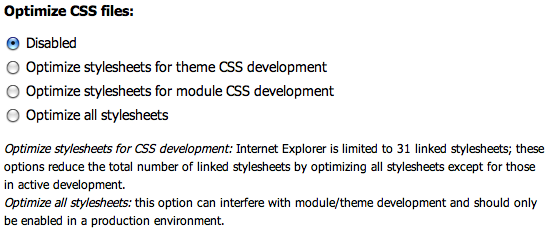
After I modified the function drupal_get_css() in common.inc like I described in my comment#7 above I thought that everything worked fine. I got one style tag per media type and in the style tag for media="all" I had more than 30 imported stylesheet files and they all seemed to be processed by IE7. What I did not realize at this time was the fact that IE7 still did only process the first 30 imported files, because my site looked correctly formatted. After I added 2 modules with some additional CSS stylesheets I noticed that IE7 did not process all of those imported stylesheets inside the style tag for media="all". The font styles (color and font-family) of the navigation menu suddenly had changed in IE7. By comparing the html source of the web page to the html source of the same page before adding the 2 modules I found out that the affected stylesheet was now number 31 in the import sequence inside the style tag for media="all". Before I added the 2 additional modules the same stylesheet was number 29 in the import sequence inside the style tag for media="all". (As you are the developer of YAML for Drupal: it is a stylesheet I called contentmod_my-yaml-layout.css which overrides styles in yamls content.css). So I think you are mistaken in your comment#5 above where you say "Well, it counts the number of <style></style> and <link type="text/css" ... /> not the number of files added with @import"
So I tried what I describe in my comment#25 above: I still group stylesheets per media type with @import inside <style> tags but I limited the number of imports to 30 stylesheets. For the following stylesheet files 31, 32, and so on I use a second <style> tag for the same media type="all". Again I would limit the number of @import sequences to 30 stylesheets, if I had more than 60 stylesheets to import for thia media type (but I haven't, I have exactly 36 CSS stylesheets for this media type). You can see the result in my comment#27 above.
The sense behind "Max. number of CSS files inside one style tag" now is that you can specify this limit for testing purposes. If in my example from comment#27 I would set it to 5, I would get 6 <style> tags for media type="all" each with 5 @import lines inside and 1 more <style> tag for the last of the 36 CSS stylesheets for the media types.
If I set the limit to 30 I reach the optimum setting, because I minimize the number of generated <style> tags using IE7s (obvious) limit for @import lines inside one <style> tag.
If I set the limit to 31 oder any higher number, I will get layout errors in IE again because @import number 31 and above will not get processed.
I considered if I should hard code the setting for "Max. number of CSS files inside one style tag" to the optimum value of 30. I did not because the possibility to specify "Max. number of CSS files inside one style tag" in performance settings page makes it easier to test IEs errors without changing the PHP source.
Comment #30
hass commentedIE does not have issues with loading only a maximum of 30 files! It have issues with more then 30
<style>or<link>tags - it doesn't matter if you add 100 or 1000 files between one style tag<style type="css/text" media="all">... [here you can add for e.g. 1000 @imports without any problems] ...</style>. 1000 @imports are nevertheless untested :-).We need to fix this without adding new options to the UI what is not required at all.
Comment #31
brahms commentedAre you sure that IE7 does not have issues importing and processing more than 30 files inside one single <style> tag? I had read your comment#5 and I know you have written there and in your new comment#30 that it doesn't matter if there are 100 or 1000 imported files inside one singel <style> tag.
But as I notized in my Development Site, in IE7 the file number 31 (contentmod_myyaml.css) did not get processed because the styles for the navigation menu elements in this file did not override the default yaml styles from a previous processed stylesheet (content.css) anymore. If I deactivated one drupal modul with 2 own CSS files, contentmod_myyaml.css got number 29 inside the <style> tag and got processed again, as I saw in the now correct styling of the navigation menu.
I can only reproduce this, I haven't found an microsft issue describing this effect.
I will test it again and maybe I can install a demonstration site to show you what I mean.
Nevertheless I'd like to thank you for your strong engagement in this issue. I think it is a very important issue which may lead to many side effects. If someone doesn't know about this IE bug he could hardly find the reason why sometimes after adding a module something suddenly does not work anymore or the freshly installed module does not work correct.
Comment #32
brahms commentedDemo Site as answer to comment#30:
I provide a demo site under http://78.47.120.6/demo/intratest/
(maybe hass will be so kind to try the demonstartion, I prepared this site as an answer to his post in comment#30)
On this site anyone can reproduce the bug in Internet Explorer 7 as I descibed it in my comment#23 above.
Here are some instructions to reproduce the bug and test the work-around patch from my comment#26> above. (If someone wants to apply the patch on a site: please don't use the patch from comment#23, because this patch does not work. Use the patch in file common.inc-5.7-css_styles.patch from comment#26> instead!) I included those instructions in the front page of the demo site too.
I would be glad if someone tries to reproduce this bug in Internet Explorer 6 and post the results here.
Please login as user demo with password demo
You see the bug in different font colors and styles of the navigation menu left under following circumstances:
Navigate to Performance, go to the bottom of the page, enable Combine CSS files per media type and set Max. number of CSS files inside one style tag to 0. Then follow this link forum-issue/how-add-images-story to go to the forum issue How to add images to a story. You will notice that the colors of the title of the navigation menu and the color of the forum topic title are blue. They should be green like defined in the CSS stylesheet contentmod_akstmk5v3.css, which you can see in the html source but did not get processed in IE.
Now try a work-around for this bug
Navigate to Performance again, go to the bottom of the page, enable Combine CSS files per media type and set Max. number of CSS files inside one style tag to 30. Then follow this link forum-issue/how-add-images-story to go to the forum issue How to add images to a story again. You will notice that the color of both the title of the navigation menu and the color of the forum topic title are now dark green because now the stylesheet contentmod_akstmk5v3.css got processed!
Comment #33
hass commentedHm... this is really new to me and makes thinks more worse... :-(. I haven't tested IE7 much regarding this issue, but thought it should work the same way wrong as IE6 and as MS documented this :-(.
Comment #34
brahms commentedhass, thank you for your quick reply. By the way, in the meantime I could test the demo site with IE6 and IE6 shows the same bug as IE7! So I think with the patch we may achieve a usable work around. We can have a maximum of 30 <style> tags over all and inside each of them a maximum of 30 imported CSS files. So we can use a limit of 900 CSS files... This is not really correct because Drupal's drupal_get_css (and my modified version) groups some no_preprocess CSS files in their own <style> tag and there are some more conditional CSS files from YAML. So we may end with a 880 file limit or so, but this should work for everyone.
Comment #35
damien tournoud commented#245268: Notify about, or avoid, IE 31 stylesheet limit was a duplicate.
Bugs should be fixed first in the development version (Drupal 7.x currently), than backported.
Comment #36
brahms commentedDamien, I agree to your comment#35. Here is my patch for the head revision of Drupal, which is Drupal 7. Please apply this patch from Drupal's base directory. This patch modifies the files include/common.inc and modules/system/system.admin.inc. It will add a fieldgroup named "Group CSS files" at the bottom of the performance settings page.
This fieldgroup provides 2 new fields:
Group CSS files per media type enables or disables the grouping of multiple CSS stylesheets (using @import) into one <style> tag per media type.
Limit for the number of CSS files inside each style tag gives the additional possibility to specify the maximum number of CSS files inside each <style> tag.
Best settings are:
Group CSS files per media type: Enabled
Limit for the number of CSS files inside each style tag: 30
Comment #37
brahms commentedHere are the backported patches for:
Drupal 6 Branch (with cvs tag DRUPAL-6): drupal-6_css-styles.patch
Drupal 6.2 (with cvs tag DRUPAL-6-2): drupal-6-2_css-styles.patch
Drupal 5 Branch (with cvs tag DRUPAL-5): drupal-5_css-styles.patch
Drupal 5.7 (with cvs tag DRUPAL-5-7): drupal-5-7_css-styles.patch
Comment #38
Crell commentedNo no no! The use of @import was removed in Drupal 6 very deliberately, because it causes various problems. Let's not bring it back. (See #145218: Use href instead of @import for CSS)
Comment #39
hass commented@Crell: If we are not able to move back to @import we cannot solve this issue...
Comment #40
Crell commented@hass: You'll forgive me for not being in favor of making our code lower quality to cater to a dying browser that has already resulted in the waste of hundreds of thousands of hours. If you use @import, you cannot effectively Save-As a page because the imported stylesheets don't come with it. Frankly I've yet to hit the 30 stylesheet mark myself so I've not encountered this problem.
What about instead some sort of setting that forced the compressed CSS to be regenerated for every page request? That way if you get as far as 30 stylesheets AND you're doing your primary development in IE 6 (in which case you're doing it wrong anyway), you can enable the compressor to get down to one file and then get a new stylesheet built each time. It's development anyway so you just eat the recompilation cost.
Comment #41
brahms commented@Crell: from an idealistic point of view you may be right if you prefer other browsers than IE, I also do prefer Firefox over IE. But if you are developing web sites for the people out there and especially if you try to develop web sites for companies you have to accept that many of them will use IE as browser. For me that is fact number one.
Drupal offers a public and a private download method: with public download method everyone has the possibility to download every file from Drupal's file system path. If you want or need to control access to downloads you have to use the private download method. Therefore you don't have the possibility to compress the stylesheets. For me this is fact number two.
A limit of 30 stylesheets seems enough at first glance. But in Drupal core alone you will find 20 stylesheets (without a theme). If you build a feature rich site you will need to integrate contributed modules and many of them bring additional stylesheets into your pages. It won't take long to recognize that 30 stylesheets are not enough. This is fact number three for me.
And if you use a modular theme like Yaml for Drupal with a lot of stylesheets you soon will get about 50 stylesheets or more that need to be processed.
So the big and serious dilemma for me is: I do need private download method, I do have a customer who uses IE7, I am using a pretty bunch of modules (cck, views, panels, tinymce to name some of them) and I am using this awesome layout framework Yaml for Drupal is.
At the end I have to choose between 2 problems:
Which of these 2 options would you select?
Comment #42
michelle@Crell - I just stumbled on this issue, but have dealt with this problem on CRO for a while. I can't turn off aggregation on the live site, even if I just want to check something quick in firebug, because then the site is unusable for any IE users that happen by. I don't know enough about this to know what the best solution is, but I wanted to offer another voice saying yes this is a real world problem even for people who don't normally use IE.
Michelle
Comment #43
bensnyder commentedThis. Patch. Saved. My. Life! Brahms you're the shiznit!
Will this patch be in 6.3?
Comment #44
hass commentedI don't know what your site is doing but this is more then unrealistic today and for the next ~2 years. I'm not a fan of IE and i hope it rest in peace, but it will *not* for the next 5 years and therefore we must also take a look to IE6 and IE7 as long as this versions going under 2% usage what may never be happen.
I truly understand save-as this issue... but it is *much more* important to get a browser working that has a market share of ~45% (IE6) and ~35% IE7. However we all know how buggy this damn browsers are or not. I don't think 80% usage are a dying browser we don't need to support...
This will not work for people with private files folder and speed will be awful...
Aside, I'm not developing "only for" or "primary with" IE... but the yaml theme provides compatibility to *all* major browsers we cannot ignore and solves uncountable issues that you do not need to care about as webdeveloper if you use the YAML CSS Framework. See http://www.yaml.de/en/documentation/introduction/browser-support.html about the supported browsers. There is no other theme out there that works reliable with so many and all this browsers. You can do this yourself different and develop only for standard compliant browsers what we are doing too, but we will not ignore IE and have a *fallback* for this browser we really need to test.
Have you tested IE8 with RTL? *argl* I don't know what this guys in Redmond are working on, but this is more broken then IE6 ever was.
Comment #45
hass commented@pegleglax: I expect this is not going to get committed as is - today and we cannot say when 6.3 goes out.
@brahms: your patch cannot get in as is, while you are changing the UI that is additional not required. This is something we don't need as we know the hard technical limits (30 files). The settings are fine for someone how like to reproduce and test this IE bugs themself, but we cannot stress people to configure this as they do not understand the issue behind (newbies, non developers, etc).
Comment #46
hass commented@brahms: your patch produces a WSOD. See your site on performance link.
Comment #47
brahms commented@hass: I agree with you. Before I'm going to modify the patch please tell me your opinion to following suggestions:
Comment #48
brahms commentedyour patch produces a WSOD. See your site on performance link
@hass: hm, I could not reproduce the WSOD with IE7 or Firefox. I also did not find any hint for the problem in apache logfiles or Drupal's watchdog logs. What browser did you use? Do you still get the WSOD?
Comment #49
hass commentedIE7. "Max. number of CSS files inside one style tag" = 0 and the "Combine CSS files per media type" have been changed from enabled to disabled. Afterwards I've got a WSOD. After some clicks, wait and another click the performance page showed again.
Don't change the UI please. I'm not yet sure what your patch does in detail as I haven't found any time to test. If the combine CSS files change the order of CSS files you must remove this stuff, too. I'm not sure what this radio box change without taking a look to the code.
Comment #50
brahms commented@hass: I am not sure but this WSOD may be a side effect of the 30 stylesheet problem. With these settings some of the stylesheet are not processed and I get some kind of javascript error (variable 'Drupal' is undefined' in IE7).
But nevertheless: I will prepare a fresh demo site for Drupal 7 head revision. I won't install any contributed module there. To get the needed number of CSS files I will slightly modify Garland theme so that it loads some dummy stylesheets. In stylesheet number 31 I will place a significant style change (I think changing the text color of all headings to red) so it would be easy to see, if this stylesheet gets processed or not.
@hass: I'm not shure what you mean here? I intend to add only one new parameter Group CSS files to performance setting page so that everyone has the possibility to switch it on or off.
My code is written to leave the order of CSS files untouched. If he does not he would be buggy! And if you disable parameter Group CSS files or if you use public download method and enable Optimize CSS files everything should work as it did before applying my patch.
But please wait for the Drupal 7 demo site and the new cleaned up patch I announced and descibed in my comment#47. I hope it will be ready in a few hours.
Comment #51
brahms commentedNew patch and Drupal 7 demo site:
I attach a new and hopefully final patch file for Drupal 7 (head revision from today). This patch modifies the files include/common.inc and modules/system/system.admin.inc. To apply the patch please gunzip this file in your Drupal 7 base directory and start the patch from there with:
It will add the new parameter Group CSS files in the existing fieldgroup Bandwith optimization in the performance settings page:
If this parameter is disabled or if the existing parameter Optimize CSS files is enabled everything keeps working like it did before applying the patch.
Only if Group CSS files is enabled and Optimize CSS files is disabled all CSS files are grouped using the CSS @import command up to a limit of 30 files per media type into single <style> tags. The order of file processing is itended to be unchanged. This will provide a work around for IE's 30 stylesheets bug.
The new demo site where everone can reproduce the bug and see the patch working is: http://78.47.120.6/demo/drupal7head/
I really hope that this patch will be accepted for core as long as it will prove to be free of bugs. It does not change Drupal 7 behaviour if the new option Group CSS files is disabled.
Comment #52
kevinquillen commentedIsn't this because IE6 doesn't recognize more than 30 CSS links? Turn on CSS compression.
But really, this seems to be a problem deeper in the Drupal core / community. Every module has its own CSS it seems like. There needs to be a more uniform approach to module layout to where its not so absurd with the CSS includes.
Comment #53
brahms commented@gh0st25: yes this is the reason (btw; IE7 shows the same bug). But you can't turn on CSS compression if you set Drupal's file download method to private...
Comment #54
Jeff Burnz commentedSubscribing
Comment #55
hass commented@brahms: only as side info... there is a private/public handing patch on the road... #166759: Public/Private File Handling that was "planed" for D6 and hopefully go in for D7, but nevertheless will not solve our issue here.
Comment #56
kevinquillen commentedAnything more than 5 CSS includes is absurd, there should be a more concerted effort to addressing that. Personally, I refuse to use @import. IE6 works fine with link rel=''.
People on slower internet connections are getting roadblocked by all those includes to download, not to mention images and site graphics.
Can't there be an algorithm where you put your CSS files into a directory, and in the admin say which files should be included in order, then, Drupal takes all of these files and creates one sitewide CSS file with all the definitions in it on demand or cron? If this is CSS Compression I apologize, but I am a stickler on the amount of includes for a website. This doesn't seem like a difficult issue, the issue is moreso on the side of the necessity (or perceived necessity) to having 25-50 CSS includes.
Comment #57
brahms commented@hass: thank you for your info about issue #166759. In the last few days I thought by myself that there could be another solution if Drupal offered a way to compress CSS files even with private download method enabled. But as you say in your last post: it will not solve our issue here at the moment.
What I don't know is who is allowed or responsible for changing the status of an issue. Because I am thinking, that my patch file from comment#51 above offers an acceptable solution for the moment (until someone finds a better one) I change the status of this issue to patch (code needs review). I really hope that this patch or another solution will find it's way into core and will be backported down to Drupal 6.x and 5.x. Life would be much easier without core patches (and I always have to apply a second one bringing the missing proxy configuration into Drupal)...
Comment #58
Crell commented@gh0st25: Drupal already does that. It's called the CSS compressor. It compresses the CSS files down to one file per media target. The issue discussed here is that you can't really use it during development (as it doesn't pick up changes you make to your CSS files) and it doesn't work with private file handling.
My recommendation is 1) Have some flag (set in $conf?) to always regenerate the compressed CSS on every page load; 2) Honestly, I've considered Drupal's private file handling to be broken for a long time to start with. I know, not a great solution, but I don't use it as it hasn't really been useful since at least Drupal 5. (It always broke the CSS compressor as well as Garland's color picker.)
Comment #59
catchThe aggregated css file already has a query string appended to force browser cache refreshes, which is incremented by http://api.drupal.org/api/function/_drupal_flush_css_js/7
So ensure the file is rebuilt and that function called every page load, and you can develop with css aggregation switched on.
#51 isn't a proper patch file, please upload it as plain text, not an archive.
Comment #60
brahms commented@catch: I have attached the plain patch file with my patch for Drupal 7 head revision described in comment#51 renamed to the standardized naming convention for patch files.
Comment #61
brahms commented@catch again: sorry, in comment#60 I had forgotten the change the issue's state to patch (code needs review) again.
Comment #62
bensnyder commentedFOR DRUPAL 6.3
Guys, I just upgraded a site I'm working on from 6.2 to 6.3. The patch for 6.2 (found in comment #37) also applies for 6.3. Here is the link in case you don't wanna scroll up :p
http://drupal.org/files/issues/drupal-6-2_css-styles.patch
Btw, I'm not the best patcher in the world so I manually applied the patch.
Once again, THANK YOU brahms for this WONDERFUL patch! I personally hope it or something with similar functionality makes it into D7!
Comment #63
brahms commented@pegleglax: thank you for the flowers :-)
In the meantime I modified the first patch from comment#37. This new patch provided using standardized naming convention in comment#60 above and described in comment#51 does not change Drupal's behaviour if the one remaining option "Group CSS" is disabled. (The patch from comment#37 still works, but the last one is IMHO better and simpler). And as I needed this patch for myself in some Drupal 5.x und 6.x sites which I updated to the new releases 5.8 and 6.3 today I provide those backports of the patch here (the names don't follow the standardized naming convention for official patches):
Comment #64
bensnyder commentedahh... the beauty of open source!
Comment #65
jfxberns commentedI tried to apply patch drupal-5-7_css-styles.patch from response #37 to a Drupal 5.7 install. I confirmed the files to be patched were 5.7 files and they had not been previously modified in any way.
I used the command:
$ patch -p0 < ../patches/drupal-5-7_css-styles.patch
The output is:
(Stripping trailing CRs from patch.)
patching file includes/common.inc
patching file modules/system/system.module
Hunk #1 FAILED at 704.
1 out of 1 hunk FAILED -- saving rejects to file modules/system/system.module.rej
Any idea why the patch is failing?
Comment #66
hass commentedPlease don't high jack this case!
Comment #67
brahms commentedI don't know why, but my uploaded file drupal-5-7_css-styles.patch in comment#37 has the wrong line endings (CR LF instead of LF). I attach the same file but this time with LFs as line endings, this works for me as I just tested with a fresh Drupal 5.7 download.
Comment #69
hass commentedHave someone already tested if attaching media type to @import (like #10) works with IE8B2 and if this 30 files limit is now gone? Nevertheless it wouldn't today - I'd like to know... :-)
Comment #70
thelocaltourist commentedI added the patches in #63 and it didn't work. Also, I'm using Drupal 6.6 and there's no CSS Aggregation option in performance.
Comment #71
brahms commented@thelocaltourist
If you don't see the group of 2 radiobuttons below the label "Group CSS files:" in the fieldset "Bandwidth optimizations" of the performance settings page then the patch (for Drupal 6.3) failed to apply. Did you see any error messages from the patch command?
Comment #72
thelocaltourist commentedNo, no error messages.
(thanks for the quick response!)
Comment #73
jrabeemer commentedsub
Comment #74
Garnerin commentedsubscribing
Comment #75
owen barton commentedThis is not a critical issue AFAICS - there is no practical benefit to sites over aggregating CSS files and a bunch more code (that could quite happily live in a contrib module). For sites with private files enabled I think the solution is to fix that code so we have the ability to add public files at the same time, rather than do a big work around.
If convenience while developing a theme is the issue, simply add this to your template.php:
Comment #76
c960657 commentedEnabling the CSS preprocessor when using private files is being worked on in #146611: Allow JS/CSS aggregation in private mode. There is a patch waiting for review.
Comment #77
hass commented#166759: Public/Private File Handling is the right way.
Comment #78
joachim commented@Grugnog: on many sites it's not an option to turn on CSS aggregation. And like Michelle says, you always need to turn it off sometimes to fix theme issues, and that will break the site for IE6 and 7 users.
+1 and also can we change this back to critical? It's an IE bug but it breaks sites and it's a pig to track down too.
Comment #79
bensnyder commentedAmen. +1
Comment #80
tombigel commentedWhat about taking a mixed approach?
Core modules CSS files are not something that 99.9% of the users and developers ever change (and most developers don't use IE anyway), so why not add an option in "Site configuration -> Performance" to compress only the core CSS files, thus saving 10 - 20 "link" entries, and keeping our theme/third party modules CSS files intact while developing?
We can take it further and separate between Core CSS files, 3rd Party Modules CSS files and Theme CSS files in The "Compress" dialog, maybe using Checkboxes, and let the user choose to compress only the files in the part that he is not currently developing.
This will give us a bit more breathing space in finding a better way to deal with this problem, and you can deal with edge cases like the "private download" thing with approaches like the ones suggested in this thread without worrying about breaking Drupal for the majority of the users.
BTW -
Another approach that was used in RTL sites on Drupal 5 and below was to load only the RTL CSS files, but in order to keep it incremental add an @import for the original CSS at the begining of the file.
I hate using @import, and I didn't like this technique even when it was the only way, but it will save another bunch of "link" tags.
Comment #81
michelleOh, I really like #80. That sounds like a great solution if someone is willing to code it.
Michelle
Comment #82
Crell commentedThere is no more distinction between "core" and "module" CSS anymore, as of Drupal 5. All CSS is coming from a module or a theme, although some modules are in core and some are not. That's not something we can easily detect (although there have been changes in the CSS system for D7 already, so I'm not sure how those affect it). That said, allowing module and theme CSS to be compressed separately makes a lot of sense, since it's rare you'll be actively modifying both at the same time.
Comment #83
hass commentedBut we shouldn't forget that such a workaround would not fix the problem for users with private download method. I would suggest to solve this issue in general.
Comment #84
tombigel commented@hass:
You're right, but right now this affects everybody, especially the RTL developers community.
From where I stand (I stand on the platform that says "NOT A PHP DEVELOPER":-)) separating the module compression looks quite easy compared to the solutions discussed here.
So I think it will be a good practice to first solve the problem for the general case, and then concentrate on the exceptions.
BTW -
Can't we use the "package" string on each module's ".info" file to tell if it's a core module or not? does anyone but Drupal itself add modules to "Core-Required" and "Core-optional"?
Comment #85
Crell commentedOnly if we actually knew what module added the JS. We don't. We only know that it's added to the "from module stuff" or "from theme stuff" arrays. (Again, unless that's changed drastically in D7 already.)
Comment #86
tombigel commented@hess:
I take back what I said.
I just got stuck with a site that has problems with CSS compress, and it was really frustrating (Especially with the large amount of CSS files Tendu's new version takes when running with RTL on IE6: 1 style.css + 1 ie.css + 1 ie6.css for parent theme, same 3 for the sub-theme, plus RTL version of each... 12 altogether).
Anyway, I guess you are right, and with no other solution we are reduced to using @import.
Though it would be nice to see it as an option and not a must (is there a way to sniff IE before building the page?).
btw - do you know if this technique is compatible with the module "conditional stylesheets"? Zen is using it and I just committed a patch for RTL support and implemented it in Tendu.
It will be a shame to lose compatibility with it.
Comment #87
hass commentedSorry, you have issues if the files are compressed? Please validate your CSS files first... they seems to have bugs. You need to figure out what's going wrong, but it shouldn't be the compressor. Only 12 Files is no problem... the problems starts if you have more then 30 link/style tags of typically UNCOMPRESSED CSS files in the HEAD section of your HTML code. Your issue shouldn't be this issue we are discussing here... I hope I haven't misunderstood something.
Comment #88
tombigel commented@hass, you totally missed my point.
I have no problem with compression (Nor my CSS files), there are some permissions issues on the site I was working on, so I couldn't compress files.
This sub-theme of Tendu loads 12 CSS files with RTL on IE6 only for the theme, not including core and modules.
So my point was that I got to the 30 files limit pretty fast, and now I get the need to solve this problem for all cases (#83).
Comment #89
hass commentedHow about fixing the permission problem? :-)
Comment #90
natrio commentedAny progress on the fix?
subscribing...
Comment #91
decibel.places commentedI had broken css in IE using the QuickTabs module 6x-2x-dev in D6.9
Fortunately I eventually found the issue on that project about Optimizing CSS in Performance settings, which resolved the issue
http://drupal.org/node/358114#comment-1258343
However, as it is a production site in dev, it is annoying.
I do most of my dev with Firefox, so I can safely turn the css performance setting off (why does FFox work and not IE?)
Comment #92
chandrabhan commented+
Comment #93
johnalbin/me contemplates… (and subscribes)
Comment #94
s.daniel commentedHaving fun with IE6 debugging atm looking for a quick fix.
How about staying with the current solution and having the option to @import all css files in a contrib module/theme?
Zen issue: http://drupal.org/node/378508
Comment #95
reg commentedI just came across this issue myself after more hours than I care to admit tracking down what was going wrong.
When you are developing you typically only look at the last 5 or so CSS files but I see the need where you just might need to look at a core file or some other file that's not near the end. Perhaps we could select the files not to compress like selecting printer pages... compress all CSS files except 1,15,17-20, 30-. I see no issue with media types since virtually all files are "all" anyway and it's just the last couple files that might be screen, print or esoteric.
So in Development mode the pages are selected to not be compressed but when aggregate is on normal Drupal behavior applies.
I guess with this method you could theoretically have multiple aggregate files if you want to strictly maintain order but Drupal probably doesn't cater to that so you would probably aggregate all non-compressed files and then put the uncompressed files after it in their relative order.
I see no problem with @import for development if it solves this problem, development is development - production is production, no need to be a purist while developing, it takes enough effort to get a significant site into production, let's not make it harder than it needs to be just for the sake of ideals.
Comment #96
Apfel007 commentedHi, I steped in the same issu.... :-(
Hope someone can give me a hint - I'm using D 6.9 and private download.
Is there a working solution to solve the 30 ccs files problem, without patching corefiles...
Cheers
Comment #97
wretched sinner - saved by grace commentedPlease don't change statuses. The fix will be applied to Drupal 7 first, and then (maybe) backported to Drupal 6.
Comment #98
Apfel007 commentedsorry
Comment #99
kevinquillen commented"Sorry, you have issues if the files are compressed? Please validate your CSS files first... they seems to have bugs. You need to figure out what's going wrong, but it shouldn't be the compressor."
He's correct. If you turn on CSS compression in Performance, the backgrounds tend to disappear. You need to add a ./ in front of the image path for the background: declaration if you are experiencing problems. This fixed it for me.
Also, why not just use link tag instead of @import? And, why tease with a backport to Drupal 6? You should always support the most widely used version not just bleeding edge. Not all people will be able to swing into Drupal 7 right away.
Comment #100
catchgh0st25, Drupal 6 is supported, Drupal 7 is in active development. We fix bugs in the development version first because this avoids regressions - it's much easier to backport a bug fix than forward port it. Additionally Drupal 7 has automated testing - which means we can ensure bugs are fixed properly with a higher rate of success with less reliance on manual testing - so it's less work to do things that way too.
Comment #101
ademarco commentedHi all,
I've adopted a solution that doesn't require any core patch, it just uses the hook_preprocess_page() in my template.php file, here it is:
It's tested on Drupal 6.10 and works well with Drupal CSS compression. Any feedback it's appreciated.
Comment #102
dvessel commentedI just ran into this article on the performance implication of using the @import declaration. Considering this is an IE only bug and would only effect it when developing for most sites. I would hate to see @import used.
The only other option I can see ATM is to give the option to only aggregate module styles freeing the theme to be inspected and worked on.
Comment #103
ademarco commentedHi all,
as a result of this conversation I've contributed a module that changes the link tag in a combination of style tag and imports. here the project page:
http://drupal.org/project/unlimited_css
It's enough to enable the module to solve the IE problem. Any feedback is appreciated.
Comment #104
ademarco commentedIn reply to #102: The code I've posted changes all the links in imports so, as stated in the article you've linked, they should be loaded at the same time. Do you see any other issues?
BTW, aggregating the core CSS files it's indeed a good idea.
Comment #105
hass commentedThis module may not work if a theme like YAML, Zen etc. alters the css array and regenerate + alters the styles output... (untested)
Comment #106
ademarco commentedGood point. Could you please open an issue in the project page about this potential problem:
http://drupal.org/project/issues/unlimited_css?status=All
I'll test it as soon as possible, thank you for your help!
Comment #107
ademarco commentedHi,
I've successfully tested on Zen as from #434298: Test using Zen theme. I suggest to move the discussion about this module to its own issue page: http://drupal.org/project/issues/unlimited_css.
Thank you for the support!
Comment #108
hass commentedI'm not sure how much or if and when Zen alters the CSS array... long time I haven't taken a look into the code, but the YAML theme (http://www.yaml-fuer-drupal.de/de/download) does - 100% for sure. I'd like to get core fixed...
Comment #109
decibel.places commentedThanks for the great work on the CSS issues! http://drupal.org/project/unlimited_css
I was having problems with the Four Seasons theme not displaying pages in admin (in Firefox):
http://drupal.org/node/285147
http://drupal.org/node/297192
I had to change admin theme and use themekey for some public pages too to use a different theme, and use Garland for the embedded Gallery2
I installed the IE Unlimited CSS Loader which also seems to resolve the display issues in Firefox and other browsers
I think the CSS loader module can also help with style issues for
QuickTabs http://drupal.org/node/346180 http://drupal.org/node/358114
and
MySite http://drupal.org/node/253522
Comment #110
hass commentedSounds like you found tons of duplicates...
Comment #111
decibel.places commented@110
no, not duplicates, these are similar issues I have reported, most involving problems with styles in IE (and some other browsers)
I think the IE Unlimited CSS Loader module fixes them, even in other browsers
thanks to antoniodemarco for taking the time to post the module to these other queues
Comment #112
ademarco commentedI'm happy to know it is also useful to solve other issues, thanks for reporting!
Comment #113
tancF*#king M$cros#ft m*ther f@c*ers!!! Sorry... I can't believe I just wasted so long trying to work out what was going on. Microsoft I hate you!!!!!
On a more positive note, thanks antoniodemarco for making that module.
Also confirmed that a zen subtheme works with the module. But it has to be latest release of zen to avoid some preprocess functions they had going on.
Comment #114
johnalbinAs much as I love to see new contributors getting excited about Drupal and making new modules (yay, Antonio!), I was disappointed to see that the unlimited_css module ignored the performance implications of @import pointed out in #102 and the partial-aggregation method from #80 that everyone seems to think is a good solution.
Since the idea in #80 is a new feature, it will never get back-ported to D6, so I’ve started to implement that solution for D6 as the IE CSS Optimizer module. Further discussion of that module should be over in that project's issue queue.
Now for D7, it seems pretty apparent to me that since most Drupal users won’t be developing CSS, that the default for the “Optimize CSS” performance option should be “enabled”. That would neatly solve this problem for nearly everybody. Of course, it would be critical that we also solve #166759: Public/Private File Handling
Now that easy fix still leaves CSS developers in the cold. Now we can leave that solution to contrib (which I think would be a bad idea for D7), or we can expand the “Optimize CSS” option to include these 2 new options:
Comment #115
Jeff Burnz commentedWell this is brilliant, and very much what we need. I agree that the unlimited_css module is not really the method we want to move forward with. Its been a good stop gap solution for D6 while developing themes/modules but for live sites its not the best option.
This certainly goes a long way towards solving the problems, and combined with style stripper all bases should be covered.
Not sure about the labels, initially I got confused, which is easy I know... perhaps
- Optimize module stylesheets
- Optimize Theme stylesheets
Small details in any case, otherwise awesome.
Comment #116
johnalbinThat's what I had originally. But if I'm a module developer and I need to work on my CSS, which option do I choose? Optimize module stylesheets? Why would I want to pick "Optimize theme stylesheets"?
But, I agree that even my wording in #114 needs improving. I wish we could have a descriptive help text below each radio button. Wait… did that help pop-up patch ever get in? Doesn't the admin/build/modules page have some now? Hmm…
Maybe… “Optimize stylesheets, but allow module CSS development”?
Comment #117
Crell commented"Compress [module|theme] CSS only" ?
Perhaps we should close this issue and continue in the optimizer module queue.
Comment #118
hass commented@John: The style sheet limit is 30 - not 31, see http://support.microsoft.com/kb/262161/en-us.
Comment #119
s.daniel commentedWould it be technically possible to have a field "exclude css files from compression[xyz.css,... ]" to manually insert filenames one is working on?
Comment #120
damienmckennaThis works great in Zen v6.x-2.x-dev, thanks! All themes should use this code.
Comment #121
Crell commentedSince we now have a working solution in contrib, let's call this fixed and continue discussion over in the IE CSS Optimizer issue queue.
Comment #122
hass commentedI think we need a solution in core as core is still broken. Only having a solution for a core bug in contrib by altering core doesn't solve the issue.
There are over 152,128 Drupal D6 installations out there compared to ~20 css optimizer installs that should mostly be dev machines...
Comment #123
decibel.places commentedcore is not "broken" - a default install or one with only a few contrib modules will be fine
the optimization is properly a contrib module for "special" circumstances
it would not hurt to include it in core, but it's not fair to say core is "broken"
Comment #124
hass commentedFor sure - core is broken! Here is the list of the CSS files in a default D6 installation with all modules enabled and RTL theme:
Sum up - 42 module files + 2-5 theme files - exceeding the maximum number of 30 files... you may subtract ~3 files as they are not always added... but overall - tooo many files.
Comment #125
michelleCore isn't broken... It's IE that's broken. The question is whether to adjust core to adapt to IE's brokenness.
Michelle
Comment #126
hass commentedThis is really nitpicking. We have a web based CMS and therefore we need to implement it how the most browsers are working. IE has a market share of more than 70% in the world. If we like it or not - we need to keep this always in mind and develop for IE, too. It's not the intention of this case to discuss browser wars.
Comment #127
michelleI'm not getting into browsers wars. Just clarfying that IE having a limit on stylesheets does not mean core is broken. If folks want to put time into accomodating IE in core, that's just peachy. But I don't consider IE's limitations to be a bug in core.
Anyway, I'm done with this. I'm not actually working on this issue so bowing out.
Michelle
Comment #128
hass commentedAll core themes are shown broken if I use IE with all core modules enabled. Therefore I say core is broken as the theme isn't showing the pages as intended. We always need to care about browsers and their abilities.
Comment #129
decibel.places commented@hass
core is not broken - IE is broken
the optimizer module fixes the issue
please contribute further energy to adding it to core if you feel strongly it should be there
Comment #130
tombigel commentedCome on people! Are you really arguing about IE?
Common Logic:
IE is broken -> IE dominates the web -> Drupal lives on the web -> Drupal depends on IE -> Drupal is broken if it does not support IE.
All good now?
@hass:
I still think that a better sustainable solution for the amount of CSS files should be found.
As I wrote earlier in this thread, I believe that the CSS files should be devided to "groups" -
Core CSS files, 3rd party Themes CSS files, 3rd party Modules CSS files.
The "Compress CSS files" feature should have a way to know which is which and the developer should have the option to choose which one to compress.
Besides that, 42 CSS files for a basic RTL installation?
I don't understand why "core" can't have a unified CSS file, or at least the option to have one.
Most themes override a great amount of these CSS properties anyway, and many of these properties can be annoying as hell (".list-item" defaults for example)
Comment #131
johnalbinIE is broken in a way that core is affected out-of-the-box for RTL sites. So core needs a work around for IE’s bug. Otherwise, core will appear to be broken to a casual user.
Imagine for a moment that #166759: Public/Private File Handling is fixed and that a site can have both public and private files in a single Drupal install. Then, given IE's bug, it seems pretty apparent that the easy fix for this problem is simply to enable CSS aggregation by default.
The question then becomes: why would we ever want to turn off CSS aggregation? o_O
The only answer I can come up with is for development purposes. If you are examining/developing the CSS on a site using a browser's handy css-inspection-related tools, having the CSS appear to come from a different file (the aggregated file) then where it actually comes from is a major PITA. Not to mention that you have to force the CSS to re-aggregate each time you tweak the CSS. And, if you're not a css develper, trust me, you have to tweak the CSS every 30 seconds (literally) to get things to look correctly cross-browser. :-p
So, our choices are these:
Solution #1 (the CSS-developers-are-on-their-own option):
Solution #2 (the explain-why-IE-is-broken-and-not-Drupal option):
As you can probably tell, I prefer solution #2. Also, note that the first two steps of both solutions are the same. So here's a patch that does step #2 of either solution.
Comment #133
johnalbinAnother try, bot?
Comment #134
hass commentedThe main reason why this is not enabled by default should be the private files folder... if private files are used - you cannot enable JS/CSS compression. About the compress module/theme css only - I cannot say how often I have analysed what core or module style is currently cluttering my theme css definition... I only hope this is not the only way... aside if I have 15 modules installed, all having LTR and RTL styles and I'm overriding them all in the theme... the latest approach will not solve the problem. 1 core + 1 print file + 1 module file + 30 theme module overrides + ~3-5 theme CSS + IE fix files... ~40 files. 15 modules seems not many for me...
It may be better to create 1-3 CSS files and link all core, module and theme styles via @imports... this would avoid the 30 style tag limit at all and load all files uncompressed.
I do not like to spoil the party, but the contrib module only deflects the problem...
However - we *NEED* to fix #166759: Public/Private File Handling or we leave all private files users out for the next ~3 years.
Comment #135
johnalbinUsing @import to load all CSS is a no-go because of performance implication of using the @import declaration. BTW, the IE CSS Optimizer module tries to load as many stylesheets as a possible using
<link>before it starts using@import(as a last resort) for the remaining stylesheets. Its not pretty, but its the best that is possible given the circumstances.Which is why I mentioned fixing #166759: Public/Private File Handling three times in my comment. :-) Fortunately, the CSS aggregator is smart enough to turn itself off right now if the files directory is not set to the "public downloads" option. So enabling the option by default won't hurt the "private downloads" people. Of course, it won't help them either.
Comment #136
hass commentedI'm aware about this "performance implication" you named "no-go", but I think it's more beneficial to have a reliable and working solution with a small performance implication - than a broken site... :-)
Comment #138
johnalbinHass, so you want a solution that doesn't involve CSS aggregation at all? What are objections to the Solution #2 that I outlined above in comment #131? The "40 stylesheets in a theme" issue is not a problem; see comment #135. Any other objections?
Comment #140
hass commentedI wasn't aware about the "link" first than "@import" solution as I'm not using the contrib module. I only hope you count them correctly as sometimes the IE hacks are added manually to the themes page.tpl.php... sometimes... and sometimes they may be added via page_preprocess like I've done it in the YAML theme and maybe there are others doing other things or using your (?) IE hacks css module... I'm really interested to take a look to the code how this counting issues are solved.
Comment #141
hass commentedWell, "IE CSS Optimizer" module looks very buggy if it comes to the count
1. It's not parsing page.tpl.php
2. It's not counting style tags
3. The Limit is 30 link/style elements not 31 as said above.
4. The module seems not the last... (no weight -> therefore alphabetic weight today) so other modules are able to add CSS files after the "IE CSS Optimizer" module.
5. CSS files added by the theme are also not counted.
6. No official release.
Untested, but this is all from a very short code review.
Comment #142
decibel.places commentedplease move discussion of the IE CSS Optimizer module to its issue queue where they belong!
http://drupal.org/project/issues/ie_css_optimizer
This thread was begun as a disussion of the problems using 31+ stylesheets in IE in general
Bug reports and support requests for the contrib module belong in its issues
FWIW I use the Unlimited CSS module to correct these problems
http://drupal.org/project/unlimited_css
@John Albin: do we really need another module that does the same thing? Perhaps you could co-maintain that module to introduce your ideas for refinement?
Comment #143
hass commentedCode wise "IE CSS Optimizer" looks better to me and have more potential... I noted this here as I do not think it heals this case. John can take this over from here - I do not like to have 6 more cases in my issue queue
Comment #144
owen barton commentedThis is fixed by the stream wrapper conversion (you can now do aggregation even with private files enabled). For folks having trouble developing with the aggregator enabled the above contrib modules should work, or else you can do what I do and add code in your theme (with a settings.php switch so it doesn't run on production sites) that deletes the aggregated files so they are recreated for each page load.
Comment #145
johnalbin@Owen, this is not fixed.
To reiterate, we have 2 problems regarding this IE limit:
I fear that there isn't enough time to get a full fix for #2 before code freeze. Also, #2 doesn't make it impossible to develop CSS, just extremely tedious (you have to constantly rebuild the cache) and difficult (you can't view source to find out which CSS file has which ruleset).
However, the fix for #1 is really simple now that core has both public and private files (see #517814: File API Stream Wrapper Conversion). yay! We just need to make CSS optimization enabled by default. Which is what this patch does.
Comment #147
owen barton commentedOK, that is a fair point. I have advocated having them on by default previously also, because having so much latency in page loads is a significant usability issue. Looks like we need to update some tests.
Comment #148
johnalbinNew patch fixes broken test.
Comment #150
johnalbinAnother test fix.
Comment #152
johnalbinAdded fix for color test.
Comment #154
donquixote commentedsubscribe
Comment #155
seutje commentedSimply making CSS aggregation enabled by default doesn't really solve any problem imho, but I guess it prevents users from going all "omagawd, where are my styles :(" and I guess most developers/themers/whatever-you-want-to-call-them will notice right away when CSS is being aggregated
however, I think that enabling this by default would annoy the hell out of me in the long run, but then at least I will be less annoyed by the recurring questions like "why is my site unstyled in IE"
is there any chance of getting a proper solution into core aside from setting aggregation on by default? perhaps aggregate all CSS except theme CSS?
Comment #156
johnalbinThe proper solution exists in contrib. But trying to get the functionality of http://drupal.org/project/issues/ie_css_optimizer into core would be difficult to argue since we're past code freeze. At the very least, I'll make sure the module is available in D7 very soon (I'm going to need it).
But even if core already had a toggle to aggregate everything except theme CSS, Drupal would still have the problem of end users seeing a broken site in IE. So we definitely need to turn on aggregation by default.
I've re-rolled the patch with a fix for Hook menu tests.
Comment #158
johnalbin“failed Failed: Failed to run tests.”? Huh? Wazzat mean? Trying again.
Comment #160
bleen commentedsuperscribe
Comment #161
donquixote commentedIf @import has such bad performance implications, why not do the following:
- If the number is lower than 30, use
- If it's more than 30, use @import for every stylesheet above the limit.
And for CSS aggregation, provide an extra option "for everyone except the admin".
I think this stuff should go in core, or shipped with D6 as an optional module, or anything to make it available on first time install. It's rightfully marked as "bug report", so why is code freeze an issue?
----
There could be an extra option to enable it based on IP address or something, to test site layout for not logged-in users - if anyone feels like writing such a module.
Comment #162
alexanderpas commentedRadical idea: How about always serving IE (-versions that have this problem) with the compressed stylesheets output when this issue occurs. (altrough, this probaly has some influence on other IE Conditional Comments)
Idea in code:
When compression is turned off, but more then 30 stylesheets are availble
Comment #163
alexanderpas commentedRadical idea: How about always serving IE (-versions that have this problem) with the compressed stylesheets output when this issue occurs. (altrough, this probaly has some influence on other IE Conditional Comments)
Idea in code:
When compression is turned off, but more then 30 stylesheets are availble
Comment #164
alexanderpas commentedRadical idea: How about always serving IE (-versions that have this problem) with the compressed stylesheets output when this issue occurs. (altrough, this probaly has some influence on other IE Conditional Comments)
Idea in code:
When compression is turned off, but more then 30 stylesheets are availble
Comment #165
treksler commentedHi,
Without a fix drupal_add_css() is simply useless, because it doesn't adequately abstract away the task of reliably adding CSS to the document in a cross-browser compatable way. Simple as that. Imagine if jQuery's $.show(); function had some arbitrary undocumented limitation that made it only show the element the first 30 times it was called in IE7 .. Ridiculous!
The obvious solution is:
tag (one per media) with multiple @import statements in each. (or up to 29 tags, and beyond that use one tag with multiple @import statements) 2) when CSS aggregation is ON, use one or tag per css file Remember, CSS aggregation is a performance optimization, so when it is off, you don't care about performance anyway so it is safe to use @import when aggregation is off. Also, now that the private file issue is fixed, there is no reason not to use aggregation in production. So, if saving web archives doesn't work while developing themes or modules (aggregation off) then no big deal.1) when CSS aggregation is OFF, use one
Comment #166
mrfelton commentedIMO this should definitely be fixed in Core. Every single Drupal site I have ever built has hit this problem. The first time it took me several hours to diagnose it. Other users may simply abandon Drupal at this point as it can be really, really frustrating.
#161, #162 and #165 all have good ideas.
Comment #167
bleen commentedThis patch fixes this issue and implements the following:
<link ...>and then display the overflow in a single<style>tag using @import.I love the idea of giving users the ability to turn CSS compression on/off for non-admins only, but I think that is a completely seperate issue and should be dealt with separately.
Thoughts?
Comment #168
q0rban commentedI think the best solution would be to just add a hook_requirements error if you go over 30 stylesheets that explains the problem and points to some solutions (like turning on preprocessing or this).
Comment #169
dave reidThe problem with a hook_requirements is that how do we know if we go over 30? It may happen on a node page, but not the front page. Maybe an admin page. Maybe you disable a module and it brings the number below 30. This is too edge-case a condition to fix in core.
We need to make sure that:
1. We have this documented thoroughly in some kind of 'Handling IE stupidness' handbook section.
2. We direct people to file issues to ensure modules only include their CSS when absolutely necessary.
3. We not add this hack to core. Support contrib solutions like http://drupal.org/project/ie_css_optimizer and http://drupal.org/project/unlimited_css
Comment #170
jacineIf core itself wasn't responsible for having loaded 20+ files, pointing to contrib would be a more reasonable argument. Just clicking around in D7, I found that editing a field (in the overlay) brought the count up to 22 stylesheets. Point is, all you have to do is enable a few modules and you are at the limit. We all know every site ends up with at least a few modules.
Despite knowing full well about this problem, I still manage to get burnt by it every now and then. It's very frustrating. Also, trying to develop themes is a nightmare with CSS compression on. Personally, I would be fine with using compression, IF there was an option to do it by type, i.e:
* Aggregate and compress ALL CSS files into one file.
* Aggregate and compress MODULE CSS files into one file.
* Aggregate and compress THEME CSS files into one file.
Is that an option here?
Comment #171
hass commentedD7 core have only in misc and modules 75 CSS files and a theme adds additional files... ~5 per theme (e.g. Garland) - so only enable a few core modules and you will reach the limit - very easily... is it acceptable that D7 is broken out of the box?
Comment #172
dave reidD7 core with *all* core modules enabled has 15 CSS on the frontpage and 17 CSS on a node page. We don't include all freakin 75 at once, you know better than that.
Comment #173
damienmckennaq0rban: just simply yelling at developers that they shouldn't use so many CSS files is not a constructive suggestion, especially when this is otherwise outside of their control. The whole point of this discussion is to work out a way to have this out of the box have a behavior that will work for what is still the most widely used browser in the world.
Comment #174
q0rban commented@DamienMcKenna: Did you intend that for hass? I only suggested putting a warning on the status page if you went over 30 CSS sheets.
Comment #175
bleen commentedDave Reid and I spoke briefly on IRC and he pointed out that when you do a clean install of D7 and enable every module you get 15 stylesheets () and 17 (node/123) ... I took it one step further and installed just Views, Admin_menu & Zen (without creating a sub theme and those numbers jumped to 20 () and 22 (node/123)
I see both arguments here. On one hand, this really *should* be handled in contrib. On the other hand, it doesn't take much to get to the magic number.
Anyone else want to weigh in?
Comment #176
damienmckennaq0rban: Yes, displaying a message doesn't fix the problem which is needing to work around a bug in what is still the most popular browser series.
Comment #177
q0rban commented@DamienMcKenna Ok, that's fine, but I wasn't yelling at any developers. I was just suggesting a status message so the site owner would at least know why things were acting funky. I'm not talking about anything rude, just something like: "Page xyz loaded more than 30 style sheets, which may cause problems in Internet Explorer. You might consider enabling CSS Preprocessing."
Comment #178
mrfelton commentedCould print a message in the watchdog for that perhaps? Though I do think a message is a good idea, a fix would be better! :)
Comment #179
q0rban commented> Could print a message in the watchdog for that perhaps
That would be simpler to implement than using hook_requirements for sure. Don't get me wrong, I'm all about a solution as long as it's not hacky. I was getting the impression that all the patches in this thread were pretty hacky, so just trying to think of another hack-free solution.
Comment #180
bleen commented@q0rban: do you feel that #167 is too hacky?
Comment #181
q0rban commented@bleen18: It is yet another UI element, and yet another workaround for a Microsoft bug. I'll leave that up to others to determine if that's hacky or not. ;)
Comment #182
mcrittenden commentedSub.
Comment #183
bleen commentedWas talking with webchick about this in IRC and she suggested it may be a good time to summarize:
PROBLEM:
IE (all versions, even 8) hates and will not render more then 30 style tags+links to css files (total). It doesn't take much to hit this limit on a Drupal install (fresh install of D7 with all core modules ~ 15-20 CSS files).
POSSIBLE SOLUTIONS
ME THINKS
did I miss anything?
Comment #184
webchickThe performance hits don't bother me too direly, since CSS aggregation should always be turned on for production for a performance boost (though few of the high-profile Drupal sites I've seen recently seem to know this trick...).
I agree that a fix of some kind belongs in core. I don't understand enough about the underlying browser render patterns / CSS itself to make a judgment call on which way is optimal, though. For that I'd defer to front-end developers who've hit this issue and been forced to work around it.
But my gut instinct is:
#1: -1. We split up all those CSS files for a reason, so that it'd be easier to find and isolate the styles that are affecting a certain part of the page.
#2: -1. Browser detection algorithms are inaccurate, in my experience. Unless jQuery helps us here.
#4: -1. The pattern that Drupal core establishes with its CSS organization leads to this issue, therefore core ought to provide a fix/workaround.
I can't really differentiate between #3 and #5.
I don't really understand exposing a setting for this though.
Comment #185
Crell commentedI am loathe to suggest this option but...
if (compression is enabled) {
use link tags (one per media type, of course)
}
else {
use style tags with a metric ton of @import statements
}
The assumption here being that if you gave a damn about performance or page save-ability, you'd turn the compressor on. If you don't have the compressor on, then you clearly don't care if your site is slow or if it's impossible to save pages from.
Themers: Would that increase or decrease the pain during theme development?
Comment #186
donquixote commentedSometimes you have more CSS files than Drupal knows about, because they are explicitly included in page.tpl.php, instead of using drupal_add_css(). I have this situation with a PHP-generated CSS file that gets the base url as a $_GET parameter (for IE6 transparent png support).
In this case it would be nice to be able to adjust the number of CSS files that go with
, before @import is used. To be safe, the default number could be 25 instead of 30.
Comment #187
hass commented@Dave Reid: re #172 - enable a RTL language, please. You may hit the limit very quickly... 17*2 = 34 CSS files...
Additionally, it really sounds like a pretty useless discussion if core have enough files out of the box or not. I'm not aware about any site that doesn't run contrib modules. And there are themes out like YAML that include *many* more than 5 CSS files like garland - I would guess an average of 10-15 without compression.
@import for uncompressed situations seems fine for me as it should work and we don't care in DEV about speed here. Aside compression may be better enabled by default. I mostly see uncompressed CSS files on Drupal sites... many may not aware about this setting and performance boost.
Comment #188
q0rban commentedI suppose it's not an option to have preprocess CSS on by default? It's really a bad idea for it to be off on a production site anyways, due to the additional number of HTTP requests.
Comment #189
effulgentsia commentedI agree that this should be fixed in core if possible. We give people an option to run without CSS aggregation. It's very easy to go over the 31 limit. And much as we would like to, we can't just say that IE isn't a supported browser.
Here's another attempt at fixing it in a way that's less hacky (IMO). I don't think there needs to be an option to turn off this logic. The theme_stylesheets() function can be overridden if someone really wants to run a site that doesn't work in IE.
Comment #190
effulgentsia commentedoops, cross posted without reading 184-188. I still think #189 is good, and given #186, theme_stylesheets() can be overridden to accomodate more sophisticated needs, or we can work on making theme_stylesheets() more flexible with respect to the magic number.
Comment #192
jwilson3+1 for overall patch ideas implemented in #167 (visual review)
-1 for new UI elements and making the performance settings screen more complicated.
(Provided that the files directory is writable), this patch would make the default performance settings on a fresh install look like this:
There's a couple problems with this.
1) Visually, this looks confusing, as it separates the two pre-existing checkboxes that are already very similar in form and function by putting the IE workaround in between them, which is totally unrelated in form and function.
2) Its counterintuitive to show this configuration (again, enabled by default) as a Bandwidth Optimization when the description text seems to describe that its somehow slower. The cost of employing the workaround is felt in a slower browser rendering, not bandwidth. See Yahoo Performance Rules.
3) Forsaking #1 and #2 above, the terminology seems unnecessarily complex: 'CSS file' and 'stylesheet', in this case both imply the same thing.
Finally, I'd argue that there is actually no need for the preference to be exposed in the admin UI. The logic should be as follows: If a page has more than 30 stylesheets, then Drupal should support it so it renders correctly in Internet Explorer.
I read this entire thread and I cannot find any reference to real stats on real or perceived performance degradation across the various popular browsers from using (for example) 30
<link>s and 30@imports versus just 60<link>ed stylesheets. If you're already at 30 stylesheets, and haven't considered (or simply cannot) turn on CSS Aggregation, then you're probably less worried about performance than you are about supporting IE. This is true for developers that need to test css without aggregation.So, in the real-world cases when a site has 30+ css files, is there anyone more concerned with specifically NOT supporting IE versus a presumably minimal performance optimization gain?
Unless I missed something (entirely possible;), it looks like all the other issues and limiting factors noted above (eg, private file system) have been resolved. There just doesn't seem to me to be much of case against this being always enabled.
Comment #193
bleen commentedIt appears no one else thinks this should be an option for users to turn on/off ... so this patch is the same as #167 but w/o the UI element.
For the record, I agree with all the comments in #192, but *if* we were going to have this checkbox, I dont know where else it would go ... hmmm
@Crelll (#185) I'm warming to your idea. If enough people chime in Ill take a look at creating a patch going in that direction, but for now, lets see how well this patch is received.
Comment #195
bleen commentedoops ... I left the "magic number" at 3 (for testing) and never put it back to 30.
This patch is the same as #167 w/o the config checkbox
Comment #196
donquixote commentedsee #186,
I strongly suggest to have a "magic number" less than 30, to allow explicit stylesheet inclusions in page.tpl.php.
Comment #197
wretched sinner - saved by grace commentedThinking about it, and how the CSS aggregation works, why not combine the CSS files using @import statements, one per media type (screen, print, all etc). That way, there are the same number of link tags between aggregated and not, the difference is the performance.
That way we completely avoid the issue of not leaving enough room for manual stylesheets in a theme.
Comment #198
effulgentsia commentedAnd here's my recommendation, so we can compare/contrast with #195. This one's a continuation of #189. Here's what I prefer about this one vs. #195:
This patch also includes a @todo for needing a comment as to why external CSS files should be after non-external ones. I don't know why we need this, but it's how HEAD works. If we don't need this, this patch can be rerolled to not do it.
Comment #199
jacineI like #198. Clean and flexible.
Comment #200
effulgentsia commentedIf you mean why not ONLY do this, then because for reasons already discussed, we would prefer to use LINK tags over STYLE tags where possible, and we should not be forced into STYLE tags just because IE sucks. But #198 does do this combining, just in a way that is compatible with IE while preserving the use of LINK tags as much as possible. Sites using aggregation get to use LINK tags. Sites not using aggregation but with <31 CSS files get to use LINK tags. The patch allows us to only do the combining into STYLE tags when we absolutely have to.
And with this, a theme can override theme_stylesheets() to do something different, like just output LINK tags and put a message on the website for the user to download a web browser that doesn't suck.
Comment #201
jwilson3@effulgentsia, does your script actually handle >60 stylesheets correctly in IE6, et al?In other words: 61 stylesheets would create: 30 link tags plus 1 style tag with 31 imports.I was under the impression based on comments #25, #27, and #34 way up above that only 30 @import statements will be rendered per<style>tag.Update: oops, this comment was for a review of patch in #184, it looks like your subsequent version in #198 does support max number of @imports per style tag. This thread is moving right along!
I like where #198 is going from a visual overview. Havent installed or tested it.
For the record, @Crell (#185) and @bleen18 (#193):
You cant just use all style + import tags because that too has a separate rendering bug in IE: FOUC (flash of unstyled content). The fix... at least one
<link rel='stylesheet'>. Hence, the beauty of the combined solution in #198 of links with @imports.Comment #202
q0rban commentedI don't like the idea of using a theme function for this. The whole premise of theme functions is to separate logic from presentation. This seems even more hacky than previous solutions to me.
Comment #203
bleen commentedTo @q0rban's point ... I think most of the code above could be handled in drupal_get_css and we could send $file_groups into the theme function. That way the theme function is truly handling only display logic and it would still be flexible enough to let a programmer rejigger those groups for his/her own purposes
Comment #204
dave reidMaybe add a 'can_group' or 'can_import' parameter to drupal_add_css()?
Comment #205
damienmckennaI'm going to make the heretical point that the default action by drupal_get_css(), when aggregation is disabled, should be to output all CSS with @import (wrapped in a STYLE tag with the correct MEDIA attribute), given that:
Comment #206
johnalbinSo that we don't bikeshed the issue title, I created a comprehensive test suite to determine once and for all that MS's KB article is wrong. It really is a 31 stylesheet limit. See Stylesheets Not Loading? 31 Reasons to Hate Internet Explorer.
The #5 solution breen and effulgentsia are suggesting (using a mix of link and @import) sounds like a good solution at first, but according to Don’t use @import, we will have even worse performance for IE users. This is because IE (all versions) will wait until it has downloaded all <link> styles and all JavaScripts before even starting to download @import stylesheets.
Again, looking at the above article, if we use all link stylesheets or all @import stylesheets we won’t have this idiotic IE performance hit. So what bleen said about solution #3 was incorrect. Using only @import for stylesheets doesn't cause performance problems.
I think Larry's suggestion in comment #185 is the best solution. When CSS aggregation is enabled, use a link tag. When CSS aggregation is disabled, use @import. Also make sure that each style tag has a max of 31 @import styles. This solves the issue and only leaves a slight possibility of javascript race-conditions; which without any concrete examples we can safely ignore, IMO.
There is additionally the question of do we enable CSS aggregation by default or not. IMO, we could and should enable it by default. It will increase performance out of the box for all users. And enabling it only creates issues for developers, but a developer will quickly look at the source code, see
<link type="text/css" rel="stylesheet" media="all" href="/sites/default/files/css/css_09986c26e7411208bc6d2574c7872939.css" />and realize something is going on. But that feels more like a separate issue if we go with Larry's suggestion.Comment #207
dave reidYes, I'd much prefer an approach of using all @imports per-media type when CSS aggregation is disabled and use <link> when aggregation is enabled. Let's not do any kind of mix.
Comment #208
mrfelton commentedIf this is to be the solution, could it be made such that @import is only used for IE and link for all proper browsers?
Comment #209
damienmckennamrfelton: As webchick has mentioned above, browser detection routines are not reliable enough to be worth using for this case, given that CSS aggregation will usually only be disabled during development it should be a-ok to do for all visitors.
Comment #210
q0rban commentedI'm in agreement with #206-7, and also support enabling CSS aggregation by default, although I suppose that's a separate issue now.
Comment #211
dave reidIts going to be impossible to do browser detection because of caching, proxies, etc.
Crazy idea...would we be able to do something like the following? Does IE not count <link> tags inside conditional comments?
Comment #212
mrfelton commented@Dave Reid: that is what I was getting at... I have never heard of
<!--[if !IE]>being misinterpreted.Comment #213
damienmckennadavereid: Is it worth bothering with that extra logic given we're hoping to push this to effectively a "site is in development" option rather than the default? Less code = less problems down the road.
Comment #214
dave reidYeah I'm really starting to flip back to my position that this should be solved in contrib.
Comment #215
hass commented1. IE *does* count link elements in conditional comments... 100% save :-(
2. We cannot merge all @imports into one style tag as IE does not support media after @import. Therefore we need to go back to the way we used in D5. Add every file with it's own @import.
Comment #216
hass commentedThis is not a development issue only. We don't/cannot/shouldn't force people to use compression... maybe they use a buggy CSS file and this breaks all if compressed... then they use an uncompressed site until their bugs are fixed (if they are going to be fixed). Or the compressor is broken...
Comment #217
damienmckennahass: If the standard practice becomes to use aggregation then developers will become more aware of bugs in their CSS and be more likely to fix them. I don't believe we should have to cow-tow developers that much.
Comment #218
mrfelton commentedIf, as it is looking, it is agreed that nothing should be done about this except enable css aggregation by default (which I honestly don't think is an adequate solution) then at least lets have a watchdog message (#178) would help people who are hitting the problem to identify it more easily.
Comment #219
jacine@JohnAlbin Thanks for the links in #206. I wasn't aware that the combination was the problem. Based on that, I agree #185 seems like a better approach.
Comment #220
effulgentsia commentedOn it.
Comment #221
bleen commented+1 for #185, #205, #206, #207:
CASE 1: Aggregation is ON
We won't get anywhere near the Magic Number, so use
<link>tags as it is generally the better optionCase 2: Aggregation is OFF
Use
<style>tags with @import's adhering to the following rules:<style>tag (IE needs this) so @imports must be grouped by "media"<style>tag should have more than 31 @import statements. So if, there are 40 "screen" stylesheets to include, thre will be 2<style media="screen">tags.Comment #222
effulgentsia commentedOk, this implements the consensus reached above.
I maintain that this logic should live in a theme function, which it does in this patch. While our consensus makes sense as a core default, there is no reason to assume that it will be universally desired. A front-end developer may have any number of reasons for wanting to customize this logic, and that's what theme functions are for.
Comment #223
effulgentsia commentedBack to a community issue.
Comment #224
q0rban commented> A front-end developer may have any number of reasons for wanting to customize this logic, and that's what theme functions are for.
No, theme functions are for customizing presentation, not logic.
Comment #225
effulgentsia commentedchange count($groups) to count($group)
A blurry line sometimes, because sometimes logic is needed to customize the presentation. And considering that themes can implement alter hooks, I'd be ok with moving this to a drupal_alter() instead of a theme() if that's what folks want. But we are talking about a function that outputs HTML markup, only implements logic needed to achieve the desired markup from some input data and options, and can benefit from preprocess functions making adjustments to the input data and options first. Seems to me to be a pretty clear-cut case for a theme function.
Comment #226
effulgentsia commentedThis one splits the logic portion into a template_process_stylesheets() function, leaving only presentation decisions in the theme_stylesheets() function.
Comment #227
effulgentsia commentedHow did that typo get back in there? This one fixes it again.
Comment #228
donquixote commentedI still think the magic number should be 25-28 rather than 30 or 31. A custom theme is usually the first thing you do as a new Drupal developer, and the chance is low that you know about that wicked stylesheet limit and the preprocess hook. I think it won't make a big difference in performance.
I also think it is important to have a good documentation page explaining CSS aggregation, the IE stylesheet limit, and some performance statistics of @import vs link vs mixed. This page can be linked to from the settings page. With good explanations we can also afford more options than "Disabled" and "Enabled".
Lastly, there should be a warning shown with a summary of all settings that are not recommended on production environments.
Comment #229
mfer commentedWhy is this set to critical. We have had this problem in previous versions of Drupal the the problem was not critical in those releases? The original CSS Preprocessor went into D5 about 3 years ago. I fail to see why this is critical for core to fix now. It may be annoying in some cases but is it critical?
A few notes stated a bunch of time but still relevant:
The option presented here of using @import presents the issue of JavaScript race conditions. D7 makes heavy use of JavaScript and in the places we do that there could be issues. Most of these issues we don't see in dev setups because of the high network speeds and low latency of the typical setup. The race conditions will show up when sites go live in intermittent ways many developers will have a hard time figuring out.
Comment #230
bleen commented@mfer: To my knowledge, there is no solution to this problem that does not involve using @import.
Back to "needs review"
I would also argue that just because this has been a problem for a long time does not mean its not a critical problem. I'll let others chime in though before changing back
Comment #231
hass commentedYou missed that this is not possible. You MUST keep the order of the CSS files. You cannot merge them together by media type or you will loose the order of CSS and therefore cascading styles order and this WILL break themes.
Comment #232
mfer commented@bleen18 There is a race condition between JavaScript and CSS that can occur using @import in the way suggested and that the patch is written to make happen. This is a deal breaker for the patch going into core.
The details are at http://www.stevesouders.com/blog/2009/04/09/dont-use-import/.
Comment #233
hass commented@mfer: we are aware about the performance degradation... but missing files are more critical than slow loading in only one browser.
Comment #234
effulgentsia commentedMy preference would be to go back to #198 with #211 added to make the n>$max_tags ones use conditional comments to be LINKs for real browsers and @import for IE.
I'm not persuaded by the performance concern in #206, as with this approach, the mix-and-match of LINK and STYLE only occurs when you're loading >31 files, so you've already decided that you don't care about performance.
I don't see any documentation that the race condition exists. The link in #232 says that scripts are LOADED before styles, but not that they are RUN before styles. Can someone find any evidence that they actually RUN before styles earlier in the DOM are fully applied?
Finally, with the approach I'm suggesting here, there would be no change relative to HEAD with respect to non-IE browsers, no change when not crossing over the IE limit, and it would replace the one condition remaining (>31 files on IE) from having styles not applied AT ALL to MAYBE having them applied later than scripts run. If we have proof that the race condition is real, then maybe that's not a good change (since it would result in intermittent bugs rather than reproducible bugs), but in the absence of such proof, I think the change makes sense and would be a net positive.
Comment #235
effulgentsia commentedPriority change was not intentional.
Comment #236
mfer commented@hass my issue is not slow loading. The issue is the race condition I pointed to in #232. This is not about performance but JavaScript/CSS based functionality breaking in a site.
It's the kind of problem that will most likely not show up for developers with fast connections or even during the development of sites. It would show up for site viewers and be hard to diagnose. The kind of thing that slips through most QA testing.
Comment #237
damienmckennamfer: so it's either:
Are you aware of any other options here?
Comment #238
mfer commentedI did a little digging into this for more detail and the race condition may not be an issue. If the style tag is before the script it should be ok. Though, I suggest someone test it.
My second reason for not liking this is the approach....
The solution for this should use a plugin style system to handle different possibilities. There is the way core does it now. There is the way this patch provides. There are still other ways people want to do this (see http://drupal.org/project/sf_cache). It is the kind of thing that should use a plugin (think handlers or components). Not the kind of thing that uses a preprocess function. There is a difference between having one thing that does something and it can be swapped out for a different way and using an event based system where everyone can act.
If we put this solution in now a good solution may get overlooked in D8. A good solution will change the APIs significantly so we can't do it now.
The initial code for this solution has existed for about a year so it will be trivial to get working when the D8 cycle opens up. I'll even code it.
So, what for now. With hook_css_alter and a preprocess function for theme_html_tag the solution we are debating here could be implemented in contrib.
Comment #239
q0rban commentedCan't we just enable css preprocessing by default and be done with it? We can add some documentation below the preprocess CSS checkbox that says, "Hey, turning this off may mess up styling in certain browsers."
Comment #240
mfer commented@DamienMcKenna I am unaware of a reason for someone to not use aggregation. If people want to cache in groupings something like sf_cache should be used. I expect this to be ported to D7 since it's being used by nowpublic and they are committed to D7.
If someone is developing in IE and they want preprocessing turned off an existing module to help can be used or hook_css_alter/theme_html_tag can be used to create the solution we are talking about here.
I don't see why core should have a hack solution because of a browser issue.
Comment #241
damienmckennamfer: for sites that don't have broken CSS and can have aggregation on production, the issue is the development-time need to be able to run with aggregation turned off (so you don't have to clear the CSS cache every time you modify a file).
Comment #242
effulgentsia commentedWhat about this idea (some of this might have been suggested in earlier comments)?
1) We change the "Aggregate and compress CSS files into one file." setting into a radio group:
a) "Aggregate CSS files into fewer files while preserving the order of CSS rules" (default)
b) "No aggregation of CSS files" (useful while a theme is being developed, warning: if site has too many CSS files, IE will fail to load some of them)
c) "Aggregate CSS files for IE only" (useful while debugging a theme in non-IE browsers, but also needing for the site to be operational in IE and running into IE's limit)
d) "Aggressively aggregate CSS files into as few files as possible and compress them" (best performance for production site, warning: may change order of CSS rules)
2) In above, d) is what the current checkbox is and b) is what currently happens when it's off. I'm suggesting adding implementation for a and c. Implementation for c) would be to do the aggregation as in a) but then spit out conditional comments with lots of LINK tags for not IE and less LINK tags for IE.
3) This means no @imports. Only LINKs.
This would address the two use-cases for why people don't always run with aggregation on: because it's annoying for development/debugging, and because it changes order of CSS rules. a) would then be a sensible default.
Comment #243
effulgentsia commentedBy the way, #242 could be done entirely within drupal_get_css() (except the UI change of checkbox -> radio): no need for a theme function or plugin/handler, so as per #238, wouldn't preclude a more proper architecture for D8.
Comment #244
mfer commented@effulgentsia I like the idea of multiple options. But, why just these?
drupal_get_css() shouldn't be overloaded with if statements or cases. This should be done with plugins. Think of Views. The plugins let you choose from a list. People can write and add more options if they choose. This is the type of thing that needs to go here as well.
To do that properly it should be done in D8.
Comment #245
Jeff Burnz commentedRight now it seems like we need a practical solution, to my mind its this:
1. CSS aggregation ON by default, warning message explaining the issue and pointing to a book page which documents it with solutions etc.
2. Leave the fix in contrib for Drupal 7, there is IE Unlimited CSS and Style Stripper, maybe others.
I think leaving this in contrib gives time for the uber-elegant solution to flourish in contrib, ripe for D8 in a couple of years time.
For me this is most certainly an edge case, I can only think of one project in the past 6 months where this was an issue and we used Unlimited CSS module which was just fine for our development purposes.
If we really must have it, then #206 is the voice of reason here and gets my +1.
Comment #246
effulgentsia commentedThinking about this some more:
1) The goal is to make Drupal as usable and error-free as possible for novice users who just install good modules and themes. It is unacceptable that someone who installs Drupal, leaves it in its default settings (aggregation off), and installs a bunch of modules that all work properly, but each one adds a css file, ends up having a site that doesn't work in the browser that the majority of people use. That's why I think this issue should be considered critical, but that's just my opinion, so I'm not changing the priority flag.
2) There are currently several reasons for why some people like aggregation off. This probably isn't exhaustive, but here's some of them:
a) In addition to aggregation, the setting also compresses (removes css comments and formatting).
b) In addition to aggregation, the setting also caches (a change to a css file doesn't "take" until you clear the Drupal cache).
c) The code in drupal_get_css() that does the aggregation sometimes results in changes to the order of CSS rules: all files without the 'preprocess' attribute explicitly FALSE are inserted in the DOM where the first of these files exists within the $css array, and all eligible files for the same media type are aggregated together, so the relative order of a.css (for media 'all') and b.css (for media 'screen') might not be preserved.
d) Not sure if this has been fixed in D7, but at least in D6, CSS files with different encodings (for example, one saved on Windows and one saved on Mac), when aggregated together, would sometimes cause problems. Possibly other kinds of "broken" CSS had/has similar problems.
3) We want to encourage people to turn aggregation on on production websites, because performance is horrible without it. Therefore, I think #2c and #2d aren't legitimate things for core to worry about, other than to make aggregation more robust within reason. I think it's totally reasonable for core to take the position that CSS files coded in a way where #2c or #2d cause problems are buggy files and should be fixed, not coddled. And better to catch the bug earlier in the process than only after turning on aggregation as part of site launch. If those were the only issues, I would recommend not having aggregation be an option, but always be on. If someone wants to maintain a contrib module that allows sensitive/buggy CSS files to avoid being aggregated, great. If right now, we removed the setting from core and always had it on, contrib modules would be able to do this, because they can implement hook_css_alter() and set each item's 'preprocess' to FALSE. This also allows a contrib module to implement its own custom aggregation logic to replace core's.
4) With regards to #2a and #2b, we could take the position that those needs should be addressed by the devel module or another contrib module. But, I also think it makes sense to allow efficient core development to not be so dependant on a contrib module. So, I suggest changing the current checkbox "Aggregate and compress CSS files into one file." to "Compress and cache aggregated CSS files", and have it be enabled by default, but can be disabled by someone who needs to do efficient development/debugging of CSS files. And change drupal_get_css() to always aggregate, but only compress and cache if that setting is enabled. Also, the uncompressed aggregation can insert comments into the aggregated files identifying which source file is inserted at that location, so someone debugging the aggregated CSS file within Firebug can easily find the source file that needs to be changed.
5) The benefits of #4 are:
a) IE problem fixed.
b) Default setting is the one that's appropriate to non developers. Developers can change the setting to sacrifice performance in order to make development more efficient.
c) Changing the performance setting on/off doesn't change CSS order, because aggregation would happen either way. The fewer differences between development and production environments, the better.
d) Without support for non-aggregation in core, people are more likely to not code CSS files that break when aggregation is turned on.
e) People really against aggregation can look to contrib for solutions.
Thoughts?
Comment #247
johnalbinYes, this is critical. By default, CSS aggregation is disabled. Which means if you have an RTL site (which nearly doubles the number of CSS files) or more then a handful of modules enabled, then you hit the 31 stylesheet limit pretty quickly. And, since theme CSS is loaded last, your site will appear mostly unstyled in all versions of IE.
And, unlike, Jeff Burnz, all (yes, ALL) of the sites I have developed in the past year have hit this 31 stylesheet limit.
I agree with the points that effulgentsia just posted. Actually, if we want to use the just-enable-CSS-aggregation-by-default patch I posted way back in #156 (which would need work now), the only people “harmed” by this would be developers/Firebug users. But if they look at the source, they'll see the aggregated giant-hex-named stylesheet. Why not add an inline html comment explaining what's going on? Something like: <-- CSS file optimization is enabled. See the handbook for details. drupal.org/node/whatev -->
One nitpick on:
I'm constantly telling people to actually open up the CSS file and stop using Firebug exclusively, because Firebug doesn't display any CSS comments at all. That's why I was suggesting an inline html comment next to the link tag for the aggregated CSS file. Firebug would still need to turn on the "show comments" option on the HTML tab, but what are gonna do? I still use "View Source" quite a lot.
Comment #248
effulgentsia commentedSo, just to summarize, I think we have 2 current options on the table:
1) #246-4 (change to have aggregation always on, change the performance checkbox to only control compression and caching)
2) leave HEAD functionality pretty much alone, change CSS aggregation to be on by default, add HTML comment as per #247, and documentation/warnings about all the horrors that will befall you if you turn aggregation off
With either option, D7 contrib and D8 can attempt more.
Any other options?
Comment #249
Jeff Burnz commentedIf 1 then please please please have the option to disable aggregation (like IE CSS Optimizer). I do use Firebug along with the other 2.5 million active daily users!
Taking away the ability to see the stylesheet name and line numbers is a little crazy. Sorry, but Drupal can have 100 stylesheets no problem - Firebug is a Drupal themers godsend for sifting through this jungle of files.
If we have aggregation on by default there must be a way to disable it, via the UI.
Comment #250
donquixote commentedIt's a pity we don't have a wiki to summarize the different options. This thread is becoming a pain to read through.
(manual pages are by default only editable by the author and some people with special rights, afaik.)
Some more thoughts.
Core vs contrib:
I think the purpose of contributed modules should be to extend core, not to fix foreseeable problems.
Having a hook for contrib module to alter the stylesheets inclusion sounds like a good idea, but I think we need a few reasonable and robust default options in core.
Priority: Critical or normal?
I think it's critical. We can expect a lot of sites to be affected, if they use a lot of modules.
Options?
I would suggest the following options:
One combination of the "advanced" options could be provided as a third default option, that can be
Preserve order?
I'm not sure about this, but I think we need a robust behavior by default, and don't want to clutter the basic interface with a new option for this. Therefore I think we should make sure that the order is not changed by default. And if we need an option, put it in contrib or "advanced settings".
Problems with file encoding?
I think it's a matter of the compression algorithm to work with different encodings and preserve the most common CSS hacks. Ideally, the compressed CSS should behave in the same way as the uncompressed one. We should not outsource this responsibility to the theme developer.
Extensibility?
I think the best would be to have very simple hooks in core that let contrib modules replace the entire CSS aggregation thing, and then let contrib come up with more fine-grained API solutions.
Firebug vs "view source" ?
I much prefer using Firebug and look at the line numbers, than doing any "view source". The only problem I have with Firebug is the browser performance penalty - but that's not related to CSS. If we can handle the problems caused by @import settings, we should
Browser-specific (IE) settings?
I am not a big friend of this, because they make it harder to compare the behavior in different browsers.
Comment #251
donquixote commentedPriority change was not intentional.
I wrote this message before John turned it back to critical.
Comment #252
jacineRe #248: #1 would totally wreck the way I develop sites. I would be vehemently against that, so #2 wins for me hands down.
I have no problem at all with CSS aggregation being on by default. It's not a big deal to turn it off. It likely will not trip themers up for more than a couple of minutes the first time they come across it. Anyone who doesn't know what it is will learn and that is a good thing.
Comment #253
donquixote commentedI am not strictly opposed to turning CSS aggregation on by default, but please, don't sell that as a solution to the 31 stylesheets problem!
I will turn aggregation off for sure (for demo sites), and I want it turned off for all browsers including IE 6 / 7, to immediately see the results of CSS changes. And I tend to have tons of stylesheets in my own themes.
Comment #254
kevinquillen commentedI can't read all these posts, but how about a core addition to Drupal that takes all active stylesheets and puts them into one uncompressed file if aggregation is off, then loads that in the theme? Then you could have a simple GUI that lets you drag and drop the sheet ordering so rules are loaded correctly.
To me the only way you can solve this (easily) is to reduce the amount of stylesheets included -without- having to turn on aggregation.
Most people should/would want this on in production mode, but when its off it certainly can break IE and has caught me off guard more than enough times. So I wouldn't mind one large CSS file, so long as Drupal could keep track of that and aggregate it properly after changes have been made.
You could even have it smart enough to break it down to something like core.css, contrib.css, yourtheme.css. The first two alone would keep 20 some sheets from loading seperatly.
Comment #255
bleen commented@stripped ... that is basically what aggregation does already (minus the GUI).
If you do read the posts you'll find several problems with this
Comment #256
damienmckennaJust to mention it, (for my $0.02) I'm vehemently opposed to leaving a message for the admin that says (paraphrase) "sorry your site is broken in IE" without providing a fix when we know it will happen. The suggestion in #250 to provide a default option to load all CSS via @import when aggregation is disabled that could then be modified by contrib is a very sound concept - provide a default solution and ways to modify if needed.
Comment #257
mfer commented@JohnAlbin because of the RTL issues the critical status makes sense.
I like the idea of having preprocessing on by default in the standard install profile. The global default should still be off. The attached patch enables preprocessing in the standard profile so expert/custom profiles that may not want it on by default do not have to turn it off.
Comment #258
mfer commentedThe previous patch should fail tests. It seems the CSS tests assume preprocessing is disabled when run. This patch fixes that as well.
Comment #260
webchickWhile it's the simplest implementation-wise, this is just throwing new WTFs in the way for everyone new to Drupal, and I'm not sure that's a good trade-off...
Something we worked very hard on this release was making it possible to create beautiful themes in Drupal with just CSS, without diving into template.php. We even added the Stark core theme to facilitate this.
New users are the ones most likely to install Drupal using the Standard profile. They'll immediately see that Garland is ugly, and then look to see what they can do about that. "Oh! Neat! A base theme I can start modifying myself! Let me go get Dreamweaver. WTF? Did I forget to Save? No... Did I forget to FTP? No... WHY DOES DRUPAL HATE ME?!?!"
Ick. :\
Comment #261
webchickCross-posted with bot.
Comment #262
mfer commentedWhen preprocessing is disabled we could go with using @import. Using @import when preprocessing is disabled will cause worse performance than the current setup but will let us scale to many more css files in IE.
The problem may be compounded if a conditional stylesheet uses link and the other stylesheets are using @import.
Comment #263
donquixote commentedThat's what others have been saying all the time. Almost.
Instead of "when preprocessing is disabled", the condition should be a magic number (27 for my taste). With aggregation enabled we will likely never hit the magic number, but in case we would, the mechanic should use @import.
The race condition (if it exists - so far I have only seen it mentioned, not explained) needs to be dealt with by theme developers, who need to make sure that scripts go after styles (or was it the other way round?). This can be encouraged by a PHP comment in the default page.tpl.php
Any "on by default" vs "off by default" is not a solution to the problem.
Comment #264
q0rban commented> Any "on by default" vs "off by default" is not a solution to the problem.
I disagree. On by default means that when Joe User downloads Drupal, downloads a theme, downloads some modules he will never run into this problem. If we use @import when preprocessing is disabled he will never run into this problem. Granted it may cause even more performance issues, but all we need is some text underneath the CSS aggregation that says disabling it will impact performance.
Comment #265
damienmckennawebchick: your use case could be improved by the suggestion from someone above to add a comment indicating the CSS has been aggregated; maybe there could be a system-wide setting that would optionally embed comments in the output for beginners to understand what they're seeing, e.g. "beginner_inline_help", that would default to TRUE for new installs?
Comment #266
kevinquillen commented'On by default' made our designers b*tch to kingdom come. It's not something that jumps right out at people and says 'hey, changing CSS? turn off aggregation'.
Comment #267
donquixote commentedAside of the point that I prefer a number condition, this is the actual solution. No matter for the default for CSS aggregation, the @import solution is necessary in every case where we risk to have more than 31 stylesheets.
With a working (condition-based) @import solution in place, the question of aggregation on or off will still have performance implications, but will be irrelevant for the 31-stylesheets problem. It will be a matter of taste: Performance vs ease of development.
So: If we need the @import solution anyway (with a reasonable condition), why don't we focus on that?
Comment #268
bleen commented@q0rban
> I disagree
I disagree with your disagreement ... 99% of Joe Users (that you are describing) will inevitably want to make *some* change to the CSS and he will (after some confusion, two google searches and maybe a hint from someone on IRC) turn off aggregation so it will be easier to find where to change that link from blue to green. I agree that aggregation should be on by default but:
a) it does not - in any way - constitute a solution to this issue
b) should be addressed in another thread
We have gone around and around in circles on this particular point. It's time to accept that there are enough compelling reasons to suggest that even if we turn on css aggregation by default, many many users will still face this issue and it will still need to be fixed.
#155, #156, #187, #206, #210, #218, #222, #242, #253, #263
UPDATE: #267, #268, #269
UPDATE: see spin off issue: #678160: Turn CSS aggregation on by default
Comment #269
mfer commentedOn by default is not an option. This was discussed in IRC. If someone downloads drupal, sees garland, goes this sucks, starts creating their own theme, and sees problems from the cached css we have a problem.
Many designers/front end developers use tools like firebug. These tools don't show CSS comments so where is the benefit of them?
@donquixote The race condition is not an issue. Further discovery found that. Looking at the number of CSS files would be a good way to balance the @import usage.
Comment #270
effulgentsia commentedI'm giving this another stab. Will try to post a patch in the next couple hours.
Comment #271
owen barton commentedI think we are going around in circles. Even though I personally don't have an issue with always on aggregation, I agree it will really frustrate newbies who don't know about tricks like #77. I think #227 is the only patch that properly addresses all the issues discussed so far. I am not sure what outstanding criticisms there are of this:
(a) #229 by mfer that it might cause JS race conditions - this was addressed by mfer in #238
(b) #238 by mfer that it is not pluggable (or does not operate as a plugin) - however as it is it would not prevent sf_cache working the way it has been, and is in addition themable - of course if someone has a way to abstract it #227 more cleanly that is welcome.
(b) #228 by donquixote that the limit should be 25 or 28 - this I agree with. Not only to we have to worry about themers adding CSS tags in page.tpl.php, but also 3rd party embedded code in nodes or blocks, which I have sometimes seen include CSS tags (although more often this is pulled in through JS). Either way, it would be unwise to run so close to the limit and cause someone some major headaches when the cost or pulling back a little is pretty small - even better just wrap it in a variable_get().
Unless there is some blocker criticism that I have missed I think #228 looks like the best way to proceed.
Comment #272
owen barton commentedUnassignment was accidental - just a comment race (and obviously I can't fix myself!)
Comment #273
effulgentsia commented:)
Comment #274
bleen commented@Owen Barton: I agree with b) (well, b2) that we should probably wrap the magic_number variable in a variable_get and make it trivial for a developer or themer to change. That said, can we all agree on 28 as our default magic number (for safeties sake)?
@effulgentsia: since you wrote #227 and seem to be making changes.... what issues are you currently trying to address?
Comment #275
bleen commentedcross cross cross post ... sorry eff
Comment #276
bleen commentedFor everyone who wants to weigh in on whether or not css aggregation should be on by default (or not) - having nothing to do with how it effects this IE 31 stylsheets issue, just generally - please see this spin-off issue: #678160: Turn CSS aggregation on by default, and please lets keep all the discussion about that there.
Comment #277
johnalbinI was the first to suggest "css aggregation on by default" and I'm fine with not using it as a fix for this.
I think Crell's solution is best. Leave CSS aggregation off by default. If CSS aggregation is disabled, use <style> tags with a max of 31 @import tags per <style tag. If CSS aggregation is enabled, use <link>.
The problem with counting stylesheets in order to determine <link> vs. @import usage is the added complexity. And what would that solution buy us? As long as Drupal uses all < link> or all @import on any particular page load, the performance is the same.
But I just thought of a new wrinkle with Drupal switching between <link> and @import. What happens when a themer adds IE conditional comment styles to the html.tpl? See seven_process_html() and garland_process_html() We can't mix @import and <link> or we're going to screw up CSS loading performance in IE.
Comment #278
bleen commented@JohnAlbin:
I'm trying my absolute best to say this without getting back into the argument about css aggregation being on by default ... with that in mind:
The reality is that the 2 use cases we are worried about are:
aggregation = on
in this case, everything will be
<link>so there are no worriesaggregation = off
In this case the site-admin is either developing/themeing (e.g. non-production site) and so performance is a non-issue (sucks, but not a problem) OR the site-admin doesnt care too much about performace or they would have turned on CSS aggregation.
right?
Comment #279
donquixote commentedComment #280
donquixote commented@bleen18 (#278):
that's how I see it, yes.
Comment #281
effulgentsia commentedHere's a work in progress. It doesn't yet pass tests. I need to take a break, but will resume in a little bit with polishing it and then posting a comment here explaining what it does at a high level and why I think it addresses all (or almost all) needs. For anyone interested in reviewing the code in the meantime, please feel free.
Comment #282
bleen commented@donquixote:
** everything below this line is unconfirmed, but needs to be checked **
it appears that, in addition to the limit of 31 (32?) stylesheets, there may also a limit on the number of @imports in a given
<style>or on a given page. Incidentally, there may also be a max filesize of 288k/stylesheet. BLAAAAAAARRRRGGG!!http://acidmartin.wordpress.com/2008/11/25/the-32-external-css-files-lim...
http://social.msdn.microsoft.com/Forums/en/iewebdevelopment/thread/ad1b6...
http://stackoverflow.com/questions/1082849/ie-question-how-many-css-incl...
http://joshua.perina.com/africa/gambia/fajara/post/internet-explorer-css...
Comment #283
donquixote commented@bleen18 (#282)
That's odd. wtf.
I made a little script to play with. It shows that all the different possibilities have a limit at 30 or 31, but you can have 30 <style> tags each filled with 30 @import statements.
I wonder what exactly the "unlimited CSS" module does to circumvent the problem. The same trick? Will it break at 31x31+1 stylesheets?
I think we could live with a solution that allows 30x30 or 31x31 stylesheets, but the clean way would be to totally get rid of any such limits and allow truly unlimited CSS (until memory melts).
Comment #284
donquixote commentedOk, great, this is unlimited_css.module:
- make packages of 25 @import statements each
- wrap each of them into a separate <style> tag.
All of this happens in unlimited_css_preprocess_page().
We could go further than that and allow second-level inclusions, but that's really not worth the trouble I think. If we can get a mechanic equivalent to unlimited_css in core, with reasonable conditions to decide when to start using @import statements, we are done.
Comment #285
donquixote commentedI had a look at the issue queue of unlimited_css.module.
The most common problem of this module is conflicts with other modules that use hook_preprocess_page. This will be less likely to happen if we put the thing in core, where it does not depend on hook_preprocess_page.
Another request was to only do this for IE browsers. I think this could be done with "advanced conditions" in contrib.
Another one: "Does not preserve order of CSS" - hrm. Needs to be investigated.
----------
Now, about the conditions, and all @import vs mixed @import + <link>.
The unlimited_css.module has a strict all-import policy, as I understand. Even if the total number is less than 25.
We could have a magic number condition (25-28), and we could have a mixed solution if we go beyond the magic number.
For $n stylesheets:
floor($n/25)style blocks with 25 import statements each.$n%25stylesheets included with link tags.If that mixed solution is good for anything. Which has been questioned somewhere above.
EDIT:
Just to get the math right:
$m = $n-3(substitution)26 - floor($m/24)link tags.floor($m/24) - 1style tags with 25 stylesheets each.One more style tag with
$m%24 + 2stylesheets.(if the magic number is 25, we allow a mix, and we want to keep the number of link tags maximized.)
Comment #286
jwilson3The mixed solution is desirable and link tags should be used at all costs because @import statments inside style tags is the equivalent of putting link tags at bottom of the page. Since CSS is required to style the page, this will cause the dreaded FOUC error (mentioned waaaaay above).
It is claimed that at least one link tag will prevent FOUC in Internet Explorer, but I think the more the better. The pseudo code quoted above barely covers this for the case of $n = 26.
I think ideally 25 is a great number of link tags (to allow room for additional link tags in template),
thoughts?
Comment #287
Jeff Burnz commented#286 see #206, there are performance implications when mixing link and @import. An empty script tag has long been the standard fix for the FOUC.
Comment #288
effulgentsia commentedGetting this in bot's queue. Will follow up with a comment summarizing it.
Comment #289
Crell commentedCan anyone who is still talking about performance please *read* this thread before replying? Performance does not matter here. At all. When aggregation is enabled, we use link and have one file per media type (typically). If you care about performance in the slightest, you'll have aggregation enabled and this entire thread is a non-issue.
This is an issue *only* when developing, for which counting milliseconds of HTTP requests is *completely irrelevant*. I'd even argue that FOUC is probably a non-issue there as well during development. Bug-free behavior is the only concern here.
I repeat: There is no performance question here. None. It is irrelevant. If you think there is, read the thread again until you realize why there is not.
Comment #290
Crell commentedSigh.
Comment #291
effulgentsia commentedAs the many comments in this issue attest to, it may well be impossible to find a universally acceptable solution, so we need to have a good default solution, and hooks for modules to customize what they don't like. #288 attempts to accomplish that.
1) The basic summary of this issue is that the
drupal_get_css()function in HEAD is broken. When aggregation is disabled, it results in a high likelihood of a site not working in IE. Even worse, the only ways for a contrib module to fix this are to either implementhook_css_alter()and remove items from the $css array (possibly aggregating them in the process ignoring the site-wide setting that has it disabled: LAME) or to implementhook_preprocess_html()and set$variables['styles'] = SOME_OTHER_FUNCTION_BECAUSE_DRUPAL_GET_CSS_IS_BROKEN();: also LAME. I don't think anyone here would consider either of these as "solutions" that we should be proud of.2) Additionally, drupal_get_css() returns output that potentially is in violation of the order specified in the $css array. But only when aggregation is enabled. So it returns a different order depending on if aggregation is enabled. Which means, people can develop something that works when aggregation is disabled, then enable aggregation and have it not work, so they then keep aggregation off and their site runs horribly slow. And this is not overridable except via the hook_preprocess_html() hack above.
3) So, this patch refactors drupal_get_css() to support more extensibility. Conceptually, drupal_get_css() in HEAD consists of these steps: get and finalize the $css array, arrange the items into groups to support aggregation, perform the aggregation, then generate markup. This patch makes those steps clear.
4) This patch does the group arrangement (resulting in the potential re-ordering of rules as in #2) regardless of whether aggregation is enabled or not. Enabling aggregation should result in performance improvement only, not cause different functionality.
5) Because the way core implements group arrangement may not be the way that is universally desired, this patch adds a
hook_css_groups_alter()so modules can do something different, like the radical concept of actually preserving the rule order in $css. Or, implement more sophisticated grouping ala http://drupal.org/project/sf_cache.6) hook_css_groups_alter() can also specify a "preprocess handler" and "markup handler" to override what core does next.
7) This patch adds a default "preprocess handler" to do the aggregation of the groups prepared in the previous step. An alternate handler may want to aggregate differently (for example, not compress, or cache differently).
8) This patch adds a default "markup handler" to generate the LINK and STYLE tags. LINK tags for anything that wouldn't be aggregated even if aggregation is enabled. LINK tags for aggregate files. STYLE tags for groups of files that can be aggregated, but aren't because the setting is disabled. If a module doesn't like this strategy, it can override the handler.
9) The logic in #8 results in equivalent markup as HEAD when aggregation is on (all LINK tags). It results in mix-and-match LINK/STYLE when aggregation is off. As per #289, if this is sub-optimal performance, who cares? The alleged race condition possibility brought up in earlier comments has been debunked. As far as FOUC, according to http://bluerobot.com/web/css/fouc.asp/, it doesn't happen as long as there is a single SCRIPT tag in the HEAD, and in D7, there always is.
So: any feedback?
Comment #292
Jeff Burnz commentedCrell, for me its not the microsecond HTTP request issue, its the parallel vrs sequential loading issue + loss of progressive loading. If the page takes just a moment longer to load this is pita for me as a themer when I am doing thousands of reloads week in week out. I am not talking about this as server performance issue or and end user issue, I am talking about this from a theme developers perspective, well, mine at least.
Comment #293
donquixote commented@jrguitar21 (#286):
I fixed the math :)
@Crell, Jeff Burnz:
Performance has a different priority on production sites than it has on development sites.
This doesn't mean that performance on dev environments is irrelevant. Time is money! It's a tradeoff with different weights, but it is a tradeoff.
I still don't feel smarter from the different statements about @import vs link vs mixed. Could someone summarize?
@effulgentsia (#291):
Point 4) This patch does the group arrangement (resulting in the potential re-ordering of rules as in #2) regardless of whether aggregation is enabled or not.
This makes a lot of sense to me!
Comment #294
effulgentsia commented@Jeff, unless there's documentation to the contrary, all browsers except IE load in parallel regardless of tag used. Using certain combinations of LINK and STYLE result in sequential loading for IE only. So, this would only be an issue if you're a developer, AND doing lots of reloads in IE, AND developing on a remote server instead of your local machine. Furthermore, I suspect (though http://www.stevesouders.com/blog/2009/04/09/dont-use-import/ doesn't make this completely clear) that all @imports within a single STYLE tag are loaded in parallel even in IE, and this is the most common situation with #288, since the vast majority of CSS files are eligible for aggregation. Yes, on a site with some files ineligible for aggregation, you would have LINK tags mixed in, and these would be done sequentially, but I doubt this would really cause that much of a problem, and if it does, I'm sure we'll see a contrib module that implements an alternate "markup handler".
Comment #295
effulgentsia commentedHere's the issue: Only IE uses sequential instead of parallel loading in some situations. There's no evidence yet posted that other browsers base their loading logic on the tag used. For IE, all LINKs is best, because it results in the most parallel loading. But it's not an option when aggregation is off (unless we compare how many CSS files are needed with some magic number that needs to take into account what else is on the page that drupal_get_css() doesn't know about -- a perfectly ok thing for a contrib module, but kind of ugly for core). According to http://www.stevesouders.com/blog/2009/04/09/dont-use-import/, all @imports within as few STYLE tags as possible would likely be next best (so, for example, if we have 40, put 31 in one and 9 in the other). But that page doesn't actually post metrics for that, so it's only a guess. But, we can't mix and match @imports of different media types (cause IE7 doesn't support that), so we would need at least one STYLE tag per media type. We don't know, but suspect that everything in one STYLE tag would need to be downloaded before IE starts downloading the ones in the next STYLE tag. The article claims (and has supporting evidence) that @imports in a STYLE tag won't load until LINK tags above it are loaded, but doesn't say what happens if you have multiple LINK tags above it (presumably based on other evidence, all LINK tags near each other would load in parallel). So, my assumption is that all consecutive LINK tags load in parallel, then when a STYLE tag is encountered, all prior loading must finish and then all @imports within the same STYLE tag are loaded in parallel, but must all finish before the next STYLE tag or set of LINK tags can start. Assuming this is true, #288 probably isn't the most performant, but is pretty close, because all files eligible for aggregation (even if aggregation is disabled) are combined into 1 or several neighboring STYLE tags, and the files ineligible for aggregation (because they were explicitly added with 'preprocess' set to FALSE when drupal_add_css() was called or are for external URLs) are likely to be near each other in neighboring LINK tags which get loaded in parallel. Further performance testing and tweaking would require time, and given what I said in #294, I think it makes more sense to let contrib figure that out, since really, we're kind of shooting in the dark here.
Comment #296
hass commentedI don't like this counting stuff very much as it must be incompatible somedays somewhere. Have someone tried to create one css added with link to the page that links inside this css file with @import? Not sure if the same limitations apply than... Maybe it's possible to have 1000 @imports inside this one master include file.
This may solve the flashing effect and allow shift+reload in dev... Never tested myself yet... Only an idea!?
Comment #297
mfer commented@hass see http://john.albin.net/css/ie-stylesheets-not-loading
Comment #298
aspilicious commentedmfer nice link! Is the latest patch doing this?
Then i'm definitly in to it.
Comment #299
effulgentsia commentedThis is a cleaned up version of #288. High-level summary on #291 (only slightly obsolete now). Biggest change relative to #288 is removing hook_css_groups_alter() and just extending hook_css_alter(). Comments in patch should be clear: if not, please provide feedback.
Personally, I think this is ready to fly. First person to provide code review gets to be comment #300. Seriously though, alpha is coming fast: this needs to get to RTBC status quickly. Timely code review would be much appreciated. Thanks!
Comment #300
johnalbinThis doesn't address the problems with our core themes I mentioned in #277. Both Garland and Seven will end up with mixed @import and <link> tags by default.
Also, this patch seems to have a lot more +'s in it then -'s. What's the performance hit? There are simpler ways to do the same thing.
Comment #301
donquixote commentedeffulgentsia (#295)
hass (#296)
There are two (unusual) use cases for the counting idea:
1) We have aggregation disabled and still have a relatively low number of stylesheets. This could happen with a theme that disables a lot of the default stylesheets, or on pages where a lot of the usual stylesheets do not apply.
2) We have aggregation enabled and nevertheless have a high number of stylesheets (more than 31). The reason could be if many modules declare that their stylesheets should not be aggregated, or if we have a high number of explicit stylesheet inclusions that Drupal doesn't know about.
These cases might be theoretical, but they show that a magic number is a more robust thing than relying on the aggregation setting. In the average case, both will have the same effect, if the magic number is sufficiently low.
Comment #302
effulgentsia commentedThanks for the review, John. Copying over your comment from #277:
This problem exists in HEAD. drupal_get_css() currently outputs all LINK tags. If a theme then outputs STYLE tags for conditional IE CSS, that's the theme's problem, and should be addressed in a separate issue.
garland_get_ie_styles()currently outputs one of each, which is just plain stupid. So, let's assume it's the theme's responsibility to stick to LINKs if it cares about performance, and if core themes aren't currently doing that, a new issue needs to be filed to fix them.Now, if a theme wants to be intelligent and output LINK tags if drupal_get_css() outputs LINK tags, and STYLE tags if drupal_get_css() outputs STYLE tags, then it can call drupal_get_css() and pass it an array of $css items instead of rendering the tags itself. This would also let it benefit from aggregating multiple IE-specific stylesheets.
Also, please see #295. If we have to use STYLE tags at all (and we do when aggregation is disabled), do we have any evidence that mixing sets of LINK tags with STYLE tags is any slower than using multiple STYLE tags. http://www.stevesouders.com/blog/2009/04/09/dont-use-import/ says nothing about this. I suspect that having aggregation disabled at all has a page load time impact that FAR overshadows any impact created by mixing LINK and STYLE tags in the way that's done in #299. If you have evidence to the contrary, please post it.
Virtually none. drupal_get_css() is called only once per page request (at most 2 or 3 times if a module/theme wants to use it for adding conditional CSS or CSS within the BODY). And it already has to either call md5() because of file aggregation or theme() a whole bunch of times to render each css item individually. The function call overhead from 3 extra functions and a couple extra walks of $css/$css_groups is nothing compared to this.
Yes, but not in a way that supports extensibility well (see #291). And this issue has generated a lot of opinions and disagreements on what the "right" way is. We have actual use-cases for wanting to override grouping logic, override aggregation logic, and override render logic. But maybe there are improvements that could be made to #299. By all means, please offer suggestions.
Comment #303
effulgentsia commentedFrom #301:
The purpose of core is to implement a default solution that's reasonable, stable, maintainable, and bug-free except in rare edge cases, and to allow for override so the edge cases can be dealt with or use-case-specific optimizations can be employed.
The case of a site that wants to run without aggregation and has a few stylesheets receives 1 STYLE tag with #299, and would receive a bunch of LINK tags with a magic number based solution. Even according to http://www.stevesouders.com/blog/2009/04/09/dont-use-import/, this makes no difference performance-wise.
The case of aggregation enabled and still exceeding 31 total files is extremely rare, and we can't predict ahead of time what the needs for such a custom and complex website might be. Anyone creating that kind of website would be perfectly able to implement a function that overrides the _drupal_css_render() default to achieve what they want.
On the flip side, a magic number based solution would require hard-coding the magic number into core code (and depending on edge case, any hard-coded number might cause undesired behavior) or exposing at as a setting, ideally with a UI for it. I'm totally fine with a magic number based solution living in a contrib module, and #299 would make that easy. I doubt that all of us participating in this issue will reach consensus on the details of a magic-number based solution for D7 core, but if opinion swings that way, I'll be happy to go along with it.
Comment #304
JonathanRoberts commentedI haven't had a chance to read through this thread yet, but based on the thread title, I believe this patch should solve the problem of developing for IE or a site that needs aggregated stylesheets.
The patch adds an array item called 'modified' with the filemtime value of the CSS file to the options array when building the list of CSS files in drupal_add_css. When the CSS aggregation under performance is turned on, this allows all CSS files to be compiled into a single file whose name is hashed by the serialized options array (and query string). Now that the modified time is in this array, you can always have aggregation turned on, but still be able to modify your stylesheets without needing to clear caches to see the updated aggregated file.
The aggregated stylesheet updates when any of its component sheets become modified.
tl;dr: You never have to turn CSS aggregation off.
Comment #305
donquixote commentedI will still turn it off, to see the correct line numbers in Firebug.
The 'modified' timestamp is an interesting approach, which could be useful, but it doesn't really solve the problem discussed in this issue.
Comment #307
effulgentsia commented@JonathanRoberts: I think #304 is quite interesting and would make for an excellent contrib module (re-implemented as a hook_css_alter() implementation). I don't think it's good for core, because it adds disk IO requests to every page request. And there remain reasons why people would want aggregation off anyway (as per #305).
Re-uploading #299 as the current patch needing review, which fixes what this issue needs fixed. @JohnAlbin, I'm still very interested in your thoughts on this regarding #302.
Comment #308
Juanlu001 commentedSubscribed.
Comment #309
owen barton commented@JonathanRoberts - making aggregation smarter is not what this issue is about - some people will still want separate files for finding code from Firebug.
I already posted a patch along the lines of what you were proposing at #678292: Add a development mode to allow changes to be picked up even when CSS/JS aggregation is enabled - review there would be very welcome :)
Comment #310
q0rban commentedI love the direction taken in #678292: Add a development mode to allow changes to be picked up even when CSS/JS aggregation is enabled. Aggregation on by default with this method would put this issue to bed and please everyone IMO. (Tempted to mark duplicate)
Comment #311
bleen commented@q0rban:
I too love the direction taken in #678292: Add a development mode to allow changes to be picked up even when CSS/JS aggregation is enabled ... I think it's a great idea, however I believe firmly that it does not solve this issue. There several legitimate circumstances (many of them described throughout this thread) in which people will want to turn off aggregation - Drupal still needs to work in those circumstances - even in IE.
Comment #312
effulgentsia commentedFollowing up on #300 and #302, this patch changes garland and seven to add IE conditional CSS correctly: by calling drupal_add_css(). For a contrib module that decides to override the _drupal_css_render() function with a custom handler in order to implement a magic number based solution, this will allow that module to have an accurate count of how many tags are being added.
I added 'html_prefix' and 'html_suffix' optional properties to css items, to support the above.
Just to summarize, here's what this patch solves:
Comment #313
effulgentsia commentedTiny change to #312. Only difference is in this one, the garland and seven IE conditional CSS are added with the 'preprocess'=>FALSE option. There is no reason to add an expensive md5() call needed for aggregation to every page hit, just to aggregate 1 file (or, if RTL, 2 files). Note that these are files not aggregated in HEAD, so with this patch, no change with respect to that decision is introduced. It also allows better benchmark comparisons between HEAD and the patch, because both have the same number of md5() calls.
I'm confirming what I said in #302 in answer to JohnAlbin's question about impact of patch on server performance: with this patch, none. With aggregation enabled, #312 was very slightly slower than HEAD, but that was entirely due to the extra md5() call which this patch removes.
It does result, however, in a situation where if aggregation is disabled, you have STYLE tags followed by LINK tags (for the IE conditional CSS). But we still have no evidence that this is any slower on IE than STYLE tags followed by STYLE tags.
Comment #314
jensimmons commentedsubscribe
Comment #315
bedlamAre we asking the wrong question?
I'm sorry if something like this has been suggested, but I could only bring myself to read about the last 100 or so comments. In any case, I think I see a workable option. Consider:
But consider also that stylesheets provided by modules should never be edited (i.e. since upgrades would destroy such edits). Thus if we could optionally aggregate only theme and/or module stylesheets into single stylesheets (I'd suggest module stylesheets be aggregated by default and the aggregated version updated as modules are enabled, disabled or uninstalled), we should be able to solve the issue without seriously impeding development (I gather there are issues with private downloads and aggregation but I'm not sure of the details...hopefully it's not an insurmountable problem...)
If I might editorialize a bit, I think this problem points to a problem with how Drupal modules are just able to add stylesheets willy-nilly whether the site developers/themers/administrators want them or not. To the best of my knowledge, module-supplied stylesheets can be overridden in the .info file, but they can't simply be deactivated. I'd like to see one (or both) of the following:
Comments? Errors in my thinking or assumptions?
-- b
Comment #316
alexanderpas commentedyou're forgetting module developpers here ;)
Comment #317
bedlamNot at all. That's why I said "optionally aggregate." As far as I can tell, doing this would solve virtually all the problems listed and doesn't seem like an insurmountable problem. Have I missed something obvious?
Comment #318
effulgentsia commented@bedlam: I think your idea is good and already exists as a contrib module: http://drupal.org/project/ie_css_optimizer. And regardless of how this issue is solved, you're correct that there are use-cases for more sophisticated aggregation logic than what comes in core, and this too exists as a contrib module: http://drupal.org/project/sf_cache. I also think your idea of stopping module-included CSS files from being included is interesting, and can be implemented in a contrib module, using D7's new hook_css_alter() hook. I suspect it's too late to implement that for D7 core, though if the idea is flushed out well in a D7 contrib module, no reason not to try getting it into D8 core.
But as you say, "optionally aggregate", which means there remain use-cases for not aggregating (some developers want access to CSS source file and line number when debugging in Firebug, and this includes both theme developers and module developers). Meanwhile, patch #313 (summary in #312) solves the IE limit issue without relying on aggregation being enabled (when aggregation is off, it combines links to files that would have been otherwise aggregated, into one or a few STYLE tags instead of using a LINK tag for each one). That patch still needs a code review, and I would love to get feedback from John Albin as to whether he has any remaining concerns with it. Or, if anyone else following this issue has concerns with it, please share them.
Comment #319
jide commentedCould not these be in hook_preprocess_page() ? It seems to work fine, but maybe I am missing something.
Comment #320
hass commentedI'm adding all theme css files in hook_pre_page
Comment #321
effulgentsia commentedThanks! That's much better. Even better, they can be in hook_preprocess_html().
Comment #322
sun.core commentedHANDLERS for adding CSS files?
As much as I LOVE YOU, effulgentsia - but this stretches our input and return on investment calcs a bit too much.
ROI? WTF?
HANDLERS for adding CSS files?
:-D
AFAIK, that CSS file limit is still apparent in IE7, and Drupal 7 loads many more CSS files than Drupal 6, so this overall bug is still somewhat critical.
Quick fix: Enable CSS aggregation by default.
Comment #323
mcrittenden commented@322, please don't enable CSS aggregation by default. Themers will rage.
Comment #324
effulgentsia commentedI very much appreciate your attention on this, sun. Yes, handlers. Here's why, and in the process, let me make the case for the ROI on this.
Simply enabling aggregation by default was rejected by webchick in #260. Even if you enable it by default, you would still have it be an option to disable, to make development easier. But consider a developer who wants it disabled in order to, for example, view source file and line numbers from within Firebug, but let's say that developer also wants to spot-check to make sure things look right in IE. Having to toggle the aggregation setting every time the developer switches from using Firebug to spot-checking in IE sucks.
Meanwhile, there is a way to simply fix the issue which is to use STYLE tags with @import statements instead of LINK tags. But that has down sides (#206), so many comments in this issue were devoted to opinions on when to use which one, but without any consensus. Seems like there's no single answer that will make everyone happy in all circumstances. What do we do in that situation? We try to pick a good enough answer, and make it overridable. How to make it overridable? I suggested a theme function in #227, but mfer correctly pointed out in #238 that a handler would make much more sense than a theme function.
So that's the origin of the 'render' handler. But if we need to change drupal_get_css() to be less hard-coded by using handlers, let's fix the other logic in drupal_get_css() that's annoyingly hard-coded. If you have the following:
With aggregation turned on, a single aggregate file will be made with a.css and b.css and the LINK tag for it included before the LINK tag for X.css, resulting in a different CSS rule processing order than what was asked for. Is that a bug (IMO, yes) or a feature (hey, it's more optimal to have fewer css files, and does the rule order really matter that much)? If we consider it a feature, we should provide some mechanism for a module to override this "feature". That's what the "group" handler does. Conveniently, it also allows modules like http://drupal.org/project/sf_cache to have very straightforward implementations.
Then there's the aggregation and compression logic itself. On several sites I've worked on, I wanted the ability to add comments within the aggregate file identifying the source file before that file's contents. But, sorry, no way to do that without hacking core.
Since the "group" and "aggregate" handlers are beyond the scope of this issue, I can re-roll the patch with just the "render" handler. But I'm not sure the "I" in the ROI calculation is significantly more with 3 handlers than with 1 (I suspect the refactoring of drupal_get_css() at all is your main concern).
The "R" in the ROI calc is a fix to a critical bug in a way that doesn't require developers to use aggregation. IMO, that justifies the time needed to review and polish the patch.
Comment #325
q0rban commentedThemers won't rage if we can figure out how to verify/fix any slowness issues in #678292: Add a development mode to allow changes to be picked up even when CSS/JS aggregation is enabled
Comment #326
donquixote commentedPlease, stop it!
I am on of those who will rage.
For reasons that have been repeated over and over in this thread.
Yes, I want to inspect all CSS files (including core modules) with Firebug, to see which file I need to override. And at the same time I want to be able to test the site in IE.
Sniffers are not a nice solution either, not bullet-proof afaik (has been discussed probably).
The one reasonable way to do it is to use @import if the number of CSS files is larger than.. let's say 20. This means, 11 stylesheets that can still be defined explicitly, circumventing this mechanism. Yes this is a magic number and as such it stinks, but 31 is a magic number too. The limit for explicit stylesheets (those that circumvent this mechanism) will always be something less than 31, so we always have a magic number limit - but now we make this number more predictable.
The condition, "more than 20 stylesheets" does typically trigger only then if CSS aggregation is off. If it is on, we will hardly have more than 20 stylesheets. And if we still have that many, it is only reasonable to use @import.
The same idea has been discussed before with higher numbers than 20, but:
- Smaller is safer.
- We don't win much by choosing a higher number. With CSS aggregation on, the number will always be smaller than 20, or otherwise there is something seriously wrong.
----
The unlimited_css module gets very close to it, but unfortunately it has some problems with stylesheet overrides and stylesheet file order.
#693180-2: Overriding module CSS files does not work with unlimited_css
The post contains a new version of unlimited_css, that attempts to solve these problems (this is "needs review", and has already received a complaint). The same algorithm could be used in core, to replace drupal_get_css().
----
I support the theme hook idea, and I would probably support the handler idea if I had any idea what handlers mean in Drupal. That said, we still need a good default, and the @import > 20 could be that good default.
Comment #327
q0rban commentedSo you are going to rage about something that is not possible currently? ;) You sound like what is proposed is a step backward.
Comment #328
donquixote commentedIt is possible with the unlimited_css module (or with the patched version, if it works as advertised).
I think this should be in core, because people should not have to install a module just to fix something that is broken.
Comment #329
s.daniel commentedAfter rereading alot of posts once more I think agregation by default and the possibility to disable agregation of singe files (or maybe core/theme/contrib modules in groups as well) ist the best sulution we can get.
* Makes Drupal fast by default.
* Results in Drupal working with every browser by default.
* Provides an easy way for themers to "check out" files they are working on.
Comment #330
bleen commentedIt has been well settled in several posts throughout this thread that turning on aggregation by default is not a solution to this issue. Please see http://drupal.org/node/228818#comment-2446150 for details and references to the posts that explain why.
A spin-off issue has been created at #678160: Turn CSS aggregation on by default if you want to discuss turning css aggregation on by default for performance reasons, but PLEASE PLEASE PLEASE do not set this issue back by suggesting that this is a solution to the IE 31 link/style tag limit.
Comment #331
alexanderpas commentedme too.
Aggregration on by default? Sure!
Combining multiple @import commands in style tags when Aggregration is turned off? Sure!
Unable to sense with firebug? NO WAI!
Breaking Design in IE without Aggregration? NO WAI!
Switching Aggregration on and off each time i'm switching between firebug and IE? NO WAI!
We have already determined that we can add a maximum total of 961 stylesheets when we add 31 style tags with 31 @import commands in each of them (optimal usecase scenario).
Sure, it isn't pretty but it works.
And besides, when Aggregration is turned on again after development, it is all pretty again.
It doesn't matter how it is impemented, as long as i can see each CSS file seperate during development.
Really, a bit slower during development isn't a problem, as long as it doesn't influence production.
Comment #332
q0rban commentedThis issue is not about giving themers a great experience by allowing complete control over theming (firebug inspection, etc.) at the same time as supporting IE. This issue is *only* about supporting IE when there are more than 31 stylesheets. Therefore, having aggregation on by default alongside the patch in #678292: Add a development mode to allow changes to be picked up even when CSS/JS aggregation is enabled *is* a solution, and a very good one IMO.
Is it the silver bullet solution for all Drupal theming wtfs? No. But it's not supposed to be. We can open separate feature requests for making the theming experience even better for drupal, but if we keep trying to turn this issue into some sort of silver bullet approach, I feel pretty confident that no solution will be committed for the actual issue at hand!
Comment #333
mcrittenden commented@#332: Even if aggregation is sensitive to changes, many (most?) themers will still disable it first thing because development without inspecting filenames in firebug can be a pain. Therefore, I don't think it's really a good solution at all. In fact, if it's enabled by default, then IMO it's a step backwards (because it will require me to disable it for development which is just an extra step).
Comment #334
alexanderpas commented@332, giving themers a great experience by allowing firebug inspection, etc. at the same time as supporting IE. is one of the best usecases of supporting IE when there are more than 31 stylesheets.
having aggregration enabled by default together with filechanges sensitivity and not being able to have seperate CSS files is one step forward on the IE front and two steps backwards on the overall front.
Remember, we have already determined that we can add a maximum total of 961 stylesheets when we add 31 style tags with 31 @import commands in each of them (optimal usecase scenario), so why aren't we (ab)using this?
Comment #335
catchThat may be true, but making themers' lives easier doesn't make this a critical bug report. The fact that you end up with stylesheets missing in IE, on live sites, because they installed a few modules and didn't enable aggregation, is. So if themer experience is what makes this patch complex with over 300 replies, then we should commit one of the simpler solutions, then solve this at a less urgent priority afterwards. If it's not, then why hasn't someone marked the current patch RTBC?
Comment #336
hass commentedI like the idea in #332, too. It would simply work, the only side effect is - we loose the original file and line number... Better than a broken page in IE and without compression the code is still readable. If there is no other reliable solution it may be the best workaround.
Comment #337
donquixote commentedWhy is this going in circles all the time?
Themer experience is not an issue, so we choose the inferior of two equally simple solutions? Wtf??
And, aside themer experience:
- We enable agg. by default.
- Joe themer disables agg.
- Joe themer forgets to re-enable aggregation.
- Site is shown to the client. Poof!
Comment #338
q0rban commentedCan you refresh my memory about the other simple solution? If you're referring to using import instead of link, I don't think that's a good option without lots of testing. We really don't know the implications of having 31+ stylesheets loaded with @import: http://www.stevesouders.com/blog/2009/04/09/dont-use-import/
So, yes, there are other options, but they are options that require lots of testing.
I agree that this is a pain. Here we need to choose the lesser of two evils. Is the greater evil for themers to have to disable aggregation, or for themers to have no idea why their site looks like spit in IE and spend hours and hours troubleshooting the problem?
This is true, however this solution is trying to fix situations like this:
- Joe themer knows nothing about aggregation or the 31 stylesheet bug.
- Joe themer shows the site to the client. Poof!
or
- Joe noob knows nothing about Drupal and enables all 4000+ contrib modules on his site
- Joe noob wonders why Drupal is so ugly
- Joe noob googles "Joomla"
or
- Joe dev enables a contrib theme and carefully selected list of modules
- Joe dev knows nothing about the 31 stylesheet bug and forgets to enable aggregation
- Joe dev shows the site to the client. Poof-bang!
Comment #339
mcrittenden commentedI'd agree, but enabling aggregation by default isn't a solution (even if aggregation was sensitive to file changes). It would have to be disabled for development (for anyone who uses Firebug), and when that happens, the original problem is still there.
The whole problem that we're trying to solve is that themes break in IE during development. A solution that only works AFTER development (i.e., turning aggregation on by default and committing #678292: Add a development mode to allow changes to be picked up even when CSS/JS aggregation is enabled) isn't a solution at all (except for the minority of DIY'ers who download Drupal, use a default/contrib theme, and don't know about aggregation).
Comment #340
bleen commentedmcrittenden is exactly correct. We are trying to solve this problem as it occurs during development for IE.
IMO aggregation should be on by default, and I've said so at #678160: Turn CSS aggregation on by default but this issue would not be solved in that case because any experienced themer would tell you that the first thing he/she would do when when developing is to turn that off in order to use the basic tools available to themers out there (ex. Firebug, IE Developer Toolbar, etc...).
These tools are indispensable to themers and any solution we come up with here *MUST* keep that in mind.
Imagine we told module developers that in order for their module to work correctly in IE they had to turn on a setting which would prevent them from using any IDE/TextEditor except notepad. It would be an unreasonable expectation and no one would advocate for it.
I dont know enough about handlers vs. hooks vs. API to comment on the patch in #321 except to say that I have tried to apply it and it seems to work great in all the use cases that have been outlined in this thread. It ensures that production sites with lots of stylesheets dont break; aggregation still works as intended; it does not hinder the work or themers who (by necessity) turn off aggregation. Can we please focus on the virtues (or lack thereof) of that patch instead of having the same argument that was pretty well settled over 100 comments ago?
Comment #341
donquixote commentedA bunch of people already do it, using the unlimited_css module.
unlimited_css has a few bugs, but they are not caused by @import - they are caused by:
I am using unlimited_css (modified version) at my projects, and it works.
The linked article really only talks about performance. Nothing of that is relevant for us.
----------
If we really want to be safe, we could put a checkbox on the performance page, saying "use @import if there are more than 20 stylesheets, to circumvent the 31 stylesheet bug in Internet Explorer."
The main use case for this checkbox would be custom themes and modules that use regex to extract stylesheet information from the $styles string - not a good idea, but who knows how many people have already done that and now don't want their sites to break.
We could add another checkbox "only use @import for IE6." I think this would be too much, and should rather be done in contrib, or in a second step. I would not do server-side browser sniffing by default, because then every cache module (boost, core, ..) would need to cache by user agent (if it doesn't already do). See #652690: Only process CSS if the browser is IE.
------
I can't say much about #321, because I have not made myself familiar with Drupal+handlers.
But: If we really want a flex point, it would be nice if it could also serve other use cases such as modules that want to cache and gzip CSS files, or add parameterized CSS etc (as much as makes sense).
Comment #342
bleen commentedI definitely wouldn't recommend this, not only because cache modules would have problems but any site using a CDN (ex. akamai) would have a whole new level of pain introduced.
It sounds like our current problem is that no one who is familiar (and invested) in this issue has much experience with Drupal+handlers except effulgentsia ... hmmm
Comment #343
robloachCan we instead have this handled by hook_css_alter()? This is becoming a very ugly solution to a very ugly problem that shouldn't exist in the first place... Turn on CSS Aggregation.
Comment #344
mcrittenden commented@catch:
It seems like the problem here is that themers aren't core-savvy enough to do a patch review on patches like #321, and core devs (i.e., the ones who can do a proper review) aren't themers so "turn on CSS aggregation" seems like a good solution to them.
By the way, I don't know if we need to do anything here; Drupal has been just fine with solutions like these living in contrib until now. But I do know that enabling aggregation won't solve anybody's problems.
Comment #345
donquixote commentedI'm curious - how exactly would this interfere with a CDN ?
EDIT:
Me understands.
I was thinking of a CDN for js and css files. But I think you are talking about a CDN for html. This makes a lot of sense now.
Of course, if you use a CDN, you will probably enable aggregation. But that's no excuse to let it break if you don't.
This hook does a very different thing. It acts while we are still dealing with an array of CSS files. We want to change the way it is printed to html.
----
Yes..
A little explanation by effulgentsia would be nice, with a few links where I can learn about Drupal+handlers. I'm not totally against reviewing, I just don't have the time to search for this information or extract it from issue comments.
And to those who don't like another flex point: I would be happy without that, if we could agree on the solution outlined in #326. The handlers can come in another step.
Comment #346
q0rban commentedFor the record, I am a themer and a developer. I already run into this problem, but as any themer does, you just find your own way to work around the issues.
Comment #347
mcrittenden commentedThat's my point. If we're going to leave it like it is, then fine, themers will get by with fixes in contrib and whatnot. But if we're going to "fix it" in core, then it actually needs to be fixed, and aggregation by default isn't a fix.
Comment #348
effulgentsia commented@Rob Loach:
Rob, you're one of the people who can give an in-depth review of #321, and I would so appreciate it if you did. In fact, hook_css_alter() plays a role in that patch. It's extended with an additional parameter to allow the necessary overrides of code that is currently hard-coded into drupal_get_css(). If you mean, can it be handled by a contrib module without any core changes, then only with some kind of aggregation logic similar to what is done by http://drupal.org/project/ie_css_optimizer. The only way with current HEAD for a contrib module to replace LINK tags with STYLE tags in order to allow >31 CSS files is to implement hook_process_html() and override $variables['styles']. #321 fixes this situation by allowing hook_css_alter() to specify handlers to use for overriding what is currently hard-coded and broken logic in drupal_get_css().
@catch:
I agree with #344. The people in this issue who care most about its solution are theme developers without the in-depth Drupal expertise to code review #321. The people who can do a code review are ok with the "enable aggregation by default" answer, but even webchick is not ok with that answer (#260). And to be fair, people are busy with other issues. I take as much responsibility for that, since I've also been too busy with other issues, and haven't gotten into IRC to aggressively solicit reviewers.
@catch:
It's not like the issue being "critical" has really resulted in it being treated as urgent. The issue was opened two years ago, and #313 has been sitting there for over 5 weeks. After posting #313, I got on IRC and talked with webchick about getting some reviewer attention on it before alpha1, and she said "Why is this on your alpha1 hit list? It can be done after alpha1, and there's more pressing issues to resolve for alpha1". I'm not saying this was the wrong answer, just pointing out that at no point in this issue's history have I gotten a sense that anyone has considered it urgent. However, some theme developers are quite passionate about wanting a solution that doesn't hinder their development process.
@donquixote:
To be honest, I'm a little surprised that handlers are the sticking point. I'd like an explanation as to why that is. They're really not that complicated. Here's a quick summary of what they are. Throughout Drupal, we try to make core as overridable as possible. The primary mechanism we use to achieve this is hooks. When code in core calls module_invoke_all($hook, ...), every module has a chance to implement the hook do something at that point in the processing. There's a special case of this, which is hooks that end with "_alter", and these get invoked by calling drupal_alter(), but they basically work the same way. The key point being that there can be >1 modules implementing the hook, and they all get to run. Another way we provide overridability is through theme functions (or templates, but for this discussion, I'll assume functions). Here, there's only 1 function that will ultimately be used (either the theme's implementation if there is one, or a base theme's implementation, or the default theme_*() function, but only one of these). But, as q0rban points out in #224, we reserve theme functions for things that output "presentation", and one could argue that the use of a STYLE tag vs. a LINK tag is not a "presentation" decision (though I believe the line is blurry here). So, that leaves the missing piece: what do we do when we want to provide a mechanism for a single function that doesn't deal with presentation decisions to be overridable? Don't want to use a theme function since those are designed for presentation. Don't want to use a hook, since those are designed to potentially have multiple implementations that all get to run. The answer: handlers. A handler is a single, swappable, function that runs at a particular point in the process. An example is the 'page callback' property of a hook_menu() implementation. Modules set this to a function to run for a particular Drupal path. Modules can change this via hook_menu_alter(), but for any given menu item, there is a single 'page callback' function. When menu_execute_active_handler() runs, it calls that single function.
So, that's basically all that #321 does. It extends hook_css_alter() with a second parameter that can be used to specify overrides of default handlers: one handler for the grouping logic for determining which files should be grouped together (if aggregation is enabled, these files get aggregated into one file, and if aggregation is disabled, these files get combined into as few STYLE tags as possible), one handler for the aggregtion step itself (the code that does the generation of an aggregate file, strips comments and whitespace, etc.), and one handler for the rendering of the LINK or STYLE tags, since someone may want to override the default logic that determines when to use which one. It basically takes the stuff that makes drupal_get_css() hard-coded, and makes it pluggable. And in the process, uses STYLE tags when aggregation is disabled to fix this issue.
For anyone joining late, #312 has additional information that's still valid for #321.
Comment #349
effulgentsia commentedJust to summarize, I think we have 3 ways we can proceed, but it would be great to find a way to pick one that we can agree on and pursue it as a unified community. There's a time for constructive debate, but I think we're nearing a time where we need to unify if we want to see any solution implemented.
1) Implement the "quick fix" of making aggregation on by default. This would in fact fix this issue, and a new non-critical issue could be opened titled something like "Theme development experience on sites using >31 CSS files really sucks". However, let's think about how "quick" this "quick fix" really is. We'd need to add some text for the "aggregation" checkbox, saying something like "if you disable this, your site might not work in IE". And given webchick's comment in #260, we'd need to resolve #678292: Add a development mode to allow changes to be picked up even when CSS/JS aggregation is enabled, which as I said on that issue, would at the very least require introducing yet another performance setting (or, the "aggregate" checkbox could become a 3-option radio choice: "disable", "enable with file change auto-checking", "enable without file change auto-checking").
2) Get code review and polish for #321, which I believe addresses every concern that has been raised in this issue, except #322: that it would take too much time to get the necessary code review. Regarding #338:
Even the article you reference says there are no implications to doing it for any non-IE browser. Also, prior to Drupal 6, @import is what core used, so it has been subject to lots of testing, including all the sites currently running Drupal 5. And John Albin has tested this thoroughly: http://john.albin.net/css/ie-stylesheets-not-loading. Furthermore, #321 only does this when aggregation is disabled (patch introduces no change at all to markup when aggregation is enabled), and even Crell who was the driving force for #145218: Use href instead of @import for CSS is ok with @import being used when aggregation is disabled (#185). Finally, we DO know what the implication is of >31 LINK tags: site fail. How is changing something that's known to be broken to something that may have theoretical implications that have not surfaced in all of the above a step backwards?
3) If handlers are the sticking point in #321, then we could pursue something along the lines of #326: a hard-coded solution that's easier to get code review for.
Any other ideas?
Comment #350
donquixote commentedThanks for the explanation of handlers (#348). I thought there is more about it :)
I had a look at the patch, and I'm happy with the handler concept.
Some comments:
1) I would use a magic number solution for _drupal_css_render(), but I have no strong opinion about it. Some weird handlers for group and aggregate could result in a bunch of files that are all aggregated, and would need to be done with @import.
2) In _drupal_css_render(), two groups can be joined into one style+@import tag, if they have the same media type. And two groups can be swapped if they have two media types that never occur at once (I think that is all media except "all", is it?). This could result in better packaging into style+@import sections, especially if there are many groups.
3) Someone argued that mixing @import and <link> would be worse than using only @import. What is the status here?
4) drupal_render vs performance: What's the benefit of passing a renderable array as return value, if all that happens to it will be an inevitable drupal_render() ? Where is the benefit?
Comment #351
donquixote commentedBtw, the renderable tree would be fun if used like this:
This thing could be returned and passed around instead of strings, and would allow subsequent theme calls to play with the raw data ..
Comment #352
effulgentsia commentedThanks, donquixote.
Well, there can be. Crell goes into a more sophisticated analysis here: http://www.garfieldtech.com/blog/drupal-handler-rfc. If someone who's up on these kinds of jargon details thinks I'm using the word "handler" inappropriately in the context of the patch, please let me know, and I'll change the word to "callback" (or whatever other word you recommend) instead.
Re #350.1 and #350.2:
I think both of those ideas make sense to explore in contrib as overrides of the default _drupal_css_render() function, but I'm nervous about adding any unnecessary complication to the default function. My goal with the default function was to implement as simple a decision as possible, which I think is "if when aggregation is enabled, files would be combined into 1 file, then when aggregation is disabled, group them into 1 STYLE tag instead (or >1 STYLE tag if necessary to stay within the 31 @imports per STYLE tag limit)". I didn't want the default render function to change any grouping decisions made by the "group" function, or any decision of which groups to aggregate vs. which not to aggregate made by the "aggregate" function. I simply want it to take unaggregated groups, and use STYLE tags for them in order to avoid the too many LINK tags problem. But I don't want this to be a hold up. I'm open to any implementation of _drupal_css_render() that solves this bug and that the community can agree to.
Re #350.3:
Please see #295 and #302. The issue is strictly IE-performance when aggregation is disabled, there's no evidence for there being functional problems in any browser or performance problems in any non-IE browser, and with aggregation enabled, you get all LINK tags. Unfortunately, no one has yet posted test results for different combination of multiple STYLE tags vs. STYLE tag followed by multiple LINK tags or LINK tags followed by a STYLE tag. There's no option that results in fully parallel downloading in IE, but which of these results in the most parallelism is unconfirmed. Barring clear data that shows one approach clearly superior to another, I don't think we should worry about it. If we get clear data, we can always open a new issue to performance-optimize _drupal_css_render(). If that data comes after D7 is released, someone will write a contrib module to implement whatever is most performant in IE.
Re #350.4:
See #313. While it's true that a drupal_render() call has some overhead, it's tiny when only done a very few times: in this case, once per call to drupal_get_css() plus once per LINK/STYLE tag (since drupal_render() calls drupal_render() on each child in the array), so maybe as much as 0.1ms could be saved by just returning a string that got built by calling theme('html_tag') directly for each tag rather than by returning a render array. The benefit, however, of using render arrays is it's consistent with the D7 approach to rendering: keep things structured as render arrays as long as possible and render to HTML string as late as possible. For example, this allows someone to create an override of _drupal_css_render() that calls _drupal_css_render() and then alters the render array before returning it back to drupal_get_css().
Re #351:
Render arrays as they are are pretty entrenched in D7 at this point. But it's an idea worth exploring for D8. I suspect performance would be an issue as PHP objects tend to be slower than PHP arrays, but it would be interesting to try it and see what the impact is.
Comment #353
Crell commentedI've decided that "handler" is too-overloaded a word. Actually so is "plugin". For the moment the evolved version of that RFC is called "components" unless I can come to an agreement with merlinofchaos about the name "plugin". :-)
Absent a broader acceptance of the terminology for many-to-one extensibility and a standardized mechanism, I'd recommend "callback" for a function-based approach.
I have no comment on the rest of the code or approach at this time. I'm trying to ignore this thread given how needlessly long it's gotten. :-(
Comment #354
donquixote commented@effulgentsia (#352):
Re Re #350.4:
I think the overhead, if any, is not in drupal_render() but in theme('html_tag'), as opposed to plain hardcoded string concatenation. I think theme('html_tag') is far too generic for targetted overrides. But you are right, it does make sense in combination with drupal_render().
Re Re #351:
"PHP objects tend to be slower than PHP arrays"
I think "Some operations on PHP objects are slower than similar operations on PHP arrays." would be more accurate. On the other hand, I would guess that polymorphic method calls are faster than building a string and finding the function with that name (that's not what we do here, it was just an example).
In #351 only one object is involved, and most of the operations will deal with nested array elements. So I guess the OOP penalty would be less severe.
On the other hand, we get a lazy evaluation benefit in case the render tree is discarded. Of course, we already did spend the time to build that tree.
Anyway, that's another issue.
Comment #355
Crell commented"OO is slower" is a gross over-simplification. Basic operations are virtually identical. Object instantiation varies widely with the object. See:
http://www.garfieldtech.com/blog/magic-benchmarks
http://blog.samboyer.org/blog/microbenchmarking-php-performant-code-now-...
I don't quite get why a class is even entering this discussion, though. We're not changing render API at this point for D7, and we really need to avoid talking about D8 in this issue lest this issue not get fixed until D8.
Comment #356
alexanderpas commentedFOR FUCKS SAKE (sorry about that...)
1)
http://www.stevesouders.com/blog/2009/04/09/dont-use-import/ is a red herring
While http://support.microsoft.com/kb/262161
well, which one do you prefer, a page that "feels" slower in IE, or the page plainly not working in IE?
http://john.albin.net/css/ie-stylesheets-not-loading
Also remember, multiple @imports within a single style tag download in parallel in all browsers, it is just that multiple @imports in different style tags do not download in parallel in IE.
2)
This is so we can override core and module stylesheets (which can't be changed)
Powered by Dreditor.
3)
RTBC #321, with the following notes:
- point 1 has already been documented and solved in the patch there.
- documentation in point 2 should be fixed.
Comment #357
effulgentsia commentedSame as #321, but with 'handler' replaced with 'callback' as per #353.
Re #356.2: No. There's already a weight system within drupal_add_css() for what you're talking about. The @todo is about why rules in css files external to the website should always take priority over rules in css files internal to the website, regardless of weights applied when calling drupal_add_css(). But the behavior is a pre-existing condition and isn't being changed by this patch, so it shouldn't hold it up. But eventually, we should document why this is done, or fix it to not do it, and that's what the @todo is for.
Comment #358
catchI still haven't properly looked at the patch, every time I look here there's another 20 followups to read. But making it pluggable, and calling it a 'callback' as opposed to a 'handler' seems fine. If the @import stuff is just FUD that's a nice bonus, but if people care at all about performance they should have aggregation on anyway. It's also nice that this helps some of the advanced css aggregation modules in contrib, you shouldn't have to _alter() runtime things to make them faster ideally.
Comment #359
effulgentsia commented@webchick: assuming this will now come across your eyes, summary of patch is in #312 and that summary is still valid for #357. The discussion from #312 on may be of interest to you as well.
Comment #360
ZoFreX commentedRegarding antoniodemarco's solution (#101), I've made a small change to your code as it didn't include conditional stylesheets. Stick this in template.php in YOURTHEME_preprocess_page:
Tested in 6.15.
Comment #361
catchPlease don't change the status of this issue unless you have a problem with the latest patch. There's a Drupal 6 module which covers this, the fix here won't be backported because it depends on completely different APIs. The last thing this issue needs, at over 330 replies, is random status changes.
Comment #362
ZoFreX commentedUh, not sure how that happened, I didn't touch any of the issue status settings. Sorry about that.
Comment #363
Anonymous (not verified) commented#357: drupal_css_workaround_for_ie_31_limit-228818-357.patch queued for re-testing.
Comment #364
dries commentedWhat are other uses cases? If it is only used for conditional stylesheets for IE, we don't need to provide that level of abstraction. If we don't have another use case, a simpler, more intuitive API might be feasible.
'css' should be 'CSS' in documentation.
See above.
css -> CSS
We need to resolve this @todo because I had the exact same question reviewing this patch. It is hard to review it properly if I don't understand the reason behind the grouping logic.
What are other uses cases? If it is only used for conditional stylesheets for IE, we don't need to provide that level of abstraction. If we don't have another use case, a simpler, more intuitive API might be feasible.
'css' should be 'CSS' in documentation.
See above.
css -> CSS
We need to resolve this @todo because I had the exact same question reviewing this patch. It is hard to review it properly if I don't understand the reason behind the grouping logic.
We should add a sentence explaining why we group by media type.
This solution sounds pretty painful to me, and looking at the implementation of the grouping function, a nightmare to override. To be honest, to me this makes it sound as if we inadequately addressed the problem and that our grouping approach is broken by design.
Comment #365
mcrittenden commentedComment #366
effulgentsia commentedWith #364. Straight to RTBC for Dries to review.
I agree with both of the above. It was hacky code to continue emulating HEAD's broken behavior. This one is both cleaner in implementation and makes more sense by design. With this code, the default grouping function preserves the order of items in $css, so that we finally fix HEAD's "aggregation changes CSS rule order" bug explained in #324.
Comment #368
effulgentsia commentedFixed a broken test, allowing remaining @todos to be removed from the patch. Also improved some comments.
Comment #369
q0rban commentedRule of thumb. Never RTBC your own patches.
Comment #370
effulgentsia commentedEven when it's a minor change to an already RTBC patch, where the change is in direct response to Dries's review (#364) on an issue that's already proven extremely challenging to get any core developer reviewers for?
Comment #371
dries commentedBased on the documentation (haven't read the code yet), I wonder why we need 'conditional_comment_downlevel_revealed'. Given that 'conditional_comment_expression' is set, it feels like'conditional_comment_downlevel_revealed' could be redundant.
I think this mapping is weird and unnecessary. If we want to keep html_prefix and hmtl_suffic for internal purposes, I recommend rolling back the 'conditional_comment_downlevel_revealed' and 'conditional_comment_expression' changes.
This looks good but we don't explain how the default grouping works.
What are the 'properties of a CSS item'? From reading the documentation, I can't tell what the return value will be.
This function feels a lot cleaner now. Good job.
Overall this feels like a nice improvement over the previous patches, but there are still a number of complex functions. I need to revisit them to see if they can be simplified. Everyone is welcome to help, of course.
Comment #372
effulgentsia commentedThanks, Dries, for taking the time to thoroughly review this patch. Questions about your feedback:
http://en.wikipedia.org/wiki/Conditional_comment explains it. Basically, only IE evaluates conditional comments. It doesn't matter what the expression is, non-IE browsers will skip right over it, so a choice needs to be made when outputting the markup whether you want non-IE browsers to load the CSS file or not. I suspect it's rare for conditional comments to be used for targeting non-IE browsers: I think it's mostly used for targeting either just IE or just some version of IE, but to be complete, this "downlevel revealed" cruft exists. I guess we could have drupal_get/add_css() try to auto-determine it by parsing the 'conditional_comment_expression', but that seems frought with peril. Or, we could make 'conditional_comment_expression' not an expression, but an array with syntax like
('IE' => TRUE | FALSE | '<N' | '<=N' | '>N' | '>=N' , 'non-IE' => TRUE | FALSE), but then we'd lose out on all the other kinds of expressions one could have that IE supports (like checking on WindowsEdition). I guess it's a question of how much we want to hide vs. expose HTML complexities from the code that calls drupal_add_css(). 'html_prefix' and 'html_suffix' is the most transparent, but requires the most ugliness in the calling code. 'conditional_comment_expression' and an optional 'conditional_comment_downlevel_revealed' creates one layer of indirection while retaining concepts and syntax that people who are used to dealing with conditional comments are used to. Something like'browser_condition' => array('IE' => '<7')would create the most friendly API to people not already used to dealing with conditional comment cruft, but is that our target audience for this?Really? I thought your goal in #364 was to create a friendlier API. So that, for example, we could have themes call:
instead of
But since grouping and rendering code needs to be aware of some kind of notion of 'html_prefix' and 'html_suffix', whether they calculate it, or whether it's prepared for them before they're called, I think it's nice to centralize their preparation, which is why I added that into drupal_get_css(). I'm fine with rolling back as you suggest, especially if I mis-interpreted your motivation for wanting those keys removed.
Comment #373
effulgentsia commentedHere's a suggestion for replacing 'conditional_comment_expression' and 'conditional_comment_downlevel_revealed': We could have something like:
'browser_condition' => array('IE' => TRUE | FALSE | expression, 'non-IE' => TRUE | FALSE)Examples:
To load something for IE only (version independent):
To load something for IE6 only:
To load something for IE8+ and non-IE:
This retains the full power of expressions which can be anything IE supports, while still being somewhat approachable, especially for the most common use-cases.
Comment #374
David_Rothstein commentedI read through this patch and overall think it's really great! - truly amazing effort to figure this all out and put it all together.
In terms of Dries's comment in #371 that the functions seem complex, my only thought was that some of the apparent complexity comes from the fact that there is (inherently) some data munging and foreach() loops needed to pass the data through three different defined callback functions. I wondered a bit if there was a simpler, more flexible way to make this stuff alterable that didn't involve a defined list of three callbacks. For example, I could imagine building up a single big array and passing it through drupal_render(), something like:
Then a #pre_render function could be used to do the aggregation and add the appropriate
'#theme' = 'html_tag'data in the right places, and anyone who wants to modify any part of it could do so on as granular a level as they wanted to, e.g. via #pre_render functions of their own.I hesitate to suggest that at all, since (a) this issue is already at 370 comments, (b) I don't even know if it would work, and (c) I think the patch is basically committable as it is, without needing any kind of major rewrite :) But it might be worth at least thinking about.
Other comments on the patch:
I agree that this seems a bit too "jargon"-y. The suggestion in #373 would be a great improvement. Before reading that, I was thinking something along the lines of
'ie_only' => TRUE/FALSE, 'ie_condition' => 'lt IE 7'/etc, which is pretty similar. Either would be good and make it nice and easy to use.Here and a million other places - I wonder, should we really be saying "IE" here, or is it better to write out "Internet Explorer"? I don't have a very strong opinion.
Why not just add the defaults first, before passing in to drupal_alter()? Seems like it would be a bit cleaner.
I agree with Dries that it does seem at least a little odd to introduce these here after going through the trouble to have separate keys for conditional comments. The reason being that anyone who is replacing the group or render callbacks now needs to think in terms of 'html_prefix' and 'html_suffix', whereas they'd otherwise be thinking in terms of the 'conditional_comment' keys whenever they use drupal_add_css(). Is there any reason that the 'conditional_comment' stuff can't be passed all the way through, and leave it up to the render callback to turn it into HTML? It feels like it belongs at that stage a bit more (especially since the linked-to Wikipedia article even suggests that there are a couple different strategies for exactly how to render these conditional comments).
Here and in several other places in the patch, instead of including the $css[$key] stuff at the end, it might be simpler to just delete that line and then use
foreach ($css as &item)at the top instead.Rather than just a URL, this should get some kind of explanation out in front also.
I think @see isn't supposed to be used inline like that; just use "see" instead.
It looks like we lost this code comment in the patch. Seems like a good one to keep around.
Grammar issue #1: Should maybe say "The variables array generated here..."?
Grammar issue #2: Should be "its" rather than "it's".
I wondered a bit why "@import" isn't actually being searched for in the regular expression, but instead "url" only... on the other hand, I guess I wonder the same thing about "LINK" and "href" :) Not a huge deal either way.
I found this a little confusing to read and follow, since a lot of the description out in front was more about rationale for the site rather than explaining what the code itself does. Maybe something like this would be better?
Comment #375
dries commentedThanks for the review David. It seems like we're still making progress on this issue so I'm going to set this back to 'needs review' -- some of David comments should be incorporated. Thanks for your hard work and persistence, effulgentsia -- I'm committed to help get this committed to D7 as soon as possible. Let's iterate a bit more on it -- it feels like we're really close!
Comment #376
dddave commented...so I'm going to set this back to 'needs review'
glad I could help. ;)
Comment #377
effulgentsia commentedI really appreciate the thorough review and commitment to this issue. I think this incorporates all the feedback from #371 and #374 except the tentative question about a regular expression used for an existing test.
I really like the suggestion in #374 to integrate this whole system better with the render system, especially using #pre_render rather than extending hook_css_alter(). That's incorporated in this patch.
Comment #378
dries commentedI received the code again, and decided to commit it to CVS HEAD. Great work all, especially effulgentsia. Let's make sure we update the upgrade instructions about this. Great work.
Comment #379
bleen commentedCool beans!!!
Comment #380
mrfelton commentedCongrats!
Comment #381
effulgentsia commentedDone:
http://drupal.org/update/theme/6/7#css-ie-31-tag-limit-workaround
http://drupal.org/update/theme/6/7#browser-targeted-css
Comment #382
effulgentsia commentedThanks and congratulations to everyone, for all the work on this. This was very much a community effort. A lot of important things were figured out before I started rolling patches, the debates helped air out important differences in goals and perspectives, and the reviews and attention at the end were critical to the code becoming commit-worthy.
At almost 400 comments, I'm hoping to let the issue stay "fixed" and automatically close in 2 weeks. So, if there's follow-up work needed, let's try to do those in follow-up issues. To that end:
#727068: drupal_get_css() needs more tests
#727072: Warn admin when IE 31 CSS file limit exceeds on D6
Comment #384
resting commentedI wrote a script that produces the import format as
Heres the code in template.php preprocess_page:
However, IE still doesn't seems to be reading all the css. Whats the next step??
Comment #385
resting commentedJust found out @imports is also limited to 31 in a single style tag (source: http://john.albin.net/ie-css-limits/single-style-test.html)
Rewrote the script to generate style tags with only 30 @imports as below. Limited to 60 imports. Not a perfect solution but should suffice for most users.
Comment #386
MEEfO commentedThank you @mfer for posting that link (post #297) and thank John for developing that module. Of all my years of design/ dev experience I had never come across this Internet Explorer bug. Impressive, given how many there are to choose from, that this one may be the nastiest yet. And that's really saying something.
Comment #387
sparkweb commentedAre there instructions for applying this patch for the average user that does not have GIT? Can't someone just create updated versions of the files in question so the average person can just upload them and overwrite the existing files? Why is the process of applying updates made to be so complex, time consuming, and directed towards advanced users beyond the average user?
I'm looking at the patch now and may have figured out what to extract to do it that way, but if anyone already has the files in this form, it would be a time-saver.
And, of course, thanks to everyone who worked on this. This one looks like a lot of work.
Does anyone know if or when this will be included in Drupal core?
Comment #388
michelle@sparkweb: this was committed in February.
As for the process. If the "average user" doesn't know how to use patches then they either learn or wait until they are committed. It's really not a good idea to be patching core if you don't know what you're doing anyway.
Michelle
Comment #389
sparkweb commentedThanks, Michelle.
Committed to 7, or to 6? We are still running Drupal 6. It looks like this is only for Drupal 7.
If it's in 6, I just need to do a core upgrade, which is what I was in the process of doing, but ran across this problem in IE and came here to check it out.
I'm still learning the Druapl way and Drupal-speak and mindset: I was taking a patch to mean something that was fully approved and ready to go. That's the way it looked if you read the thread as someone who doesn't know the difference --but since I made the post I've been reading up, and along with your comments I'm seeing how things are done here: a patch is a patch which, if you're properly geared up, you can use GIT and test it out, otherwise, if you want it in a simple upgarde, wait for the final "commit."
It seems to me that should be marked on the page (http://qa.drupal.org/pifr/test/34433) where you get the patch that it has been committed to core and one can get it just by upgrading. I would say it should be in this thread, but now it is...
Also, one can know what one is doing in terms of how to work with appplying changes to core code while not knowing how to use GIT. I hack core code in other systems all the time. It's not too far fetched to take the patch and apply it to the core files yourself (just compare the files and apply the differences). Of course it's easier if you use GIT since that is how Drupal is set up -- but you have to go through the motions of setting it up and learning how to use it.
Another way to do it, which is used in other projects, is just provide new files one can upload and overwrite the old files with rather than requiring a user to have GIT to do it. That's what I meant by "average user," since unlesss you're deep into Drupal or use GIT for other purposes--in which case you're probably more of a programmer--you're not going to be able to use or try out the patch. But it seems Drupal is trying to encourage more user involvement for testing out patches, which you don't have to be a programmer, but then puts up this kind of roadblock and more Drupal learning curve, thereby turning off and leaving another level of Web developer out who might otherwise be very capable of using and testing the patch and contributing to the project.
I went out and got hooked up with GIT anyway, and was in the process of setting it up....we'll see, since I have a job to get done and a client waiting...
Thanks :)
Comment #390
michelleIt does say it was committed here in this issue: http://drupal.org/node/228818#comment-2647054
You don't need to use git to apply patches but you shouldn't be patching core with uncommitted patches if you don't have a good idea of what you're doing. Until a patch is committed, there's no way to know for sure it will get in or if it's secure.
Yes, this is for Drupal 7. I have no idea if a backport to Drupal 6 is feasible. I haven't been following this issue... Just clicked on it to see why it popped up in my tracker again months after it had been closed.
Michelle
Comment #391
jide commentedYou may not know that there is a simple way to fix this issue : enable CSS aggregation so that there is only one stylesheet.
Comment #392
damienmckenna@jide: please read the full discussion, enabling aggregation does not solve the problem for the use-case when you need to be able to load each CSS file individually.
Comment #393
donquixote commentedThere are two modules around to solve this in D6. You can pick one.
http://drupal.org/project/unlimited_css -> have my fingers in this one
http://drupal.org/project/ie_css_optimizer -> this is the one i recommend for added control.
Comment #394
jide commented@DamienMcKenna : I'm perfectly aware of this, I'm trying to help a user who may not be aware of the aggregation mechanism and could have been lost in here (I may be wrong though). Hopefully issue summaries will help with this kind of situations.
Comment #395
sparkweb commentedThanks everyone for the extra comments. Seems like I tore the scab off this one... LOL.
Anyways, as far as finding the comment in this thread that states this change was committed, I did follow through the discussion fairly closely to get an idea what the problem was and the solutions were -- and I have to say I am very impressed with how the community here solved this issue -- but there are close to 400 comments--and are comments where that notice should be?
Hard-core Drupalers please try to understand the point of view of someone who has not spent a zillion hours of their life to become a hard-core Drupaler: I don't know the jargon and where to find things on this site and how this whole system works like you do, and if you come here from other projects which are, let's just say, organized differently, this site and the entire Drupal edifice can be a very obtuse thing to find your way around in and absorb. It seems to me a lot of Drupalers, once indoctrinated in the Drupal way and Drupal-speak, have lost their "beginnner's mind" and forget that what is obvious to them is not necessarily obvious to the rest of the world and otherwise intelligent people who are trying to understand the ways of the Drupal universe--and that these ways are not primary truths of existence or even the rest of the programming and Web development world, and there's a very big world out there....
Then, there are those who do get that and truly try to help with solid comments and pointers and references. Thanks Don Quixote for the link to those modules--I will check them out.
Yes, I realize that I can just use the built-in CSS aggregator, which I have on the live site, except that in development, when you're working on the site CSS, this is a major PITA for obvious reasons.
So, if I don't need GIT to apply patches, can someone point me to where I am instructed as to how to do that? From what I've seen of patch files (like the one on this issue), it has changes and additions for multiple files in it and appears to be designed to be used with GIT. The only way I can see to use that file manually would be to extract the changes for each file, compare them to the existing file, and apply the newer changes. Of course I realize that if this patch was tested for 7 I can't just go around dumping the changes into 6. Well, I could try, but it would be largely experimental and hazardous and probably a waste of time.
Regards,
:-)
Comment #396
donquixote commentedThere used to be a manual somewhere, "how to apply patches".
http://drupal.org/node/132745
http://drupal.org/patch
(and i only found this by googling)
well, I don't find the one with "apply a patch without git, cvs and friends". Does it no longer exist?
Anyway, posting these links here is quite pointless anyway, since after a while it will get lost in comments again.
What you could or should do is create a new documentation issue, asking for a guide to apply patches without git.
And the other thing, you can follow the issue about
#1036132: Provide a mechanism for issue summaries
So, knowing how quickly stuff gets lost, I post again the links to the two
modules for D6, from #393.
Unlimited CSS module
CSS Optimizer module -> more powerful.
and to say it again,
this has been committed and fixed in D7.
Now, I hope this will still stick out after a ton of new posts have been added.