

 The 2026 Drupal Business Survey is open. Your response will help shape the future of the Drupal business ecosystem.
By Anonymous (not verified) on
 The Dutch language website FondswervingOnline.nl (or "Fundraising Online") is the largest online fundraising and subsidies database in the Netherlands. The website offers businesses and NGO’s access to a community with the latest public data on subsidies, sponsorship opportunities, government funding, private investors, prizes, microcredits and more.
The initial goal of the project was to build the best possible website in its niche. We looked at Efactor.com (an entrepreneur community) for inspiration and we asked ourselves if it were possible build a similar community with Drupal. We believe it can! Our registered users have access to a mini-Facebook profile with status and activity updates. Based on the user preferences, members with identical interests are matched and can find each other, for example to cooperate in a joint fundraising application. Community pages and a forum are available to share user interests.
All content is produced in-house and the database offers over 2,500 investment and fundraising opportunities and 1,500 news articles. An earlier version of the website was chaotic and difficult to use. With Drupal we were able to overcome this obstacle. Using Drupal’s built-in taxonomy system, all content is now categorized into eight main vocabularies, such as financing type, organization name, geographic region and area of interest. That taxonomy data is used throughout the site to show blocks of related content, lists of relevant items and to build filterable views of content.
The business model evolves around the premium content module, which shows public teasers but hides the full body. A growing number of 1,000+ subscribers pay an annual fee to get full access to the database. Payments are processed through Ubercart. After valid payment, via PayPal or iDEAL, new members are automatically assigned to the premium user role.
Site Layout and Features
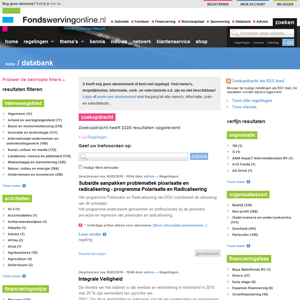
The most important aspect of the project was to make content accessible, searchable and well-organized. We achieved our goals using mostly existing Drupal community modules. In short, the website's user experience evolves around four main "hinges":
- Multiple taxonomy vocabularies form the backbone of the content structure;
- Apache SOLR search is integrated throughout the website to provide relevant results and related content;
- Data is presented to the user through Views (a UI for building queries) and Panels (customizable mini-layouts);
- Exploded navigation menu’s, or “mega dropdown menus” populated with Views and Panels.
1. Taxonomy and vocabularies
All of the 4,000+ nodes are tagged with relevant taxonomies. We organized all content into the following categories.
-
Content "backbones" (providing a main guide for navigating through the site)
- Areas of interest
- Activities (themes or topics)
-
Content "attributes" (to reduce search results to specific items)
- Financing type (subsidies, funds, prizes, micro credits etc.)
- Financing stage (startups, early stage, expansion etc.)
- Organisation name
- Target region (e.g. Belgium, Amsterdam)
- Organization type (non-profit, business, private individual)
- Status (dropped, under review, etc.)
Note that we do not use sub-categories. Each vocabulary is stand-alone, which allows for flexible combinations to pinpoint specific content. For example, it allows us to specifically find funding for a non-profit education startup in Amsterdam, the AUV Fund (search result provided by Apache SOLR).
2.Faceted Search with Apache SOLR
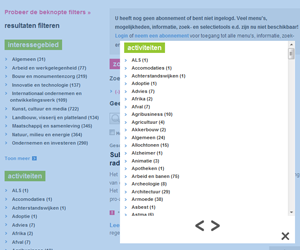
This brings us to faceted searching with the Apache Solr Java engine and the Drupal Apache Solr Search Integration project. In our case, Apache SOLR runs off a separate Tomcat/Java instance. This keeps the load off MySQL for complex search queries. The Drupal Solr module offers two impressive features: 1) filterable search results or “faceted searching” and 2) “more like this” blocks for each selected taxonomy vocabulary.
We felt it should be easy to find specific content relevant to people's needs. This was a major concern and Apache Solr fits right in. The "more like this" blocks are perfectly capable of matching side content with the main article. Not only is content compared with taxonomy tags, but also by the content’s body text and title. Visitors and registered members can quickyl find exactly what they are looking for.
There are other "more like this" modules out there, like RelatedContent, Relevant Content and MoreLikeThis (with OpenCalais semantic search integration). We tried all of them and from our own experiences we would recommend using Apache Solr and its "more like this" blocks.
3. Content Presentation with Views and Panels
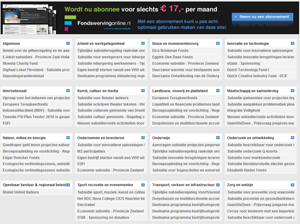
The Fondswervingonline homepage is completely built with Views and Panels. From top to bottom, the header bar consists of a navigation area with multi-column "mega dropdown menu's", which in fact are custom built using views and panels (within a jQuery dropdown action).
Further down a three-column panel shows latest news and other custom content listings. Our content types are customized using CCK (Content Construction Kit).
The middle section is inspired by CNN.com’s bottom topics grid showing latest items. We basically built a similar grid for our own “areas of interest” backbone vocabulary. This is easy to do with Drupal: create 16 separate content lists with the Views module, save them as Views panes and place them inside a 4x4 custom grid built with the Panels module. Specifically as a mini-panel. Mini panels are blocks that you can put into your theme's template regions. (Our homepage layout is based on a page-front.tpl.php with custom layout regions.)
4. Exploded Navigation or Mega Dropdown Menu's
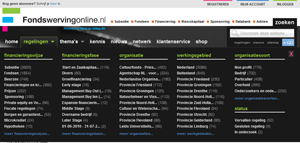
The exploded menu's, or mega dropdown menus, serve as a quick access point to all content. There is no such dropdown menu available as a Drupal module, but you can easily create one yourself with Drupal's built-in jQuery, and again using the Views and Panels modules. The mega dropdowns are simply multi-column mini-panels (Drupal blocks) populated with custom views. The advantage of such navigation menu's is that menu items are automatically refresh whenever new content is added. We even use an AJAX pager in the Themes dropdown.
Performance
Performance deserves its own chapter. As you might expect, the complex Views, Panels, Apache Solr search filters and its related content blocks put a heavy load on the server. At first, performance was problematic. But we figured the Drupal community would have some solutions for us. Here's a list of the most important performance measures we took:
-
Anonymous users
- Install Pressflow. "Pressflow is a distribution of Drupal with integrated performance, scalability, availability, and testing enhancements". Pressflow removes redundant backwards compatibility code, making it fully optimized for PHP5 and MySQL5, while still maintaining backward compatiblity with any Drupal module. At the same time it adds extra caching features and provides support for MySQL replication (which we did not use for this project).
- Boost module for static HTML caching. The Boost module is a real lifesaver. In our case, the difference between using Boost and not using Boost means handling 200 simultaneous visitors or having a server meltdown.
-
Logged-in users
- Block cache alter. This is a lesser-known module that allows blocks to be cached even when using node access modules. It allows to set block-specific caching and refreshing options with a small override to the core block module. Normally, the default Drupal block caching is disabled when using node access module. This module circumvents that limitation.
- Memcache API module - PHP memcache is also used by high-traffic sites like Facebook and Digg.
- Install APC Cache. The PHP-APC module is an op-code cache which speeds up PHP page "compilation". We didn't integrate this directly with Drupal, but APC nevertheless enhances PHP code on the fly, as it runs as a server process.
- Views cache. This is easily overlooked, but views actually have an internal caching setting. This should be turned on for production sites, e.g. cache for 1 hour, 6 hours or 6 days, depending on the type of content.
- CSS Gzip
- Javascript Aggregator
The site runs on a small dedicated CentOS server and now easily handles 200+ simultaneous visitors on minimal RAM, with a very reasonable server load.
Drupal Modules That Were Used
This list include all the modules we used, except for absolutely general modules, hopefully giving people some direction to create a site like ours. It's also our way of saying "thanks" to all the genius module developers out there.
Site Administration
- Ad, Admin role, Administration menu & toolbar, Advanced user management, Backup and migrate, Better formats, Contact Form Blocks, Custom Breadcrumbs, DB Maintenance, Draggable Views, Fasttoggle, Flag, Flag Weights, IMCE, IMCE Wysiwyg API Bridge, Path Filter, Path redirect, Pathauto, Pathologic, Rules, Scheduler, Tab Tamer, Vertical Tabs, Views Bulk Operations, Views Custom Field, Views Groupby, Webform, Webform blocks, Wysiwyg, XML Sitemap
Taxonomy / vocabularies / categorization
- Edit Term, Mass change, Mass tag, Taxonomy Image, Taxonomy Import/Export via XML, Taxonomy Manager, Taxonomy Multi Editor, Taxonomy VTN, Taxonomy Hide, Taxonomy Title, Suggested terms
Performance
Theming, fancy stuff
- Block Class, ImageMagick Raw, ImageAPI, ImageCache, ImageCache Profile Pictures, Lightbox2, Views Carousel, Views Slideshow, Rubik theme
Search, Apache SOLR
Community and user
- Me aliases, Activity, Comment form above comments, Email Marketer for Interspire, Favorites, Follow, FAQ, Invite, Login destination, LoginToboggan, Mollom, Profile taxonomy, Role Expire, Twitter
Ecommerce
- Ubercart, iDEAL Payment Pro (Dutch market)
Content
- Autocomplete widgets, CCK, Cumulus tag clouds, Date, Filefield and Imagefield, Galleria, Link, Locale Updater, Menu access, Menu class, Menu trails, Messaging, Notifications, Panels, Multiblock, Node Type Filter, Nodeaccess, Nodewords, OpenSearch Plugin, OpenSearch feed, Page Title, Premium content, Print, Read more link, Quick Tabs, Tagadelic
Credits
This project is developed for content provider Tekst en Uitleg BV from Schoonebeek (The Netherlands). Drupal development and project strategy made possible by Morningtime Digital from Munich (Germany) in collaboration with design studio REM-ART from Antwerp (Belgium).

Comments
nice site
Site looks great, congratulations!
I had lightbox2 but removed it becuse I found it was downloading unneeded small images on pages where it was not in use.
Maybe it is worth using a reverse proxy such as nginx to improve performance. Other threads here suggest that for caching, using Varnish for caching beats using Boost. I have tried Boost, Varnish and nginx, and have varnish running (with caching set to external on Drupal's Performance page). However, I have never been able get caching for logged in users to work, though I tried Cache Router. The one problem with Varnish, once you have figure out how to get it to work, is that if it dies, your website in effect becomes unreachable, and when my sever was overloaded, it did die. The only process which died was monit, a tool designed to restart failed services...
John
Digit Professionals specialising in Drupal, WordPress & CiviCRM support for publishers in non-profit and related sectors
I've heard about Varnish. I
I've heard about Varnish. I think for future projects I'll try out this server setup: http://getpantheon.com/, which includes Varnish/memcache etc. If I understood correctly, their varnish setup allows to fall back on normal processes.
Very nice site. I see you're
Very nice site.
I see you're using Apache and Boost and memcached. Is there anything else interesting about the server setup? How are you running PHP? Are you using anything to cache or otherwise increase speed for logged in users?
Thanks! For this project we
Thanks!
For this project we use a regular Apache 2.x + PHP 5.x setup, nothing but a basic dedicated Linux CentOs box.
For logged in users, we do use APC Cache for PHP (an opcode cache), as well as Views caches set to 1-6 hours. And also the Block Cache Alter module, which can cache blocks for logged in users by role/page combination. A lot of our complex Views and SOLR facet blocks are actually cached for logged in users using that Block Cache Alter module. The Pressflow enhancement of Drupal we use has an extra module for URL Alias caching.
your server php is running in
your server php is running in mod_php or fastcgi ?
many people said that fastcgi is much efficient than mod_php in large site
"The Pressflow enhancement of
"The Pressflow enhancement of Drupal we use has an extra module for URL Alias caching."
I wonder why you also use Path alias cache while Pressflow already support "URL Alias caching". Any advantage that I am not aware of?
Great site. Thanks for sharing.
love, light n laughter
Pressflow includes it in the
Pressflow includes it in the form of a module called Path Alias Cache. I'm not sure if it has any relation to http://drupal.org/project/pathcache.
Very nice and useful
Very nice and useful write-up.
Danke/bedankt!
MegaMenu
Great Site!!
Can you share some of the approaches by which you achieved the MegaMenu kind of effect, using the jquery and panels? Any code that you can share about this? Or even snippet.
-Victor
Drupal Jobs, Drupal Search
I was inspired by this
I was inspired by this article, it explains a great jQuery dropdown : http://aext.net/2009/08/perfect-sign-in-dropdown-box-likes-twitter-with-...
See the demo: http://aext.net/example/twitterlogin
I use identical jQuery functions as in that example. In page.tpl.php I have a basic div and region setup like:
<div id="dropdown"><?php print $dropdown; ?></div>. All you need to do is build your menu with Views and Mini Panels any way you like it, and publish it in the $dropdown region. Anything goes, you could put a mini-site inside the dropdown, or a video carousel, latest news, user logins blocks, anything... Just regular blocks in a template region, but you use jQuery to make it look like a dropdown.Great, will give it a spin
Great, will give it a spin !!
Cheers
Nice website
There are 24 errors while checking this website in "Markup Validation Service".
You can easily remove some silly errors.
Good luck.
Nihonsei
You wrote a bible full of
You wrote a bible full of text here, but you've missed the most obvious spelling error ever... For the Dutchies amongst us:
WORD nu lid moet zonder t, uiteraard!!! --> http://s3.cdn.fondswervingonline.nl/sites/all/themes/fondsen/images/f-ba...
//EDIT
OMG there are 2 spelling errors in the same banner... GEBRUIKEN MAKEN is wrong as well. it should state GEBRUIK MAKEN.
Spelling
Thanks!
Indeed, stupid mistakes...
I will correct this a.s.a.p.
Other points not clear to visitors in general and Dutch visitors in particular?
Suggestions are more than welcome!
Kind regards,
Fondswervingonline.nl
Jaap Burgstra
Very nice site!
Very nice site!
Server configuration
Can you give server configuration?
How did u create blocks of
How did u create blocks of taxonomy terms of the mega dropdown menu ?
Hi, it's built with the Views
Hi, it's built with the Views module, custom block views filtered by vocabulary. You can use the Views Groupby module (for Drupal 6.x) to group terms together.
I tried to build a similar
I tried to build a similar block views on my own but failed
http://i36.photobucket.com/albums/e28/adrianmak2/Capture-13.png
Could you mind show me a little bit how to setup a views?
How many people worked on this?
Hi,
Thanks for sharing how the site was built. Indeed an eye opener for a beginner like me.
I'm wondering how many people worked on this? With all that functions and modules, I guess its tough to get
people working on it simultaneously?
Lastly I'm glad IE 6 is not supported =D.
By reading from the page
By reading from the page source, are the two mega menus published into two different theme regions ?
I saw they are into two different div.
Yes indeed, they are two
Yes indeed, they are two separate regions. jQuery lets them interact (one closes when another opens etc).
This is awesome
Wow! this is great new to drupal and just trying to find some great looking site and well this is awesome. Thanks for the in depth post. How many people worked on this project?
Just 1 drupal genius and 1
Just 1 drupal genius and 1 designer. All content was produced and tagged by the client.
Contact me if you need any services.
I may do that
I'll keep you in mind I may actually do that!
great site! would you mind
great site! would you mind sharing your server setup and configuration (optimization)?
o_0
And after another week I couldn't take the spelling errors anymore, so I edited your banner...
http://ep2up.com/uploads/1276084864.png
Peace
@o_0: spelling errors
Wow thanks!
The only problem: the server was going down, and the showcase site as well.
So I'm so sorry I was bussy this week with other problems.
Neverless, thanks. I need a lot off peace now.
Jaap
Siteowner Fondswervingonline.nl
403?
It doesn't make me happy to see information like this only accessible to paid subscribers. So I'm not sure what I think of the 403 ;)
"Forbidden
You don't have permission to access / on this server."
Showcase version Fondswervingonline offline
Due to technical problems with the server and showcase site, the showcase version of Fondswervingonline.nl is offline.
Fondswervingonline.nl is now only available in the previous version.
Fondswervingonline.nl
Tekst en Uitleg BV
Site owner
What an excellent website.. I
What an excellent website.. I am really impressed. The Site Layout is very user friendly. Hope I am able to make something like this in future.
Seems you need more then one
Seems you need more then one person to change the text on the banner :)
It is still the same!
Re: seems you need more thene one
I don't use the "services" of Morningtime (the "scripter" of this site) anymore.